




CAPITAL X EA MT5 v1.8 with SetFiles (Unlimited)

Subscriptions for Special Plan
- 30 EA package is more economical!
- Special package with 99%
- Download 1 EA/Day

Subscriptions for Premium Membership
- Download Unlimited in 1 Year
- Get 100% Discount
- Get free access to all

Subscriptions for Gold Membership
- 1 Year Membership
- Get 100% Discount
- Access EA+Indicator+Course
Frequently bought together 🎁
Add these products to enhance your purchase



Quick Verdict
Best For
✅ Traders looking for a volatility-filtered automated trading system.
✅ Investors seeking verified Myfxbook performance with long-term consistency.
✅ Traders who prefer pending-order execution instead of market chasing.
✅ Users wanting built-in break-even protection and trailing stop management.
✅ Traders focused on disciplined risk control and capital preservation.
Overall Rating
9.0/10 ⭐⭐⭐⭐⭐
CAPITAL X EA is a sophisticated automated trading robot that combines ATR-based volatility analysis, pending-order execution, break-even compensation and account protection tools. With verified Myfxbook performance showing substantial long-term growth and controlled drawdown, the EA is designed for traders who prioritize structured execution and disciplined risk management over aggressive trading approaches.
CAPITAL X MT5 Review
What is CAPITAL X EA MT5?
CAPITAL X EA is a fully automated Expert Advisor (EA) designed to identify trading opportunities through volatility analysis and pending-order placement techniques.
Unlike many traditional EAs that constantly execute market orders, CAPITAL X waits for specific market conditions before placing pending orders, helping traders avoid unnecessary entries during unfavorable periods.
The system integrates:
🔹 ATR-based volatility filtering.
🔹 Pending-order execution logic.
🔹 Break-even compensation.
🔹 Trailing stop management.
🔹 Spread protection.
🔹 Trading schedule controls.
🔹 Daily account protection tools.
The goal is to create a disciplined trading environment that adapts to changing market conditions while maintaining strict control over risk exposure.
How Does CAPITAL X EA MT5 Work?
ATR-Based Market Analysis
CAPITAL X continuously measures market volatility using the Average True Range (ATR) indicator.
The EA classifies market conditions into:
🔹 Low Volatility
🔹 Normal Volatility
🔹 High Volatility
When volatility falls below predefined thresholds, trading activity can be suspended to avoid weak market movements.
Pending Order Execution
Rather than entering immediately, the EA places pending orders at strategic distances from current market price.
This approach helps:
🔹 Reduce false entries
🔹 Improve trade quality
🔹 Capture stronger directional moves
🔹 Avoid random market noise
Dynamic Trade Management
Once a trade becomes profitable, the system automatically manages positions through:
🔹 Break-even protection
🔹 Commission compensation
🔹 Spread compensation
🔹 Trailing stop activation
This helps secure profits while allowing trades room to develop.
Trading Schedule Control
Users can customize:
🔹 Trading days
🔹 Trading sessions
🔹 Profit targets
🔹 Daily loss limits
allowing the EA to fit different trading styles and account objectives.
Key Features of CAPITAL X EA MT5
ATR Volatility Filter
Filters out low-quality market conditions and focuses on periods with stronger price movement.
Pending Order Strategy
Uses candle-close confirmation before placing pending orders.
Break-Even Compensation System
Automatically accounts for spreads and commissions when calculating break-even levels.
Advanced Trailing Stop
Protects open profits while maximizing trade potential.
Spread Protection
Blocks trade execution when spreads exceed predefined limits.
Virtual Stop Loss & Take Profit Support
Can hide SL and TP levels from brokers when enabled.
Trading Schedule Filters
Allows full control over trading days and trading sessions.
Daily Profit and Loss Controls
Helps maintain disciplined account management.
Flexible Money Management
Supports both conservative and aggressive optimization profiles.
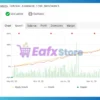
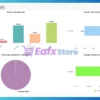
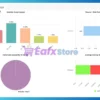
Profit Performance Verified by MyFxBook
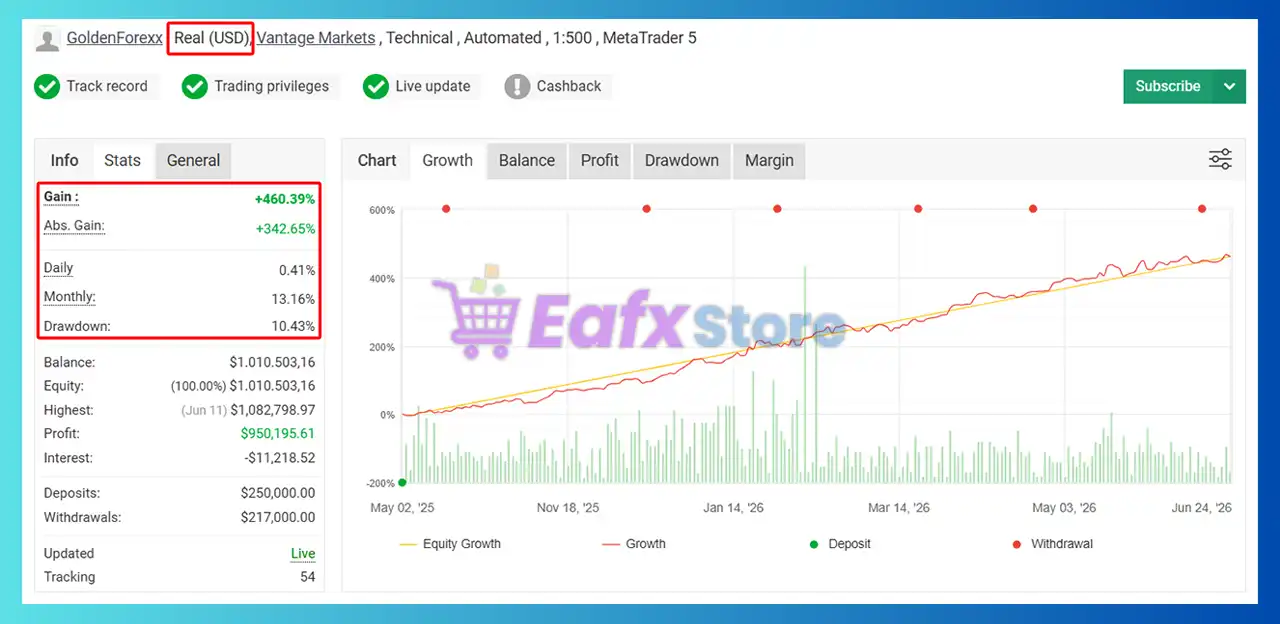
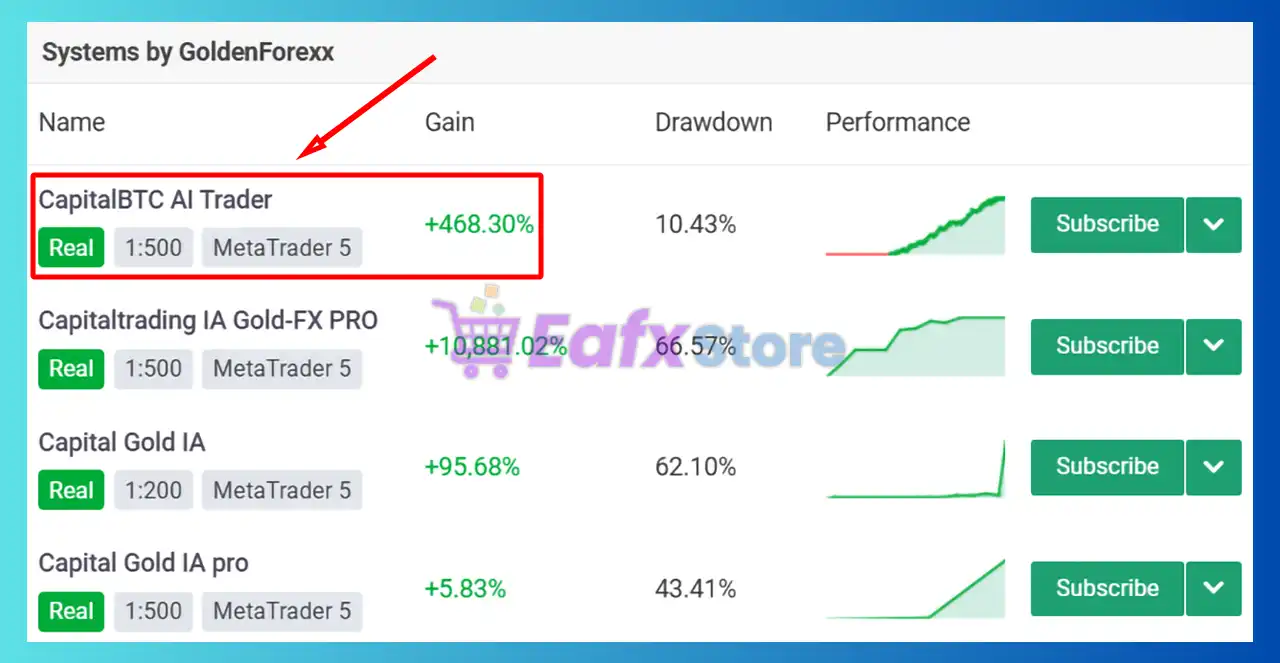
The verified Myfxbook statistics demonstrate strong long-term account growth with controlled risk metrics.
Verified Account Highlights
➡️ Real Signal Myfxbook: View here
CAPITAL X EA MT5 Myfxbook
| Metric | Result |
|---|---|
| Account Type | Real USD Account |
| Broker | Vantage Markets |
| Platform | MetaTrader 5 |
| Leverage | 1:500 |
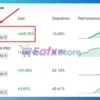
| Total Gain | +460.39% |
| Absolute Gain | +342.65% |
| Monthly Gain | 13.16% |
| Daily Gain | 0.41% |
| Drawdown | 10.43% |
| Total Profit | $950,195+ |
| Tracking Record | 54 Weeks |
| Live Updates | Verified |
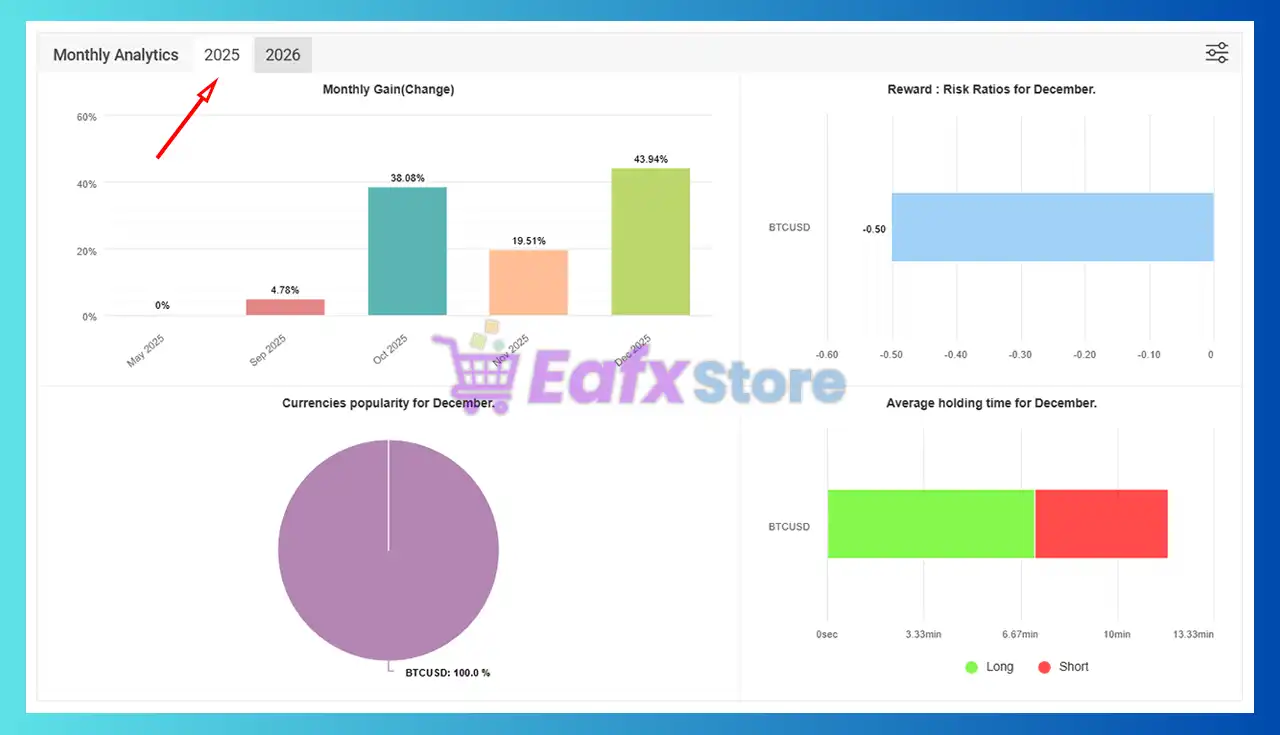
Monthly Growth Analysis
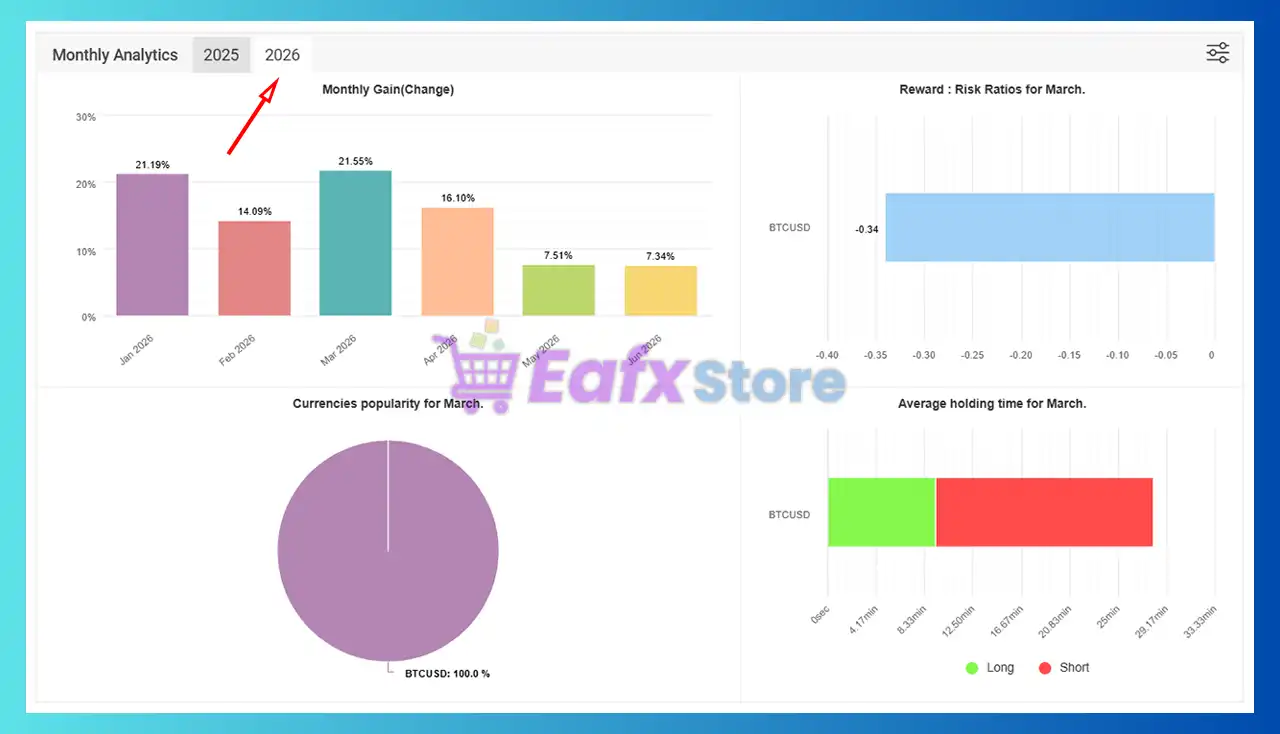
The Myfxbook analytics show consistent profitability across multiple months.
2025 Results
CAPITAL X MT5 Myfxbook
| Month | Gain |
|---|---|
| September | 4.78% |
| October | 38.08% |
| November | 19.51% |
| December | 43.94% |
2026 Results
CAPITAL X EA Myfxbook
| Month | Gain |
|---|---|
| January | 21.19% |
| February | 14.09% |
| March | 21.55% |
| April | 16.10% |
| May | 7.51% |
| June | 7.34% |
Performance Assessment
The verified results suggest:
🔹 Strong account growth.
🔹 Consistent monthly returns.
🔹 Controlled drawdown levels.
🔹 Long-term operational stability.
🔹 Robust execution across changing market environments.
The balance curve demonstrates steady upward progression rather than erratic performance spikes, which is often a positive sign for long-term sustainability.
Why CAPITAL X EA MT5 Stands Out
Volatility-Driven Trading Logic
Many EAs trade continuously regardless of market conditions.
CAPITAL X actively measures volatility before participating in the market.
Professional Pending Order Execution
The pending-order framework allows the EA to wait for confirmation rather than forcing entries.
Verified Real Account Performance
Few EAs provide long-term verified Myfxbook statistics showing both profitability and drawdown data.
Built-In Cost Compensation
The break-even system includes both commissions and spreads, creating more realistic trade management.
Flexible Risk Control
The EA offers multiple protection layers for traders who prioritize capital preservation.
Risk Management Features
ATR Volatility Protection
Avoids trading during low-quality market conditions.
Maximum Spread Filter
Prevents entries during expensive execution environments.
Break-Even Compensation
Includes commissions and spread costs before securing break-even levels.
Trailing Stop Protection
Locks in profits automatically as trades move favorably.
Daily Loss Limitation
Can stop trading after reaching predefined daily loss thresholds.
Profit Target Control
Allows users to secure daily profit objectives automatically.
Trading Schedule Restrictions
Limits exposure during unfavorable sessions.
Virtual Stop Levels
Optional hidden SL and TP functionality provides additional execution privacy.
Recommended Trading Conditions
| Features | Type |
|---|---|
| Trading platform | MetaTrader 5 (MT5) |
| Time frames | Any |
| Currency pairs | BTCUSD (Bitcoin) |
| Minimum / Recommended deposit | $1,000 (Use effectively with Cent accounts) |
| Minimum / Recommended leverage | Any |
| Account type | ECN / Raw Spread |
| Product type | NoDLL |
| Additional services | Unlock and Decompile |
| Recommended brokers | Exness Broker, Icmarkets Broker |
| Recommended VPS | MyfxVPS.com (Blue VPS, Golden VPS). Lowest Latency, 2 week Free Trial, 100% Free for 12-18 Months. |
Product Download Package?
The download package of the product suite includes:
 Experts: CAPITAL X EA v1.8.ex5
SetFiles: BTCUSD_H1_Signal.set
 Reviewed by David Easton
Weaknesses and Risk Warnings
Optimization May Be Required
Performance may vary depending on broker conditions and market behavior.
Large Stop Loss Structure
The EA uses relatively wide stop-loss parameters, which may not suit aggressive traders.
Volatility Dependency
Trading opportunities may decrease significantly during prolonged low-volatility periods.
Market Conditions Can Change
Past performance does not guarantee future profitability.
Automated Trading Risk
Unexpected market events, slippage, and execution delays can still impact results.
Proper Testing Is Recommended
Forward testing on a demo account is strongly recommended before live deployment.
Who Should Use CAPITAL X EA MT5?
Conservative Automated Traders
Ideal for traders seeking structured risk management and disciplined execution.
Investors Focused on Long-Term Growth
Suitable for traders prioritizing steady account growth over aggressive short-term gains.
Myfxbook-Oriented Traders
A strong option for users who value verified live performance.
Professional Portfolio Managers
Useful for traders managing larger accounts and seeking systematic execution.
Traders Seeking Volatility-Based Strategies
Well-suited for those who understand the importance of trading only when market conditions are favorable.
Final Verdict
CAPITAL X EA is a well-designed automated trading system that combines volatility analysis, pending-order execution, break-even protection, and disciplined risk management into a comprehensive trading framework.
Its strongest advantage is the combination of verified Myfxbook performance, consistent long-term growth, and a robust set of account protection tools. The ATR-based volatility filter, spread control mechanisms, and advanced trade management features help distinguish it from many generic automated systems on the market.
For traders seeking a professional MT5 Expert Advisor that emphasizes capital preservation, controlled risk, and verified real-account performance, CAPITAL X represents a compelling choice worthy of serious consideration.
🔢 CAPITAL X EA MT5 – Complete Settings Guide and Parameter Explanation
CAPITAL X EA is an advanced automated trading robot designed to combine pending-order execution, volatility analysis, break-even compensation, trading schedule controls and account protection features.
The EA uses ATR-based market volatility filtering and flexible risk-management tools to help traders adapt to changing market conditions while maintaining structured trade management and capital preservation.
CAPITAL X EA MT5 Settings
🔢 CAPITAL X EA MT5 Parameters Explained
Below are the details of the parameters in the advisor’s trading system settings table:
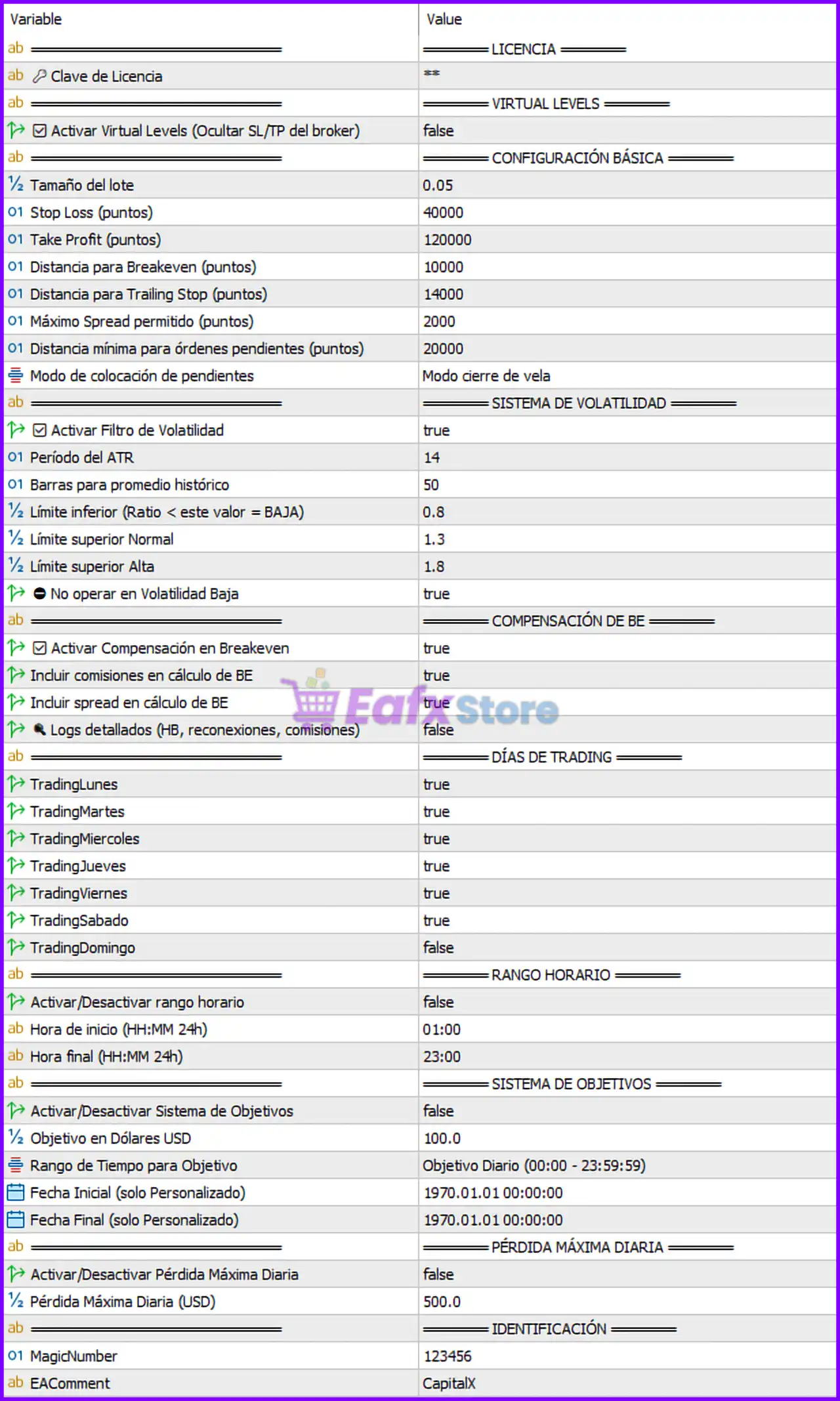
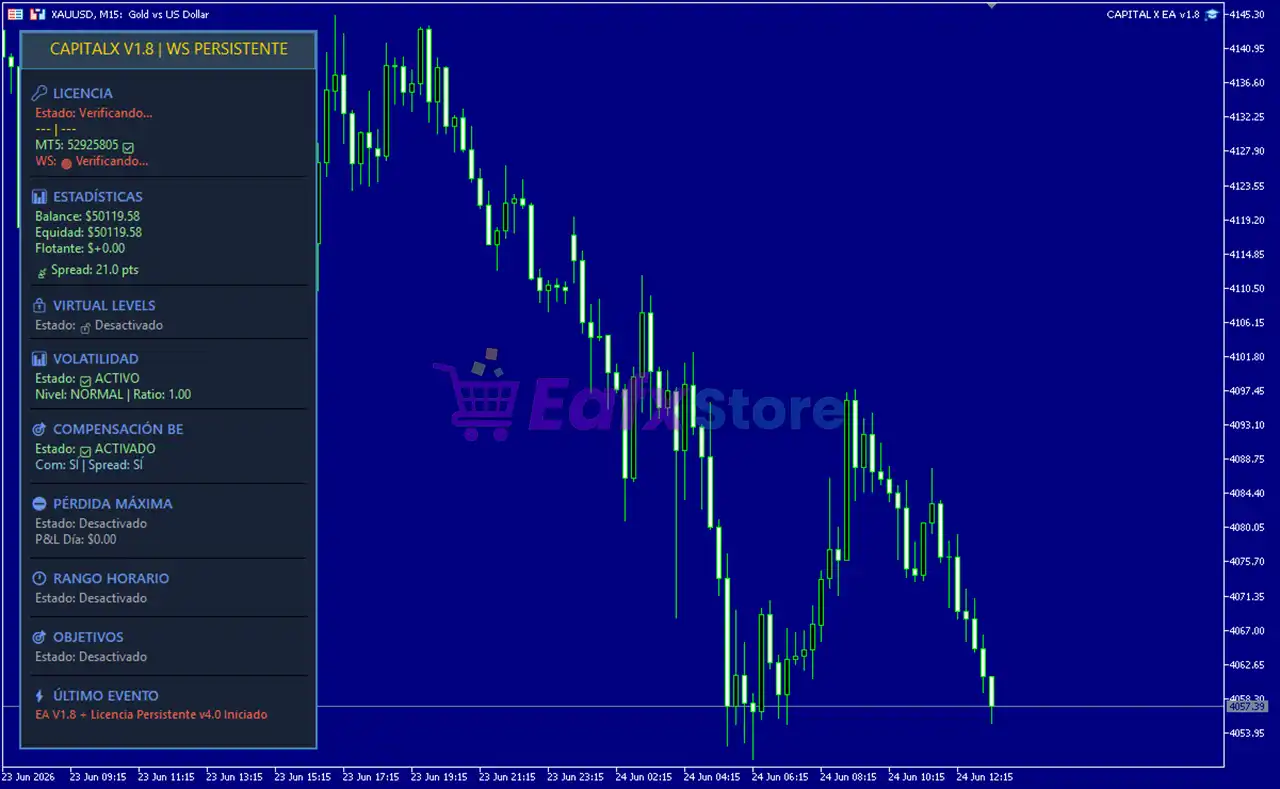
CAPITAL X EA MT5 Settings Panel
🔶 LICENSE SETTINGS
🔹 Clave de Licencia = ** – License key used to activate and validate the CAPITAL X EA MT5 installation.
🔶 VIRTUAL LEVELS
🔹 Activar Virtual Levels (Ocultar SL/TP del broker) = false – Disables virtual Stop Loss and Take Profit levels, allowing SL/TP values to remain visible to the broker.
🔶 BASIC CONFIGURATION
🔹 Tamaño del lote = 0.05 – Sets the fixed trading volume to 0.05 lots per position.
🔹 Stop Loss (puntos) = 40000 – Defines a Stop Loss distance of 40,000 points from the trade entry price.
🔹 Take Profit (puntos) = 120000 – Sets a Take Profit target of 120,000 points.
🔹 Distancia para Breakeven (puntos) = 10000 – Moves the trade to breakeven after achieving 10,000 points of profit.
🔹 Distancia para Trailing Stop (puntos) = 14000 – Activates the trailing stop mechanism after the trade reaches 14,000 points of profit.
🔹 Máximo Spread permitido (puntos) = 2000 – Blocks trade execution when spread exceeds 2,000 points.
🔹 Distancia mínima para órdenes pendientes (puntos) = 20000 – Requires pending orders to be placed at least 20,000 points from current market price.
🔹 Modo de colocación de pendientes = Modo cierre de vela – Pending orders are placed after candle close confirmation.
🔶 VOLATILITY SYSTEM
🔹 Activar Filtro de Volatilidad = true – Enables the ATR-based volatility filtering system.
🔹 Período del ATR = 14 – Uses an ATR period of 14 for volatility calculations.
🔹 Barras para promedio histórico = 50 – Calculates historical volatility averages using the last 50 bars.
🔹 Límite inferior (Ratio < este valor = BAJA) = 0.8 – Volatility ratios below 0.8 are classified as low volatility.
🔹 Límite superior Normal = 1.3 – Defines the upper boundary for normal market volatility at 1.3.
🔹 Límite superior Alta = 1.8 – Defines the threshold for high volatility conditions at 1.8.
🔹 No operar en Volatilidad Baja = true – Prevents new trades during low-volatility market conditions.
🔶 BREAK-EVEN COMPENSATION
🔹 Activar Compensación en Breakeven = true – Enables break-even compensation adjustments.
🔹 Incluir comisiones en cálculo de BE = true – Includes broker commissions when calculating break-even levels.
🔹 Incluir spread en cálculo de BE = true – Includes spread costs in break-even calculations.
🔹 Logs detallados (HB, reconexiones, comisiones) = false – Disables detailed operational logging.
🔶 TRADING DAYS
🔹 TradingLunes = true – Enables trading on Monday.
🔹 TradingMartes = true – Enables trading on Tuesday.
🔹 TradingMiercoles = true – Enables trading on Wednesday.
🔹 TradingJueves = true – Enables trading on Thursday.
🔹 TradingViernes = true – Enables trading on Friday.
🔹 TradingSabado = true – Enables trading on Saturday.
🔹 TradingDomingo = false – Disables trading on Sunday.
🔶 TRADING TIME RANGE
🔹 Activar/Desactivar rango horario = false – Time-based trading restrictions are disabled.
🔹 Hora de inicio (HH:MM 24h) = 01:00 – Trading start time is configured as 01:00.
🔹 Hora final (HH:MM 24h) = 23:00 – Trading end time is configured as 23:00.
🔶 TARGET SYSTEM
🔹 Activar/Desactivar Sistema de Objetivos = false – Profit target management system is disabled.
🔹 Objetivo en Dólares USD = 100.0 – Target profit value is set to USD 100.0.
🔹 Rango de Tiempo para Objetivo = Objetivo Diario (00:00 – 23:59:59) – Profit target is measured over a daily period.
🔹 Fecha Inicial (solo Personalizado) = 1970.01.01 00:00:00 – Default custom start date value.
🔹 Fecha Final (solo Personalizado) = 1970.01.01 00:00:00 – Default custom end date value.
🔶 DAILY MAXIMUM LOSS
🔹 Activar/Desactivar Pérdida Máxima Diaria = false – Daily loss protection is disabled.
🔹 Pérdida Máxima Diaria (USD) = 500.0 – Maximum daily loss threshold is set to USD 500.0.
🔶 IDENTIFICATION SETTINGS
🔹 MagicNumber = 123456 – Unique identifier used by the EA to manage and track its positions.
🔹 EAComment = CapitalX – Comment attached to all trades opened by the EA.
🔢 CAPITAL X EA MT5 Configuration Summary
🔹 Fixed Lot Size: 0.05
🔹 Stop Loss: 40,000 points
🔹 Take Profit: 120,000 points
🔹 Breakeven Distance: 10,000 points
🔹 Trailing Stop Activation: 14,000 points
🔹 Maximum Allowed Spread: 2,000 points
🔹 Minimum Pending Order Distance: 20,000 points
🔹 ATR Period: 14
🔹 Historical Volatility Bars: 50
🔹 Low Volatility Threshold: 0.8
🔹 Normal Volatility Threshold: 1.3
🔹 High Volatility Threshold: 1.8
🔹 Profit Target: USD 100.0
🔹 Daily Loss Limit: USD 500.0
🔹 Magic Number: 123456
🔢 Why These Settings Matter
🔹 The ATR Volatility Filter helps avoid entering trades during unfavorable market conditions.
🔹 The Break-Even Compensation System ensures trading costs such as spread and commissions are covered.
🔹 The Pending Order Distance Control prevents orders from being placed too close to current price action.
🔹 The Trading Day Filters allow traders to customize which days the EA is allowed to operate.
🔹 The Profit Target System helps automate account growth objectives.
🔹 The Daily Loss Protection can be used to limit account exposure during adverse trading periods.
🔹 The Spread Filter helps reduce execution risk during periods of abnormal market conditions.
🔹 The Virtual Levels Option provides additional privacy by hiding SL and TP from the broker when enabled.
🔢 Conclusion
CAPITAL X EA offers a robust combination of volatility analysis, pending-order management, break-even protection and account safety features.
With ATR-based market filtering, configurable trading schedules, daily target controls, and detailed risk management options, the EA provides traders with a structured framework for automated trading. Proper optimization of these settings can help improve trade quality, manage risk efficiently and maintain long-term account stability.
🔢 FAQs
❓ What is the default lot size used by CAPITAL X EA MT5?
The default fixed lot size is 0.05 lots per trade.
❓ How does the volatility filter work?
The EA uses ATR Period 14 and compares current volatility against historical averages over 50 bars to determine market conditions.
❓ Does CAPITAL X EA MT5 support break-even protection?
Yes. The EA includes a break-even compensation system that accounts for both commissions and spread costs.
❓ Can I restrict trading to specific days?
Yes. Individual trading days such as Monday through Saturday can be enabled or disabled independently.
❓ What is the maximum daily loss setting?
The default daily loss protection value is USD 500.0, although the feature is disabled by default until activated.
User Reviews
Only logged in customers who have purchased this product may leave a review.
❓ What is CAPITAL X MT5 designed to do?
CAPITAL X MT5 is an automated trading system that combines pending orders, ATR volatility filtering, break-even protection, and account safety tools.
❓ How does the volatility filter work in CAPITAL X MT5?
CAPITAL X MT5 uses a 14-period ATR and historical volatility analysis to avoid trading during low-volatility conditions and improve entry quality.
❓ Can CAPITAL X MT5 hide Stop Loss and Take Profit levels?
Yes, CAPITAL X MT5 includes a Virtual Levels feature that can hide Stop Loss and Take Profit values from the broker when enabled.
❓ Does CAPITAL X MT5 include break-even protection?
Yes, CAPITAL X MT5 automatically moves trades to break-even and can include spread and commission costs in the calculation for accuracy.
❓ How are pending orders managed in CAPITAL X MT5?
CAPITAL X MT5 places pending orders only after candle-close confirmation and maintains a minimum distance from current market prices.
❓ Can I control which days CAPITAL X MT5 trades?
Yes, CAPITAL X MT5 allows traders to enable or disable trading individually for each day of the week based on their preferences.
❓ Does CAPITAL X MT5 have spread protection?
Yes, CAPITAL X MT5 blocks new trade execution whenever the spread exceeds the configured maximum threshold of 2,000 points.
❓ Can CAPITAL X MT5 be used for account protection?
Yes, CAPITAL X MT5 offers optional daily profit targets, maximum daily loss limits, and advanced risk management controls.
❓ What is the purpose of the ATR volatility thresholds?
CAPITAL X MT5 classifies market conditions as low, normal, or high volatility, helping the EA adapt its trading decisions accordingly.
❓ Why do traders choose CAPITAL X MT5?
CAPITAL X MT5 combines volatility analysis, pending-order precision, break-even compensation, spread filtering, and account protection tools.
🔥 Get This EA for FREE with Our Membership! 🚀🚀
Unlock access to this EA, premium Indicators, and exclusive trading tools completely FREE with any of our Membership Plans! Thousands of traders already benefit from our VIP library—join them and level up your trading instantly. Choose Your Membership:
- SPECIAL – 1 Month Membership
- GOLD – 1 Year Membership
- PREMIUM – 1 Year Membership
-
 Original price was: $4,999.00.$249.00Current price is: $249.00.
 -
 Original price was: $4,500.00.$249.00Current price is: $249.00.
 -
 Original price was: $4,999.00.$249.00Current price is: $249.00.
 -
 Original price was: $28,000.00.$249.00Current price is: $249.00.
-
 10Original price was: $499.00.$69.00Current price is: $69.00.
 -
 1Original price was: $1,599.00.$59.00Current price is: $59.00.
 -
 0Original price was: $500.00.$69.00Current price is: $69.00.
 -
 3Original price was: $999.00.$69.00Current price is: $69.00.
There are no reviews yet.