
🔢 EA 2050 Pro – Complete EA Settings Explanation
EA 2050 Pro is an advanced automated Forex trading Expert Advisor (EA) developed for MetaTrader 4 platforms. The robot combines Martingale strategy management, trailing stop technology, equity protection and time-based trading filters to automate market execution efficiently.
With multiple configurable modules such as MATRiScalper, ExpertsPRO, and MartiPRO settings, EA 2050 Pro is designed for traders seeking flexible risk management and automated trade optimization.

🔢 EA 2050 Pro Input Parameters Explained
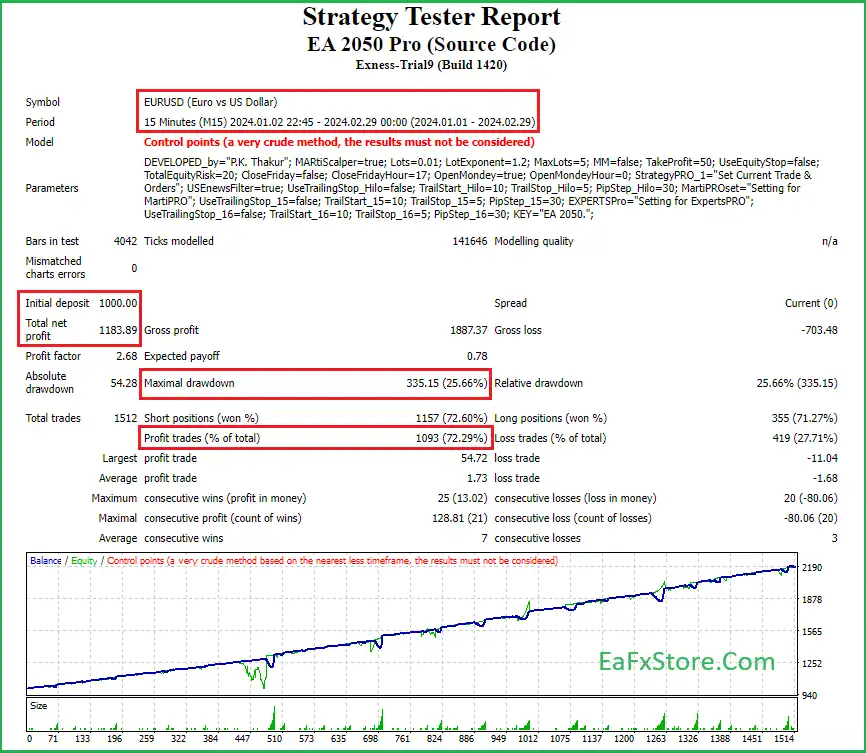
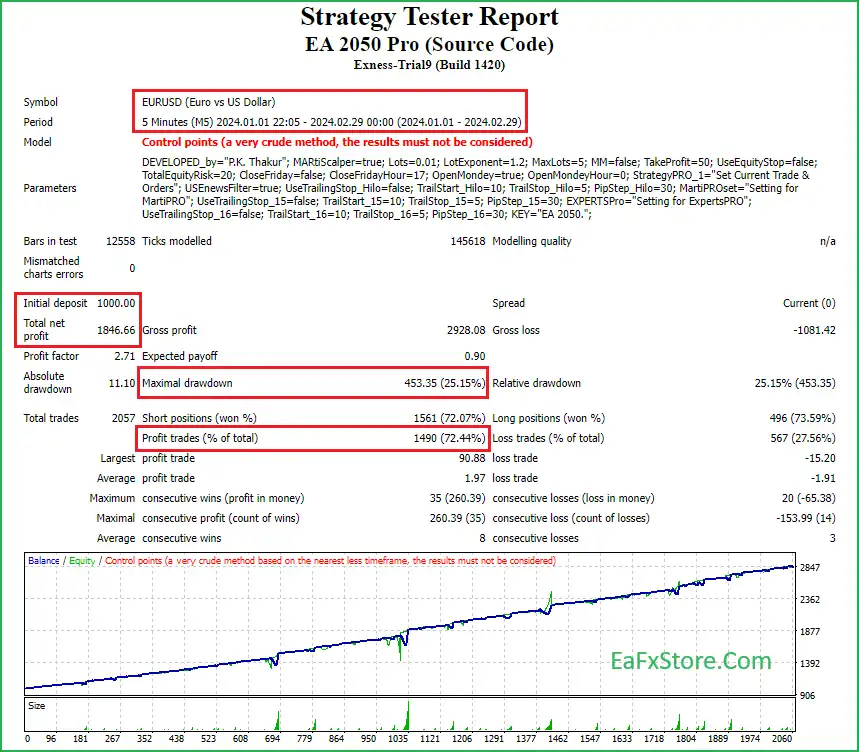
Below are the details of the parameters in the advisor’s trading system settings table:
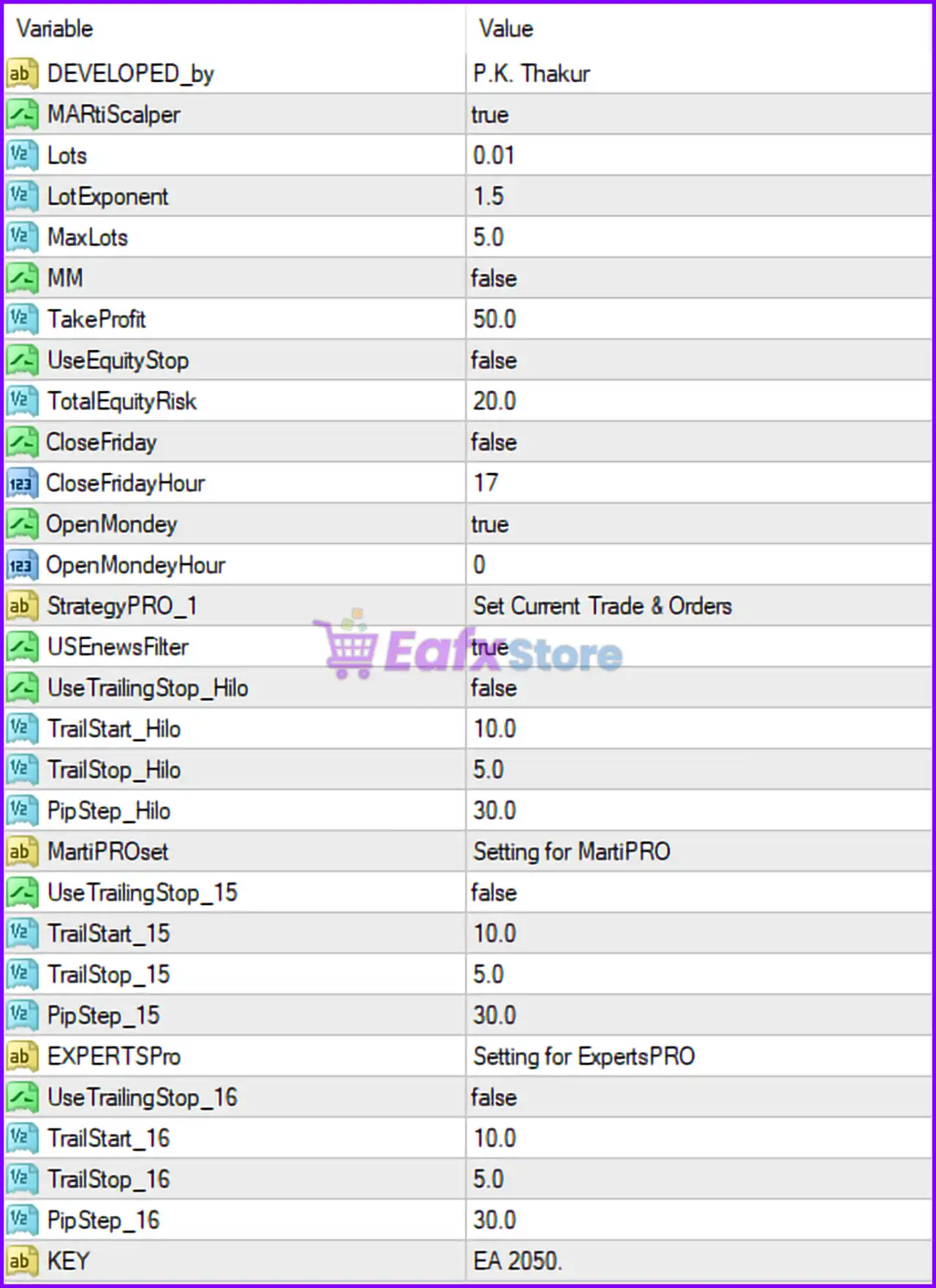
🔹 DEVELOPED_by = P.K. Thakur — Displays the developer name of the EA, identifying the creator of EA 2050 Pro.
🔹 MATRiScalper = true — Enables the MATRiScalper trading module used for automated scalping strategies and fast market entries.
🔹 Lots = 0.01 — Defines the initial trade lot size used by the EA. A value of 0.01 means trades start with micro lot sizing.
🔹 LotExponent = 1.5 — Determines the multiplication factor applied to lot sizes during Martingale or progressive trade scaling sequences.
🔹 MaxLots = 5.0 — Sets the maximum lot size limit allowed by the EA. The robot will not open positions larger than 5.0 lots.
🔹 MM = false — Disables the Money Management feature. With the value set to false, the EA does not automatically adjust lot sizes based on account balance.
🔹 TakeProfit = 50.0 — Defines the Take Profit target in pips or points used to automatically close profitable trades.
🔹 UseEquityStop = false — Disables the equity protection stop feature that would normally close all trades when a specific equity loss level is reached.
🔹 TotalEquityRisk = 20.0 — Specifies the maximum account equity risk percentage configured for the EA risk management system.
🔹 CloseFriday = false — Disables automatic trade closure before the market closes on Friday.
🔹 CloseFridayHour = 17 — Defines the hour for Friday trade closure if the CloseFriday feature is enabled. The configured value is 17.
🔹 OpenMonday = true — Enables automatic trading when the Forex market opens on Monday.
🔹 OpenMondayHour = 0 — Specifies the trading start hour on Monday. The EA begins operation at hour 0.
🔹 StrategyPRO_1 = Set Current Trade & Orders — Internal strategy configuration section used for managing active trades and pending orders.
🔹 USENewsFilter = true — Activates the news filter system to avoid trading during high-impact economic news events.
🔹 UseTrailingStop_Hilo = false — Disables the HiLo trailing stop feature for dynamic stop-loss adjustment.
🔹 TrailStart_Hilo = 10.0 — Defines the profit level at which the HiLo trailing stop would begin operating if enabled.
🔹 TrailStop_Hilo = 5.0 — Sets the trailing stop distance used by the HiLo trailing stop system.
🔹 PipStep_Hilo = 30.0 — Specifies the pip distance between orders within the HiLo strategy configuration.
🔹 MartiPROset = Setting for MartiPRO — Configuration category for Martingale-related strategy settings.
🔹 UseTrailingStop_15 = false — Disables the trailing stop function associated with the 15-strategy profile.
🔹 TrailStart_15 = 10.0 — Defines the trailing stop activation level for the 15-strategy profile.
🔹 TrailStop_15 = 5.0 — Sets the trailing stop distance for the 15-strategy profile.
🔹 PipStep_15 = 30.0 — Specifies the pip step distance between trades for the 15-strategy profile.
🔹 EXPERTSPro = Setting for ExpertsPRO — Internal configuration category dedicated to ExpertsPRO strategy management.
🔹 UseTrailingStop_16 = false — Disables the trailing stop function for the 16-strategy profile.
🔹 TrailStart_16 = 10.0 — Defines the trailing stop activation point for the 16-strategy profile.
🔹 TrailStop_16 = 5.0 — Specifies the trailing stop distance for the 16-strategy profile.
🔹 PipStep_16 = 30.0 — Determines the pip interval between trade entries for the 16-strategy profile.
🔹 KEY = EA 2050. — Displays the internal EA license or identification key associated with EA 2050 Pro.
🔢 Conclusion
EA 2050 Pro is a feature-rich automated trading system that integrates Martingale logic, scalping strategies, trailing stop management, and advanced risk controls into a single Expert Advisor.
With configurable settings such as LotExponent, MaxLots, USENewsFilter, and TotalEquityRisk, traders can customize the EA according to their preferred trading style and risk tolerance. Understanding every parameter is essential for optimizing EA performance and maintaining controlled automated trading operations.
🔢 FAQs
❓ What is EA 2050 Pro used for?
EA 2050 Pro is an automated Forex trading Expert Advisor designed for scalping, Martingale trading, and advanced trade management on MetaTrader platforms.
❓ What does LotExponent = 1.5 mean?
It means the EA increases trade lot sizes by a multiplier of 1.5 during progressive trade sequences or Martingale operations.
❓ Why is USENewsFilter set to true?
The news filter is enabled to help the EA avoid trading during high-impact economic news events that may cause market volatility.
❓ What is the purpose of MaxLots = 5.0?
It limits the maximum trade size the EA can open, helping control excessive position sizing risk.
❓ What does UseEquityStop = false represent?
It means the equity protection stop feature is currently disabled, so the EA will not automatically close trades based on total account equity loss levels.