


🔢 Gann Gold EA MT5 Settings Guide
Gann Gold EA MT5 is an automated Gold trading Expert Advisor built around a combination of Gann-based trade logic, trend filtering, basket-level protection, risk management, manual SL/TP controls, trailing-stop management, session filtering, news filtering and visual chart tools.
The displayed configuration provides detailed control over how trades are opened, managed, and closed, while also allowing traders to define basket profit/loss limits and account-level drawdown protection.
With settings such as Fix lot size = 0.01, Risk percentage per trade = 3.0, Max Open Trade = 3, Stop Loss = 100.0, Take Profit = 200.0, Max Spread = 40, and Basket Profit Target = $100.0, Gann Gold EA MT5 offers a highly configurable framework for automated XAUUSD trading.
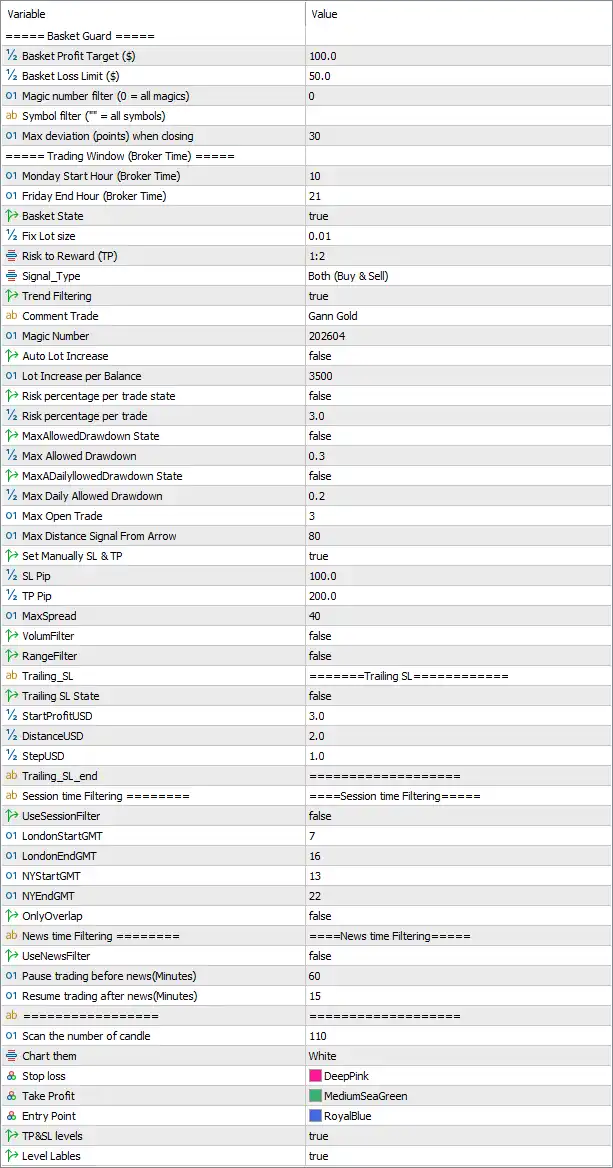
🔢 Gann Gold EA MT5 Settings Explained
🔶 Basket Guard Settings
🔹 Basket Profit Target ($): 100.0 — Sets the basket-level profit target to $100.0. When the EA's basket of trades reaches the configured target according to its internal logic, basket-level profit management can be triggered.
🔹 Basket Loss Limit ($): 50.0 — Sets the basket-level loss limit to $50.0, providing a defined monetary loss threshold for the combined basket.
🔹 Magic number filter (0 = all magics): 0 — Sets the Magic Number filter to 0, which according to the parameter description means all Magic Numbers are included.
🔹 Symbol filter (" " = all symbols): — The symbol filter is left blank, which means the displayed configuration uses the EA's all-symbols option according to the parameter description.
🔹 Max deviation (points) when closing: 30 — Allows a maximum closing deviation of 30 points when the EA closes trades.
🔶 Trading Window Settings
🔹 Monday Start Hour (Broker Time): 10 — Sets the trading window start to 10:00 broker time on Monday.
🔹 Friday End Hour (Broker Time): 21 — Sets the trading window end to 21:00 broker time on Friday.
🔶 Basic Trading Settings
🔹 Basket State: true — Enables the basket-management state/function.
🔹 Fix lot size: 0.01 — Sets the fixed trading volume to 0.01 lots.
🔹 Risk to Reward (TP): 1:2 — Sets the configured Take Profit risk-to-reward relationship to 1:2, meaning the target reward is twice the defined risk under this setting.
🔹 Signal_Type: Both (Buy & Sell) — Allows the EA to generate both Buy and Sell trading signals.
🔹 Trend Filtering: true — Enables trend filtering so that the EA can use its trend-validation logic when determining eligible trades.
🔹 comment Trade: Gann Gold — Sets the trade comment to Gann Gold, making positions generated by the EA easier to identify.
🔹 Magic Number: 202604 — Assigns 202604 as the EA's Magic Number for identifying and managing its trades.
🔶 Lot & Risk Management
🔹 Auto Lot Increase: false — Disables automatic increases in trading lot size.
🔹 Lot Increase per Balance: 3500 — Sets the balance threshold/reference for increasing lot size to 3500. Because Auto Lot Increase = false, the automatic increase function is currently disabled.
🔹 Risk percentage per trade state: false — Disables percentage-based risk sizing for each trade.
🔹 Risk percentage per trade: 3.0 — Sets the configured risk percentage per trade to 3.0. Since the corresponding risk-per-trade state is false, this value is not currently active under the displayed configuration.
🔶 Drawdown Protection
🔹 MaxAllowedDrawdown State: false — Disables the maximum allowed drawdown protection based on this setting.
🔹 Max Allowed Drawdown: 0.3 — Sets the maximum allowed drawdown parameter to 0.3. Because its state is false, the protection is currently disabled.
🔹 Max2AllowedDrawdown State: false — Disables the secondary maximum drawdown protection.
🔹 Max Daily Allowed Drawdown: 0.2 — Sets the maximum daily allowed drawdown parameter to 0.2. The displayed configuration does not show a separate enabled state for this parameter, so its exact operational behavior should be verified against the EA's implementation.
🔶 Trade Limits & Entry Settings
🔹 Max Open Trade: 3 — Limits the EA to a maximum of 3 open trades according to its trade-management logic.
🔹 Max Distance Signal From Arrow: 80 — Sets the maximum allowed distance between the trading signal and its corresponding arrow to 80, according to the EA's internal distance unit.
🔹 Set Manually SL & TP: true — Enables manually defined Stop Loss and Take Profit levels.
🔹 SL Pip: 100.0 — Sets the manual Stop Loss distance to 100.0 pips/points according to the EA's internal unit convention.
🔹 TP Pip: 200.0 — Sets the manual Take Profit distance to 200.0 pips/points according to the EA's internal unit convention.
🔹 MaxSpread: 40 — Sets the maximum permitted spread to 40, helping prevent entries when market spread exceeds the configured threshold.
🔶 Market Condition Filters
🔹 VolumFilter: false — Disables the volume-based market filter.
🔹 RangeFilter: false — Disables the range-based market filter.
🔶 Trailing Stop Settings
🔹 Trailing_SL: — Defines the section containing the EA's trailing Stop Loss settings.
🔹 Trailing SL State: false — Disables the trailing Stop Loss system in the displayed configuration.
🔹 StartProfitUSD: 3.0 — Sets the floating-profit threshold for activating the trailing system to $3.0, if trailing is enabled.
🔹 DistanceUSD: 2.0 — Sets the trailing distance to $2.0 according to the EA's monetary trailing logic.
🔹 StepUSD: 1.0 — Sets the trailing update step to $1.0.
🔹 Trailing_SL_end: — Defines the end/status field for the trailing Stop Loss section; the displayed value is a separator line rather than a numerical setting.
🔶 Session Time Filtering
🔹 UseSessionFilter: false — Disables the dedicated session-time filter.
🔹 LondonStartGMT: 7 — Sets the London session start reference to 07:00 GMT.
🔹 LondonEndGMT: 16 — Sets the London session end reference to 16:00 GMT.
🔹 NYStartGMT: 13 — Sets the New York session start reference to 13:00 GMT.
🔹 NYEndGMT: 22 — Sets the New York session end reference to 22:00 GMT.
🔹 OnlyOverlap: false — Disables the option to restrict trading exclusively to the overlap between the configured London and New York sessions.
🔶 News Time Filtering
🔹 UseNewsFilter: false — Disables the economic-news trading filter.
🔹 Pause trading before news(Minutes): 60 — Configures the EA to pause trading 60 minutes before a relevant news event if the news filter is enabled.
🔹 Resume trading after news(Minutes): 15 — Configures the EA to resume trading 15 minutes after a relevant news event if the news filter is enabled.
🔶 Chart & Visual Settings
🔹 Scan the number of candle: 110 — Sets the number of candles scanned by the EA's chart/analysis logic to 110.
🔹 Chart Item: White — Sets the chart item/background-related display color to White.
🔹 Stop loss: DeepPink — Assigns DeepPink as the visual color for Stop Loss levels on the chart.
🔹 Take Profit: MediumSeaGreen — Assigns MediumSeaGreen as the visual color for Take Profit levels.
🔹 Entry Point: RoyalBlue — Assigns RoyalBlue as the visual color for entry points.
🔹 TP&SL levels: true — Enables visual display of Take Profit and Stop Loss levels on the chart.
🔹 Level Lables: true — Enables display of labels associated with the configured trading levels.
🔢 Key Configuration Highlights
🔹 Basket Protection: The EA uses a $100.0 Basket Profit Target and a $50.0 Basket Loss Limit.
🔹 Position Size: The active fixed lot size is 0.01 lots, while automatic lot increases are disabled.
🔹 Trade Direction: Signal_Type = Both (Buy & Sell), allowing the EA to trade in both market directions.
🔹 Risk-to-Reward: The configured Risk to Reward (TP) is 1:2, providing a 2-to-1 reward relationship under the selected configuration.
🔹 Maximum Trades: The EA allows up to 3 open trades at the same time.
🔹 Manual SL/TP: Manual Stop Loss and Take Profit management is enabled, with SL = 100.0 and TP = 200.0.
🔹 Spread Protection: MaxSpread = 40, providing a defined spread threshold for trade execution.
🔹 Trend Filter: Trend Filtering = true, enabling trend-based trade validation.
🔹 Volume and Range Filters: Both VolumFilter = false and RangeFilter = false, so these additional filters are disabled.
🔹 Trailing Stop: The trailing system is currently disabled with Trailing SL State = false, although its parameters are configured at StartProfitUSD = 3.0, DistanceUSD = 2.0, and StepUSD = 1.0.
🔹 Session Filter: UseSessionFilter = false, so the configured London and New York session times are not actively restricting trades through this filter.
🔹 News Filter: UseNewsFilter = false, meaning the configured 60-minute pre-news and 15-minute post-news windows are currently inactive.
🔹 Trading Window: The broad broker-time window runs from Monday 10:00 through Friday 21:00 according to the displayed start/end parameters.
🔹 Chart Visualization: TP&SL levels = true and Level Lables = true, enabling visual trading-level information on the chart.
🔢 Conclusion
Gann Gold EA MT5 provides a comprehensive configuration system for automated Gold trading, combining Gann-based signal logic, trend filtering, basket management, fixed-lot execution, drawdown controls, manual SL/TP settings, spread protection, session controls, news protection, and chart visualization.
The displayed configuration uses a 0.01 fixed lot size, a 1:2 Risk-to-Reward setting, a $100.0 basket profit target, and a $50.0 basket loss limit. The EA can open up to 3 trades, supports both Buy and Sell signals, and uses 100.0 SL and 200.0 TP values with manual SL/TP management enabled.
Several protective features are available but currently disabled, including Trailing SL, Session Filtering, News Filtering, Volume Filtering, Range Filtering, and the primary drawdown protection. This is important when interpreting the configuration: the presence of a parameter does not necessarily mean that its protection is currently active.
For live trading, traders should pay particular attention to the Max Open Trade = 3, MaxSpread = 40, Basket Profit Target = $100.0, Basket Loss Limit = $50.0, Risk percentage per trade = 3.0, and drawdown parameters of 0.3 and 0.2. These settings should be validated through backtesting and forward testing on the intended broker and XAUUSD trading environment.
🔢 FAQs
❓ What is the default lot size of Gann Gold EA MT5?
The displayed Fix lot size is 0.01 lots, while Auto Lot Increase = false, so automatic lot-size increases are disabled.
❓ What are the Stop Loss and Take Profit settings?
Manual SL/TP is enabled with Set Manually SL & TP = true. The configured values are SL Pip = 100.0 and TP Pip = 200.0, corresponding to the displayed 1:2 Risk-to-Reward configuration.
❓ How many trades can Gann Gold EA MT5 open?
The Max Open Trade parameter is set to 3, limiting the EA to a maximum of 3 open trades according to its internal trade-management logic.
❓ Does Gann Gold EA MT5 use a trailing stop?
A trailing-stop system is available, but it is currently disabled because Trailing SL State = false. Its configured parameters are StartProfitUSD = 3.0, DistanceUSD = 2.0, and StepUSD = 1.0.
❓ Is the news filter enabled?
No. UseNewsFilter = false, so the news filter is currently disabled. If activated, the EA is configured to pause trading 60 minutes before news and resume 15 minutes after the event.


