

🔢 Gapscalper AI EA MT5 Settings Explained – Complete Parameter Guide
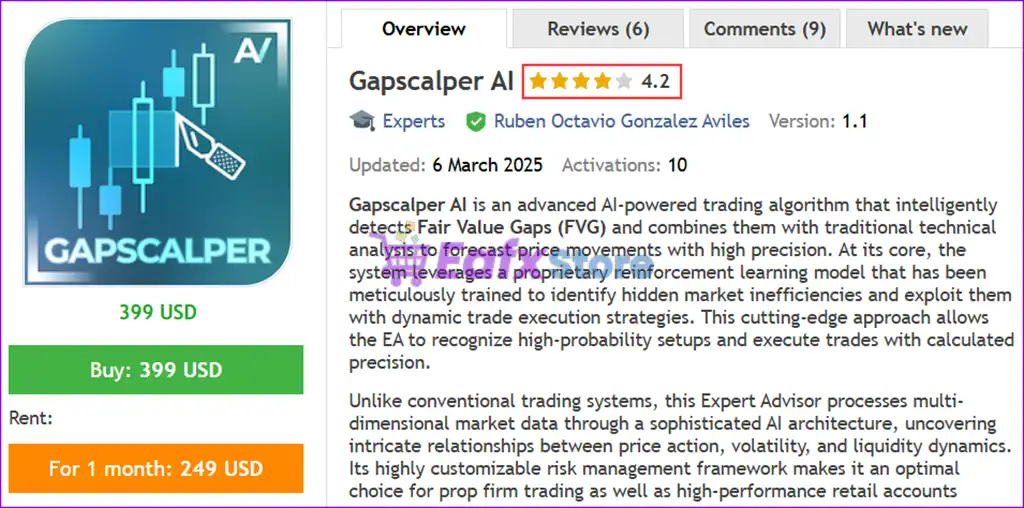
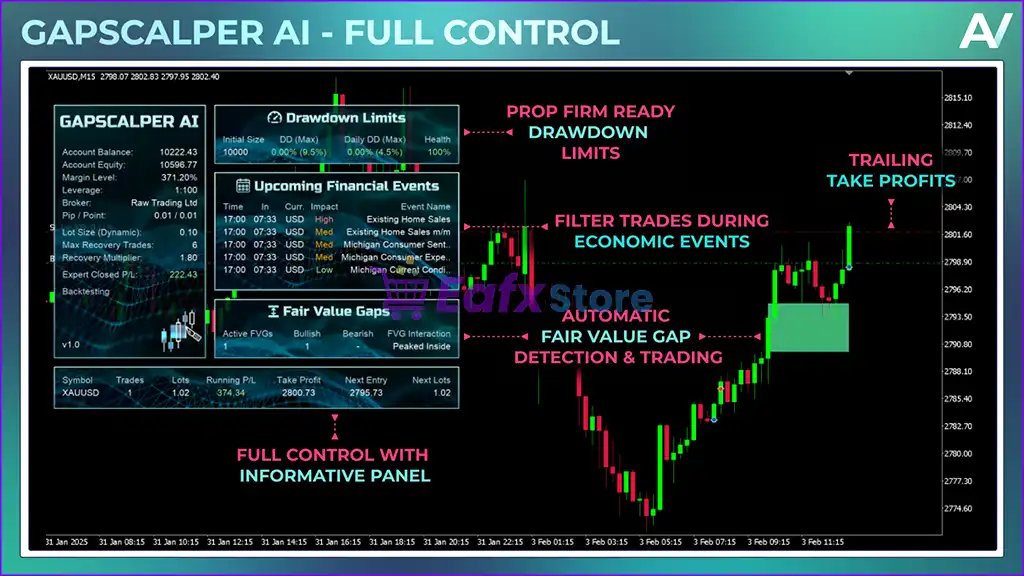
Gapscalper AI EA is an intelligent MetaTrader 5 Expert Advisor designed to trade market gaps using advanced recovery logic, Fair Value Gap (FVG) filtering, dynamic money management and built-in prop firm protection.
The EA combines trailing profit management, news filtering, and drawdown controls to help traders maximize opportunities while maintaining disciplined risk management.

🔢 Installation Panel Parameters
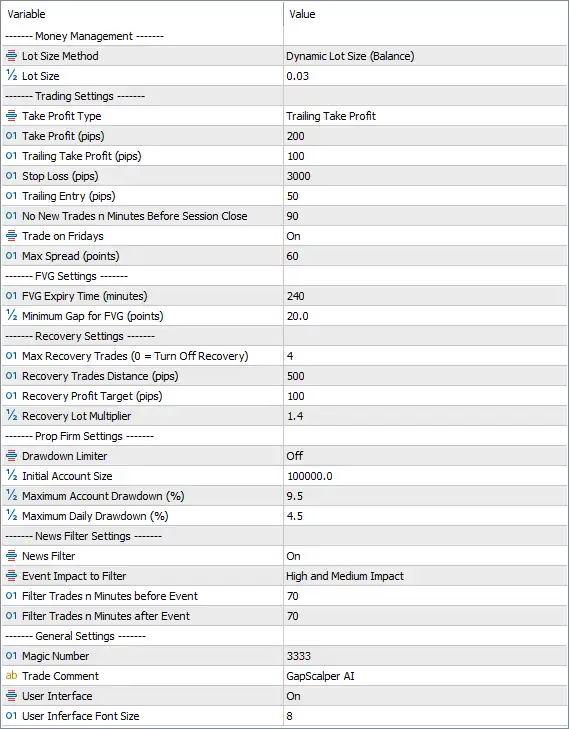
Below are the details of the parameters in the advisor’s trading system settings table:
🔶 Money Management
🔹 Lot Size Method = Dynamic Lot Size (Balance) – Automatically calculates the trading lot size based on the current account balance.
🔹 Lot Size = 0.03 – Sets the base trading volume to 0.03 lots when calculating position size.
🔶 Trading Settings
🔹 Take Profit Type = Trailing Take Profit – Uses a trailing take profit system that locks in profits as the market moves favorably.
🔹 Take Profit (pips) = 200 – Sets the initial Take Profit target to 200 pips.
🔹 Trailing Take Profit (pips) = 100 – Activates the trailing Take Profit once the trade reaches 100 pips of profit.
🔹 Stop Loss (pips) = 3000 – Defines a Stop Loss distance of 3000 pips for each trade.
🔹 Trailing Entry (pips) = 50 – Uses a 50-pip trailing entry mechanism before executing trades.
🔹 No New Trades in Minutes Before Session Close = 90 – Stops opening new trades 90 minutes before the trading session closes.
🔹 Trade on Fridays = On – Allows the EA to continue opening trades on Fridays.
🔹 Max Spread (points) = 60 – Prevents new trades when the market spread exceeds 60 points.
🔶 FVG Settings
🔹 FVG Expiry Time (minutes) = 240 – Fair Value Gap (FVG) signals remain valid for 240 minutes before expiring.
🔹 Minimum Gap for FVG (points) = 20.0 – Requires a minimum Fair Value Gap size of 20.0 points before a signal is considered valid.
🔶 Recovery Settings
🔹 Max Recovery Trades (0 = Turn Off Recovery) = 4 – Allows a maximum of 4 recovery trades; setting 0 disables the recovery system.
🔹 Recovery Trades Distance (pips) = 500 – Opens each recovery trade after the market moves 500 pips from the previous position.
🔹 Recovery Profit Target (pips) = 100 – Closes the recovery basket when a combined profit of 100 pips is reached.
🔹 Recovery Lot Multiplier = 1.4 – Multiplies the lot size of each recovery trade by 1.4.
🔶 Prop Firm Settings
🔹 Drawdown Limiter = Off – Disables automatic drawdown limitation.
🔹 Initial Account Size = 100000.0 – Sets the reference account size to 100,000.0 for drawdown calculations.
🔹 Maximum Account Drawdown (%) = 9.5 – Sets the maximum total account drawdown limit to 9.5%.
🔹 Maximum Daily Drawdown (%) = 4.5 – Limits the maximum daily account drawdown to 4.5%.
🔶 News Filter Settings
🔹 News Filter = On – Enables the built-in economic news filter.
🔹 Event Impact to Filter = High and Medium Impact – Blocks trading around both High and Medium impact economic events.
🔹 Filter Trades n Minutes before Event = 70 – Stops opening new trades 70 minutes before scheduled news releases.
🔹 Filter Trades n Minutes after Event = 70 – Resumes trading 70 minutes after the news event ends.
🔶 General Settings
🔹 Magic Number = 3333 – Assigns the unique identifier 3333 to all positions opened by the EA.
🔹 Trade Comment = GapScalper AI – Adds the trade comment "GapScalper AI" to every position for identification.
🔹 User Interface = On – Displays the EA's graphical information panel on the trading chart.
🔹 User Interface Font Size = 8 – Sets the interface font size to 8 for on-chart information.
🔢 Conclusion
Gapscalper AI EA MT5 is a feature-rich automated trading solution that combines gap trading, Fair Value Gap (FVG) analysis, intelligent recovery management, dynamic lot sizing, and integrated prop firm protection. With configurable trailing profits, advanced news filtering, recovery controls, and drawdown management, the EA offers traders a flexible framework for managing both risk and performance across changing market conditions.
🔢 FAQs
❓ What is the recommended lot sizing method in Gapscalper AI EA MT5?
The default configuration uses Dynamic Lot Size (Balance), allowing position sizes to adjust automatically based on account balance.
❓ Does Gapscalper AI EA MT5 include a recovery system?
Yes. The EA supports up to 4 recovery trades with a configurable 1.4 lot multiplier and 500-pip recovery distance.
❓ Can the EA avoid trading during important news events?
Yes. The built-in News Filter blocks trading around High and Medium impact economic news with customizable time buffers.
❓ Is Gapscalper AI EA MT5 suitable for prop firm accounts?
Yes. It includes configurable Maximum Account Drawdown (9.5%) and Maximum Daily Drawdown (4.5%) settings to help meet prop firm risk requirements.
❓ What is the purpose of the FVG settings?
The Fair Value Gap (FVG) settings define the minimum gap size (20.0 points) and signal validity period (240 minutes) used to identify high-quality trading opportunities.



