

🔢 Deeptrader AI MT5 Settings Explained – Complete Parameter Guide
Deeptrader AI MT5 is an advanced multi-symbol Expert Advisor for MetaTrader 5 that combines AI-assisted trade filtering, dynamic money management, recovery trading and integrated news protection.
Designed to trade multiple Forex pairs simultaneously from a single chart, the EA offers flexible risk control, intelligent trade selection, and automated recovery features for improved trading efficiency.
🔢 Installation Panel Parameters
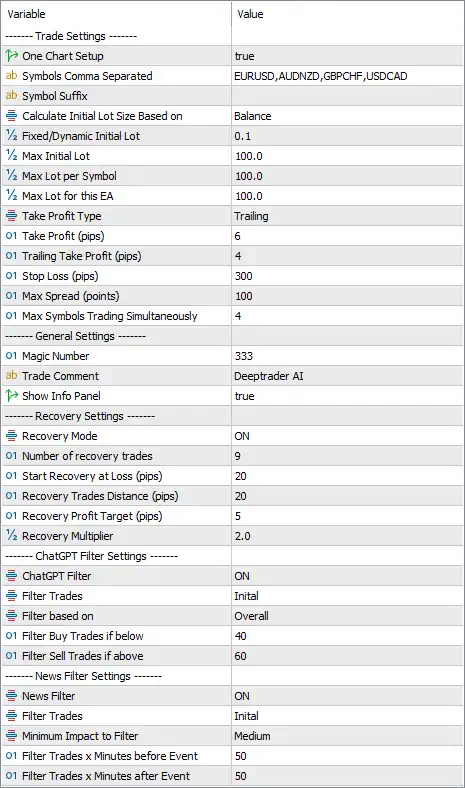
Below are the details of the parameters in the advisor’s trading system settings table:
🔶 Trade Settings
🔹 One Chart Setup = true – Enables multi-symbol trading from a single MT5 chart without attaching the EA to every individual symbol.
🔹 Symbols Comma Separated = EURUSD,AUDNZD,GBPCHF,USDCAD – Specifies the symbols the EA is allowed to trade simultaneously.
🔹 Symbol Suffix = (Blank) – Enter your broker's symbol suffix if required (for example: .m, -ecn, or pro); leave blank if no suffix is used.
🔹 Calculate Initial Lot Size Based on = Balance – Calculates the initial trading lot size according to the current account balance.
🔹 Fixed/Dynamic Initial Lot = 0.1 – Sets the initial lot size to 0.10 lots when using the selected lot calculation method.
🔹 Max Initial Lot = 100.0 – Limits the maximum starting lot size to 100.0 lots.
🔹 Max Lot per Symbol = 100.0 – Restricts each trading symbol to a maximum position size of 100.0 lots.
🔹 Max Lot for this EA = 100.0 – Defines the overall maximum lot size the EA may use across all managed trades.
🔹 Take Profit Type = Trailing – Uses a trailing Take Profit system that follows profitable price movements automatically.
🔹 Take Profit (pips) = 6 – Sets the initial Take Profit target at 6 pips.
🔹 Trailing Take Profit (pips) = 4 – Activates the trailing Take Profit after the trade reaches 4 pips of profit.
🔹 Stop Loss (pips) = 300 – Defines a Stop Loss distance of 300 pips for every position.
🔹 Max Spread (points) = 100 – Prevents the EA from opening trades when the spread exceeds 100 points.
🔹 Max Symbols Trading Simultaneously = 4 – Allows the EA to trade a maximum of 4 symbols at the same time.
🔶 General Settings
🔹 Magic Number = 333 – Assigns the unique identifier 333 to all trades opened by the EA.
🔹 Trade Comment = Deeptrader AI – Adds the comment "Deeptrader AI" to every order for easier identification.
🔹 Show Info Panel = true – Displays the EA's information panel directly on the chart.
🔶 Recovery Settings
🔹 Recovery Mode = ON – Enables the automatic recovery system for managing losing positions.
🔹 Number of Recovery Trades = 9 – Allows a maximum of 9 recovery trades during a recovery sequence.
🔹 Start Recovery at Loss (pips) = 20 – Begins opening recovery positions after the original trade reaches a loss of 20 pips.
🔹 Recovery Trades Distance (pips) = 20 – Places each additional recovery trade every 20 pips of adverse price movement.
🔹 Recovery Profit Target (pips) = 5 – Closes the recovery basket once the combined profit reaches 5 pips.
🔹 Recovery Multiplier = 2.0 – Multiplies each new recovery trade's lot size by 2.0.
🔶 ChatGPT Filter Settings
🔹 ChatGPT Filter = ON – Enables the AI-assisted trade filtering system before opening new positions.
🔹 Filter Trades = Initial – Applies the ChatGPT filter during the initial trade entry process.
🔹 Filter based on = Overall – Evaluates the overall market conditions before allowing new trades.
🔹 Filter Buy Trades if below = 40 – Blocks Buy trades when the AI filter score falls below 40.
🔹 Filter Sell Trades if above = 60 – Blocks Sell trades when the AI filter score exceeds 60.
🔶 News Filter Settings
🔹 News Filter = ON – Activates the built-in economic news filter.
🔹 Filter Trades = Initial – Applies news filtering only to newly opened trades.
🔹 Minimum Impact to Filter = Medium – Filters out trading during Medium and higher-impact economic events.
🔹 Filter Trades x Minutes before Event = 50 – Stops opening new trades 50 minutes before scheduled news releases.
🔹 Filter Trades x Minutes after Event = 50 – Resumes opening trades 50 minutes after the news event concludes.
🔢 Conclusion
Deeptrader AI MT5 is a sophisticated multi-currency Expert Advisor that combines AI-assisted trade filtering, dynamic balance-based lot sizing, recovery management, trailing profit optimization, and integrated economic news protection. Its ability to manage multiple symbols from a single chart, together with flexible recovery controls and intelligent market filtering, makes it a comprehensive solution for traders seeking automated portfolio management with enhanced risk control.
🔢 FAQs
❓ Can Deeptrader AI MT5 trade multiple currency pairs simultaneously?
Yes. The EA supports One Chart Setup and can trade EURUSD, AUDNZD, GBPCHF, and USDCAD simultaneously, with up to 4 active symbols.
❓ How does the recovery system work?
The EA starts recovery after a 20-pip loss, allows up to 9 recovery trades, and uses a 2.0 recovery multiplier to manage losing positions.
❓ What is the purpose of the ChatGPT Filter?
The ChatGPT Filter analyzes overall market conditions and blocks Buy or Sell trades when predefined AI thresholds are not met.
❓ Does Deeptrader AI MT5 avoid trading during important news events?
Yes. The News Filter blocks new trades around Medium and higher-impact news, beginning 50 minutes before and ending 50 minutes after each event.
❓ How is the trading lot size calculated?
The EA calculates the initial lot size based on the account balance, with an initial configured lot of 0.10 and configurable maximum lot limits.



