







GM Grid MT5 (Latest version) - Unlimited

Subscriptions for Special Plan
- 30 EA package is more economical!
- Special package with 99%
- Download 1 EA/Day

Subscriptions for Premium Membership
- Download Unlimited in 1 Year
- Get 100% Discount
- Get free access to all

Subscriptions for Gold Membership
- 1 Year Membership
- Get 100% Discount
- Access EA+Indicator+Course
Frequently bought together 🎁
Add these products to enhance your purchase



What is GM Grid MT5?
GM Grid MT5 is a powerful Expert Advisor (EA) for automated trading, designed with Price Action and advanced Indicators to deliver adaptability and structured execution. It combines grid-based logic with risk management controls, enabling stable performance across multiple assets while adapting to changing market conditions.
 Vendor Website: View here
About the Author
This product is compiled by Tran Duc Anh. This author has more than +7 years of experience working on MQL5 with many famous products such as GM Grid MT5, GM Dawn EA MT5, GM Bounty Hunter MT5, GM Grid MT4, GM Dawn MT4 and others. Among them, GM Grid MT5 is his best performing products.
GM Grid MT5 Review
Key Features of GM Grid MT5
🔹 Price Action Trading Core: Uses market structure and indicators for precise entry decisions.
🔹 Grid & Martingale Logic: Applies structured position scaling for recovery and profit cycles.
🔹 Multi-Asset Compatibility: Works on forex pairs and gold with flexible trading setups.
🔹 Low Spread Optimization: Designed for ECN environments to ensure efficient execution.
🔹 User-Friendly Setup: Easy installation with minimal configuration requirements.
Why Choose & Use GM Grid MT5?
🔹 Adaptive Trading System: Adjusts to different market conditions and instruments.
🔹 Recovery-Oriented Design: Built to handle drawdowns with structured logic.
🔹 Flexible Usage Options: Suitable for both automated and semi-automated trading styles.
🔹 Scalable Performance: Can be optimized for various account sizes and strategies.
🔹 Marketplace-Ready EA: Ideal for traders seeking versatile and dynamic automation.
GM Grid MT5 Review
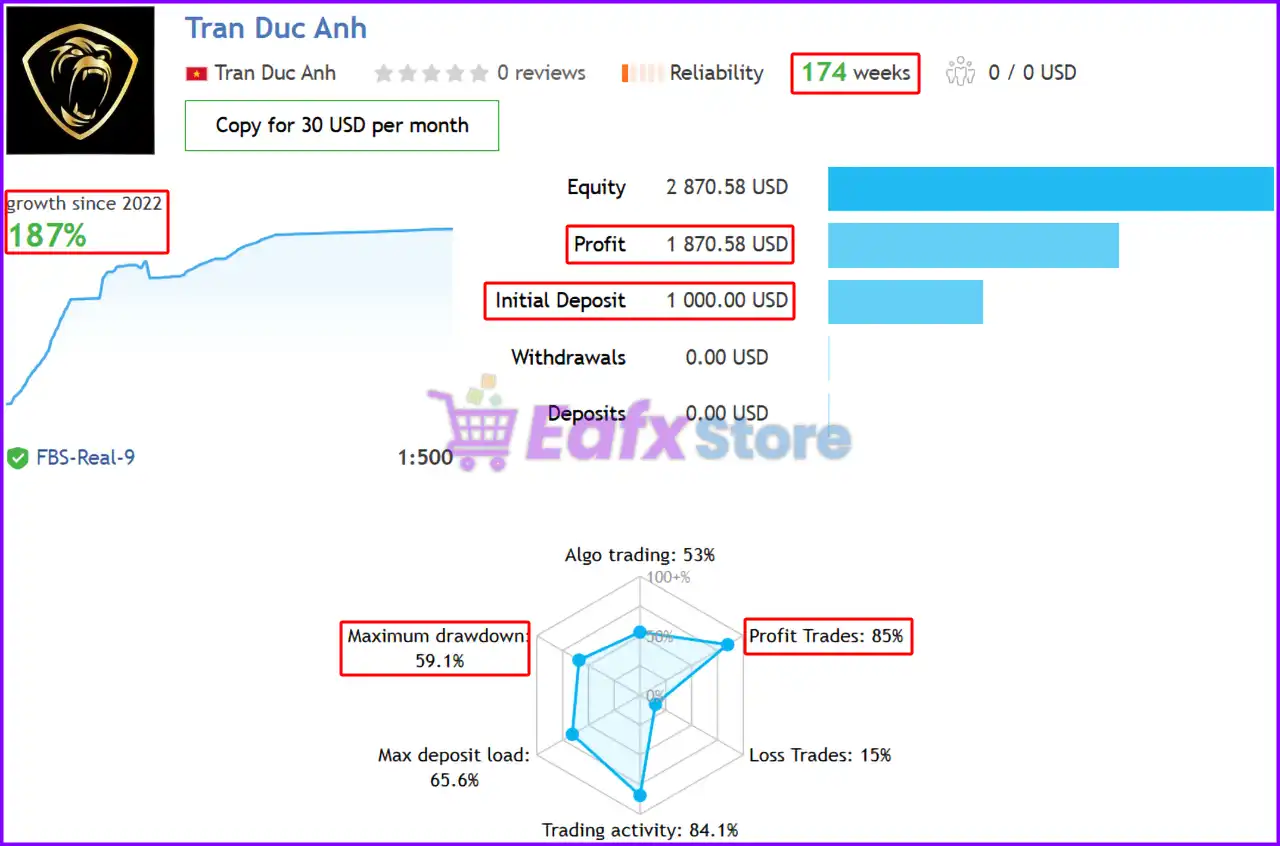
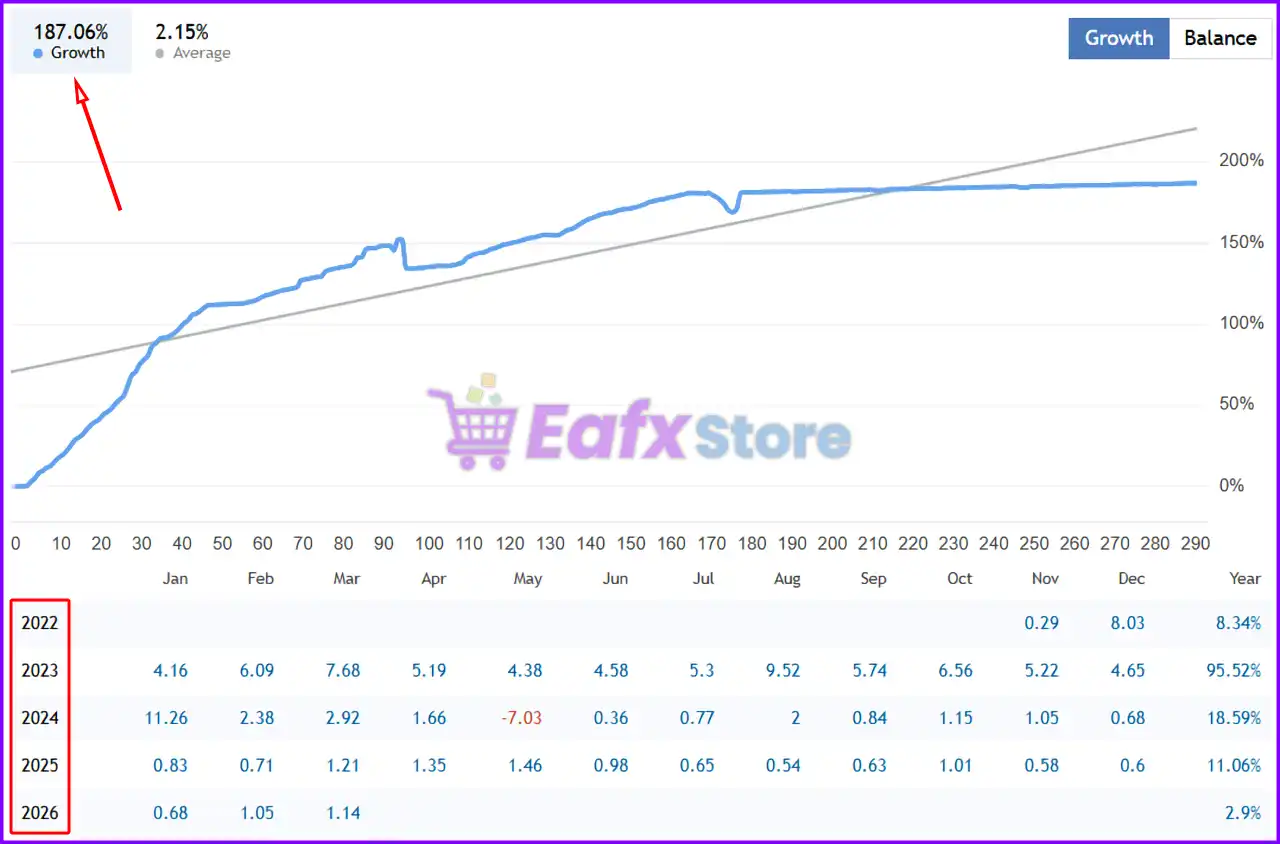
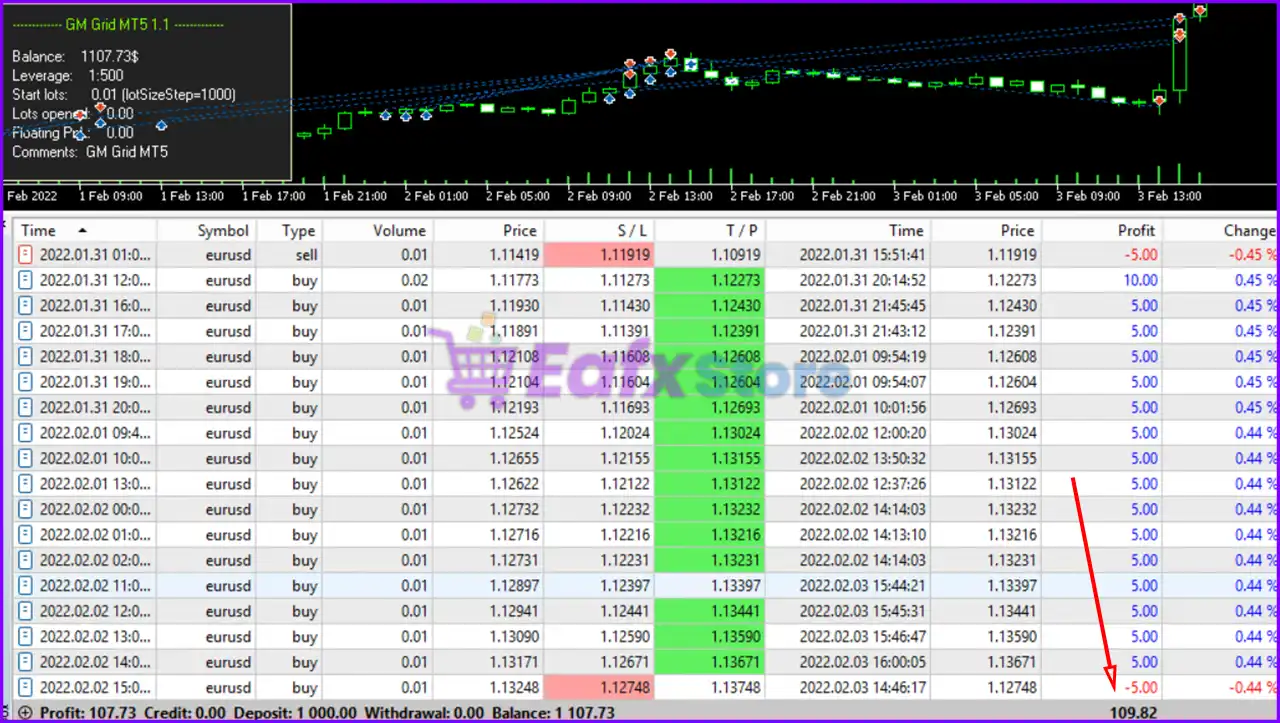
The GM Grid MT5 achieved impressive profit performance when trading with XAUUSD (Gold), EURUSD, GBPUSD pair. Trading results on real account for 174 consecutive weeks of trading:
✅ Initial Deposit: $1,000
✅ Growth Rate: +187%
✅ Win Rate (% of total): 85%
✅ Maximum Drawdown: 59.1%
GM Grid MT5 Signal Results
GM Grid MT5 Signal
What is the GM Grid MT5 Trading Strategy?
🔹 Grid-Based Execution: Opens multiple positions at defined intervals to capture market moves.
🔹 Martingale Recovery Logic: Adjusts lot sizes strategically to manage drawdown cycles.
🔹 Price Action Analysis: Identifies entry zones based on market behavior and structure.
🔹 Flexible Timeframe Trading: Adapts signals across different chart periods for stability.
🔹 Continuous Market Participation: Maintains activity to capture recurring opportunities.
Recommended settings
Recommended settings and parameters to pay attention to from developers and experts:
| Features | Type |
|---|---|
| Trading platform | MetaTrader 5 (MT5) |
| Time frames | M1 (1 minute chart) |
| Currency pairs | XAUUSD (Gold) & Forex pairs |
| Minimum / Recommended deposit | $1,000 |
| Minimum / Recommended leverage | 1:500 |
| Account type | Any |
| Product type | Original version |
| Additional services | Unlock and Decompile |
| Recommended brokers | Exness Broker, Icmarkets Broker |
| Recommended VPS | MyfxVPS.com (Blue VPS, Golden VPS). Lowest Latency, 2 week Free Trial, 100% Free for 12-18 Months. |
Product Download Package?
The download package of the product suite includes:
 Experts: GM Grid MT5.ex5
 Reviewed by David Easton
Conclusion
In short, GM Grid MT5 is a versatile automated trading solution that combines price action analysis with grid and martingale logic for adaptive performance. Its structured execution and multi-asset capability allow traders to capture opportunities across different markets. This EA is ideal for those seeking a flexible system that balances recovery strategies with dynamic trading in evolving market conditions.
GM Grid MT5 Settings & Parameters Guide
GM Grid MT5 is an automated grid trading system designed with configurable money management, directional trading controls, Martingale-based loss recovery, grid recovery parameters, profit protection, and flexible trading-session management. Its Inputs provide detailed control over lot sizing, order frequency, Stop Loss, Take Profit, Breakeven, Trailing Stop, grid spacing, lot multipliers, maximum exposure, and chart-panel display. The supplied configuration is particularly notable for its Martingale on loss strategy mode and multiple grid-recovery controls.
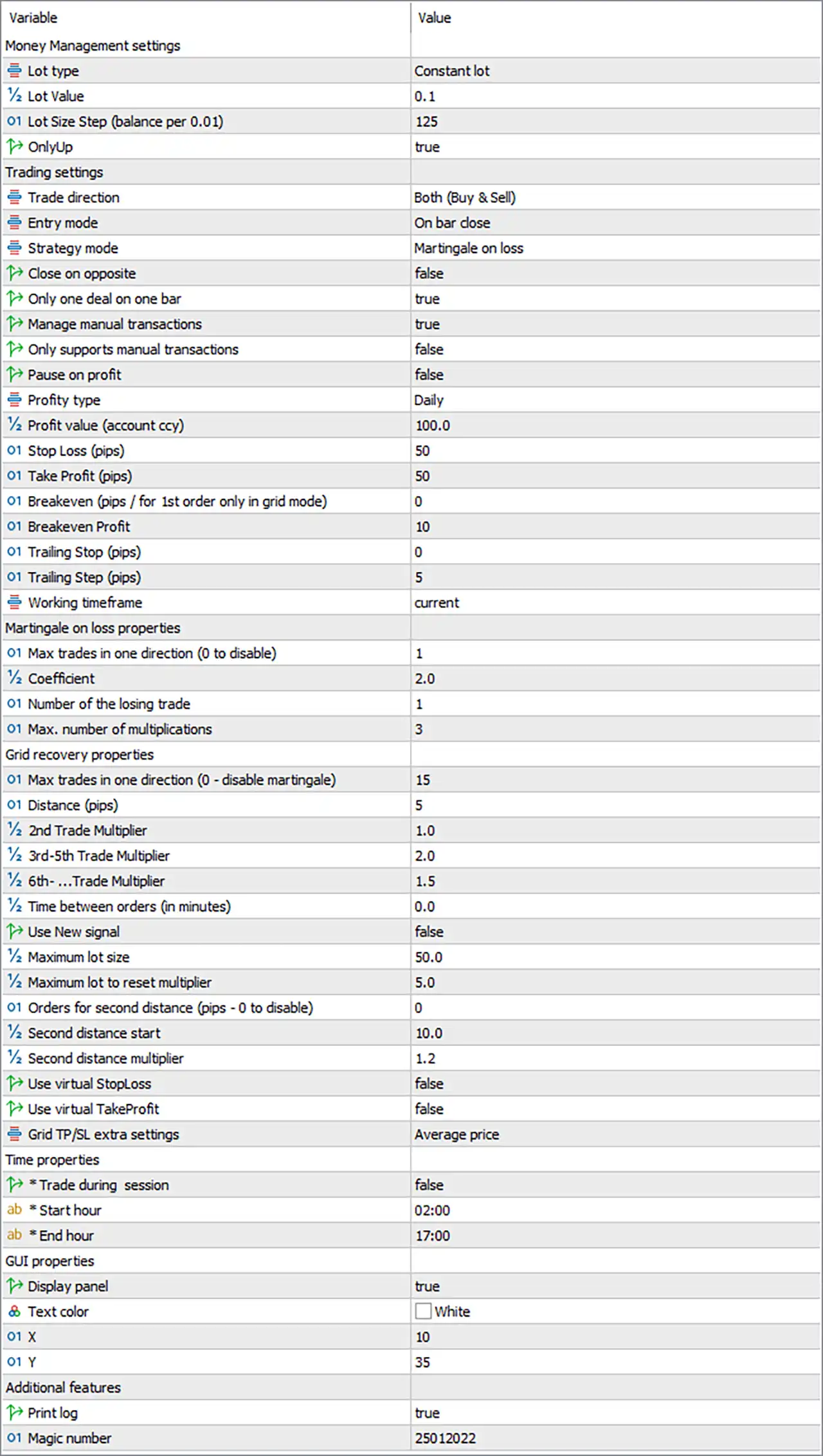
GM Grid MT5 Settings Panel
Money Management Settings
🔹 Lot type — Constant lot: Selects Constant lot as the active position-sizing method, using a predefined trading volume rather than dynamically calculating the lot size from account balance.
🔹 Lot Value — 0.1: Sets the constant trading volume to 0.1 lots for the EA’s initial or standard position sizing.
🔹 Lot Size Step (balance per 0.01) — 125: Sets the balance requirement to 125 for each 0.01 lot increment when the EA’s lot-sizing calculation uses this parameter.
🔹 OnlyUp — true: Enables the OnlyUp option, allowing the EA to apply its configured upward-only behavior within the relevant position or lot-management logic.
Trading Settings
🔹 Trade direction — Both (Buy & Sell): Allows the EA to trade in both Buy and Sell directions, rather than restricting operations to only one market direction.
🔹 Entry mode — On bar close: Configures the EA to evaluate or execute its entry logic based on the bar close.
🔹 Strategy mode — Martingale on loss: Enables the Martingale on loss strategy mode, where the EA can increase position sizing after losing trades according to its configured multipliers and limits.
🔹 Close on opposite — false: Disables automatic closing of an existing position when an opposite-direction trading signal occurs.
🔹 Only one deal on one bar — true: Restricts the EA to one deal per bar, helping prevent multiple entries from being opened on the same candle.
🔹 Manage manual transactions — true: Allows the EA to manage manual transactions alongside its automated trading operations.
🔹 Only supports manual transactions — false: Keeps the EA from being restricted exclusively to manually opened transactions.
🔹 Pause on profit — false: Disables the automatic trading pause that would otherwise be triggered when the configured profit condition is reached.
🔹 Profit type — Daily: Defines the profit measurement period as Daily, so the profit-management condition is evaluated on a daily basis.
🔹 Profit value (account ccy) — 100.0: Sets the configured profit threshold to 100.0 account currency units.
🔹 Stop Loss (pips) — 50: Sets the Stop Loss distance to 50 pips for applicable trades.
🔹 Take Profit (pips) — 50: Sets the Take Profit distance to 50 pips for applicable trades.
🔹 Breakeven (pips / for 1st order only in grid mode) — 0: Sets the Breakeven trigger to 0 pips, effectively disabling a positive-distance Breakeven trigger in the supplied configuration.
🔹 Breakeven Profit — 10: Sets the Breakeven Profit value to 10, defining the configured profit amount used when the Breakeven mechanism is activated.
🔹 Trailing Stop (pips) — 0: Sets the Trailing Stop distance to 0 pips, which means the trailing-stop function is not actively configured with a positive trailing distance.
🔹 Trailing Step (pips) — 5: Sets the Trailing Step to 5 pips, defining the minimum configured step for trailing-stop adjustments when trailing functionality is active.
🔹 Working timeframe — current: Configures the EA to operate using the current chart timeframe.
Martingale on Loss Properties
🔹 Max trades in one direction (0 to disable) — 1: Limits the maximum number of trades in one direction to 1 within this Martingale-on-loss configuration.
🔹 Coefficient — 2.0: Sets the Martingale position-size coefficient to 2.0, determining the multiplication factor used when the recovery logic increases the position size.
🔹 Number of the losing trade — 1: Sets the losing-trade sequence reference to 1, indicating that the Martingale calculation starts from the first losing trade.
🔹 Max. number of multiplications — 3: Limits the Martingale multiplication process to a maximum of 3 multiplications.
Grid Recovery Properties
🔹 Max trades in one direction (0 – disable martingale) — 15: Allows up to 15 trades in one direction for the grid-recovery system. A value of 0 would disable the Martingale function according to the parameter description.
🔹 Distance (pips) — 5: Sets the grid distance between applicable recovery orders to 5 pips.
🔹 2nd Trade Multiplier — 1.0: Sets the lot multiplier for the 2nd trade to 1.0.
🔹 3rd-5th Trade Multiplier — 2.0: Sets the lot multiplier for the 3rd through 5th trades to 2.0.
🔹 6th-….Trade Multiplier — 1.5: Sets the lot multiplier for the 6th and subsequent trades to 1.5, according to the EA’s grid-recovery logic.
🔹 Time between orders (in minutes) — 0.0: Sets the minimum configured time between successive orders to 0.0 minutes, allowing orders to be placed without a time-delay requirement when other conditions are satisfied.
🔹 Use New signal — false: Disables the New Signal option for opening or managing additional grid-recovery positions.
🔹 Maximum lot size — 50.0: Limits the maximum individual or calculated lot size to 50.0 lots.
🔹 Maximum lot to reset multiplier — 5.0: Sets 5.0 lots as the maximum lot level associated with resetting the multiplier according to the EA’s recovery logic.
🔹 Orders for second distance (pips – 0 to disable) — 0: Sets this secondary-distance order function to 0, which disables the second-distance mechanism according to the parameter description.
🔹 Second distance start — 10.0: Sets the starting distance for the secondary grid-distance mechanism to 10.0 pips when that function is enabled.
🔹 Second distance multiplier — 1.2: Sets the multiplier for the secondary distance to 1.2.
🔹 Use virtual StopLoss — false: Disables the virtual Stop Loss mechanism.
🔹 Use virtual TakeProfit — false: Disables the virtual Take Profit mechanism.
🔹 Grid TP/SL extra settings — Average price: Configures the grid’s additional TP/SL calculation mode to Average price, meaning the grid’s overall exit levels are based on the average position price.
Time Properties
🔹 Trade during session — false: Disables the specific trading-session restriction, so the Start Hour and End Hour settings are not actively limiting trading through this switch.
🔹 Start hour — 02:00: Defines the configured trading-session start time as 02:00.
🔹 End hour — 17:00: Defines the configured trading-session end time as 17:00.
GUI Properties
🔹 Display panel — true: Enables the EA’s on-chart information panel for displaying trading and system information.
🔹 Text color — White: Sets the GUI panel text color to White.
🔹 X — 10: Sets the horizontal GUI position to 10.
🔹 Y — 35: Sets the vertical GUI position to 35.
Additional Features
🔹 Print log — true: Enables logging of EA activity and relevant trading information in the platform’s log.
🔹 Magic number — 25012022: Assigns the unique Magic Number 25012022 to trades generated or managed by this EA, helping distinguish them from other positions.
Conclusion
The supplied GM Grid MT5 configuration is built around a Constant lot model with Lot Value = 0.1, while its trading direction is set to Both (Buy & Sell) and its entry mode is On bar close. The selected strategy mode is Martingale on loss, with a 2.0 coefficient and a maximum of 3 multiplications in the dedicated Martingale settings.
The grid-recovery configuration allows up to 15 trades in one direction, uses a 5-pip distance, and applies different multipliers across trade sequences: 1.0 for the 2nd trade, 2.0 for the 3rd–5th trades, and 1.5 for the 6th and subsequent trades. The maximum lot size is configured at 50.0 lots, while the maximum lot for resetting the multiplier is 5.0.
For trade management, the supplied settings use Stop Loss = 50 pips and Take Profit = 50 pips. Breakeven is set to 0 pips, Breakeven Profit is 10, and Trailing Stop is set to 0 pips with a 5-pip Trailing Step. Both virtual Stop Loss and virtual Take Profit are disabled, while grid TP/SL management is based on Average price.
The configuration also enables the on-chart GUI panel, uses White text, positions the panel at X = 10 and Y = 35, enables logging, and identifies the EA with Magic Number 25012022.
FAQs
❓ What trading strategy does GM Grid MT5 use in the supplied configuration?
The selected Strategy mode is Martingale on loss, supported by dedicated Martingale and grid-recovery parameters.
❓ What are the main Stop Loss and Take Profit settings?
The EA is configured with Stop Loss = 50 pips and Take Profit = 50 pips.
❓ How many grid trades can GM Grid MT5 open in one direction?
The Max trades in one direction parameter under Grid recovery properties is set to 15. The separate Martingale-on-loss setting is 1.
❓ What are the grid lot multipliers?
The configuration uses 1.0 for the 2nd trade, 2.0 for the 3rd–5th trades, and 1.5 for the 6th and subsequent trades.
❓ Is the Trailing Stop enabled?
The supplied Trailing Stop = 0 pips, so no positive trailing distance is configured. The Trailing Step remains set to 5 pips.
User Reviews
Only logged in customers who have purchased this product may leave a review.
❓ What is GM Grid MT5 and how does it work?
GM Grid MT5 is an automated trading EA that uses price action and grid logic to open multiple positions, manage recovery cycles, and adapt to market conditions.
❓ Which markets can GM Grid MT5 trade?
GM Grid MT5 supports multiple assets including XAUUSD, EURUSD, and GBPUSD, offering flexibility across both gold and forex markets.
❓ Is GM Grid MT5 suitable for beginners?
GM Grid MT5 can be used by beginners, but understanding grid and Martingale logic is important to manage risk and use it effectively.
❓ What timeframe is recommended for GM Grid MT5?
GM Grid MT5 performs best on the M1 timeframe, allowing it to capture frequent opportunities and adapt quickly to market changes.
❓ How does GM Grid MT5 manage risk?
GM Grid MT5 uses structured grid spacing, Martingale scaling, and position control to manage drawdowns and optimize recovery cycles.
❓ What is the minimum deposit required for GM Grid MT5?
GM Grid MT5 requires a recommended deposit of around $1,000 to handle grid strategies and ensure proper risk management.
❓ Can GM Grid MT5 trade automatically without supervision?
GM Grid MT5 can operate fully automatically, managing entries, scaling positions, and recovery processes without manual intervention.
❓ What makes GM Grid MT5 different from other EAs?
GM Grid MT5 stands out with its combination of price action analysis, grid trading, and multi-asset compatibility for flexible trading strategies.
❓ Does GM Grid MT5 guarantee consistent profits?
GM Grid MT5 aims for consistent performance, but it cannot guarantee profits as market conditions and volatility can affect results.
❓ Is GM Grid MT5 suitable for long-term trading?
GM Grid MT5 can be used long-term with proper risk settings, but careful management is needed due to its grid and Martingale strategy.
-
 Original price was: $999.00.$249.00Current price is: $249.00.
 -
 Original price was: $1,200.00.$249.00Current price is: $249.00.
 -
 Original price was: $2,620.00.$249.00Current price is: $249.00.
 -
 Original price was: $1,000.00.$249.00Current price is: $249.00.
-
 0Original price was: $1,299.00.$249.00Current price is: $249.00.
 -
 0Original price was: $199.00.$179.00Current price is: $179.00.
 -
 1Original price was: $1,299.00.$249.00Current price is: $249.00.
 -
 27Original price was: $60,000.00.$239.00Current price is: $239.00.
There are no reviews yet.