


ET9 for MT5 Settings Guide
ET9 for MT5 is an automated trading system designed around a flexible multi-strategy framework, combining configurable lot sizing, automated money management, risk control, profit protection, and multiple ET strategy modules.
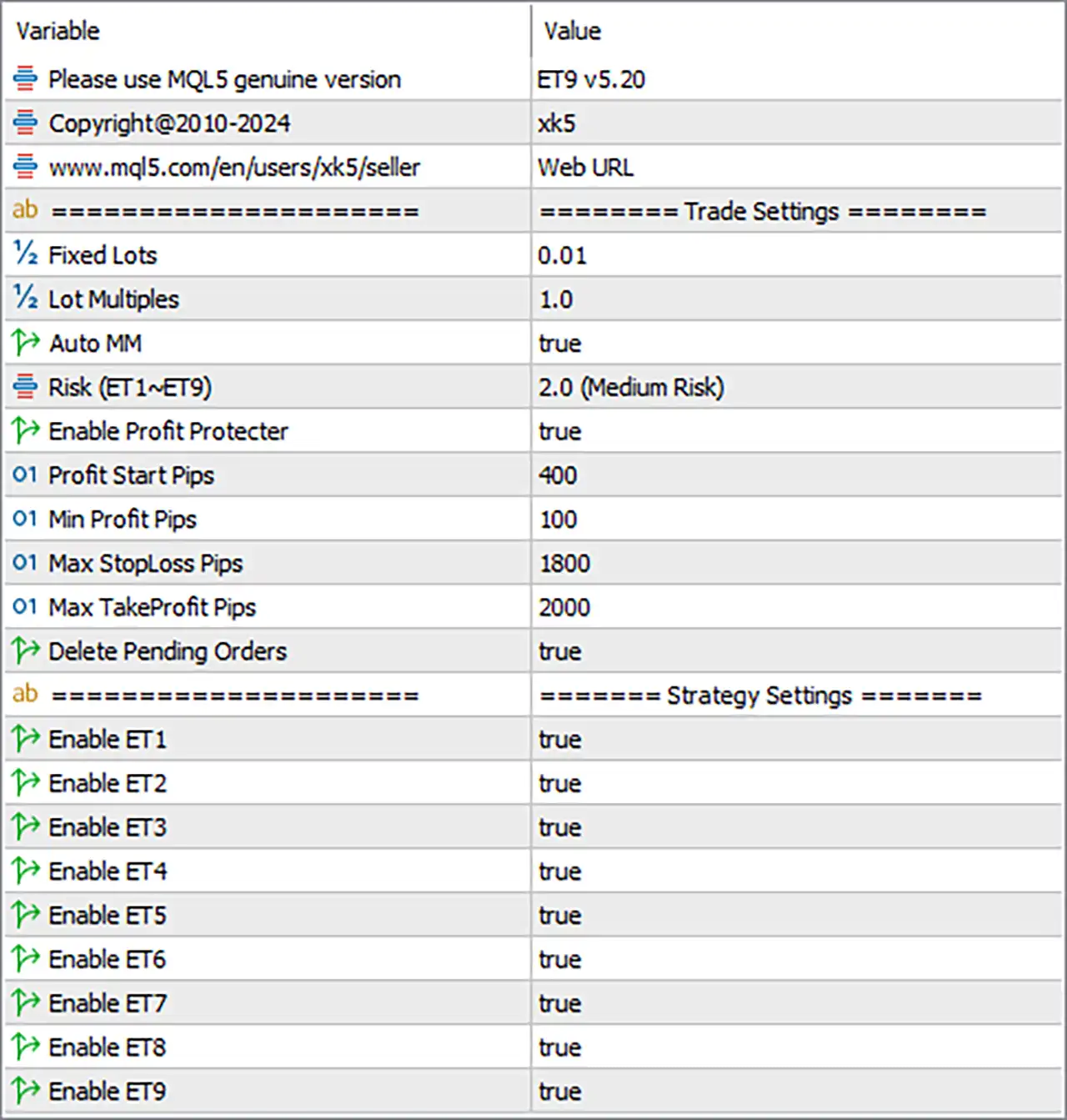
Trade Settings
🔹 Fixed Lots — 0.01: Sets the fixed trading volume to 0.01 lots when fixed-lot sizing is used, providing a defined position size for each trade.
🔹 Lot Multiples — 1.0: Sets the lot-size multiplier to 1.0, keeping the calculated trading volume at its standard level without additional scaling.
🔹 Auto MM — true: Enables Automatic Money Management, allowing the EA to calculate position sizing according to its internal money-management logic.
🔹 Risk (ET1~ET9) — 2.0 (Medium Risk): Sets the overall strategy risk level for ET1 through ET9 to 2.0, classified in the panel as Medium Risk.
🔹 Enable Profit Protector — true: Activates the Profit Protector, allowing the EA to apply its built-in mechanism for protecting accumulated trading profits.
🔹 Profit Start Pips — 400: The profit-protection mechanism starts operating after a position reaches 400 pips of profit.
🔹 Min Profit Pips — 100: Defines 100 pips as the minimum profit level associated with the profit-protection mechanism.
🔹 Max StopLoss Pips — 1800: Sets the maximum Stop Loss distance to 1800 pips, providing a predefined upper limit for loss protection.
🔹 Max TakeProfit Pips — 2000: Sets the maximum Take Profit distance to 2000 pips, defining the upper limit for the EA's profit-target calculation.
🔹 Delete Pending Orders — true: Enables automatic deletion of pending orders according to the EA's internal order-management conditions.
Strategy Settings
🔹 Enable ET1 — true: Activates the ET1 strategy module, allowing ET1 to participate in the EA's trading operations.
🔹 Enable ET2 — true: Activates the ET2 strategy module, allowing ET2 to participate in the EA's trading operations.
🔹 Enable ET3 — true: Activates the ET3 strategy module, allowing ET3 to participate in the EA's trading operations.
🔹 Enable ET4 — true: Activates the ET4 strategy module, allowing ET4 to participate in the EA's trading operations.
🔹 Enable ET5 — true: Activates the ET5 strategy module, allowing ET5 to participate in the EA's trading operations.
🔹 Enable ET6 — true: Activates the ET6 strategy module, allowing ET6 to participate in the EA's trading operations.
🔹 Enable ET7 — true: Activates the ET7 strategy module, allowing ET7 to participate in the EA's trading operations.
🔹 Enable ET8 — true: Activates the ET8 strategy module, allowing ET8 to participate in the EA's trading operations.
🔹 Enable ET9 — true: Activates the ET9 strategy module, keeping the ninth strategy component enabled for trading.
Platform & Version Information
🔹 Please use MQL5 genuine version — ET9 v5.20: Indicates that the supplied configuration is intended for the genuine MQL5 version and identifies the EA build as ET9 v5.20.
🔹 Copyright@2010-2024 — xk5: Displays the copyright information Copyright@2010-2024 and the associated identifier xk5.
🔹 www.mql5.com/en/users/xk5/seller — Web URL: Provides the seller's MQL5 web address shown in the EA Inputs panel.
Conclusion
The supplied ET9 for MT5 configuration is set up with 0.01 Fixed Lots, 1.0 Lot Multiples, and Auto MM enabled. The overall risk setting is 2.0 (Medium Risk) for ET1~ET9, while the Profit Protector is enabled with a 400-pip starting level and 100-pip minimum profit. The configuration also allows up to 1800 pips Stop Loss and 2000 pips Take Profit. Importantly, ET1 through ET9 are all enabled, giving the EA access to all nine available strategy modules in this configuration.
FAQs
❓ What is the recommended lot size in this ET9 for MT5 configuration?
The supplied settings use Fixed Lots = 0.01. However, Auto MM = true, so the EA may use its internal money-management logic depending on how the system prioritizes these settings.
❓ What does Risk 2.0 (Medium Risk) mean?
The panel specifies Risk (ET1~ET9) = 2.0 (Medium Risk). This is the configured risk level applied to the ET1 through ET9 strategy modules.
❓ When does the Profit Protector start?
With Enable Profit Protector = true and Profit Start Pips = 400, the configured profit-protection mechanism begins at 400 pips according to the EA's internal logic.
❓ What are the maximum Stop Loss and Take Profit settings?
The configuration specifies Max StopLoss Pips = 1800 and Max TakeProfit Pips = 2000.
❓ Are all ET strategies enabled in this configuration?
Yes. ET1, ET2, ET3, ET4, ET5, ET6, ET7, ET8, and ET9 are all set to true, meaning all nine strategy modules are enabled.


