


GM Dawn EA MT5 (Latest version) - Unlimited

Subscriptions for Special Plan
- 30 EA package is more economical!
- Special package with 99%
- Download 1 EA/Day

Subscriptions for Premium Membership
- Download Unlimited in 1 Year
- Get 100% Discount
- Get free access to all

Subscriptions for Gold Membership
- 1 Year Membership
- Get 100% Discount
- Access EA+Indicator+Course
Frequently bought together 🎁
Add these products to enhance your purchase



What is GM Dawn EA MT5?
GM Dawn EA MT5 is a reliable Expert Advisor (EA) designed for automated trading across forex markets, combining adaptive Indicators with smart execution logic. It focuses on stability, disciplined risk management, and flexible performance, allowing traders to achieve consistent results while maintaining controlled exposure in changing market conditions.
 Vendor Website: View here
About the Author
This product is compiled by Tran Duc Anh. This author has more than +7 years of experience working on MQL5 with many famous products such as GM Dawn EA MT5, GM Grid MT5, GM Bounty Hunter MT5, GM Grid MT4, GM Dawn MT4 and others. Among them, GM Dawn EA is his best performing products.
GM Dawn EA MT5 Review
Key Features of GM Dawn EA for MT5
🔹 No Grid or Risky Methods: Designed with a clean strategy avoiding aggressive recovery systems.
🔹 Smart SL & TP Control: Every trade includes predefined Stop Loss (SL) and Take Profit (TP) levels.
🔹 Multi-Pair Compatibility: Works efficiently across various forex pairs with high liquidity.
🔹 Adaptive Lot Management: Auto lot adjusts position size based on account balance and risk.
🔹 Simple Plug & Play Setup: Easy installation with minimal configuration required.
What is the GM Dawn MT5 Trading Strategy?
🔹 Indicator-Based Entries: Uses structured indicators to detect high-probability market setups.
🔹 Trend-Aligned Execution: Trades follow dominant market direction for improved consistency.
🔹 Controlled Risk Placement: Each trade is executed with defined SL and TP for protection.
GM Dawn EA MT5 Review
🔹 Flexible Market Adaptation: Adjusts trading behavior based on volatility and liquidity.
🔹 Disciplined Trade Filtering: Avoids overtrading by focusing on clear and stable conditions.
GM Dawn EA MT5 Trading Results
GM Dawn MT5 Review
Why Choose & Use GM Dawn EA?
🔹 Stable Performance Focus: Built for consistent results with controlled drawdown levels.
🔹 Beginner-Friendly Design: Simple to use with automatic adjustments for different accounts.
🔹 Risk Management Priority: Protects capital through structured and predefined trade logic.
🔹 Broker Compatibility: Works with most brokers and account types without complexity.
🔹 Marketplace-Ready Solution: Ideal for traders seeking safe, automated forex trading.
Recommended settings
Recommended settings and parameters to pay attention to from developers and experts:
| Features | Type |
|---|---|
| Trading platform | MetaTrader 5 (MT5) |
| Time frames | Any |
| Currency pairs | 28 currency pairs |
| Minimum / Recommended deposit | $200 |
| Minimum / Recommended leverage | Any |
| Account type | Any |
| Product type | Original version |
| Additional services | Unlock and Decompile |
| Recommended brokers | Exness Broker, Icmarkets Broker |
| Recommended VPS | MyfxVPS.com (Blue VPS, Golden VPS). Lowest Latency, 2 week Free Trial, 100% Free for 12-18 Months. |
Product Download Package?
The download package of the product suite includes:
 Experts: GM Dawn MT5.ex5
 Reviewed by David Easton
Conclusion
In short, GM Dawn MT5 is a reliable and disciplined automated trading solution built for stable performance and controlled risk. By avoiding Grid and Martingale strategies, it ensures safer execution while maintaining consistent results. With adaptive indicators, smart SL/TP control and multi-pair compatibility, this EA is ideal for traders seeking a secure, user-friendly system for long-term forex trading success.
GM Dawn EA MT5 Settings & Parameters Guide
GM Dawn EA MT5 is an automated trading system equipped with structured money management, market-order execution, Stop Loss and spread controls, daily trading filters, holiday protection, and an integrated economic-news filter.
Its Inputs allow traders to define fixed or dynamic position sizing, split trades into smaller orders, control trading days, and manage exposure around Low, Medium, High Impact News and NFP events. The supplied configuration also includes visual news lines and broker-time-zone synchronization for clearer market-event management.
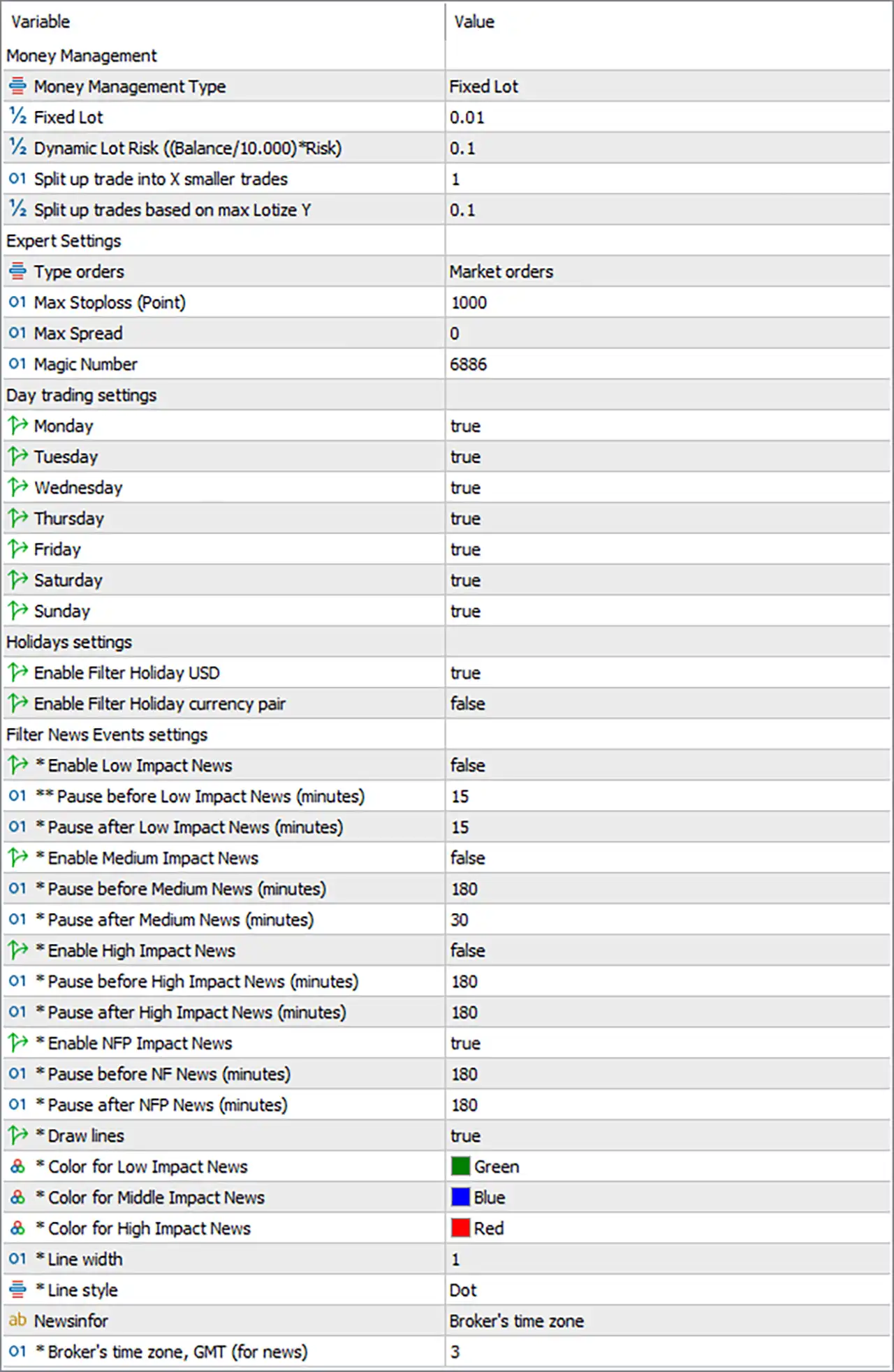
GM Dawn EA MT5 Settings Panel
Money Management
🔹 Money Management Type — Fixed Lot: Selects Fixed Lot as the active money-management method, meaning the EA uses a predefined lot size for trading.
🔹 Fixed Lot — 0.01: Sets the fixed trading volume to 0.01 lots for each applicable trade.
🔹 *Dynamic Lot Risk ((Balance/10.000)Risk) — 0.1: Sets the Dynamic Lot Risk parameter to 0.1, which is used by the EA’s dynamic position-sizing formula when dynamic money management is selected.
🔹 Split up trade into X smaller trades — 1: Configures the EA to divide a trade into 1 smaller trade, meaning no additional subdivision is applied beyond the single configured trade.
🔹 Split up trades based on max Lotize Y — 0.1: Sets the maximum lot-size subdivision threshold to 0.1 lots, which can be used when splitting larger calculated positions into smaller trades.
Expert Settings
🔹 Type orders — Market orders: Configures the EA to execute trades using Market orders rather than pending-order execution.
🔹 Max Stoploss (Point) — 1000: Sets the maximum Stop Loss distance to 1000 points, providing an upper limit for the EA’s loss-protection calculation.
🔹 Max Spread — 0: Sets Max Spread = 0 in the supplied configuration, meaning the EA’s spread-control behavior depends on how this value is interpreted internally by the EA.
🔹 Magic Number — 6886: Assigns the unique Magic Number 6886 to trades generated by GM Dawn EA MT5, helping distinguish its positions from other trading activities.
Day Trading Settings
🔹 Monday — true: Enables trading on Monday.
🔹 Tuesday — true: Enables trading on Tuesday.
🔹 Wednesday — true: Enables trading on Wednesday.
🔹 Thursday — true: Enables trading on Thursday.
🔹 Friday — true: Enables trading on Friday.
🔹 Saturday — true: Enables trading on Saturday.
🔹 Sunday — true: Enables trading on Sunday.
Holidays Settings
🔹 Enable Filter Holiday USD — true: Enables the USD Holiday Filter, allowing the EA to apply its holiday-related trading restriction for USD events or holidays.
🔹 Enable Filter Holiday currency pair — false: Disables the Holiday Currency Pair Filter, so the additional currency-pair holiday filter is not active in the supplied configuration.
Filter News Events Settings
🔹 Enable Low Impact News — false: Disables filtering around Low Impact News events.
🔹 Pause before Low Impact News (minutes) — 15: Defines a 15-minute pause period before a Low Impact News event when the Low Impact News filter is enabled.
🔹 Pause after Low Impact News (minutes) — 15: Defines a 15-minute pause period after a Low Impact News event when the filter is enabled.
🔹 Enable Medium Impact News — false: Disables filtering around Medium Impact News events.
🔹 Pause before Medium News (minutes) — 180: Defines a 180-minute pause period before a Medium Impact News event when the corresponding filter is enabled.
🔹 Pause after Medium News (minutes) — 30: Defines a 30-minute pause period after a Medium Impact News event when the corresponding filter is enabled.
🔹 Enable High Impact News — false: Disables filtering around High Impact News events in the supplied configuration.
🔹 Pause before High Impact News (minutes) — 180: Defines a 180-minute pause period before a High Impact News event when the High Impact News filter is enabled.
🔹 Pause after High Impact News (minutes) — 180: Defines a 180-minute pause period after a High Impact News event when the High Impact News filter is enabled.
🔹 Enable NFP Impact News — true: Enables the NFP News Filter, allowing the EA to apply its configured trading pause around Non-Farm Payroll events.
🔹 Pause before NFP News (minutes) — 180: Configures the EA to pause trading 180 minutes before an NFP event when the NFP filter is active.
🔹 Pause after NFP News (minutes) — 180: Configures the EA to pause trading 180 minutes after an NFP event when the NFP filter is active.
News Visualization Settings
🔹 Draw lines — true: Enables the drawing of news-event lines on the trading chart, making scheduled economic events easier to identify visually.
🔹 Color for Low Impact News — Green: Assigns Green to Low Impact News lines on the chart.
🔹 Color for Middle Impact News — Blue: Assigns Blue to Medium/Middle Impact News lines on the chart.
🔹 Color for High Impact News — Red: Assigns Red to High Impact News lines on the chart.
🔹 Line width — 1: Sets the news-event line width to 1, producing a thin chart line.
🔹 Line style — Dot: Configures the news-event chart lines to use the Dot line style.
News Information & Time Zone
🔹 NewsInfo — Broker’s time zone: Configures the news information to use the broker’s time zone as the reference for displaying economic events.
🔹 Broker’s time zone, GMT (for news) — 3: Sets the broker’s news time-zone offset to GMT +3, allowing scheduled news events to be interpreted according to this configured broker time.
Conclusion
The supplied GM Dawn EA MT5 configuration uses Fixed Lot = 0.01 with Market orders, while the dynamic risk parameter remains configured at 0.1. The EA can split trades into 1 smaller trade, with a maximum lot subdivision value of 0.1. Its risk-control settings include Max Stoploss = 1000 points, Max Spread = 0, and Magic Number = 6886.
All seven day-trading switches from Monday through Sunday are set to true. The USD Holiday Filter is enabled, while the currency-pair holiday filter is disabled. For economic events, Low Impact, Medium Impact, and High Impact News filters are disabled, whereas the NFP Impact News filter is enabled with 180 minutes before and 180 minutes after the event.
The chart-based news visualization system is also enabled, using Green for Low Impact, Blue for Middle Impact, and Red for High Impact events, with Line Width = 1 and Dot style. News timing is based on the Broker’s time zone, configured at GMT +3.
FAQs
❓ What lot size is configured for GM Dawn EA MT5?
The supplied configuration uses Money Management Type = Fixed Lot and Fixed Lot = 0.01.
❓ What type of orders does GM Dawn EA MT5 use?
The Type orders parameter is set to Market orders, so the supplied configuration is designed around market-order execution.
❓ Which trading days are enabled?
Monday, Tuesday, Wednesday, Thursday, Friday, Saturday, and Sunday are all set to true in the supplied Inputs.
❓ Which news filter is active in the current configuration?
The NFP Impact News filter is enabled with 180 minutes before and 180 minutes after the event. The Low, Medium, and High Impact News filters are set to false.
❓ What is the configured news time zone?
The EA uses the Broker’s time zone, with Broker’s time zone, GMT (for news) = 3, corresponding to GMT +3.
User Reviews
Only logged in customers who have purchased this product may leave a review.
❓ What is GM Dawn MT5 and how does it work?
GM Dawn MT5 is an automated trading EA that uses adaptive indicators and structured logic to identify opportunities and execute trades with controlled risk.
❓ Which markets can GM Dawn MT5 trade?
GM Dawn MT5 supports up to 28 forex pairs, allowing traders to diversify strategies and take advantage of multiple market opportunities.
❓ Is GM Dawn MT5 suitable for beginners?
GM Dawn MT5 is beginner-friendly with a plug-and-play setup and automatic adjustments, making it easy to use without advanced technical knowledge.
❓ What timeframe is recommended for GM Dawn MT5?
GM Dawn MT5 can operate on any timeframe, offering flexibility to adapt to different trading styles and market conditions.
❓ How does GM Dawn MT5 manage risk?
GM Dawn MT5 uses predefined Stop Loss and Take Profit levels along with adaptive lot sizing to control exposure and protect capital.
❓ Does GM Dawn MT5 use risky strategies like Grid or Martingale?
GM Dawn MT5 avoids grid and Martingale strategies, focusing on clean, disciplined trading methods for stable and consistent performance.
❓ What is the minimum deposit required for GM Dawn MT5?
GM Dawn MT5 requires a recommended minimum deposit of around $200 to ensure stable performance and proper risk management.
❓ Can GM Dawn MT5 trade automatically without supervision?
GM Dawn MT5 operates fully automatically, handling entries, exits, and trade management without manual intervention.
❓ What makes GM Dawn MT5 different from other EAs?
GM Dawn MT5 stands out with its no-grid approach, multi-pair capability, and focus on disciplined execution with strong risk control.
❓ Is GM Dawn MT5 suitable for long-term trading?
GM Dawn MT5 is designed for long-term use with stable logic, adaptive performance, and consistent execution across changing market conditions.
-
 Original price was: $439.00.$249.00Current price is: $249.00.
-
 Original price was: $9,999.00.$249.00Current price is: $249.00.
-
 Original price was: $30,000.00.$249.00Current price is: $249.00.
-
 Original price was: $30,000.00.$249.00Current price is: $249.00.
-
 0Original price was: $199.00.$179.00Current price is: $179.00.
-
 2Original price was: $990.00.$599.00Current price is: $599.00.
-
 6Original price was: $2,580.00.$249.00Current price is: $249.00.
-
 4Original price was: $938.00.$249.00Current price is: $249.00.
There are no reviews yet.