


Sorgo EA MT5 Settings & Parameters Guide
Sorgo EA MT5 is an automated trading system designed with flexible position sizing, multi-order management, predefined Stop Loss and Take Profit controls, optional trailing-stop functionality, trading-hour filters, spread protection, and unique trade identification. The supplied configuration provides both manual and automated lot-management options, allowing traders to fine-tune position sizes, order execution, risk parameters, and trading conditions according to their preferred setup.
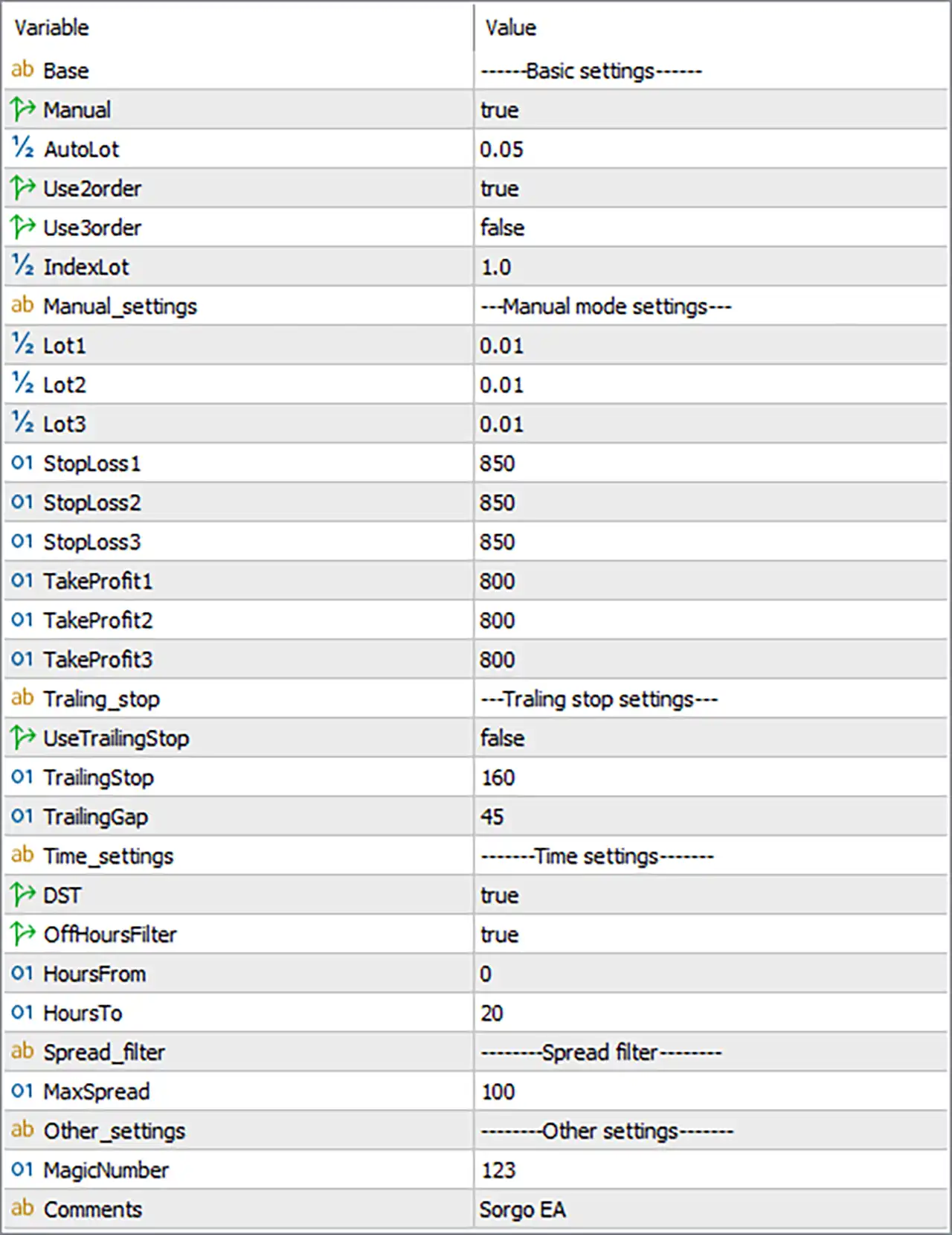
Basic Settings
🔹 Manual — true: Enables Manual mode, allowing the EA to use the manually configured lot sizes and related manual trading parameters.
🔹 AutoLot — 0.05: Sets the Auto Lot value to 0.05, providing the configured lot-size reference when automatic lot management is used.
🔹 Use2order — true: Enables the 2-order trading mode, allowing Sorgo EA MT5 to use its second-order configuration.
🔹 Use3order — false: Disables the 3-order trading mode, so the third-order configuration is not active in the supplied settings.
🔹 IndexLot — 1.0: Sets the Index Lot multiplier to 1.0, keeping the calculated lot value at its standard multiplier level.
Manual Mode Settings
🔹 Lot1 — 0.01: Sets the first manually configured trading position to 0.01 lots.
🔹 Lot2 — 0.01: Sets the second manually configured trading position to 0.01 lots.
🔹 Lot3 — 0.01: Sets the third manually configured trading position to 0.01 lots.
🔹 StopLoss1 — 850: Sets the Stop Loss for the first order at 850, according to the EA's internal point/pip calculation.
🔹 StopLoss2 — 850: Sets the Stop Loss for the second order at 850, maintaining the same predefined loss-control distance.
🔹 StopLoss3 — 850: Sets the Stop Loss for the third order at 850, providing the same Stop Loss configuration across all three order levels.
🔹 TakeProfit1 — 800: Sets the Take Profit for the first order at 800, defining its predefined profit target.
🔹 TakeProfit2 — 800: Sets the Take Profit for the second order at 800.
🔹 TakeProfit3 — 800: Sets the Take Profit for the third order at 800.
Trailing Stop Settings
🔹 UseTrailingStop — false: Disables the Trailing Stop function in the supplied configuration.
🔹 TrailingStop — 160: Defines a Trailing Stop distance of 160 when the trailing-stop function is enabled.
🔹 TrailingGap — 45: Sets the Trailing Gap to 45, defining the configured gap used by the EA's trailing-stop mechanism.
Time Settings
🔹 DST — true: Enables Daylight Saving Time (DST) adjustment for the EA's time-management logic.
🔹 OffHoursFilter — true: Enables the Off Hours Filter, restricting trading according to the configured trading-hour parameters.
🔹 HoursFrom — 0: Sets the beginning of the configured trading period to hour 0.
🔹 HoursTo — 20: Sets the end of the configured trading period to hour 20.
Spread Filter
🔹 MaxSpread — 100: Sets the maximum permitted spread to 100 according to the EA's internal spread-unit calculation. Trading conditions exceeding this threshold may be filtered.
Other Settings
🔹 MagicNumber — 123: Assigns the unique Magic Number 123 to trades generated by Sorgo EA MT5, helping distinguish its positions from other EA or manual trades.
🔹 Comments — Sorgo EA: Uses "Sorgo EA" as the trade comment, allowing the EA's positions to be identified more easily in the trading terminal.
Conclusion
The supplied Sorgo EA MT5 configuration uses Manual = true, with Lot1, Lot2, and Lot3 all set to 0.01 lots. The EA is configured to use the 2-order mode, while the 3-order mode is disabled. Each configured order uses Stop Loss = 850 and Take Profit = 800.
The Trailing Stop is currently disabled, although its parameters remain configured at TrailingStop = 160 and TrailingGap = 45. Time management is active through DST = true and OffHoursFilter = true, with the trading-hour range configured from 0 to 20. The spread filter allows a maximum value of 100, while MagicNumber = 123 and the trade comment "Sorgo EA" provide clear trade identification.
FAQs
❓ What lot size does Sorgo EA MT5 use in the supplied settings?
The manual configuration uses 0.01 lots for Lot1, Lot2, and Lot3. The AutoLot parameter is set to 0.05.
❓ Is the 2-order or 3-order mode enabled?
The 2-order mode is enabled with Use2order = true, while the 3-order mode is disabled with Use3order = false.
❓ What are the Stop Loss and Take Profit settings?
All three order levels use StopLoss = 850 and TakeProfit = 800.
❓ Does Sorgo EA MT5 use a Trailing Stop?
The supplied configuration has UseTrailingStop = false, so the Trailing Stop is currently disabled. Its configured values are TrailingStop = 160 and TrailingGap = 45.
❓ What are the trading-hour and spread-filter settings?
The OffHoursFilter is enabled, with HoursFrom = 0 and HoursTo = 20. The maximum configured spread is 100, while DST = true enables Daylight Saving Time adjustment.


