


🔢 Super Tenet EA MT5 – Complete Settings Guide & Parameter Explanation
Super Tenet EA is an advanced automated trading system for MetaTrader 5 that combines adaptive indicator calculations, Z-Score signal analysis, moving average trend filtering, multi-level profit management, stress testing mechanisms, margin protection and auto-scaling position control.
The EA is designed to identify statistically significant trading opportunities while maintaining strict risk management and capital preservation rules.

🔢 Installation Panel Parameters
Below are the details of the parameters in the advisor’s trading system settings table:
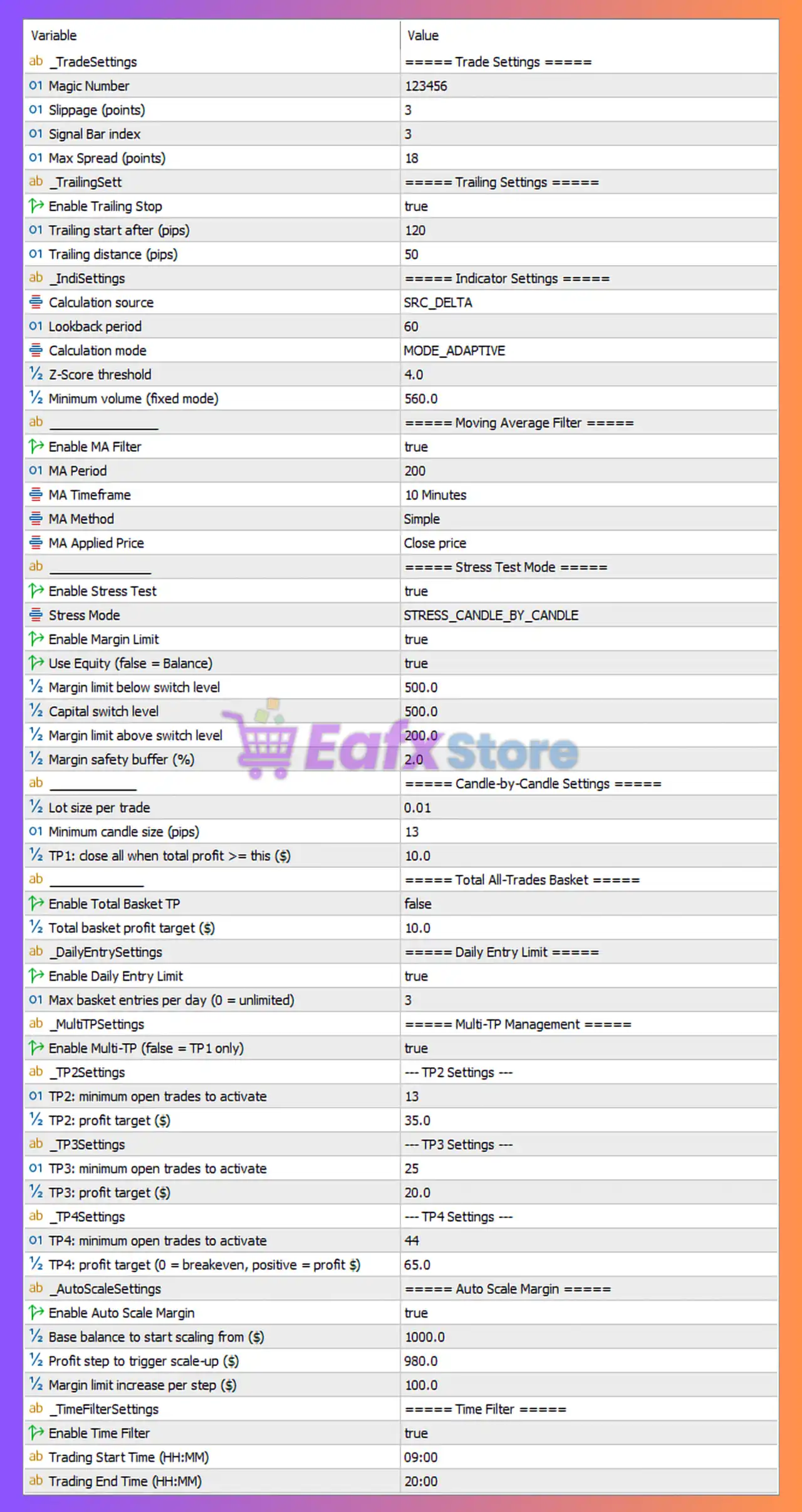
🔄 Trade Settings
🔹 Magic Number = 123456 — Unique trade identifier used by the EA to manage and distinguish its own positions.
🔹 Slippage (points) = 3 — Maximum acceptable execution slippage is limited to 3 points.
🔹 Signal Bar index = 3 — The EA analyzes the candle located 3 bars back for signal generation.
🔹 Max Spread (points) = 18 — New trades are blocked whenever the market spread exceeds 18 points.
🔄 Trailing Settings
🔹 Enable Trailing Stop = true — Activates automatic trailing stop management for open positions.
🔹 Trailing start after (pips) = 120 — Trailing stop begins once profit reaches 120 pips.
🔹 Trailing distance (pips) = 50 — Stop Loss trails price at a distance of 50 pips.
🔄 Indicator Settings
🔹 Calculation source = SRC_DELTA — Uses the SRC_DELTA data source for signal calculations.
🔹 Lookback period = 60 — Uses the previous 60 bars for statistical calculations.
🔹 Calculation mode = MODE_ADAPTIVE — Enables adaptive calculation logic that adjusts to market conditions.
🔹 Z-Score threshold = 4.0 — Trading signals require a statistical Z-Score value of at least 4.0.
🔹 Minimum volume (fixed mode) = 560.0 — Minimum required trading volume is 560.0 when operating in fixed mode.
🔄 Moving Average Filter Settings
🔹 Enable MA Filter = true — Activates trend filtering using a Moving Average.
🔹 MA Period = 200 — Uses a 200-period Moving Average as the trend filter.
🔹 MA Timeframe = 10 Minutes — Calculates the Moving Average on the 10-minute timeframe.
🔹 MA Method = Simple — Uses the Simple Moving Average (SMA) calculation method.
🔹 MA Applied Price = Close price — Moving Average calculations are based on candle closing prices.
🔄 Stress Test Mode Settings
🔹 Enable Stress Test = true — Enables built-in stress testing and market condition validation.
🔹 Stress Mode = STRESS_CANDLE_BY_CANDLE — Performs stress analysis on a candle-by-candle basis.
🔹 Enable Margin Limit = true — Activates margin protection controls.
🔹 Use Equity (false = Balance) = true — Uses account equity instead of balance for risk calculations.
🔹 Margin limit below switch level = 500.0 — Margin protection activates below the 500.0 threshold.
🔹 Capital switch level = 500.0 — Capital management switches mode at 500.0.
🔹 Margin limit above switch level = 200.0 — Margin protection threshold above switch level is 200.0.
🔹 Margin safety buffer (%) = 2.0 — Maintains a 2.0% safety buffer for margin protection.
🔄 Candle-by-Candle Settings
🔹 Lot size per trade = 0.01 — Opens each position with a fixed lot size of 0.01 lots.
🔹 Minimum candle size (pips) = 13 — A candle must be at least 13 pips in size to qualify for trading conditions.
🔹 TP1: close all when total profit >= this ($) = 10.0 — Closes all trades when total basket profit reaches $10.0.
🔄 Total All-Trades Basket Settings
🔹 Enable Total Basket TP = false — Disables overall basket Take Profit management.
🔹 Total basket profit target ($) = 10.0 — Basket profit target is configured at $10.0 if enabled.
🔄 Daily Entry Limit Settings
🔹 Enable Daily Entry Limit = true — Restricts the number of new trades opened each day.
🔹 Max basket entries per day (0 = unlimited) = 3 — Allows a maximum of 3 basket entries per day.
🔄 Multi-TP Management Settings
🔹 Enable Multi-TP (false = TP1 only) = true — Activates multiple Take Profit stages.
🔶 TP2 Settings
🔹 TP2: minimum open trades to activate = 13 — TP2 becomes active when at least 13 trades are open.
🔹 TP2: profit target ($) = 35.0 — TP2 closes positions when basket profit reaches $35.0.
🔶 TP3 Settings
🔹 TP3: minimum open trades to activate = 25 — TP3 activates when 25 trades are open.
🔹 TP3: profit target ($) = 20.0 — TP3 profit target is $20.0.
🔶 TP4 Settings
🔹 TP4: minimum open trades to activate = 44 — TP4 activates when 44 trades are open.
🔹 TP4: profit target (0 = breakeven, positive = profit $) = 65.0 — TP4 closes positions at $65.0 profit.
🔄 Auto Scale Margin Settings
🔹 Enable Auto Scale Margin = true — Automatically adjusts risk and margin parameters as account equity grows.
🔹 Base balance to start scaling from ($) = 1000.0 — Scaling begins once account balance reaches $1000.0.
🔹 Profit step to trigger scale-up ($) = 980.0 — Risk scaling increases after each $980.0 profit increment.
🔹 Margin limit increase per step ($) = 100.0 — Margin limit increases by $100.0 for each scaling level.
🔄 Time Filter Settings
🔹 Enable Time Filter = true — Restricts trading activity to a specific time window.
🔹 Trading Start Time (HH:MM) = 09:00 — Trading begins at 09:00.
🔹 Trading End Time (HH:MM) = 20:00 — Trading stops at 20:00.
🔢 Conclusion
Super Tenet EA is a sophisticated statistical trading EA that combines adaptive Z-Score analysis, 200-period trend filtering, multi-stage profit targets, equity-based risk controls, margin protection and automatic scaling mechanisms.
With features such as trailing stops, daily entry limits, stress testing, and multiple Take Profit levels, the EA is designed to balance aggressive opportunity detection with disciplined risk management.



