


🔢 Tenet Scalp EA MT5 – Complete Settings Guide & Parameter Explanation
Tenet Scalp EA is an advanced scalping Expert Advisor (EA) for MetaTrader 5 that combines adaptive statistical analysis, moving average trend filtering, recovery management, trailing stop protection and flexible money management.
The EA is designed to identify high-probability short-term trading opportunities while maintaining strict risk controls and efficient trade management.

🔢 Installation Panel Parameters
Below are the details of the parameters in the advisor’s trading system settings table:
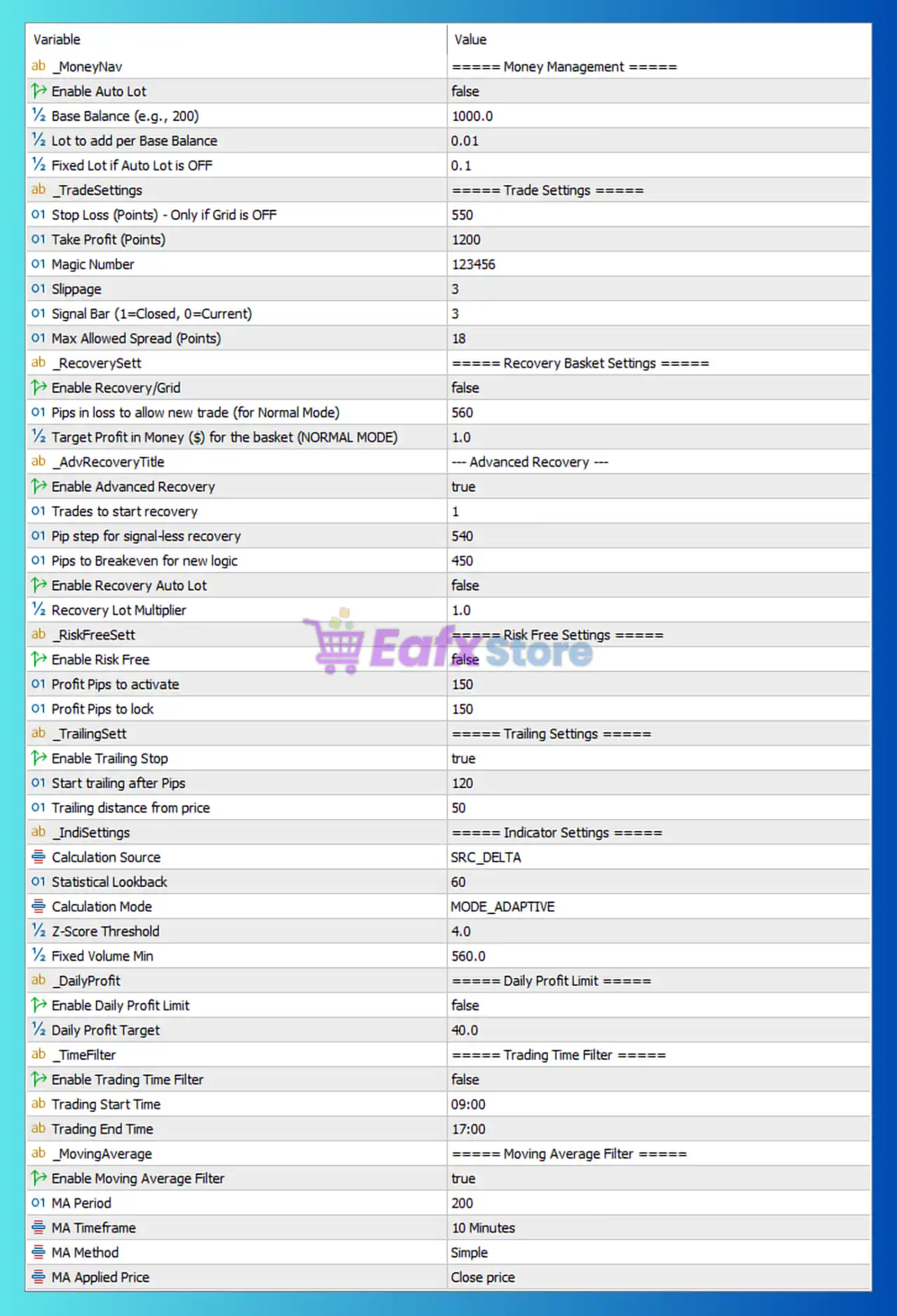
🔄 Money Management Settings
🔹 Enable Auto Lot = false — Automatic lot size calculation is disabled; the EA uses fixed lot sizing.
🔹 Base Balance (e.g., 200) = 1000.0 — Reference account balance used for automatic lot calculations when Auto Lot is enabled.
🔹 Lot to add per Base Balance = 0.01 — In Auto Lot mode, the EA adds 0.01 lots for each balance increment defined by the base balance.
🔹 Fixed Lot if Auto Lot is OFF = 0.1 — Fixed trading volume set to 0.1 lots when Auto Lot is disabled.
🔄 Trade Settings
🔹 Stop Loss (Points) – Only if Grid is OFF = 550 — Sets a fixed Stop Loss of 550 points when Grid trading is disabled.
🔹 Take Profit (Points) = 1200 — Each position targets 1200 points of profit.
🔹 Magic Number = 123456 — Unique identifier used by the EA to manage and track its own trades.
🔹 Slippage = 3 — Maximum allowed execution slippage is 3 points.
🔹 Signal Bar (1=Closed, 0=Current) = 3 — The EA analyzes signals based on the candle located 3 bars back.
🔹 Max Allowed Spread (Points) = 18 — Trading is blocked whenever the spread exceeds 18 points.
🔄 Recovery Basket Settings
🔹 Enable Recovery/Grid = false — Standard Grid recovery trading is disabled.
🔹 Pips in loss to allow new trade (for Normal Mode) = 560 — A new recovery trade can be considered after a loss reaches 560 pips.
🔹 Target Profit in Money ($) for the basket (NORMAL MODE) = 1.0 — Basket positions close when total profit reaches $1.0.
🔄 Advanced Recovery Settings
🔹 Enable Advanced Recovery = true — Activates advanced recovery logic for managing losing positions.
🔹 Trades to start recovery = 1 — Recovery mode starts after 1 open trade.
🔹 Pip step for signal-less recovery = 540 — Recovery trades without signals are opened every 540 pips.
🔹 Pips to Breakeven for new logic = 450 — Recovery positions move toward breakeven management after 450 pips.
🔹 Enable Recovery Auto Lot = false — Recovery trades do not use automatic lot sizing.
🔹 Recovery Lot Multiplier = 1.0 — Recovery positions maintain the same lot size without multiplication.
🔄 Risk Free Settings
🔹 Enable Risk Free = false — Risk-Free (Breakeven Lock) functionality is disabled.
🔹 Profit Pips to activate = 150 — If enabled, Risk-Free mode would activate after 150 pips profit.
🔹 Profit Pips to lock = 150 — The EA would lock 150 pips of profit when Risk-Free mode is triggered.
🔄 Trailing Stop Settings
🔹 Enable Trailing Stop = true — Automatic trailing stop management is enabled.
🔹 Start trailing after Pips = 120 — Trailing begins once profit reaches 120 pips.
🔹 Trailing distance from price = 50 — Stop Loss follows price at a distance of 50 pips.
🔄 Indicator Settings
🔹 Calculation Source = SRC_DELTA — Uses the SRC_DELTA data source for statistical calculations.
🔹 Statistical Lookback = 60 — Uses the previous 60 bars for analysis.
🔹 Calculation Mode = MODE_ADAPTIVE — Adaptive calculation mode adjusts to changing market conditions.
🔹 Z-Score Threshold = 4.0 — Trading signals require a Z-Score of at least 4.0.
🔹 Fixed Volume Min = 560.0 — Minimum volume requirement is set to 560.0.
🔄 Daily Profit Limit Settings
🔹 Enable Daily Profit Limit = false — Daily profit target protection is currently disabled.
🔹 Daily Profit Target = 40.0 — If enabled, trading would stop after reaching $40.0 daily profit.
🔄 Trading Time Filter Settings
🔹 Enable Trading Time Filter = false — Time-based trading restrictions are disabled.
🔹 Trading Start Time = 09:00 — Configured trading start time is 09:00.
🔹 Trading End Time = 17:00 — Configured trading end time is 17:00.
🔄 Moving Average Filter Settings
🔹 Enable Moving Average Filter = true — Trend filtering using a Moving Average is enabled.
🔹 MA Period = 200 — Uses a 200-period Moving Average.
🔹 MA Timeframe = 10 Minutes — Moving Average is calculated on the 10-minute timeframe.
🔹 MA Method = Simple — Uses the Simple Moving Average (SMA) method.
🔹 MA Applied Price = Close price — The Moving Average is calculated using candle closing prices.
🔢 Conclusion
Tenet Scalp EA MT5 is a statistically driven scalping EA that combines adaptive Z-Score analysis, advanced recovery logic, 200-period trend filtering and trailing stop management.
With configurable money management, spread protection, basket recovery controls, and moving average confirmation, the EA is designed to provide a balance between aggressive scalping opportunities and disciplined risk management.




