




KingPulse FX v2.6 Source Code MQ4 + SetFiles

Subscriptions for Special Plan
- 30 EA package is more economical!
- Special package with 99%
- Download 1 EA/Day

Subscriptions for Premium Membership
- Download Unlimited in 1 Year
- Get 100% Discount
- Get free access to all

Subscriptions for Gold Membership
- 1 Year Membership
- Get 100% Discount
- Access EA+Indicator+Course
Frequently bought together 🎁
Add these products to enhance your purchase



What is KingPulse FX?
KingPulse FX Source Code is an automated and optimized Expert Advisor (EA) for trading currency pairs. The source code of KingPulse FX can be upgraded and changed in structure and features, and new strategies can be created to improve performance.
The advisor integrates safe capital management features, while making the most of the Metatrader 4 (MT4) platform, helping investors overcome the difficult challenges of the forex markets.
🔶 Vender Website: Click here

KingPulse FX Overview
KingPulse FX Professional Features
Main Features
🔹 Smart strategy: Use three indicators to confirm entry signals, making trading more stable and sustainable.
🔹 Risk management: Provide multiple parameters so you can customize the risk level to suit your trading strategy.
🔹 Professional capital management: Integrated Stop Loss (SL) automation helps overcome adverse news in the forex market.
Additional Features
🔹 Automatic trading: Automatically select the currency pairs with the highest profit potential based on correlations and anti-correlations.
🔹 Intuitive interface: The dashboard visually displays the status of transactions and currency pairs, making it easy for you to monitor and manage.
Outstanding Advantages
🔹 Time saving: Automate the analysis and trading process, saving you time and effort.
🔹 Increased trading efficiency: Thanks to the use of multiple indicators and risk management tools, KingPulse FX helps increase profitability and minimize risks.
🔹 User-friendly interface: Intuitive and easy-to-use interface, suitable for both beginners and experienced traders.
🔹 Transparency: Providing detailed trading history on Myfxbook can evaluate the effectiveness of the advisor.
KingPulse FX Review
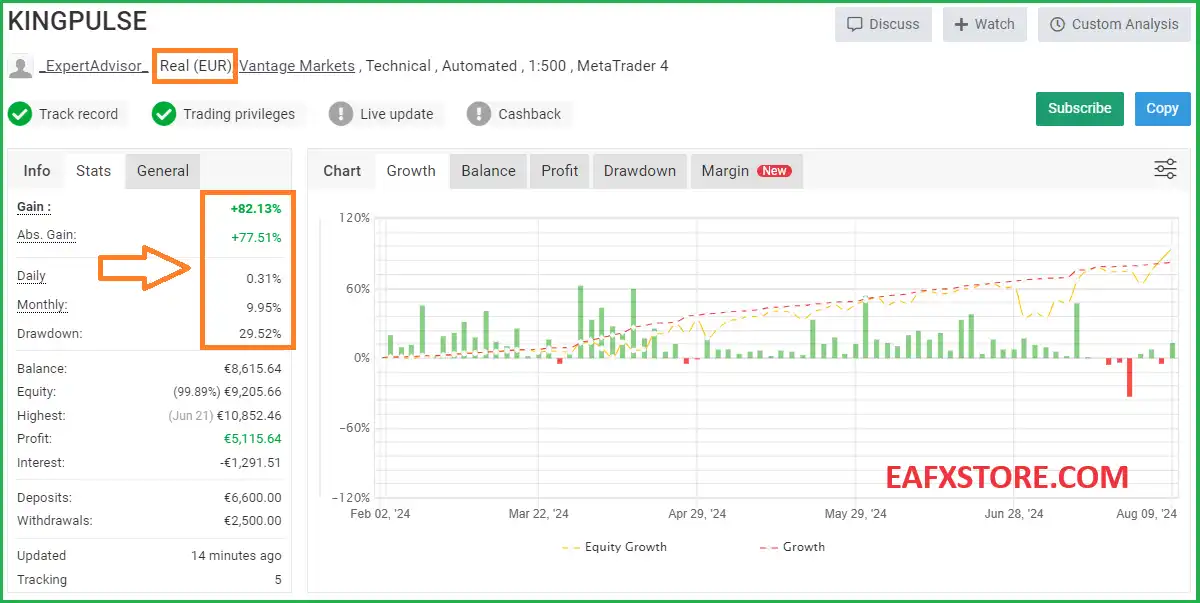
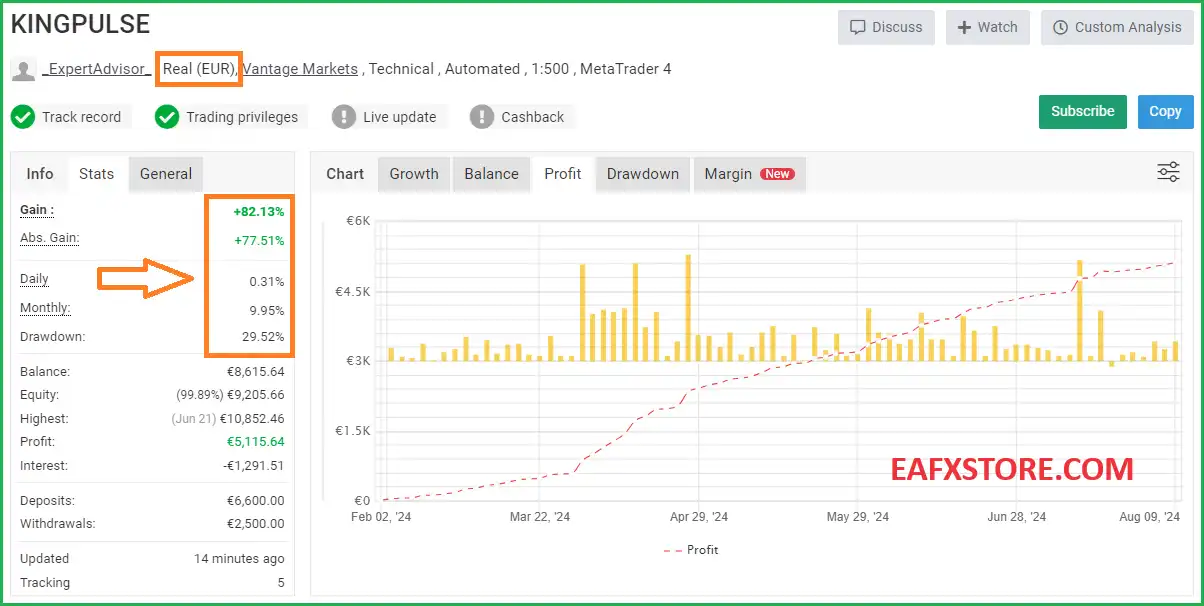
KingPulse FX EA real trading results show stable profit potential and high stability in performance, safety shows unlimited profit potential in the future.
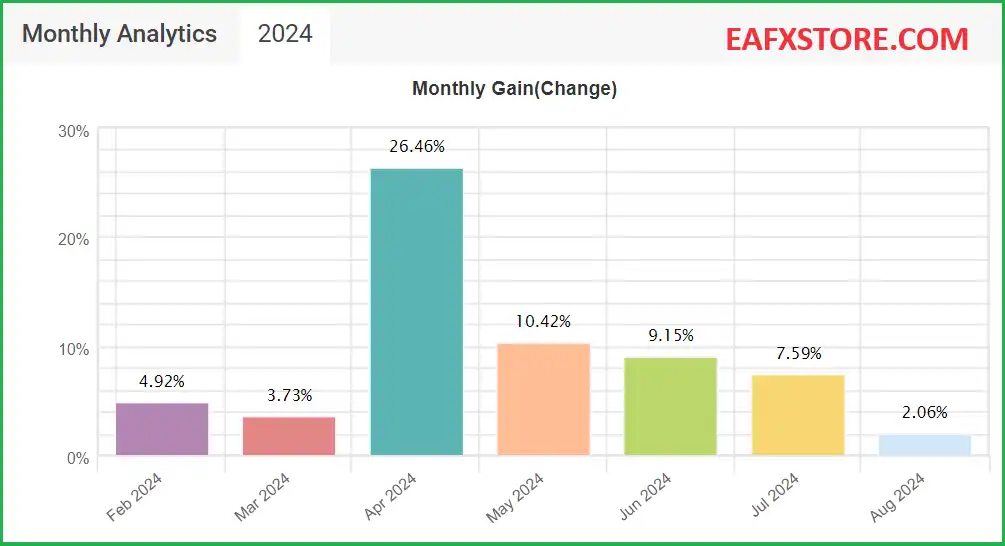
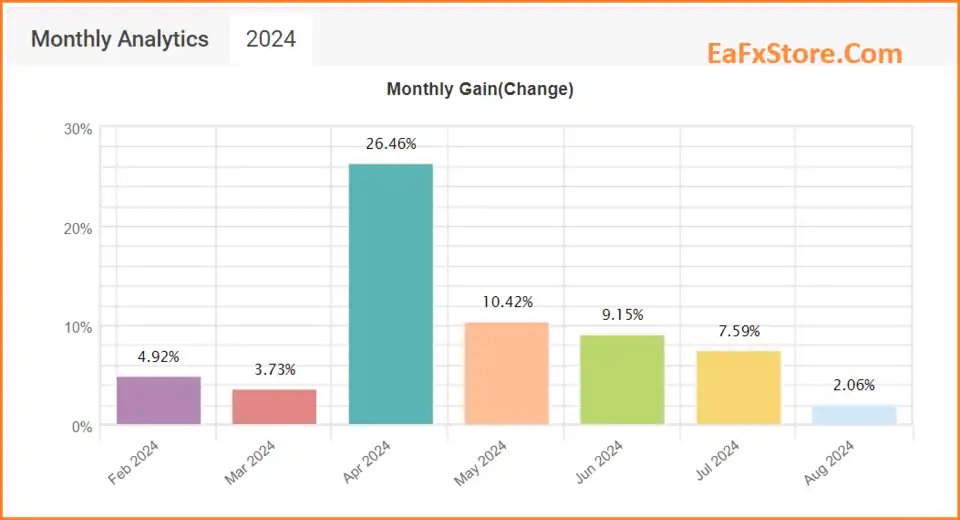
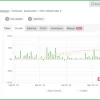
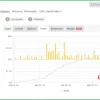
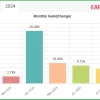
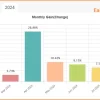
EA is verified real trading performance by MyFxBook and achieved 82% profit performance and average monthly profit of 10%.
KingPulse FX Performance Verified by MyFxBook
KingPulse FX MT4 Performance Verified by MyFxBook
KingPulse FX EA Performance Verified by MyFxBook
Recommended Settings
Recommended settings and parameters to pay attention to from developers and experts:
| Features | Type |
|---|---|
| Trading platform | MetaTrader 4 (MT4) |
| Currency pairs | EURUSD, GBPUSD, USDCAD, EURGBP, EURAUD, AUDUSD, AUDCAD, USDJPY and GBPCAD |
| Time frames | H1 (60 minute chart) |
| Minimum / Recommended deposit | $500 |
| Setup files | Available |
| Product type | Source Code MQ4 |
| Additional services | Unlock and Decompile |
| Recommended brokers | Exness Broker, Icmarkets Broker |
| Recommended VPS | MyfxVPS.com ( Blue VPS, Golden VPS). Lowest Latency, 2 week Free Trial, 100% Free for 12-18 Months. |
Product Download Package?
The download package of the product suite includes:
Experts
✅ KingPulse_FX_2.6.ex4
✅ KingPulse_FX_2.6.mq4
SetFiles
✅ KingPulse_Standard_H1.set
Libraries
✅ KingPulse FX 2.6.dll
✅ KingPulse FX 2.6_.dll
Indicators
✅ AA_OverLayChart.ex4
✅ AA_SpreadRatio_1.1.ex4
✅ PulseMatrixCorrelation.ex4
➡️ Reviewed by David Easton
🔢 KingPulse FX EA Settings Guide
KingPulse FX EA is a highly configurable automated trading system built around multi-instrument analysis, correlation monitoring, overlay calculations, pyramiding controls, position management and flexible profit/loss protection.
The supplied settings show that the EA can work with a portfolio of multiple currency pairs while evaluating correlation periods, average correlation, Bollinger-based conditions, overlay values, spread relationships and operational trading windows.
Its configuration also includes pyramiding management, automatic lot calculation, multiple TP targets, trailing controls, daily gain/loss limits, drawdown protection, floating-account controls, and extensive notification options. The following guide explains every visible parameter from the supplied screenshots while preserving all numerical values and Boolean settings.
🔄 Pyramiding Settings
🔹 Pyramiding Type: Disabled — Disables the pyramiding mechanism, so additional pyramid entries are not activated by this setting.
🔹 Maximum Number of Operations, 0 = Unlimited: 0 — Sets the maximum number of operations to unlimited because the value is 0.
🔹 Measure Distance Also on Second Instrument: false — Disables distance measurement on the second instrument.
🔹 Pyramiding Step 1 Distance Points: 0 — Sets the required distance for Pyramiding Step 1 to 0 points.
🔹 Use Independent Pyramiding: false — Disables independent pyramiding logic.
🔹 Differential Number of Operations to Disable Independent Pyramiding: 0 — Sets the operation differential threshold to 0.
🔹 Disable Independent Pyramiding if Numerator/Denominator Pairs Are Equal: false — Keeps this automatic disabling condition turned off.
🔹 Pyramiding Type – Step 2: Disabled — Disables the second pyramiding stage.
🔹 Number of Pyramids for Step 2: 0 — Sets the number of Step 2 pyramiding operations to 0.
🔹 Pyramiding Step 2 Distance Points: 0 — Sets Step 2 distance to 0 points.
🔹 Pyramiding Type – Step 3: Disabled — Disables the third pyramiding stage.
🔹 Number of Pyramids for Step 3: 0 — Sets the Step 3 pyramid count to 0.
🔹 Pyramiding Step 3 Distance Points: 0 — Sets Step 3 distance to 0 points.
🔹 Pyramiding Type – Step 4: Disabled — Disables the fourth pyramiding stage.
🔹 Number of Pyramids for Step 4: 0 — Sets the Step 4 pyramid count to 0.
🔹 Pyramiding Step 4 Distance Points: 0 — Sets Step 4 distance to 0 points.
🔹 Lot Size Increment Type: None — Disables automatic lot-size incrementing through this setting.
🔹 Increment Value: 0.01 — Defines an increment value of 0.01 lots when lot-size increment functionality is used.
🔄 Correlation Pair Filters
🔹 Do Not Trade Correlated Pairs List 1: Blank — No specific spread/pair exclusion list is entered in the first visible field.
🔹 Do Not Trade Correlated Pairs List 2: Blank — No additional exclusion list is specified.
🔹 Do Not Trade Correlated Pairs List 3: Blank — No third exclusion list is specified.
🔹 Do Not Trade Correlated Pairs with Same Numerator or Same Denominator: false — Allows pairs with the same numerator or denominator because this restriction is disabled.
🔹 Trade ONLY Correlated Pairs with Same Numerator or Same Denominator: false — Does not restrict trading exclusively to pairs sharing the same numerator or denominator.
🔹 Additional Spread List to Trade: Blank — No additional spread list is specified.
🔄 Panel Settings
🔹 Request Confirmation Before Opening Operations: true — Enables confirmation requests before opening operations.
🔹 Font Size: 8 — Sets the panel font size to 8.
🔹 Delta X Position: 0 — Sets the horizontal panel offset to 0.
🔹 Delta Y Position: 0 — Sets the vertical panel offset to 0.
🔹 Graphics Multiplier: 2.0 — Sets the graphics scaling multiplier to 2.0.
🔹 Template File Name: PulseMatrixNuovo.tpl — Specifies PulseMatrixNuovo.tpl as the chart/template file.
🔄 Error & Alert Notifications
EA Error Alerts
🔹 EA Alerts for Errors: true — Enables EA alerts when errors occur.
🔹 Use Alarm for Errors: true — Enables alarm notifications for EA errors.
🔹 Use Push Notifications for Errors: true — Enables push notifications for errors.
🔹 Use Email for Errors: true — Enables email notifications for errors.
Order Entry Alerts
🔹 EA Alerts for Order Placement: true — Enables alerts when new orders are placed.
🔹 Use Alarm for Order Placement: true — Enables alarm notifications for order placement.
🔹 Use Push Notifications for Order Placement: true — Enables push notifications for order placement.
🔹 Use Email for Order Placement: true — Enables email notifications for order placement.
Order Modification Alerts
🔹 EA Alerts for Order Modification: true — Enables alerts when existing orders are modified, including Stop Loss or Take Profit changes.
🔹 Use Alarm for Order Modification: true — Enables alarm notifications for order modifications.
🔹 Use Push Notifications for Order Modification: true — Enables push notifications for order modifications.
🔹 Use Email for Order Modification: true — Enables email notifications for order modifications.
🔄 Core & Portfolio Settings
🔹 Magic Number (1,1000,2000 etc.): 1 — Assigns Magic Number 1 to identify and manage the EA’s trades.
🔹 Additional Comment: Blank — No additional order comment is specified.
🔹 Maximum Number of Active Pairs: 20 — Allows up to 20 operational currency pairs.
🔹 Instruments: EURUSD,GBPUSD,GBP...USD,CAD,EURGBP,EUR...AUD,AUDUSD,AUDCAD,USDJPY — Defines the visible portfolio of instruments used by the EA.
🔹 Correlation Period: 50 — Uses 50 periods for correlation calculations.
🔹 Average Correlation Period: 50 — Uses 50 periods for average-correlation calculations.
🔄 Overlay Settings
🔹 Number of Bars: 900 — Uses 900 bars for the overlay calculation/analysis.
🔹 Calculate Distance from Last Cross: false — Disables calculating the overlay distance from the latest crossover.
🔄 Spread Ratio Settings
🔹 Use Spread Ratio: false — Disables the spread-ratio filter.
🔹 Bollinger Period: 40 — Sets the Bollinger calculation period to 40.
🔹 Standard Deviation: 1.0 — Sets the Bollinger Standard Deviation multiplier to 1.0.
🔄 Operating Hours
🔹 Operating Time (Broker): 00:00:00-23:59:59 — Allows operation throughout virtually the entire broker trading day.
🔹 Operating Time 2 (Broker): 00:00:00-23:59:59 — Defines a second operating window covering 00:00:00-23:59:59.
🔹 Enter Immediately After Placement or Parameter Update: false — Prevents immediate entry following placement or parameter updates.
🔄 Lot Management
🔹 Base Lots: 0.1 — Sets the base trading volume to 0.1 lots.
🔹 Calculate Lots Automatically for the Second Instrument: true — Enables automatic lot calculation for the second instrument.
🔹 Overlay Value for Entry: 90.0 — Sets the overlay entry threshold/value to 90.0.
🔹 Overlay Points Value for Entry: 0.0 — Sets the point-based overlay entry value to 0.0.
🔹 Use Correlation Filter for Entry: false — Disables the correlation filter as an entry requirement.
🔹 Positive Correlation Value for Entry: 60.0 — Defines the positive-correlation entry value as 60.0.
🔹 Negative Correlation Value for Entry: 0.0 — Defines the negative-correlation entry value as 0.0.
🔄 Take Profit & Stop Loss Settings
🔹 Closing Value Adaptation Type: Do Not Adapt — Disables adaptive modification of closing values.
🔹 Adaptation Size % (for Summation): 100.0 — Sets the adaptation percentage to 100.0.
🔹 Target Currency Value: 10.0 — Sets the first target monetary value to 10.0.
🔹 Number of Averaging Operations to Activate Second Target, 0 = Disabled: 0 — Disables activation of the second target through averaging operations.
🔹 Adaptation Size % (for Summation): 100.0 — Sets the second-stage adaptation percentage to 100.0.
🔹 Target Currency Value 2: 10.0 — Sets the second monetary target to 10.0.
🔹 Number of Averaging Operations to Activate Third Target, 0 = Disabled: 0 — Disables activation of the third target through averaging operations.
🔹 Adaptation Size % (for Summation): 100.0 — Sets the third-stage adaptation percentage to 100.0.
🔹 Target Currency Value 3: 10.0 — Sets the third monetary target to 10.0.
🔹 Stop Loss Value, 0 = Disabled: 0.0 — Disables the monetary Stop Loss because the value is 0.0.
🔹 Trailing Stop Start, 0 = Disabled: 0.0 — Disables trailing-stop activation because the start value is 0.0.
🔹 Trailing Stop: 0.0 — Sets the trailing-stop distance to 0.0.
🔹 Trailing Step: 0.0 — Sets the trailing-step increment to 0.0.
🔄 Overlay Closing Management
🔹 Use Closing on Overlay Value: false — Disables closing positions based on the overlay value.
🔹 Overlay Value for Closing: 60.0 — Defines 60.0 as the overlay threshold if overlay-based closing is enabled.
🔹 Closing Type: Positive or Negative — Allows the closing mechanism to consider either positive or negative conditions.
🔄 Profit & Daily Loss Controls
🔹 Maximum Number of Profitable Operations: 0 — Sets no explicit maximum number of profitable operations.
🔹 Maximum Daily Gain in Currency, 0 = Disabled: 0.0 — Disables the maximum daily gain limit because the value is 0.0.
🔹 Maximum Daily Loss in Currency, 0 = Disabled: 0.0 — Disables the maximum daily loss limit because the value is 0.0.
🔄 Drawdown Protection
🔹 Limit New Operations if DD Exceeded: false — Does not block new operations when the drawdown threshold is exceeded.
🔹 Limit Grid Operations if DD Exceeded: false — Does not block grid operations when drawdown exceeds a defined threshold.
🔹 Maximum Orders per Currency, 0 = Unlimited: 0 — Allows an unlimited number of orders per currency because the value is 0.
🔹 Maximum Orders per Financial Instrument, 0 = Unlimited: 0 — Allows an unlimited number of orders per financial instrument.
🔹 Floating Control Type: In Account Currency — Uses the account’s currency as the basis for floating-result control.
🔹 Limit Value: 0.0 — Sets the floating-control limit to 0.0.
🔢 KingPulse FX EA Configuration Summary
🔹 Magic Number: 1
🔹 Maximum Active Pairs: 20
🔹 Correlation Period: 50
🔹 Average Correlation Period: 50
🔹 Overlay Bars: 900
🔹 Bollinger Period: 40
🔹 Bollinger Standard Deviation: 1.0
🔹 Base Lots: 0.1
🔹 Automatic Second-Instrument Lot Calculation: true
🔹 Overlay Entry Value: 90.0
🔹 Correlation Entry Filter: false
🔹 Positive Correlation Threshold: 60.0
🔹 Negative Correlation Threshold: 0.0
🔹 Stop Loss: 0.0 — disabled.
🔹 Trailing Stop: 0.0 — disabled.
🔹 Daily Gain Limit: 0.0 — disabled.
🔹 Daily Loss Limit: 0.0 — disabled.
🔹 Drawdown Entry Restrictions: false.
🔹 Maximum Orders per Currency: 0 — unlimited.
🔹 Maximum Orders per Instrument: 0 — unlimited.
🔹 Floating Control: In Account Currency.
🔢 Conclusion
KingPulse FX EA provides an extensive configuration structure focused on multi-pair trading, correlation analysis, overlay calculations, flexible position sizing, and portfolio-level trade management.
The supplied configuration supports up to 20 active pairs, uses a 50-period correlation calculation and 50-period average correlation, and analyzes 900 bars for its overlay component. The EA uses 0.1 base lots with automatic lot calculation for the second instrument enabled.
Several advanced protections are currently disabled, including pyramiding, spread-ratio filtering, correlation filtering for entry, Stop Loss, trailing stop, daily gain/loss limits, and drawdown-based entry restrictions. This means the actual risk profile depends significantly on the underlying strategy logic and the broker/account conditions.
For deployment, traders should carefully test the interaction between the 20-pair portfolio, 0.1 base lot, overlay threshold 90.0, correlation period 50, and unlimited order settings represented by 0. Extensive backtesting and forward testing are recommended before using the configuration on a live account.
🔢 FAQs
❓ What is KingPulse FX EA designed to do?
KingPulse FX EA is configured as a multi-instrument automated trading system with correlation, overlay, portfolio, and position-management capabilities.
❓ How many currency pairs can KingPulse FX EA operate simultaneously?
The supplied setting Maximum Number of Active Pairs = 20, allowing up to 20 operational pairs.
❓ Does KingPulse FX EA use correlation analysis?
Yes. The EA has a Correlation Period of 50 and an Average Correlation Period of 50. However, the dedicated correlation filter for entry is currently set to false.
❓ Is the trailing stop enabled in these settings?
No. Trailing Stop Start = 0.0, Trailing Stop = 0.0, and Trailing Step = 0.0, which means trailing-stop functionality is effectively disabled in the supplied configuration.
❓ Are daily profit and loss limits enabled?
No. Both Maximum Daily Gain = 0.0 and Maximum Daily Loss = 0.0, where 0.0 means disabled according to the displayed parameter descriptions.
User Reviews
Only logged in customers who have purchased this product may leave a review.
❓ What markets can KingPulse FX EA trade?
KingPulse FX EA can manage a portfolio of up to 20 active currency pairs, using multi-instrument analysis and correlation monitoring for portfolio-based trading.
❓ How many currency pairs can KingPulse FX EA manage at once?
KingPulse FX EA supports up to 20 active pairs, allowing traders to operate a broader portfolio while monitoring correlations between different instruments.
❓ Does KingPulse FX EA use correlation analysis?
Yes. KingPulse FX EA uses a 50-period correlation and 50-period average correlation for portfolio analysis, although the entry correlation filter is currently disabled.
❓ What is the base lot size of KingPulse FX EA?
The configured Base Lots value is 0.1, while automatic lot calculation for the second instrument is enabled to support multi-instrument position management.
❓ Does KingPulse FX EA use a Stop Loss?
The current configuration has Stop Loss = 0.0, meaning the monetary Stop Loss is disabled. Traders should evaluate the resulting risk carefully before live deployment.
❓ Is the trailing stop enabled in KingPulse FX EA?
No. KingPulse FX EA currently has Trailing Stop Start = 0.0 and Trailing Stop = 0.0, so trailing-stop management is disabled in this configuration.
❓ Does KingPulse FX EA have daily profit and loss limits?
Both daily controls are disabled because Maximum Daily Gain = 0.0 and Maximum Daily Loss = 0.0 in the supplied configuration.
❓ What is the overlay entry value in KingPulse FX EA?
KingPulse FX EA uses an Overlay Value for Entry of 90.0 and analyzes 900 bars for its overlay calculation under the displayed settings.
❓ Does KingPulse FX EA use pyramiding?
No. Pyramiding is currently disabled, with all four pyramid stages disabled and the Lot Size Increment Type set to None in the supplied configuration.
❓ Are drawdown protections enabled in KingPulse FX EA?
No. Drawdown-based restrictions are disabled, while maximum orders per currency and instrument are both set to 0, meaning unlimited orders are permitted.
🔥 Get This EA for FREE with Our Membership! 🚀🚀
Unlock access to this EA, premium Indicators, and exclusive trading tools completely FREE with any of our Membership Plans! Thousands of traders already benefit from our VIP library—join them and level up your trading instantly. Choose Your Membership:
- SPECIAL – 1 Month Membership
- GOLD – 1 Year Membership
- PREMIUM – 1 Year Membership
-
 Original price was: $999.00.$89.00Current price is: $89.00.
 -
 Original price was: $999.00.$89.00Current price is: $89.00.
 -
 Original price was: $3,000.00.$89.00Current price is: $89.00.
 -
 Original price was: $1,400.00.$89.00Current price is: $89.00.
-
 1Original price was: $2,500.00.$299.00Current price is: $299.00.
 -
 0Original price was: $890.00.$149.00Current price is: $149.00.
 -
 0Original price was: $900.00.$199.00Current price is: $199.00.
 -
 1Original price was: $2,500.00.$199.00Current price is: $199.00.
There are no reviews yet.