






Lord Arles MT5 (Latest version) - Unlimited

Subscriptions for Special Plan
- 30 EA package is more economical!
- Special package with 99%
- Download 1 EA/Day

Subscriptions for Premium Membership
- Download Unlimited in 1 Year
- Get 100% Discount
- Get free access to all

Subscriptions for Gold Membership
- 1 Year Membership
- Get 100% Discount
- Access EA+Indicator+Course
Frequently bought together 🎁
Add these products to enhance your purchase


What is Lord Arles MT5?
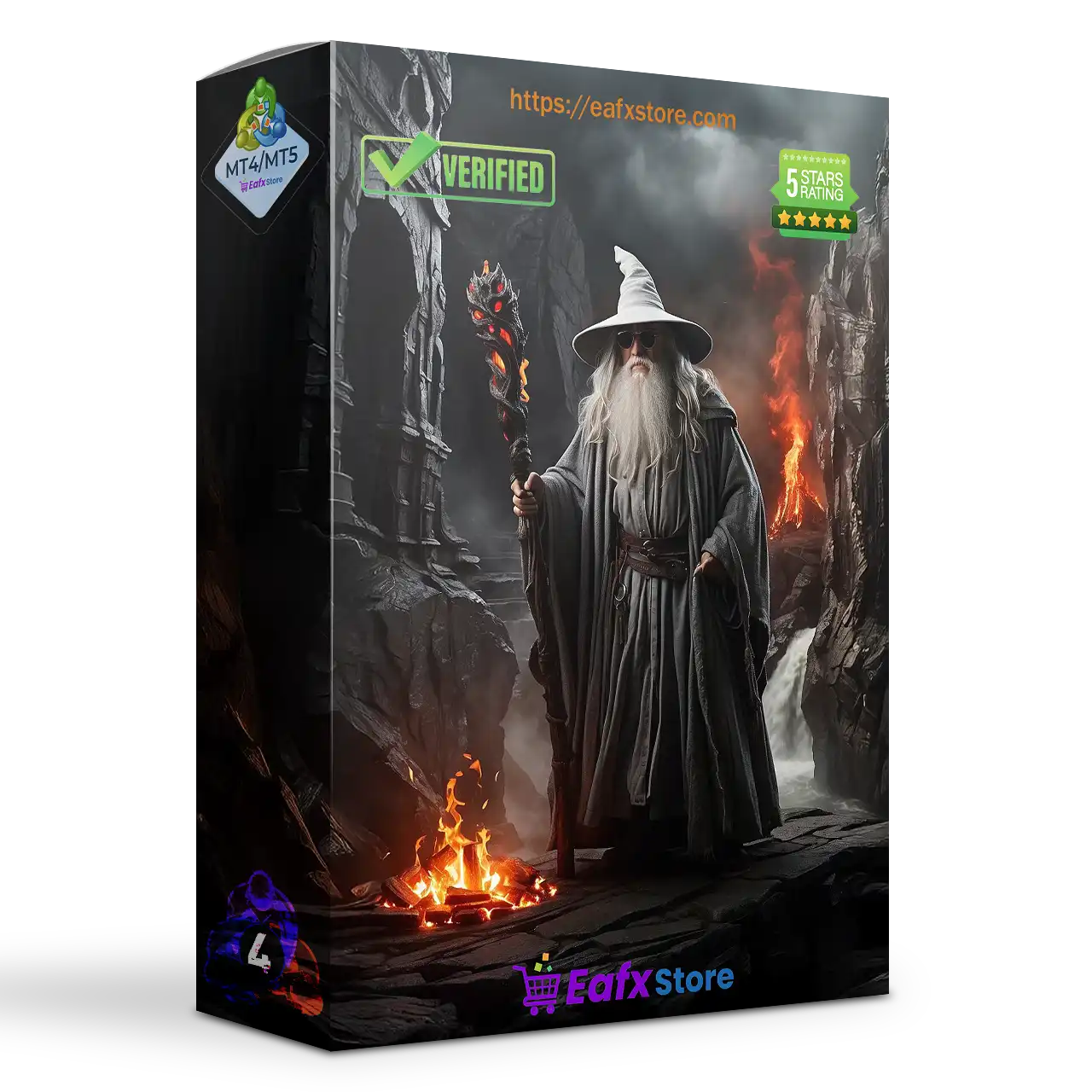
Lord Arles MT5 is a powerful and dynamic automated trading system, offering traders an aggressive yet highly adaptable approach to the forex market. Inspired by the god of my favorite saga, this Expert Advisor (EA) is designed to thrive in volatile conditions, ensuring precise market entries and exits with unparalleled efficiency.
 Vendor Website: Click here
About the Author
This product is compiled by Nestor Alejandro Chiariello. This author has more than +5 years of experience working on MQL5 with many famous products such as Lord Arles MT5, Odin AI EA MT4, Cleopatra EA MT4, Ra AI MT4, Mr Bitcoin AI MT5 and other advisors. Among them, Lord Arles MT5 is his best performing products.
Delivery time 24h-48h after payment.
Refund if not delivered.
You will receive the current version without any limitations (ID+Time).
Lord Arles MT5 Overview
Key Features of Lord Arles MT5
🔹Versatile Trading Strategy: Adapts to market conditions, shifting between aggressive and dynamic approaches for optimal performance.
🔹Intelligent Market Analysis: Considers news, events, market movements, tick patterns, and proprietary internal logic for informed trading decisions.
🔹Adaptive Risk Management: Features built-in protections against volatile market conditions and a unique recovery logic that scales with profitability.
🔹Comprehensive Exit Strategy: Utilizes a sophisticated exit strategy based on market analysis and news events.
🔹Customizable Stop Loss: Allows individual Stop loss (SL) settings for each position.
🔹Prop Firm Friendly: Suitable for use with prop firms like FTMO and MFF.
🔹Manual Trading Assistance: Integrated buttons within the graphic system empower manual trading and automated recovery of manual positions.
🔹Unique Algorithms: Employs proprietary aggressive and dynamic algorithms for distinct trading styles.
Why choose Lord Arles MT5?
🔹Market Adaptability: Dynamically adjusts to changing market conditions for maximized profitability.
🔹Robust Risk Management: Protects capital with advanced risk management and recovery mechanisms.
🔹Enhanced Trading Control: Empowers traders with manual trading options and automated recovery.
🔹Wide Compatibility: Functions seamlessly with all brokers and currency pairs.
🔹Prop Firm Suitability: Meets the requirements of prop firm trading.
🔹Comprehensive Support: Offers post-purchase assistance and configuration files.
🔹Unique and Powerful Algorithms: Leverages proprietary algorithms for superior trading performance.
🔹News-Driven Trading: Integrates market news for informed decision-making.
🔹Customizable and Flexible: Allows for personalized optimization based on individual trading preferences.
Lord Arles MT5 Review
Lord Arles MT5 Live Results
🔶 The Lord Arles EA has demonstrated exceptional growth of 1,002% over 46 weeks of trading. Performance specifications include:
✅ Initial Deposit: $3,920
✅ Total Net Profit: $19,543 (Weeks of Trading 46 weeks)
✅ Total Growth: 1,002%
✅ Total Withdrawals: $12,300
✅ Maximum Drawdown: 43.9%
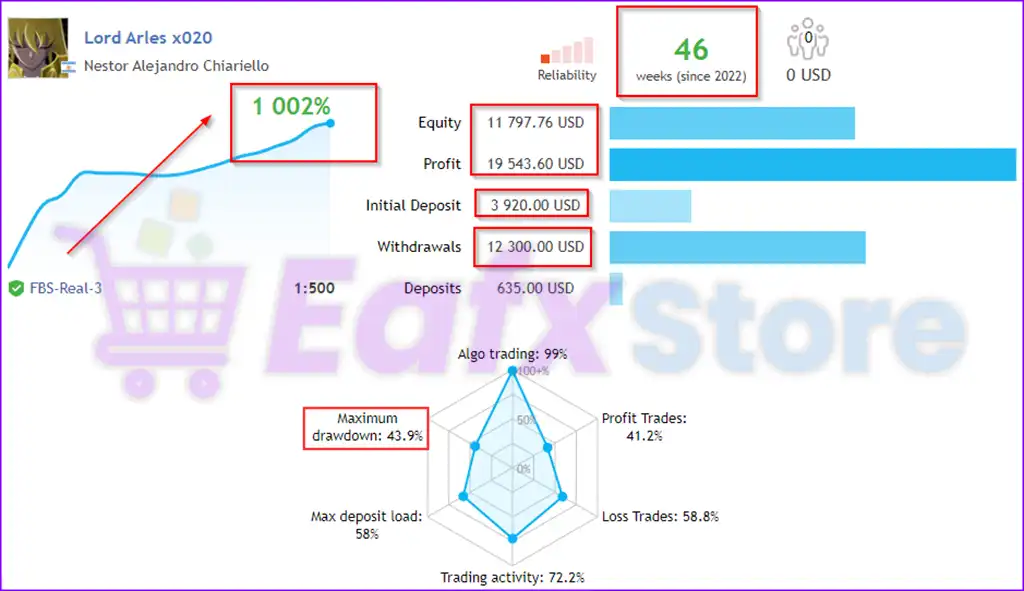
Lord Arles EA Live Signal
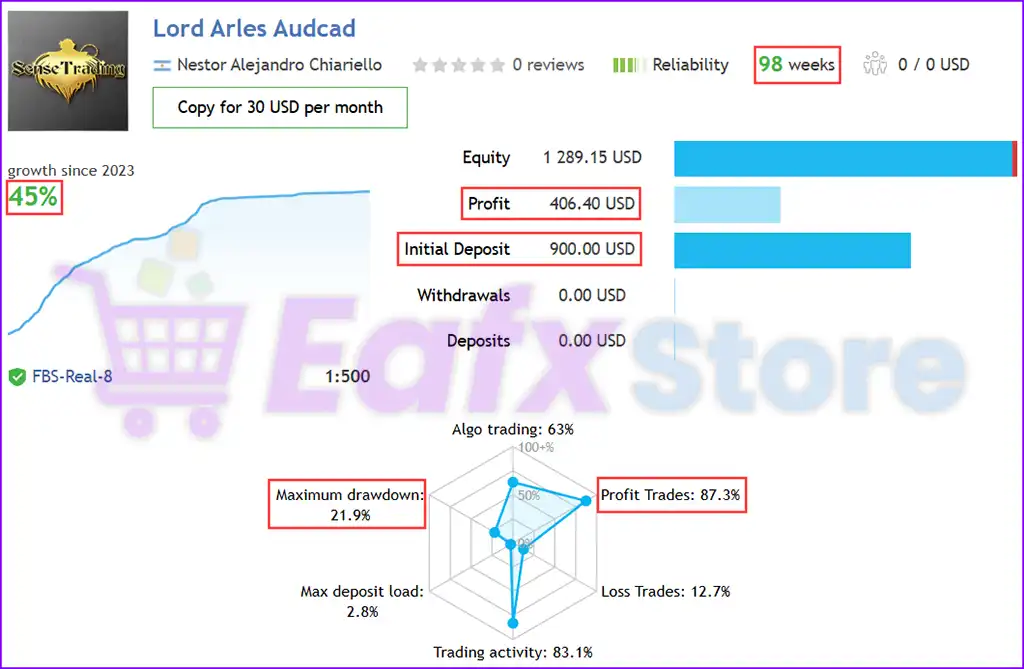
🔶 The Lord Arles EA is a long-term, stable algorithmic trading system that has been running for 98 weeks. Key performance metrics:
✅ Initial Deposit: $900
✅ Total Net Profit: 45%
✅ Max Drawdown: 21.9%
✅ Win Rate: 87.3%
Lord Arles MT5 Live Signal
Lord Arles MT5 Backtest Results
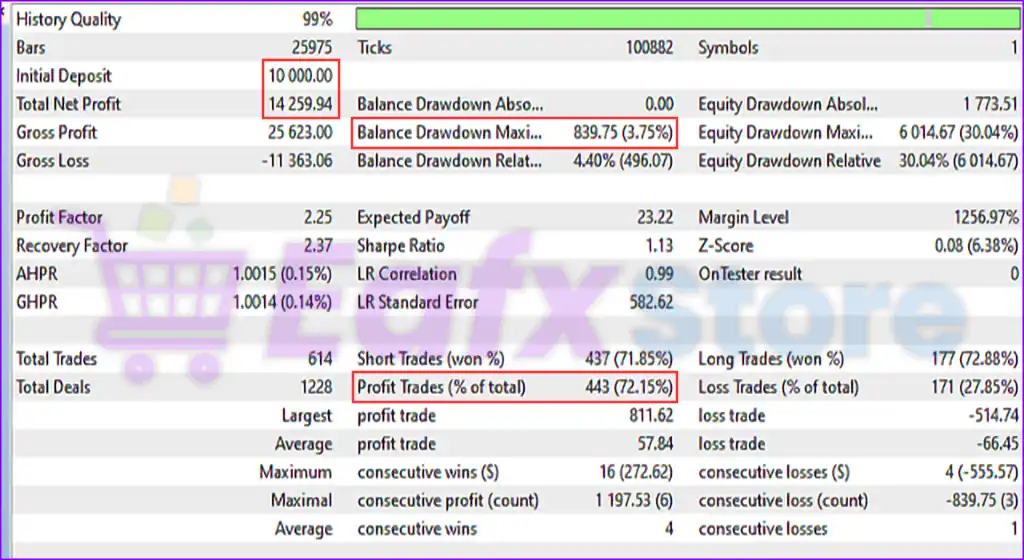
🔶 The Lord Arles MT5 demonstrates a strong ability to generate consistent profits while maintaining low balance drawdown. The system maintains a high winning rate and effectively controls risk with a maximum balance drawdown of only 3.75%.
✅ Trading currency pair: AUDCAD
✅ Initial Deposit: $10,000
✅ Total Net Profit: $14,260
✅ Balance Drawdown Maximum: 3.75%
✅ Equity Drawdown Maximum: 30.04%
✅ Win Rate (Profit Trades): 72.15%
Lord Arles MT5 Backtests
Lord Arles MT5 Backtest
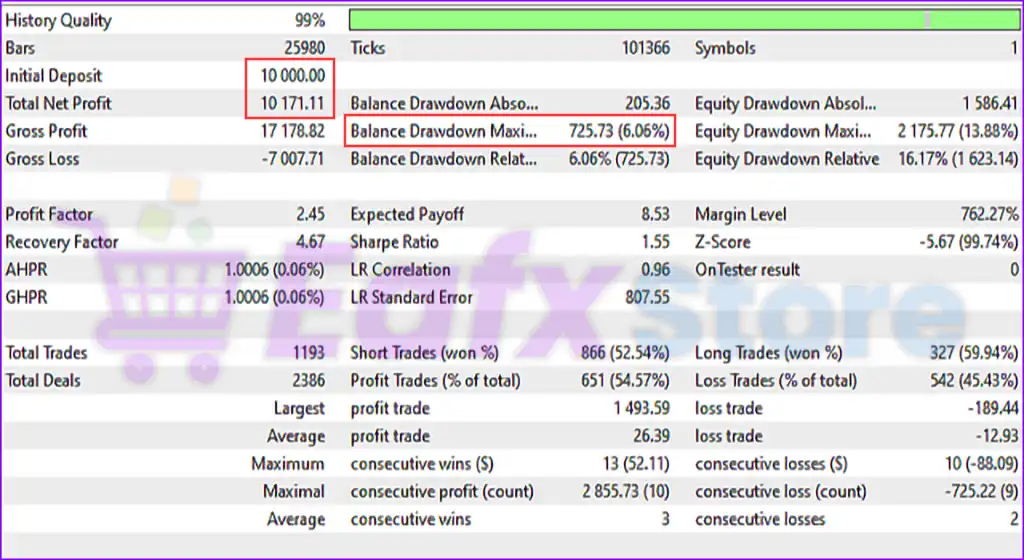
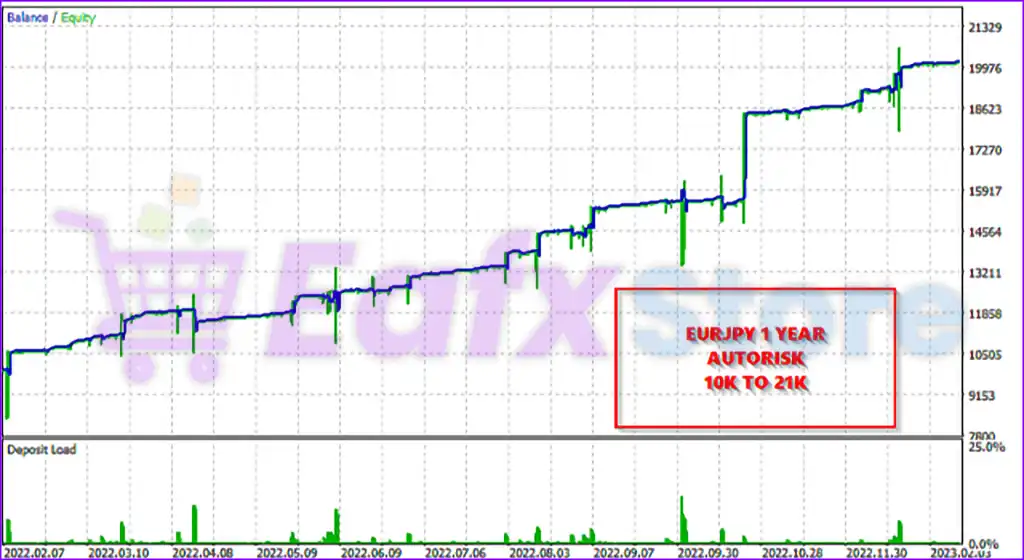
🔶 The Lord Arles EA is a high-precision trading algorithm that focuses on steady profit generation with minimal drawdown.
✅ Trading currency pair: EURJPY
✅ Initial Deposit: $10,000
✅ Total Net Profit: $10,172
✅ Max Balance Drawdown: 6.06%
✅ Max Equity Drawdown: 13.88%
Lord Arles MT5 Backtests Results
Lord Arles MT5 Backtest Results
User Reviews and Feedback
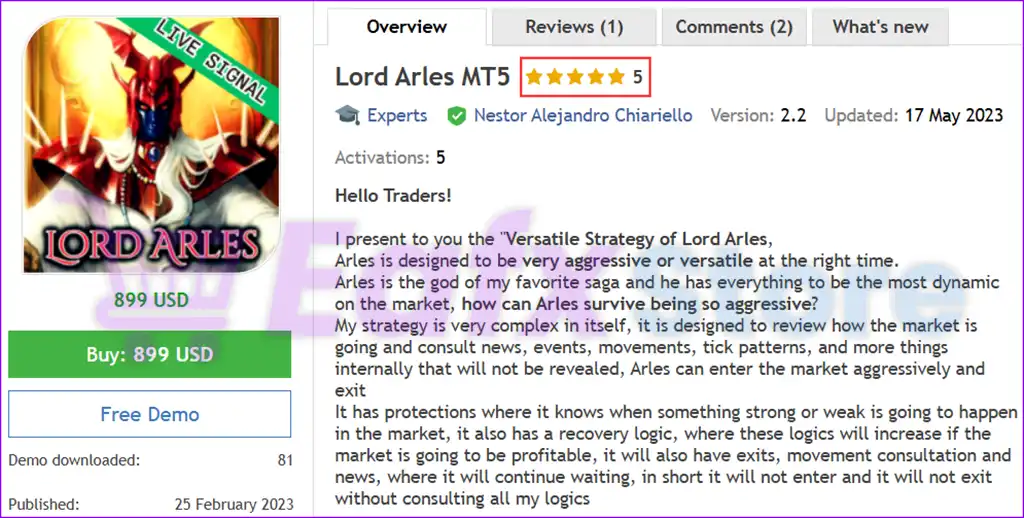
Lord Arles MT5 showcases exceptional potential in generating consistent and reliable profits, positioning itself as a valuable tool in the forex market. Highly acclaimed by the MQL5 community for its performance and stability, this expert advisor has earned the trust of traders worldwide.
⭐⭐⭐⭐⭐ Gostly (2023.03.16): “The author of Ea is nice, is available to facilitate the configuration, for the moment tested only on demo account 1 week, gives good results. I will launch on the real account and will update the opinion within 6 months or 1 year.”
Trading Specifications
Recommended settings and parameters to pay attention to from developers and experts:
| Features | Type |
|---|---|
| Trading platform | MetaTrader 5 (MT5) |
| Time frames | Any Timeframes |
| Currency pairs | AUDCAD, EURJPY (Any) |
| Minimum / Recommended deposit | $500 |
| Type Account | Any, Prop Firm (FTMO, MFF, ...) |
| Additional services | Unlock and Decompile |
| Recommended brokers | Exness Broker, Icmarkets Broker |
| Recommended VPS | MyfxVPS.com ( Blue VPS, Golden VPS). Lowest Latency, 2 week Free Trial, 100% Free for 12-18 Months. |
Product Download Package?
The download package of the product suite includes:
✅ Experts: Lord Arles MT5.ex5
➡️ Reviewed by David Easton
Conclusion: Lord Arles MT5 is the Ultimate Trading Solution
In short, Lord Arles MT5 stands out as a top-tier automated trading system, combining versatility, precision, and adaptability to optimize forex trading performance. With its intelligent market analysis, adaptive risk management, and proprietary algorithms, this expert advisor ensures efficient trade execution while safeguarding capital.
Backed by impressive live trading results and rigorous backtesting, Lord Arles MT5 has demonstrated remarkable profitability with minimal drawdown, making it an excellent choice for both retail traders and prop firm professionals. Its compatibility with multiple brokers, integration of news-driven strategies, and customizable trading parameters further enhance its appeal.
🔢 Lord Arles MT5 Settings Explained – Complete Parameter Guide
Lord Arles MT5 is a fully automated Expert Advisor designed with advanced recovery management, intelligent risk control, aggressive flow algorithms, economic news filtering, and holiday protection.
It offers flexible trade management, dynamic recovery options, configurable money management, and built-in safety features, making it suitable for traders seeking a customizable MT5 trading solution.

Lord Arles MT5 Settings
🔢 Lord Arles MT5 Parameters Explained
Below are the details of the parameters in the advisor’s trading system settings table:
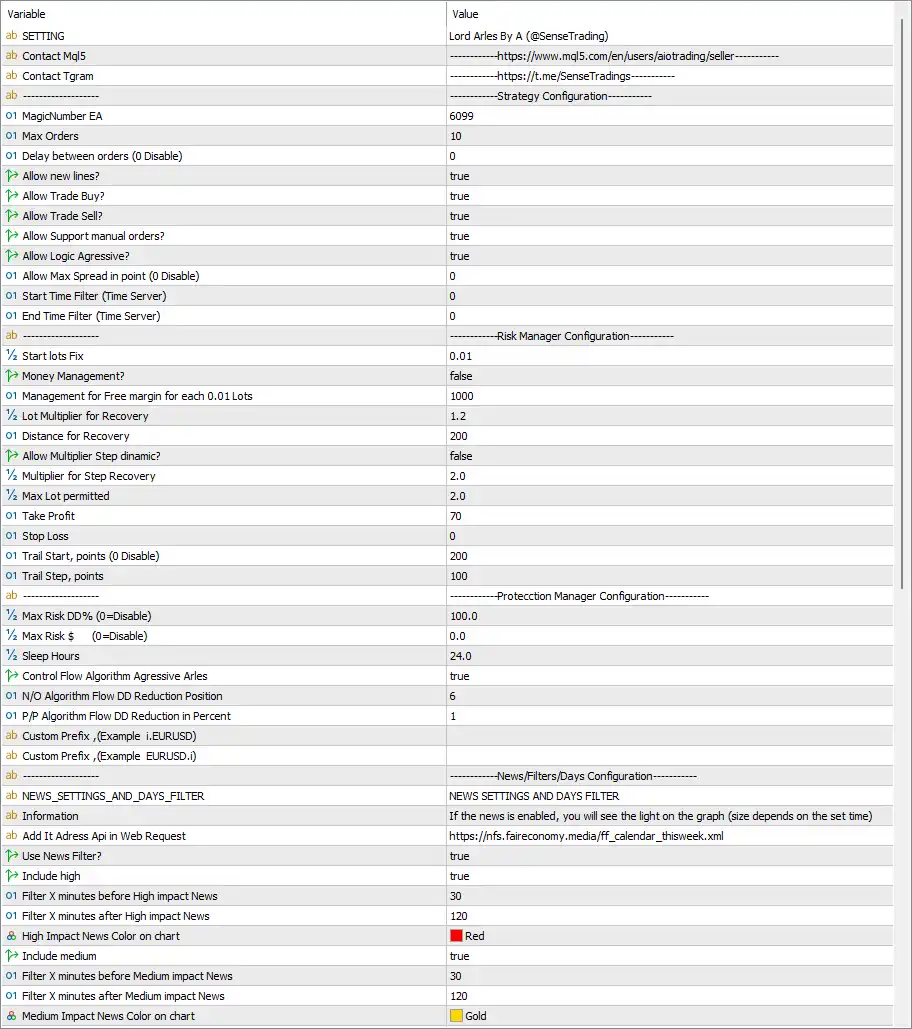
Lord Arles MT5 Settings Panel
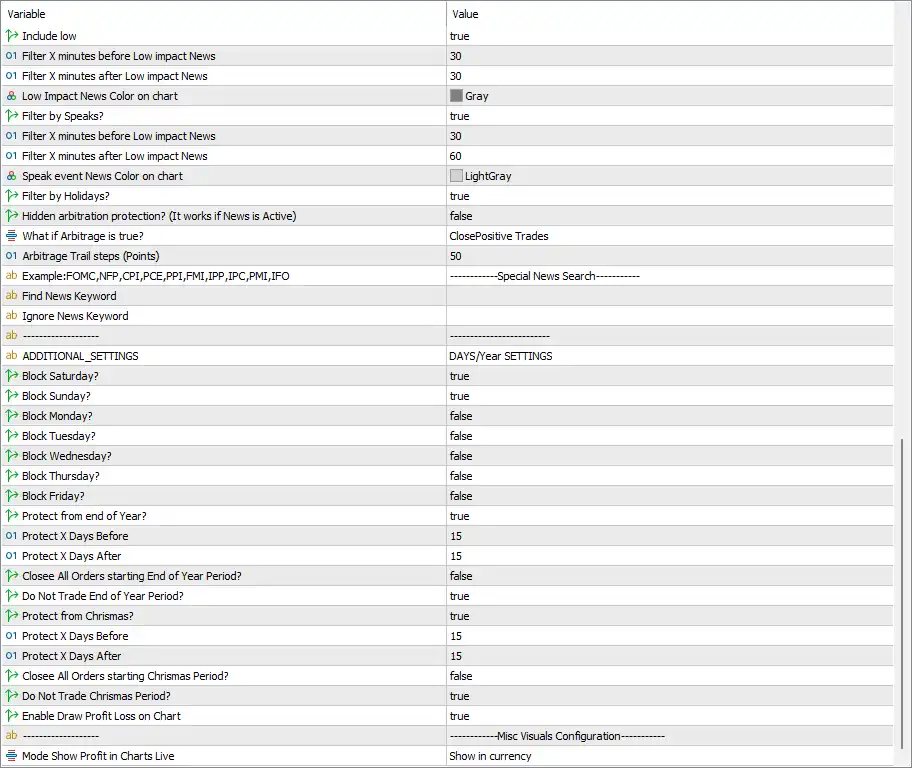
Lord Arles MT5 EA Settings Panel
🔶 General Settings
🔹 Setting = Lord Arles By A (@SenseTrading) – Displays the EA name and developer information.
🔹 Contact Mql5 – Provides the official MQL5 seller profile for product updates and technical support.
🔹 Contact Tgram – Displays the official Telegram support channel.
🔹 MagicNumber EA = 6099 – Assigns Magic Number 6099 to uniquely identify all trades opened by Lord Arles MT5.
🔹 Max Orders = 10 – Allows a maximum of 10 simultaneous open positions.
🔹 Delay between orders (0 Disable) = 0 – No waiting time between consecutive trade entries.
🔹 Allow new lines? = true – Enables the EA to generate new trading levels or trading signals.
🔹 Allow Trade Buy? = true – Allows the EA to execute Buy positions.
🔹 Allow Trade Sell? = true – Allows the EA to execute Sell positions.
🔹 Allow Support manual orders? = true – Enables the EA to manage manually opened trades.
🔹 Allow Logic Aggressive? = true – Activates the aggressive trading algorithm for more active market participation.
🔹 Allow Max Spread in point (0 Disable) = 0 – Disables spread limitation, allowing trading regardless of spread.
🔹 Start Time Filter (Time Server) = 0 – Trading starts immediately according to server time.
🔹 End Time Filter (Time Server) = 0 – No ending time restriction is applied.
🔶 Risk Manager Configuration
🔹 Start lots Fix = 0.01 – Starts every new trading cycle with 0.01 lots.
🔹 Money Management = false – Disables automatic lot sizing based on account balance.
🔹 Management for Free margin for each 0.01 Lots = 1000 – Requires approximately 1000 units of free margin for every 0.01 lot.
🔹 Lot Multiplier for Recovery = 1.2 – Multiplies recovery trade size by 1.2 after qualifying positions.
🔹 Distance for Recovery = 200 – Opens recovery trades every 200 points.
🔹 Allow Multiplier Step dynamic? = false – Disables dynamic lot multiplier adjustment.
🔹 Multiplier for Step Recovery = 2.0 – Uses a 2.0 multiplier for recovery step progression.
🔹 Max Lot permitted = 2.0 – Limits the maximum trade size to 2.0 lots.
🔹 Take Profit = 70 – Sets the Take Profit target to 70 points.
🔹 Stop Loss = 0 – No fixed Stop Loss is applied.
🔹 Trail Start, points (0 Disable) = 200 – Activates trailing stop after 200 points of profit.
🔹 Trail Step, points = 100 – Moves the trailing stop every 100 points.
🔶 Protection Manager Configuration
🔹 Max Risk DD% (0=Disable) = 100.0 – Sets maximum drawdown protection to 100.0%.
🔹 Max Risk $ (0=Disable) = 0.0 – Disables fixed currency drawdown protection.
🔹 Sleep Hours = 24.0 – Pauses trading for 24.0 hours after protection conditions are triggered.
🔹 Control Flow Algorithm Aggressive Arles = true – Enables the EA’s aggressive flow-control algorithm for position management.
🔹 N/O Algorithm Flow DD Reduction Position = 6 – Uses 6 positions in the drawdown reduction algorithm.
🔹 P/P Algorithm Flow DD Reduction in Percent = 1 – Uses 1% as the drawdown reduction threshold.
🔹 Custom Prefix (Example i.EURUSD) = (blank) – Allows custom broker symbol prefixes if required.
🔹 Custom Prefix (Example EURUSD.i) = (blank) – Allows custom broker symbol suffixes if required.
🔶 News Filter Settings
🔹 NEWS_SETTINGS_AND_DAYS_FILTER – Main section for economic news management.
🔹 Information – Displays information explaining how economic news appears on the trading chart.
🔹 Add It Address Api in Web Request = https://nfs.faireconomy.media/ff_calendar_thisweek.xml – Uses the Fair Economy calendar feed for downloading economic news.
🔹 Use News Filter = true – Enables automatic economic news filtering.
🔹 Include High = true – Filters High-impact economic news.
🔹 Filter X Minutes Before High Impact News = 30 – Stops opening trades 30 minutes before High-impact news.
🔹 Filter X Minutes After High Impact News = 120 – Resumes trading 120 minutes after High-impact news.
🔹 High Impact News Color on Chart = Red – Displays High-impact events in Red.
🔹 Include Medium = true – Filters Medium-impact economic events.
🔹 Filter X Minutes Before Medium Impact News = 30 – Stops trading 30 minutes before Medium-impact news.
🔹 Filter X Minutes After Medium Impact News = 120 – Resumes trading 120 minutes after Medium-impact news.
🔹 Medium Impact News Color on Chart = Gold – Displays Medium-impact events in Gold.
🔹 Include Low = true – Filters Low-impact economic events.
🔹 Filter X Minutes Before Low Impact News = 30 – Stops trading 30 minutes before Low-impact news.
🔹 Filter X Minutes After Low Impact News = 30 – Resumes trading 30 minutes after Low-impact news.
🔹 Low Impact News Color on Chart = Gray – Displays Low-impact events in Gray.
🔹 Filter by Speaks? = true – Enables filtering for central bank speeches and official announcements.
🔹 Filter X Minutes Before Speeches = 30 – Stops trading 30 minutes before speech events.
🔹 Filter X Minutes After Speeches = 60 – Resumes trading 60 minutes after speech events.
🔹 Speak Event News Color on Chart = LightGray – Displays speech events in LightGray.
🔹 Filter by Holidays? = true – Enables holiday trading protection.
🔹 Example: FOMC, NFP, CPI, PCE, PPI, FMI, IPP, IPC, PMI, IFO – Lists supported economic event keywords.
🔹 Find News Keyword = (blank) – Allows traders to specify additional news keywords.
🔹 Ignore News Keyword = (blank) – Allows selected keywords to be excluded from filtering.
🔹 Hidden arbitration protection? (It works if News is Active) = false – Disables hidden arbitrage protection.
🔹 What if Arbitrage is true? = ClosePositiveTrades – Closes profitable trades when arbitrage conditions occur.
🔹 Arbitrage Trail steps (Points) = 50 – Uses 50 points as the arbitrage trailing distance.
🔶 Days & Year Settings
🔹 Block Saturday? = true – Prevents trading on Saturday.
🔹 Block Sunday? = true – Prevents trading on Sunday.
🔹 Block Monday? = false – Allows trading on Monday.
🔹 Block Tuesday? = false – Allows trading on Tuesday.
🔹 Block Wednesday? = false – Allows trading on Wednesday.
🔹 Block Thursday? = false – Allows trading on Thursday.
🔹 Block Friday? = false – Allows trading on Friday.
🔹 Protect from end of Year? = true – Enables year-end trading protection.
🔹 Protect X Days Before = 15 – Starts year-end protection 15 days before the protected period.
🔹 Protect X Days After = 15 – Ends protection 15 days after the protected period.
🔹 Close All Orders starting End of Year Period? = false – Keeps existing positions open during year-end.
🔹 Do Not Trade End of Year Period? = true – Blocks new trades during the protected year-end period.
🔹 Protect from Christmas? = true – Enables Christmas trading protection.
🔹 Protect X Days Before = 15 – Starts Christmas protection 15 days before Christmas.
🔹 Protect X Days After = 15 – Ends Christmas protection 15 days after Christmas.
🔹 Close All Orders starting Christmas Period? = false – Existing positions remain open during Christmas.
🔹 Do Not Trade Christmas Period? = true – Prevents opening new positions during Christmas protection.
🔹 Enable Draw Profit Loss on Chart = true – Displays floating profit and loss directly on the chart.
🔶 Misc Visual Configuration
🔹 Mode Show Profit in Charts Live = Show in currency – Displays live trading profit in account currency instead of points.
🔢 Conclusion
Lord Arles MT5 is a feature-rich Expert Advisor built with flexible risk management, intelligent recovery logic, aggressive trading algorithms, advanced news filtering and comprehensive holiday protection.
With configurable money management, dynamic recovery controls, and robust safety mechanisms, it provides traders with extensive control over automated trading performance while helping manage market risk during volatile conditions.
🔢 FAQs
❓ What is the default starting lot size in Lord Arles MT5?
The default configuration starts with 0.01 lots for each new trading cycle.
❓ Does Lord Arles MT5 include an economic news filter?
Yes. It supports High, Medium, Low impact news, central bank speeches, holiday filters, and customizable news keywords.
❓ Can Lord Arles MT5 manage manually opened trades?
Yes. The Allow Support manual orders option enables the EA to manage manual positions alongside automated trades.
❓ How does the recovery system work?
The EA can increase position sizes using a Lot Multiplier for Recovery = 1.2, a 200-point recovery distance, and configurable recovery algorithms.
❓ What is the purpose of Magic Number 6099?
Magic Number 6099 uniquely identifies all trades opened by Lord Arles MT5, ensuring they are managed independently from other Expert Advisors running on the same MT5 account.
User Reviews
Only logged in customers who have purchased this product may leave a review.
1. What is Lord Arles MT5?
Lord Arles MT5 is an advanced automated trading system for MetaTrader 5 (MT5) that adapts dynamically to market conditions. It uses aggressive and strategic trading methods to maximize profitability while maintaining risk control.
2. How does Lord Arles MT5 work?
The EA analyzes market trends, tick patterns, and news events to identify optimal trading opportunities. It integrates intelligent risk management and customizable exit strategies to enhance performance in volatile market conditions.
3. What makes Lord Arles MT5 different from other EAs?
Unlike many EAs, Lord Arles MT5 is highly adaptable, shifting between aggressive and dynamic strategies based on market conditions. It also includes a manual trading assistance feature, allowing traders to intervene if needed.
4. Which currency pairs does Lord Arles MT5 support?
The EA is optimized for AUDCAD and EURJPY, but it can be used with any currency pair, making it versatile for various market conditions.
5. What is the minimum deposit required to use Lord Arles MT5?
The recommended minimum deposit is $500, ensuring the EA has enough capital to operate effectively and manage risk properly.
6. What is the expected profitability and drawdown of Lord Arles MT5?
Live trading results over 46 weeks show:
✔ Total Growth: 1,002%
✔ Maximum Drawdown: 43.9%
✔ Win Rate: 87.3%
Backtest results on AUDCAD with a $10,000 deposit show:
✔ Total Net Profit: $14,260
✔ Maximum Balance Drawdown: 3.75%
✔ Profit Trades: 72.15%
7. Is Lord Arles MT5 compatible with prop firms like FTMO and MFF?
Yes, the EA is prop firm-friendly and meets the requirements for trading on FTMO, MFF, and other proprietary trading firms.
8. Can I manually trade while using Lord Arles MT5?
Yes, the EA features manual trading assistance, allowing traders to execute manual trades while the system automatically manages risk and recovery.
-
 Original price was: $500.00.$249.00Current price is: $249.00.
 -
 Original price was: $888.00.$249.00Current price is: $249.00.
 -
 Original price was: $439.00.$249.00Current price is: $249.00.
 -
 Original price was: $9,999.00.$249.00Current price is: $249.00.
-
 0Original price was: $1,299.00.$249.00Current price is: $249.00.
 -
 0Original price was: $500.00.$199.00Current price is: $199.00.
 -
 1Original price was: $1,299.00.$249.00Current price is: $249.00.
 -
 6Original price was: $1,000.00.$599.00Current price is: $599.00.
There are no reviews yet.