


🔢 Mr Bitcoin AI EA MT5 Settings Explained – Complete Parameter Guide
Mr Bitcoin AI EA is an intelligent Bitcoin trading Expert Advisor for MetaTrader 5 that combines AI-driven market analysis, flexible risk management, advanced news filtering, drawdown protection and automated position management.
The EA provides extensive customization for money management, trading schedules, volatility control, and holiday filters, making it suitable for traders seeking a highly configurable automated Bitcoin trading solution.
🔢 Mr Bitcoin AI EA MT5 Parameters Explained
Below are the details of the parameters in the advisor’s trading system settings table:
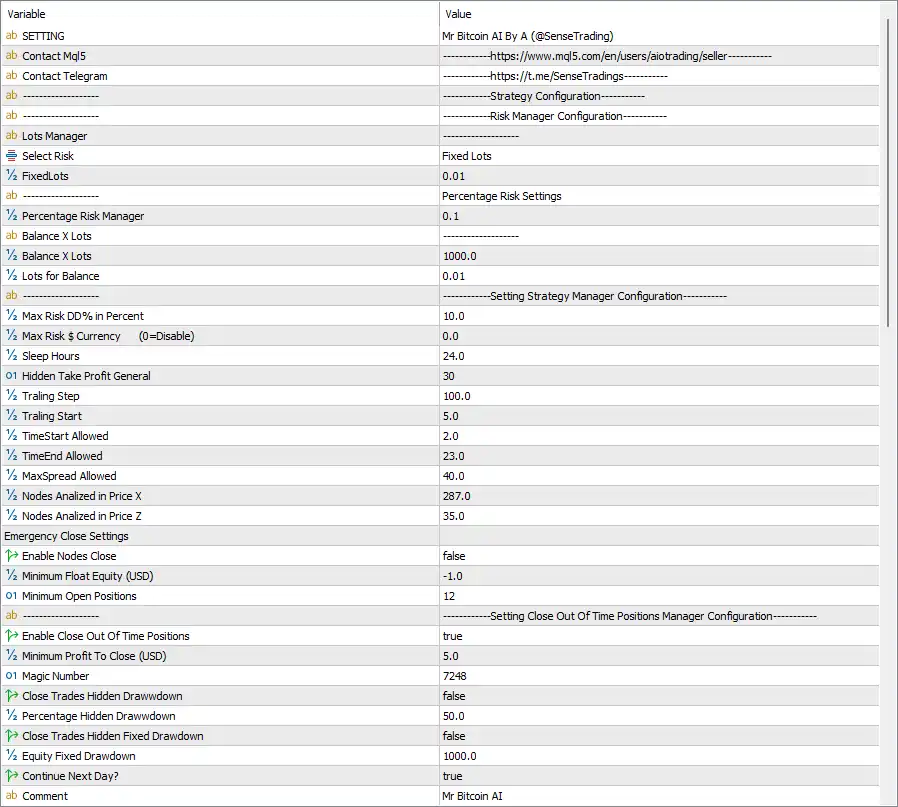
🔄 Lot Management
🔹 Lots Manager – Main section for configuring position sizing methods.
🔹 Select Risk = Fixed Lots – Uses fixed lot sizing instead of percentage-based risk management.
🔹 FixedLots = 0.01 – Opens every position with a fixed trading volume of 0.01 lots.
🔄 Percentage Risk Settings
🔹 Percentage Risk Manager = 0.1 – Sets the percentage-based risk to 0.1% when percentage risk mode is enabled.
🔹 Balance X Lots = 1000.0 – Uses 1000.0 account currency units as the balance reference for dynamic lot calculations.
🔹 Lots for Balance = 0.01 – Opens 0.01 lots for every 1000.0 units of account balance.
🔄 Strategy Manager Configuration
🔹 Max Risk DD% in Percent = 10.0 – Limits the maximum account drawdown to 10.0%.
🔹 Max Risk $ Currency (0=Disable) = 0.0 – Disables fixed currency drawdown protection.
🔹 Sleep Hours = 24.0 – Sets the recovery waiting period to 24.0 hours after risk protection is triggered.
🔹 Hidden Take Profit General = 30 – Uses a hidden Take Profit target of 30 according to the EA's internal logic.
🔹 Trailing Step = 100.0 – Moves the trailing stop every 100.0 points.
🔹 Trailing Start = 5.0 – Activates trailing stop after 5.0 profit units.
🔹 TimeStart Allowed = 2.0 – Allows new trades starting at 02:00.
🔹 TimeEnd Allowed = 23.0 – Stops opening new positions after 23:00.
🔹 MaxSpread Allowed = 40.0 – Prevents new trades whenever the spread exceeds 40.0.
🔹 Nodes Analyzed in Price X = 287.0 – Uses 287.0 analytical nodes in the primary AI price model.
🔹 Nodes Analyzed in Price Z = 35.0 – Uses 35.0 analytical nodes in the secondary AI price model.
🔄 Emergency Close Settings
🔹 Enable Nodes Close = false – Disables emergency closing based on AI node conditions.
🔹 Minimum Float Equity (USD) = -1.0 – Sets the floating equity threshold to -1.0 USD before emergency logic can activate.
🔹 Minimum Open Positions = 12 – Requires at least 12 open positions before emergency closing conditions are evaluated.
🔄 Close Out-of-Time Positions
🔹 Enable Close Out Of Time Positions = true – Automatically closes positions that remain open beyond the allowed trading period.
🔹 Minimum Profit To Close (USD) = 5.0 – Requires at least 5.0 USD profit before closing out-of-time positions.
🔹 MagicNumber = 7248 – Assigns Magic Number 7248 to uniquely identify all trades opened by the EA.
🔹 Close Trades Hidden Drawdown = false – Disables closing trades based on hidden percentage drawdown.
🔹 Percentage Hidden Drawdown = 50.0 – Sets the hidden drawdown threshold to 50.0% if enabled.
🔹 Close Trades Hidden Fixed Drawdown = false – Disables fixed hidden drawdown protection.
🔹 Equity Fixed Drawdown = 1000.0 – Sets the fixed equity drawdown threshold to 1000.0 account currency units.
🔹 Continue Next Day = true – Allows the EA to resume trading automatically on the next trading day.
🔹 Comment = Mr Bitcoin AI – Adds the trade comment "Mr Bitcoin AI" to all EA positions.
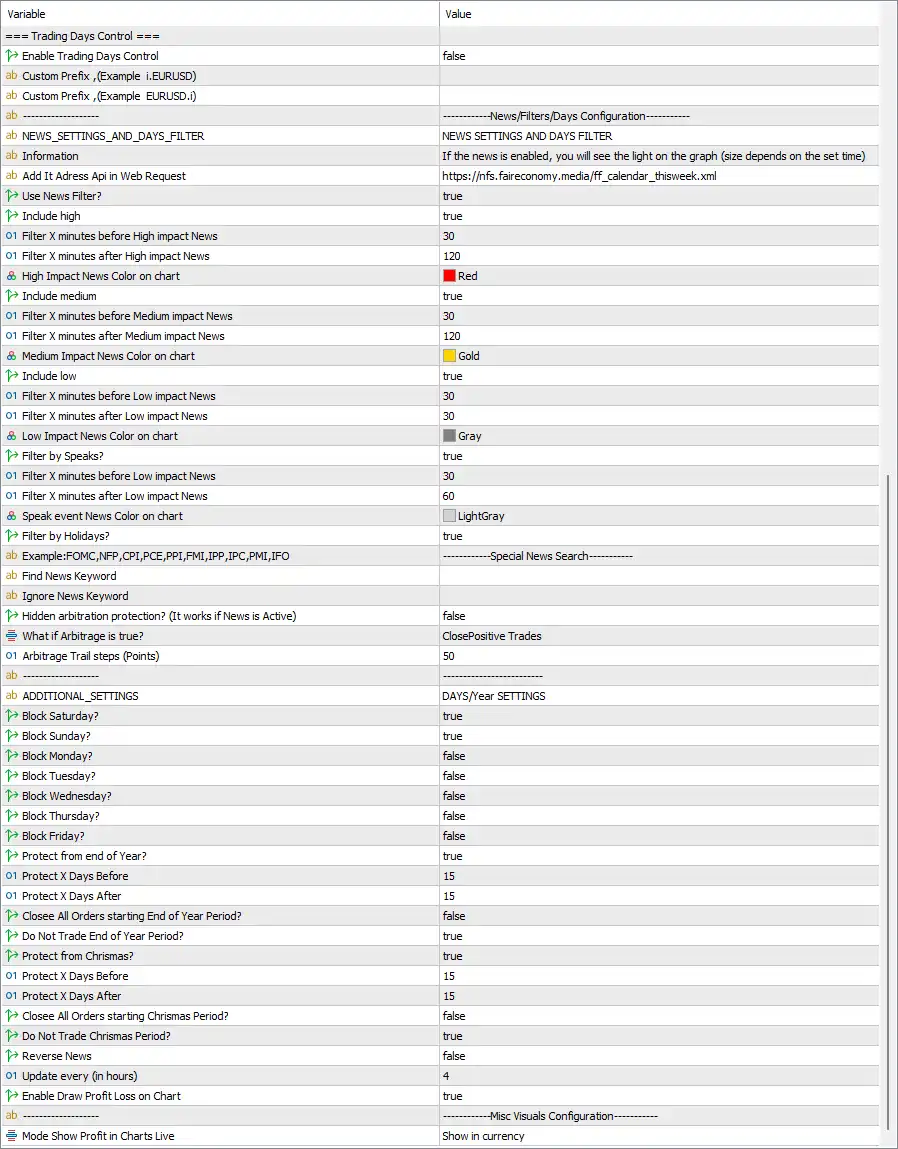
🔄 Trading Days Control
🔹 Enable Trading Days Control = false – Disables weekday trading restrictions, allowing trading according to the main schedule.
🔹 Custom Prefix (Example i.EURUSD) = (blank) – Leaves the broker symbol prefix empty.
🔹 Custom Prefix (Example EURUSD.i) = (blank) – Leaves the broker symbol suffix empty.
🔄 News Filter Settings
🔹 NEWS_SETTINGS_AND_DAYS_FILTER – Main section for economic news filtering.
🔹 Information – Displays information explaining how news events are shown on the trading chart.
🔹 Add It Address Api in Web Request = https://nfs.faireconomy.media/ff_calendar_thisweek.xml – Uses the Fair Economy calendar feed for downloading economic news.
🔹 Use News Filter = true – Enables automatic news filtering.
🔹 Include High = true – Filters High-impact economic events.
🔹 Filter X Minutes Before High Impact News = 30 – Stops trading 30 minutes before High-impact news.
🔹 Filter X Minutes After High Impact News = 120 – Resumes trading 120 minutes after High-impact news.
🔹 High Impact News Color on Chart = Red – Displays High-impact news in Red.
🔹 Include Medium = true – Enables Medium-impact news filtering.
🔹 Filter X Minutes Before Medium Impact News = 30 – Stops trading 30 minutes before Medium-impact news.
🔹 Filter X Minutes After Medium Impact News = 120 – Resumes trading 120 minutes after Medium-impact news.
🔹 Medium Impact News Color on Chart = Gold – Displays Medium-impact news in Gold.
🔹 Include Low = true – Enables Low-impact news filtering.
🔹 Filter X Minutes Before Low Impact News = 30 – Stops trading 30 minutes before Low-impact news.
🔹 Filter X Minutes After Low Impact News = 30 – Resumes trading 30 minutes after Low-impact news.
🔹 Low Impact News Color on Chart = Gray – Displays Low-impact news in Gray.
🔹 Filter by Speaks = true – Filters central bank speeches and important official events.
🔹 Filter X Minutes Before Low Impact News (Speeches) = 30 – Stops trading 30 minutes before speeches.
🔹 Filter X Minutes After Low Impact News (Speeches) = 60 – Resumes trading 60 minutes after speeches.
🔹 Speak Event News Color on Chart = LightGray – Displays speech events in LightGray.
🔹 Filter by Holidays = true – Enables holiday filtering.
🔹 Example: FOMC, NFP, CPI, PCE, PPI, FMI, IPP, IPC, PMI, IFO – Lists supported economic event keywords.
🔹 Find News Keyword = (blank) – Allows custom news keywords to be included.
🔹 Ignore News Keyword = (blank) – Allows selected news keywords to be ignored.
🔹 Hidden Arbitration Protection (It works if News is Active) = false – Disables hidden arbitrage protection.
🔹 What if Arbitrage is true? = ClosePositiveTrades – Closes profitable trades when arbitrage protection is triggered.
🔹 Arbitrage Trail Steps (Points) = 50 – Uses a 50-point trailing distance during arbitrage protection.
🔄 Days & Year Settings
🔹 Block Saturday = true – Disables trading on Saturday.
🔹 Block Sunday = true – Disables trading on Sunday.
🔹 Block Monday = false – Allows trading on Monday.
🔹 Block Tuesday = false – Allows trading on Tuesday.
🔹 Block Wednesday = false – Allows trading on Wednesday.
🔹 Block Thursday = false – Allows trading on Thursday.
🔹 Block Friday = false – Allows trading on Friday.
🔹 Protect from End of Year = true – Enables year-end trading protection.
🔹 Protect X Days Before = 15 – Starts year-end protection 15 days before the protected period.
🔹 Protect X Days After = 15 – Ends protection 15 days after the protected period.
🔹 Close All Orders Starting End of Year Period = false – Does not automatically close all positions at year-end.
🔹 Do Not Trade End of Year Period = true – Prevents opening new positions during the protected year-end period.
🔹 Protect from Christmas = true – Enables Christmas trading protection.
🔹 Protect X Days Before = 15 – Starts Christmas protection 15 days before Christmas.
🔹 Protect X Days After = 15 – Ends Christmas protection 15 days after Christmas.
🔹 Close All Orders Starting Christmas Period = false – Keeps existing positions open during Christmas unless other rules apply.
🔹 Do Not Trade Christmas Period = true – Blocks new trades during the protected Christmas period.
🔹 Reverse News = false – Disables reverse trading during news events.
🔹 Update Every (in hours) = 4 – Refreshes economic news every 4 hours.
🔹 Enable Draw Profit Loss on Chart = true – Displays profit and loss information directly on the chart.
🔄 Misc Visual Settings
🔹 Mode Show Profit in Charts Live = Show in currency – Displays real-time trading profit in account currency instead of points or percentages.
🔢 Conclusion
Mr Bitcoin AI EA MT5 offers an extensive set of professional trading controls designed specifically for automated Bitcoin trading. Its configurable money management, AI-based market analysis, advanced economic news filters, holiday protection, hidden trade management, and intelligent drawdown controls provide traders with a highly flexible environment for managing both risk and execution. Proper configuration of these settings can help improve trading consistency while reducing exposure during high-risk market conditions.
🔢 FAQs
❓ What lot sizing method does Mr Bitcoin AI EA MT5 use by default?
The default configuration uses Fixed Lots with a trading volume of 0.01 lots.
❓ Does Mr Bitcoin AI EA MT5 include an economic news filter?
Yes. The EA includes a comprehensive news filter supporting High, Medium, Low impact events, speeches, holidays, and customizable news keywords.
❓ How does the EA protect against excessive drawdown?
It includes configurable maximum drawdown limits, hidden drawdown controls, emergency closing options, and trading suspension settings to help manage account risk.
❓ Can Mr Bitcoin AI EA MT5 automatically stop trading during holidays?
Yes. The EA supports automatic protection during weekends, Christmas, and the end-of-year period using configurable trading restrictions.
❓ What is the purpose of the Magic Number 7248?
Magic Number 7248 uniquely identifies every position opened by Mr Bitcoin AI EA MT5, allowing the EA to manage its own trades independently from other Expert Advisors.



