




Luna AI PRO EA MT4 v1.1 with SetFiles (Platform build 1476+)

Subscriptions for Special Plan
- 30 EA package is more economical!
- Special package with 99%
- Download 1 EA/Day

Subscriptions for Premium Membership
- Download Unlimited in 1 Year
- Get 100% Discount
- Get free access to all

Subscriptions for Gold Membership
- 1 Year Membership
- Get 100% Discount
- Access EA+Indicator+Course
Frequently bought together 🎁
Add these products to enhance your purchase

What is Luna AI PRO?
Luna AI PRO EA stands out as an exceptionally sophisticated night Scalping trading solution, ranking among the finest available. Crafted through extensive live trading experience, it employs a mean reversion strategy, meticulously curating the optimal pairs and techniques for effective execution.
🔶 Vendor Website: Click here
About the Author
This product is compiled by Wim Schrynemakers. This Malta author has more than +14 years of experience working on MQL5 with many famous products such as Luna AI PRO MT5, Gold Trade Pro MT4, Indicement MT4 and other products. Among them, Luna AI PRO EA is his best performing products.
Key Features of Luna AI PRO for MT4
🔹 One-Chart Portfolio Engine: Trade multiple pairs from a single chart, simplifying setup while keeping full control.
🔹 Dynamic Pair Risk Control: Each symbol adjusts its own risk based on performance, reducing drawdown and boosting stability.
🔹 Advanced Market Filters: News, swap, rollover, and correlation filters block risky conditions and protect open equity.
🔹 Strict Risk Management Core: Every trade follows controlled exposure rules to maintain smooth and resilient growth.
🔹 Proven Live Performance: Designed around real trading data, focusing on reliability instead of artificial backtest curves.
Why Choose & Use Luna AI PRO?
🔹 Capital Protection First: Built to minimize drawdowns through layered filters and disciplined trade management.
🔹 Consistent Long-Term Growth: Aims for steady performance instead of aggressive gains that threaten account safety.
🔹 Fully Automated Workflow: Ideal for hands-free trading with intelligent decisions running in the background.
🔹 Adaptive to Market Change: Evolves with volatility and session behavior, staying effective over time.
🔹 Professional-Grade Reliability: Engineered for real trading environments, delivering resilience in live conditions.
Luna AI PRO EA Review
Luna AI PRO EA Signal Results
The Luna AI PRO achieved impressive profit performance when trading with FX pairs. Trading results on real account for 288 consecutive weeks of trading:
✅ Initial Deposit: $213.93
✅ Growth Rate: +93%
✅ Win Rate (% of total): 86.9%
✅ Maximum Drawdown: 25%
✅ Live Signal Results: Click here
Luna AI PRO EA Signal Results
Luna AI PRO Myfxbook Results
Luna AI PRO’s real trading performance has been verified by Myfxbook in detail and transparently over the long term. This makes it easy for investors to evaluate and use the advisor effectively.

luna ai pro myfxbook

Luna ai pro myfxbook
What is the Luna AI PRO Trading Strategy?
🔹 Night Scalping Logic: Targets low-volatility sessions using mean-reversion behavior for precise and efficient entries.
🔹 Multi-Pair Portfolio Model: Trades selected symbols together, balancing performance and reducing dependency on one market.
🔹 Adaptive Exposure System: Automatically scales risk per pair based on results, improving long-term consistency.
🔹 Condition-Based Execution: Trades only when market quality meets strict criteria, filtering noise and weak setups.
🔹 Stability-Oriented Design: Focuses on smooth equity curves and controlled recovery during unfavorable phases.
Recommended Settings
Recommended settings and parameters to pay attention to from developers and experts:
| Features | Type |
|---|---|
| Trading platform | MetaTrader 4 (MT4) |
| Currency pairs | EURAUD, GBPCHF, GBPAUD, AUDUSD, AUDCAD, EURUSD, GBPUSD, USDCHF, GBPAUD, GBPCAD, AUDJPY, USDCAD, EURCAD, EURCHF, EURGBP |
| Time frames | Any Times |
| Minimum / Recommended deposit | $500 |
| Product type | NoDLL / Fix |
| Additional services | Unlock and Decompile |
| Recommended brokers | Exness Broker, Icmarkets Broker |
| Recommended VPS | MyfxVPS.com ( Blue VPS, Golden VPS). Lowest Latency, 2 week Free Trial, 100% Free for 12-18 Months. |
Product Download Package?
The download package of the product suite includes:
Experts
✅ Luna AI PRO EA v1.1_fix.ex4
SetFiles
✅ Luna AI PRO_Risk0.5.set
✅ Luna AI PRO_Risk1.set
✅ Luna AI PRO_Risk2.set
✅ Luna AI PRO_Risk3.set
✅ Luna AI PRO_Risk4.set
✅ Luna AI PRO_Risk5.set
✅ Luna AI PRO_Risk6.set
✅ Luna AI PRO_Risk7.set
✅ Luna AI PRO_Risk8.set
✅ Luna AI PRO_Risk9.set
✅ Luna AI PRO_Risk10.set
➡️ Reviewed by David Easton
Conclusion
In short, Powered by years of live market experience, Luna AI PRO EA delivers professional night scalping with disciplined risk management. Its smart performance monitor dynamically adjusts exposure per pair, keeping drawdown under control. Proven on real accounts and verified by Myfxbook, Luna AI PRO offers a safe, data-driven path to consistent Forex growth.
🔢 Luna AI PRO EA MT4 Settings Guide
Luna AI PRO EA is an advanced automated trading Expert Advisor designed to manage multi-pair trading with configurable entry filters, trading sessions, news protection, spread controls, swap filtering, rollover management and dynamic position sizing.
The EA includes dedicated risk-management features such as performance-based lot sizing, maximum historical drawdown adjustment, trade-splitting options, correlation controls, and account-balance-based calculations. Its detailed configuration allows traders to customize how trades are opened, filtered, sized, and managed across different market conditions.
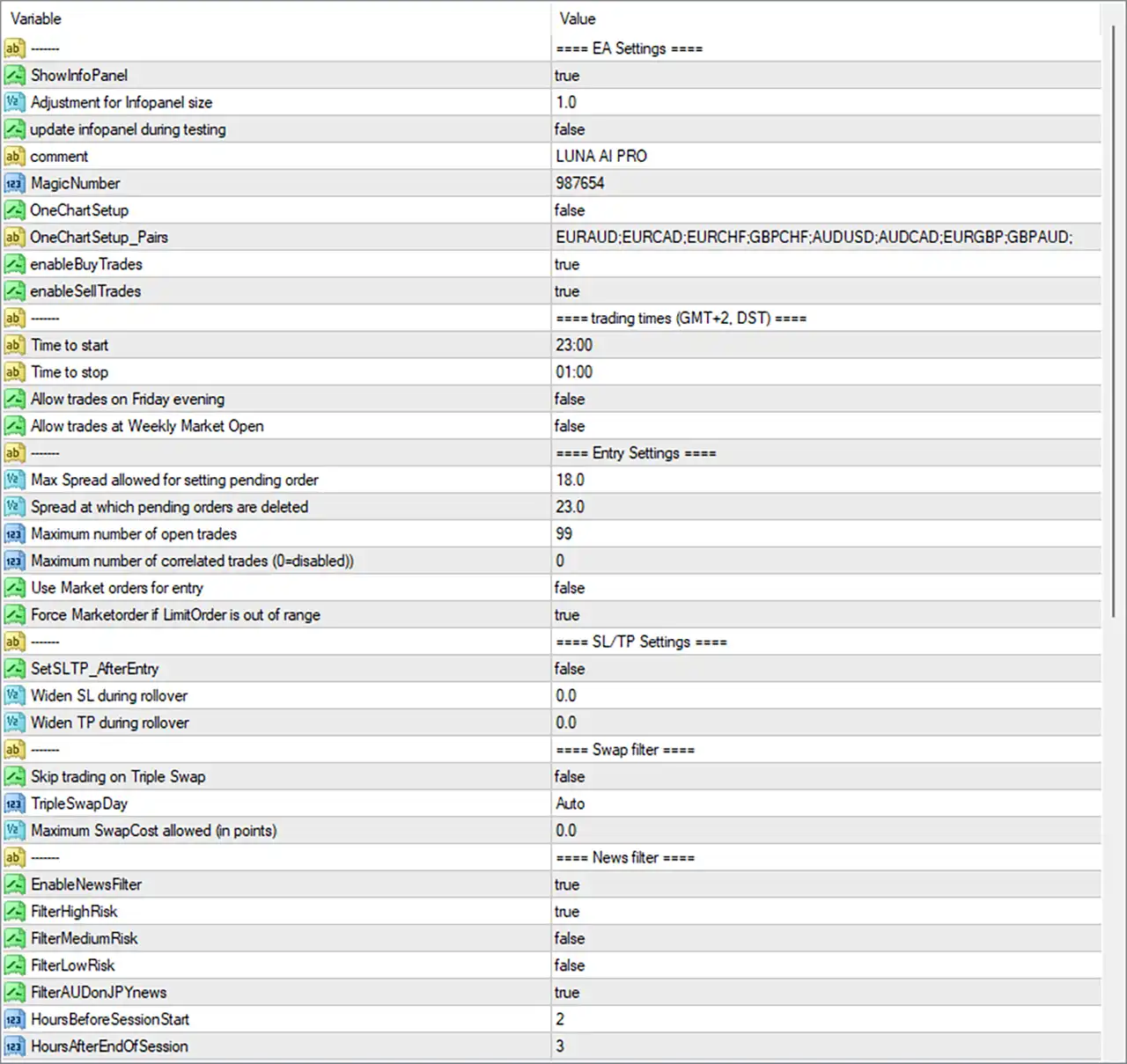
Luna AI PRO EA MT4 Settings Panel
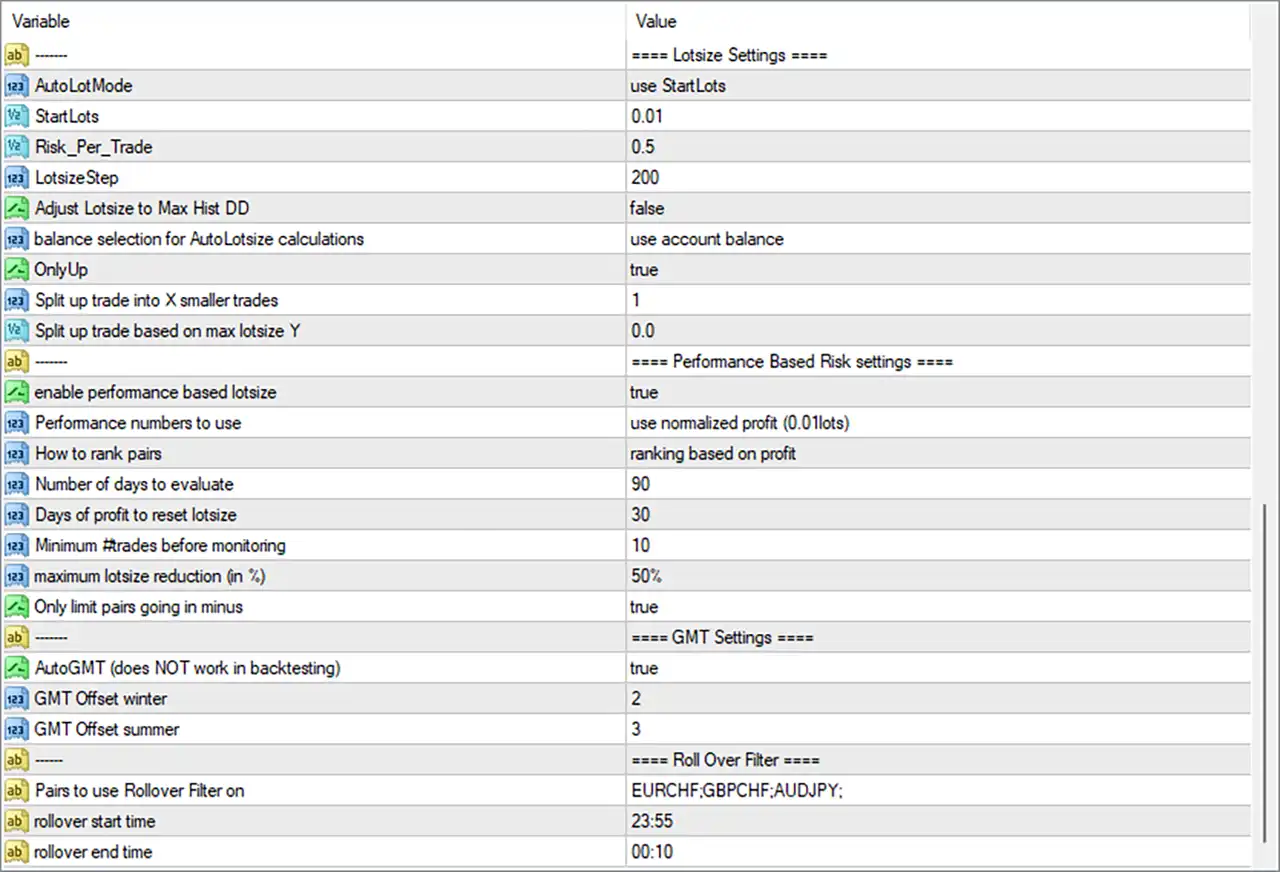
Luna AI PRO EA Settings Panel
🔢 Luna AI PRO EA MT4 Input Settings
⚙️ EA Settings
🔹 ShowInfoPanel = true — Enables the EA information panel on the MT4 chart so important operating information can be displayed.
🔹 Adjustment for Infopanel size = 1.0 — Sets the information-panel size adjustment to 1.0, defining the configured display scale.
🔹 update infopanel during testing = false — Disables information-panel updates while the EA is running in backtesting or Strategy Tester mode.
🔹 comment = LUNA AI PRO — Sets LUNA AI PRO as the trade comment used to identify positions opened by the EA.
🔹 MagicNumber = 987654 — Assigns the unique Magic Number 987654 so the EA can identify and manage its own trades.
🔹 OneChartSetup = false — Disables the One Chart Setup mode in the displayed configuration.
🔹 OneChartSetup_Pairs = EURAUD;EURCAD;EURCHF;GBPCHF;AUDUSD;AUDCAD;EURGBP;GBPAUD; — Defines the configured symbol list for One Chart Setup: EURAUD, EURCAD, EURCHF, GBPCHF, AUDUSD, AUDCAD, EURGBP and GBPAUD.
🔹 enableBuyTrades = true — Enables Buy trades, allowing the EA to open long positions when its trading conditions are satisfied.
🔹 enableSellTrades = true — Enables Sell trades, allowing the EA to open short positions when its trading conditions are satisfied.
⚙️ Trading Times — GMT+2, DST
🔹 Time to start = 23:00 — Sets the configured trading-session start time to 23:00.
🔹 Time to stop = 01:00 — Sets the configured trading-session stop time to 01:00.
🔹 Allow trades on Friday evening = false — Disables trading during the configured Friday evening period.
🔹 Allow trades at Weekly Market Open = false — Disables trading around the weekly market opening period.
⚙️ Entry Settings
🔹 Max Spread allowed for setting pending order = 18.0 — Sets the maximum spread condition at 18.0 for placing pending orders.
🔹 Spread at which pending orders are deleted = 23.0 — Configures pending orders to be deleted when the spread reaches 23.0, according to the EA’s spread-management logic.
🔹 Maximum number of open trades = 99 — Sets the maximum configured number of simultaneously open trades to 99.
🔹 Maximum number of correlated trades (0=disabled) = 0 — Sets the correlated-trade limit to 0; according to the parameter description, 0 = disabled.
🔹 Use Market orders for entry = false — Disables the use of Market orders as the primary entry method.
🔹 Force Marketorder if LimitOrder is out of range = true — Enables the EA to use a Market order when a Limit Order is considered outside the permitted range.
⚙️ SL/TP Settings
🔹 SetSLTP_AfterEntry = false — Disables the option to set Stop Loss and Take Profit after the entry has been executed.
🔹 Widen SL during rollover = 0.0 — Sets the additional Stop Loss widening during rollover to 0.0.
🔹 Widen TP during rollover = 0.0 — Sets the additional Take Profit widening during rollover to 0.0.
⚙️ Swap Filter
🔹 Skip trading on Triple Swap = false — Disables the option to automatically skip trading on the Triple Swap day.
🔹 TripleSwapDay = Auto — Sets the Triple Swap day detection to Auto, allowing the EA to determine the applicable day automatically.
🔹 Maximum SwapCost allowed (in points) = 0.0 — Sets the maximum allowed swap cost to 0.0 points.
⚙️ News Filter
🔹 EnableNewsFilter = true — Enables the EA’s economic-news filtering system.
🔹 FilterHighRisk = true — Enables filtering around High Risk economic news events.
🔹 FilterMediumRisk = false — Disables filtering around Medium Risk news events.
🔹 FilterLowRisk = false — Disables filtering around Low Risk news events.
🔹 FilterAUDonJPYnews = true — Enables special filtering for AUD-related exposure during JPY news events.
🔹 HoursBeforeSessionStart = 2 — Configures the news filter to consider the specified news window 2 hours before the session starts.
🔹 HoursAfterEndOfSession = 3 — Configures the news filter to consider the specified news window for 3 hours after the session ends.
⚙️ Lotsize Settings
🔹 AutoLotMode = use StartLots — Selects use StartLots as the active lot-size calculation method.
🔹 StartLots = 0.01 — Sets the starting trading volume to 0.01 lots.
🔹 Risk_Per_Trade = 0.5 — Sets the configured risk-per-trade value to 0.5.
🔹 LotsizeStep = 200 — Sets the lot-size calculation step to 200.
🔹 Adjust Lotsize to Max Hist DD = false — Disables adjustment of lot size based on the maximum historical drawdown.
🔹 balance selection for AutoLotsize calculations = use account balance — Configures automatic lot-size calculations to use the account balance as the selected balance reference.
🔹 OnlyUp = true — Enables the OnlyUp option within the lot-size management system.
🔹 Split up trade into X smaller trades = 1 — Sets the trade-splitting value to 1, meaning the configured trade is not divided into multiple smaller orders through this parameter.
🔹 Split up trade based on max lotsize Y = 0.0 — Sets the maximum-lot-size-based trade splitting threshold to 0.0.
⚙️ Performance Based Risk Settings
🔹 enable performance based lotsize = true — Enables performance-based lot-size management.
🔹 Performance numbers to use = use normalized profit (0.01lots) — Configures the EA to evaluate performance using normalized profit based on 0.01 lots.
🔹 How to rank pairs = ranking based on profit — Ranks trading pairs according to their recorded profit performance.
🔹 Number of days to evaluate = 90 — Sets the performance evaluation period to 90 days.
🔹 Days of profit to reset lotsize = 30 — Sets the profit period used to reset the lot-size calculation to 30 days.
🔹 Minimum #trades before monitoring = 10 — Requires a minimum of 10 trades before the performance-monitoring logic is applied.
🔹 maximum lotsize reduction (in %) = 50% — Limits the maximum lot-size reduction to 50% under the performance-based risk system.
🔹 Only limit pairs going in minus = true — Enables the EA to limit pairs that are moving into negative performance according to the performance-based lot-size logic.
⚙️ GMT Settings
🔹 AutoGMT (does NOT work in backtesting) = true — Enables automatic GMT detection; the parameter explicitly indicates that AutoGMT does NOT work in backtesting.
🔹 GMT Offset winter = 2 — Sets the winter GMT offset to 2.
🔹 GMT Offset summer = 3 — Sets the summer GMT offset to 3.
⚙️ Rollover Filter
🔹 Pairs to use Rollover Filter on = EURCHF:GBPCHF:AUDJPY: — Applies the Rollover Filter to EURCHF, GBPCHF, and AUDJPY.
🔹 rollover start time = 23:55 — Sets the Rollover Filter start time to 23:55.
🔹 rollover end time = 00:10 — Sets the Rollover Filter end time to 00:10.
🔢 Luna AI PRO EA MT4 Risk Management Overview
Luna AI PRO EA MT4 combines several layers of automated risk and trade-management controls. The displayed configuration starts with StartLots = 0.01 and uses account balance for AutoLotsize calculations. The EA also has Risk_Per_Trade = 0.5, LotsizeStep = 200, and performance-based lot sizing enabled.
The performance module evaluates trading results over 90 days, requires at least 10 trades before monitoring, and can reduce the maximum lot size by up to 50%. Pair performance is ranked based on profit using normalized profit (0.01lots).
For market protection, the EA uses a maximum pending-order spread of 18.0 and deletes pending orders when the spread reaches 23.0. The maximum number of open trades is configured at 99, while correlated-trade control is disabled because Maximum number of correlated trades = 0.
The news filter is enabled, with High Risk news filtering active while Medium Risk and Low Risk filtering remain disabled. The configuration also enables FilterAUDonJPYnews = true, adding a specific news filter for AUD exposure during JPY-related news events.
🔢 Trading Session and Rollover Management
The displayed trading-time configuration uses GMT+2, DST, with a session from 23:00 to 01:00. Friday evening trading and trading at the weekly market open are both disabled.
The Rollover Filter is specifically applied to EURCHF, GBPCHF, and AUDJPY, with a rollover window from 23:55 to 00:10. Both Widen SL during rollover = 0.0 and Widen TP during rollover = 0.0 indicate that no additional SL or TP widening is configured during rollover.
🔢 Conclusion
Luna AI PRO EA MT4 provides a highly configurable framework for automated trading, combining trade-entry controls, multi-pair support, news filtering, spread protection, swap management, rollover filtering, GMT synchronization, and dynamic performance-based position sizing.
The displayed configuration uses MagicNumber = 987654, StartLots = 0.01, Risk_Per_Trade = 0.5, LotsizeStep = 200, and a 50% maximum lotsize reduction under the performance-based risk module. The EA also evaluates pair performance over 90 days and requires 10 trades before monitoring begins.
For market-event protection, EnableNewsFilter = true and FilterHighRisk = true, while the configured trading session is 23:00–01:00 under the GMT+2, DST settings. Traders should test any changes to these parameters in the MT4 Strategy Tester or on a demo account first, particularly when changing risk, lot-size, trading-session, or news-filter settings.
User Reviews
Only logged in customers who have purchased this product may leave a review.
❓ What kind of strategy does Luna AI PRO use?
Luna AI PRO uses a night scalping mean-reversion strategy, targeting calm market hours to capture small, consistent profits with controlled risk.
❓ Is Luna AI PRO safe for long-term trading?
Luna AI PRO avoids martingale and grid, using strict risk rules and adaptive control, making it suitable for stable long-term automation.
❓ Can Luna AI PRO trade multiple pairs at once?
Yes, Luna AI PRO can monitor and manage many pairs from one chart, allowing efficient multi-pair trading with centralized control.
❓ How does Luna AI PRO manage risk automatically?
Luna AI PRO adjusts risk per pair based on performance, lowering exposure on weak pairs and increasing it on profitable ones.
❓ Is Luna AI PRO beginner friendly?
Luna AI PRO is fully automated with optimized defaults, making professional night scalping accessible even for traders with little experience.
❓ What pairs work best with Luna AI PRO?
Luna AI PRO supports many pairs like EURUSD, GBPUSD, AUDUSD, and EURAUD, giving traders wide diversification options.
❓ Does Luna AI PRO rely on dangerous techniques?
No, Luna AI PRO avoids martingale, grid, and wide stop losses, focusing on disciplined entries and professional risk control.
❓ Has Luna AI PRO been proven in real trading?
Luna AI PRO has live accounts running over a year and verified by Myfxbook, showing consistent and transparent performance.
❓ What is the recommended starting balance?
Luna AI PRO works best with a minimum deposit of $500, providing enough margin for stable multi-pair night scalping.
❓ Can Luna AI PRO adapt to changing performance?
Yes, Luna AI PRO dynamically shifts risk between pairs, ensuring capital is focused on stronger performers while limiting weak ones.
🔥 Get This EA for FREE with Our Membership! 🚀🚀
Unlock access to this EA, premium Indicators, and exclusive trading tools completely FREE with any of our Membership Plans! Thousands of traders already benefit from our VIP library—join them and level up your trading instantly. Choose Your Membership:
- SPECIAL – 1 Month Membership
- GOLD – 1 Year Membership
- PREMIUM – 1 Year Membership
-
 Original price was: $500.00.$249.00Current price is: $249.00.
-
 Original price was: $888.00.$249.00Current price is: $249.00.
-
 Original price was: $439.00.$249.00Current price is: $249.00.
-
 Original price was: $9,999.00.$249.00Current price is: $249.00.
-
 1Original price was: $11,000.00.$89.00Current price is: $89.00.
-
 3Original price was: $999.00.$69.00Current price is: $69.00.
-
 1Original price was: $950.00.$59.00Current price is: $59.00.
-
 10Original price was: $2,100.00.$69.00Current price is: $69.00.
There are no reviews yet.