



🔢 NeonScalper EA MT5 Settings Guide
NeonScalper EA is a professional automated scalping Expert Advisor for MetaTrader 5 that combines intelligent risk management, dynamic trailing stop functionality, support and resistance breakout analysis, and customizable visual tools.
Designed for disciplined intraday trading, the EA provides flexible position sizing, precise trade management, and configurable session timing to help traders optimize performance while maintaining effective capital protection.
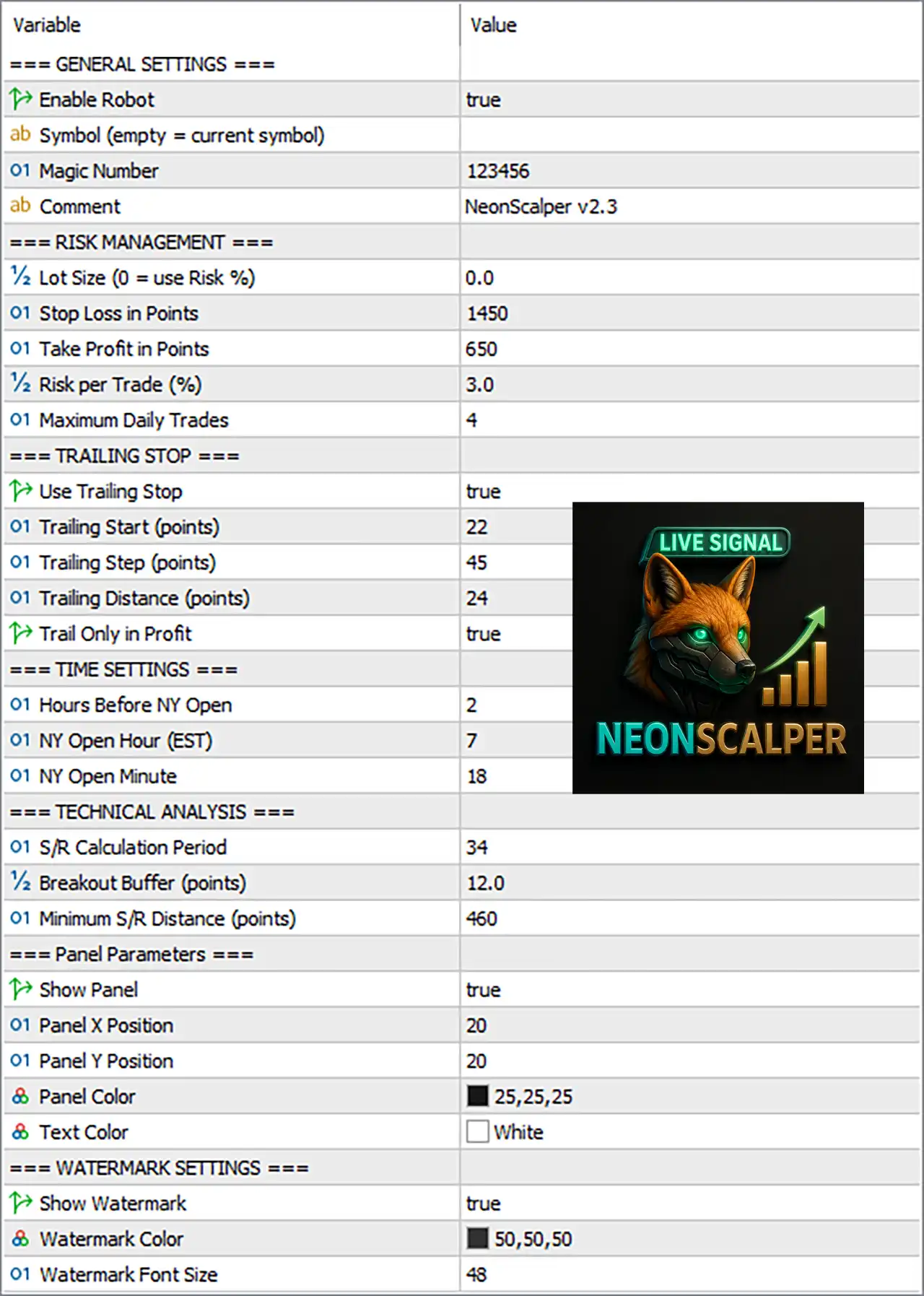
🔢 General Settings
🔹 Enable Robot = true – Activates the Expert Advisor, allowing NeonScalper EA MT5 to execute automated trading.
🔹 Symbol (empty = current symbol) – Allows you to specify a trading symbol manually; leaving this field empty makes the EA trade the current chart symbol.
🔹 Magic Number = 123456 – Assigns the unique Magic Number 123456 to identify all trades opened by NeonScalper EA MT5.
🔹 Comment = NeonScalper v2.3 – Adds the trade comment "NeonScalper v2.3" to every order opened by the EA.
🔢 Risk Management
🔹 Lot Size (0 = use Risk %) = 0.0 – Uses automatic lot calculation based on the configured risk percentage because the value is 0.0.
🔹 Stop Loss in Points = 1450 – Sets the protective Stop Loss distance to 1450 points for every trade.
🔹 Take Profit in Points = 650 – Sets the Take Profit target to 650 points.
🔹 Risk per Trade (%) = 3.0 – Risks 3.0% of the account balance on each trade when automatic position sizing is enabled.
🔹 Maximum Daily Trades = 4 – Limits the EA to a maximum of 4 trades per trading day.
🔢 Trailing Stop
🔹 Use Trailing Stop = true – Enables automatic Trailing Stop management to secure profits.
🔹 Trailing Start (points) = 22 – Activates the trailing stop after the trade gains 22 points.
🔹 Trailing Step (points) = 45 – Moves the Stop Loss in increments of 45 points during trailing.
🔹 Trailing Distance (points) = 24 – Maintains a trailing distance of 24 points behind the current market price.
🔹 Trail Only in Profit = true – Applies the trailing stop only after the trade becomes profitable.
🔢 Time Settings
🔹 Hours Before NY Open = 2 – Begins monitoring trading conditions 2 hours before the New York market opens.
🔹 NY Open Hour (EST) = 7 – Sets the New York session opening hour to 07:00 EST.
🔹 NY Open Minute = 18 – Specifies the New York session opening minute as 18, resulting in 07:18 EST.
🔢 Technical Analysis
🔹 S/R Calculation Period = 34 – Uses 34 historical bars to calculate Support and Resistance levels.
🔹 Breakout Buffer (points) = 12.0 – Requires a 12.0-point breakout beyond Support or Resistance before validating an entry.
🔹 Minimum S/R Distance (points) = 460 – Requires a minimum distance of 460 points between Support and Resistance levels.
🔢 Panel Parameters
🔹 Show Panel = true – Displays the NeonScalper EA MT5 information panel on the trading chart.
🔹 Panel X Position = 20 – Positions the panel 20 pixels from the left edge of the chart.
🔹 Panel Y Position = 20 – Positions the panel 20 pixels from the top edge of the chart.
🔹 Panel Color = RGB (25,25,25) – Sets the panel background color to RGB (25,25,25), creating a dark interface.
🔹 Text Color = White – Displays all panel text using the White color for improved readability.
🔢 Watermark Settings
🔹 Show Watermark = true – Displays the NeonScalper watermark on the trading chart.
🔹 Watermark Color = RGB (50,50,50) – Sets the watermark color to RGB (50,50,50).
🔹 Watermark Font Size = 48 – Displays the watermark using a font size of 48.
🔢 Risk Level
🔹 Fix Lot – Uses a constant trading volume regardless of account balance, providing stable and predictable position sizing.
🔹 Safe – Prioritizes capital preservation through conservative position sizing and lower overall market exposure.
🔹 Balanced – Maintains a moderate balance between profit potential and drawdown, making it suitable for most trading accounts.
🔹 Aggressive – Increases trading volume and account exposure to maximize potential returns while accepting significantly higher trading risk.
🔢 Conclusion
NeonScalper EA MT5 is a feature-rich automated scalping solution that combines intelligent money management, advanced trailing stop protection, support and resistance breakout analysis and customizable chart visualization.
With flexible risk controls, session timing parameters, and powerful trade management tools, the EA can be adapted to different trading styles and account sizes. Proper configuration of these settings helps improve execution quality, maintain disciplined risk management, and support consistent long-term automated trading performance.
🔢 FAQs
❓ What happens when Lot Size is set to 0.0?
When Lot Size = 0.0, NeonScalper EA MT5 automatically calculates the trading volume using the configured Risk per Trade (%) value.
❓ How does the Trailing Stop feature work?
The EA activates trailing after the trade reaches 22 points of profit and then adjusts the Stop Loss according to the configured trailing distance and step.
❓ Why is the Maximum Daily Trades setting important?
Limiting the EA to 4 trades per day helps prevent overtrading and reduces unnecessary market exposure during volatile conditions.
❓ What is the purpose of the Breakout Buffer?
The 12-point Breakout Buffer helps filter false breakouts by requiring price to move beyond key Support or Resistance levels before opening a trade.
❓ Can I trade symbols other than the current chart?
Yes. You can specify a symbol manually in the Symbol field, or leave it empty to allow NeonScalper EA MT5 to trade the current chart symbol automatically.



