


🔢 One Shoot AI EA MT5 – Complete Settings & Configuration Guide
One Shoot AI EA is a multi-asset automated trading Expert Advisor designed to work across XAUUSD (Gold), BTCUSD (Bitcoin), and NASDAQ. Its configuration combines automated lot sizing, multi-timeframe signal logic, hybrid anti-slippage protection, symbol-specific execution controls, spread filtering, slippage management, and individual magic numbers for each supported market.
The supplied settings show a configuration focused on controlled one-shot execution across three different asset classes, with each symbol having its own maximum spread, maximum slippage, initial lot, and unique identification number. The EA also includes Flipping Money, dashboard monitoring, GMT adjustment, automatic risk-based lot sizing, and automatic symbol detection.
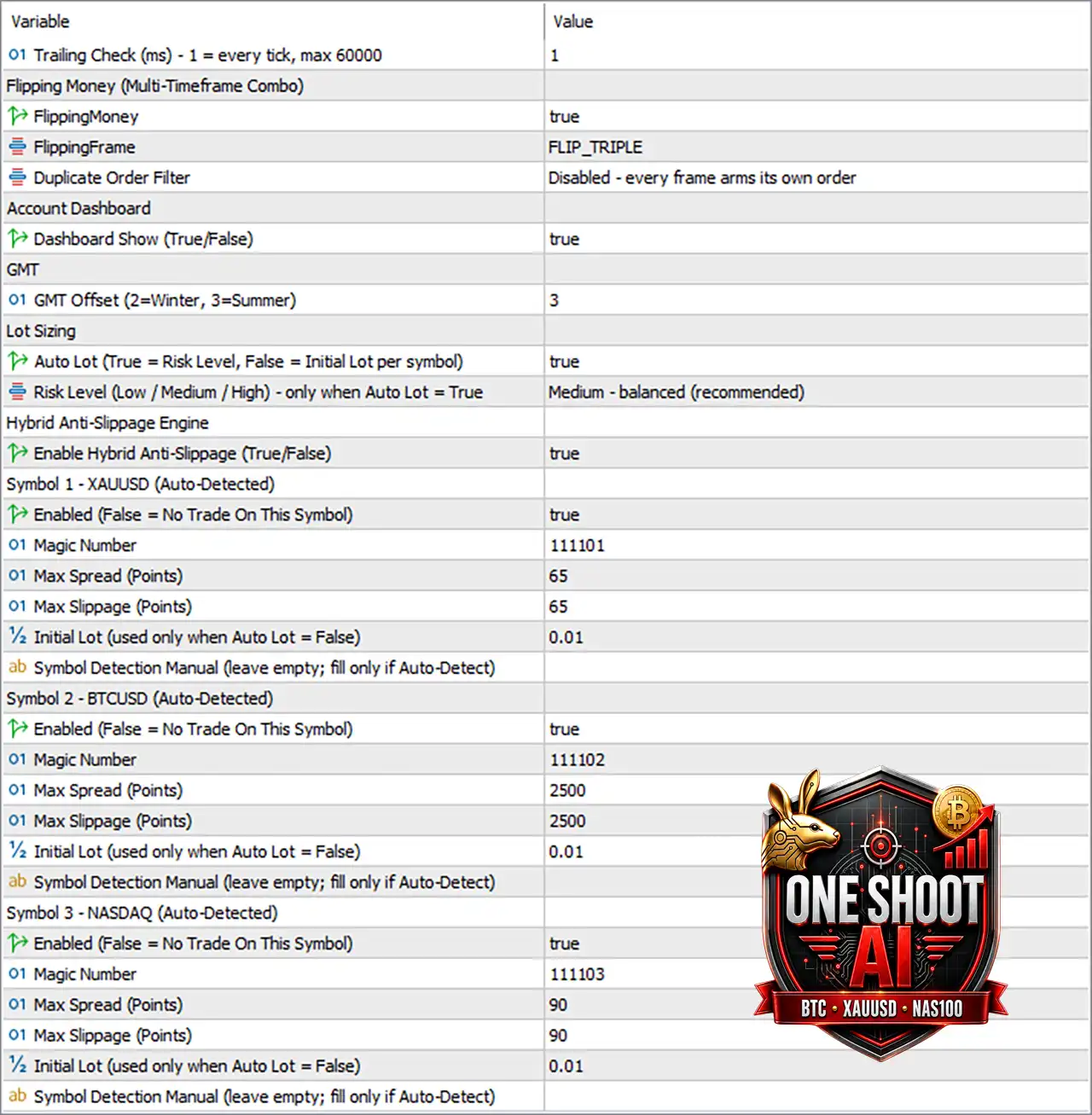
🔄 General & Trailing Settings
🔹 Trailing Check (ms) - 1 = every tick, max 60000 = 1 — Sets the trailing-stop checking interval to 1 millisecond, which the parameter description defines as checking every tick; the maximum permitted value is 60000 ms.
🔄 Flipping Money – Multi-Timeframe Combo
🔹 FlippingMoney = true — Enables the Flipping Money functionality.
🔹 FlippingFrame = FLIP_TRIPLE — Selects the FLIP_TRIPLE multi-timeframe flipping configuration.
🔹 Duplicate Order Filter = Disabled - every frame arms its own order — Disables duplicate-order filtering, allowing each timeframe/frame to arm its own order.
🔄 Account Dashboard
🔹 Dashboard Show (True/False) = true — Enables the account dashboard display.
🔄 GMT Settings
🔹 GMT Offset (2=Winter, 3=Summer) = 3 — Sets the GMT offset to 3, corresponding to the parameter's Summer setting; 2 = Winter and 3 = Summer.
🔄 Lot Sizing
🔹 Auto Lot (True = Risk Level, False = Initial Lot per symbol) = true — Enables automatic lot sizing based on the selected risk level rather than simply using each symbol's initial lot.
🔹 Risk Level (Low / Medium / High) - only when Auto Lot = True = Medium - balanced (recommended) — Selects Medium - balanced (recommended) as the automatic risk level.
🔄 Hybrid Anti-Slippage Engine
🔹 Enable Hybrid Anti-Slippage (True/False) = true — Enables the EA's Hybrid Anti-Slippage Engine, designed to help control execution quality during periods of unfavorable price movement.
🔄 Symbol 1 – XAUUSD
🔹 Symbol 1 = XAUUSD (Auto-Detected) — Configures the first trading instrument as XAUUSD (Gold) with automatic symbol detection.
🔹 Enabled (False = No Trade On This Symbol) = true — Enables trading on XAUUSD.
🔹 Magic Number = 111101 — Assigns the unique EA identifier 111101 to XAUUSD trades.
🔹 Max Spread (Points) = 65 — Limits the maximum permitted XAUUSD spread to 65 points.
🔹 Max Slippage (Points) = 65 — Limits the maximum permitted XAUUSD execution slippage to 65 points.
🔹 Initial Lot (used only when Auto Lot = False) = 0.01 — Sets the XAUUSD initial lot to 0.01 when automatic lot sizing is disabled.
🔹 Symbol Detection Manual (leave empty; fill only if Auto-Detect) — The manual symbol-detection field is left empty, so the EA relies on Auto-Detect.
🔄 Symbol 2 – BTCUSD
🔹 Symbol 2 = BTCUSD (Auto-Detected) — Configures the second trading instrument as BTCUSD (Bitcoin) with automatic symbol detection.
🔹 Enabled (False = No Trade On This Symbol) = true — Enables trading on BTCUSD.
🔹 Magic Number = 111102 — Assigns the unique EA identifier 111102 to BTCUSD trades.
🔹 Max Spread (Points) = 2500 — Limits the maximum permitted BTCUSD spread to 2500 points.
🔹 Max Slippage (Points) = 2500 — Limits the maximum permitted BTCUSD execution slippage to 2500 points.
🔹 Initial Lot (used only when Auto Lot = False) = 0.01 — Sets the BTCUSD initial lot to 0.01 when automatic lot sizing is disabled.
🔹 Symbol Detection Manual (leave empty; fill only if Auto-Detect) — The manual BTCUSD symbol-detection field is left empty, allowing automatic detection.
🔄 Symbol 3 – NASDAQ
🔹 Symbol 3 = NASDAQ (Auto-Detected) — Configures the third trading instrument as NASDAQ with automatic symbol detection.
🔹 Enabled (False = No Trade On This Symbol) = true — Enables trading on NASDAQ.
🔹 Magic Number = 111103 — Assigns the unique EA identifier 111103 to NASDAQ trades.
🔹 Max Spread (Points) = 90 — Limits the maximum permitted NASDAQ spread to 90 points.
🔹 Max Slippage (Points) = 90 — Limits the maximum permitted NASDAQ execution slippage to 90 points.
🔹 Initial Lot (used only when Auto Lot = False) = 0.01 — Sets the NASDAQ initial lot to 0.01 when automatic lot sizing is disabled.
🔹 Symbol Detection Manual (leave empty; fill only if Auto-Detect) — The manual NASDAQ symbol-detection field is left empty, allowing automatic detection.
🔢 Important Configuration Notes
🔹 Auto Lot is currently enabled, so the displayed Initial Lot = 0.01 values for XAUUSD, BTCUSD, and NASDAQ are fallback values used only when Auto Lot = False.
🔹 All three symbols are enabled, meaning XAUUSD, BTCUSD, and NASDAQ are currently permitted by their individual symbol switches.
🔹 Duplicate Order Filter is disabled, so the displayed setting explicitly allows every frame to arm its own order.
🔹 GMT Offset = 3 is configured as the Summer setting according to the parameter description.
🔹 Spread and slippage values are expressed in points, and their practical monetary/price impact depends on the broker's symbol specifications and number of digits.
🔹 Magic Numbers 111101, 111102, and 111103 allow the EA to distinguish trades belonging to each individual symbol configuration.
🔢 Conclusion
One Shoot AI EA MT5 is configured as a flexible multi-market automated trading system covering Gold, Bitcoin, and NASDAQ. Its current setup emphasizes automatic risk management, multi-timeframe flipping logic, symbol-specific execution controls, and hybrid anti-slippage protection.
The configuration uses Auto Lot = true with Medium - balanced (recommended) risk, while all three supported symbols are enabled. Each instrument has its own execution parameters and unique Magic Number: 111101 for XAUUSD, 111102 for BTCUSD, and 111103 for NASDAQ.
With FlippingMoney = true, FLIP_TRIPLE, Dashboard Show = true, and Enable Hybrid Anti-Slippage = true, the EA provides several layers of automated execution and monitoring. However, traders should verify their broker's point size, contract specifications, spread conditions, execution model, and symbol naming conventions before using these settings on a live account.
🔢 FAQs
❓ What markets does One Shoot AI EA MT5 support?
The supplied configuration supports XAUUSD, BTCUSD, and NASDAQ, with all three symbols currently set to Enabled = true.
❓ Is One Shoot AI EA MT5 using automatic lot sizing?
Yes. Auto Lot = true, with Risk Level = Medium - balanced (recommended). The 0.01 initial lots are only used when Auto Lot is set to false.
❓ What is the Magic Number for each symbol?
XAUUSD uses 111101, BTCUSD uses 111102, and NASDAQ uses 111103.
❓ What are the maximum spread and slippage settings?
XAUUSD uses 65 spread / 65 slippage points, BTCUSD uses 2500 / 2500 points, and NASDAQ uses 90 / 90 points.
❓ What does FLIP_TRIPLE mean in the current configuration?
The EA is configured with FlippingMoney = true and FlippingFrame = FLIP_TRIPLE, indicating that the selected flipping-money system is operating in its triple-frame/multi-timeframe configuration.


