


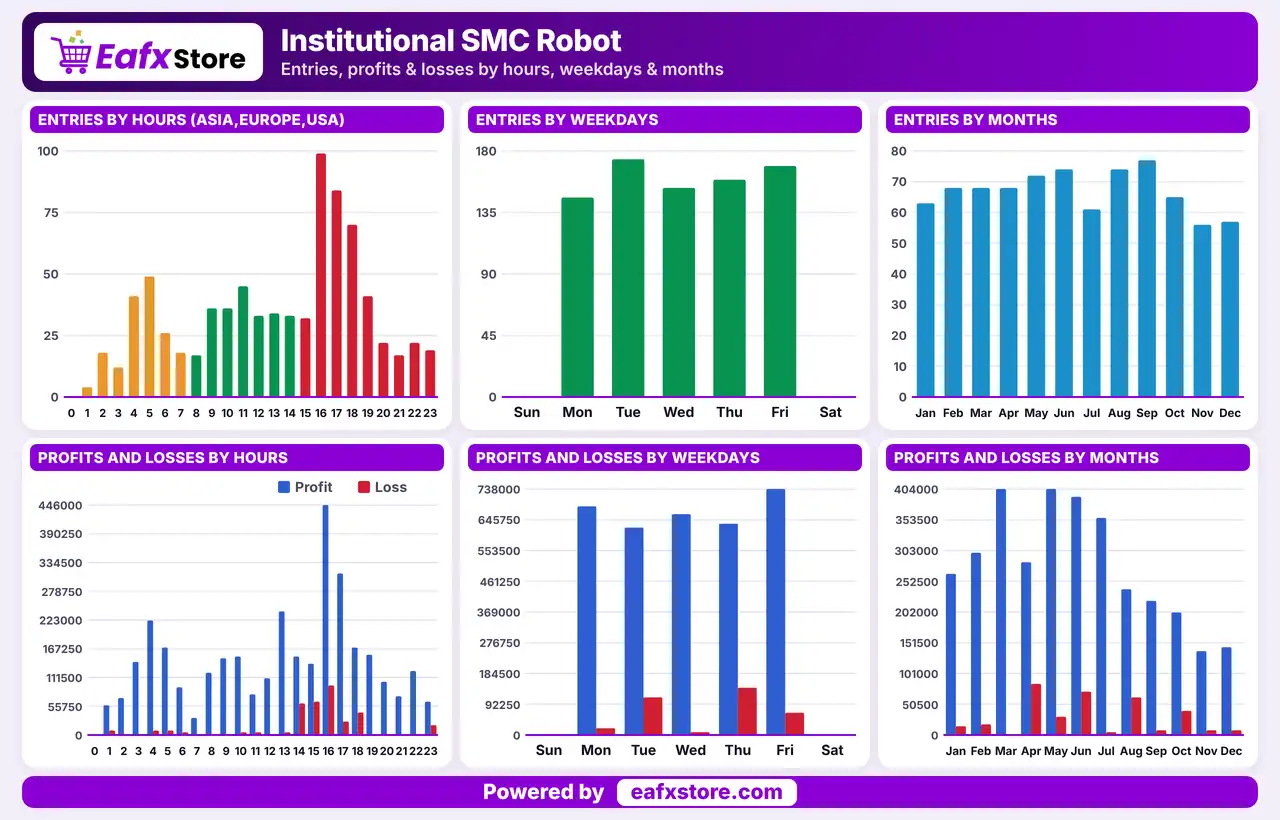
🔢 Institutional SMC Robot MT5: Complete Settings Guide and Configuration Explained
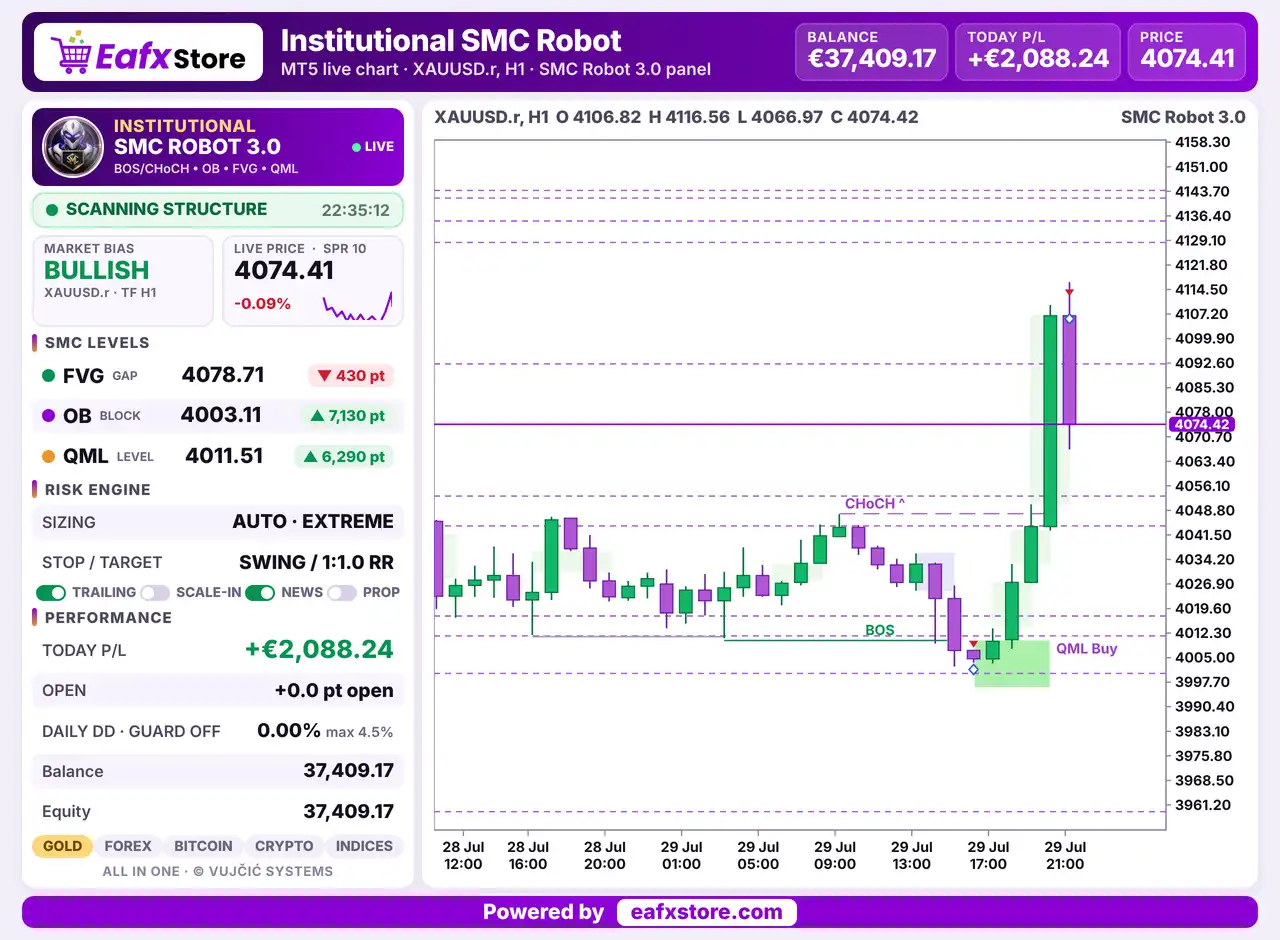
Institutional SMC Robot is an automated trading Expert Advisor designed around Smart Money Concepts (SMC), with configurable market-structure detection, Fair Value Gap (FVG) and Order Block (OB) filters, dynamic stop-loss and take-profit calculations, trailing-stop management, and risk controls. Its inputs allow traders to adjust swing sensitivity, confirm breakouts, visualize key chart structures, control position sizing, and configure news-event protection.
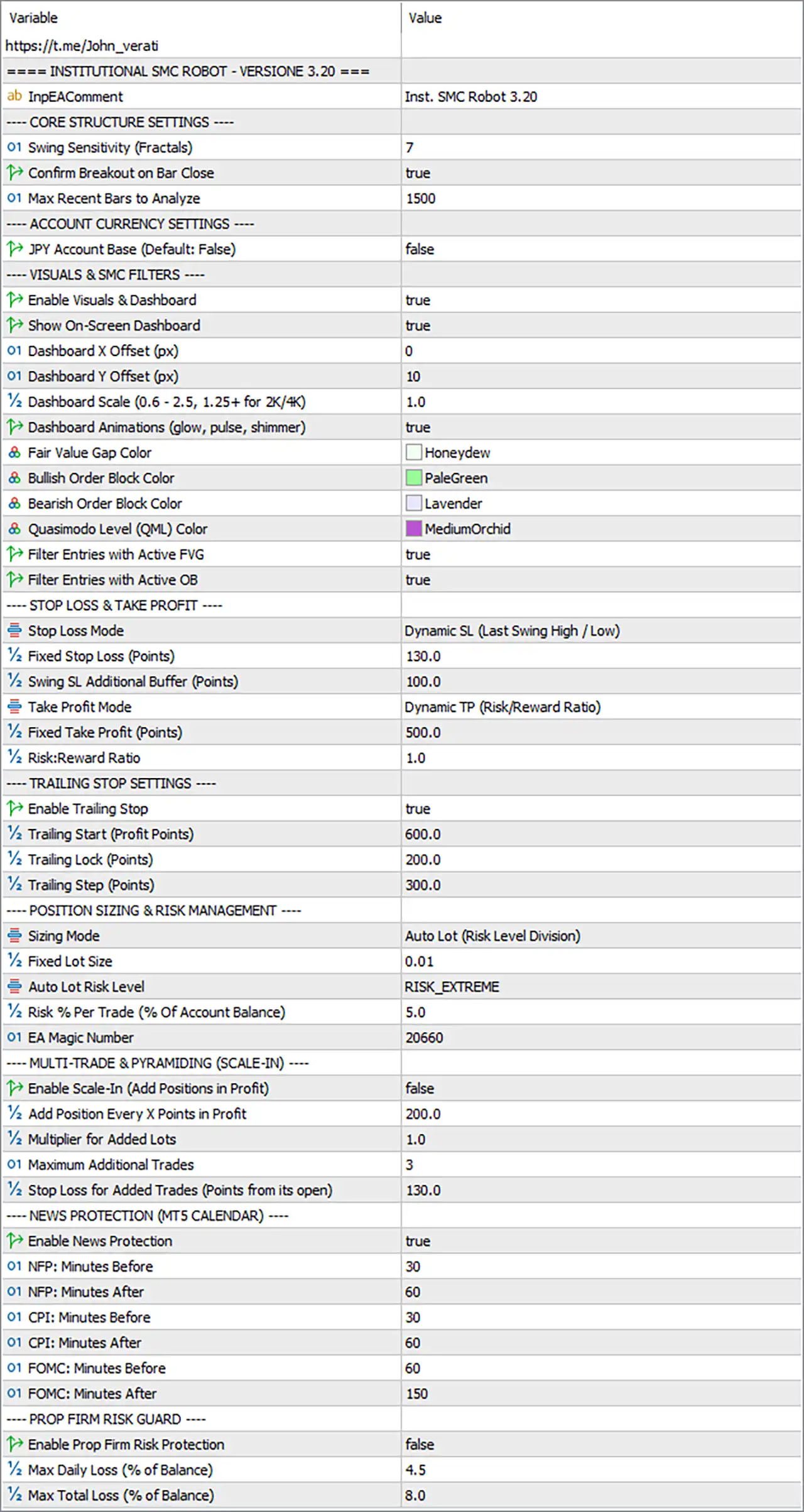
The displayed configuration is Institutional SMC Robot. It includes automatic lot sizing with an extreme risk profile selected, active news protection, and optional prop firm risk protection. This guide explains every visible input, preserving the original parameter names and values.
⚙️ Core Structure Settings
🔹 ---- CORE STRUCTURE SETTINGS ---- = Section heading — Introduces the parameters used to detect market structure and confirm potential breakout conditions.
🔹 Swing Sensitivity (Fractals) = 7 — Sets swing sensitivity to 7. This parameter controls the sensitivity of fractal-based swing detection. The EA may use identified swing highs and lows to assess market structure, but the exact number of bars required for confirmation depends on its implementation.
🔹 Confirm Breakout on Bar Close = true — Enables breakout confirmation at candle close. This setting is intended to require a completed candle to confirm a breakout rather than relying solely on a temporary price movement during an unfinished candle.
🔹 Max Recent Bars to Analyze = 1500 — Sets the maximum historical bar-analysis window to 1500 bars. The EA can use this limit to examine recent price history when identifying market structure and related trading signals.
⚙️ Account Currency Settings
🔹 ---- ACCOUNT CURRENCY SETTINGS ---- = Section heading — Introduces the account-currency configuration.
🔹 JPY Account Base (Default: False) = false — Disables the JPY account-base option. If this setting is intended to adjust calculations for Japanese yen-denominated accounts, those adjustments are not enabled through this switch.
⚙️ Visuals and Smart Money Concepts Filters
🔹 ---- VISUALS & SMC FILTERS ---- = Section heading — Introduces the chart-visualization options and SMC entry filters.
🔹 Enable Visuals & Dashboard = true — Enables the EA’s visual elements and dashboard functionality, allowing supported chart information and market-structure annotations to be displayed.
🔹 Show On-Screen Dashboard = true — Enables the on-screen dashboard. This setting controls whether the dashboard is displayed on the chart, assuming the visualization system is active.
🔹 Dashboard X Offset (px) = 0 — Sets the dashboard’s horizontal offset to 0 pixels. This places it at the default horizontal reference position defined by the EA.
🔹 Dashboard Y Offset (px) = 10 — Sets the dashboard’s vertical offset to 10 pixels. This moves the dashboard vertically relative to its default chart position.
🔹 Dashboard Scale (0.6 - 2.5, 1.25+ for 2K/4K) = 1.0 — Sets the dashboard scale to 1.0, within the supported range of 0.6–2.5. The note recommends a scale of 1.25 or higher for 2K/4K displays; the current value uses the standard scale.
🔹 Dashboard Animations (glow, pulse, shimmer) = true — Enables dashboard animations such as glow, pulse, and shimmer effects. This setting affects the visual presentation rather than necessarily changing trading decisions.
🔹 Fair Value Gap Color = Honeydew — Sets the Fair Value Gap (FVG) display color to Honeydew, a very light green shade. It determines how FVG zones are colored on the chart.
🔹 Bullish Order Block Color = PaleGreen — Sets the bullish Order Block display color to PaleGreen, a light green shade used to distinguish bullish zones.
🔹 Bearish Order Block Color = Lavender — Sets the bearish Order Block display color to Lavender, a light purple shade used to distinguish bearish zones.
🔹 Quasimodo Level (QML) Color = MediumOrchid — Sets the Quasimodo Level (QML) display color to MediumOrchid, a purple-magenta shade used to highlight QML levels.
🔹 Filter Entries with Active FVG = true — Enables the active Fair Value Gap entry filter. The EA is configured to use the presence or status of an active FVG as part of its entry qualification, according to its internal rules.
🔹 Filter Entries with Active OB = true — Enables the active Order Block entry filter. The EA is configured to consider active Order Block conditions when evaluating potential entries.
⚙️ Stop-Loss and Take-Profit Settings
🔹 ---- STOP LOSS & TAKE PROFIT ---- = Section heading — Introduces the trade exit configuration.
🔹 Stop Loss Mode = Dynamic SL (Last Swing High / Low) — Selects Dynamic SL (Last Swing High / Low) as the stop-loss method. The EA is configured to calculate the stop-loss level using the most recent relevant swing high or swing low rather than relying exclusively on a fixed stop distance.
🔹 Fixed Stop Loss (Points) = 130.0 — Sets the fixed stop-loss distance to 130.0 points. This value is available as a configured distance, although the selected stop-loss mode is dynamic; whether this fixed value is used as a fallback or under other conditions depends on the EA’s logic.
🔹 Swing SL Additional Buffer (Points) = 100.0 — Sets an additional buffer of 100.0 points for swing-based stop-loss placement. This may add distance beyond the relevant swing high or low to help accommodate price fluctuations.
🔹 Take Profit Mode = Dynamic TP (Risk/Reward Ratio) — Selects dynamic take-profit calculation based on a risk/reward ratio. The target is intended to be calculated in relation to the distance between the entry price and the stop loss.
🔹 Fixed Take Profit (Points) = 500.0 — Sets the fixed take-profit distance to 500.0 points. Since the selected mode is dynamic, this value may serve as an alternative or fallback setting depending on the EA’s implementation.
🔹 Risk Ratio = 1.0 — Sets the risk/reward ratio to 1.0, corresponding to a nominal 1:1 target-to-risk relationship when the dynamic take-profit calculation uses this value directly.
⚙️ Trailing Stop Settings
🔹 ---- TRAILING STOP SETTINGS ---- = Section heading — Introduces the trailing-stop parameters used to manage open positions.
🔹 Enable Trailing Stop = true — Enables trailing-stop management. The EA can adjust stop-loss levels according to its trailing rules when the required conditions are met.
🔹 Trailing Start (Profit Points) = 600.0 — Sets the trailing activation threshold to 600.0 profit points. Trailing management is configured to begin after the qualifying profit reaches this threshold, subject to the EA’s implementation.
🔹 Trailing Lock (Points) = 200.0 — Sets the trailing lock parameter to 200.0 points. This may define the profit distance the EA attempts to preserve when trailing activates or adjusts, depending on its stop-management logic.
🔹 Trailing Step (Points) = 300.0 — Sets the trailing adjustment step to 300.0 points. This parameter controls the configured increment for trailing-stop updates; the precise relationship between the start, lock, and step values depends on the EA’s algorithm.
⚙️ Position Sizing and Risk Management
🔹 ---- POSITION SIZING & RISK MANAGEMENT ---- = Section heading — Introduces the position-sizing and per-trade risk parameters.
🔹 Sizing Mode = Auto Lot (Risk Level Division) — Selects automatic lot sizing using the Risk Level Division method. Position volume is calculated automatically according to the EA’s risk-sizing logic rather than being determined solely by a fixed lot.
🔹 Fixed Lot Size = 0.01 — Sets the fixed lot-size parameter to 0.01 lots. Because automatic sizing is selected, this value may apply only when fixed-lot mode is used or under specific fallback conditions.
🔹 Auto Lot Risk Level = RISK_EXTREME — Selects RISK_EXTREME as the automatic risk profile. This label indicates the most aggressive-sounding risk category, but the exact lot-sizing multiplier and resulting exposure must be verified in the EA’s implementation.
🔹 Risk % Per Trade (% Of Account Balance) = 5.0 — Sets the risk parameter to 5.0% of account balance per trade. If the EA interprets this as the percentage at risk between entry and stop loss, a losing trade could risk approximately 5% of balance before costs and execution differences. Confirm the actual calculation, particularly because the selected profile is RISK_EXTREME.
🔹 EA Magic Number = 20660 — Assigns Magic Number 20660 to trades managed by Institutional SMC Robot MT5. This identifier helps distinguish the EA’s trades from other positions when the trade-management system uses Magic Numbers consistently.
⚙️ Multi-Trade and Pyramiding (Scale-In)
🔹 ---- MULTI-TRADE & PYRAMIDING (SCALE-IN) ---- = Section heading — Introduces the settings for adding positions to an existing profitable trade.
🔹 Enable Scale-In (Add Positions in Profit) = false — Disables scale-in trading. The EA is not configured to add further positions to a profitable trade through this feature.
🔹 Add Position Every X Points in Profit = 200.0 — Sets the scale-in interval to 200.0 profit points. If scale-in is enabled, this parameter may determine how much additional favorable price movement is required before another position can be added.
🔹 Multiplier for Added Lots = 1.0 — Sets the added-position lot multiplier to 1.0. If used, this multiplier would leave the calculated added lot size unchanged relative to its reference size, subject to the EA’s internal sizing rules.
🔹 Maximum Additional Trades = 3 — Sets the maximum number of additional scale-in trades to 3. This limit is relevant when scale-in is enabled; the feature is currently disabled.
🔹 Stop Loss for Added Trades (Points from its open) = 130.0 — Sets the stop-loss distance for each added trade to 130.0 points from its own opening price. This parameter may apply when additional trades are enabled.
⚙️ News Protection (MT5 Calendar)
🔹 ---- NEWS PROTECTION (MT5 CALENDAR) ---- = Section heading — Introduces the economic-calendar protection settings for news-related volatility.
🔹 Enable News Protection = true — Enables the news-protection feature. The EA is configured to use the specified event buffers around selected economic releases, subject to the availability of MT5 calendar data and the EA’s event-handling logic.
🔹 NFP: Minutes Before = 30 — Sets the pre-event exclusion period for Non-Farm Payrolls (NFP) to 30 minutes. When a qualifying NFP event is detected, the EA may avoid opening trades during the 30 minutes before its scheduled release.
🔹 NFP: Minutes After = 60 — Sets the post-event exclusion period for NFP to 60 minutes. This allows a configured one-hour buffer after the event before the EA resumes eligible trading.
🔹 CPI: Minutes Before = 30 — Sets the pre-event exclusion period for Consumer Price Index (CPI) releases to 30 minutes.
🔹 CPI: Minutes After = 60 — Sets the post-event exclusion period for CPI releases to 60 minutes.
🔹 FOMC: Minutes Before = 60 — Sets the pre-event exclusion period for Federal Open Market Committee (FOMC) events to 60 minutes, providing a one-hour buffer before the scheduled release.
🔹 FOMC: Minutes After = 150 — Sets the post-event exclusion period for FOMC events to 150 minutes, equivalent to 2 hours and 30 minutes after the scheduled release.
⚙️ Prop Firm Risk Guard
🔹 ---- PROP FIRM RISK GUARD ---- = Section heading — Introduces the optional account protection settings designed to help manage drawdown limits.
🔹 Enable Prop Firm Risk Protection = false — Disables the prop firm risk-protection feature. The configured daily and total loss thresholds may not be enforced by this feature while it remains disabled.
🔹 Max Daily Loss (% of Balance) = 4.5 — Sets the maximum daily loss threshold to 4.5% of account balance. If prop firm protection is enabled and the EA applies this limit as labeled, it may trigger a trading restriction when daily losses reach the threshold.
🔹 Max Total Loss (% of Balance) = 8.0 — Sets the maximum total loss threshold to 8.0% of account balance. If the protection feature is enabled, this value may be used to limit overall account losses according to the EA’s risk-control logic.
🔢 Conclusion
The displayed Institutional SMC Robot MT5 Version 3.20 configuration combines fractal-based market-structure detection with active Fair Value Gap and Order Block entry filters. The structure settings use Swing Sensitivity = 7, breakout confirmation on bar close, and a maximum analysis window of 1500 bars.
Risk and trade management are configured with dynamic swing-based stop loss, dynamic take profit using a 1.0 risk/reward ratio, and enabled trailing-stop management. Automatic lot sizing uses the RISK_EXTREME profile with 5.0% risk per trade, making the risk calculation especially important to verify before deployment. Scale-in trading is disabled, while MT5 calendar news protection is enabled with event-specific buffers for NFP, CPI, and FOMC releases.
The prop firm risk guard is disabled even though daily and total loss thresholds are set to 4.5% and 8.0%. Traders who require those protections should verify the EA’s drawdown calculation and enable the feature only after testing. Backtesting and demo trading are recommended before using these settings on a live account.


