


🔢 Quantix Core G33 EA MT5 Settings Guide
Quantix Core G33 EA MT5 is an automated trading Expert Advisor built around structured money management, trade execution, recovery management, and economic-news filtering. Its configuration provides several ways to control position sizing, including fixed lots, risk-based trading, and lots-per-balance calculations.
The supplied settings use a Medium risk profile, 0.01 Fixed Lot, 0.3 Lots per 1000 Balance, and an automatic recovery mode. The EA also includes configurable news protection, with high-importance news filtering enabled and specific waiting periods before and after economic events.
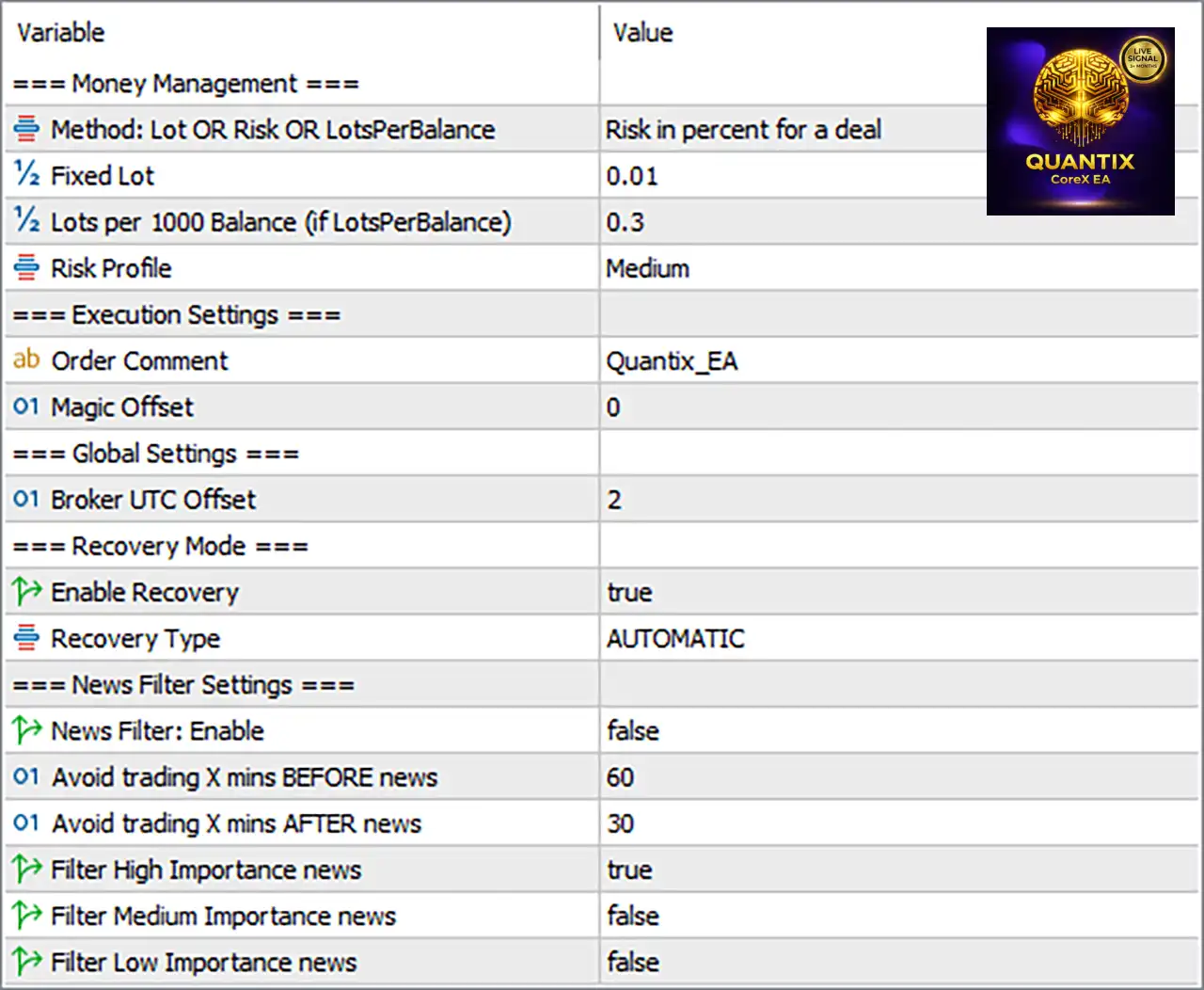
🔢 Quantix Core G33 EA MT5 Settings Explained
Money Management
🔹 Method: Lot OR Risk OR LotsPerBalance: Risk in percent for a deal — Selects the money-management method based on risk percentage for each deal.
🔹 Fixed Lot: 0.01 — Sets the fixed trading volume to 0.01 lots when the Fixed Lot method is used.
🔹 Lots per 1000 Balance (if LotsPerBalance): 0.3 — Sets the position size to 0.3 lots per 1000 units of account balance when the LotsPerBalance method is selected.
🔹 Risk Profile: Medium — Sets the EA's predefined risk profile to Medium, indicating the selected configuration is intended to use a moderate risk level.
Execution Settings
🔹 Order Comment: Quantix_EA — Assigns Quantix_EA as the comment attached to orders generated by the Expert Advisor.
🔹 Magic Offset: 0 — Sets the Magic Offset value to 0, which controls the EA's internal trade-identification offset.
Global Settings
🔹 Broker UTC Offset: 2 — Sets the broker's UTC time offset to 2, allowing the EA to align time-dependent functions with the broker's server time.
Recovery Mode
🔹 Enable Recovery: true — Enables the EA's recovery mechanism.
🔹 Recovery Type: AUTOMATIC — Configures recovery to operate in AUTOMATIC mode, allowing the EA to manage recovery according to its internal algorithm.
News Filter Settings
🔹 News Filter: Enable: false — Disables the overall economic-news trading filter in the supplied configuration.
🔹 Avoid trading X mins BEFORE news: 60 — Configures a 60-minute pre-news avoidance period if the News Filter is enabled.
🔹 Avoid trading X mins AFTER news: 30 — Configures a 30-minute post-news avoidance period if the News Filter is enabled.
🔹 Filter High Importance news: true — Enables filtering for high-importance economic news events.
🔹 Filter Medium Importance news: false — Disables filtering for medium-importance economic news events.
🔹 Filter Low Importance news: false — Disables filtering for low-importance economic news events.
Key Configuration Highlights
🔹 Money Management Method: Risk in percent for a deal.
🔹 Fixed Lot: 0.01.
🔹 Lots per 1000 Balance: 0.3.
🔹 Risk Profile: Medium.
🔹 Order Comment: Quantix_EA.
🔹 Magic Offset: 0.
🔹 Broker UTC Offset: 2.
🔹 Recovery: Enabled with true.
🔹 Recovery Type: AUTOMATIC.
🔹 News Filter: Disabled with false.
🔹 Pre-News Avoidance: 60 minutes.
🔹 Post-News Avoidance: 30 minutes.
🔹 High-Importance News Filter: Enabled with true.
🔹 Medium-Importance News Filter: Disabled with false.
🔹 Low-Importance News Filter: Disabled with false.
Risk Management Analysis
🔹 Risk-Based Trading: The displayed Money Management Method is “Risk in percent for a deal”, indicating that the selected money-management framework is designed around percentage-based trade risk.
🔹 Fixed-Lot Alternative: Fixed Lot = 0.01 provides a small fixed-volume alternative if the EA is switched to fixed-lot management.
🔹 Balance-Based Alternative: Lots per 1000 Balance = 0.3 provides another position-sizing option based on account balance.
🔹 Risk Profile: The Medium profile provides a predefined risk classification rather than an explicitly stated numerical risk percentage in the supplied screenshot.
🔹 Recovery Protection: Enable Recovery = true means the recovery functionality is active, while Recovery Type = AUTOMATIC allows the EA to handle recovery according to its programmed rules.
🔹 News Protection: Although the overall News Filter: Enable = false, the individual High Importance = true, Medium Importance = false, and Low Importance = false settings remain configured. The pre-news and post-news values are 60 and 30 minutes, respectively.
🔹 Time Synchronization: Broker UTC Offset = 2 is important for time-sensitive functions because it tells the EA how to interpret broker/server time relative to UTC.
Conclusion
Quantix Core G33 EA MT5 offers a compact but flexible configuration focused on risk-based money management, fixed-lot alternatives, balance-based position sizing, automatic recovery, trade identification, broker-time synchronization, and economic-news controls.
The supplied configuration uses a Medium risk profile, with Fixed Lot = 0.01 and Lots per 1000 Balance = 0.3 available as alternative sizing parameters. The selected money-management description is “Risk in percent for a deal”, indicating that percentage-based risk management is the displayed primary method.
The EA's Recovery Mode is enabled and set to AUTOMATIC, allowing the programmed recovery mechanism to manage qualifying situations automatically. For execution identification, orders use the comment Quantix_EA, while the Magic Offset is 0.
For news management, the overall News Filter is currently disabled, despite the High Importance news filter being set to true. If the overall news filter is activated, the configured protection window would avoid trading 60 minutes before and 30 minutes after relevant news, with only high-importance events selected for filtering.
Overall, Quantix Core G33 EA MT5 provides several configurable layers for managing exposure and recovery. Traders should verify how the selected risk method interacts with the Medium risk profile, recovery algorithm, and account size through backtesting and forward testing before using the EA in a live trading environment.
FAQs
❓ What money-management method is configured in Quantix Core G33 EA MT5?
The displayed method is “Risk in percent for a deal”, indicating percentage-based risk management.
❓ What is the Fixed Lot setting?
The Fixed Lot parameter is set to 0.01 lots.
❓ Is the recovery system enabled?
Yes. Enable Recovery = true, and the Recovery Type is AUTOMATIC.
❓ Is the news filter enabled?
The overall News Filter: Enable = false, so the news-filter function is currently disabled. However, Filter High Importance news = true is configured as the selected event category if the main filter is activated.
❓ What are the news protection periods?
The EA is configured to avoid trading 60 minutes before news and 30 minutes after news when the news filter is active.


