

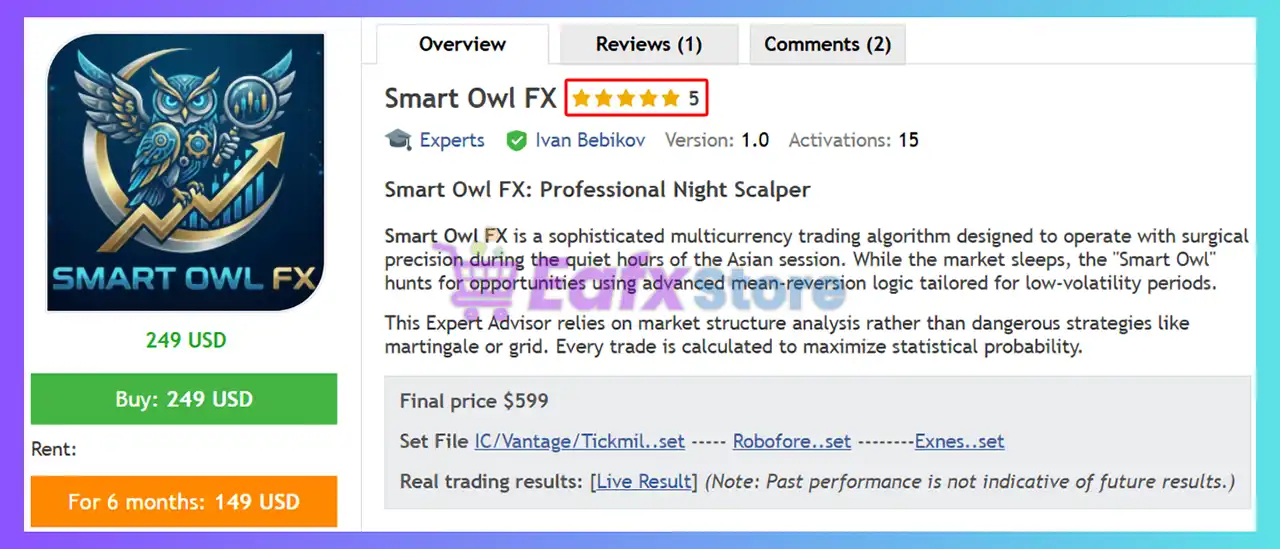
Smart Owl FX EA MT5 – Complete Settings Guide & Explanation
Smart Owl FX EA is a professional multi-currency automated trading Expert Advisor (EA) designed for the MetaTrader 5 platform. The EA integrates advanced money management, auto lot sizing, news filtering, spread protection, time-based trading control and pair-specific optimization settings.
With support for multiple Forex pairs and intelligent risk allocation, Smart Owl FX EA is suitable for traders seeking stable and diversified automated Forex trading performance.
Installation Panel Parameters
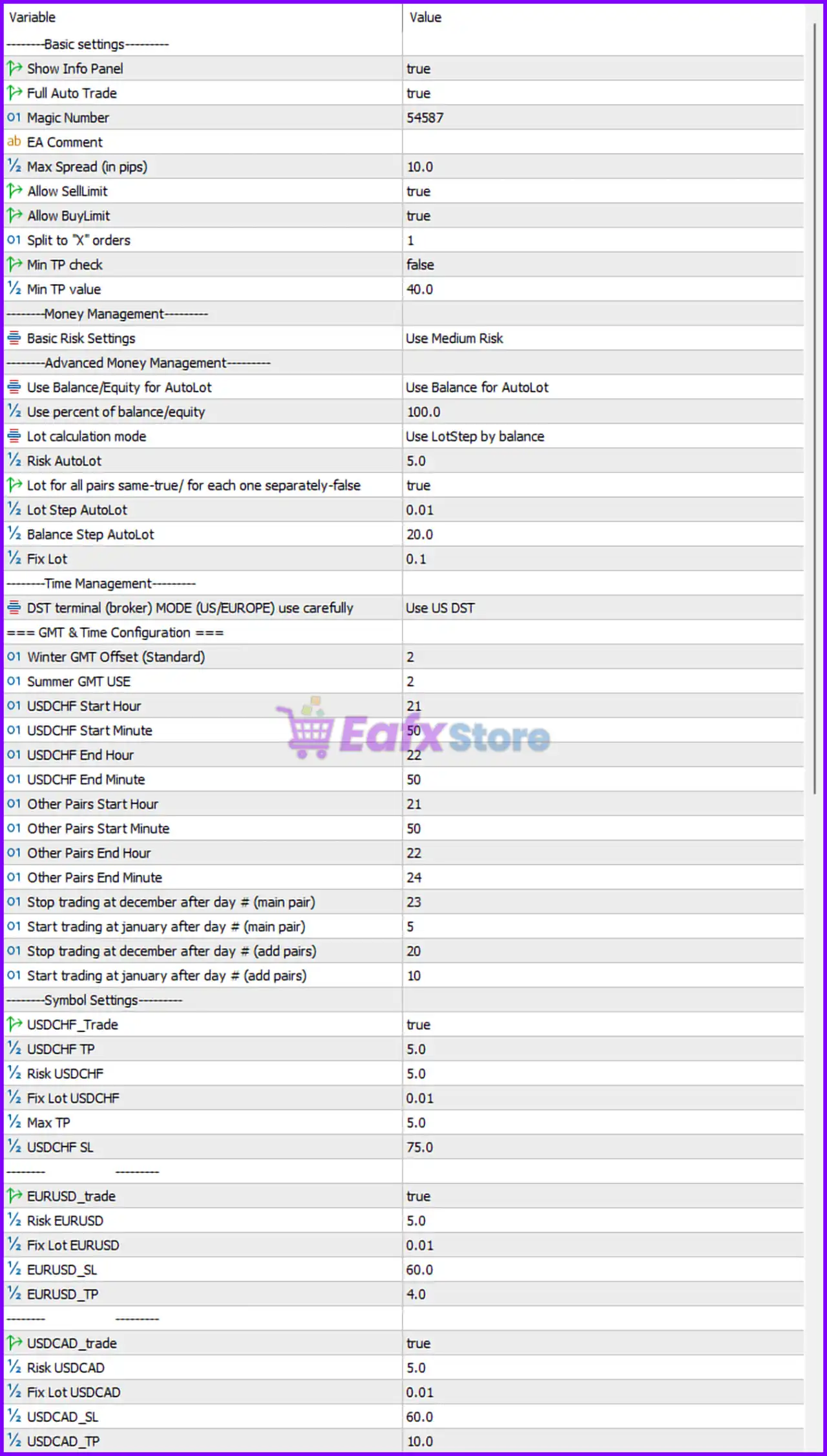
Below are the details of the parameters in the advisor’s trading system settings table:
Basic Settings
🔹 ---------Basic settings--------- — Main section header for the EA general configuration settings.
🔹 Show Info Panel = true — Displays the EA information panel directly on the chart.
🔹 Full Auto Trade = true — Enables fully automated trade execution.
🔹 Magic Number = 54587 — Unique identifier used by the EA to manage and track trades.
🔹 EA Comment = EA Comment — Adds the default comment text to all trades opened by the EA.
🔹 Max Spread (in pips) = 10.0 — Maximum spread allowed before opening new trades.
🔹 Allow SellLimit = true — Allows the EA to place Sell Limit pending orders.
🔹 Allow BuyLimit = true — Allows the EA to place Buy Limit pending orders.
🔹 Split to “X” orders = 1 — Number of split orders used for trade execution.
🔹 Min TP check = false — Disables minimum take profit verification before order placement.
🔹 Min TP value = 40.0 — Minimum take profit target value when Min TP check is enabled.
Money Management Settings
🔹 ---------Money Management--------- — Main section header for money management settings.
🔹 Basic Risk Settings = Use Medium Risk — Uses the Medium Risk profile for trading operations.
Advanced Money Management Settings
🔹 ---------Advanced Money Management--------- — Section header for advanced lot sizing controls.
🔹 Use Balance/Equity for AutoLot = Use Balance for AutoLot — Uses account balance instead of equity for automatic lot calculations.
🔹 Use percent of balance/equity = 100.0 — Uses 100.0% of account balance/equity for lot calculation references.
🔹 Lot calculation mode = Use LotStep by balance — Calculates lot size using balance-based step increments.
🔹 Risk AutoLot = 5.0 — Automatic lot sizing risk level set to 5.0%.
🔹 Lot for all pairs same=true/ for each one separately=false = true — Uses identical lot sizing for all currency pairs.
🔹 Lot Step AutoLot = 0.01 — Lot size increases in increments of 0.01.
🔹 Balance Step AutoLot = 20.0 — Increases lot size for every 20.0 balance units.
🔹 Fix Lot = 0.1 — Fixed manual lot size value set to 0.1.
Time Management Settings
🔹 ---------Time Management--------- — Main section header for broker time and session controls.
🔹 DST terminal (broker) MODE (US/EUROPE) use carefully = Use US DST — Uses United States daylight saving time settings.
GMT & Time Configuration Settings
🔹 === GMT & Time Configuration === — Section header for GMT offset and trading session scheduling.
🔹 Winter GMT Offset (Standard) = 2 — Broker GMT offset during winter is +2.
🔹 Summer GMT USE = 2 — Broker GMT offset during summer is +2.
🔹 USDCHF Start Hour = 21 — USDCHF trading session begins at hour 21.
🔹 USDCHF Start Minute = 50 — USDCHF trading session starts at minute 50.
🔹 USDCHF End Hour = 22 — USDCHF trading session ends at hour 22.
🔹 USDCHF End Minute = 50 — USDCHF trading session ends at minute 50.
🔹 Other Pairs Start Hour = 21 — Trading session for other pairs begins at hour 21.
🔹 Other Pairs Start Minute = 50 — Trading session for other pairs begins at minute 50.
🔹 Other Pairs End Hour = 22 — Trading session for other pairs ends at hour 22.
🔹 Other Pairs End Minute = 24 — Trading session for other pairs ends at minute 24.
🔹 Stop trading at december after day # (main pair) = 23 — Stops trading the main pair after December 23.
🔹 Start trading at january after day # (main pair) = 5 — Resumes trading the main pair after January 5.
🔹 Stop trading at december after day # (add pairs) = 20 — Stops trading additional pairs after December 20.
🔹 Start trading at january after day # (add pairs) = 10 — Resumes trading additional pairs after January 10.
Symbol Settings – USDCHF
🔹 ---------Symbol Settings--------- — Main section header for currency pair configuration settings.
🔹 UsdCHF_Trade = true — Enables automated trading for USDCHF.
🔹 UsdCHF TP = 5.0 — Take profit target for USDCHF trades is 5.0 pips.
🔹 Risk USDCHF = 5.0 — Risk level for USDCHF trading is 5.0%.
🔹 Fix Lot USDCHF = 0.01 — Fixed lot size for USDCHF is 0.01.
🔹 Max TP = 5.0 — Maximum take profit value allowed for USDCHF.
🔹 USDCHF SL = 75.0 — Stop loss value for USDCHF trades is 75.0 pips.
Symbol Settings – EURUSD
🔹 EURUSD_trade = true — Enables automated trading for EURUSD.
🔹 Risk EURUSD = 5.0 — Risk level for EURUSD trading is 5.0%.
🔹 Fix Lot EURUSD = 0.01 — Fixed lot size for EURUSD is 0.01.
🔹 EURUSD_SL = 60.0 — Stop loss value for EURUSD trades is 60.0 pips.
🔹 EURUSD_TP = 4.0 — Take profit target for EURUSD trades is 4.0 pips.
Symbol Settings – USDCAD
🔹 USDCAD_trade = true — Enables automated trading for USDCAD.
🔹 Risk USDCAD = 5.0 — Risk level for USDCAD trading is 5.0%.
🔹 Fix Lot USDCAD = 0.01 — Fixed lot size for USDCAD is 0.01.
🔹 USDCAD_SL = 60.0 — Stop loss value for USDCAD trades is 60.0 pips.
🔹 USDCAD_TP = 10.0 — Take profit target for USDCAD trades is 10.0 pips.
Symbol Settings – EURCHF
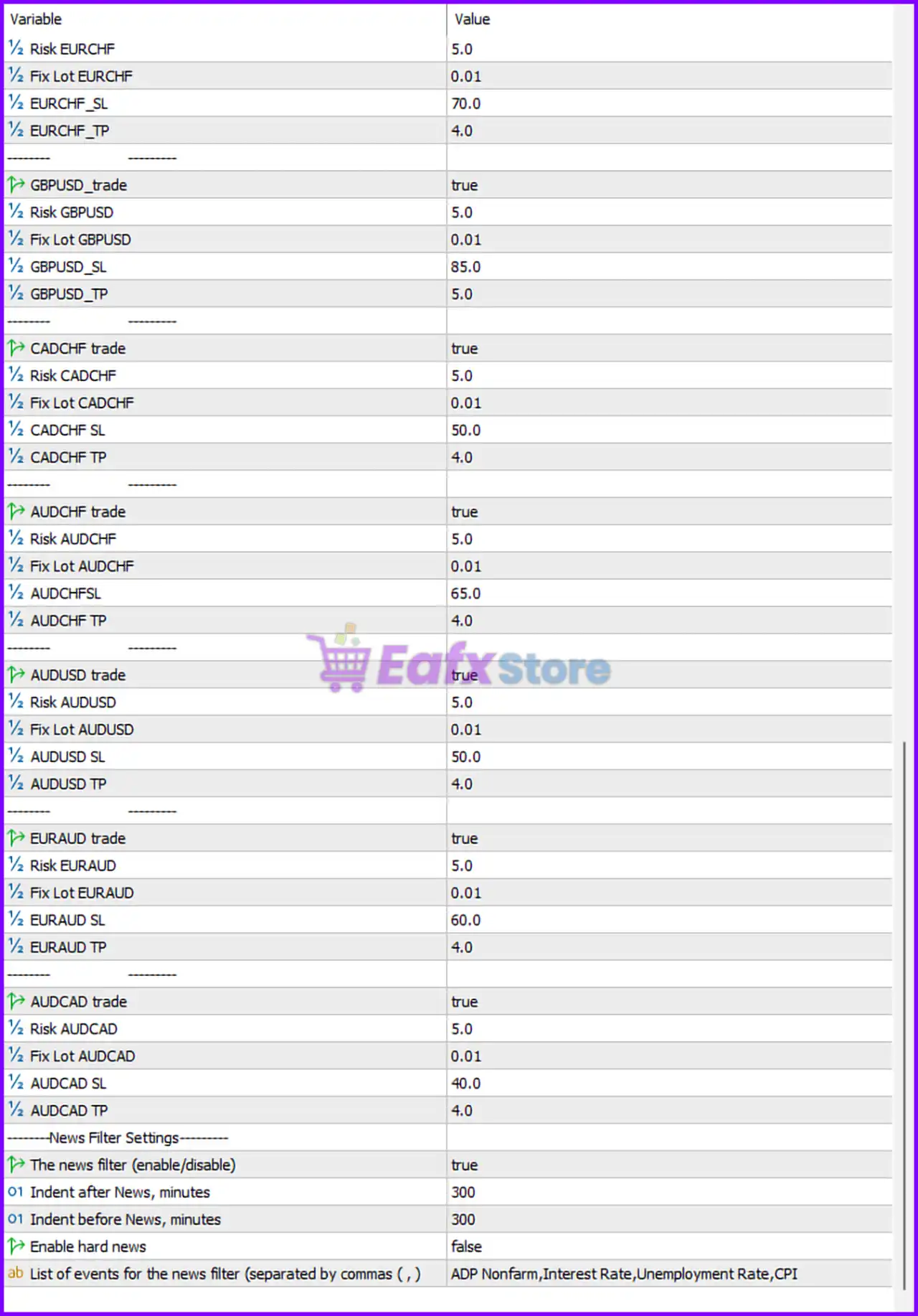
🔹 Risk EURCHF = 5.0 — Risk level for EURCHF trading is 5.0%.
🔹 Fix Lot EURCHF = 0.01 — Fixed lot size for EURCHF is 0.01.
🔹 EURCHF_SL = 70.0 — Stop loss value for EURCHF trades is 70.0 pips.
🔹 EURCHF_TP = 4.0 — Take profit target for EURCHF trades is 4.0 pips.
Symbol Settings – GBPUSD
🔹 GBPUSD_trade = true — Enables automated trading for GBPUSD.
🔹 Risk GBPUSD = 5.0 — Risk level for GBPUSD trading is 5.0%.
🔹 Fix Lot GBPUSD = 0.01 — Fixed lot size for GBPUSD is 0.01.
🔹 GBPUSD_SL = 85.0 — Stop loss value for GBPUSD trades is 85.0 pips.
🔹 GBPUSD_TP = 5.0 — Take profit target for GBPUSD trades is 5.0 pips.
Symbol Settings – CADCHF
🔹 CADCHF_trade = true — Enables automated trading for CADCHF.
🔹 Risk CADCHF = 5.0 — Risk level for CADCHF trading is 5.0%.
🔹 Fix Lot CADCHF = 0.01 — Fixed lot size for CADCHF is 0.01.
🔹 CADCHF_SL = 50.0 — Stop loss value for CADCHF trades is 50.0 pips.
🔹 CADCHF TP = 4.0 — Take profit target for CADCHF trades is 4.0 pips.
Symbol Settings – AUDCHF
🔹 AUDCHF trade = true — Enables automated trading for AUDCHF.
🔹 Risk AUDCHF = 5.0 — Risk level for AUDCHF trading is 5.0%.
🔹 Fix Lot AUDCHF = 0.01 — Fixed lot size for AUDCHF is 0.01.
🔹 AUDCHFSL = 65.0 — Stop loss value for AUDCHF trades is 65.0 pips.
🔹 AUDCHF TP = 4.0 — Take profit target for AUDCHF trades is 4.0 pips.
Symbol Settings – AUDUSD
🔹 AUDUSD trade = true — Enables automated trading for AUDUSD.
🔹 Risk AUDUSD = 5.0 — Risk level for AUDUSD trading is 5.0%.
🔹 Fix Lot AUDUSD = 0.01 — Fixed lot size for AUDUSD is 0.01.
🔹 AUDUSD SL = 50.0 — Stop loss value for AUDUSD trades is 50.0 pips.
🔹 AUDUSD TP = 4.0 — Take profit target for AUDUSD trades is 4.0 pips.
Symbol Settings – EURAUD
🔹 EURAUD trade = true — Enables automated trading for EURAUD.
🔹 Risk EURAUD = 5.0 — Risk level for EURAUD trading is 5.0%.
🔹 Fix Lot EURAUD = 0.01 — Fixed lot size for EURAUD is 0.01.
🔹 EURAUD SL = 60.0 — Stop loss value for EURAUD trades is 60.0 pips.
🔹 EURAUD TP = 4.0 — Take profit target for EURAUD trades is 4.0 pips.
Symbol Settings – AUDCAD
🔹 AUDCAD trade = true — Enables automated trading for AUDCAD.
🔹 Risk AUDCAD = 5.0 — Risk level for AUDCAD trading is 5.0%.
🔹 Fix Lot AUDCAD = 0.01 — Fixed lot size for AUDCAD is 0.01.
🔹 AUDCAD SL = 40.0 — Stop loss value for AUDCAD trades is 40.0 pips.
🔹 AUDCAD TP = 4.0 — Take profit target for AUDCAD trades is 4.0 pips.
News Filter Settings
🔹 ---------News Filter Settings--------- — Main section header for economic news filtering.
🔹 The news filter (enable/disable) = true — Enables the built-in news filter system.
🔹 Indent after News, minutes = 300 — Blocks trading for 300 minutes after major news releases.
🔹 Indent before News, minutes = 300 — Blocks trading for 300 minutes before major news releases.
🔹 Enable hard news = false — Disables filtering for hard-impact news only.
🔹 List of events for the news filter (separated by commas (, )) = ADP Nonfarm,Interest Rate,Unemployment Rate,CPI — Filters trading during ADP Nonfarm, Interest Rate, Unemployment Rate, and CPI economic events.
Conclusion
Smart Owl FX EA is a highly configurable multi-currency trading Expert Advisor that combines automatic lot sizing, advanced money management, spread protection, time-based trading filters, and economic news filtering into a professional MT5 trading solution.
With optimized settings for multiple Forex pairs and flexible risk controls, the EA is suitable for traders seeking stable and diversified automated Forex trading performance.
FAQs
❓ What is Smart Owl FX EA MT5?
Smart Owl FX EA MT5 is an automated multi-currency Forex trading Expert Advisor for MetaTrader 5 with advanced money management and news filtering systems.
❓ Does Smart Owl FX EA MT5 support automatic lot sizing?
Yes, the EA supports AutoLot calculation based on account balance, equity, and configurable risk settings.
❓ Which currency pairs are supported in the provided settings?
The settings include USDCHF, EURUSD, USDCAD, EURCHF, GBPUSD, CADCHF, AUDCHF, AUDUSD, EURAUD, and AUDCAD.
❓ Can Smart Owl FX EA MT5 filter economic news events?
Yes, the EA includes a built-in news filter for events such as ADP Nonfarm, Interest Rate, Unemployment Rate, and CPI.
❓ Does Smart Owl FX EA MT5 support pending orders?
Yes, the EA supports both Buy Limit and Sell Limit pending orders for automated trade execution.


