
🔢 QuantumPip EA MT5 Settings Explained – Complete Parameter Guide
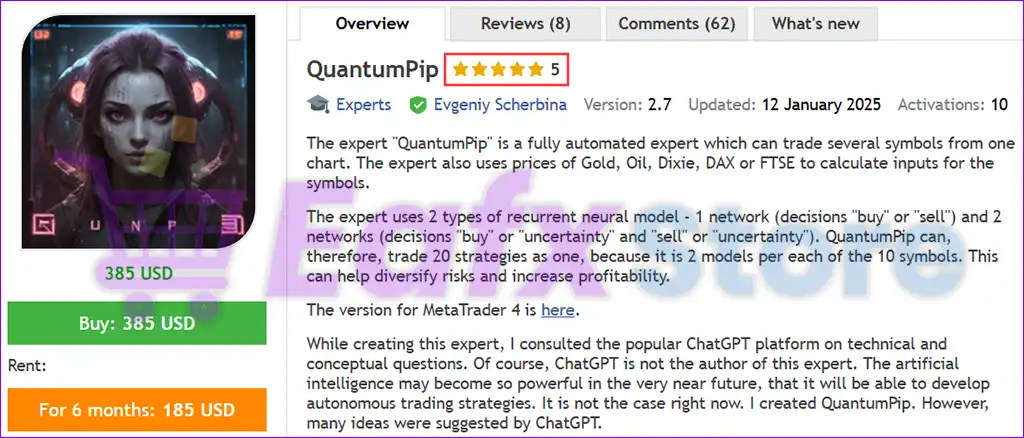
QuantumPip EA is a professional multi-asset Expert Advisor for MetaTrader 5 that supports Forex pairs, Gold, Oil, and stock indices. The EA combines advanced risk management, flexible money management, automatic trade management, and multi-symbol trading capabilities.
With configurable Take Profit, Trailing Stop, Stop Loss, spread protection, and portfolio-wide trade control, QuantumPip EA MT5 is designed to deliver stable automated trading across multiple financial markets.
🔢 Installation Panel Parameters
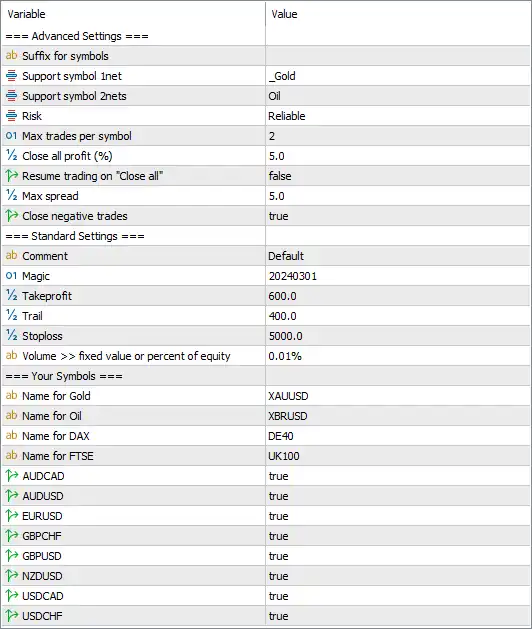
Below are the details of the parameters in the advisor’s trading system settings table:
🔶 Advanced Settings
🔹 Suffix for Symbols – Specifies the broker's symbol suffix if your broker uses custom instrument names (leave blank if not required).
🔹 Support Symbol 1net = _Gold – Defines the suffix or identifier used for Gold-related symbols.
🔹 Support Symbol 2nets = Oil – Defines the suffix or identifier used for Oil trading symbols.
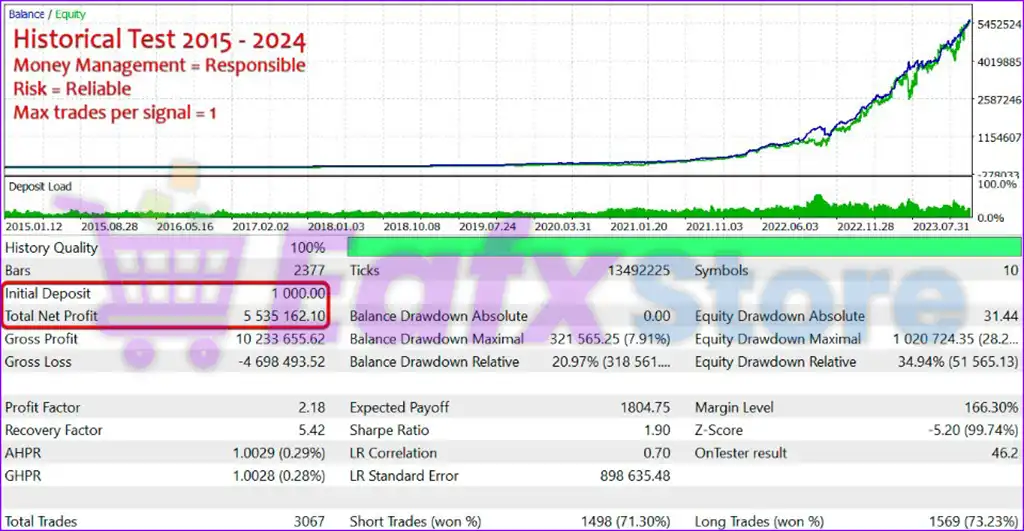
🔹 Risk = Reliable – Selects the Reliable risk profile for more conservative and stable trading behavior.
🔹 Max Trades per Symbol = 2 – Limits the EA to a maximum of 2 simultaneous open trades for each trading symbol.
🔹 Close All Profit (%) = 5.0 – Closes all open positions once the overall floating profit reaches 5.0%.
🔹 Resume Trading on "Close All" = false – Prevents the EA from automatically opening new trades immediately after a global close.
🔹 Max Spread = 5.0 – Allows new trades only when the market spread is 5.0 points or lower.
🔹 Close Negative Trades = true – Enables automatic closure of losing trades when the EA's internal exit conditions are met.
🔶 Standard Settings
🔹 Comment = Default – Adds the trade comment "Default" to all positions opened by the EA.
🔹 Magic = 20240301 – Unique Magic Number (20240301) used to identify and manage the EA's positions.
🔹 Takeprofit = 600.0 – Sets the default Take Profit target to 600.0 points.
🔹 Trail = 400.0 – Starts or maintains the trailing stop using a distance of 400.0 points.
🔹 Stoploss = 5000.0 – Sets the Stop Loss distance to 5000.0 points.
🔹 Volume >> Fixed Value or Percent of Equity = 0.01% – Uses 0.01% of account equity (or the configured fixed volume option) for position sizing.
🔶 Supported Trading Symbols
🔹 Name for Gold = XAUUSD – Assigns XAUUSD as the Gold trading symbol.
🔹 Name for Oil = XBRUSD – Assigns XBRUSD as the Brent Oil trading symbol.
🔹 Name for DAX = DE40 – Assigns DE40 as the German DAX index symbol.
🔹 Name for FTSE = UK100 – Assigns UK100 as the FTSE 100 index symbol.
🔶 Enabled Forex Symbols
🔹 AUDCAD = true – Enables automated trading for AUDCAD.
🔹 AUDUSD = true – Enables automated trading for AUDUSD.
🔹 EURUSD = true – Enables automated trading for EURUSD.
🔹 GBPCHF = true – Enables automated trading for GBPCHF.
🔹 GBPUSD = true – Enables automated trading for GBPUSD.
🔹 NZDUSD = true – Enables automated trading for NZDUSD.
🔹 USDCAD = true – Enables automated trading for USDCAD.
🔹 USDCHF = true – Enables automated trading for USDCHF.
🔢 Conclusion
QuantumPip EA MT5 is a versatile multi-market trading robot that supports Forex, Gold, Oil, and major stock indices within a single Expert Advisor. Its configurable risk profile, portfolio-level profit management, spread protection, trailing stop system, and multi-symbol support allow traders to build a diversified automated trading strategy while maintaining disciplined risk control. The flexible symbol mapping also makes the EA compatible with brokers that use customized instrument names.
🔢 FAQs
❓ What markets can QuantumPip EA MT5 trade?
QuantumPip EA MT5 supports Forex pairs, Gold (XAUUSD), Brent Oil (XBRUSD), DAX (DE40), and FTSE (UK100).
❓ How many trades can QuantumPip EA MT5 open per symbol?
By default, the EA allows a maximum of 2 simultaneous trades per symbol.
❓ What happens when the total account profit reaches 5%?
The Close All Profit (%) = 5.0 setting instructs the EA to close all open positions once the combined floating profit reaches 5.0%.
❓ Can I use QuantumPip EA MT5 with brokers that use custom symbol names?
Yes. The Suffix for Symbols, Support Symbol 1net, and Support Symbol 2nets settings allow the EA to adapt to broker-specific symbol naming conventions.
❓ Does QuantumPip EA MT5 include built-in risk management?
Yes. The EA includes configurable risk profiles, maximum spread filtering, Stop Loss, Take Profit, Trailing Stop, automatic losing-trade management, and portfolio-wide profit control for enhanced capital protection.