🔢 Aura Neuron MT4 Settings Guide – Complete Parameters Explained
Aura Neuron MT4 is an advanced automated Forex trading Expert Advisor (EA) designed for MetaTrader 4 users who want intelligent trade execution, recovery systems, hedging capability and volatility filtering.
The EA includes powerful money management features, ATR-based range filters, trailing stop automation, trading session control, and economic news protection to help traders optimize performance while managing risk efficiently.
🔢 Installation Panel Parameters
Below are the details of the parameters in the advisor’s trading system settings table:
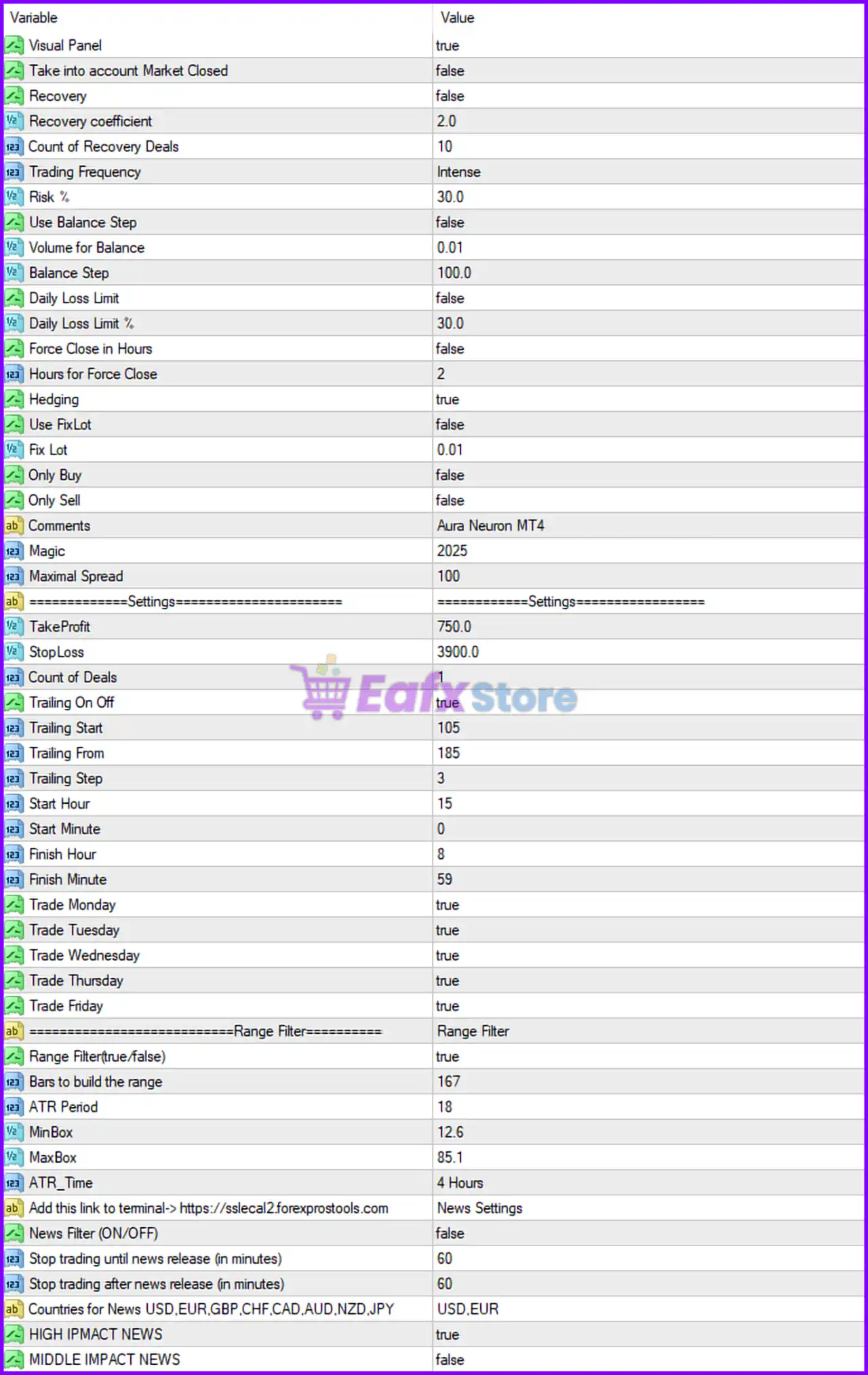
🔶 Complete Aura Neuron MT4 Settings Explained
🔹 Visual Panel = true: Enables the on-chart visual information panel for monitoring EA activity.
🔹 Take into account Market Closed = false: The EA does not consider market closed conditions in calculations.
🔹 Recovery = false: Recovery mode is disabled.
🔹 Recovery coefficient = 2.0: Recovery multiplier coefficient is set to 2.0.
🔹 Count of Recovery Deals = 10: Maximum recovery trades allowed is 10.
🔹 Trading Frequency = Intense: Trading mode is configured for aggressive/intense execution frequency.
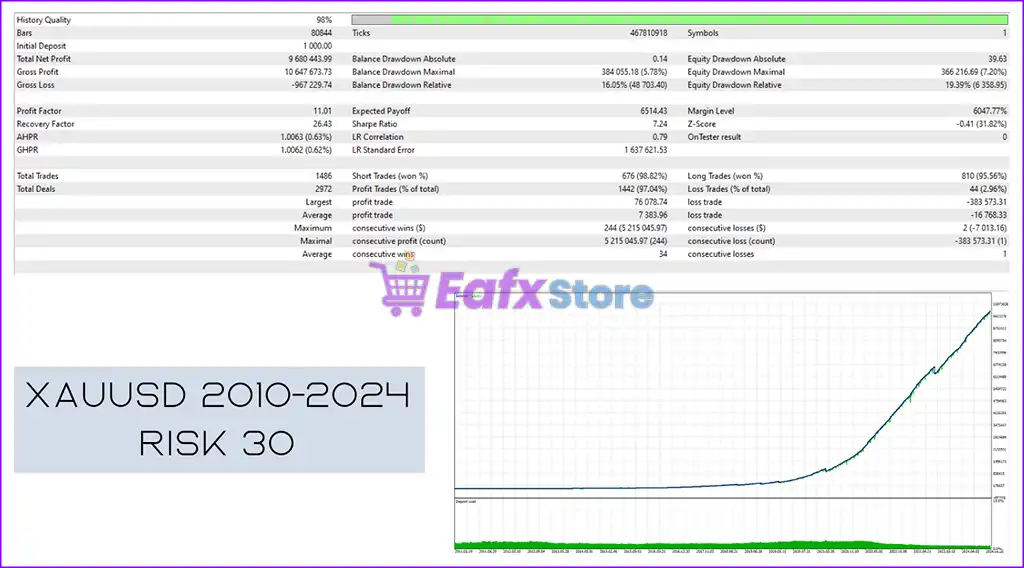
🔹 Risk % = 30.0: Risk percentage per trading cycle is set to 30.0%.
🔹 Use Balance Step = false: Automatic balance step lot adjustment is disabled.
🔹 Volume for Balance = 0.01: Trading volume reference per balance step is 0.01.
🔹 Balance Step = 100.0: Balance increment step is configured at 100.0.
🔹 Daily Loss Limit = false: Daily loss protection feature is disabled.
🔹 Daily Loss Limit % = 30.0: Maximum daily loss percentage threshold is 30.0%.
🔹 Force Close in Hours = false: Forced trade closing after specified hours is disabled.
🔹 Hours for Force Close = 2: Forced close timer is set to 2 hours if enabled.
🔹 Hedging = true: Hedging functionality is enabled.
🔹 Use FixLot = false: Fixed lot mode is disabled.
🔹 Fix Lot = 0.01: Fixed lot size value is 0.01.
🔹 Only Buy = false: Buy-only trading mode is disabled.
🔹 Only Sell = false: Sell-only trading mode is disabled.
🔹 Comments = Aura Neuron MT4: Order comment text displayed on trades is Aura Neuron MT4.
🔹 Magic = 2025: Unique magic number used for identifying EA trades is 2025.
🔹 Maximal Spread = 100: Maximum allowed spread for opening trades is 100.
🔶 Trade Settings
🔹 TakeProfit = 750.0: Take-profit target is set to 750.0 points.
🔹 StopLoss = 3900.0: Stop-loss distance is configured at 3900.0 points.
🔹 Count of Deals = 1: Maximum simultaneous trades allowed is 1.
🔹 Trailing On Off = true: Trailing stop functionality is enabled.
🔹 Trailing Start = 105: Trailing stop activates after 105 points profit.
🔹 Trailing From = 185: Trailing calculation starts from 185 points.
🔹 Trailing Step = 3: Trailing stop moves in increments of 3 points.
🔹 Start Hour = 15: Trading session starts at hour 15.
🔹 Start Minute = 0: Trading starts at minute 0.
🔹 Finish Hour = 8: Trading session ends at hour 8.
🔹 Finish Minute = 59: Trading stops at minute 59.
🔹 Trade Monday = true: Trading is enabled on Monday.
🔹 Trade Tuesday = true: Trading is enabled on Tuesday.
🔹 Trade Wednesday = true: Trading is enabled on Wednesday.
🔹 Trade Thursday = true: Trading is enabled on Thursday.
🔹 Trade Friday = true: Trading is enabled on Friday.
🔶 Range Filter Settings
🔹 Range Filter (true/false) = true: ATR-based range filter is enabled.
🔹 Bars to build the range = 167: The EA uses 167 candles to calculate the trading range.
🔹 ATR Period = 18: Average True Range period is set to 18.
🔹 MinBox = 12.6: Minimum range box size is configured at 12.6.
🔹 MaxBox = 85.1: Maximum range box size is configured at 85.1.
🔹 ATR_Time = 4 Hours: ATR calculations use the 4 Hours timeframe.
🔶 News Filter Settings
🔹 Add this link to terminal -> https : // slecal2.forexprostools.com: News source URL required for the news filter feature.
🔹 News Filter (ON/OFF) = false: News filter functionality is disabled.
🔹 Stop trading until news release (in minutes) = 60: Trading pauses 60 minutes before news releases.
🔹 Stop trading after news release (in minutes) = 60: Trading resumes 60 minutes after news events.
🔹 Countries for News USD,EUR,GBP,CHF,CAD,AUD,NZD,JPY = USD,EUR: News filtering monitors economic events for USD and EUR.
🔹 HIGH IMPACT NEWS = true: High-impact news events are filtered.
🔹 MIDDLE IMPACT NEWS = false: Medium-impact news events are ignored.
🔢 Conclusion
Aura Neuron MT4 is a feature-rich Expert Advisor that combines aggressive trading logic with advanced risk management, ATR range filtering, trailing stop automation, hedging systems and news protection. With customizable trading sessions, recovery options, and spread controls, the EA is suitable for traders seeking a flexible automated trading solution for MetaTrader 4.
🔢 FAQs
❓ What is Aura Neuron MT4?
Aura Neuron MT4 is an automated Forex trading Expert Advisor for MetaTrader 4 with advanced risk management and trading filters.
❓ Does Aura Neuron MT4 support hedging?
Yes, the EA includes hedging functionality with Hedging = true.
❓ What is the default Take Profit setting in Aura Neuron MT4?
The default take-profit target is 750.0 points.
❓ Can Aura Neuron MT4 filter news events?
Yes, the EA includes a built-in economic news filter system.
❓ What timeframe does the ATR filter use?
The ATR filter calculations use the 4 Hours timeframe.