


🔢 SAWA BlackBox Alpha MT5 Settings Explained – Complete Configuration Guide
SAWA BlackBox Alpha MT5 is an automated multi-strategy Expert Advisor for MetaTrader 5 that combines configurable trading sessions, flexible money management and independent strategy modules.
The EA allows traders to customize symbol selection, lot sizing, profit targets, averaging logic, trailing stops, and hedging parameters, making it suitable for adapting to different market conditions and account sizes while maintaining complete control over risk management.
🔢 SAWA BlackBox Alpha MT5 Settings
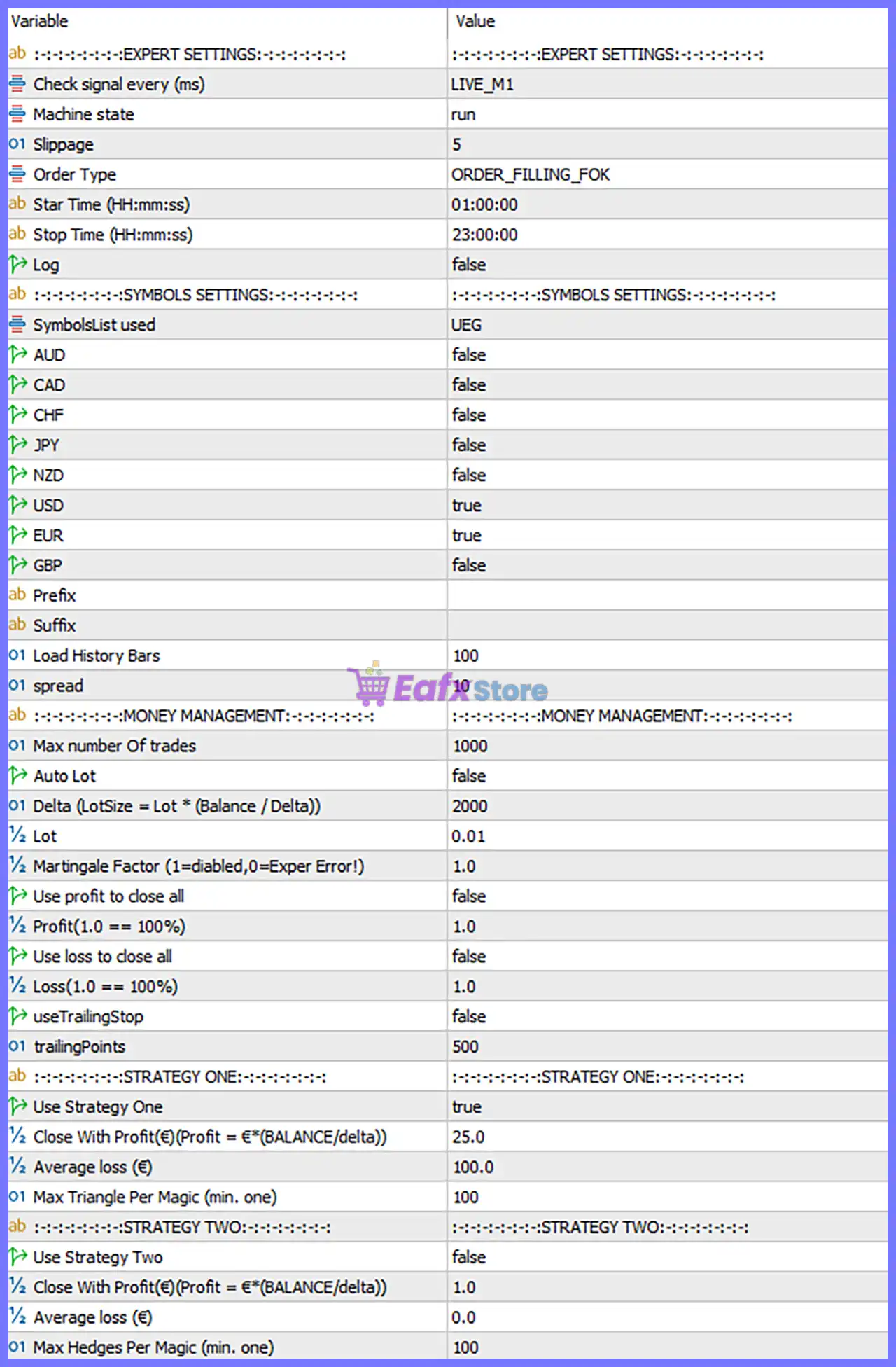
Below are the details of the parameters in the advisor’s trading system settings table:
🔶 Expert Settings
🔹 Check signal every (ms) = LIVE_M1 – The EA evaluates trading signals using the LIVE_M1 execution mode for real-time market analysis.
🔹 Machine state = run – Sets the EA operating status to run, allowing automated trading to remain active.
🔹 Slippage = 5 – Allows a maximum execution slippage of 5 points when placing orders.
🔹 Order Type = ORDER_FILLING_FOK – Uses the Fill-Or-Kill (FOK) order execution policy, requiring the full order volume to be filled immediately or cancelled.
🔹 Start Time (HH:mm:ss) = 01:00:00 – The EA begins opening new trades at 01:00:00 server time.
🔹 Stop Time (HH:mm:ss) = 23:00:00 – The EA stops opening new trades after 23:00:00 server time.
🔹 Log = false – Disables detailed logging to reduce journal output.
🔶 Symbols Settings
🔹 SymbolsList used = UEG – Uses the predefined UEG symbol group for trading.
🔹 AUD = false – Trading for AUD-related symbols is disabled.
🔹 CAD = false – Trading for CAD-related symbols is disabled.
🔹 CHF = false – Trading for CHF-related symbols is disabled.
🔹 JPY = false – Trading for JPY-related symbols is disabled.
🔹 NZD = false – Trading for NZD-related symbols is disabled.
🔹 USD = true – Enables trading for USD-related symbols.
🔹 EUR = true – Enables trading for EUR-related symbols.
🔹 GBP = false – Trading for GBP-related symbols is disabled.
🔹 Prefix = (Blank) – No broker-specific symbol prefix is applied.
🔹 Suffix = (Blank) – No broker-specific symbol suffix is applied.
🔹 Load History Bars = 100 – Loads the most recent 100 historical bars for calculations.
🔹 Spread = 10 – Sets the maximum acceptable spread to 10 points.
🔶 Money Management
🔹 Max number Of trades = 1000 – Allows up to 1000 simultaneous trades across the EA.
🔹 Auto Lot = false – Disables automatic lot calculation.
🔹 Delta (LotSize = Lot × (Balance / Delta)) = 2000 – Uses 2000 as the balance divisor when calculating dynamic lot sizes.
🔹 Lot = 0.01 – Sets the fixed trading volume to 0.01 lots.
🔹 Martingale Factor (1 = disabled, 0 = Expert Error!) = 1.0 – Uses a Martingale factor of 1.0, effectively disabling lot multiplication.
🔹 Use profit to close all = false – Disables automatic closure of all positions based on total account profit.
🔹 Profit (1.0 = 100%) = 1.0 – Profit threshold equals 100% when profit-based closing is enabled.
🔹 Use loss to close all = false – Disables automatic closure of all positions based on total account loss.
🔹 Loss (1.0 = 100%) = 1.0 – Loss threshold equals 100% when loss-based closing is enabled.
🔹 useTrailingStop = false – Disables the trailing stop feature.
🔹 trailingPoints = 500 – Sets the trailing distance to 500 points if trailing stop is enabled.
🔶 Strategy One
🔹 Use Strategy One = true – Enables the first trading strategy.
🔹 Close With Profit (€) (Profit = € × (BALANCE / delta)) = 25.0 – Closes Strategy One positions after reaching a calculated profit target of 25.0€ adjusted by balance.
🔹 Average loss (€) = 100.0 – Allows averaging trades after an accumulated floating loss of 100.0€.
🔹 Max Triangle Per Magic (min. one) = 100 – Permits up to 100 triangle/averaging structures for each Magic Number.
🔶 Strategy Two
🔹 Use Strategy Two = false – Disables the second trading strategy.
🔹 Close With Profit (€) (Profit = € × (BALANCE / delta)) = 1.0 – Defines a profit target of 1.0€ if Strategy Two is enabled.
🔹 Average loss (€) = 0.0 – No averaging loss threshold is configured for Strategy Two.
🔹 Max Hedges Per Magic (min. one) = 100 – Allows up to 100 hedge positions per Magic Number if Strategy Two becomes active.
🔢 Conclusion
SAWA BlackBox Alpha MT5 provides a flexible automated trading framework that combines configurable trading sessions, selective symbol filtering, fixed or balance-based lot sizing, and independent strategy modules.
With support for customizable profit targets, averaging controls, hedging limits, and risk management parameters, the EA allows traders to fine-tune its behavior according to different market environments while maintaining full control over execution and exposure.
🔢 FAQs
❓ What is the primary trading mode of SAWA BlackBox Alpha MT5?
The EA operates in automated mode using configurable strategy modules, money management, and symbol filters.
❓ Can I enable automatic lot sizing?
Yes. Simply change Auto Lot from false to true to calculate lots based on account balance and the Delta parameter.
❓ Does SAWA BlackBox Alpha MT5 support multiple strategies?
Yes. The EA includes Strategy One and Strategy Two, which can be enabled or disabled independently.
❓ Can I limit trading to specific currencies?
Yes. The Symbols Settings section allows you to enable or disable trading for AUD, CAD, CHF, JPY, NZD, USD, EUR, and GBP symbol groups.
❓ Does the EA include trailing stop and Martingale features?
Yes. Both features are available. In the current configuration, Trailing Stop is disabled and the Martingale Factor is set to 1.0, which effectively disables Martingale lot progression.



