


MachinePRO EA MT5 Settings Explained – Complete Configuration Guide
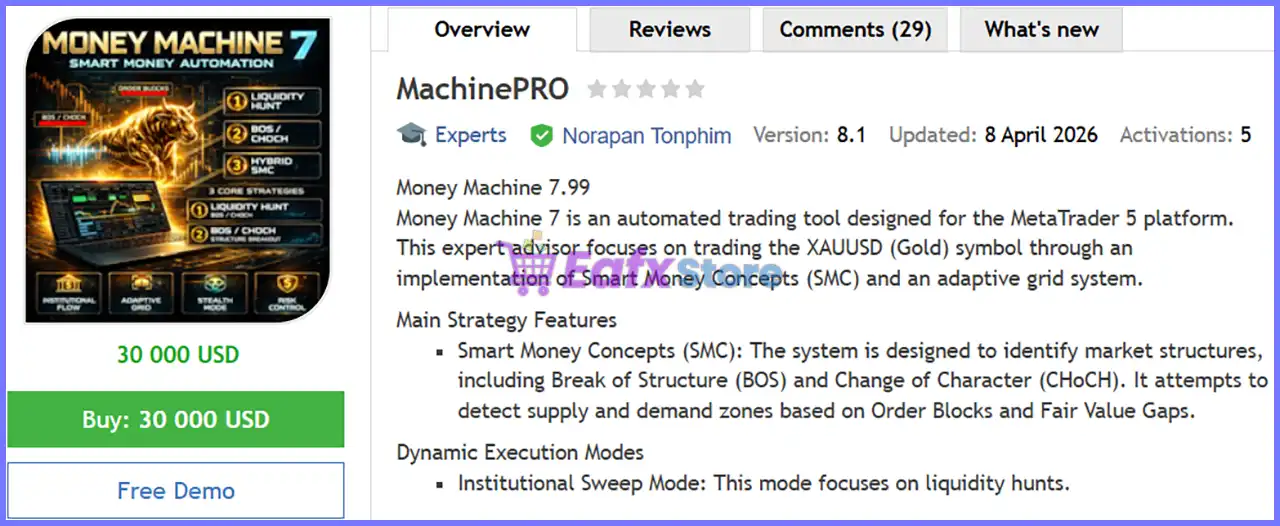
MachinePRO EA is a comprehensive automated trading Expert Advisor designed for MetaTrader 5, combining breakout trading, liquidity hunting, Fair Value Gap (FVG) analysis, ADR-based auto grid management, institutional recovery logic and advanced money management.
The EA provides multiple layers of protection through news filters, trend confirmation, breakeven and trailing stop systems, daily loss controls, and visualization tools, allowing traders to customize every aspect of their automated trading strategy.

MachinePRO EA MT5 Settings
Below are the details of the parameters in the advisor’s trading system settings table:
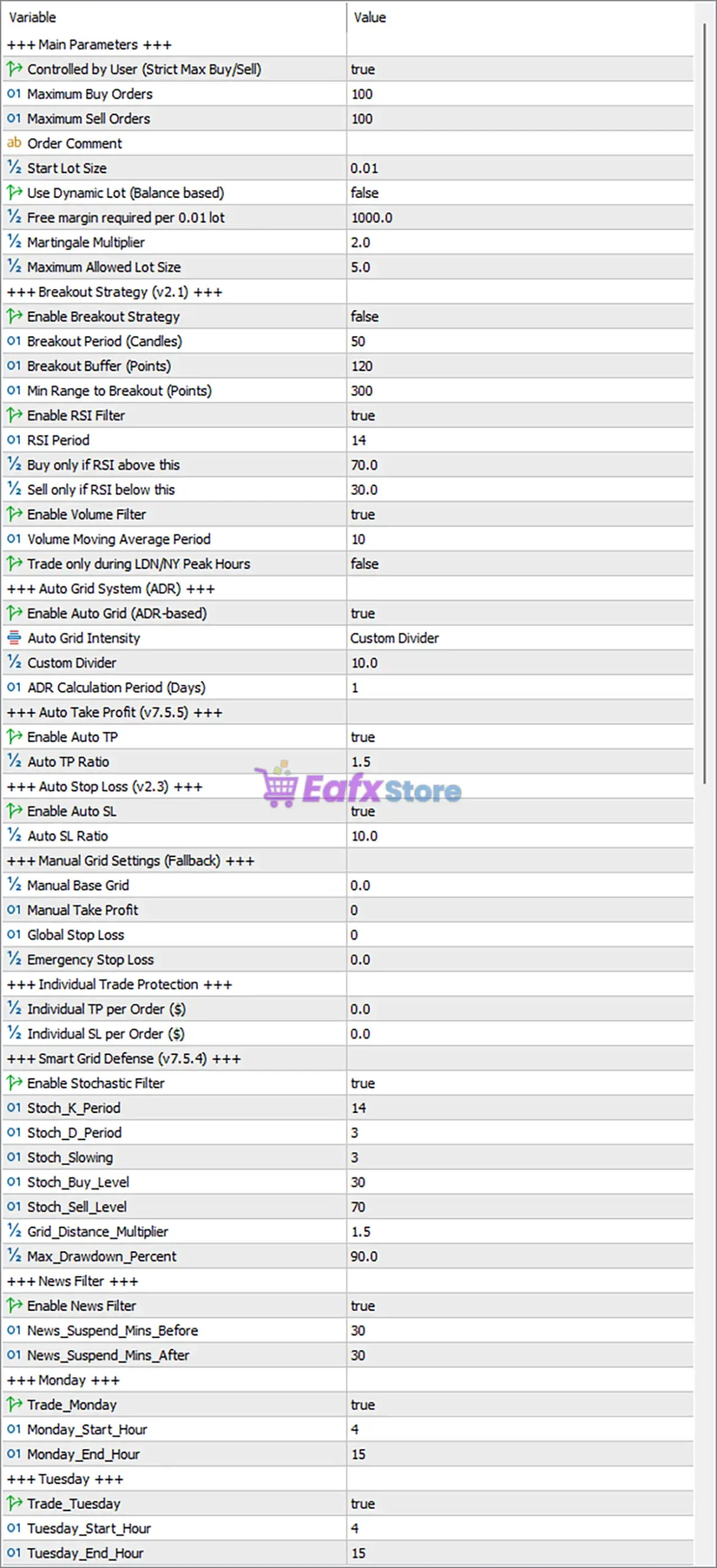
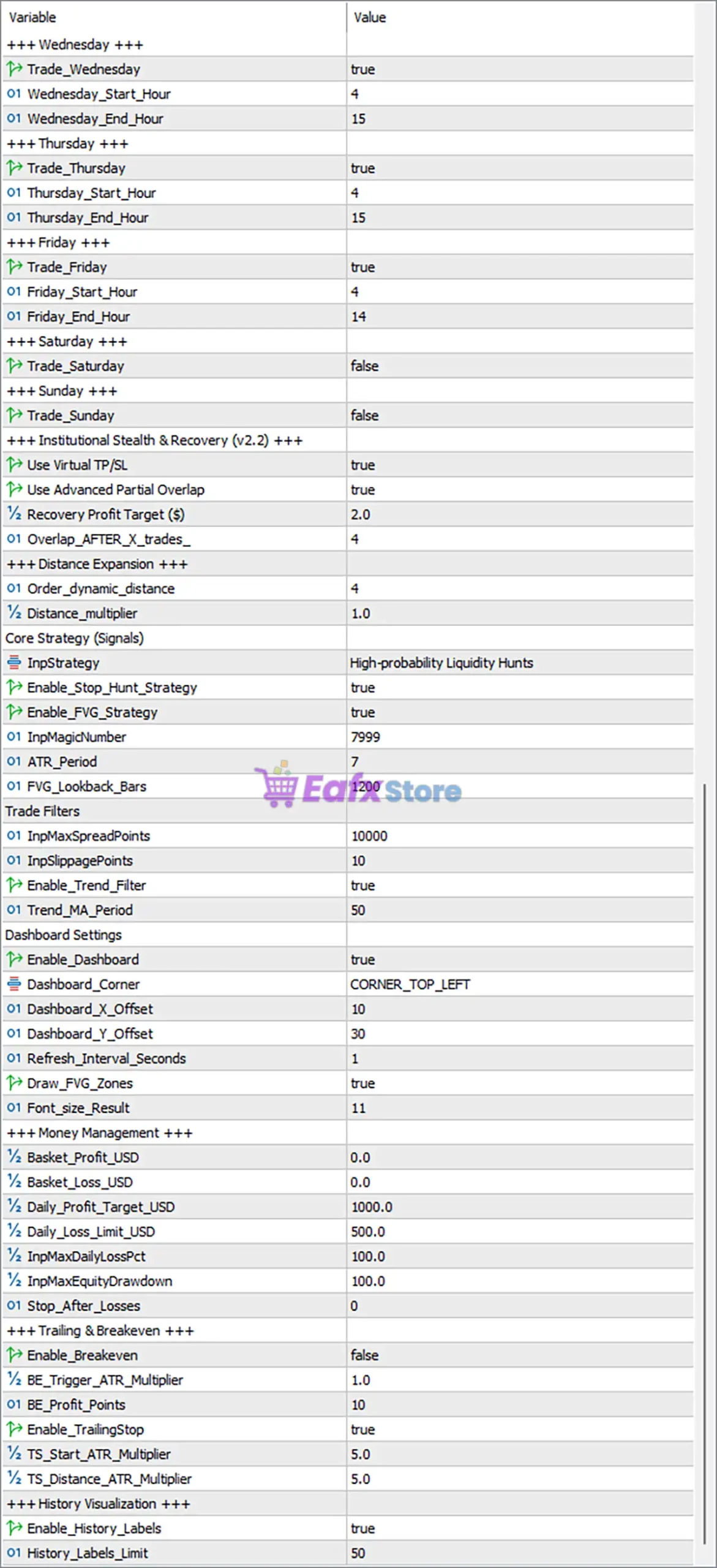
Main Parameters
🔹 Controlled by User (Strict Max Buy/Sell) = true – Enables strict user-defined limits for the maximum number of Buy and Sell positions.
🔹 Maximum Buy Orders = 100 – Allows a maximum of 100 Buy positions to remain open simultaneously.
🔹 Maximum Sell Orders = 100 – Allows a maximum of 100 Sell positions to remain open simultaneously.
🔹 Order Comment = (Blank) – Defines the trade comment attached to all orders opened by the EA.
🔹 Start Lot Size = 0.01 – Sets the initial trading volume to 0.01 lots.
🔹 Use Dynamic Lot (Balance based) = false – Disables automatic lot scaling according to account balance.
🔹 Free Margin Required per 0.01 Lot = 1000.0 – Requires 1000.0 units of free margin for every 0.01 lot traded.
🔹 Martingale Multiplier = 2.0 – Doubles the lot size progression using a 2.0 multiplication factor.
🔹 Maximum Allowed Lot Size = 5.0 – Limits the maximum trading volume to 5.0 lots.
Breakout Strategy (v2.1)
🔹 Enable Breakout Strategy = false – Disables the breakout trading module.
🔹 Breakout Period (Candles) = 50 – Uses the previous 50 candles to calculate breakout levels.
🔹 Breakout Buffer (Points) = 120 – Adds a 120-point buffer before confirming breakout entries.
🔹 Minimum Range to Breakout (Points) = 300 – Requires at least 300 points of market range before breakout activation.
🔹 Enable RSI Filter = true – Uses RSI confirmation before opening breakout trades.
🔹 RSI Period = 14 – Calculates RSI using a 14-period lookback.
🔹 Buy only if RSI above this = 70.0 – Buy trades require RSI to exceed 70.0.
🔹 Sell only if RSI below this = 30.0 – Sell trades require RSI below 30.0.
🔹 Enable Volume Filter = true – Filters trades based on trading volume.
🔹 Volume Moving Average Period = 10 – Uses a 10-period moving average of volume.
🔹 Trade only during LDN/NY Peak Hours = false – Does not restrict trading to London/New York overlap.
Auto Grid System (ADR)
🔹 Enable Auto Grid (ADR-based) = true – Enables Automatic ADR-based grid spacing.
🔹 Auto Grid Intensity = Custom Divider – Uses a custom divider for grid calculations.
🔹 Custom Divider = 10.0 – Applies a divisor of 10.0 to ADR calculations.
🔹 ADR Calculation Period (Days) = 1 – Calculates ADR from the last 1 day.
Auto Take Profit (v7.5.5)
🔹 Enable Auto TP = true – Automatically calculates Take Profit targets.
🔹 Auto TP Ratio = 1.5 – Sets Take Profit to 1.5 times the calculated distance.
Auto Stop Loss (v2.3)
🔹 Enable Auto SL = true – Automatically calculates Stop Loss values.
🔹 Auto SL Ratio = 10.0 – Applies a Stop Loss ratio of 10.0.
Manual Grid Settings (Fallback)
🔹 Manual Base Grid = 0.0 – Uses automatic grid spacing when 0.0 is selected.
🔹 Manual Take Profit = 0 – Manual TP is disabled.
🔹 Global Stop Loss = 0 – Global Stop Loss is disabled.
🔹 Emergency Stop Loss = 0.0 – Emergency Stop Loss is disabled.
Individual Trade Protection
🔹 Individual TP per Order ($) = 0.0 – Individual Take Profit per trade is disabled.
🔹 Individual SL per Order ($) = 0.0 – Individual Stop Loss per trade is disabled.
Smart Grid Defense (v7.5.4)
🔹 Enable Stochastic Filter = true – Enables Stochastic confirmation before grid entries.
🔹 Stoch_K_Period = 14 – Uses 14 periods for %K.
🔹 Stoch_D_Period = 3 – Uses 3 periods for %D.
🔹 Stoch_Slowing = 3 – Applies a slowing value of 3.
🔹 Stoch_Buy_Level = 30 – Buy confirmation level is 30.
🔹 Stoch_Sell_Level = 70 – Sell confirmation level is 70.
🔹 Grid_Distance_Multiplier = 1.5 – Expands grid spacing by 1.5x.
🔹 Max_Drawdown_Percent = 90.0 – Maximum allowable drawdown is 90.0%.
News Filter
🔹 Enable News Filter = true – Blocks trading around major economic news.
🔹 News_Suspend_Mins_Before = 30 – Stops trading 30 minutes before news releases.
🔹 News_Suspend_Mins_After = 30 – Resumes trading 30 minutes after news releases.
Weekly Trading Schedule
🔹 Trade_Monday = true – Enables trading on Monday.
🔹 Monday_Start_Hour = 4 – Monday trading begins at 04:00.
🔹 Monday_End_Hour = 15 – Monday trading ends at 15:00.
🔹 Trade_Tuesday = true – Enables trading on Tuesday.
🔹 Tuesday_Start_Hour = 4 – Tuesday trading begins at 04:00.
🔹 Tuesday_End_Hour = 15 – Tuesday trading ends at 15:00.
🔹 Trade_Wednesday = true – Enables trading on Wednesday.
🔹 Wednesday_Start_Hour = 4 – Wednesday trading begins at 04:00.
🔹 Wednesday_End_Hour = 15 – Wednesday trading ends at 15:00.
🔹 Trade_Thursday = true – Enables trading on Thursday.
🔹 Thursday_Start_Hour = 4 – Thursday trading begins at 04:00.
🔹 Thursday_End_Hour = 15 – Thursday trading ends at 15:00.
🔹 Trade_Friday = true – Enables trading on Friday.
🔹 Friday_Start_Hour = 4 – Friday trading begins at 04:00.
🔹 Friday_End_Hour = 14 – Friday trading ends at 14:00.
🔹 Trade_Saturday = false – Disables trading on Saturday.
🔹 Trade_Sunday = false – Disables trading on Sunday.
Institutional Stealth & Recovery (v2.2)
🔹 Use Virtual TP/SL = true – Uses hidden Take Profit and Stop Loss levels.
🔹 Use Advanced Partial Overlap = true – Enables advanced overlapping recovery entries.
🔹 Recovery Profit Target ($) = 2.0 – Closes recovery baskets after earning $2.0.
🔹 Overlap_AFTER_X_trades = 4 – Starts overlapping positions after 4 trades.
Distance Expansion
🔹 Order_dynamic_distance = 4 – Dynamically adjusts grid spacing using level 4.
🔹 Distance_multiplier = 1.0 – Uses a 1.0x multiplier for spacing calculations.
Core Strategy (Signals)
🔹 InpStrategy = High-probability Liquidity Hunts – Selects the High-Probability Liquidity Hunt strategy.
🔹 Enable_Stop_Hunt_Strategy = true – Activates Stop Hunt detection.
🔹 Enable_FVG_Strategy = true – Enables Fair Value Gap (FVG) trading logic.
🔹 InpMagicNumber = 7999 – Assigns Magic Number 7999.
🔹 ATR_Period = 7 – Uses 7-period ATR.
🔹 FVG_Lookback_Bars = 1200 – Scans the previous 1200 bars for Fair Value Gaps.
Trade Filters
🔹 InpMaxSpreadPoints = 10000 – Maximum permitted spread is 10000 points.
🔹 InpSlippagePoints = 10 – Allows up to 10 points of slippage.
🔹 Enable_Trend_Filter = true – Enables trend confirmation before entry.
🔹 Trend_MA_Period = 50 – Uses a 50-period Moving Average as the trend filter.
Dashboard Settings
🔹 Enable Dashboard = true – Displays the EA dashboard.
🔹 Dashboard_Corner = CORNER_TOP_LEFT – Positions the dashboard in the top-left corner.
🔹 Dashboard_X_Offset = 10 – Horizontal dashboard offset is 10 pixels.
🔹 Dashboard_Y_Offset = 30 – Vertical dashboard offset is 30 pixels.
🔹 Refresh_Interval_Seconds = 1 – Refreshes dashboard every 1 second.
🔹 Draw_FVG_Zones = true – Draws Fair Value Gap zones on the chart.
🔹 Font_size_Result = 11 – Dashboard font size is 11.
Money Management
🔹 Basket_Profit_USD = 0.0 – Basket profit target disabled.
🔹 Basket_Loss_USD = 0.0 – Basket loss limit disabled.
🔹 Daily_Profit_Target_USD = 1000.0 – Stops trading after earning $1000.0 daily.
🔹 Daily_Loss_Limit_USD = 500.0 – Stops trading after losing $500.0 daily.
🔹 InpMaxDailyLossPct = 100.0 – Maximum daily loss percentage is 100.0%.
🔹 InpMaxEquityDrawdown = 100.0 – Maximum equity drawdown allowed is 100.0%.
🔹 Stop_After_Losses = 0 – No stop limit based on consecutive losses.
Trailing & Breakeven
🔹 Enable_Breakeven = false – Breakeven function is disabled.
🔹 BE_Trigger_ATR_Multiplier = 1.0 – Breakeven activates at 1.0 ATR.
🔹 BE_Profit_Points = 10 – Breakeven trigger profit equals 10 points.
🔹 Enable_TrailingStop = true – Enables automatic trailing stop.
🔹 TS_Start_ATR_Multiplier = 5.0 – Trailing begins after 5 ATR.
🔹 TS_Distance_ATR_Multiplier = 5.0 – Trailing distance equals 5 ATR.
History Visualization
🔹 Enable_History_Labels = true – Displays historical trade labels.
🔹 History_Labels_Limit = 50 – Shows up to 50 historical labels on the chart.
Conclusion
MachinePRO EA is a feature-rich automated trading solution that combines breakout detection, liquidity hunting, Fair Value Gap analysis, ADR-based grid management, institutional recovery algorithms, intelligent money management and advanced trade protection.
With extensive configuration options covering risk control, news filtering, trading schedules, trailing stops, and dashboard visualization, the EA provides traders with exceptional flexibility for optimizing automated Gold and Forex trading strategies while maintaining strict control over risk exposure.
FAQs
❓ What trading strategy does MachinePRO EA MT5 use?
MachinePRO EA MT5 combines liquidity hunting, Fair Value Gap (FVG) analysis, breakout trading, ADR-based grid management, and institutional recovery techniques.
❓ Can I disable the Auto Grid system?
Yes. The Enable Auto Grid (ADR-based) parameter allows you to enable or disable automatic grid trading.
❓ Does the EA include economic news protection?
Yes. The integrated News Filter blocks new trades before and after major economic events using customizable time windows.
❓ Can I limit trading to specific weekdays and hours?
Yes. Every trading day has independent enable/disable switches along with configurable start and end trading hours.
❓ Is MachinePRO EA MT5 suitable for advanced risk management?
Yes. The EA includes daily profit and loss limits, drawdown protection, Smart Grid Defense, virtual TP/SL, recovery management, breakeven, trailing stop, and multiple trade filters for comprehensive portfolio protection.


