







SmartChoise MT5 (Latest version) - Unlimited

Subscriptions for Special Plan
- 30 EA package is more economical!
- Special package with 99%
- Download 1 EA/Day

Subscriptions for Premium Membership
- Download Unlimited in 1 Year
- Get 100% Discount
- Get free access to all

Subscriptions for Gold Membership
- 1 Year Membership
- Get 100% Discount
- Access EA+Indicator+Course
Frequently bought together 🎁
Add these products to enhance your purchase



SmartChoise MT5: AI-Driven Recovery Trading with Advanced Filters
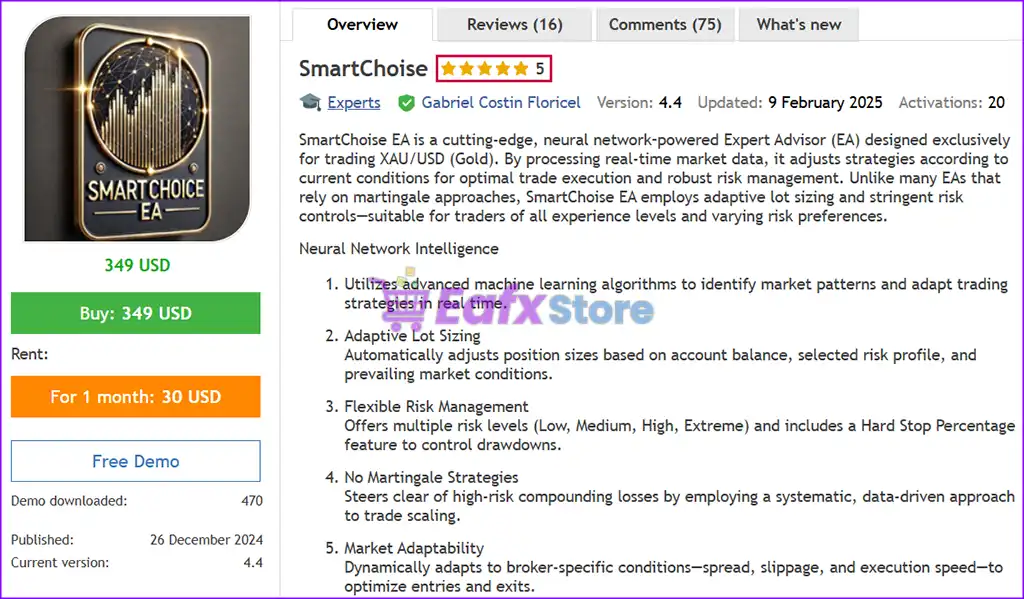
SmartChoise MT5 is an advanced neural network-powered Expert Advisor (EA) designed specifically for trading XAU/USD (Gold). It uses advanced machine learning algorithms to analyze real-time market data and adapt its trading strategy to current conditions. Unlike many other EAs, SmartChoise has strict risk controls, making it suitable for traders of all experience levels and risk appetites.
 Vendor Website: View here
About the Author
This product is compiled by Gabriel Costin Floricel. This author has more than +2 years of experience working on MQL5 with many famous products such as SmartChoise MT5, SmartChoise MT4, SmartBid EA MT5, SmartChoise Battery EA MT5 and other advisors. Among them, SmartChoise MT5 is his best performing products.
Delivery time 24h-48h after payment.
Refund if not delivered.
You will receive the current version without any limitations (ID+Time).
SmartChoise MT5 Review
Key Features of SmartChoise EA for MT5
🔹 Neural Network Engine: Continuously analyzes market data to improve trade accuracy and adaptability.
🔹 Dynamic Lot Sizing: Adjusts position size based on equity, volatility and trend strength.
🔹 Advanced Risk Control: Uses hard stop, spread filter and news filter for safer trading.
🔹 Flexible Trading Modes: Offers multiple strategies and risk levels for personalized setups.
🔹 Recovery Management System: Helps manage drawdowns while maintaining structured exposure.
What is the SmartChoise EA Trading Strategy?
🔹 AI-Based Market Analysis: Uses neural models to detect optimal entry and exit conditions.
🔹 Multi-Strategy Execution: Combines Support/Resistance, Candlestick and AI-driven signals.
🔹 Adaptive Trade Logic: Executes trades only when conditions meet strict validation criteria.
🔹 Volatility & News Filtering: Avoids unstable market phases to improve trade reliability.
🔹 Structured Recovery Approach: Applies controlled recovery to stabilize equity over time.
SmartChoise MT5 Review
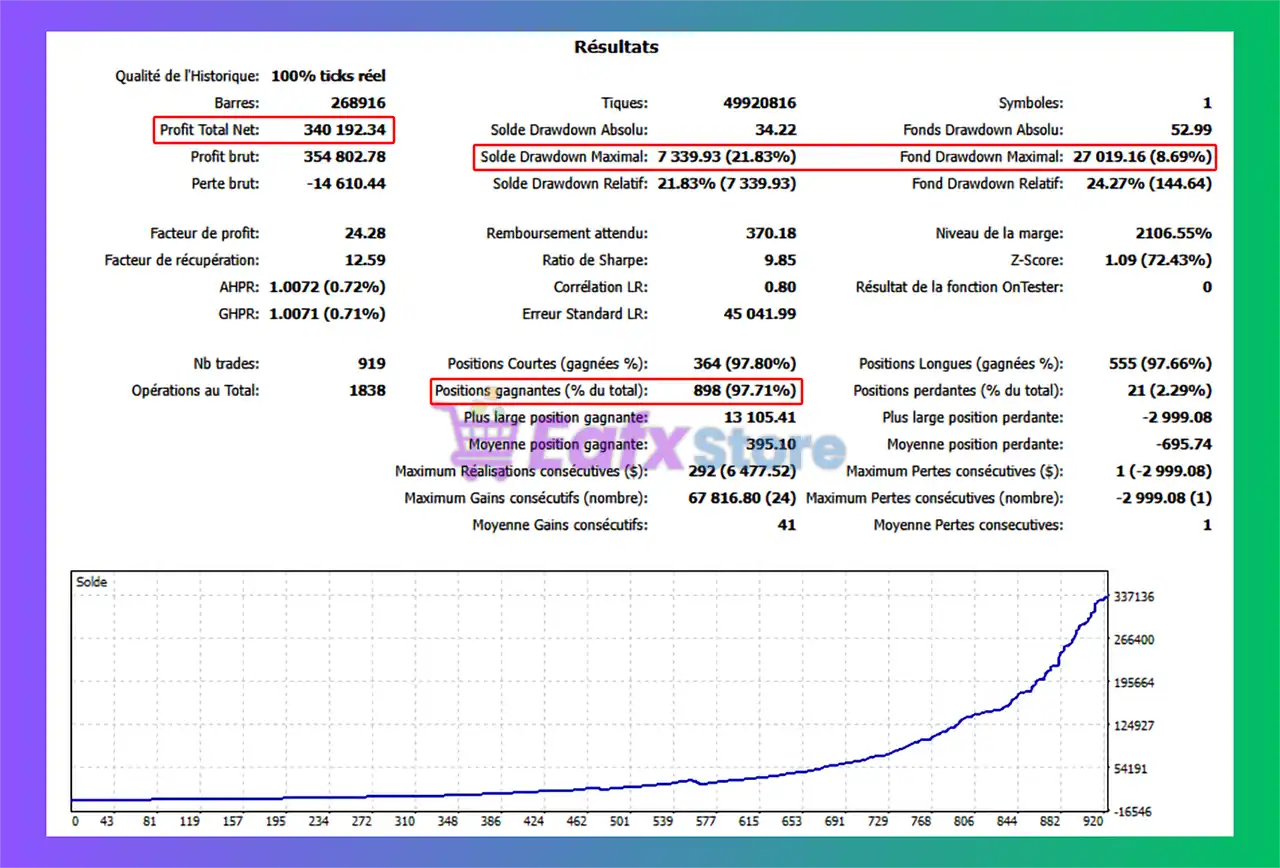
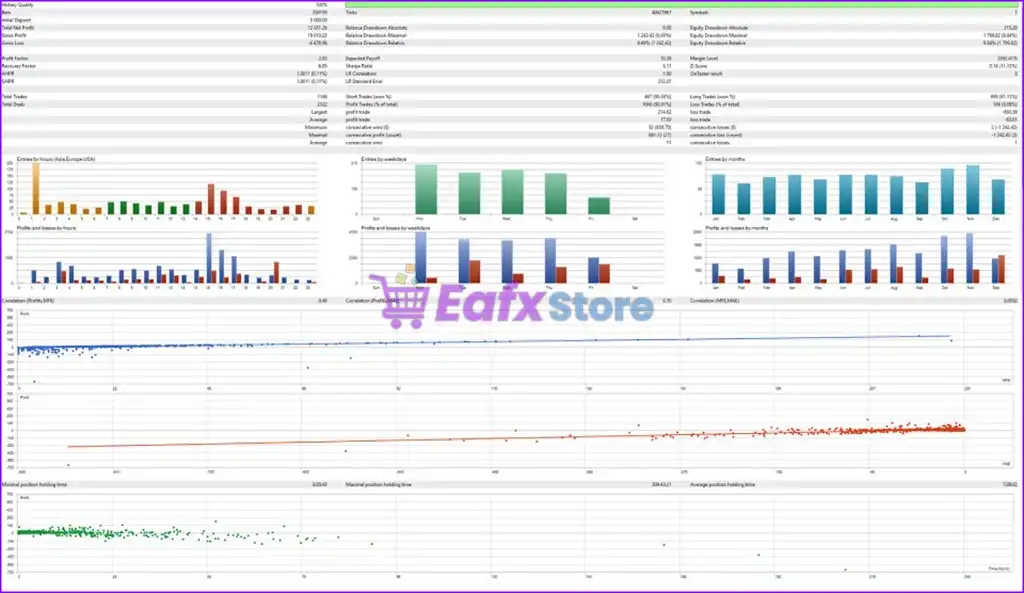
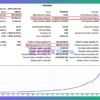
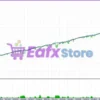
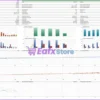
🔶 SmartChoise MT5 backtest results show the real capabilities of the EA using 100% real tick data with a starting trading capital of $1,000 for 1 year.
✅ Initial Deposit: $1,000
✅ Total Net Profit: $340,000
✅ Win Rate: 97.71%
⚠️ Maximum Drawdown: 21.83%
SmartChoise MT5 Backtest Results
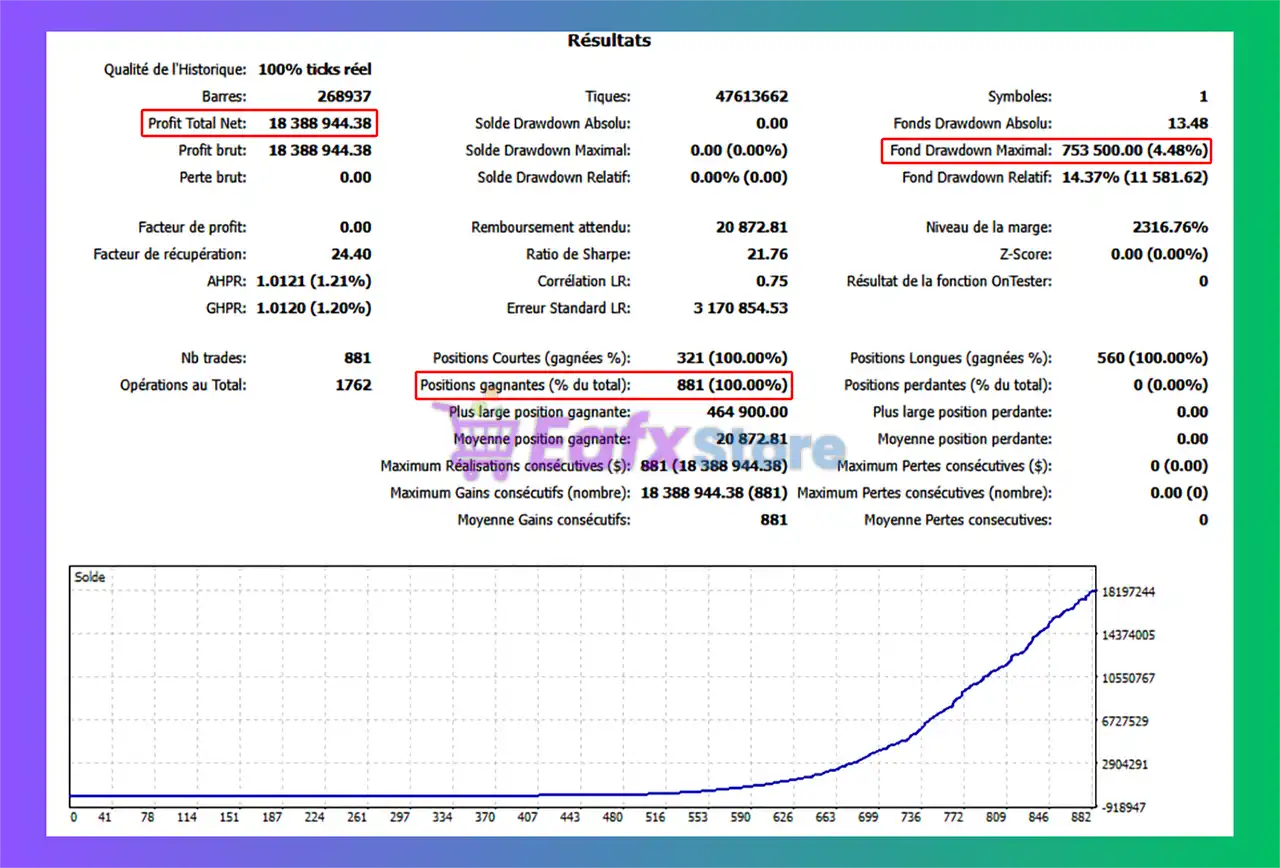
🔶 SmartChoise MT5 backtest results show the real capabilities of the EA using 100% real tick data with a starting trading capital of $10,000 for 1 year.
✅ Initial Deposit: $10,000
✅ Total Net Profit: $18.39 million
✅ Win Rate: 100%
⚠️ Maximum Drawdown: 4.48%
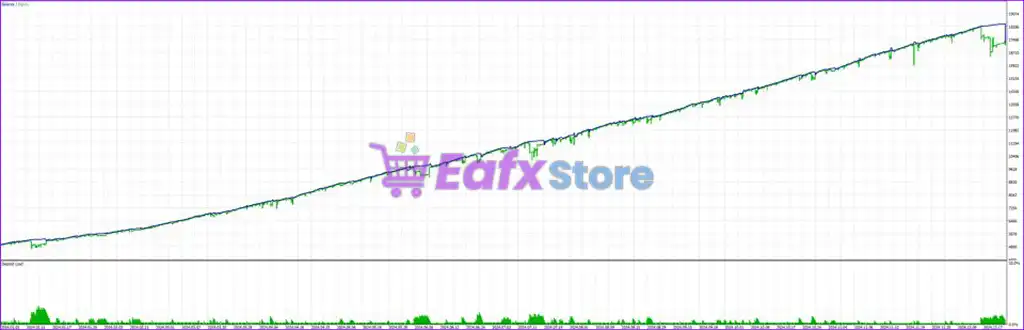
SmartChoise EA Backtest Results
Why Choose SmartChoise MT5?
🔹 Consistency Over Aggression: Designed for long-term stability and controlled growth.
🔹 Strong Risk Management: Protects capital with adaptive exposure and drawdown limits.
🔹 Fully Automated System: Removes emotional trading and ensures disciplined execution.
🔹 Customizable for All Traders: Fits both conservative and aggressive trading styles.
🔹 Marketplace-Ready Solution: Ideal EA for traders seeking reliable and scalable automation.
Is SmartChoise MT5 safe?
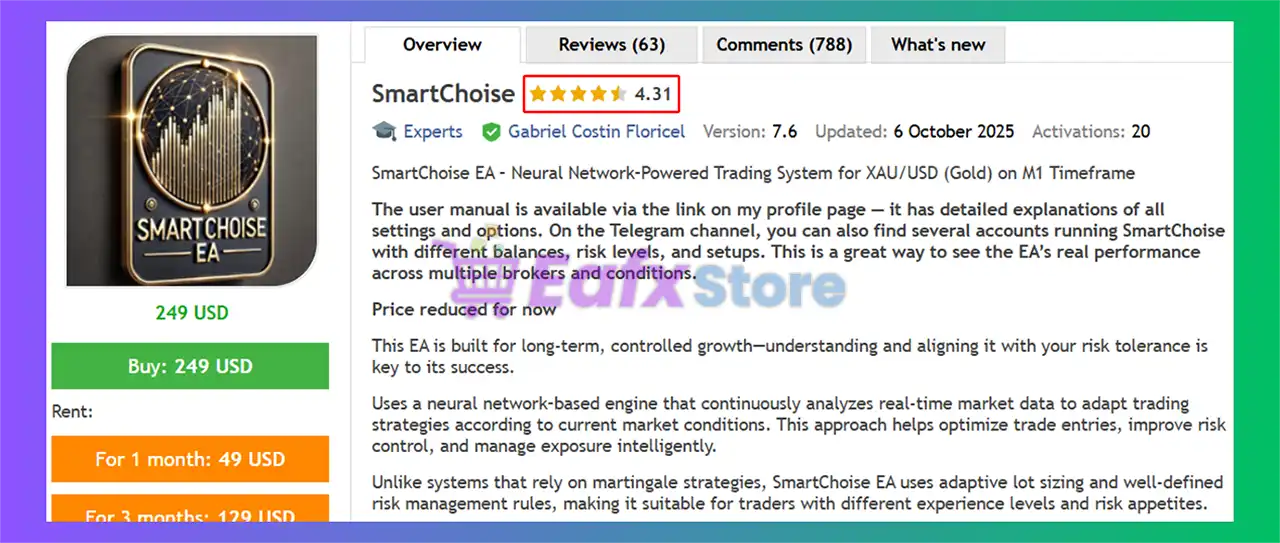
SmartChoise MT5 demonstrates remarkable potential in delivering stable and reliable profits, making it a reliable tool in the forex market. SmartChoise is highly regarded by the MQL5 community in many aspects and has gained the trust of its users.
⭐⭐⭐⭐⭐ Kemse (2025.02.07): “I rented this EA last weekend, 5 days passed and with a bankroll of €500 I already earned €30.06 and the graph doesn’t lie, it’s exactly the same as promised in the backtest.”
⭐⭐⭐⭐⭐ Ferran Lopez Navarro (2025.01.27): “A great EA, I’ve been with him for two weeks now and my earnings are always positive, Gabriel is a very attentive and resolute author. Let’s hope this EA lasts a long time.”
⭐⭐⭐⭐⭐ Wheeler (2025.02.08): “I have been with it for a while and all the positive operations, that is with its respective drawdown, the best thing is Gabriel’s almost immediate attention, he solves any problem with the EA at the moment, he is updating it every day, at the moment a 10 in everything.”
Trading Specifications
Recommended settings and parameters to pay attention to from developers and experts:
| Features | Type |
|---|---|
| Trading platform | MetaTrader 5 (MT5) |
| Time frames | M1, M5, M15, M30 |
| Currency pairs | XAU/USD (Gold) |
| Minimum / Recommended deposit | $100+ |
| Product type | Original version |
| Additional services | Unlock and Decompile |
| Recommended brokers | Exness Broker, Icmarkets Broker |
| Recommended VPS | MyfxVPS.com ( Blue VPS, Golden VPS). Lowest Latency, 2 week Free Trial, 100% Free for 12-18 Months. |
Product Download Package?
The download package of the product suite includes:
✅ Experts: SmartChoise.ex5
➡️ Reviewed by David Easton
Conclusion
In short, SmartChoise EA stands out as a powerful, AI-driven trading tool designed for traders seeking consistent performance and robust risk management in the XAU/USD market. By leveraging neural network intelligence and adaptive strategies, it dynamically adjusts to market conditions, ensuring optimized trade execution without relying on risky martingale strategies.
🔢 SmartChoise MT5 Settings Explained – Complete Expert Advisor Configuration Guide
SmartChoise MT5 is an advanced multi-strategy Expert Advisor (EA) for MetaTrader 5 that combines Neural Network trading, recovery systems, adaptive risk control, smart money management and news filtering into one automated trading solution.
The EA supports multiple entry methods, trailing systems, drawdown protection, equity management and advanced recovery logic.
With flexible customization options, SmartChoise MT5 is designed for traders seeking automated portfolio management and intelligent risk-adjusted trading.

SmartChoise MT5 Setting
🔢 SmartChoise MT5 Full Settings Explanation
Below are the details of the parameters in the advisor’s trading system settings table:
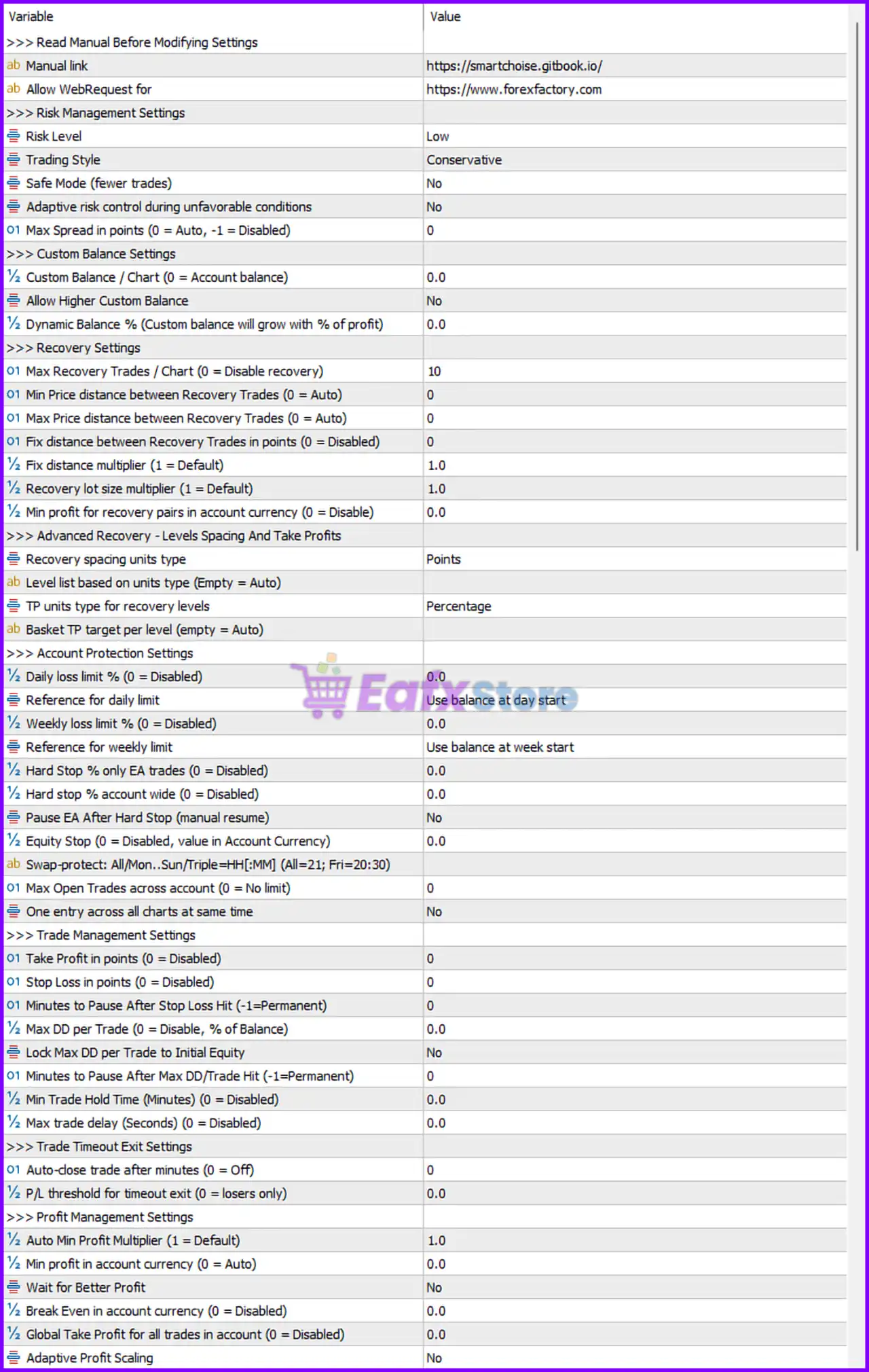
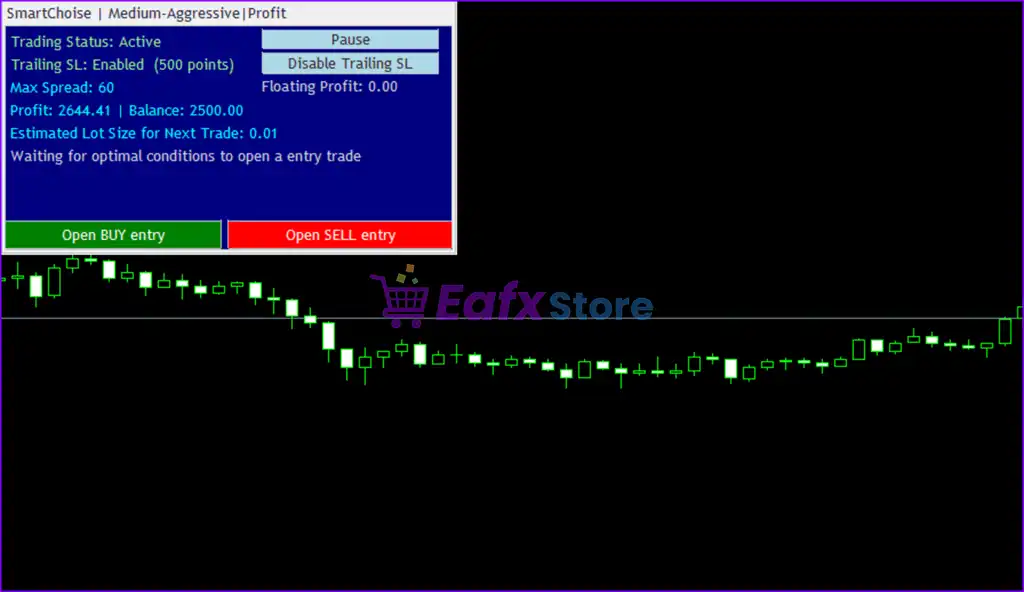
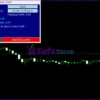
SmartChoise MT5 Setting Panel
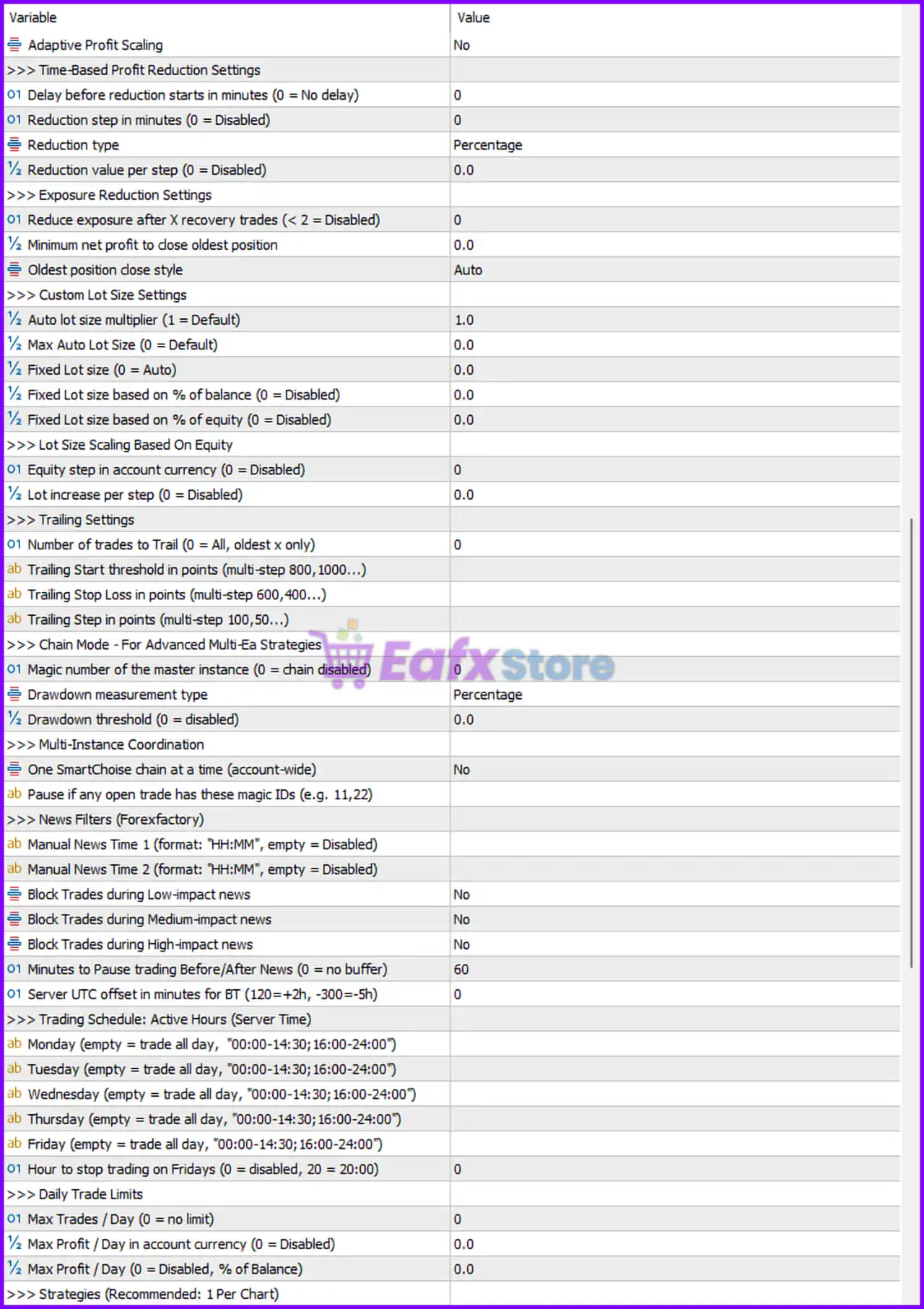
SmartChoise EA MT5 Setting Panel
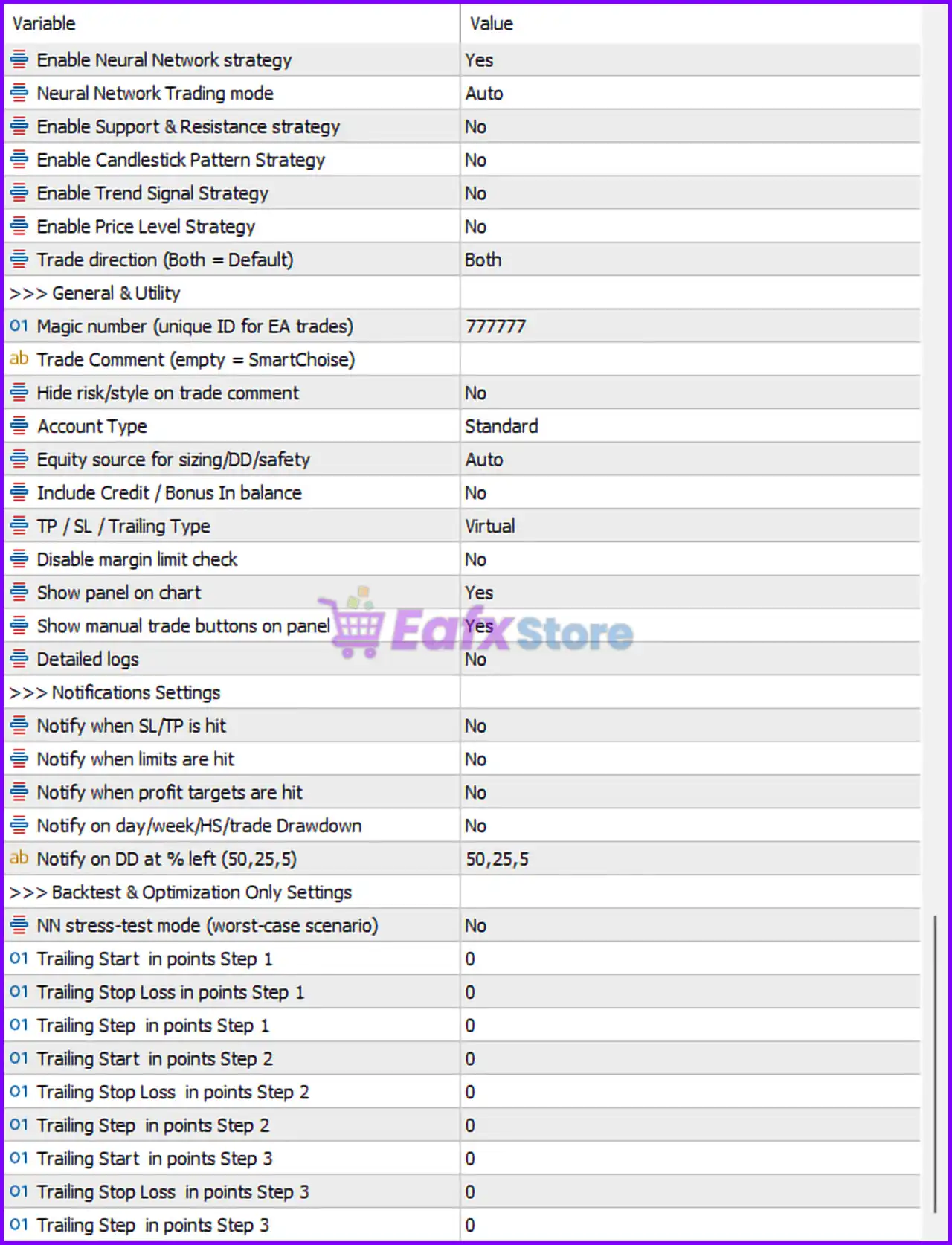
SmartChoise EA MT5 Settings Panel
Strategy Configuration Settings
🔹 Enable Neural Network strategy = Yes: Activates the Neural Network trading algorithm.
🔹 Neural Network Trading mode = Auto: Automatically controls Neural Network trading behavior.
🔹 Enable Support & Resistance strategy = No: Disables Support and Resistance trading strategy.
🔹 Enable Candlestick Pattern Strategy = No: Disables candlestick pattern recognition strategy.
🔹 Enable Trend Signal Strategy = No: Disables trend signal entry strategy.
🔹 Enable Price Level Strategy = No: Disables price level trading logic.
🔹 Trade direction (Both = Default) = Both: Allows both Buy and Sell trades.
General & Utility Settings
🔹 Magic number (unique ID for EA trades) = 777777: Unique identifier 777777 for EA-managed trades.
🔹 Trade Comment (empty = SmartChoise) =: Uses default SmartChoise trade comment.
🔹 Hide risk/style on trade comment = No: Displays risk and style information in trade comments.
🔹 Account Type = Standard: Configures EA for Standard account trading conditions.
🔹 Equity source for sizing/DD/safety = Auto: Automatically selects equity source for sizing and safety calculations.
🔹 Include Credit / Bonus in balance = No: Excludes broker credit or bonuses from balance calculations.
🔹 TP / SL / Trailing Type = Virtual: Uses virtual Stop Loss, Take Profit, and trailing management.
🔹 Disable margin limit check = No: Keeps margin safety checks enabled.
🔹 Show panel on chart = Yes: Displays EA control panel on the trading chart.
🔹 Show manual trade buttons on panel = Yes: Enables manual trading buttons on the EA panel.
🔹 Detailed logs = No: Disables detailed EA logging.
Notification Settings
🔹 Notify when SL/TP is hit = No: Disables notifications for Stop Loss or Take Profit events.
🔹 Notify when limits are hit = No: Disables pending order execution notifications.
🔹 Notify when profit targets are hit = No: Disables profit target alerts.
🔹 Notify on day/week/HS/trade Drawdown = No: Disables drawdown notifications.
🔹 Notify on DD at % left (50,25,5) = 50,25,5: Sends drawdown alerts when balance reaches 50%, 25%, and 5%.
Backtest & Optimization Settings
🔹 NN stress-test mode (worst-case scenario) = No: Disables Neural Network stress-testing mode.
🔹 Trailing Start in points Step 1 = 0: Trailing Step 1 start value is 0.
🔹 Trailing Stop Loss in points Step 1 = 0: Step 1 trailing stop loss is 0.
🔹 Trailing Step in points Step 1 = 0: Step 1 trailing increment is 0.
🔹 Trailing Start in points Step 2 = 0: Trailing Step 2 start value is 0.
🔹 Trailing Stop Loss in points Step 2 = 0: Step 2 trailing stop loss is 0.
🔹 Trailing Step in points Step 2 = 0: Step 2 trailing increment is 0.
🔹 Trailing Start in points Step 3 = 0: Trailing Step 3 start value is 0.
🔹 Trailing Stop Loss in points Step 3 = 0: Step 3 trailing stop loss is 0.
🔹 Trailing Step in points Step 3 = 0: Step 3 trailing increment is 0.
Risk Management Settings
🔹 Risk Level = Low: Uses low-risk trading profile.
🔹 Trading Style = Conservative: Applies conservative trading strategy.
🔹 Safe Mode (fewer trades) = No: Disables Safe Mode trade limitation.
🔹 Adaptive risk control during unfavorable conditions = No: Disables adaptive risk reduction.
🔹 Max Spread in points (0 = Auto, -1 = Disabled) = 0: Uses automatic spread filtering.
Custom Balance Settings
🔹 Custom Balance / Chart (0 = Account balance) = 0.0: Uses actual account balance.
🔹 Allow Higher Custom Balance = No: Prevents custom balance override.
🔹 Dynamic Balance % (Custom balance will grow with % of profit) = 0.0: Dynamic balance growth disabled.
Recovery Settings
🔹 Max Recovery Trades / Chart (0 = Disable recovery) = 10: Allows up to 10 recovery trades.
🔹 Min Price distance between Recovery Trades (0 = Auto) = 0: Uses automatic minimum recovery spacing.
🔹 Max Price distance between Recovery Trades (0 = Auto) = 0: Uses automatic maximum recovery spacing.
🔹 Fix distance between Recovery Trades in points (0 = Disabled) = 0: Fixed recovery spacing disabled.
🔹 Fix distance multiplier (1 = Default) = 1.0: Uses standard recovery distance multiplier 1.0.
🔹 Recovery lot size multiplier (1 = Default) = 1.0: Uses default recovery lot multiplier.
🔹 Min profit for recovery pairs in account currency (0 = Disable) = 0.0: Recovery profit filter disabled.
Advanced Recovery Settings
🔹 Recovery spacing units type = Points: Recovery spacing measured in points.
🔹 Level list based on units type (Empty = Auto): Uses automatic recovery level list.
🔹 TP units type for recovery levels = Percentage: Recovery Take Profit uses percentage mode.
🔹 Basket TP target per level (empty = Auto): Uses automatic basket Take Profit calculation.
Account Protection Settings
🔹 Daily loss limit % (0 = Disabled) = 0.0: Daily loss protection disabled.
🔹 Reference for daily limit = Use balance at day start: Uses opening daily balance as reference.
🔹 Weekly loss limit % (0 = Disabled) = 0.0: Weekly loss protection disabled.
🔹 Reference for weekly limit = Use balance at week start: Uses weekly starting balance reference.
🔹 Hard Stop % only EA trades (0 = Disabled) = 0.0: EA-specific hard stop disabled.
🔹 Hard stop % account wide (0 = Disabled) = 0.0: Account-wide hard stop disabled.
🔹 Pause EA after Hard Stop (manual resume) = No: EA continues running after stop events.
🔹 Equity Stop (0 = Disabled, value in Account Currency) = 0.0: Equity stop disabled.
🔹 Swap-protect: All/Mon.-Sun/Triple=HH[:MM] (All=21; Fri=20:30): Swap protection schedule configurable.
🔹 Max Open Trades across account (0 = No limit) = 0: Unlimited account-wide trades allowed.
🔹 One entry across all charts at same time = No: Multiple chart entries allowed simultaneously.
Trade Management Settings
🔹 Take Profit in points (0 = Disabled) = 0: Fixed Take Profit disabled.
🔹 Stop Loss in points (0 = Disabled) = 0: Fixed Stop Loss disabled.
🔹 Minutes to Pause After Stop Loss Hit (-1 = Permanent) = 0: No pause after Stop Loss.
🔹 Max DD per Trade (0 = Disable, % of Balance) = 0.0: Per-trade drawdown control disabled.
🔹 Lock Max DD per Trade to Initial Equity = No: Drawdown not locked to initial equity.
🔹 Minutes to Pause After Max DD/Trade Hit (-1 = Permanent) = 0: No pause after drawdown limit.
🔹 Min Trade Hold Time (Minutes) (0 = Disabled) = 0.0: Minimum trade holding time disabled.
🔹 Max trade delay (Seconds) (0 = Disabled) = 0.0: Trade delay disabled.
Trade Timeout Exit Settings
🔹 Auto-close trade after minutes (0 = Off) = 0: Auto-close timeout disabled.
🔹 P/L threshold for timeout exit (0 = losers only) = 0.0: No timeout profit/loss filter.
Profit Management Settings
🔹 Auto Min Profit Multiplier (1 = Default) = 1.0: Uses default minimum profit multiplier.
🔹 Min profit in account currency (0 = Auto) = 0.0: Uses automatic profit threshold.
🔹 Wait for Better Profit = No: Disables delayed profit-taking logic.
🔹 Break Even in account currency (0 = Disabled) = 0.0: Break-even protection disabled.
🔹 Global Take Profit for all trades in account (0 = Disabled) = 0.0: Global TP disabled.
🔹 Adaptive Profit Scaling = No: Adaptive profit scaling disabled.
Time-Based Profit Reduction Settings
🔹 Delay before reduction starts in minutes (0 = No delay) = 0: Profit reduction starts immediately.
🔹 Reduction step in minutes (0 = Disabled) = 0: Time-based reduction disabled.
🔹 Reduction type = Percentage: Profit reduction uses percentage calculations.
🔹 Reduction value per step (0 = Disabled) = 0.0: Reduction amount disabled.
Exposure Reduction Settings
🔹 Reduce exposure after X recovery trades (< 2 = Disabled) = 0: Exposure reduction disabled.
🔹 Minimum net profit to close oldest position = 0.0: No minimum profit requirement.
🔹 Oldest position close style = Auto: Uses automatic close style.
Custom Lot Size Settings
🔹 Auto lot size multiplier (1 = Default) = 1.0: Uses default auto-lot multiplier.
🔹 Max Auto Lot Size (0 = Default) = 0.0: Uses default maximum auto lot size.
🔹 Fixed Lot size (0 = Auto) = 0.0: Auto lot sizing enabled.
🔹 Fixed Lot size based on % of balance (0 = Disabled) = 0.0: Balance-based fixed lot disabled.
🔹 Fixed Lot size based on % of equity (0 = Disabled) = 0.0: Equity-based fixed lot disabled.
Lot Size Scaling Based On Equity
🔹 Equity step in account currency (0 = Disabled) = 0: Equity step scaling disabled.
🔹 Lot increase per step (0 = Disabled) = 0.0: Lot scaling disabled.
Trailing Settings
🔹 Number of trades to Trail (0 = All, oldest x only) = 0: Trails all open trades.
🔹 Trailing Start threshold in points (multi-step 800,1000…): Configurable trailing activation threshold.
🔹 Trailing Stop Loss in points (multi-step 600,400…): Configurable trailing stop distance.
🔹 Trailing Step in points (multi-step 100,50…): Configurable trailing increment.
Chain Mode Settings
🔹 Magic number of the master instance (0 = chain disabled) = 0: Chain mode disabled.
🔹 Drawdown measurement type = Percentage: Uses percentage-based drawdown calculations.
🔹 Drawdown threshold (0 = disabled) = 0.0: Chain drawdown protection disabled.
Multi-Instance Coordination Settings
🔹 One SmartChoise chain at a time (account-wide) = No: Multiple SmartChoise instances allowed.
🔹 Pause if any open trade has these magic IDs (e.g. 11,22): Magic-number pause coordination supported.
News Filters (ForexFactory)
🔹 Manual News Time 1 (format: HH:MM”, empty = Disabled): Manual news filter slot 1.
🔹 Manual News Time 2 (format: HH:MM”, empty = Disabled): Manual news filter slot 2.
🔹 Block Trades during Low-impact news = No: Low-impact news trading allowed.
🔹 Block Trades during Medium-impact news = No: Medium-impact news trading allowed.
🔹 Block Trades during High-impact news = No: High-impact news trading allowed.
🔹 Minutes to Pause trading Before/After News (0 = no buffer) = 60: Stops trading 60 minutes before and after news.
🔹 Server UTC offset in minutes for BT (120=+2h, -300=-5h) = 0: Backtest UTC offset is 0.
Trading Schedule Settings
🔹 Monday (empty = trade all day, “00:00-14:30;16:00-24:00”): Monday trading schedule configurable.
🔹 Tuesday (empty = trade all day, “00:00-14:30;16:00-24:00”): Tuesday trading schedule configurable.
🔹 Wednesday (empty = trade all day, “00:00-14:30;16:00-24:00”): Wednesday trading schedule configurable.
🔹 Thursday (empty = trade all day, “00:00-14:30;16:00-24:00”): Thursday trading schedule configurable.
🔹 Friday (empty = trade all day, “00:00-14:30;16:00-24:00”): Friday trading schedule configurable.
🔹 Hour to stop trading on Fridays (0 = disabled, 20 = 20:00) = 0: Friday stop hour disabled.
Daily Trade Limits
🔹 Max Trades / Day (0 = no limit) = 0: Unlimited daily trades allowed.
🔹 Max Profit / Day in account currency (0 = Disabled) = 0.0: Daily profit cap disabled.
🔹 Max Profit / Day (0 = Disabled, % of Balance) = 0.0: Percentage daily profit cap disabled.
Strategies Recommendation
🔹 Strategies (Recommended: 1 Per Chart): Recommended to run one strategy per chart.
🔢 Conclusion
SmartChoise MT5 is a highly advanced and flexible Expert Advisor that combines Neural Network trading, adaptive recovery systems, multi-layer risk management, news filtering and intelligent trade execution.
With extensive customization options for money management, exposure control, trailing systems, and account protection, SmartChoise MT5 is suitable for both conservative and advanced traders seeking automated portfolio-level trading solutions.
🔢 FAQs
❓ What is SmartChoise MT5?
SmartChoise MT5 is a multi-strategy automated trading Expert Advisor for MetaTrader 5 with Neural Network technology and advanced risk management.
❓ Does SmartChoise MT5 support Neural Network trading?
Yes, the EA includes an integrated Neural Network strategy with automatic trading mode.
❓ Can SmartChoise MT5 use recovery and basket trading systems?
Yes, the EA supports advanced recovery systems, basket TP management, and exposure reduction tools.
❓ Does SmartChoise MT5 include news filtering?
Yes, the EA supports ForexFactory-based news filtering and scheduled trading pauses.
❓ Is SmartChoise MT5 suitable for automated portfolio trading?
Yes, SmartChoise MT5 is designed for advanced automated trading with account-wide coordination and multi-instance management.
User Reviews
Only logged in customers who have purchased this product may leave a review.
1. What is SmartChoise EA?
SmartChoise EA is an advanced Expert Advisor (EA) powered by a neural network, designed for trading XAU/USD (Gold) on MetaTrader 5. It uses AI-driven algorithms to optimize trade execution and risk management.
2. How does SmartChoise EA differ from other trading EAs?
Unlike many other EAs that rely on high-risk strategies like martingale, SmartChoise EA uses adaptive lot sizing and strict risk controls to ensure sustainable and safe trading.
3. What trading platform is required for SmartChoise EA?
SmartChoise EA is designed exclusively for MetaTrader 5 (MT5) and does not support other platforms like MT4.
4. What is the minimum deposit required to use SmartChoise EA?
The minimum deposit required is $100, though a higher balance is recommended for better risk management.
5. Can I customize the risk settings of SmartChoise EA?
Yes, SmartChoise EA offers multiple risk levels (Low, Medium, High, Extreme) and a Hard Stop Percentage feature to control drawdowns.
6. Does SmartChoise EA work with all brokers?
While it can work with most brokers, it is recommended to use Exness Broker or HTFX Broker for optimal performance.
7. Do I need a VPS to run SmartChoise EA?
A VPS (Virtual Private Server) is highly recommended to ensure 24/7 operation. Suggested VPS providers include MyfxVPS.com (Blue VPS, Golden VPS) with free trials available.
8. Is SmartChoise EA suitable for beginners?
Yes, the EA is designed for traders of all experience levels, offering customizable settings to accommodate both conservative and aggressive trading styles.
-
 Original price was: $4,250.00.$249.00Current price is: $249.00.
 -
 Original price was: $2,000.00.$249.00Current price is: $249.00.
 -
 Original price was: $1,450.00.$249.00Current price is: $249.00.
 -
 Original price was: $2,000.00.$249.00Current price is: $249.00.
-
 4Original price was: $499.00.$249.00Current price is: $249.00.
 -
 0Original price was: $290.00.$179.00Current price is: $179.00.
 -
 0Original price was: $199.00.$179.00Current price is: $179.00.
 -
 0Original price was: $430.00.$249.00Current price is: $249.00.
There are no reviews yet.