




🔢 Gold One EA MT5 Settings Explained – Complete Parameter Guide
Gold One EA is a fully automated MetaTrader 5 Expert Advisor designed specifically for XAUUSD (Gold) trading. It combines flexible money management, configurable trailing stop logic, optional martingale recovery, ATR-based calculations, and advanced drawdown protection to help traders optimize performance while maintaining controlled risk.
Understanding every setting allows users to tailor the EA to different account sizes, broker conditions, and trading objectives.

🔢 Gold One EA MT5 Parameters Explained
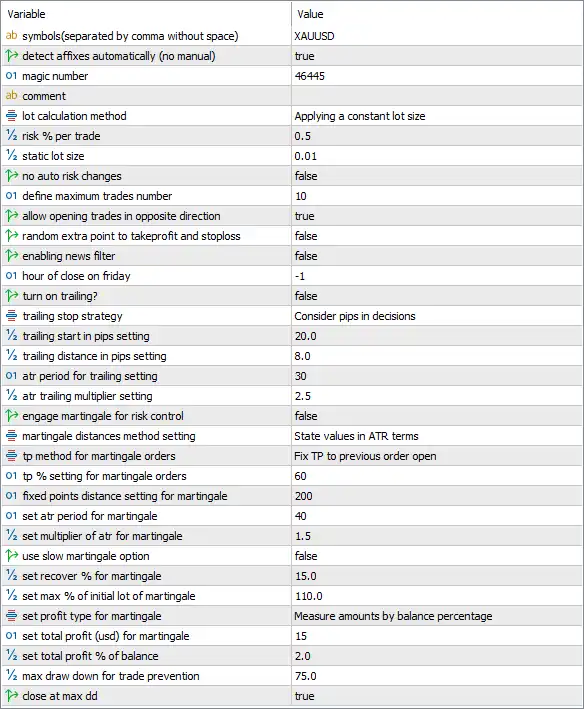
Below are the details of the parameters in the advisor’s trading system settings table:
🔄 General Trading Settings
🔹 Symbols (separated by comma without space) = XAUUSD – Specifies that the EA will trade only the XAUUSD symbol.
🔹 Detect affixes automatically (no manual) = true – Automatically detects the broker's symbol prefix or suffix without manual configuration.
🔹 Magic Number = 46445 – Uses 46445 as the unique identifier for all trades opened by the EA.
🔹 Comment – Optional text comment attached to every order opened by the EA.
🔄 Money Management
🔹 Lot Calculation Method = Applying a constant lot size – Uses a fixed lot sizing method instead of dynamic position sizing.
🔹 Risk % per Trade = 0.5 – Sets the trading risk to 0.5% per position when risk-based sizing is applied.
🔹 Static Lot Size = 0.01 – Opens every trade with a fixed position size of 0.01 lots.
🔹 No Auto Risk Changes = false – Allows the EA to adjust risk automatically when required.
🔄 Trade Management
🔹 Define Maximum Trades Number = 10 – Limits the total number of simultaneously open trades to 10.
🔹 Allow Opening Trades in Opposite Direction = true – Allows Buy and Sell positions to be opened simultaneously when trading conditions permit.
🔹 Random Extra Point to TakeProfit and StopLoss = false – Disables random offsets for Stop Loss and Take Profit values.
🔄 News & Time Filters
🔹 Enabling News Filter = false – The built-in economic news filter is disabled.
🔹 Hour of Close on Friday = -1 – No automatic Friday closing hour is specified (-1 disables this feature).
🔄 Trailing Stop Settings
🔹 Turn On Trailing? = false – Disables the automatic Trailing Stop function.
🔹 Trailing Stop Strategy = Consider pips in decisions – Uses pip-based calculations for trailing decisions when Trailing Stop is enabled.
🔹 Trailing Start in Pips Setting = 20.0 – Begins trailing after the position reaches 20.0 pips of profit.
🔹 Trailing Distance in Pips Setting = 8.0 – Maintains an 8.0-pip distance between price and the Stop Loss during trailing.
🔹 ATR Period for Trailing Setting = 30 – Uses an ATR period of 30 for ATR-based trailing calculations.
🔹 ATR Trailing Multiplier Setting = 2.5 – Applies a 2.5× ATR multiplier to determine the trailing distance.
🔄 Martingale & Recovery Settings
🔹 Engage Martingale for Risk Control = false – Disables the Martingale recovery system.
🔹 Martingale Distance Method Setting = State values in ATR terms – Measures grid spacing using ATR-based values.
🔹 TP Method for Martingale Orders = Fix TP to previous order open – Sets the Take Profit based on the previous order's opening price.
🔹 TP % Setting for Martingale Orders = 60 – Uses a 60% Take Profit parameter for Martingale calculations.
🔹 Fixed Points Distance Setting for Martingale = 200 – Sets a fixed spacing of 200 points between Martingale orders.
🔹 Set ATR Period for Martingale = 40 – Uses an ATR period of 40 for Martingale calculations.
🔹 Set Multiplier of ATR for Martingale = 1.5 – Applies a 1.5× ATR multiplier when calculating Martingale order spacing.
🔹 Use Slow Martingale Option = false – Disables the slower Martingale progression mode.
🔹 Set Recover % for Martingale = 15.0 – Targets 15.0% recovery when Martingale is active.
🔹 Set Max % of Initial Lot for Martingale = 110.0 – Limits Martingale position sizing to 110.0% of the initial lot size.
🔹 Set Profit Type for Martingale = Measure amounts by balance percentage – Calculates Martingale profit targets as a percentage of account balance.
🔹 Set Total Profit (USD) for Martingale = 15 – Closes the Martingale cycle after achieving 15 USD profit.
🔹 Set Total Profit % of Balance = 2.0 – Alternatively targets 2.0% account balance profit.
🔄 Drawdown Protection
🔹 Max Drawdown for Trade Prevention = 75.0 – Stops opening new trades when account drawdown reaches 75.0%.
🔹 Close at Max DD = true – Automatically closes positions if the maximum drawdown threshold is reached.
🔢 Conclusion
Gold One EA MT5 offers a balanced combination of automated Gold trading, flexible money management, ATR-based calculations, optional Martingale recovery and comprehensive drawdown protection.
Its configurable parameters allow traders to optimize trading performance for different account sizes and broker environments while maintaining disciplined risk management. Proper configuration of each setting can significantly improve long-term trading consistency and account stability.
🔢 FAQs
❓ What symbol is Gold One EA MT5 designed to trade?
Gold One EA MT5 is configured to trade XAUUSD (Gold).
❓ Does Gold One EA MT5 support automatic lot sizing?
Yes. The EA supports both constant lot sizing and risk-based money management, although this configuration uses a fixed lot of 0.01 lots.
❓ Can I enable Martingale in Gold One EA MT5?
Yes. The EA includes a fully configurable Martingale system, but in this configuration it is disabled.
❓ Does the EA include drawdown protection?
Yes. It can stop trading and automatically close positions when the configured maximum drawdown level is reached.
❓ Is a news filter available in Gold One EA MT5?
Yes. The EA includes a built-in news filter, although it is disabled in the current configuration.