




0
SHOPPING CART
Instant Digital Delivery
Get your EA software delivered instantly to your email after purchase.
Instant Activation
Your EA will be activated immediately after purchase. No waiting time!
All-Inclusive Pricing
No hidden fees—what you see is what you pay.

Oracle EA MT5 (Latest version) – GroupBuy

Oracle MT5 is an automated and optimized trading robot with Gold and GBPUSD. Real performance has been verified on real accounts.

Price range: $89.00 through $599.00
In stock

Select a variant to see availability.

What is Oracle MT5?

Oracle MT5 is an advanced Expert Advisor (EA) designed for automated trading on GBPUSD and Gold markets. It combines machine learning technology with technical indicators to analyze market conditions and identify trading opportunities. The EA focuses on stability, adaptability, and structured risk management, helping traders maintain consistent automated trading performance.

🔶 Vendor Website: View here

🔶 This is GroupBuy ==> How to Join

About the Author

This product is compiled by Stanislav Tomilov. This author has more than +12 years of experience working on MQL5 with many famous products such as Oracle MT5, Full Throttle DMX MT5, Aura Neuron MT5, Vortex Gold EA MT5, One Gold MT4Aura Superstar MT4 and other advisors. Among them, Oracle EA MT5 is his best performing products.

🔶 Join Our Channel Telegram

Key Features of Oracle MT5

🔹 AI-Powered Market Analysis: Combines neural network modules with indicators to detect trading opportunities.
🔹 Dual Market Trading: Optimized for GBPUSD and XAUUSD to provide diversified automated trading exposure.
🔹 Indicator-Based Strategy: Uses RSI and Bollinger Bands to confirm trends and improve entry accuracy.
🔹 Integrated Safety Controls: Each trade is protected with structured Stop Loss (SL) to maintain strict risk limits.
🔹 Flexible Configuration Options: Traders can customize risk levels and trading parameters for different accounts.

Why Choose & Use Oracle MT5?

🔹 Stable Automated Trading: Designed to maintain consistent performance across varying market conditions.
🔹 Advanced Analytical Technology: Combines machine learning with proven technical indicators.
🔹 Disciplined Risk Framework: Structured Stop Loss and controlled exposure support balanced trading.
🔹 Prop Firm Friendly Design: Risk-focused structure suitable for disciplined trading environments.
🔹 Simple Deployment Process: Quick installation with minimal configuration required for immediate use.

Oracle MT5 Review

Oracle MT5 Live Signal Results

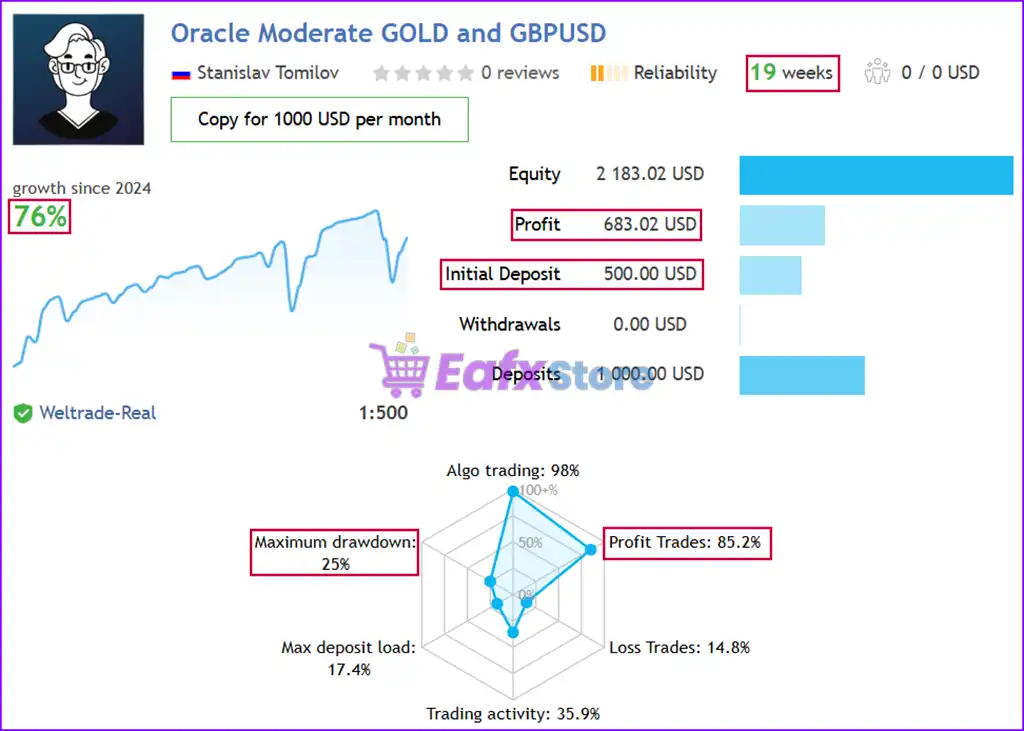
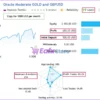
Oracle EA has demonstrated outstanding trading performance on a real account, achieving consistent profitability over 19 consecutive weeks. Starting with an initial capital of $500, the algorithm delivered remarkable returns while maintaining optimized risk management. Key trading metrics:

Intinal Deposit: $500
Total Profit: +76%
Winning Rate: 85.2%
Maximum Drawdown: 25%

Oracle EA Live Signal

Oracle EA Live Signal

Oracle MT5 Backtest Results

Oracle EA backtested trading results on Gold and GBPUSD pairs. The advisor maintained stability and significantly reduced risks despite market volatility.

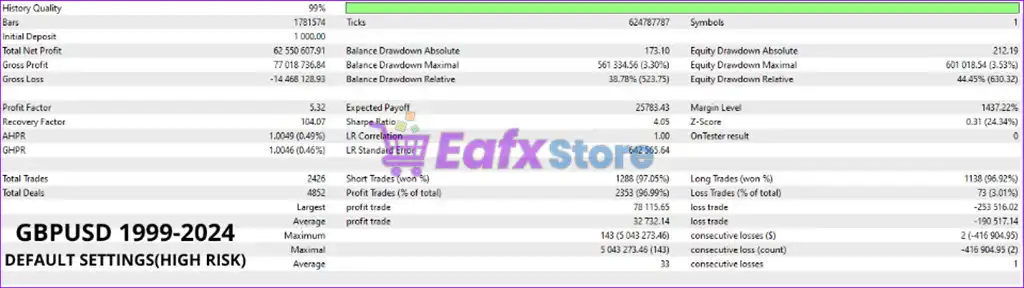
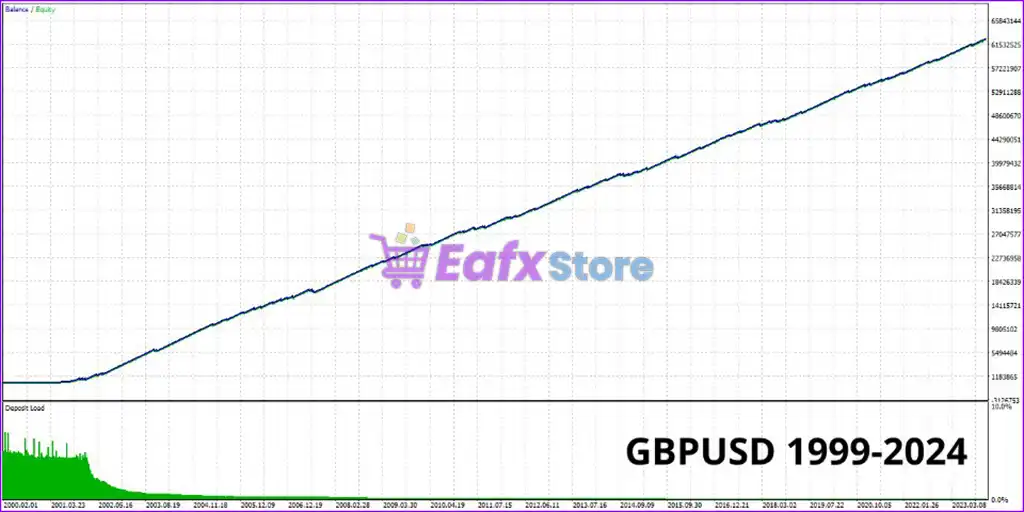
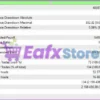
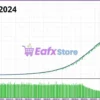
✅ Trading GBPUSD for 24 years (1999 – 2024), the total profit is $62.5 million from a capital of $1000. The risk is optimized at Maximum drawdown: 3.3% and the win rate is 96.99%.

Oracle MT5 Backtests

Oracle MT5 Backtests

Oracle MT5 Backtest

Oracle MT5 Backtest

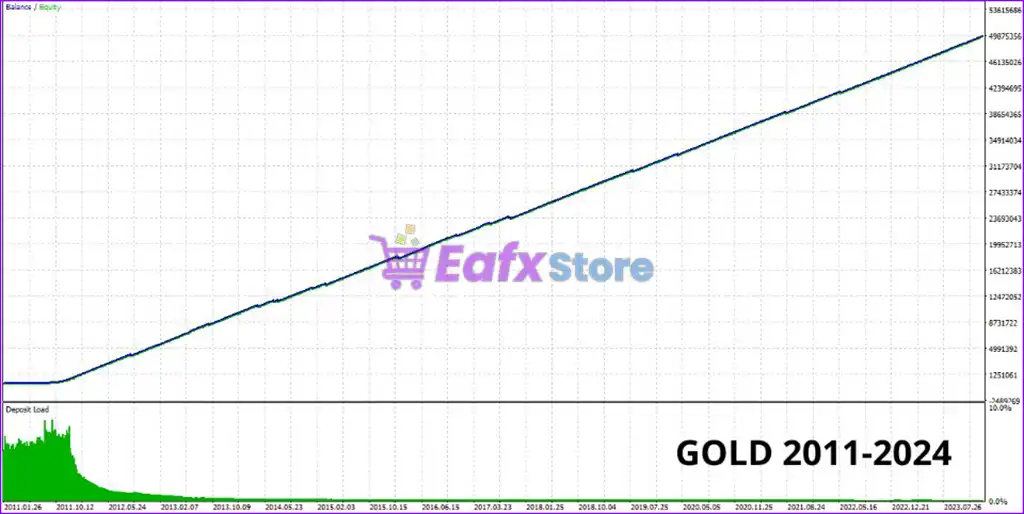
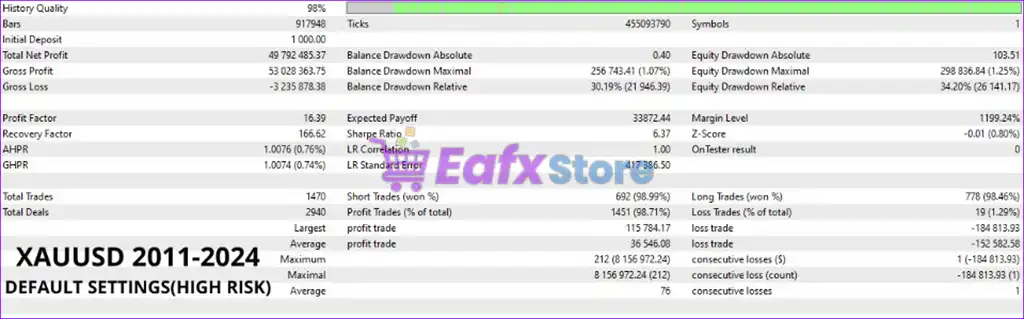
✅ Trading GOLD for 13 years (2011 – 2024), the total profit is $49.79 million from a capital of $1000. The risk level is optimized at Maximum drawdown: 1.07% and the winning rate is 98.71%.

Oracle MT5 Backtest Results

Oracle MT5 Backtest Results

Oracle MT5 Backtests Results

Oracle MT5 Backtests Results

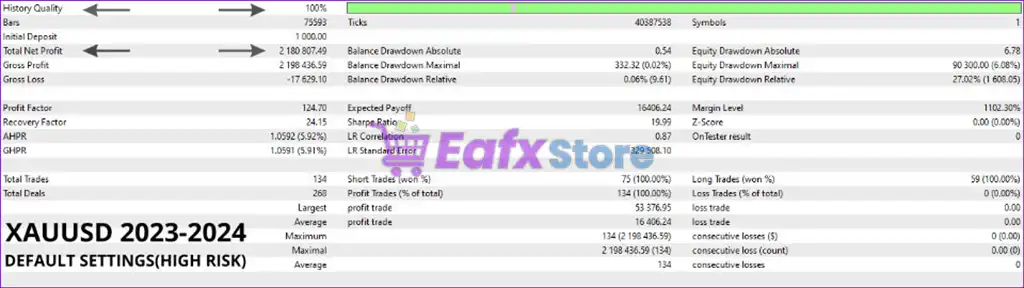
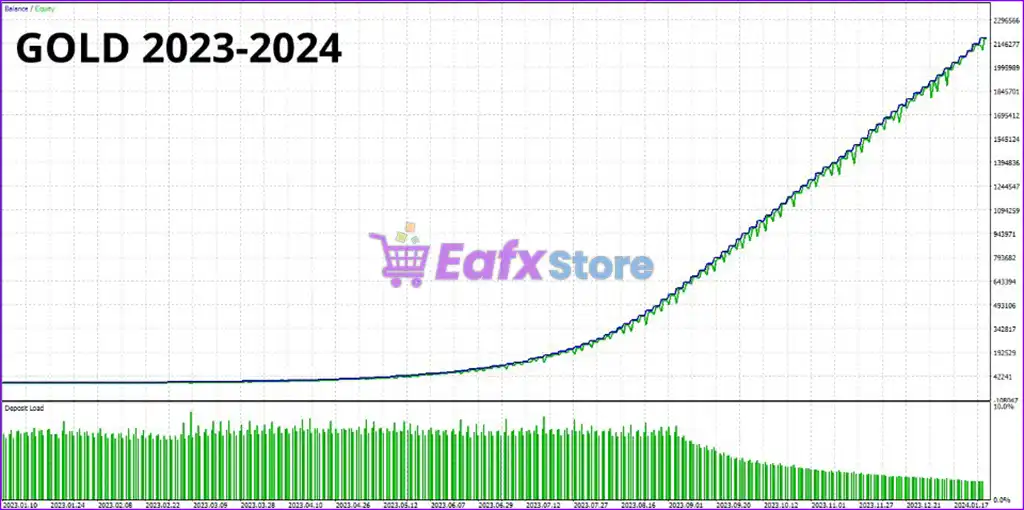
✅ Trading with GBPUSD for 1 year (2023 – 2024), the total profit is $2.18 million from a capital of $1000. The risk level is optimized at Maximum drawdown: 0.02% and the winning rate is 100%.

Oracle EA MT5 Backtests

Oracle EA MT5 Backtests

Oracle EA MT5 Backtest

Oracle EA MT5 Backtest

What is the Oracle MT5 Trading Strategy?

🔹 Machine Learning Analysis: Neural modules analyze historical and real-time market data for patterns.
🔹 Indicator Confirmation Logic: RSI and Bollinger Bands validate trend direction before opening trades.
🔹 Adaptive Market Behavior: Strategy adjusts trading decisions based on changing volatility conditions.
🔹 Structured Entry Timing: Trades are executed when technical signals align with machine learning analysis.
🔹 Automated Trade Management: Positions are managed automatically with predefined exits and protection.

Is Oracle MT5 safe?

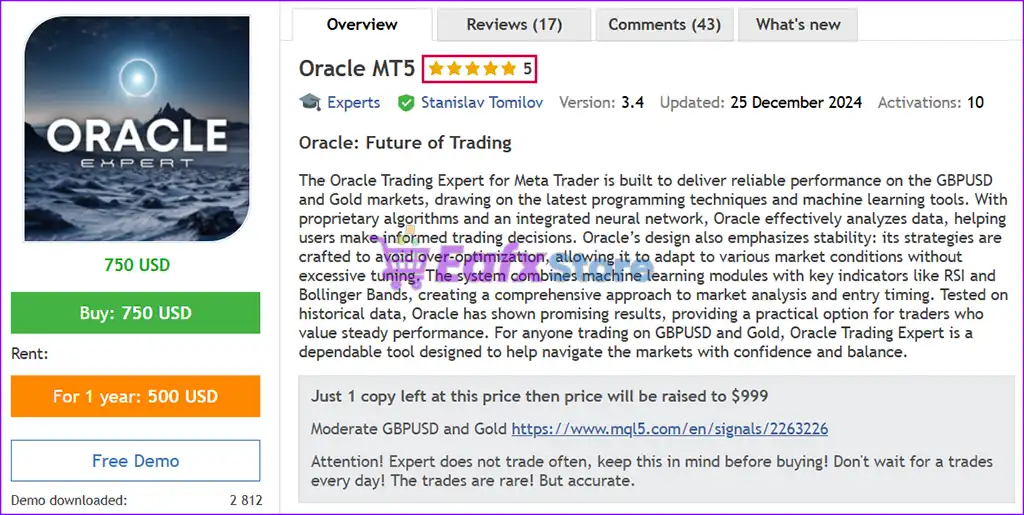
Oracle MT5 demonstrates remarkable potential in delivering stable and reliable profits, making it a reliable tool in the forex market. Oracle EA is highly regarded by the MQL5 community in many aspects and has gained the trust of its users.

⭐⭐⭐⭐⭐ Kwflavia (2024.12.02)

“This EA gives fairly consistent trading results and I recommend this seller.”

⭐⭐⭐⭐⭐ Le Chen (2024.08.28)

“This EA is very good.”

⭐⭐⭐⭐⭐ Kim Hari (2024.04.30)

“There were two transactions. Both were profits. Not a lot of deals but it’s like EA that sees profits in solid places. Good!”

⭐⭐⭐⭐⭐ Amwidt123 (2024.07.06)

“This EA has undergone multiple days of testing. We chose to purchase it. It employs the currently most advanced neural network deep learning technology.”

Trading Specifications

Recommended settings and parameters to pay attention to from developers and experts:

FeaturesType
Trading platformMetaTrader 5 (MT5)
Time framesM5 (5 minute chart)
Currency pairsXAUUSD (Gold) & GBPUSD
Minimum / Recommended deposit$100+
Minimum / Recommended leverage1:30+
Account typeAny
Product typeOriginal version
Additional servicesUnlock and Decompile
Recommended brokersExness Broker, Icmarkets Broker
Recommended VPSMyfxVPS.com ( Blue VPS, Golden VPS). Lowest Latency, 2 week Free Trial, 100% Free for 12-18 Months.

Product Download Package?

The download package of the product suite includes:

✅ Setting (If Any).docx
✅ Installation Guide.docx

➡️ Reviewed by David Easton

Conclusion

In short, Oracle MT5 stands out as a powerful and reliable trading solution, backed by the expertise of Stanislav Tomilov, a seasoned MQL5 developer with over nine years of experience. With its advanced machine learning algorithms, risk management strategies, and proven backtesting results, Oracle EA has consistently demonstrated exceptional performance in both live and historical trading.
🔢 Oracle MT5 Settings Guide

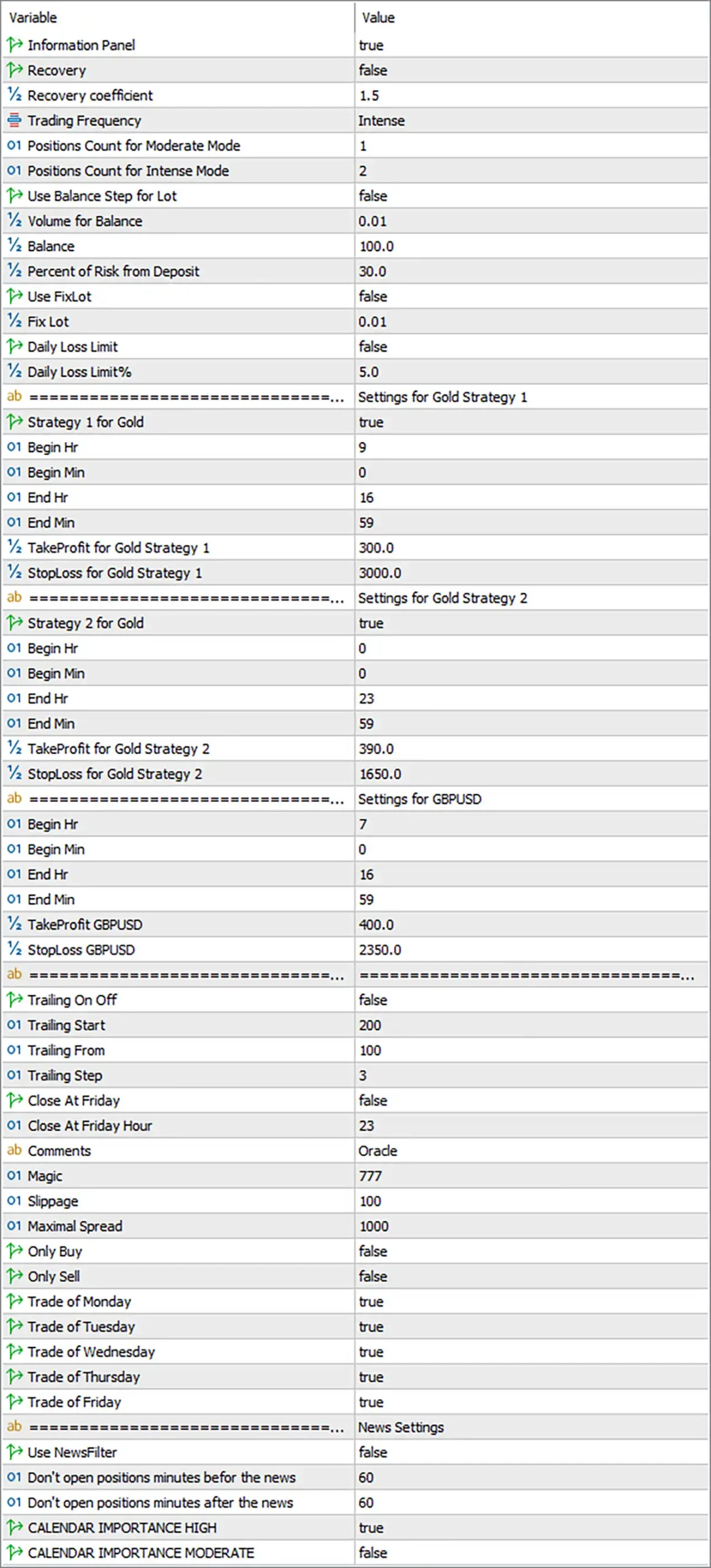
Oracle MT5 is a flexible automated trading Expert Advisor designed to combine multiple trading strategies, configurable position sizing, session-based trading windows, trailing management, spread controls, weekday filters and news protection.

The supplied settings show a multi-market configuration covering Gold and GBPUSD, with two separate Gold strategies and dedicated trading schedules for each market.

Oracle MT5 Settings Panel

Oracle MT5 Settings Panel

🔶 General & Money Management Settings

🔹 Information Panel = true – Displays the EA information panel on the chart for easier monitoring of its current trading configuration and status.

🔹 Recovery = false – Disables the recovery mechanism in the current configuration, meaning recovery-based position adjustments are not activated.

🔹 Recovery coefficient = 1.5 – Defines the recovery multiplier as 1.5 if the Recovery function is enabled.

🔹 Trading Frequency = Intense – Selects the Intense trading-frequency mode, allowing the EA to operate with a more active trading profile.

🔹 Positions Count for Moderate Mode = 1 – Sets the position threshold for the Moderate trading mode to 1 position.

🔹 Positions Count for Intense Mode = 2 – Sets the position threshold for the Intense trading mode to 2 positions.

🔹 Use Balance Step for Lot = false – Disables balance-step-based lot calculation.

🔹 Volume for Balance = 0.01 – Sets the volume reference to 0.01 lots for the configured balance-based calculation.

🔹 Balance = 100.0 – Defines 100.0 as the balance reference associated with the volume calculation.

🔹 Percent of Risk from Deposit = 30.0 – Sets the deposit-based risk parameter to 30.0%.

🔹 Use FixLot = false – Disables the fixed-lot mode.

🔹 Fix Lot = 0.01 – Defines a fixed lot size of 0.01 if fixed-lot trading is enabled.

🔹 Daily Loss Limit = false – Disables the daily loss limit in the current configuration.

🔹 Daily Loss Limit% = 5.0 – Defines a daily loss threshold of 5.0% when the Daily Loss Limit function is activated.

🔶 Gold Strategy 1 Settings

🔹 Strategy 1 for Gold = true – Enables Gold Strategy 1 for automated trading.

🔹 Begin Hr = 9 – Sets the Strategy 1 trading start hour to 9.

🔹 Begin Min = 0 – Sets the Strategy 1 starting minute to 0, creating a start time of 09:00.

🔹 End Hr = 16 – Sets the Strategy 1 trading end hour to 16.

🔹 End Min = 59 – Sets the Strategy 1 ending minute to 59, creating an end time of 16:59.

🔹 TakeProfit for Gold Strategy 1 = 300.0 – Sets the Take Profit parameter for Gold Strategy 1 to 300.0.

🔹 StopLoss for Gold Strategy 1 = 3000.0 – Sets the Stop Loss parameter for Gold Strategy 1 to 3000.0.

🔶 Gold Strategy 2 Settings

🔹 Strategy 2 for Gold = true – Enables Gold Strategy 2 for automated Gold trading.

🔹 Begin Hr = 0 – Sets the Strategy 2 trading start hour to 0.

🔹 Begin Min = 0 – Sets the Strategy 2 starting minute to 0, creating a start time of 00:00.

🔹 End Hr = 23 – Sets the Strategy 2 trading end hour to 23.

🔹 End Min = 59 – Sets the Strategy 2 ending minute to 59, creating an end time of 23:59.

🔹 TakeProfit for Gold Strategy 2 = 390.0 – Sets the Take Profit parameter for Gold Strategy 2 to 390.0.

🔹 StopLoss for Gold Strategy 2 = 1650.0 – Sets the Stop Loss parameter for Gold Strategy 2 to 1650.0.

🔶 GBPUSD Settings

🔹 Begin Hr = 7 – Sets the GBPUSD trading start hour to 7.

🔹 Begin Min = 0 – Sets the GBPUSD starting minute to 0, creating a start time of 07:00.

🔹 End Hr = 16 – Sets the GBPUSD trading end hour to 16.

🔹 End Min = 59 – Sets the GBPUSD ending minute to 59, creating an end time of 16:59.

🔹 TakeProfit GBPUSD = 400.0 – Sets the Take Profit parameter for GBPUSD to 400.0.

🔹 StopLoss GBPUSD = 2350.0 – Sets the Stop Loss parameter for GBPUSD to 2350.0.

🔶 Trailing Stop Settings

🔹 Trailing On Off = false – Disables the trailing-stop mechanism in the current configuration.

🔹 Trailing Start = 200 – Specifies 200 as the profit level at which trailing management would start if enabled.

🔹 Trailing From = 100 – Defines 100 as the trailing reference distance/starting parameter used by the EA when trailing is active.

🔹 Trailing Step = 3 – Sets the trailing adjustment step to 3.

🔶 Friday & Trade Execution Settings

🔹 Close At Friday = false – Disables automatic closing of positions on Friday.

🔹 Close At Friday Hour = 23 – Sets the Friday closing hour to 23 if Friday position closure is enabled.

🔹 Comments = Oracle – Uses “Oracle” as the trade comment for identifying EA-generated orders.

🔹 Magic = 777 – Assigns 777 as the EA’s Magic Number for identifying and managing its own positions.

🔹 Slippage = 100 – Sets the maximum permitted slippage parameter to 100.

🔹 Maximal Spread = 1000 – Sets the maximum permitted spread parameter to 1000.

🔹 Only Buy = false – Disables buy-only trading, allowing the EA to trade in both directions subject to its strategy logic.

🔹 Only Sell = false – Disables sell-only trading, allowing both Buy and Sell opportunities.

🔶 Trading Days

🔹 Trade of Monday = true – Enables trading on Monday.

🔹 Trade of Tuesday = true – Enables trading on Tuesday.

🔹 Trade of Wednesday = true – Enables trading on Wednesday.

🔹 Trade of Thursday = true – Enables trading on Thursday.

🔹 Trade of Friday = true – Enables trading on Friday.

🔶 News Settings

🔹 Use NewsFilter = false – Disables the automated news filter in the current configuration.

🔹 Don’t open positions minutes before the news = 60 – Specifies a 60-minute restriction window before relevant news when the news filter is enabled.

🔹 Don’t open positions minutes after the news = 60 – Specifies a 60-minute restriction window after relevant news when the news filter is enabled.

🔹 CALENDAR IMPORTANCE HIGH = true – Enables filtering for High-importance economic-calendar events when the News Filter is activated.

🔹 CALENDAR IMPORTANCE MODERATE = false – Disables filtering for Moderate-importance economic-calendar events.

🔢 Oracle MT5 Configuration Summary

🔹 Trading Frequency: Intense

🔹 Recovery: Disabled

🔹 Recovery Coefficient: 1.5

🔹 Balance-Step Lot Sizing: Disabled

🔹 Volume for Balance: 0.01

🔹 Balance Reference: 100.0

🔹 Deposit Risk: 30.0%

🔹 Fixed Lot: Disabled

🔹 Fixed Lot Value: 0.01

🔹 Daily Loss Protection: Disabled

🔹 Daily Loss Limit: 5.0%

🔹 Gold Strategy 1: Enabled — 09:00–16:59

🔹 Gold Strategy 1 Take Profit: 300.0

🔹 Gold Strategy 1 Stop Loss: 3000.0

🔹 Gold Strategy 2: Enabled — 00:00–23:59

🔹 Gold Strategy 2 Take Profit: 390.0

🔹 Gold Strategy 2 Stop Loss: 1650.0

🔹 GBPUSD Trading Window: 07:00–16:59

🔹 GBPUSD Take Profit: 400.0

🔹 GBPUSD Stop Loss: 2350.0

🔹 Trailing Stop: Disabled

🔹 Trailing Start: 200

🔹 Trailing From: 100

🔹 Trailing Step: 3

🔹 Friday Closing: Disabled

🔹 Magic Number: 777

🔹 Trade Comment: Oracle

🔹 Slippage: 100

🔹 Maximum Spread: 1000

🔹 Buy-Only Mode: Disabled

🔹 Sell-Only Mode: Disabled

🔹 Trading Days: Monday–Friday enabled

🔹 News Filter: Disabled

🔹 Pre-News Restriction: 60 minutes

🔹 Post-News Restriction: 60 minutes

🔹 High-Importance News: Enabled

🔹 Moderate-Importance News: Disabled

🔢 Conclusion

Oracle MT5 provides a broad set of configuration options for traders looking for a multi-strategy automated trading system. The current setup enables Gold Strategy 1, Gold Strategy 2, and GBPUSD trading, with different trading windows and separate Take Profit and Stop Loss parameters.

The EA is configured for Intense trading frequency, while Recovery and Fixed Lot modes are disabled. The 30.0% deposit-risk parameter is present, although its exact operational effect depends on the EA’s internal position-sizing logic and the active lot-management settings.

A notable point is that Trailing On Off = false, so the configured trailing values (200, 100, and 3) are currently inactive. Likewise, the Daily Loss Limit = false and Use NewsFilter = false mean their corresponding numerical settings are configured but not actively enforcing those protections.

Before deploying Oracle MT5 on a live account, traders should carefully verify the EA’s unit conventions for Take Profit, Stop Loss, spread, slippage, and risk values, then conduct forward testing under their intended broker conditions.

🔢 FAQs

What markets does Oracle MT5 trade according to these settings?

The configuration includes Gold through two dedicated strategies and GBPUSD through a separate trading schedule.

What are the trading hours for Gold Strategy 1?

Gold Strategy 1 is enabled from 09:00 to 16:59 based on the configured Begin and End hour/minute values.

Is Gold Strategy 2 active throughout the day?

Yes. Gold Strategy 2 is configured from 00:00 to 23:59, effectively covering the entire day subject to the EA’s other trading conditions.

Is the trailing stop currently active?

No. Trailing On Off = false, so the trailing parameters Trailing Start = 200, Trailing From = 100, and Trailing Step = 3 are not currently active.

Is the news filter enabled?

No. Use NewsFilter = false. If activated, the configuration specifies 60 minutes before and 60 minutes after news, with High-importance events enabled and Moderate-importance events disabled.

User Reviews

0.0 out of 5
0
0
0
0
0
Write a review

There are no reviews yet.

Only logged in customers who have purchased this product may leave a review.

1. What is Oracle EA MT5?

Oracle EA MT5 is an automated trading system designed for MetaTrader 5, specializing in trading GBPUSD and Gold (XAUUSD) using advanced machine learning and neural networks.

2. How does Oracle EA MT5 work?

Oracle EA MT5 analyzes market data using a combination of proprietary algorithms, traditional indicators (RSI, Bollinger Bands), and AI-powered strategies to execute profitable trades automatically.

3. What are the key features of Oracle EA MT5?

The EA offers advanced risk management, machine learning-based analysis, stable trading strategies, backtested performance, and easy customization with a built-in news filter.

4. Is Oracle EA MT5 profitable?

Yes, Oracle EA has shown consistent profitability, achieving a 76% total profit in 19 consecutive weeks with an 85.2% win rate, as well as impressive backtesting results.

5. What currency pairs does Oracle EA MT5 trade?

It is designed to trade GBPUSD and Gold (XAUUSD), with optimized strategies for both markets.

6. What are the recommended settings for Oracle EA MT5?

Minimum Deposit: $100
Leverage: 1:30 or higher
Timeframe: M5
Recommended Brokers: Exness Broker, HTFX Broker
VPS Recommendation: MyfxVPS.com (offers a free trial and low latency)

7. Does Oracle EA MT5 use risky trading strategies?

No, it avoids high-risk strategies such as Martingale, hedging, grid trading, scalping, high-frequency trading (HFT), and arbitrage to ensure stable and controlled risk management.

8. Is Oracle EA MT5 suitable for FTMO and Prop Firms?

Yes, Oracle EA MT5 is designed to meet the requirements of proprietary trading firms like FTMO by maintaining strict risk control and stable performance.

Worldwide Instant Access
Download your EA software from anywhere in the world.
Reliable & Tested
Each EA is thoroughly tested and optimized for best performance.
Recently Viewed
  • Original price was: $500.00.Current price is: $89.00.
  • Original price was: $1,499.00.Current price is: $199.00.
  • Original price was: $3,999.00.Current price is: $299.00.
  • Price range: $60.00 through $599.00
Related Items
  • 4
    $370.00
  • 0
    $180.00
  • 7
    Original price was: $1,199.00.Current price is: $229.00.
  • 3
    Price range: $89.00 through $599.00
Want Unlimited Access to EA Bots, Indicators & Exclusive Trading Tools?

Start today, get instant access to all EA bots!

Download Unlimited - Exclusive Updates - Save More

The company’s mission

We are an organization offering affordable Forex trading tools for educational purposes. Achieve the greatest benefits with minimal investment at eafxstore.com.
  • Telegram
  • Email
  • Youtube
  • Facebook

Policy

DCMA REPORT
Privacy Policy
Refund policy

Help

About US
Contact
Copyright 2023 ©EAFXSTORE.COM
EA FX Store
Logo
Shopping cart