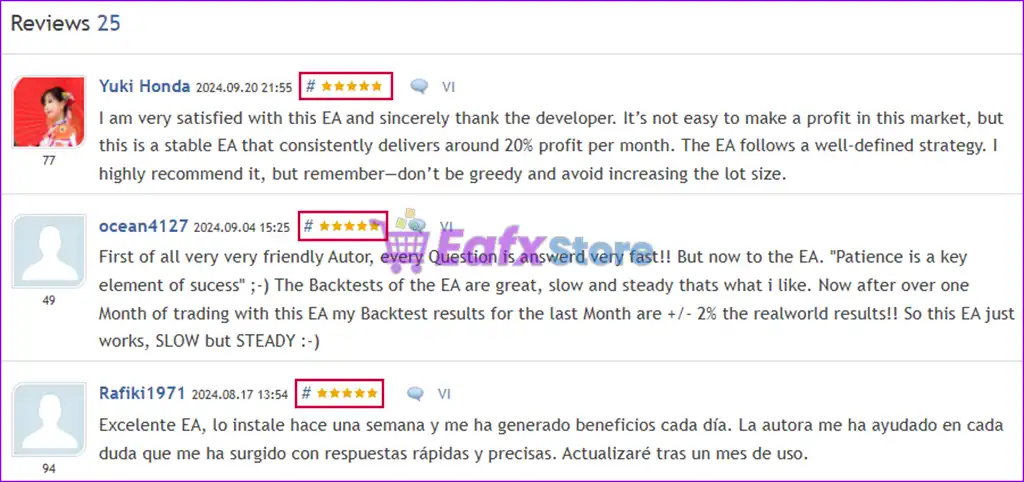


🔢 Tiger Trade Pro MT5 Settings Explained – Complete Parameter Guide
Tiger Trade Pro MT5 is an automated MetaTrader 5 Expert Advisor designed to execute trades with intelligent position management, automatic lot sizing, dynamic grid spacing, equity protection, and flexible trading controls. It combines customizable risk management, optional trailing stops, trading session filters, and news filtering to help traders optimize performance while maintaining disciplined capital protection.

🔢 Tiger Trade Pro MT5 Parameters Explained
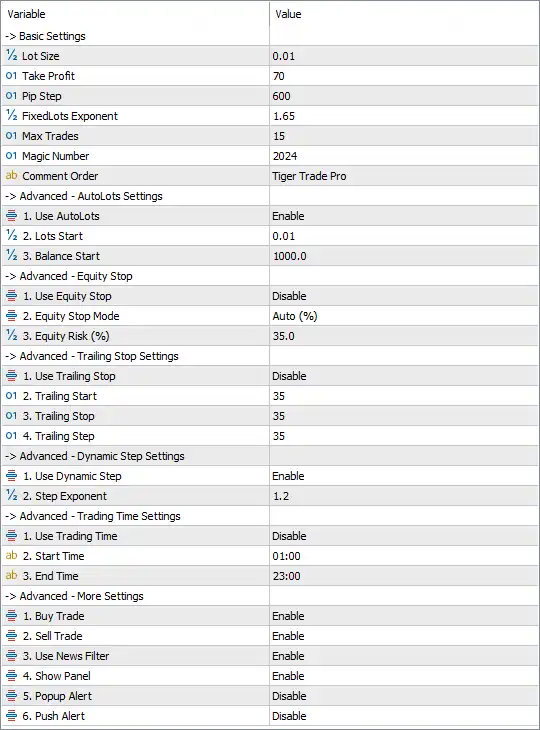
Below are the details of the parameters in the advisor’s trading system settings table:
🔄 Basic Settings
🔹 Lot Size = 0.01 – Sets the initial trading volume to 0.01 lots when opening new positions.
🔹 Take Profit = 70 – Closes trades automatically after reaching a profit target of 70 points.
🔹 Pip Step = 600 – Defines a 600-point distance between additional positions in the trading sequence.
🔹 Fixed Lots Exponent = 1.65 – Uses a 1.65× multiplier to increase lot sizes for subsequent positions when applicable.
🔹 Max Trades = 15 – Limits the maximum number of simultaneously open trades to 15.
🔹 Magic Number = 2024 – Assigns Magic Number 2024 to uniquely identify all trades opened by Tiger Trade Pro MT5.
🔹 Comment Order = Tiger Trade Pro – Attaches the comment "Tiger Trade Pro" to every order placed by the EA.
🔄 Advanced – AutoLots Settings
🔹 Use AutoLots = Enable – Enables automatic lot size calculation based on account balance.
🔹 Lots Start = 0.01 – Sets the starting lot size for the AutoLots system to 0.01 lots.
🔹 Balance Start = 1000.0 – Uses 1000.0 account currency units as the reference balance for automatic lot calculations.
🔄 Advanced – Equity Stop Settings
🔹 Use Equity Stop = Disable – Disables the automatic Equity Stop protection.
🔹 Equity Stop Mode = Auto (%) – Uses Auto (%) as the Equity Stop calculation method if the feature is enabled.
🔹 Equity Risk (%) = 35.0 – Sets the Equity Stop threshold to 35.0% of account equity.
🔄 Advanced – Trailing Stop Settings
🔹 Use Trailing Stop = Disable – Disables the automatic Trailing Stop function.
🔹 Trailing Start = 35 – Begins trailing after the trade gains 35 points if Trailing Stop is enabled.
🔹 Trailing Stop = 35 – Maintains a 35-point trailing distance behind market price.
🔹 Trailing Step = 35 – Updates the Stop Loss every 35 points as the market moves in favor of the trade.
🔄 Advanced – Dynamic Step Settings
🔹 Use Dynamic Step = Enable – Enables automatic adjustment of trade spacing based on market conditions.
🔹 Step Exponent = 1.2 – Applies a 1.2× multiplier when calculating dynamic step distances.
🔄 Advanced – Trading Time Settings
🔹 Use Trading Time = Disable – Disables trading session restrictions, allowing trading at any time.
🔹 Start Time = 01:00 – Defines 01:00 as the beginning of the trading session when the time filter is enabled.
🔹 End Time = 23:00 – Defines 23:00 as the end of the trading session when the time filter is enabled.
🔄 Advanced – More Settings
🔹 Buy Trade = Enable – Allows the EA to open Buy positions.
🔹 Sell Trade = Enable – Allows the EA to open Sell positions.
🔹 Use News Filter = Enable – Activates the built-in economic news filter to avoid trading during important market events.
🔹 Show Panel = Enable – Displays the EA's information panel on the chart.
🔹 Popup Alert = Disable – Disables popup notifications for trading events.
🔹 Push Alert = Disable – Disables push notifications to connected mobile devices.
🔢 Conclusion
Tiger Trade Pro MT5 is a flexible automated trading Expert Advisor that combines intelligent AutoLots, dynamic trade spacing, configurable equity protection, optional trailing stops, and built-in news filtering. Its extensive risk management and trading control features make it suitable for traders seeking an adaptable EA that can be customized for different account sizes, broker conditions, and market environments. Proper configuration of these parameters helps improve long-term consistency while maintaining disciplined risk management.
🔢 FAQs
❓ What is Tiger Trade Pro MT5 designed for?
Tiger Trade Pro MT5 is an automated MetaTrader 5 Expert Advisor that manages trade entries, money management, and risk control with configurable trading parameters.
❓ Does Tiger Trade Pro MT5 support automatic lot sizing?
Yes. The EA includes an AutoLots system that automatically calculates position size based on account balance, starting from 0.01 lots with a 1000.0 balance reference.
❓ Can I limit the maximum number of trades?
Yes. The Max Trades parameter is set to 15, limiting the total number of simultaneously open positions.
❓ Does Tiger Trade Pro MT5 include a news filter?
Yes. The built-in News Filter is enabled, helping the EA avoid opening trades during significant economic news releases.
❓ What is the purpose of the Magic Number?
The Magic Number (2024) uniquely identifies trades opened by Tiger Trade Pro MT5, allowing the EA to manage only its own positions independently from other Expert Advisors.