
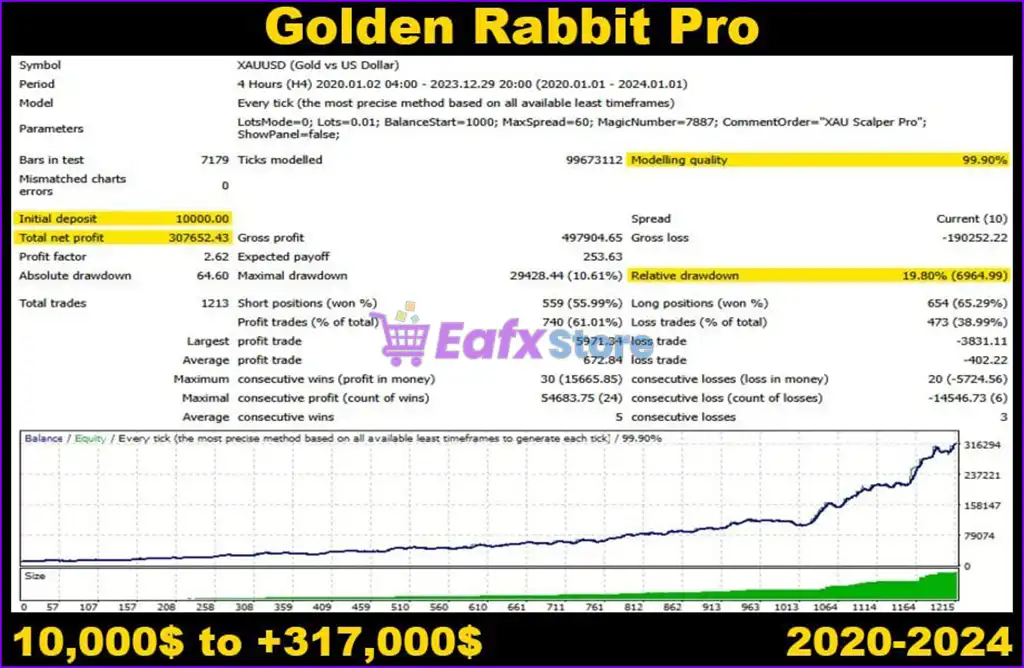

🔢 Golden Rabbit Pro MT5 Settings Explained – Complete Parameter Guide
Golden Rabbit Pro MT5 is an automated Expert Advisor for MetaTrader 5 designed to simplify algorithmic trading with intelligent Auto Lot management, configurable execution modes, spread protection, and built-in chart monitoring.
Its lightweight settings make it easy to deploy while still providing essential money management and broker protection features. Understanding each parameter allows traders to optimize the EA for different account sizes and trading environments.

🔢 Golden Rabbit Pro MT5 Parameters Explained
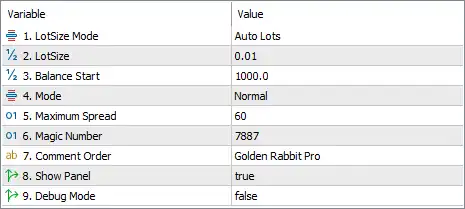
Below are the details of the parameters in the advisor’s trading system settings table:
🔄 Money Management Settings
🔹 LotSize Mode = Auto Lots – Enables automatic lot sizing, allowing the EA to calculate the trading volume based on the account balance instead of using a permanently fixed lot size.
🔹 LotSize = 0.01 – Sets the base lot size to 0.01 lots, which serves as the initial trading volume or the minimum lot used by the Auto Lots system.
🔹 Balance Start = 1000.0 – Uses 1000.0 units of account balance as the reference point for automatic lot size calculations.
🔄 Trading Configuration
🔹 Mode = Normal – Runs the EA in Normal trading mode, using the default execution logic and strategy configuration.
🔹 Maximum Spread = 60 – Prevents the EA from opening new positions when the market spread exceeds 60 points, helping avoid trades during unfavorable market conditions.
🔄 Identification Settings
🔹 Magic Number = 7887 – Assigns 7887 as the unique identifier for all positions opened by Golden Rabbit Pro MT5, allowing the EA to manage only its own trades.
🔹 Comment Order = Golden Rabbit Pro – Adds "Golden Rabbit Pro" as the order comment for every trade executed by the EA.
🔄 Interface & Diagnostics
🔹 Show Panel = true – Displays the EA's information panel directly on the trading chart, providing quick access to important trading information and status.
🔹 Debug Mode = false – Disables debugging mode, allowing the EA to operate normally without generating additional diagnostic information.
🔢 Conclusion
Golden Rabbit Pro MT5 offers a clean and user-friendly configuration focused on automated position sizing, reliable trade execution, and essential risk protection. With Auto Lots, spread filtering, Magic Number management, and a built-in chart panel, the EA provides traders with a practical solution for managing automated trading efficiently. Properly configuring these parameters ensures stable operation across different brokers and account sizes while maintaining consistent risk management.
🔢 FAQs
❓ What is Golden Rabbit Pro MT5?
Golden Rabbit Pro MT5 is an automated Expert Advisor for MetaTrader 5 that combines automatic lot sizing, spread protection, and configurable trading settings for efficient algorithmic trading.
❓ Does Golden Rabbit Pro MT5 support automatic lot sizing?
Yes. The EA uses Auto Lots mode, automatically adjusting trade volume according to the account balance.
❓ What is the purpose of the Maximum Spread setting?
The Maximum Spread (60) parameter prevents the EA from opening new trades when the market spread becomes too high, helping reduce trading costs during volatile conditions.
❓ Why is the Magic Number important?
The Magic Number (7887) uniquely identifies trades opened by Golden Rabbit Pro MT5, ensuring the EA only manages its own positions without interfering with other Expert Advisors.
❓ Can I disable the chart information panel?
Yes. The Show Panel option can be turned on or off depending on whether you want the EA's information panel displayed on the chart.