
🔢 Price Action FX MT5 Settings Explained – Complete Parameter Guide
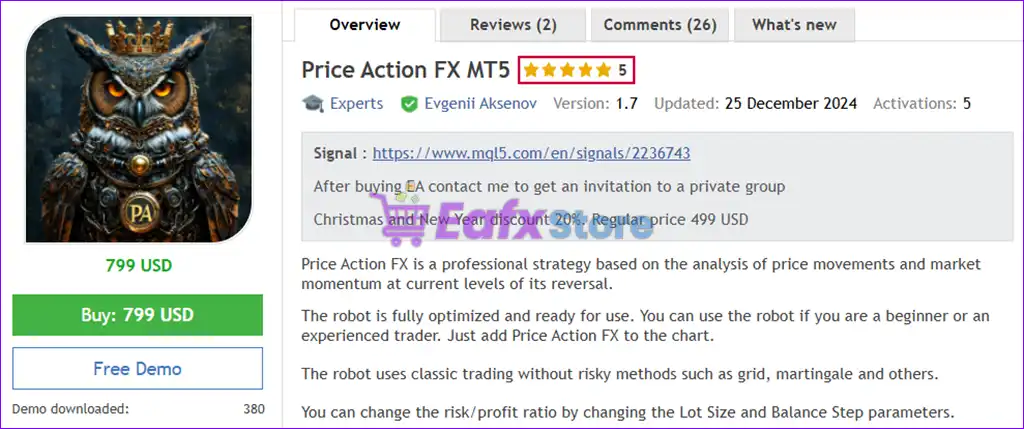
Price Action FX MT5 is an automated MetaTrader 5 Expert Advisor that utilizes Price Action trading principles combined with flexible money management, spread protection, trading session controls and trailing stop management.
The EA includes configurable position sizing, order limitations, broker time adjustments, and holiday filters to help traders achieve more stable and disciplined automated trading performance across different broker environments.

🔢 Price Action FX MT5 Parameters Explained
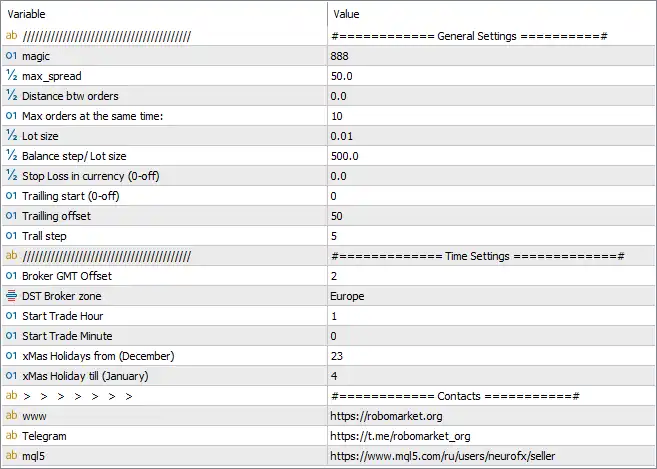
Below are the details of the parameters in the advisor’s trading system settings table:
🔶 General Settings
🔹 Magic = 888 – Assigns Magic Number 888 as the unique identifier for all trades opened and managed by Price Action FX MT5.
🔹 Max_Spread = 50.0 – Prevents the EA from opening new positions when the market spread exceeds 50.0 points, helping reduce trading costs during volatile conditions.
🔹 Distance btw Orders = 0.0 – Sets the minimum distance between consecutive orders to 0.0 points, meaning no additional spacing restriction is applied.
🔹 Max Orders at the Same Time = 10 – Limits the maximum number of simultaneously open trades to 10.
🔹 Lot Size = 0.01 – Sets the default trading volume to 0.01 lots.
🔹 Balance Step / Lot Size = 500.0 – Uses 500.0 units of account balance as the reference for adjusting lot size according to account growth.
🔹 Stop Loss in Currency (0 = Off) = 0.0 – Disables the currency-based Stop Loss feature because the value is set to 0.0.
🔹 Trailing Start (0 = Off) = 0 – Disables Trailing Stop activation since the starting value is 0.
🔹 Trailing Offset = 50 – Sets the Trailing Stop offset to 50 points when the trailing function is enabled.
🔹 Trail Step = 5 – Updates the Trailing Stop every 5 points as the market moves in favor of the trade.
🔶 Time Settings
🔹 Broker GMT Offset = 2 – Configures the broker server time to GMT +2.
🔹 DST Broker Zone = Europe – Applies European Daylight Saving Time (DST) rules for automatic seasonal time adjustment.
🔹 Start Trade Hour = 1 – Allows the EA to begin opening trades starting at 01:00 broker time.
🔹 Start Trade Minute = 0 – Sets the trading start minute to 00, meaning trading begins exactly at 01:00.
🔹 XMas Holidays From (December) = 23 – Starts the Christmas holiday trading restriction on December 23.
🔹 XMas Holiday Till (January) = 4 – Ends the Christmas holiday restriction on January 4, allowing trading to resume afterward.
🔢 Conclusion
Price Action FX MT5 provides a straightforward yet effective configuration for automated Price Action trading. With configurable spread protection, dynamic lot sizing references, order management limits, broker time synchronization, holiday trading filters, and trailing stop controls, the EA offers traders a reliable framework for managing automated trades under varying market conditions. Proper adjustment of these settings helps improve execution quality, enhance risk management, and maintain stable long-term trading performance.
🔢 FAQs
❓ What is Price Action FX MT5?
Price Action FX MT5 is an automated Expert Advisor for MetaTrader 5 that applies Price Action trading concepts with configurable money management and risk control features.
❓ How many trades can Price Action FX MT5 open simultaneously?
The current configuration allows a maximum of 10 open trades at the same time.
❓ Does Price Action FX MT5 include a Trailing Stop?
Yes. The EA supports a Trailing Stop system with configurable Trailing Offset and Trail Step, although it is disabled in this configuration because Trailing Start = 0.
❓ Why is the Broker GMT Offset important?
The Broker GMT Offset (2) ensures that trading sessions and time-based filters are synchronized correctly with the broker's server time.
❓ What is the purpose of the Magic Number?
The Magic Number (888) uniquely identifies trades opened by Price Action FX MT5, allowing the EA to manage only its own positions without interfering with other Expert Advisors running on the same trading account.