


🔢 TitanShield US30 EA MT5 Settings Guide
TitanShield US30 EA MT5 is a specialized automated trading system designed for the US30 index and built around an expanding dynamic grid recovery approach. Its configuration combines an initial trade size, broker-point based Take Profit settings, progressive grid spacing, lot multiplication, basket-level Take Profit management, spread protection, and a maximum lot safety cap.
The published specifications confirm that the EA uses widening grid gaps and weighted-average basket exit management to handle market pullbacks while controlling trade density during extended movements.
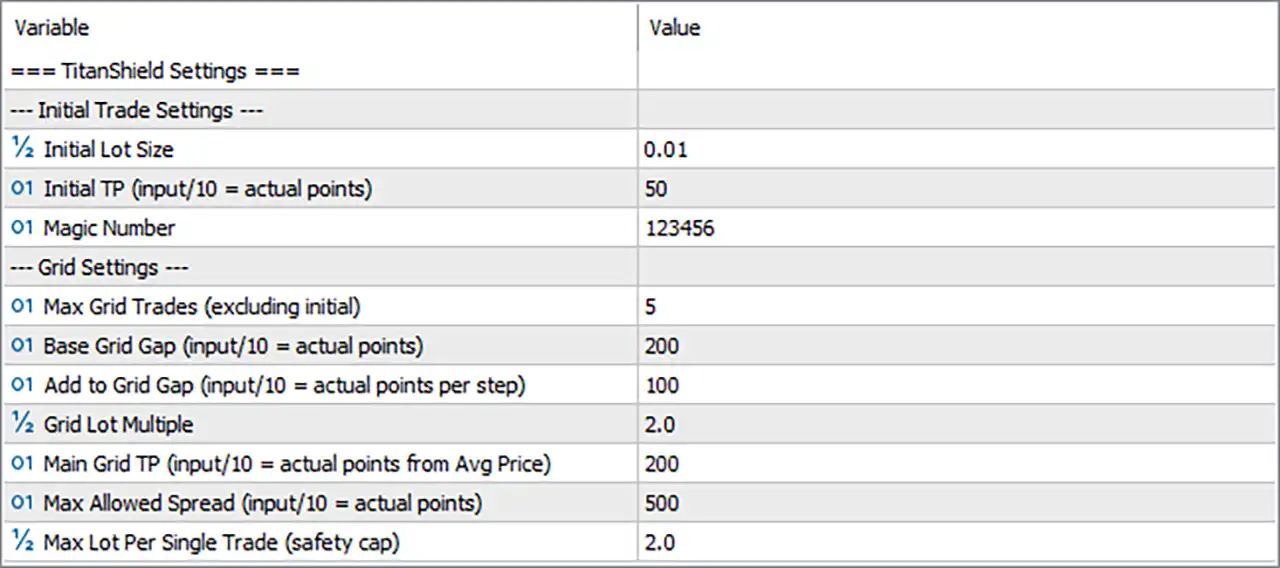
🔢 TitanShield Settings
⚙️ Initial Trade Settings
🔹 Initial Lot Size = 0.01 — Defines the starting volume of the first trade opened by TitanShield US30 EA MT5. The configured initial position size is 0.01 lots.
🔹 Initial TP (input/10 = actual points) = 50 — Sets the Take Profit value for the initial trade. With the displayed conversion rule, the input value is divided by 10 to determine the actual broker-point distance.
🔹 Magic Number = 123456 — Provides a unique identifier that allows the EA to recognize and manage positions associated with its own trading operations.
⚙️ Grid Settings
🔹 Max Grid Trades (excluding initial) = 5 — Limits the number of additional grid positions that can be opened after the initial trade, allowing up to 5 recovery trades beyond the first position.
🔹 Base Grid Gap (input/10 = actual points) = 200 — Defines the base distance used before placing the first additional grid position. According to the displayed formula, the input value is divided by 10 to obtain the actual point distance.
🔹 Add to Grid Gap (input/10 = actual points per step) = 100 — Determines how much additional distance is added to each subsequent grid level, creating progressively wider spacing as the grid expands.
🔹 Grid Lot Multiple = 2.0 — Sets the lot-size multiplier used when calculating the volume of subsequent grid trades. A value of 2.0 represents a doubling factor within the EA's grid sizing calculation.
🔹 Main Grid TP (input/10 = actual points from Avg Price) = 200 — Defines the main basket Take Profit distance from the average price of the active grid positions, using the displayed input-to-point conversion.
🔹 Max Allowed Spread (input/10 = actual points) = 500 — Sets the maximum spread threshold permitted before the EA can proceed with its trading logic. The displayed setting converts the input value by dividing it by 10.
🔹 Max Lot Per Single Trade (safety cap) = 2.0 — Establishes a hard maximum lot size for any individual grid order, providing an additional exposure-control mechanism regardless of the calculated grid volume.
⚙️ How the TitanShield US30 EA MT5 Settings Work Together
The configuration is structured around an initial position followed by controlled grid expansion. The Initial Lot Size = 0.01 determines the starting exposure, while Max Grid Trades = 5 limits the number of additional positions. The Base Grid Gap = 200 and Add to Grid Gap = 100 create progressively wider spacing between grid levels rather than maintaining a fixed distance. This expanding-grid structure is consistent with the published TitanShield strategy description.
The Grid Lot Multiple = 2.0 controls the volume progression of grid positions, while Max Lot Per Single Trade = 2.0 acts as an upper safety limit for each individual order. Meanwhile, Main Grid TP = 200 manages the basket exit relative to the average position price, and Max Allowed Spread = 500 helps prevent entries when spread conditions exceed the configured threshold.
🔢 Conclusion
TitanShield US30 EA MT5 uses a relatively compact configuration but places strong emphasis on grid management and exposure control. The combination of 0.01 initial lot size, 5 maximum additional grid trades, 200 base grid gap, and 100 additional gap per step creates an expanding recovery structure. The 2.0 Grid Lot Multiple increases calculated grid volume, while the 2.0 maximum lot safety cap limits the size of an individual order. The 200 Main Grid TP and 500 maximum spread threshold provide additional control over basket exits and trading conditions. Since US30 point conventions can vary between brokers, the input-to-actual-point conversion shown in the settings should be checked against the broker's quotation format before deployment.



