





Titan Trend Architect EA MT5 (Latest version) - Unlimited

Subscriptions for Special Plan
- 30 EA package is more economical!
- Special package with 99%
- Download 1 EA/Day

Subscriptions for Premium Membership
- Download Unlimited in 1 Year
- Get 100% Discount
- Get free access to all

Subscriptions for Gold Membership
- 1 Year Membership
- Get 100% Discount
- Access EA+Indicator+Course
Frequently bought together 🎁
Add these products to enhance your purchase




Quick Overview
Titan Trend Architect EA is a no-code strategy builder. Most EAs lock the entry logic inside a black box. This one lets traders mix and match entry triggers, trend filters and exit logic straight from the EA parameters, using dropdown menus.
Four entry triggers, three trend filters and three exit options make dozens of combinations possible inside a single EA. Whatever mix is chosen, the same protections stay on: a daily drawdown circuit breaker, virtual stops and strictly one trade at a time.
Best for:
✅ Traders who want to build their own strategy without coding.
✅ Prop Firm traders who must respect a daily drawdown limit.
✅ XAUUSD, XAGUSD and NAS100 traders on the M15 chart.
✅ Traders who want no Grid and no Martingale.
What is Titan Trend Architect EA MT5?
Titan Trend Architect is a MetaTrader 5 Expert Advisor (EA) designed as a strategy-building environment, not a single fixed trading model.
Its strategy matrix lets users select entry triggers, trend filters and exit logic through the EA parameters. Different selections create different strategy combinations, all inside the same EA.
⭐ Vendor Website: View here
⭐ Delivery time 24h-48h after payment.
⭐ Refund if not delivered.
⭐ You will receive the current version without any limitations (ID+Time).
Titan Trend Architect EA MT5 Review
Key Features of Titan Trend Architect EA
No-Code Strategy Matrix
Select a trigger, a trend filter and an exit logic from dropdown menus, and the EA behaves as that strategy.
Change one choice and it becomes a different system, which is how a single EA can stand in for many.
Aegis Shield
This is a hard-coded daily drawdown circuit breaker. A trader sets the percentage, for example 4% to stay under a 5% daily limit. It is a safeguard that helps with daily risk control, not a promise of passing any challenge.
Ghost Protection (Stealth SL/TP)
Stop loss and take profit are managed virtually inside the EA’s memory instead of being placed as visible orders. The aim is to keep them away from stop hunting by brokers.
One-Shot Execution
The EA opens a maximum of one trade at any time. There is no grid and no martingale, so exposure never builds up through added positions.
Three Markets, One Chart
The EA supports XAUUSD, XAGUSD and NAS100 on the M15 timeframe, so the same builder can be used across Gold, Silver and a major index.
Backtest and Live Performance
Titan Trend Architect EA demonstrates strong long-term backtest performance, generating $312,750 in net profit with a 2.85 profit factor across 1,428 trades. The reported 6.4% drawdown highlights a favorable balance between return generation and risk control.
| Parameter | Results |
|---|---|
| Net Profit | $312,750 |
| Profit Factor | 2.85 |
| Drawdown | 6.4% |
| Total Trades | 1,428 |
| Profit Above Initial Capital | $212,750 |
| Backtest Period | 2019–2023 |
Titan Trend Architect EA MT5 Backtest Results
How Does Titan Trend Architect EA Work?
🔹 Step 1: The EA waits for the chosen entry trigger to fire on the M15 chart.
🔹 Step 2: The trend filter checks the H4 or daily direction. With filter [0] None, this check is skipped.
🔹 Step 3: If the trade qualifies, the EA opens a single position. No other trade can be open at the same time.
🔹 Step 4: The chosen exit logic manages the position, with stop loss and take profit held virtually inside the EA.
🔹 Step 5: Aegis Shield watches daily drawdown in the background and acts as the circuit breaker at the set percentage.
How to Set Up Titan Trend Architect EA
🔹 Step 1: Open a chart of XAUUSD, XAGUSD or NAS100.
🔹 Step 2: Set the chart to M15 and attach the EA.
🔹 Step 3: Pick the entry trigger, trend filter and exit logic in the inputs.
🔹 Step 4: Set the Aegis Shield percentage to suit the account or prop firm rule.
🔹 Step 5: Test the combination on demo before going live.
What Sets It Apart
🔹 A blueprint, not a black box: The logic is built by the trader from clear parts.
🔹 Defenses stay on whatever the mix: Every combination keeps the drawdown breaker, virtual stops and one-trade limit.
🔹 Clean risk profile: No grid and no martingale, so a losing run cannot snowball through added positions.
Recommended Trading Conditions
For the best performance, the developer recommends:
| Features | Type |
|---|---|
| Trading platform | MetaTrader 5 (MT5) |
| Time frames | M15 |
| Currency pairs | XAUUSD (Gold), XAGUSD (Silver), or NAS100 |
| Minimum / Recommended deposit | $100+ |
| Minimum / Recommended leverage | Any |
| Account type | Any |
| Additional services | Unlock and Decompile |
| Recommended brokers | Exness Broker, Icmarkets Broker |
| Recommended VPS | MyfxVPS.com (Blue VPS, Golden VPS). Lowest Latency, 2 week Free Trial, 100% Free for 12-18 Months. |
Product Download Package?
The download package of the product suite includes:
✅ Experts: Titan Trend Architect.ex5
Limitations and Risk Warnings
🔹 More freedom, more responsibility: the trader makes every choice, so a weak combination is the trader’s to find and avoid.
🔹 Outcomes differ widely: different mixes of trigger, filter and exit can behave very differently.
🔹 Filter [0] None is aggressive: it trades every single trigger with no trend check.
🔹 Virtual stops need a live EA: because Stop Loss (SL) and Take Profit (TP) are held inside the EA, it must stay running and connected, which is where a VPS helps.
🔹 No guarantees: Aegis Shield limits daily drawdown but does not promise profit or a passed challenge. See our guide on stop-loss placement for background.
Who Should Use Titan Trend Architect EA?
🔹 Prop firm traders: those who must stay under a daily drawdown limit and want a hard breaker for it.
🔹 Strategy builders: those who enjoy combining entries, filters and exits and testing the results.
🔹 Gold, Silver and NAS100 traders: those who work these markets on M15.
🔹 Experienced automation users: those who understand strategy-specific risk and test before going live.
🔹 Not for traders who: want grid or martingale recovery, or one fixed system with no testing.
Final Verdict
Titan Trend Architect EA gives traders a blueprint instead of a black box. Four triggers, three trend filters and three exits can be mixed freely, and the same defenses stay on whatever the mix: a daily drawdown breaker, virtual stops and one trade at a time.
The flexibility is the main advantage, and the need to test each combination is the main limitation. It suits traders who like to build, test and refine, especially those working within prop firm drawdown rules.
🔢 Titan Trend Architect EA MT5 Settings Guide
Titan Trend Architect EA MT5 is a flexible strategy-builder Expert Advisor designed to combine different trading components into a structured automated system. Its Inputs panel allows the trading architecture to be customized through an Entry Trigger, Trend Filter, and Exit Logic, while dedicated indicator parameters control MACD, RSI, Bollinger Bands, and Asian-session settings.
The configuration also includes percentage-based risk management, fixed Stop Loss and Take Profit levels, virtual SL/TP protection, daily drawdown protection, and basic chart-panel positioning.
The published product description presents Titan Trend Architect as a no-code strategy builder that allows different trading logic modules to be mixed and matched directly through the EA parameters.
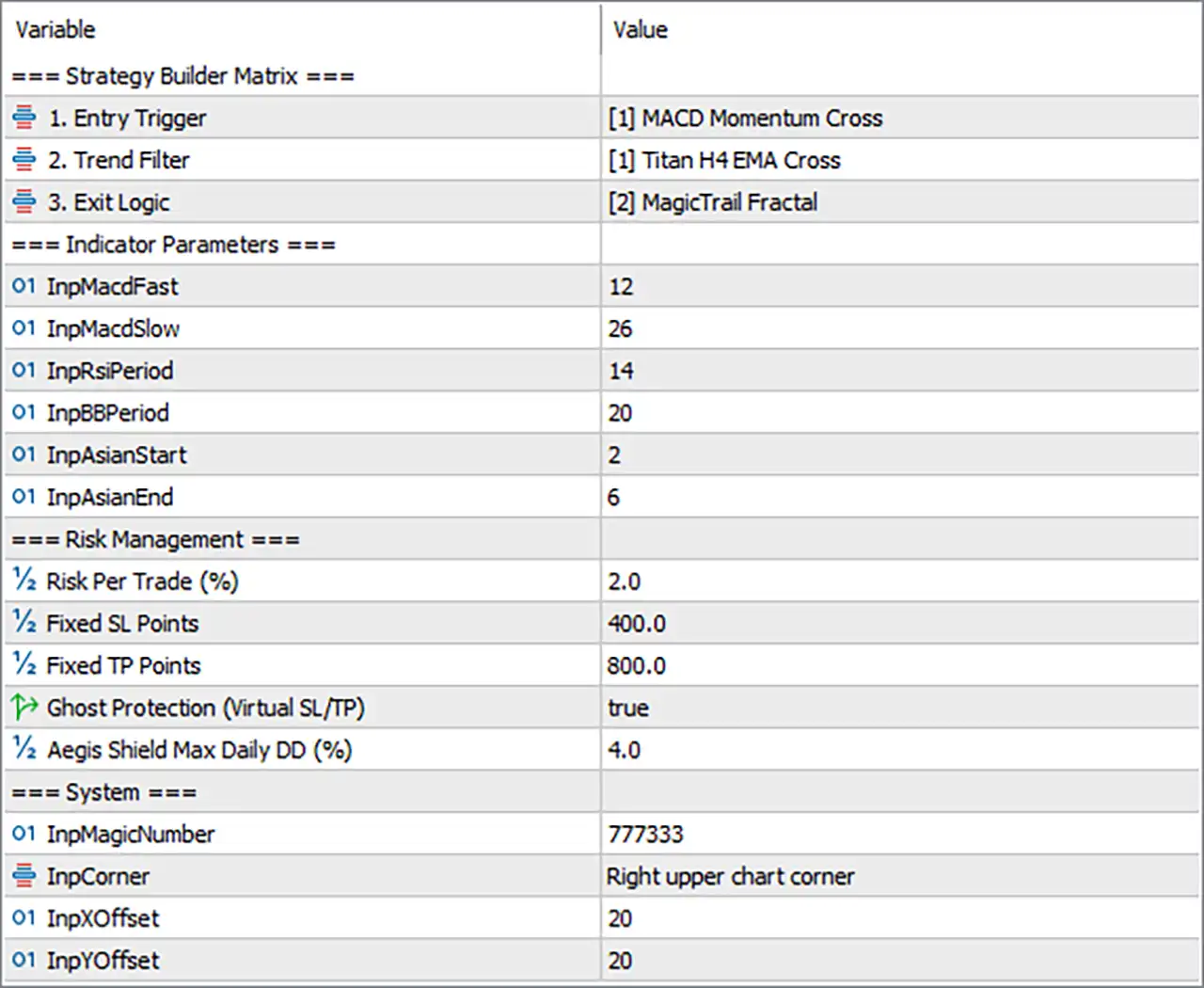
Titan Trend Architect EA MT5 Settings Panel
⚙️ Strategy Builder Matrix
🔹 Entry Trigger = [1] MACD Momentum Cross — Selects the MACD Momentum Cross as the primary entry-trigger module, allowing MACD-based momentum crossover conditions to initiate potential trading signals.
🔹 Trend Filter = [1] Titan H4 EMA Cross — Selects the Titan H4 EMA Cross as the trend-direction filter, using an H4 EMA crossover framework to determine the broader market bias for entries.
🔹 Exit Logic = [2] MagicTrail Fractal — Selects MagicTrail Fractal as the active exit-management logic, indicating that fractal-based trailing or exit conditions are used to manage open positions.
⚙️ Indicator Parameters
🔹 InpMacdFast = 12 — Sets the fast MACD calculation period to 12, controlling the responsiveness of the fast component used by the MACD-based entry trigger.
🔹 InpMacdSlow = 26 — Sets the slow MACD calculation period to 26, providing the slower reference component for identifying momentum crossover conditions.
🔹 InpRsiPeriod = 14 — Sets the RSI calculation period to 14, defining the number of price periods used by the RSI component within the EA’s indicator framework.
🔹 InpBBPeriod = 20 — Sets the Bollinger Bands calculation period to 20, controlling the lookback length used when the EA’s Bollinger Bands logic is referenced.
🔹 InpAsianStart = 2 — Defines the Asian-session starting hour as 2, providing the beginning point for the EA’s Asian-session calculation or filtering logic.
🔹 InpAsianEnd = 6 — Defines the Asian-session ending hour as 6, establishing the end point of the configured Asian trading window.
⚙️ Risk Management
🔹 Risk Per Trade (%) = 2.0 — Sets the configured risk allocation to 2.0% per trade, providing the basis for calculating position exposure under the EA’s percentage-based risk management.
🔹 Fixed SL Points = 400.0 — Sets the fixed Stop Loss distance to 400.0 points, establishing a predefined protective distance for trades when fixed SL logic is used.
🔹 Fixed TP Points = 800.0 — Sets the fixed Take Profit distance to 800.0 points, creating a predefined profit target for trades when fixed TP logic is active.
🔹 Ghost Protection (Virtual SL/TP) = true — Enables virtual Stop Loss and Take Profit protection, with the setting configured to true so the EA can use its virtual protection mechanism rather than relying solely on visible broker-side levels.
🔹 Aegis Shield Max Daily DD (%) = 4.0 — Sets the maximum daily drawdown protection threshold to 4.0%, providing a daily account-level risk-control boundary for the Aegis Shield mechanism.
⚙️ System
🔹 InpMagicNumber = 777333 — Assigns the unique Expert Advisor identifier 777333, allowing Titan Trend Architect to distinguish its own trades from positions generated by other systems.
🔹 InpCorner = Right upper chart corner — Places the EA’s information panel in the Right upper chart corner, determining where the on-chart interface is positioned.
🔹 InpXOffset = 20 — Sets the horizontal chart-panel offset to 20, controlling the panel’s horizontal distance from the selected chart corner.
🔹 InpYOffset = 20 — Sets the vertical chart-panel offset to 20, controlling the panel’s vertical distance from the selected chart corner.
🔢 Configuration Overview
The displayed configuration creates a clearly defined trading architecture: MACD Momentum Cross handles entry triggering, Titan H4 EMA Cross provides the broader trend filter, and MagicTrail Fractal manages exits. The indicator values of 12, 26, 14, and 20 provide the core MACD, RSI, and Bollinger Bands parameters, while the Asian session is configured from 2 to 6.
On the risk side, the EA is configured with 2.0% Risk Per Trade, 400.0 Fixed SL Points, and 800.0 Fixed TP Points, producing a nominal 1:2 relationship between the configured fixed SL and TP distances. Ghost Protection = true and Aegis Shield Max Daily DD = 4.0% add additional layers of trade and account protection. The system identifier is 777333, while the chart panel is positioned at the upper-right with 20 horizontal and 20 vertical offsets.
🔢 Conclusion
Titan Trend Architect EA MT5 provides a modular configuration that separates entries, trend confirmation, and exit management. The current setup uses MACD Momentum Cross, Titan H4 EMA Cross, and MagicTrail Fractal as its three primary strategy components. With Risk Per Trade = 2.0%, Fixed SL = 400.0 points, Fixed TP = 800.0 points, and Aegis Shield Max Daily DD = 4.0%, the configuration combines trade-level and daily drawdown controls. The enabled Ghost Protection mechanism and dedicated Magic Number 777333 further define the operational structure of this setup.
User Reviews
Only logged in customers who have purchased this product may leave a review.
❓ What is Titan Trend Architect EA MT5?
A MetaTrader 5 Expert Advisor built as a no-code strategy builder. Entry triggers, trend filters and exit logic can be combined through its parameters.
❓ How does Titan Trend Architect EA work?
It lets the user select an entry trigger, add a trend filter and choose exit logic. The chosen combination then trades and manages positions automatically.
❓ Do I need coding skills to use Titan Trend Architect EA?
No. The strategy components are selected through the EA parameters, so no source code needs to be changed.
❓ Which market does Titan Trend Architect EA trade?
The market is chosen by the user. Symbol availability and execution depend on the broker and account.
❓ Which timeframe does Titan Trend Architect EA use?
The timeframe is chosen by the user, so each configuration should be tested on the timeframe planned for live use.
❓ Is every combination in Titan Trend Architect EA profitable?
No. Different combinations can behave very differently, and the builder does not establish that any of them is profitable.
❓ Does Titan Trend Architect EA include risk management?
Exit logic is configurable and exposure is controlled through the chosen settings. Position sizing should suit the market, and risk can be reduced but never removed.
❓ Is Titan Trend Architect EA suitable for live trading?
Only after realistic forward testing with the intended broker, symbol, execution costs and conservative account risk.
❓ Does Titan Trend Architect EA guarantee profits?
No. Historical, simulated or short-term results are not a promise of future performance.
❓ How should Titan Trend Architect EA be tested?
With realistic spread, commission and slippage, then forward-tested on the exact broker and market planned for live use. Each configuration needs its own test.
-
 Original price was: $4,999.00.$249.00Current price is: $249.00.
 -
 Original price was: $4,500.00.$249.00Current price is: $249.00.
 -
 Original price was: $4,999.00.$249.00Current price is: $249.00.
 -
 Original price was: $28,000.00.$249.00Current price is: $249.00.
-
 4Original price was: $499.00.$249.00Current price is: $249.00.
 -
 1Original price was: $500.00.$249.00Current price is: $249.00.
 -
 0Original price was: $430.00.$249.00Current price is: $249.00.
 -
 6Original price was: $1,000.00.$599.00Current price is: $599.00.
There are no reviews yet.