






Zafari Scalper EA MT5 (Latest version) - Unlimited

Subscriptions for Special Plan
- 30 EA package is more economical!
- Special package with 99%
- Download 1 EA/Day

Subscriptions for Premium Membership
- Download Unlimited in 1 Year
- Get 100% Discount
- Get free access to all

Subscriptions for Gold Membership
- 1 Year Membership
- Get 100% Discount
- Access EA+Indicator+Course
Frequently bought together 🎁
Add these products to enhance your purchase



Quick Overview
Zafari Scalper is a premium MT5 Gold scalping EA built for XAU/USD on M5. Its positioning combines AI-oriented analysis, statistical models, quantitative processing and dynamic risk management for short-term automated execution.
Best For
✅ Gold-focused M5 scalping.
✅ Traders seeking quantitative signal filtering.
✅ Accounts using dynamic risk management.
Overall Rating
⭐⭐⭐⭐⭐ 8.6/10
What is Zafari Scalper EA?
Zafari Scalper EA is a MetaTrader 5 Expert Advisor (EA) specialized for XAU/USD on the M5 timeframe. The system is designed around short-term Gold trading, combining artificial-intelligence-oriented processing, statistical analysis and quantitative methods to identify trading opportunities while adapting position risk to changing market conditions.
 Vendor Website: View here
Delivery time 24h-48h after payment.
Refund if not delivered.
You will receive the current version without any limitations (ID+Time).
Zafari Scalper EA MT5 Review
How Does Zafari Scalper EA Work?
AI and Quantitative Analysis
The system combines artificial-intelligence-oriented processing with statistical and quantitative analysis to evaluate short-term XAU/USD conditions before generating trading decisions.
M5 Gold Execution
The EA is specifically configured for XAU/USD on M5, keeping the operating environment focused on short-term Gold price movements rather than broad multi-asset deployment.
Real-Time Market Assessment
Market conditions are evaluated dynamically so the trading process can react to changing volatility and price behavior instead of relying on one static entry rule.
Dynamic Risk Management
Position risk is managed dynamically as part of the architecture, helping the EA adjust exposure rather than treating every trade as an identical fixed-size transaction.
Historical Trading Results Performance
Zafari Scalper EA delivers a strong backtest performance on XAUUSD M5, growing the initial $10,000 balance to approximately $579,661. The test recorded a 95.33% winning-trade ratio with a 15.97% maximum equity drawdown, showing strong profitability alongside relatively controlled risk.
Zafari Scalper EA MT5 Backtest Results
| Parameter | Result |
|---|---|
| Test Period | 2026.01.01 – 2026.03.31 |
| Initial Deposit | $10,000 |
| Symbol / Timeframe | XAUUSD / M5 |
| Net Profit | $569,660.88 |
| Profit Factor | 5.75 |
| Equity Drawdown Max. | $14,814.35 (3.62%) |
| Balance Drawdown Max. | $12,249.36 (2.99%) |
| Total Trades | 1,455 |
| Winning Trades | 95.33% |
| Largest Profit Trade | $5,361.30 |
| Largest Loss Trade | -$12,249.36 |
Key Features
XAU/USD Specialization
Designed specifically for Gold on M5, keeping the strategy tightly focused on the volatility and behavior of one major precious-metal market.
AI-Oriented Processing
Uses artificial-intelligence-oriented analysis as part of a broader quantitative architecture for evaluating short-term trading opportunities.
Statistical Modeling
Statistical analysis supports the decision process and adds another layer beyond simple single-indicator entries.
Quantitative Architecture
The system integrates quantitative methods into its trade-selection framework rather than relying solely on discretionary-style signals.
Dynamic Risk Management
Exposure is managed dynamically, giving the EA a structured mechanism for adapting position risk to trading conditions.
Short-Term Execution
The M5 operating model is built around frequent market observation and timely automated execution when qualifying conditions appear.
Zafari Scalper EA Risk Management
Dynamic Position Risk
The product description states that dynamic risk management is integrated into the trading architecture, providing a structured way to control exposure.
Market Specialization
Restricting the strategy to XAU/USD and M5 reduces the number of operating variables but also makes performance highly dependent on Gold market conditions.
Execution Sensitivity
M5 scalping can be sensitive to spread, slippage, latency and broker execution, so live conditions may materially affect results.
Capital Discipline
Dynamic risk controls should be evaluated alongside account size, broker conditions and acceptable drawdown rather than interpreted as a guarantee of capital protection.
Recommended Trading Conditions
For the best performance, the developer recommends:
| Features | Type |
|---|---|
| Trading platform | MetaTrader 5 (MT5) |
| Time frames | M5 |
| Currency pairs | XAUUSD (Gold) |
| Minimum / Recommended deposit | $100+ |
| Minimum / Recommended leverage | Any |
| Account type | Any |
| Additional services | Unlock and Decompile |
| Recommended brokers | Exness Broker, Icmarkets Broker |
| Recommended VPS | MyfxVPS.com (Blue VPS, Golden VPS). Lowest Latency, 2 week Free Trial, 100% Free for 12-18 Months. |
Strengths and Limitations
Focused Gold Architecture
XAU/USD M5 specialization creates a clear operating scope and a defined target market for the EA.
Layered Quantitative Approach
AI-oriented, statistical and quantitative components provide a broader analytical framework than a single-indicator scalper.
Execution Dependence
Short-term Gold trading can be highly sensitive to spread, latency and slippage, which may change real-world outcomes.
Narrow Market Scope
The XAU/USD-only positioning means the EA is less diversified than multi-asset systems.
Who Should Use Zafari Scalper EA?
Gold Scalping Specialists
The product is suited to users specifically looking for automated XAU/USD M5 scalping rather than a broad portfolio EA.
Quantitative Strategy Users
It may appeal to users interested in AI-oriented and statistical processing within an automated trading framework.
Product Download Package?
The download package of the product suite includes:
 Experts: Zafari Scalper.ex5
 Reviewed by David Easton
Final Verdict
Zafari Scalper EA offers a clearly defined automated trading concept with a focused market or technical architecture. Its strongest appeal comes from the specific strategy and controls described above, while performance expectations should remain tied to broker conditions, configuration and verified trading evidence.
🔢 Zafari Scalper EA MT5 – Easy-to-Read Inputs Guide
Zafari Scalper EA MT5 is an advanced automated scalping system designed for MetaTrader 5, with the published configuration focused on XAU/USD (Gold) and the M5 timeframe. Its architecture combines artificial intelligence, statistical classification, structural pattern analysis, support and resistance, price action, Bollinger Bands, Fibonacci extensions, volatility analysis, and dynamic portfolio risk management.
The supplied Inputs reveal an extensive multi-layer framework in which individual signal engines can be enabled or disabled, while risk, execution, confluence, volatility, and visual settings can be fine-tuned independently.
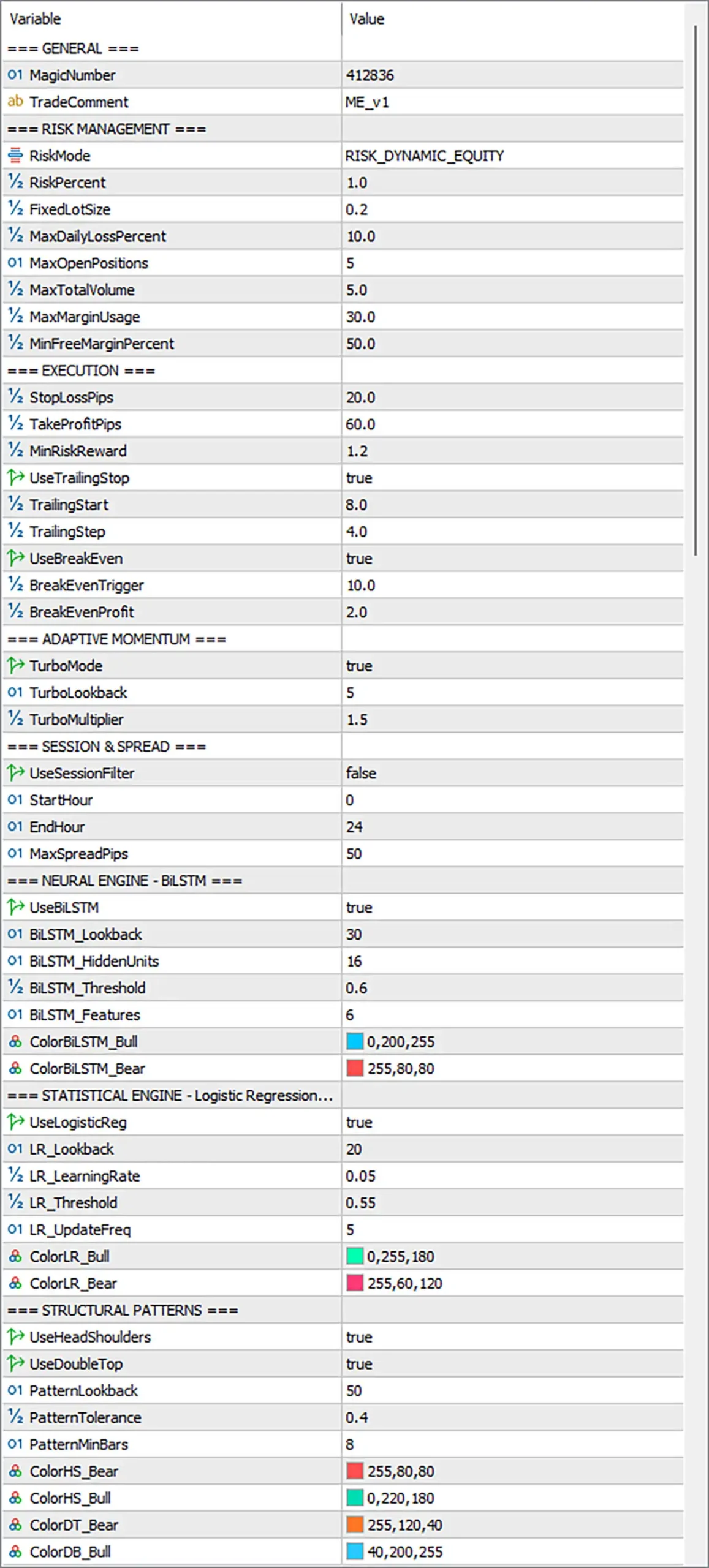
Zafari Scalper EA MT5 Settings Panel
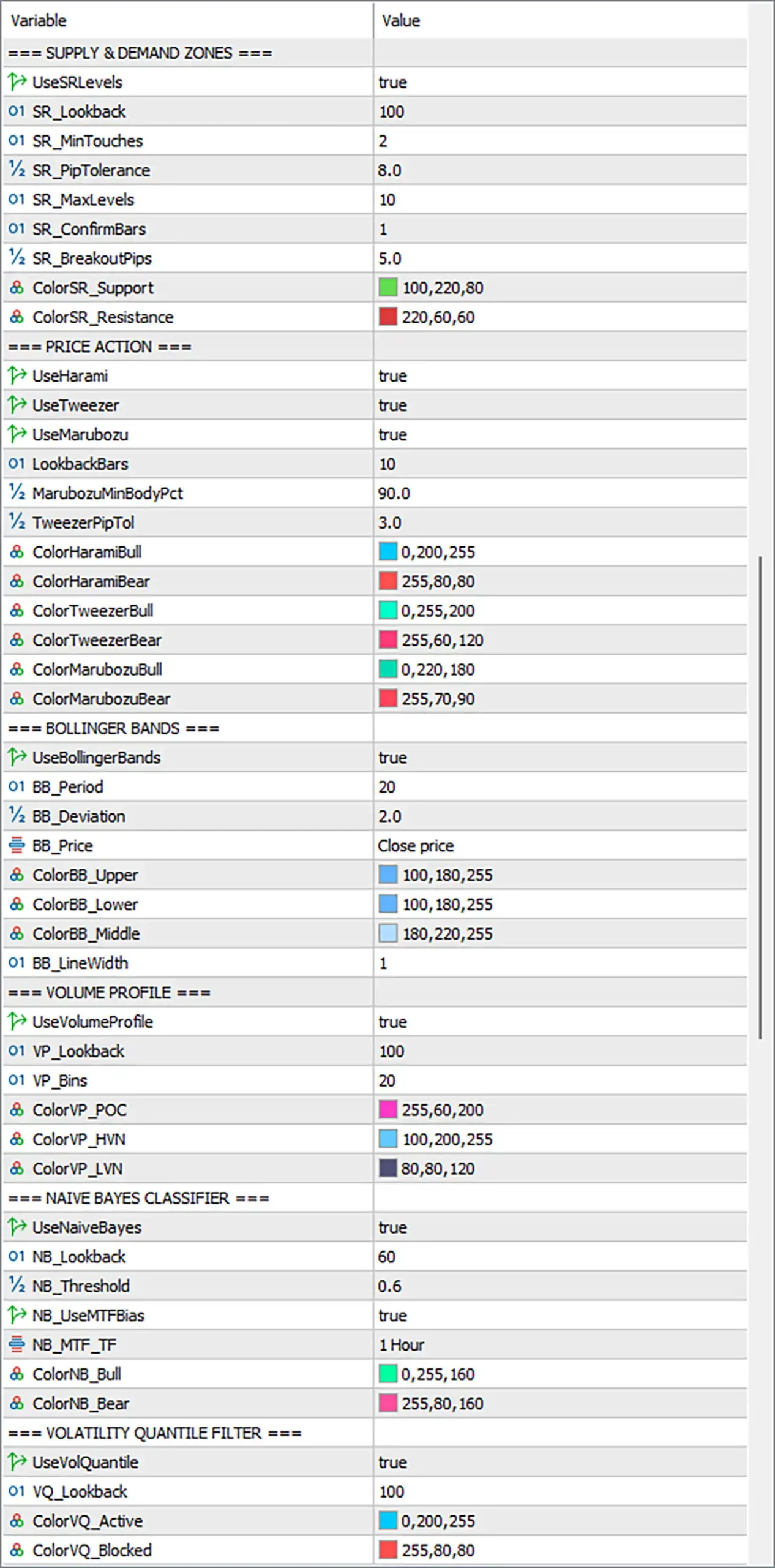
Zafari Scalper EA Settings Panel
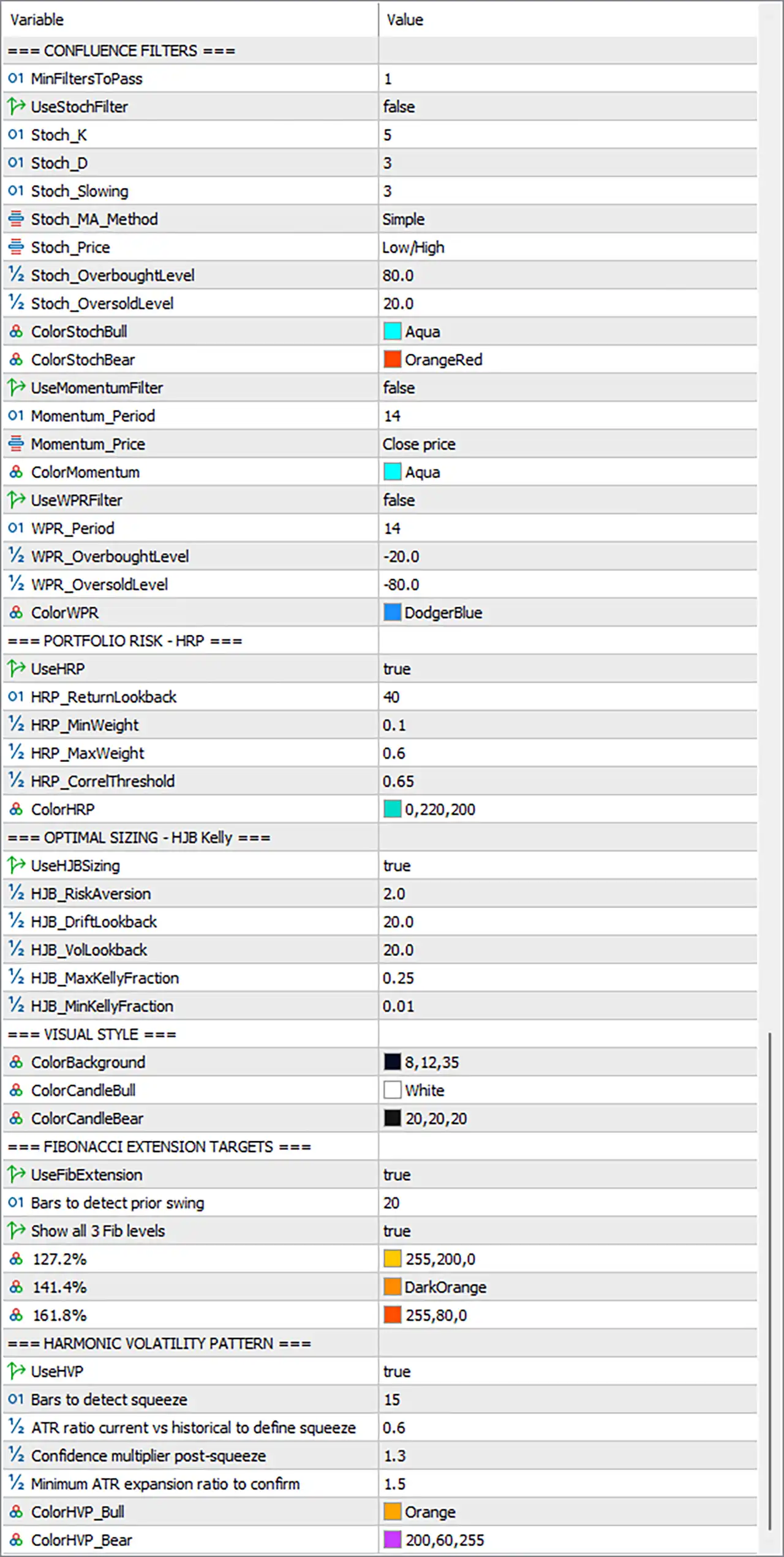
Zafari Scalper MT5 Settings Panel
=== GENERAL ===
412836, allowing the EA to distinguish its own positions from trades managed by other systems or opened manually.🔹 TradeComment = ME_v1 — Sets ME_v1 as the trade comment attached to applicable orders and positions for identification and trade-management purposes.
=== RISK MANAGEMENT ===
🔹 RiskPercent = 1.0 — Sets the configured risk percentage to 1.0, providing the base percentage used by the selected dynamic-equity risk model.
🔹 FixedLotSize = 0.2 — Defines the fixed lot size as 0.2 lots when a fixed-lot risk mode is selected or when the EA’s internal sizing logic uses this parameter.
🔹 MaxDailyLossPercent = 10.0 — Sets the maximum daily loss threshold to 10.0%, providing a daily account-protection limit.
🔹 MaxOpenPositions = 5 — Limits the EA to a maximum of 5 simultaneously open positions, controlling the amount of concurrent market exposure.
🔹 MaxTotalVolume = 5.0 — Sets the maximum combined trading volume to 5.0 lots across the positions managed by the EA.
🔹 MaxMarginUsage = 30.0 — Limits configured margin usage to 30.0%, helping prevent excessive utilization of available account margin.
🔹 MinFreeMarginPercent = 50.0 — Requires at least 50.0% free margin according to the EA’s configured margin-protection logic before additional exposure is permitted.
The public product description confirms the same core risk framework: maximum daily loss, up to 5 simultaneous positions, 5 lots of total volume, 30% margin usage, and 50% minimum free margin.
=== EXECUTION ===
20.0 pips for applicable positions.🔹 TakeProfitPips = 60.0 — Sets the configured Take Profit distance to 60.0 pips, defining the primary profit target used by the execution engine.
🔹 MinRiskReward = 1.2 — Sets the minimum acceptable risk-to-reward requirement to 1.2, helping prevent trades whose calculated reward does not meet the configured threshold.
🔹 UseTrailingStop = true — Enables trailing-stop management, allowing the EA to progressively protect favorable price movement.
🔹 TrailingStart = 8.0 — Sets the trailing activation level to 8.0 pips of favorable movement before trailing protection begins.
🔹 TrailingStep = 4.0 — Sets the trailing adjustment step to 4.0 pips, controlling how far price must move before the trailing protection is updated.
🔹 UseBreakEven = true — Enables break-even protection, allowing the EA to move trade protection toward the entry level after the configured trigger is reached.
🔹 BreakEvenTrigger = 10.0 — Sets the break-even activation threshold to 10.0 pips of favorable movement.
🔹 BreakEvenProfit = 2.0 — Sets the protected profit offset to 2.0 pips when the break-even mechanism is activated.
The published product description also states that Zafari Scalper uses automatic trailing protection from 8 pips of profit and automatic break-even at 10 pips.
=== ADAPTIVE MOMENTUM ===
🔹 TurboLookback = 5 — Sets the Turbo analysis lookback to 5 bars, defining the recent market-history window used by the adaptive momentum component.
🔹 TurboMultiplier = 1.5 — Sets the Turbo multiplier to 1.5, increasing the intensity of the configured Turbo-mode calculation. The published description states that Turbo Mode applies a 1.5x multiplier to lot sizing and extends signal lookback.
=== SESSION & SPREAD ===
🔹 StartHour = 0 — Sets the session start hour to 0.
🔹 EndHour = 24 — Sets the session end hour to 24, representing a full-day schedule when the session filter is activated.
🔹 MaxSpreadPips = 50 — Sets the maximum permitted spread to 50 pips, restricting trading when the spread exceeds the configured threshold.
The published product information confirms an optional session filter and a maximum spread setting of 50 pips.
=== NEURAL ENGINE – BiLSTM ===
🔹 BiLSTM_Lookback = 30 — Sets the BiLSTM historical sequence length to 30 candles, defining the amount of recent price information supplied to the neural component.
🔹 BiLSTM_HiddenUnits = 16 — Sets the neural network’s hidden-unit count to 16, defining the internal model capacity configured for the BiLSTM engine.
🔹 BiLSTM_Threshold = 0.6 — Sets the minimum BiLSTM confidence threshold to 0.6 before the neural engine can qualify its directional output.
🔹 BiLSTM_Features = 6 — Sets the number of input features used by the BiLSTM component to 6.
🔹 ColorBiLSTM_Bull = 0,200,255 — Sets the bullish BiLSTM visualization color to RGB 0,200,255, producing a bright cyan-blue display.
🔹 ColorBiLSTM_Bear = 255,80,80 — Sets the bearish BiLSTM visualization color to RGB 255,80,80, producing a bright red tone.
The published description specifies a BiLSTM network using a 30-candle window and 16 hidden units, matching the supplied configuration.
=== STATISTICAL ENGINE – Logistic Regression ===
🔹 LR_Lookback = 20 — Sets the Logistic Regression analysis window to 20 bars, defining the recent historical data used for statistical calculations.
🔹 LR_LearningRate = 0.05 — Sets the online-learning rate to 0.05, controlling the adjustment magnitude used when updating the statistical model.
🔹 LR_Threshold = 0.55 — Sets the minimum Logistic Regression confidence threshold to 0.55 for qualifying model output.
🔹 LR_UpdateFreq = 5 — Configures the statistical model to update every 5 bars, allowing the model to adapt periodically to newer market information.
🔹 ColorLR_Bull = 0,255,180 — Sets the bullish Logistic Regression visualization color to RGB 0,255,180.
🔹 ColorLR_Bear = 255,60,120 — Sets the bearish Logistic Regression visualization color to RGB 255,60,120.
The published system description identifies Adaptive Logistic Regression as an online-learning statistical classifier that updates every 5 candlesticks.
=== STRUCTURAL PATTERNS ===
🔹 UseDoubleTop = true — Enables Double Top pattern detection as part of the structural-analysis engine.
🔹 PatternLookback = 50 — Sets the structural-pattern search window to 50 bars.
🔹 PatternTolerance = 0.4 — Sets the pattern matching tolerance to 0.4, controlling how much structural variation can be accepted when identifying chart formations.
🔹 PatternMinBars = 8 — Requires a minimum of 8 bars for the configured structural pattern to qualify for analysis.
🔹 ColorHS_Bear = 255,80,80 — Sets the bearish Head & Shoulders visualization color to RGB 255,80,80.
🔹 ColorHS_Bull = 0,220,180 — Sets the bullish or inverse-pattern visualization color to RGB 0,220,180.
🔹 ColorDT_Bear = 255,120,40 — Sets the bearish Double Top visualization color to RGB 255,120,40.
🔹 ColorDB_Bull = 40,200,255 — Sets the bullish Double Bottom visualization color to RGB 40,200,255.
The public product description confirms automated recognition of Head & Shoulders, Inverse Head & Shoulders, Double Top, and Double Bottom formations.
=== CONFLUENCE FILTERS ===
1 qualifying enabled confluence filter to pass before a setup can satisfy this layer of the trading framework.Stochastic Filter
🔹 UseStochFilter = false — Disables the Stochastic oscillator as an active confluence filter in the current configuration.
🔹 Stoch_K = 5 — Sets the Stochastic %K period to 5.
🔹 Stoch_D = 3 — Sets the Stochastic %D smoothing period to 3.
🔹 Stoch_Slowing = 3 — Sets Stochastic slowing to 3, controlling the additional smoothing applied to the oscillator.
🔹 Stoch_MA_Method = Simple — Selects the Simple moving-average method for Stochastic smoothing.
🔹 Stoch_Price = Low/High — Uses Low/High as the configured price basis for Stochastic calculations.
🔹 Stoch_OverboughtLevel = 80.0 — Sets the Stochastic overbought threshold to 80.0.
🔹 Stoch_OversoldLevel = 20.0 — Sets the Stochastic oversold threshold to 20.0.
🔹 ColorStochBull = Aqua — Sets the bullish Stochastic visualization color to Aqua.
🔹 ColorStochBear = OrangeRed — Sets the bearish Stochastic visualization color to OrangeRed.
Momentum Filter
🔹 UseMomentumFilter = false — Disables the Momentum indicator as an active confluence filter.
🔹 Momentum_Period = 14 — Sets the Momentum calculation period to 14.
🔹 Momentum_Price = Close price — Uses Close price as the source for Momentum calculations.
🔹 ColorMomentum = Aqua — Sets the Momentum visualization color to Aqua.
Williams %R Filter
🔹 UseWPRFilter = false — Disables Williams %R as an active confluence filter.
🔹 WPR_Period = 14 — Sets the Williams %R calculation period to 14.
🔹 WPR_OverboughtLevel = -20.0 — Sets the Williams %R overbought threshold to -20.0.
🔹 WPR_OversoldLevel = -80.0 — Sets the Williams %R oversold threshold to -80.0.
🔹 ColorWPR = DodgerBlue — Sets the Williams %R visualization color to DodgerBlue.
=== PORTFOLIO RISK – HRP ===
🔹 HRP_ReturnLookback = 40 — Sets the return-analysis lookback period to 40 observations for the HRP calculations.
🔹 HRP_MinWeight = 0.1 — Sets the minimum permitted HRP engine weight to 0.1, preventing an enabled signal engine from receiving less than the configured minimum allocation.
🔹 HRP_MaxWeight = 0.6 — Sets the maximum HRP engine weight to 0.6, preventing any individual engine from receiving more than the configured maximum allocation.
🔹 HRP_CorrelThreshold = 0.65 — Sets the correlation threshold to 0.65, controlling how signal-engine relationships are evaluated by the portfolio-risk component.
🔹 ColorHRP = 0,220,200 — Sets the HRP visualization color to RGB 0,220,200.
The public product description states that HRP weights the main signal engines using hierarchical correlation to reduce risk concentration.
=== OPTIMAL SIZING – HJB Kelly ===
🔹 HJB_RiskAversion = 2.0 — Sets the HJB risk-aversion coefficient to 2.0, controlling how strongly the sizing model penalizes risk when calculating the optimal position allocation.
🔹 HJB_DriftLookback = 20.0 — Sets the historical lookback for drift estimation to 20.0 periods.
🔹 HJB_VolLookback = 20.0 — Sets the volatility estimation lookback to 20.0 periods.
🔹 HJB_MaxKellyFraction = 0.25 — Caps the calculated Kelly fraction at 0.25, preventing the sizing model from exceeding the configured maximum Kelly allocation.
🔹 HJB_MinKellyFraction = 0.01 — Sets the minimum Kelly fraction to 0.01, establishing a lower boundary for the Kelly-based sizing calculation.
The published description identifies the HJB component as a Hamilton-Jacobi-Bellman / Continuous Kelly sizing model with risk aversion 2.0, using market drift and historical volatility to adjust position size.
=== VISUAL STYLE ===
8,12,35, creating a dark blue visual theme.🔹 ColorCandleBull = White — Sets bullish candle visualization to White.
🔹 ColorCandleBear = 20,20,20 — Sets bearish candle visualization to RGB 20,20,20, producing a very dark candle color.
=== FIBONACCI EXTENSION TARGETS ===
🔹 Bars to detect prior swing = 20 — Uses 20 bars when searching for the prior swing required to calculate Fibonacci Extension levels.
🔹 Show all 3 Fib levels = true — Enables display of all three configured Fibonacci Extension levels simultaneously.
🔹 127.2% = 255,200,0 — Sets the visualization color for the 127.2% Fibonacci Extension level to RGB 255,200,0.
🔹 141.4% = DarkOrange — Sets the visualization color for the 141.4% Fibonacci Extension level to DarkOrange.
🔹 161.8% = 255,80,0 — Sets the visualization color for the 161.8% Fibonacci Extension level to RGB 255,80,0.
The public description confirms that the system uses 127.2%, 141.4%, and 161.8% Fibonacci Extension levels as dynamic target references.
=== HARMONIC VOLATILITY PATTERN ===
🔹 Bars to detect squeeze = 15 — Sets the squeeze-detection window to 15 bars.
🔹 ATR ratio current vs historical to define squeeze = 0.6 — Sets the current-to-historical ATR ratio threshold to 0.6, defining the configured volatility-compression condition.
🔹 Confidence multiplier post-squeeze = 1.3 — Sets the post-squeeze confidence multiplier to 1.3, increasing the confirmation requirement or weighting applied after a volatility compression event.
🔹 Minimum ATR expansion ratio to confirm = 1.5 — Requires a minimum ATR expansion ratio of 1.5 to confirm the post-squeeze volatility expansion.
🔹 ColorHVP_Bull = Orange — Sets bullish HVP visualization to Orange.
🔹 ColorHVP_Bear = 200,60,255 — Sets bearish HVP visualization to RGB 200,60,255.
The published strategy description confirms that HVP detects volatility squeeze/expansion cycles using ATR and uses a 1.3x post-compression confidence multiplier.
=== SUPPLY & DEMAND ZONES ===
🔹 SR_Lookback = 100 — Sets the Support and Resistance analysis window to 100 bars.
🔹 SR_MinTouches = 2 — Requires a minimum of 2 touches for a Support or Resistance level to qualify.
🔹 SR_PipTolerance = 8.0 — Sets the permitted price tolerance around Support and Resistance levels to 8.0 pips.
🔹 SR_MaxLevels = 10 — Limits the number of identified Support and Resistance levels to 10.
🔹 SR_ConfirmBars = 1 — Requires 1 confirmation bar for the configured Support and Resistance validation logic.
🔹 SR_BreakoutPips = 5.0 — Sets the breakout confirmation distance to 5.0 pips.
🔹 ColorSR_Support = 100,220,80 — Sets Support-level visualization to RGB 100,220,80.
🔹 ColorSR_Resistance = 220,60,60 — Sets Resistance-level visualization to RGB 220,60,60.
The public product description states that the EA can identify up to 10 Support and Resistance levels using pivots, with a minimum of 2 touches and configurable tolerance.
=== PRICE ACTION ===
🔹 UseTweezer = true — Enables Tweezer Top/Bottom pattern recognition.
🔹 UseMarubozu = true — Enables Marubozu candlestick recognition for strong-body price-action analysis.
🔹 LookbackBars = 10 — Sets the price-action pattern search window to 10 bars.
🔹 MarubozuMinBodyPct = 90.0 — Requires the Marubozu candle body to represent at least 90.0% according to the configured body-percentage condition.
🔹 TweezerPipTol = 3.0 — Sets the Tweezer pattern price tolerance to 3.0 pips.
🔹 ColorHaramiBull = 0,200,255 — Sets bullish Harami visualization to RGB 0,200,255.
🔹 ColorHaramiBear = 255,80,80 — Sets bearish Harami visualization to RGB 255,80,80.
🔹 ColorTweezerBull = 0,255,200 — Sets bullish Tweezer visualization to RGB 0,255,200.
🔹 ColorTweezerBear = 255,60,120 — Sets bearish Tweezer visualization to RGB 255,60,120.
🔹 ColorMarubozuBull = 0,220,180 — Sets bullish Marubozu visualization to RGB 0,220,180.
🔹 ColorMarubozuBear = 255,70,90 — Sets bearish Marubozu visualization to RGB 255,70,90.
The published strategy description specifically lists Harami, Tweezer Top/Bottom, and Marubozu as price-action recognition components.
=== BOLLINGER BANDS ===
🔹 BB_Period = 20 — Sets the Bollinger Bands calculation period to 20.
🔹 BB_Deviation = 2.0 — Sets the Bollinger Bands standard-deviation multiplier to 2.0.
🔹 BB_Price = Close price — Uses Close price as the input price for the Bollinger Bands calculation.
🔹 ColorBB_Upper = 100,180,255 — Sets the upper Bollinger Band color to RGB 100,180,255.
🔹 ColorBB_Lower = 100,180,255 — Sets the lower Bollinger Band color to RGB 100,180,255.
🔹 ColorBB_Middle = 180,220,255 — Sets the middle Bollinger Band color to RGB 180,220,255.
🔹 BB_LineWidth = 1 — Sets the Bollinger Bands line width to 1.
The published description specifies Bollinger Bands using a 20-period calculation and 2.0 deviation.
=== VOLUME PROFILE ===
🔹 VP_Lookback = 100 — Sets the Volume Profile historical analysis window to 100 bars.
🔹 VP_Bins = 20 — Divides the analyzed price range into 20 Volume Profile bins for distribution analysis.
🔹 ColorVP_POC = 255,60,200 — Sets the Point of Control visualization color to RGB 255,60,200.
🔹 ColorVP_HVN = 100,200,255 — Sets the High Volume Node visualization color to RGB 100,200,255.
🔹 ColorVP_LVN = 80,80,120 — Sets the Low Volume Node visualization color to RGB 80,80,120.
=== NAIVE BAYES CLASSIFIER ===
🔹 NB_Lookback = 60 — Sets the Naive Bayes historical analysis window to 60 bars.
🔹 NB_Threshold = 0.6 — Sets the minimum Naive Bayes confidence threshold to 0.6 for qualifying model output.
🔹 NB_UseMTFBias = true — Enables the multi-timeframe bias component within the Naive Bayes analysis.
🔹 NB_MTF_TF = 1 Hour — Sets the higher-timeframe bias reference to 1 Hour.
🔹 ColorNB_Bull = 0,255,160 — Sets bullish Naive Bayes visualization to RGB 0,255,160.
🔹 ColorNB_Bear = 255,80,160 — Sets bearish Naive Bayes visualization to RGB 255,80,160.
The public description confirms that the Naive Bayes classifier incorporates multi-timeframe bias, including H1 trend confirmation.
=== VOLATILITY QUANTILE FILTER ===
🔹 VQ_Lookback = 100 — Sets the volatility-quantile calculation window to 100 bars.
🔹 ColorVQ_Active = 0,200,255 — Sets the visualization color for an active volatility regime to RGB 0,200,255.
🔹 ColorVQ_Blocked = 255,80,80 — Sets the visualization color for a blocked volatility regime to RGB 255,80,80.
The published description states that the Volatility Quantile Filter divides volatility into Q1–Q4 regimes and is designed to trade only within Q2 and Q3.
🔢 Conclusion
Zafari Scalper EA MT5 presents an unusually broad multi-layer configuration, combining artificial intelligence, statistical modeling, structural analysis, price action, volatility analysis, quantitative indicators, portfolio risk management, and adaptive position sizing. The published product description identifies XAU/USD and M5 as the primary configuration and describes ten integrated signal engines working together to evaluate Gold-market opportunities.
The supplied settings use RiskMode = RISK_DYNAMIC_EQUITY with RiskPercent = 1.0, while maximum daily loss is limited to 10.0%, simultaneous positions to 5, total volume to 5.0 lots, margin usage to 30.0%, and minimum free margin to 50.0%. Execution protection combines StopLossPips = 20.0, TakeProfitPips = 60.0, trailing protection, and break-even management.
On the signal side, the configuration activates the BiLSTM, Logistic Regression, Head & Shoulders, Double Top, HRP, HJB sizing, Fibonacci, HVP, Support and Resistance, price action, Bollinger Bands, Volume Profile, Naive Bayes, and Volatility Quantile components. Some optional confluence filters—Stochastic, Momentum, and Williams %R—are currently disabled, while MinFiltersToPass = 1 controls the minimum confluence requirement.
The configuration also demonstrates a strong emphasis on adaptive intelligence. BiLSTM uses a 30-candle lookback and 16 hidden units, Logistic Regression updates every 5 bars, Naive Bayes uses an H1 multi-timeframe bias, HVP requires a 1.5 ATR expansion ratio for confirmation, HRP manages correlations between signal engines, and HJB/Kelly sizing uses risk aversion 2.0 with configurable Kelly boundaries.
Overall, Zafari Scalper EA MT5 is configured as a multi-engine Gold scalping framework rather than a single-indicator trading system. The extensive Inputs allow the signal engines, confluence filters, volatility regime controls, risk allocation, and visual components to be adjusted independently. The exact proprietary weighting and final trade-decision sequence remain internal to the EA and should not be inferred beyond the exposed parameters.
User Reviews
Only logged in customers who have purchased this product may leave a review.
What is Zafari Scalper EA?
Zafari Scalper is a MetaTrader 5 Expert Advisor built around the specific trading architecture described for Zafari Scalper v3.0. Its operating scope, market focus and controls should be evaluated from the product’s stated configuration rather than from generic EA assumptions.
Which platform does Zafari Scalper EA use?
Zafari Scalper EA is presented for MetaTrader 5. The exact symbol and timeframe depend on the product configuration; the documented operating conditions should be followed because platform, market and execution settings can materially affect automated trading behavior.
How does Zafari Scalper EA work?
Zafari Scalper EA is a specialized automated trading system whose behavior depends on its documented strategy, market, timeframe and risk settings. Results can vary with volatility, execution conditions, spread, slippage and configuration.
What strategy does Zafari Scalper EA use?
Zafari Scalper EA uses a defined technical or quantitative framework rather than discretionary manual execution. The strategy centers on the signals and filters described for the product, with entries and exits handled automatically according to its configured rules.
What timeframe does Zafari Scalper EA trade?
The recommended timeframe for Zafari Scalper EA depends on its documented architecture. The product is not treated as a universal all-timeframe system; the specified timeframe or timeframe range should be considered part of its strategy design.
How does Zafari Scalper EA manage risk?
Risk in Zafari Scalper EA is controlled through the mechanisms documented for the product, which may include position sizing, Stop Loss, drawdown controls, spread filters or trade limits. These controls manage exposure but cannot eliminate market risk.
Is Zafari Scalper EA suitable for Gold or XAUUSD?
Zafari Scalper should only be treated as a Gold-focused system where its documented instrument is XAUUSD or Gold. Where another market is specified, the product should not be assumed to transfer its behavior unchanged to XAUUSD.
How should drawdown be evaluated with Zafari Scalper EA?
Drawdown behavior for Zafari Scalper EA depends on market conditions, configuration, broker execution and position sizing. Where the product includes explicit drawdown controls, those mechanisms should be considered protective constraints rather than promises of a fixed maximum loss.
Does Zafari Scalper EA have verified live performance?
Live performance for Zafari Scalper EA should be assessed from actual broker-specific results and the exact configuration used. Backtest or promotional positioning alone is not sufficient to establish a fixed future return or drawdown expectation.
What broker conditions are important for Zafari Scalper EA?
Broker suitability for Zafari Scalper EA depends on spread, execution, symbol naming, leverage and account type. Any broker specifically stated in the product conditions should be treated as the preferred reference environment for evaluation.
-
 Original price was: $1,200.00.$249.00Current price is: $249.00.
 -
 Original price was: $1,200.00.$249.00Current price is: $249.00.
 -
 Original price was: $1,000.00.$249.00Current price is: $249.00.
 -
 Original price was: $1,999.00.$249.00Current price is: $249.00.
-
 0Original price was: $1,299.00.$249.00Current price is: $249.00.
 -
 1Original price was: $500.00.$249.00Current price is: $249.00.
 -
 3Original price was: $199.00.$159.00Current price is: $159.00.
 -
 0Original price was: $199.00.$179.00Current price is: $179.00.
There are no reviews yet.