


🔢 Venom Gold Pro EA MT5 Settings Explained – Complete Parameter Guide
Venom Gold Pro EA is an advanced automated trading system for MetaTrader 5 designed to trade Gold using intelligent recovery management, optional grid functionality, account protection and flexible lot sizing.
The EA provides traders with comprehensive risk management settings, allowing both conservative and aggressive trading styles while maintaining strong control over floating drawdown and recovery operations.

🔢 Installation Panel Parameters
Below are the details of the parameters in the advisor’s trading system settings table:
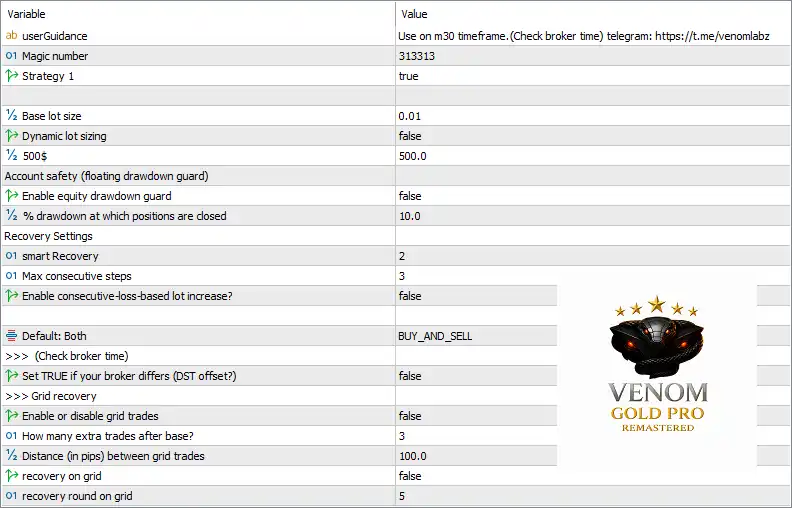
🔶 General Settings
🔹 userGuidance = Use on m30 timeframe. (Check broker time) telegram: https://t.me/venomlabz – Displays the recommended usage instructions, suggesting the EA should run on the M30 timeframe and reminding traders to verify their broker's server time.
🔹 Magic number = 313313 – Assigns the unique Magic Number 313313 to identify all positions opened by Venom Gold Pro EA MT5.
🔹 Strategy 1 = true – Enables Strategy 1, allowing the EA's primary trading algorithm to execute trades.
🔶 Lot Size Settings
🔹 Base lot size = 0.01 – Sets the default trading volume to 0.01 lots.
🔹 Dynamic lot sizing = false – Disables automatic lot scaling based on account balance or equity, keeping the lot size fixed.
🔹 500$ = 500.0 – Uses 500.0 as the reference account balance for lot sizing calculations or preset recommendations.
🔶 Account Safety (Floating Drawdown Guard)
🔹 Enable equity drawdown guard = false – Disables automatic protection based on floating account equity drawdown.
🔹 % drawdown at which positions are closed = 10.0 – Specifies that if the drawdown guard is enabled, all positions will be closed once floating drawdown reaches 10.0%.
🔶 Recovery Settings
🔹 smart Recovery = 2 – Sets the Smart Recovery mode to Level 2, controlling how the EA manages losing positions.
🔹 Max consecutive steps = 3 – Limits the recovery sequence to a maximum of 3 consecutive recovery steps.
🔹 Enable consecutive-loss-based lot increase? = false – Disables automatic lot size increases after consecutive losing trades.
🔶 Trading Direction
🔹 Default: Both = BUY_AND_SELL – Allows the EA to open both Buy and Sell positions.
🔶 Broker Time Settings
🔹 (Check broker time) – Reminder to verify your broker's server time before using the EA.
🔹 Set TRUE if your broker differs (DST offset?) = false – Keeps Daylight Saving Time (DST) adjustment disabled because the broker's time matches the expected configuration.
🔶 Grid Recovery Settings
🔹 Enable or disable grid trades = false – Disables the grid trading system.
🔹 How many extra trades after base? = 3 – Allows up to 3 additional recovery trades beyond the initial position if grid trading is enabled.
🔹 Distance (in pips) between grid trades = 100.0 – Sets 100.0 pips as the spacing between each grid order.
🔹 recovery on grid = false – Disables recovery management through grid positions.
🔹 recovery round on grid = 5 – Defines 5 recovery rounds when grid recovery is enabled.
🔢 Conclusion
Venom Gold Pro EA MT5 offers a flexible combination of fixed lot trading, intelligent recovery logic, optional grid management, and floating drawdown protection. Its simple yet powerful configuration allows traders to customize risk exposure while maintaining complete control over recovery cycles and account safety. Whether you prefer conservative money management or more advanced recovery techniques, the EA provides the essential settings needed for disciplined automated Gold trading.
🔢 FAQs
❓ What timeframe is recommended for Venom Gold Pro EA MT5?
The developer recommends running the EA on the M30 timeframe while ensuring your broker's server time is correctly configured.
❓ Does Venom Gold Pro EA MT5 support both Buy and Sell trades?
Yes. The default trading direction is BUY_AND_SELL, allowing the EA to execute both long and short positions.
❓ Can I enable dynamic lot sizing?
Yes. The EA includes a Dynamic lot sizing option, although it is disabled by default in this configuration.
❓ Does the EA include drawdown protection?
Yes. Venom Gold Pro EA MT5 includes an Equity Drawdown Guard, which can automatically close positions after reaching a specified drawdown percentage.
❓ Is grid trading mandatory in Venom Gold Pro EA MT5?
No. Grid trading is completely optional and is disabled by default, allowing traders to use the EA without any grid recovery strategy if preferred.



