Swing Master EA Settings Explained – Complete Configuration Guide
Swing Master EA is a professional automated Forex trading robot designed for swing trading strategies using Bollinger Bands, ATR analysis, MACD filters, RSI exits, ZigZag calculations and advanced money management systems.
The EA supports market orders, limit orders, averaging logic, trend filtering, and volatility-based adjustments. With customizable entry and exit conditions, Swing Master EA is suitable for traders seeking intelligent automated trading across multiple market conditions.
Swing Master EA Full Settings Explanation
Below are the details of the parameters in the advisor’s trading system settings table:
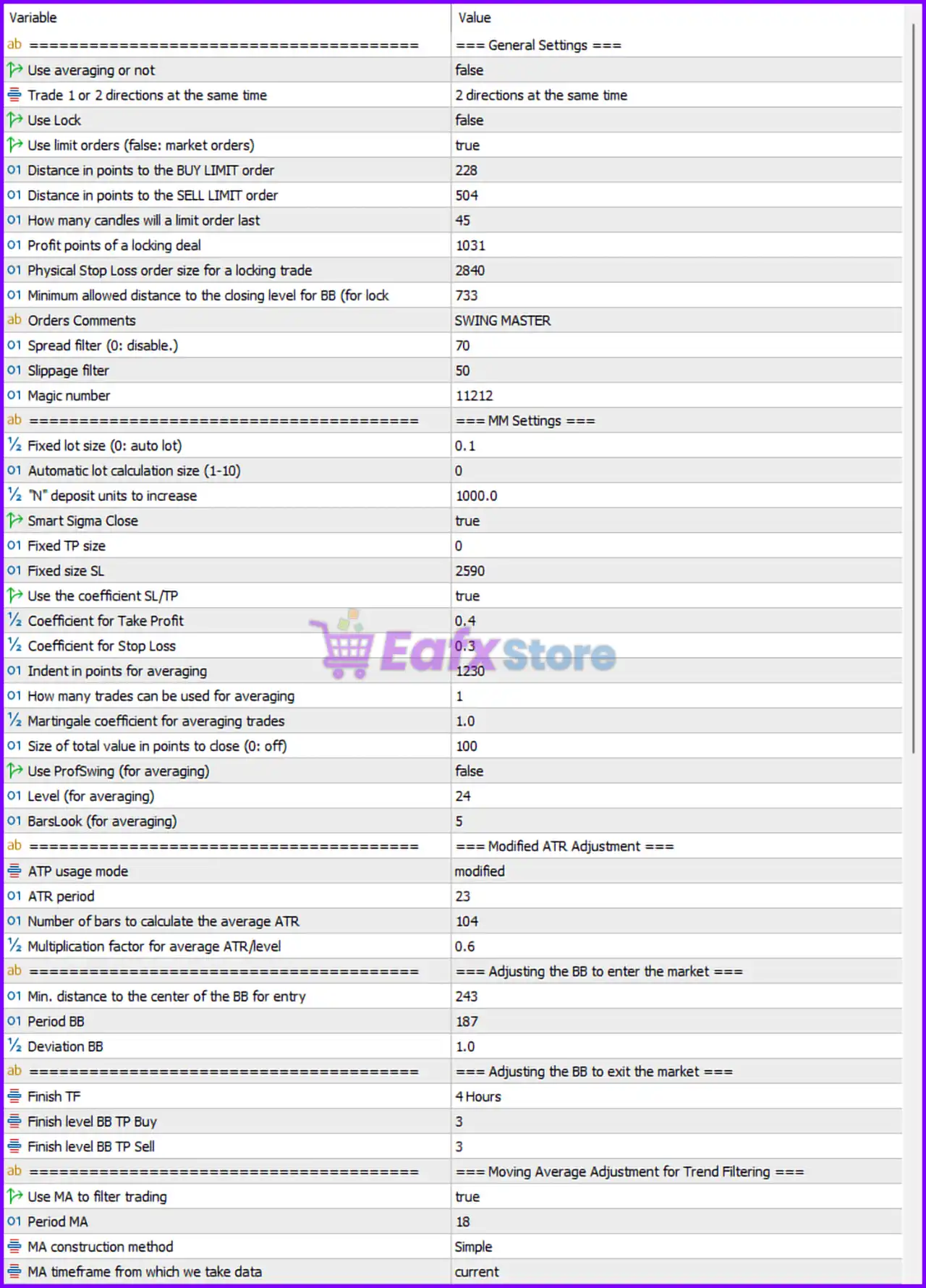
General Settings
🔹 Use averaging or not = false: Disables averaging or grid recovery trading mode.
🔹 Trade 1 or 2 directions at the same time = 2 directions at the same time: Allows simultaneous Buy and Sell trading.
🔹 Use Lock = false: Disables hedge locking functionality.
🔹 Use limit orders (false: market orders) = true: Uses pending limit orders instead of instant market execution.
🔹 Distance in points to the BUY LIMIT order = 228: Sets Buy Limit order distance to 228 points.
🔹 Distance in points to the SELL LIMIT order = 504: Sets Sell Limit order distance to 504 points.
🔹 How many candles will a limit order last = 45: Pending limit orders remain active for 45 candles.
🔹 Profit points of a locking deal = 1031: Sets locking trade profit target to 1031 points.
🔹 Physical Stop Loss order size for a locking trade = 2840: Defines physical stop loss for lock trades as 2840 points.
🔹 Minimum allowed distance to the closing level for BB (for lock) = 733: Minimum Bollinger Band distance required for lock trade exits is 733.
🔹 Orders Comments = SWING MASTER: Adds SWING MASTER as the comment on all EA trades.
🔹 Spread filter (0: disable.) = 70: Maximum allowed spread is 70 points.
🔹 Slippage filter = 50: Sets maximum slippage tolerance to 50.
🔹 Magic number = 11212: Unique identifier 11212 for EA trade management.
Money Management (MM) Settings
🔹 Fixed lot size (0: auto lot) = 0.1: Uses fixed lot size 0.1.
🔹 Automatic lot calculation size (1-10) = 0: Disables automatic lot calculation.
🔹 'N' deposit units to increase = 1000.0: Increases lot scaling every 1000.0 deposit units.
🔹 Smart Sigma Close = true: Enables smart volatility-based position closing logic.
🔹 Fixed TP size = 0: Fixed Take Profit size is disabled.
🔹 Fixed size SL = 2590: Fixed Stop Loss distance is 2590 points.
🔹 Use the coefficient SL/TP = true: Enables coefficient-based Stop Loss and Take Profit calculations.
🔹 Coefficient for Take Profit = 0.4: Uses TP multiplier coefficient 0.4.
🔹 Coefficient for Stop Loss = 0.3: Uses SL multiplier coefficient 0.3.
🔹 Indent in points for averaging = 1230: Averaging trades spacing is 1230 points.
🔹 How many trades can be used for averaging = 1: Allows maximum 1 averaging trade.
🔹 Martingale coefficient for averaging trades = 1.0: Uses Martingale multiplier 1.0.
🔹 Size of total value in points to close (0: off) = 100: Closes positions after total profit reaches 100 points.
🔹 Use ProfSwing (for averaging) = false: Disables Professional Swing averaging logic.
🔹 Level (for averaging) = 24: Averaging activation level is 24.
🔹 BarsLook (for averaging) = 5: Uses 5 bars for averaging calculations.
Modified ATR Adjustment Settings
🔹 ATR usage mode = modified: Uses modified ATR calculation mode.
🔹 ATR period = 23: ATR indicator period is 23.
🔹 Number of bars to calculate the average ATR = 104: Uses 104 bars for ATR averaging.
🔹 Multiplication factor for average ATR/level = 0.6: ATR multiplier coefficient is 0.6.
Bollinger Bands Entry Settings
🔹 Min. distance to the center of the BB for entry = 243: Minimum Bollinger Band center distance for entries is 243.
🔹 Period BB = 187: Bollinger Bands period is 187.
🔹 Deviation BB = 1.0: Bollinger Bands deviation value is 1.0.
Bollinger Bands Exit Settings
🔹 Finish TF = 4 Hours: Exit calculations use the H4 timeframe.
🔹 Finish level BB TP Buy = 3: Bollinger Band TP level for Buy trades is 3.
🔹 Finish level BB TP Sell = 3: Bollinger Band TP level for Sell trades is 3.
Moving Average Trend Filter Settings
🔹 Use MA to filter trading = true: Enables Moving Average trend filtering.
🔹 Period MA = 18: Moving Average period is 18.
🔹 MA construction method = Simple: Uses Simple Moving Average (SMA).
🔹 MA timeframe from which we take data = current: Uses current chart timeframe for MA calculations.
Professional Swing Filter Settings
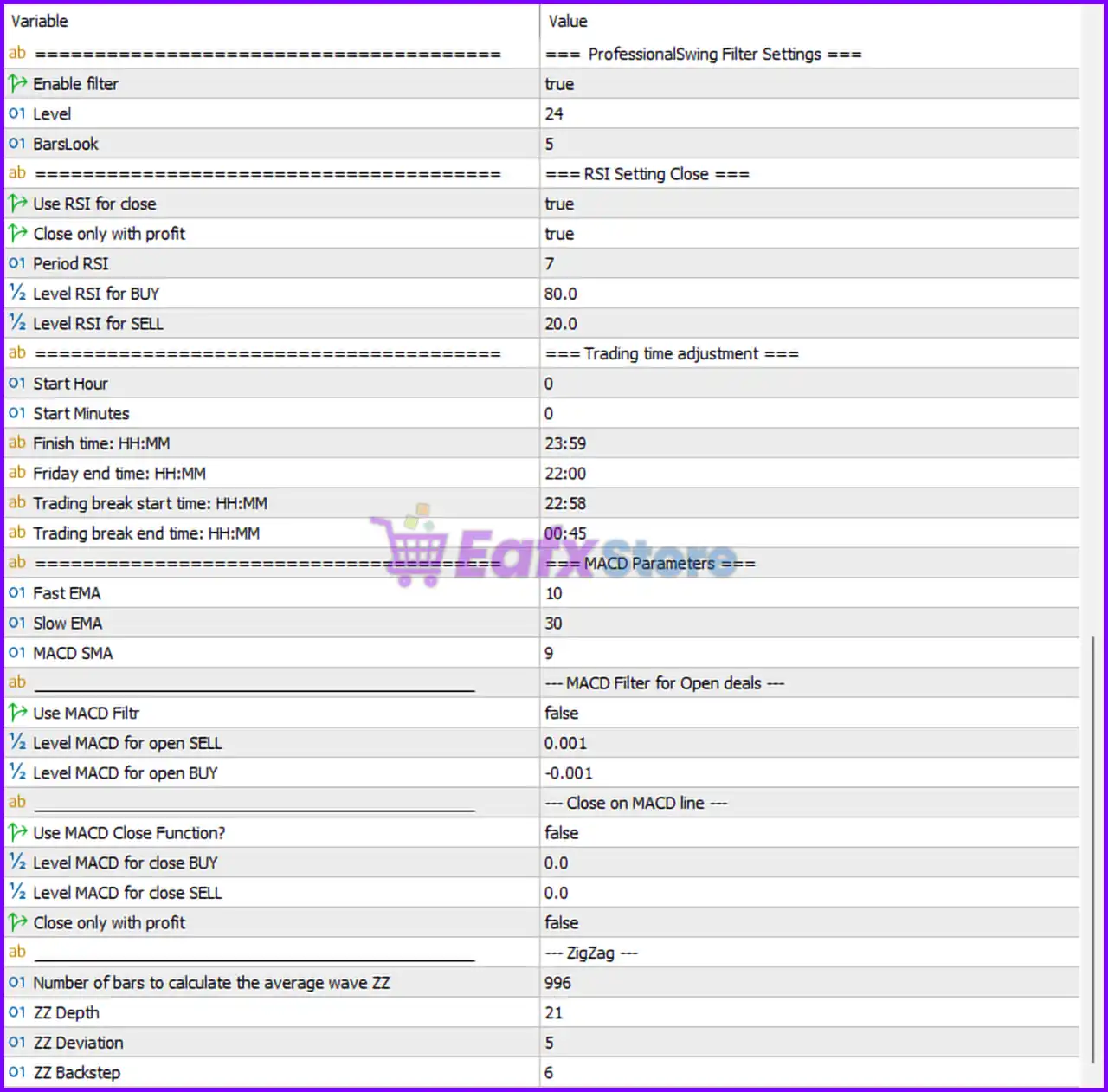
🔹 Enable filter = true: Enables Professional Swing filtering.
🔹 Level = 24: Swing filter level is 24.
🔹 BarsLook = 5: Swing filter uses 5 historical bars.
RSI Close Settings
🔹 Use RSI for close = true: Enables RSI-based trade closing.
🔹 Close only with profit = true: RSI closes trades only when positions are profitable.
🔹 Period RSI = 7: RSI indicator period is 7.
🔹 Level RSI for BUY = 80.0: RSI close threshold for Buy trades is 80.0.
🔹 Level RSI for SELL = 20.0: RSI close threshold for Sell trades is 20.0.
Trading Time Adjustment Settings
🔹 Start Hour = 0: Trading starts at hour 0.
🔹 Start Minutes = 0: Trading starts at minute 0.
🔹 Finish time HH:MM = 23:59: Trading ends at 23:59.
🔹 Friday end time HH:MM = 22:00: Friday trading stops at 22:00.
🔹 Trading break start time HH:MM = 22:58: Trading pause starts at 22:58.
🔹 Trading break end time HH:MM = 00:45: Trading resumes at 00:45.
MACD Parameters Settings
🔹 Fast EMA = 10: Fast EMA period is 10.
🔹 Slow EMA = 30: Slow EMA period is 30.
🔹 MACD SMA = 9: MACD signal SMA period is 9.
MACD Filter for Open Deals
🔹 Use MACD Filtr = false: Disables MACD entry filtering.
🔹 Level MACD for open SELL = 0.001: MACD threshold for Sell entries is 0.001.
🔹 Level MACD for open BUY = -0.001: MACD threshold for Buy entries is -0.001.
MACD Close Function Settings
🔹 Use MACD Close Function? = false: Disables MACD-based trade closing.
🔹 Level MACD for close BUY = 0.0: MACD close threshold for Buy trades is 0.0.
🔹 Level MACD for close SELL = 0.0: MACD close threshold for Sell trades is 0.0.
🔹 Close only with profit = false: MACD can close both profitable and losing trades.
ZigZag Settings
🔹 Number of bars to calculate the average wave ZZ = 996: Uses 996 bars for ZigZag wave analysis.
🔹 ZZ Depth = 21: ZigZag Depth parameter is 21.
🔹 ZZ Deviation = 5: ZigZag Deviation parameter is 5.
🔹 ZZ Backstep = 6: ZigZag Backstep parameter is 6.
Conclusion
Swing Master EA is a sophisticated swing trading Expert Advisor featuring advanced Bollinger Bands logic, ATR-based volatility adaptation, RSI and MACD filtering, ZigZag analysis and intelligent money management tools.
The EA provides flexible entry and exit systems for traders who want automated swing trading with strong technical analysis integration. Proper optimization of the settings can help improve consistency, reduce risk exposure, and adapt trading performance to various market environments.
FAQs
❓ What is Swing Master EA?
Swing Master EA is an automated Forex trading robot designed for swing trading strategies using technical indicators and advanced money management.
❓ Does Swing Master EA support Bollinger Bands trading?
Yes, the EA uses Bollinger Bands for both market entry and exit calculations.
❓ Can Swing Master EA use RSI and MACD filters?
Yes, the EA includes configurable RSI and MACD filters for entries and exits.
❓ Does Swing Master EA support averaging and Martingale systems?
Yes, averaging and Martingale features are available and configurable.
❓ Is Swing Master EA suitable for automated swing trading?
Yes, the EA is specifically optimized for automated swing trading strategies across different market conditions.