


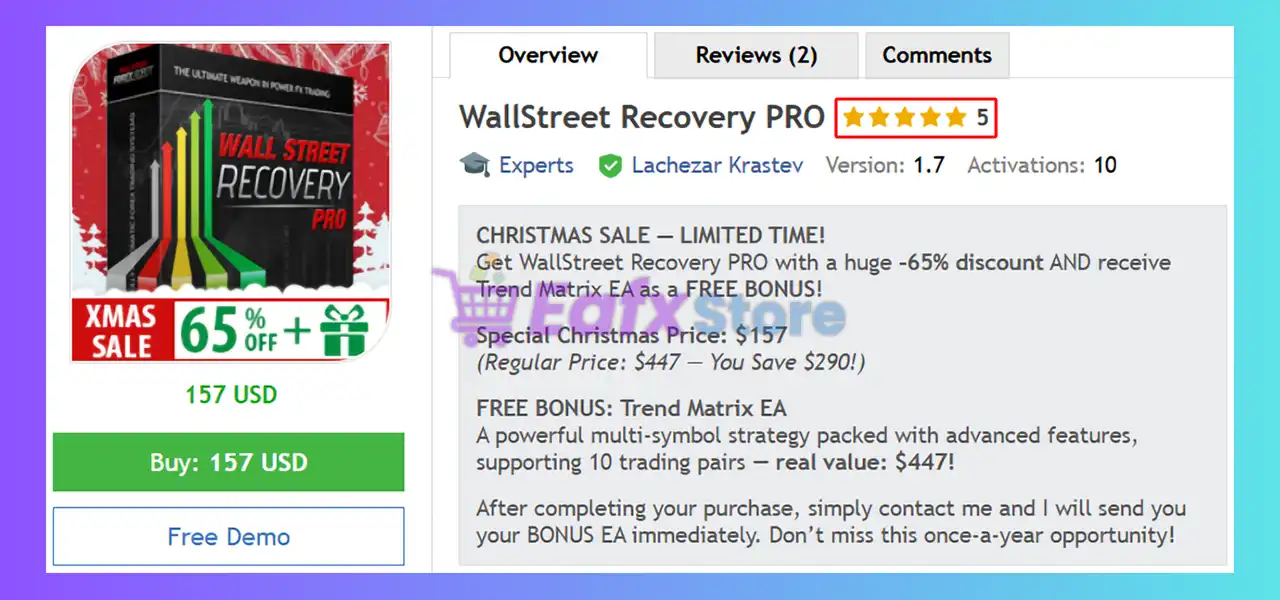


WallStreet Recovery PRO EA MT4 v1.7 (Platform build 1476+)

Subscriptions for Special Plan
- 30 EA package is more economical!
- Special package with 99%
- Download 1 EA/Day

Subscriptions for Premium Membership
- Download Unlimited in 1 Year
- Get 100% Discount
- Get free access to all

Subscriptions for Gold Membership
- 1 Year Membership
- Get 100% Discount
- Access EA+Indicator+Course
Frequently bought together 🎁
Add these products to enhance your purchase




What is WallStreet Recovery PRO?
WallStreet Recovery PRO EA is a fully automated Forex trading system built on the core WallStreet platform, enhanced with the Advanced Recovery System to turn losing streaks into profits. The system provides intelligent, controlled trade management without martingale risk, delivering consistent performance, plug-and-trade setups and intelligent risk protection for long-term performance.
🔶 Vendor Website: View here
About the Author
This product is compiled by Lachezar Krastev. This author has more than +14 years of experience working on MQL5 with many famous products such as WallStreet Recovery PRO MT4, Infinity Trader EA MT4, Infinity Trader EA MT5, Forex GOLD Investor MT5 and other advisors. Among them, WallStreet Recovery PRO is his best performing products.
Key Features of WallStreet Recovery PRO for MT4
🔹 Advanced Money & Risk Control: Auto-adjusts lot size, protects drawdown, locks profit, ensures stable performance across brokers.
🔹 Dynamic Market Adaptation: Smart entry & exit logic with flexible SL/TP and volatility reaction for smooth execution.
🔹 Protection & Security Tools: News filter, spread-slippage guard, profit lock, SPY module shielding against unfair brokers.
What is the WallStreet Recovery PRO trading strategy?
🔹 Intelligent Recovery Logic: Turns temporary drawdown into profit using structured recovery—no aggressive martingale or blind grid.
🔹 Adaptive Trend Positioning: Identifies high-probability entries and manages trades with volatility-aware exit rules.
🔹 Cycle-Based Execution: Closes cycles in net profit through measured scaling and controlled recovery management.
WallStreet Recovery PRO EA MT4 Review
WallStreet Recovery PRO MT4 Signal Results
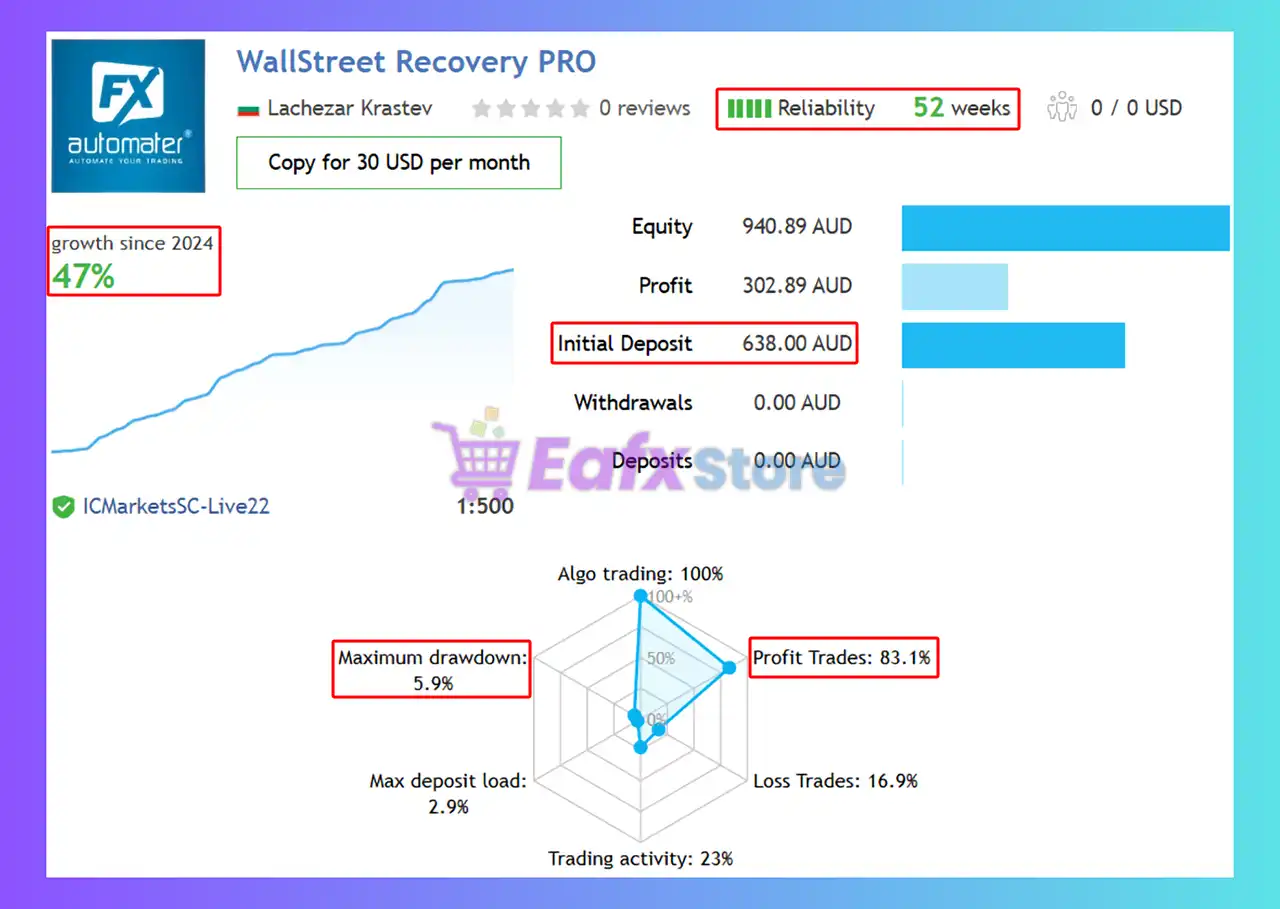
The WallStreet Recovery PRO achieved impressive profit performance when trading. Trading results on real account for 52 consecutive weeks of trading:
✅ Initial Deposit: $638
✅ Growth Rate: +47%
✅ Win Rate (% of total): 83.10%
✅ Maximum Drawdown: 5.90%
WallStreet Recovery PRO Signal Results
WallStreet Recovery PRO MT4 Backtests
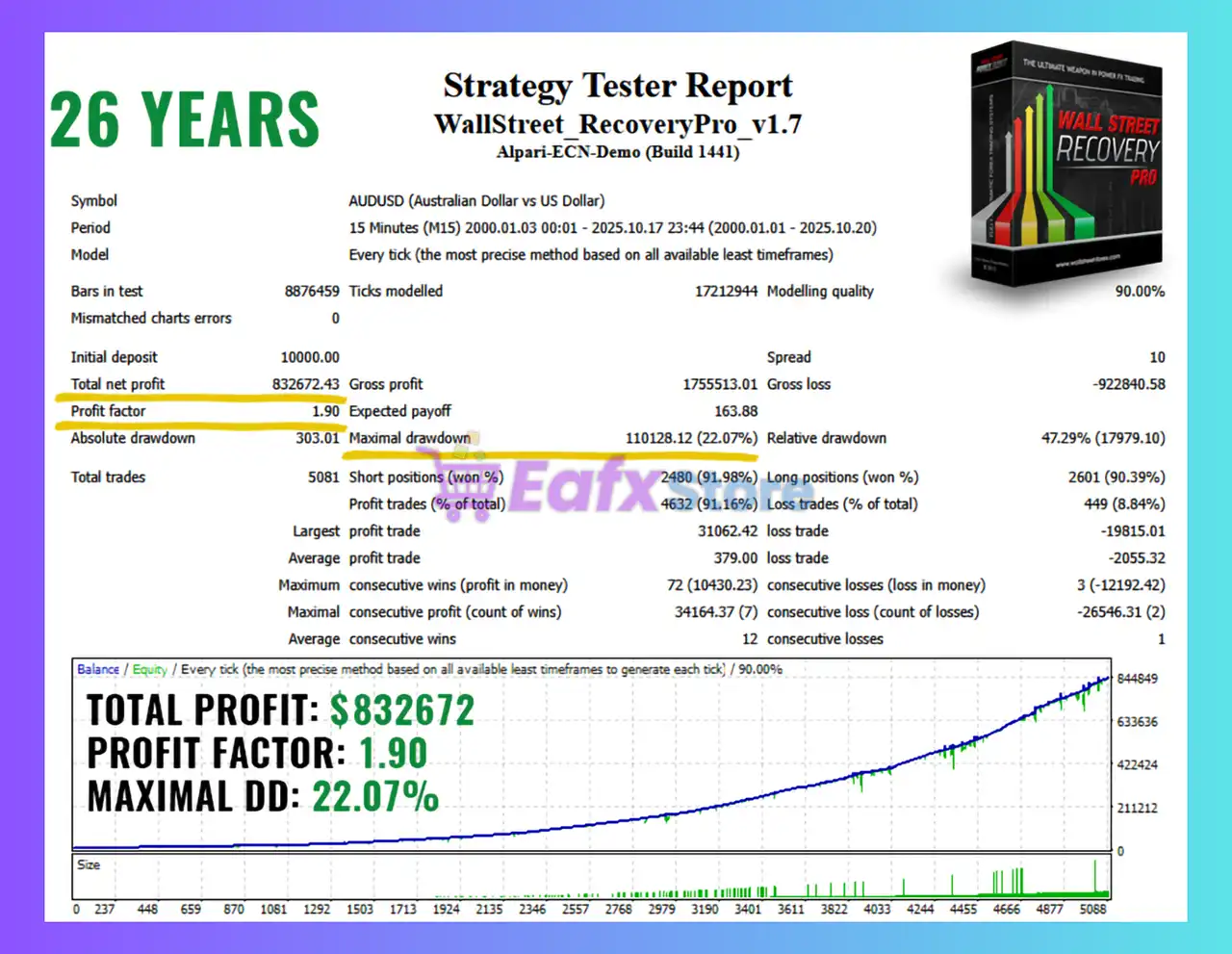
🧩 The WallStreet Recovery PRO backtest trading results achieved impressive profit performance for 26 years on the AUDUSD pair. The advisor showed the ability to maintain safe stars on the 15-minute chart.
✅ Initial Deposit: $10,000
✅ Total Net Profit: $832,672.43
✅ Win Rate (% of total): 91.16%
✅ Maximum Drawdown: 22.07%
WallStreet Recovery PRO MT4 Backtest
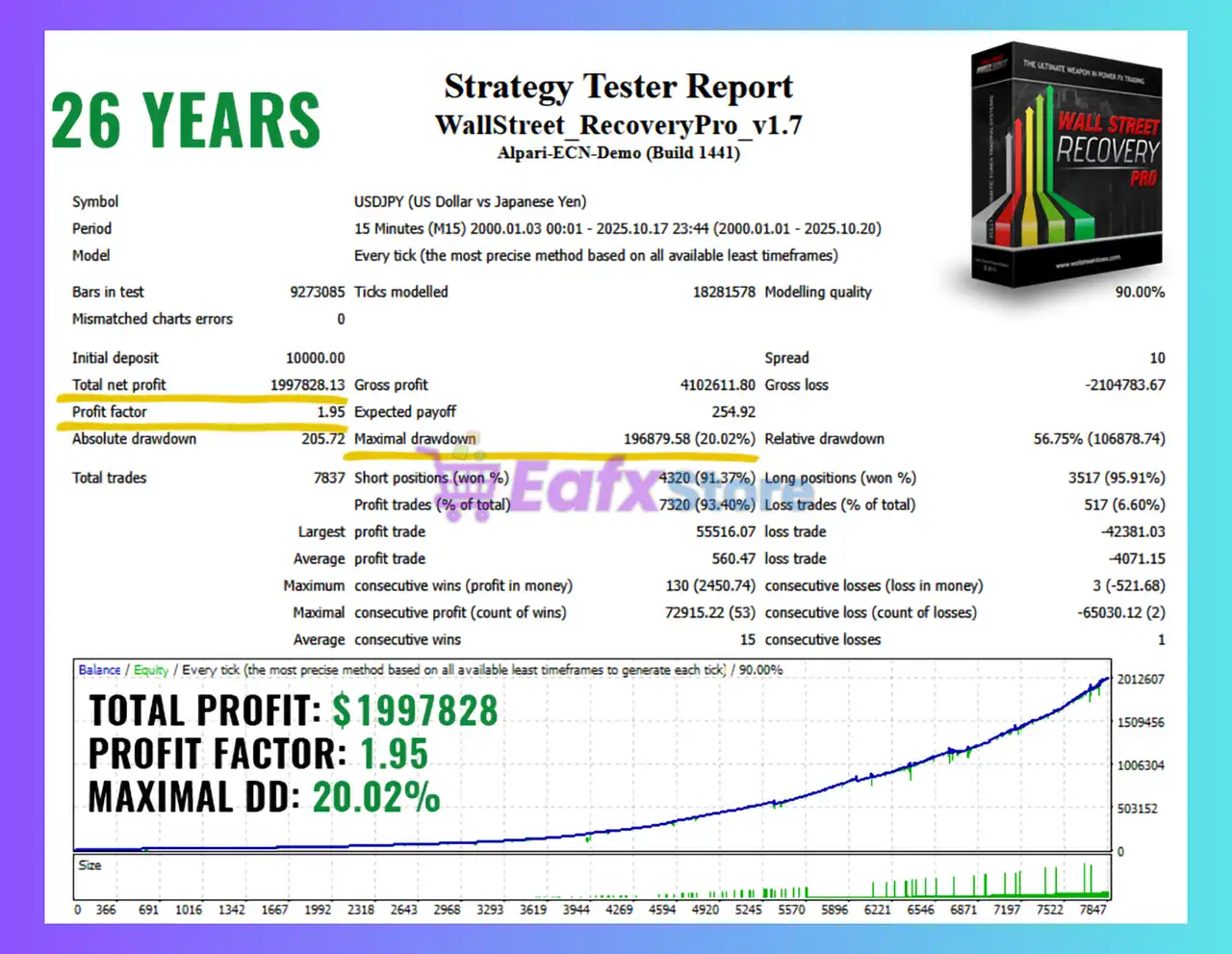
🧩 The WallStreet Recovery PRO backtest trading results achieved impressive profit performance for 26 years on the USDJPY pair.
✅ Initial Deposit: $10,000
✅ Total Net Profit: $1.99 million
✅ Win Rate (% of total): 94.40%
✅ Maximum Drawdown: 20.02%
WallStreet Recovery PRO EA Backtest
Why choose & use WallStreet Recovery PRO?
🔹 Safe Growth With Recovery Engine: Smart loss-to-profit conversion improves consistency in real trading conditions.
🔹 Prop-Firm Friendly Risk Control: Drawdown protection aligns with FTMO-style rules, ideal for challenge accounts.
🔹 Plug-and-Trade Simplicity: No setup complexity, optimized presets included—install, attach, trade instantly.
Is WallStreet Recovery PRO safe?
WallStreet Recovery PRO EA shows significant potential in providing stable and reliable profits, making it a reliable tool in the forex market. The advisor is highly appreciated by the MQL5 community in many aspects and has won the trust of users.
⭐⭐⭐⭐⭐ B4BcpFGj (2025.11.27)
“I’m impressed with backtests and live results. Looking forward to see how it performs on live account.”
⭐⭐⭐⭐⭐ Acarette (2025.11.10)
“This is my second purchase from this seller and very satisfied with both. Very easy install and great support from Lachezar. Great price for this sophisticated EA.”
Recommended settings
Recommended settings and parameters to pay attention to from developers and experts:
| Features | Type |
|---|---|
| Trading platform | MetaTrader 4 (MT4) |
| Time frames | M15 (15 minute chart) |
| Currency pairs | EURUSD, GBPUSD, USDJPY, AUDUSD, USDCHF, USDCAD, NZDUSD |
| Minimum / Recommended deposit | $100 |
| Minimum / Recommended leverage | Any |
| Account types | Any |
| Product type | NoDLL / Unlimited |
| Additional services | Unlock and Decompile |
| Recommended brokers | Exness Broker, Icmarkets Broker |
| Recommended VPS | MyfxVPS.com (Blue VPS, Golden VPS). Lowest Latency, 2 week Free Trial, 100% Free for 12-18 Months. |
Product Download Package?
The download package of the product suite includes:
✅ Experts: WallStreet Recovery PRO v1.7_fix.ex4
➡️ Reviewed by David Easton
Conclusion
In short, WallStreet Recovery PRO delivers powerful risk control, adaptive market execution, and layered protection tools that enhance stability in both real trading and long-term backtests. Its intelligent recovery engine, trend-aware entries, and cycle-based profit closure make it a dependable choice for steady growth. Ultimately, this EA stands out as a precision-built system crafted for traders who demand safer profits with smarter automation.
🔢 WallStreet Recovery PRO EA MT4 Settings Guide
WallStreet Recovery PRO EA is an automated trading Expert Advisor that combines configurable risk management, recovery controls, broker-spread protection, trading-hour management, GMT synchronization, news filtering, and position-execution settings. The configuration shown in the provided panels gives traders detailed control over lot sizing, maximum exposure, daily and account-level protection, Broker Spy alerts, Stop Loss and Take Profit parameters, recovery behavior, and trading direction.
The displayed setup is particularly notable for its 0.01 fixed lot size, 3.0 maximum spread, 2-point slippage, 1,200-point Stop Loss, 19:00 last-trade hour, 20:00 exit hour, automatic GMT offset, and 30-minute news protection window.

WallStreet Recovery PRO EA MT4 Settings Panel

WallStreet Recovery PRO MT4 Settings Panel
🔢 WallStreet Recovery PRO EA MT4 Settings Explained
🔄 Time Management Settings
🔹 MondayTrading: true — Enables trading on Monday.
🔹 MondayHoursForbidden: — The Monday forbidden-hours field is blank, so no specific restricted hours are entered in the displayed configuration.
🔹 TuesdayTrading: true — Enables trading on Tuesday.
🔹 TuesdayHoursForbidden: — The Tuesday forbidden-hours field is blank, meaning no specific restricted hours are configured.
🔹 WednesdayTrading: true — Enables trading on Wednesday.
🔹 WednesdayHoursForbidden: — The Wednesday forbidden-hours field is blank.
🔹 ThursdayTrading: true — Enables trading on Thursday.
🔹 ThursdayHoursForbidden: — The Thursday forbidden-hours field is blank.
🔹 FridayTrading: true — Enables trading on Friday.
🔹 FridayHoursForbidden: — The Friday forbidden-hours field is blank.
🔹 SaturdayTrading: true — Enables the Saturday trading flag.
🔹 SundayTrading: true — Enables the Sunday trading flag.
🔄 Notifications Settings
🔹 EMAIL_Notification: false — Disables email notifications from the EA.
🔹 PUSH_Notification: false — Disables push notifications to the MT4 mobile application.
🔄 Protection Settings
🔹 Max open lots: 0.0 — Sets the maximum open-lot protection value to 0.0. This parameter should be interpreted according to the EA’s internal handling of zero values, which may represent a disabled limit.
Daily Protections
🔹 Maximum daily loss(currency): 0.0 — Sets the maximum daily loss in account currency to 0.0.
🔹 Maximum daily drawdown %: 0.0 — Sets the maximum daily drawdown percentage to 0.0%.
🔹 Daily reset hour (terminal): 0 — Sets the daily protection reset hour to 0, based on terminal time.
🔹 Maximum daily profit (currency): 0.0 — Sets the maximum daily profit target in account currency to 0.0.
🔹 Maximum daily profit %: 0.0 — Sets the maximum daily profit target to 0.0%.
Account Protections
🔹 Minimum Equity(currency): 0.0 — Sets the minimum account-equity protection level to 0.0 in account currency.
🔹 Maximum Equity drawdown %: 0.0 — Sets the maximum equity drawdown threshold to 0.0%.
🔹 Maximum Equity(currency): 0.0 — Sets the maximum equity protection value to 0.0 in account currency.
🔹 Maximum open trades (account): 0 — Sets the account-wide maximum number of open trades to 0. The EA’s internal interpretation of zero should be verified, as zero may represent a disabled limit.
🔄 Broker Spy Settings
🔹 BSM Alerts: true — Enables Broker Spy monitoring alerts.
🔹 BSM_Alert_Open_Delay: 1000 — Sets the Broker Spy open-order alert delay to 1000, according to the EA’s internal time unit.
🔹 BSM_Alert_Open_Slippage: 2.0 — Sets the allowed/monitored opening slippage threshold to 2.0.
🔹 BSM_Alert_StopLimit_Delay: 1000 — Sets the Broker Spy Stop/Limit alert delay to 1000.
🔹 BSM_Alert_StopLimit_Slippage: 2.0 — Sets the Stop/Limit alert slippage threshold to 2.0.
🔹 BSM_Alert_Close_Delay: 1000 — Sets the Broker Spy closing-order alert delay to 1000.
🔹 BSM_Alert_Close_Slippage: 2.0 — Sets the closing-order slippage threshold to 2.0.
🔄 Risk Management Settings
🔹 FixedLots: 0.01 — Sets the fixed trading volume to 0.01 lots.
🔹 AutoMM: 0.0 — Sets the automatic money-management value to 0.0.
🔹 AutoMM_Max: 20.0 — Sets the maximum automatic money-management value to 20.0.
🔄 General Settings
🔹 WinLargeFonts: false — Disables the large-font display mode.
🔹 Magic: 456321 — Sets the EA’s Magic Number to 456321, allowing MT4 to identify and manage trades belonging to WallStreet Recovery PRO.
🔹 EA_Comment: — The EA comment field is blank in the displayed configuration.
🔹 MaxSpread: 3.0 — Sets the maximum allowed trading spread to 3.0.
🔹 MaxSpreadExit: 0.0 — Sets the spread threshold for exit management to 0.0.
🔹 Slippage: 2 — Sets the maximum configured execution slippage to 2.
🔹 StealthMode: false — Disables Stealth Mode.
🔹 EmergencyStopDist: 200 — Sets the emergency-stop distance to 200, according to the EA’s internal distance unit.
🔹 NFA: false — Disables NFA-specific trading restrictions.
🔹 No_Hedge: false — Disables the no-hedging restriction, meaning the EA is not explicitly prevented from maintaining opposing positions by this parameter.
🔹 Long Trades: true — Enables Long/Buy trading.
🔹 Short Trades: true — Enables Short/Sell trading.
🔹 NoConcurrentTrades: false — Disables the restriction against concurrent trades.
🔄 Custom Settings
🔹 PendingOrderDist: 0 — Sets the pending-order distance to 0.
🔹 StopLimitExpire: 15 — Sets the Stop/Limit pending-order expiration period to 15 according to the EA’s internal time unit.
🔹 StopLoss: 1200 — Sets the Stop Loss distance to 1,200 points.
🔹 TakeProfit: 0 — Sets the Take Profit value to 0, meaning no positive fixed Take Profit value is configured in this field.
🔹 SecureProfit: 0 — Sets the Secure Profit level to 0.
🔹 SecureProfit Triger: 0 — Sets the Secure Profit trigger to 0.
🔄 Recovery Settings
🔹 RecoveryAfter: 0 — Sets the recovery activation threshold to 0.
🔹 MaxRecoveryTrades: 0 — Sets the maximum number of recovery trades to 0.
🔹 RecoveryTradeLots: 0.0 — Sets the recovery trade volume to 0.0 lots.
🔹 RecoveryMMC: 0.0 — Sets the recovery money-management coefficient to 0.0.
🔹 RecoveryMinProfitDollars: -1.0 — Sets the minimum recovery profit threshold to -1.0 dollars.
Note: Although the EA is named WallStreet Recovery PRO, the displayed recovery parameters are largely set to 0, so the exact behavior of the recovery mechanism should be verified from the EA’s documentation before assuming that recovery trading is active.
🔄 Monday–Friday Rules
🔹 MondayStartHour: 0 — Sets the Monday starting hour to 0.
🔹 FridayExit: false — Disables the dedicated Friday-exit function.
🔹 LastTradeHour: 19 — Sets the last permitted trading hour to 19:00 according to the EA’s internal time reference.
🔹 ExitHour: 20 — Sets the configured exit hour to 20:00.
🔄 GMT Settings
🔹 AutoGMT_Offset: true — Enables automatic GMT-offset handling.
🔹 ManualGMT_Offset: 2 — Sets the manual GMT offset to 2 when manual GMT handling is used.
🔹 DST_Usage: EU_DST — Configures the EA to use the EU_DST daylight-saving-time convention.
🔄 News Filter Settings
🔹 Avoid_News: false — Disables the main news-avoidance function.
🔹 Include_Medium_News: true — Enables inclusion of medium-impact news in the news-filter logic.
🔹 Wait_Before_News: 30 — Sets the configured pre-news waiting period to 30 minutes.
🔹 Wait_After_News: 30 — Sets the configured post-news waiting period to 30 minutes.
🔢 Key Configuration Highlights
🔹 Fixed Lot Size: The displayed configuration uses FixedLots = 0.01, providing a fixed starting trade volume of 0.01 lots.
🔹 Spread Protection: MaxSpread = 3.0, providing a relatively tight spread threshold for new trading activity.
🔹 Execution Slippage: The general slippage setting is 2, while Broker Spy slippage thresholds are 2.0.
🔹 Stop Loss: The configured Stop Loss is 1,200 points.
🔹 Take Profit: TakeProfit = 0, so no fixed positive Take Profit value is entered in the displayed configuration.
🔹 Trading Direction: Both Long Trades = true and Short Trades = true, allowing trading in both directions.
🔹 Trading Days: Monday through Friday are enabled, while SaturdayTrading = true and SundayTrading = true are also displayed as enabled.
🔹 Friday Management: LastTradeHour = 19 and ExitHour = 20, while the separate FridayExit function is set to false.
🔹 Recovery Parameters: MaxRecoveryTrades = 0, RecoveryTradeLots = 0.0, and RecoveryMMC = 0.0, indicating that recovery-related exposure is not actively configured through positive values.
🔹 GMT Management: Automatic GMT offset is enabled with AutoGMT_Offset = true, a manual offset of 2, and EU_DST selected.
🔹 News Timing: The configured news waiting period is 30 minutes before and 30 minutes after an event.
🔹 Notifications: Both EMAIL_Notification = false and PUSH_Notification = false, so external notifications are disabled.
🔹 Broker Monitoring: BSM Alerts = true, with open, Stop/Limit, and close monitoring delays all set to 1000 and slippage thresholds at 2.0.
🔢 Conclusion
WallStreet Recovery PRO EA offers a broad configuration framework covering risk management, broker monitoring, trading direction, custom order management, recovery parameters, GMT synchronization, trading schedules, and news-event handling.
The displayed setup uses a 0.01 fixed lot, 3.0 maximum spread, 2 slippage, 1,200-point Stop Loss, and enables both Long and Short trades. Broker Spy monitoring is also enabled, with 1000 delay settings and 2.0 slippage thresholds for opening, Stop/Limit, and closing operations.
The EA includes several account and daily protection parameters, but they are currently set to 0.0, while the maximum open-trade value is 0. Because zero can represent a disabled protection limit in many EA implementations, traders should verify the exact behavior in the EA documentation rather than assuming these values automatically provide active protection.
The recovery section is also important: MaxRecoveryTrades = 0, RecoveryTradeLots = 0.0, and RecoveryMMC = 0.0. Therefore, the displayed configuration does not show an aggressively configured recovery mechanism despite the EA’s name. Proper backtesting and forward testing are recommended before using these settings on a live account.
🔢 FAQs
❓ What is the default lot size of WallStreet Recovery PRO EA MT4?
The displayed FixedLots value is 0.01, meaning the EA is configured to use 0.01 lots under the fixed-lot setting.
❓ What are the Stop Loss and Take Profit settings?
The configured StopLoss is 1200 points, while TakeProfit is 0. Therefore, a fixed positive Take Profit value is not configured in the displayed settings.
❓ Does WallStreet Recovery PRO EA MT4 support both Buy and Sell trades?
Yes. Long Trades = true and Short Trades = true, so both trading directions are enabled.
❓ What are the configured trading and exit hours?
The EA uses MondayStartHour = 0, LastTradeHour = 19, and ExitHour = 20. The dedicated FridayExit function is set to false.
❓ Does the EA have a news filter?
The main Avoid_News setting is false, while Include_Medium_News = true. The configured waiting periods are 30 minutes before and 30 minutes after news events.
User Reviews
Only logged in customers who have purchased this product may leave a review.
❓ What is WallStreet Recovery PRO EA and how does it work?
WallStreet Recovery PRO EA is an advanced automated Forex trading system built on the WallStreet platform, enhanced with a smart Recovery System that converts temporary losing periods into net profit cycles. It manages trades intelligently using volatility filters, adaptive exits, and controlled scaling—without relying on martingale or dangerous grid strategies.
❓ How does the Advanced Recovery System protect accounts without using martingale?
The EA uses a structured, measured recovery model that increases exposure only when market conditions justify it. Instead of doubling lots like martingale, the system gradually adjusts position size while targeting cycle-based profit closure, keeping drawdown controlled and ensuring far safer long-term performance.
❓ Is WallStreet Recovery PRO suitable for beginners or only advanced traders?
Both can use it easily. The EA comes with fully optimized presets, automated risk control, and plug-and-trade installation. Beginners benefit from hands-off trading, while advanced traders gain access to powerful protection tools like news filters, slippage guards, profit locks, and trend-adaptive execution.
❓ What trading strategy does WallStreet Recovery PRO use to generate profits?
The strategy is based on intelligent recovery logic combined with adaptive trend positioning. It identifies high-probability trend setups on the M15 chart, enters during favorable volatility windows, and completes trade cycles only when the overall basket reaches secure net profit, ensuring sustainable long-term gains.
❓ What are the verified trading results of WallStreet Recovery PRO EA?
Real-account results show +47% growth over 52 weeks, an 83.10% win rate, and a maximum drawdown of only 5.90% with an initial deposit of $638. These metrics demonstrate stability and consistency, especially important for conservative traders and prop-firm users.
❓ How reliable are the long-term backtests of WallStreet Recovery PRO?
Backtests over 26 years on pairs such as AUDUSD and USDJPY show exceptional performance:
AUDUSD: $832,672 net profit, 91.16% win rate, 22.07% drawdown
USDJPY: $1.99M net profit, 94.40% win rate, 20.02% drawdown
These results highlight excellent long-term survivability and strategy durability under varying market cycles.
❓ Which currency pairs and timeframes does WallStreet Recovery PRO perform best on?
The EA is optimized for the M15 timeframe and works effectively on major pairs such as EURUSD, GBPUSD, USDJPY, AUDUSD, USDCHF, USDCAD, and NZDUSD. These pairs offer stable liquidity, predictable volatility patterns, and ideal conditions for recovery-based execution.
❓ What is the minimum recommended deposit to run WallStreet Recovery PRO safely?
The recommended minimum deposit is $100, although many traders use higher amounts for even smoother performance. The EA adapts lot size automatically through its Advanced Money Management system, ensuring stable risk across different account sizes.
❓ Is WallStreet Recovery PRO compatible with prop-firm challenges like FTMO?
Yes. The EA includes prop-firm-friendly risk control, strict drawdown protection, and smart recovery logic that helps maintain equity consistency—key requirements for firms that enforce daily and overall drawdown limits. Many traders use it specifically for challenge accounts.
❓ Do I need to manually adjust settings or does the EA run automatically?
WallStreet Recovery PRO is designed for fully automated, plug-and-trade operation. Once attached to the chart, it manages entry timing, recovery logic, SL/TP optimization, spread protection, and profit locking on its own. Manual adjustments are optional, not required.
🔥 Get This EA for FREE with Our Membership! 🚀🚀
Unlock access to this EA, premium Indicators, and exclusive trading tools completely FREE with any of our Membership Plans! Thousands of traders already benefit from our VIP library—join them and level up your trading instantly. Choose Your Membership:
- SPECIAL – 1 Month Membership
- GOLD – 1 Year Membership
- PREMIUM – 1 Year Membership
-
 Original price was: $500.00.$249.00Current price is: $249.00.
 -
 Original price was: $888.00.$249.00Current price is: $249.00.
 -
 Original price was: $439.00.$249.00Current price is: $249.00.
 -
 Original price was: $9,999.00.$249.00Current price is: $249.00.
-
 10Original price was: $499.00.$69.00Current price is: $69.00.
 -
 3Original price was: $999.00.$69.00Current price is: $69.00.
 -
 3Original price was: $999.00.$69.00Current price is: $69.00.
 -
 10Original price was: $2,100.00.$69.00Current price is: $69.00.
There are no reviews yet.