


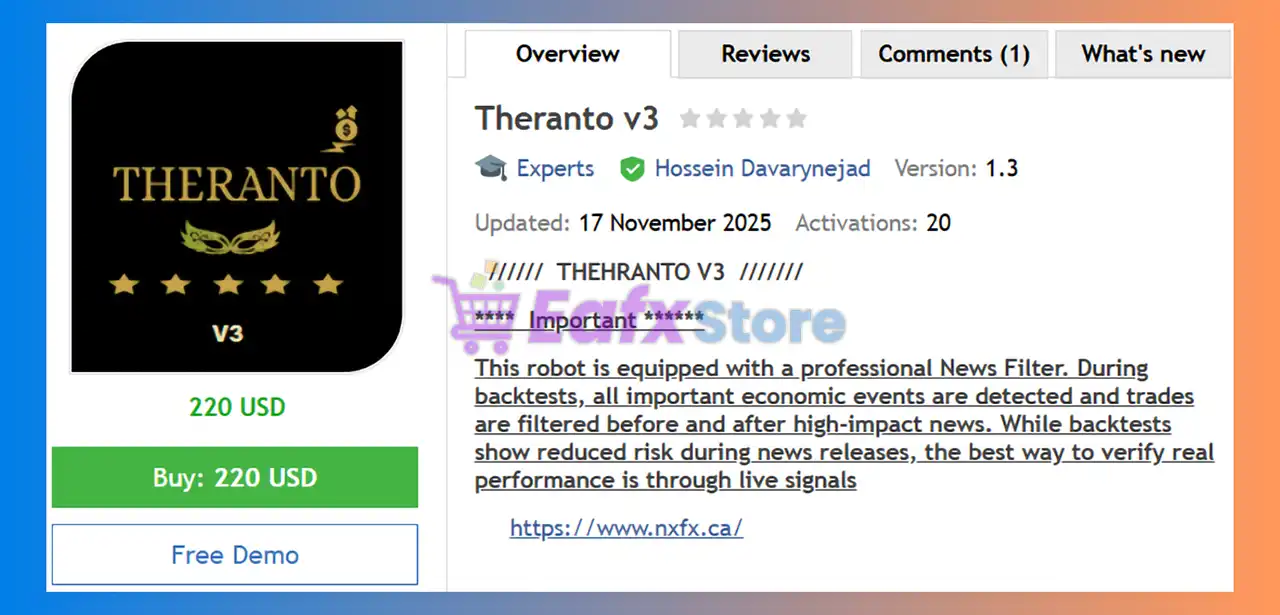
🔢 Theranto v3 EA MT4 Settings Guide
Theranto v3 EA MT4 is an automated trading Expert Advisor designed with configurable controls for EMA-based market analysis, position sizing, trading schedules, broker-spread filtering, trailing-stop management, drawdown protection, recovery settings, and automated economic-news monitoring. The displayed configuration provides traders with detailed control over the EA's trading conditions, risk parameters, maximum exposure, and news-event behavior.
With settings such as EMA Period 30, Lot Size 0.01, Power_Bulls 100.0, Maximum Spread 10.0, Maximum Slippage 4, and a 10.0-point trailing stop, Theranto v3 offers a structured configuration framework for automated trading while allowing users to adapt its behavior to different broker and account conditions.
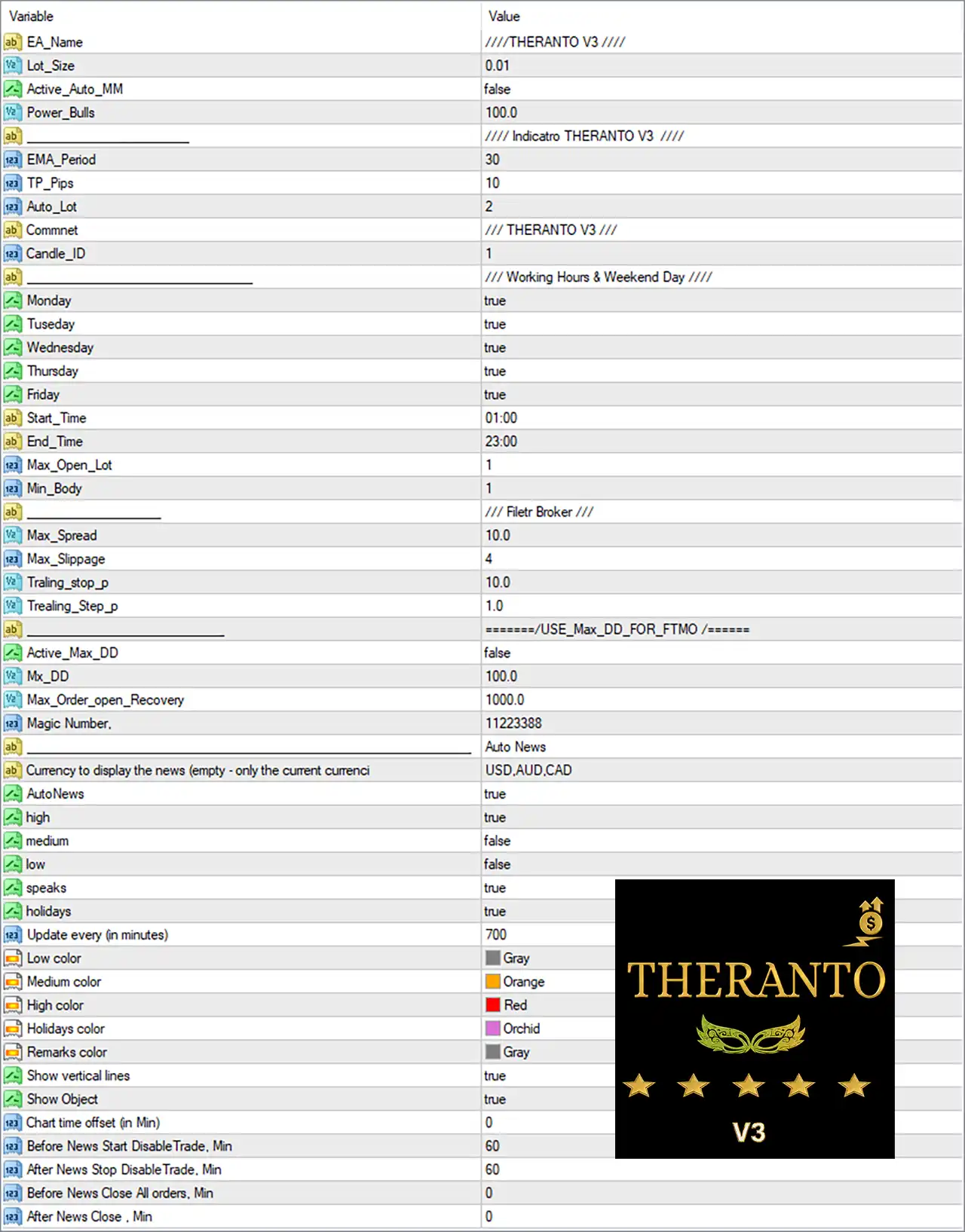
🔢 Theranto v3 EA MT4 Settings Explained
🔶 General EA Settings
🔹 EA_Name: ////THERANTO V3 //// — Defines the EA name as THERANTO V3, identifying the active Expert Advisor configuration.
🔹 Lot_Size: 0.01 — Sets the fixed trading lot size to 0.01 lots.
🔹 Active_Auto_MM: false — Disables automatic money management, meaning the EA is not currently using its Auto MM function.
🔹 Power_Bulls: 100.0 — Sets the Power_Bulls parameter to 100.0, which controls the EA's configured bullish-market strength or trading condition according to its internal strategy logic.
🔶 Indicator Settings
🔹 EMA_Period: 30 — Sets the Exponential Moving Average period to 30, providing the primary EMA reference used by the EA's indicator-based trading logic.
🔹 TP_Pips: 10 — Sets the Take Profit target to 10 pips.
🔹 Auto_Lot: 2 — Sets the automatic lot parameter to 2. Although Active_Auto_MM = false, this value remains available for the EA's automatic lot-sizing logic.
🔹 Comment: // THERANTO V3 /// — Sets the trade comment to THERANTO V3, making EA-generated positions easier to identify.
🔹 Candle_ID: 1 — Sets the candle identification/reference value to 1, indicating that the EA uses the specified candle index in its trading calculations.
🔶 Working Hours & Trading Days
🔹 Monday: true — Enables trading on Monday.
🔹 Tuesday: true — Enables trading on Tuesday.
🔹 Wednesday: true — Enables trading on Wednesday.
🔹 Thursday: true — Enables trading on Thursday.
🔹 Friday: true — Enables trading on Friday.
🔹 Start_Time: 01:00 — Sets the daily trading start time to 01:00.
🔹 End_Time: 23:00 — Sets the daily trading end time to 23:00.
🔹 Max_Open_Lot: 1 — Sets the maximum allowed open lot exposure to 1 according to the EA's internal lot-management logic.
🔹 Min_Body: 1 — Sets the minimum candle-body parameter to 1, which is used by the EA when evaluating candle conditions.
🔶 Broker Filter Settings
🔹 Max_Spread: 10.0 — Sets the maximum permitted spread to 10.0, helping prevent trading when the broker's spread exceeds the configured threshold.
🔹 Max_Slippage: 4 — Sets the maximum permitted execution slippage to 4.
🔹 Traling_stop_p: 10.0 — Sets the trailing-stop distance to 10.0 pips/points according to the EA's internal unit convention, allowing the Stop Loss to follow favorable price movement.
🔹 Trealing_Step_p: 1.0 — Sets the trailing-stop update step to 1.0, determining the minimum favorable movement required for the trailing mechanism to adjust according to the EA's internal logic.
🔶 FTMO Maximum Drawdown Settings
🔹 Active_Max_DD: false — Disables the maximum-drawdown protection feature in the current configuration.
🔹 Mx_DD: 100.0 — Sets the maximum drawdown parameter to 100.0. Because Active_Max_DD = false, this threshold is not currently active.
🔹 Max_Order_open_Recovery: 1000.0 — Sets the maximum recovery-related open-order parameter to 1000.0 according to the EA's internal recovery-management logic.
🔹 Magic Number: 11223388 — Assigns 11223388 as the EA's Magic Number, allowing MT4 to distinguish Theranto v3 trades from trades generated by other EAs or manual trading.
🔶 Automated News Settings
🔹 Auto News: [section] — Defines the configuration section dedicated to the EA's automated economic-news monitoring system.
🔹 Currency to display the news (empty - only the current currency): USD,AUD,CAD — Configures the news calendar to display events related to USD, AUD, and CAD.
🔹 AutoNews: true — Enables the automated news-monitoring system.
🔹 high: true — Enables filtering/display of high-impact economic news.
🔹 medium: false — Disables medium-impact news filtering/display.
🔹 low: false — Disables low-impact news filtering/display.
🔹 speaks: true — Enables consideration/display of scheduled speeches within the news system.
🔹 holidays: true — Enables consideration/display of holidays in the economic calendar.
🔹 Update every (in minutes): 700 — Sets the news-calendar update interval to 700 minutes.
🔶 News Display Colors
🔹 Low color: Gray — Assigns Gray to low-impact news events.
🔹 Medium color: Orange — Assigns Orange to medium-impact news events.
🔹 High color: Red — Assigns Red to high-impact news events.
🔹 Holidays color: Orchid — Assigns Orchid to holiday events.
🔹 Remarks color: Gray — Assigns Gray to remarks or additional news information.
🔶 News Chart Display
🔹 Show vertical lines: true — Enables vertical chart lines marking relevant economic-news events.
🔹 Show Object: true — Enables the display of news-related objects on the MT4 chart.
🔹 Chart time offset (in Min): 0 — Sets the chart time offset to 0 minutes, meaning no additional time adjustment is configured.
🔶 News Trading Protection
🔹 Before News Start DisableTrade, Min: 60 — Instructs the EA to disable trading 60 minutes before a relevant news event.
🔹 After News Stop DisableTrade, Min: 60 — Instructs the EA to keep trading disabled for 60 minutes after a relevant news event.
🔹 Before News Close All orders, Min: 0 — Sets the pre-news period for closing all orders to 0 minutes, meaning no advance order-closing period is configured.
🔹 After News Close, Min: 0 — Sets the post-news order-closing period to 0 minutes.
🔢 Key Configuration Highlights
🔹 Fixed Lot Trading: The EA uses Lot_Size = 0.01, while Active_Auto_MM = false, so automatic money management is disabled.
🔹 EMA Strategy: The primary EMA period is set to 30, providing a trend/reference calculation for the EA's indicator-based logic.
🔹 Take Profit: The configured Take Profit is 10 pips.
🔹 Trading Schedule: Trading is enabled from 01:00 to 23:00, Monday through Friday.
🔹 Maximum Exposure: Max_Open_Lot = 1, defining a maximum open-lot parameter of 1.
🔹 Spread Protection: The maximum allowed spread is 10.0, helping avoid unfavorable broker execution conditions.
🔹 Slippage Control: Maximum slippage is limited to 4.
🔹 Trailing Stop: The trailing stop is configured at 10.0, with a trailing step of 1.0.
🔹 Drawdown Protection: The maximum drawdown function is currently disabled because Active_Max_DD = false, despite Mx_DD = 100.0 being configured.
🔹 Magic Number: The EA uses 11223388 for trade identification.
🔹 News Monitoring: AutoNews = true, with high-impact news enabled, while medium- and low-impact news are disabled.
🔹 News Currencies: The displayed news currencies are USD, AUD, and CAD.
🔹 News Protection: Trading is disabled 60 minutes before and 60 minutes after relevant news events.
🔹 Chart News Visualization: Vertical news lines and chart objects are both enabled with true.
🔢 Conclusion
Theranto v3 EA MT4 provides a configurable automated trading framework combining EMA-based analysis, fixed-lot execution, Take Profit management, trailing-stop protection, broker spread and slippage filters, trading schedules, recovery controls, drawdown parameters, and automated economic-news monitoring.
The displayed configuration uses a 0.01 lot size, 30-period EMA, 10-pip Take Profit, 10.0 maximum spread, 4 maximum slippage, and 10.0 trailing stop with a 1.0 trailing step. Trading is enabled Monday through Friday from 01:00 to 23:00.
The EA's automated news system is also active, monitoring USD, AUD, and CAD events while prioritizing high-impact news. Trading is configured to stop 60 minutes before and 60 minutes after relevant news releases.
Before using these settings on a live MT4 account, traders should pay particular attention to the 0.01 lot size, Max_Open_Lot = 1, Max_Spread = 10.0, Max_Slippage = 4, and the disabled Active_Max_DD setting. These parameters should be tested under the intended broker's execution conditions to ensure that the EA's risk and trade-management behavior matches the trader's objectives.
🔢 FAQs
❓ What is the default lot size of Theranto v3 EA MT4?
The displayed Lot_Size is 0.01 lots, while Active_Auto_MM = false, meaning automatic money management is currently disabled.
❓ What EMA period does Theranto v3 EA MT4 use?
The EA uses an EMA_Period of 30, which serves as the configured moving-average period for its indicator-based trading logic.
❓ What are the trading hours for Theranto v3 EA MT4?
Trading is enabled from 01:00 to 23:00, with Monday, Tuesday, Wednesday, Thursday, and Friday all set to true.
❓ Does Theranto v3 EA MT4 use a news filter?
Yes. AutoNews = true, with high-impact news enabled. The configured news currencies are USD, AUD, and CAD, while medium- and low-impact news are disabled.
❓ How does the news protection system work?
The EA is configured to disable trading 60 minutes before and 60 minutes after relevant news events. The settings for closing all orders are both 0 minutes, so no additional pre-news or post-news order-closing period is configured.


