


🔢 Wave Rider EA MT5 Settings Guide
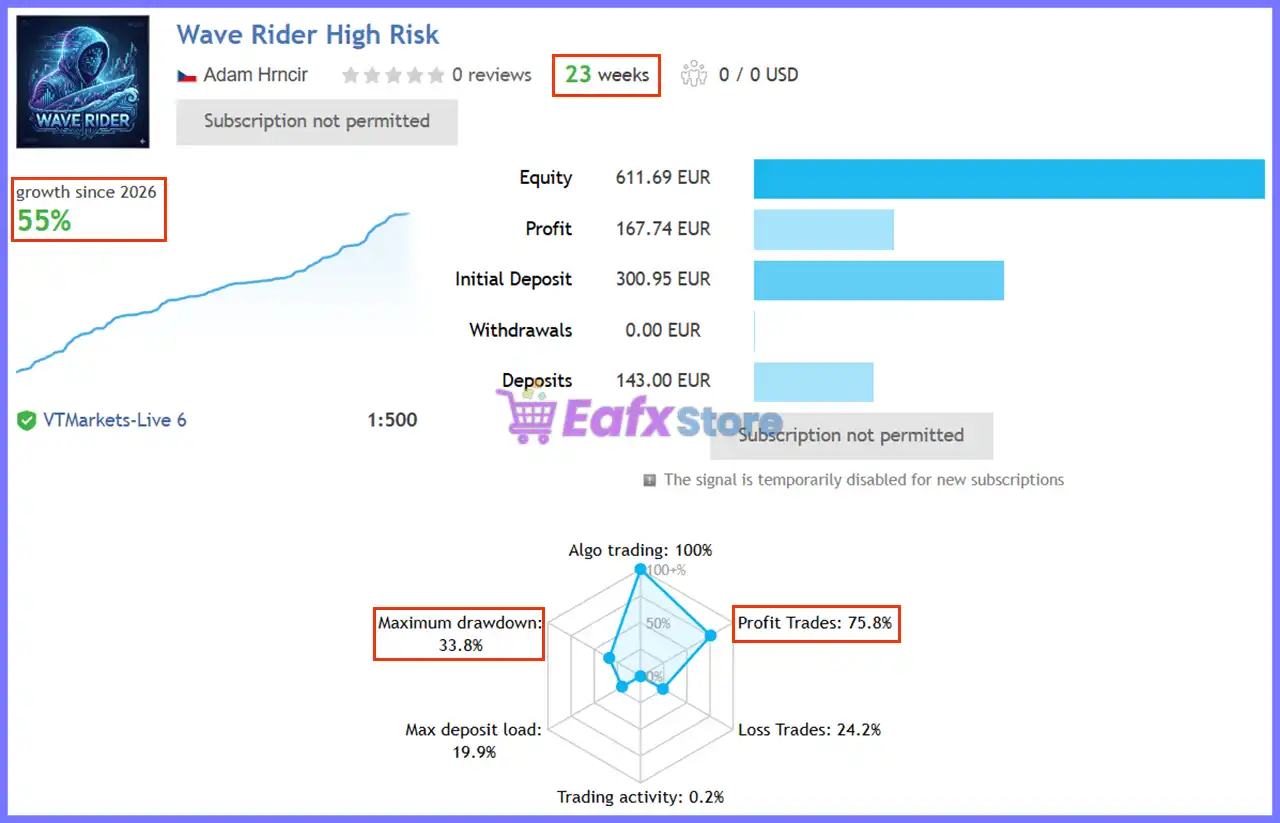
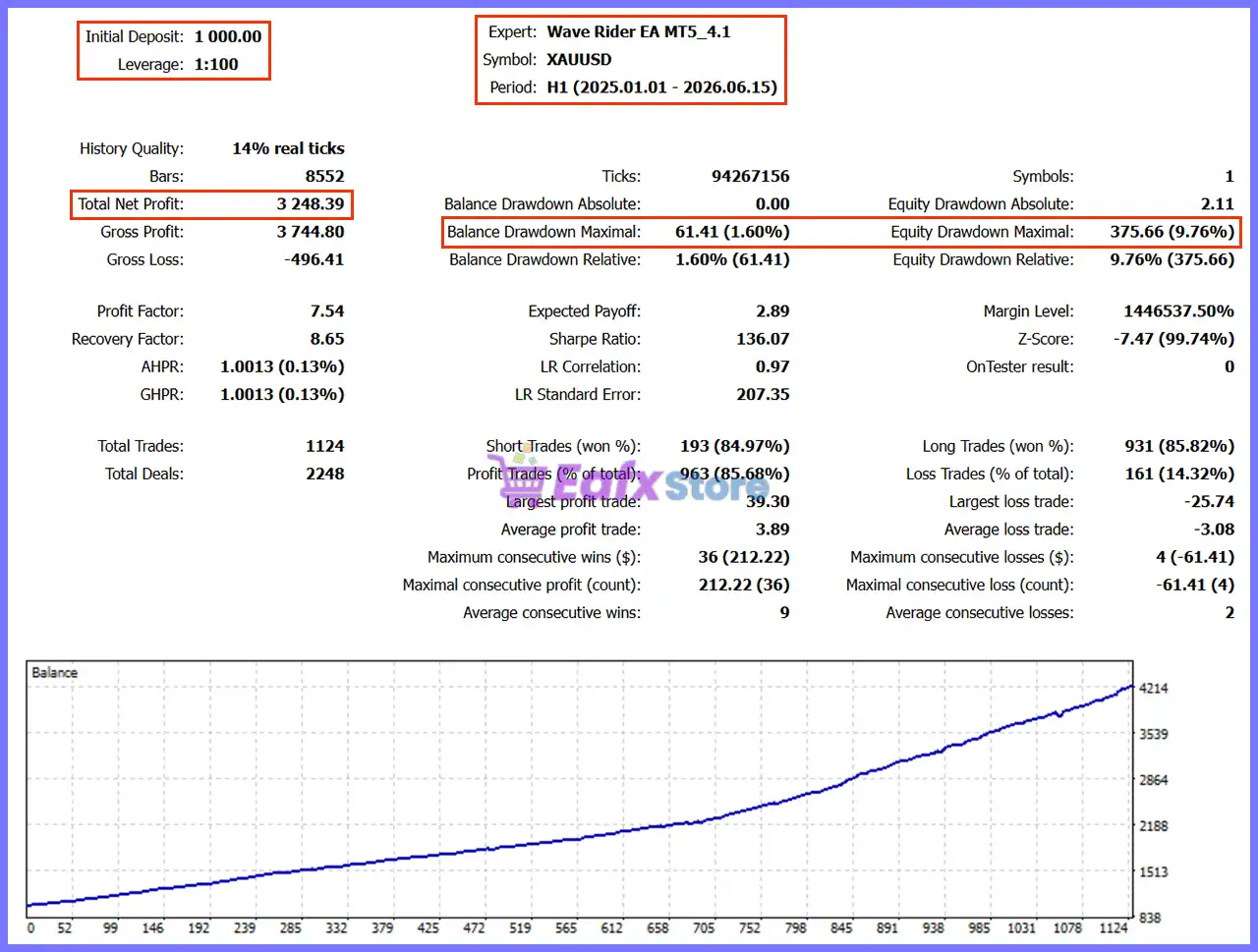
Wave Rider EA MT5 is a multi-strategy automated trading system for MetaTrader 5 that combines Support & Resistance, Pullback, Trend Breakout, and M5 intraday trading into a single Expert Advisor. It features intelligent position sizing, configurable grid recovery, advanced drawdown protection, trading session filters, economic news filtering and a comprehensive dashboard.
With extensive customization options, Wave Rider EA MT5 can be optimized for both conservative and aggressive trading styles while maintaining strong risk management.
🔢 Wave Rider EA MT5 Settings Explained
🔄 Main Settings
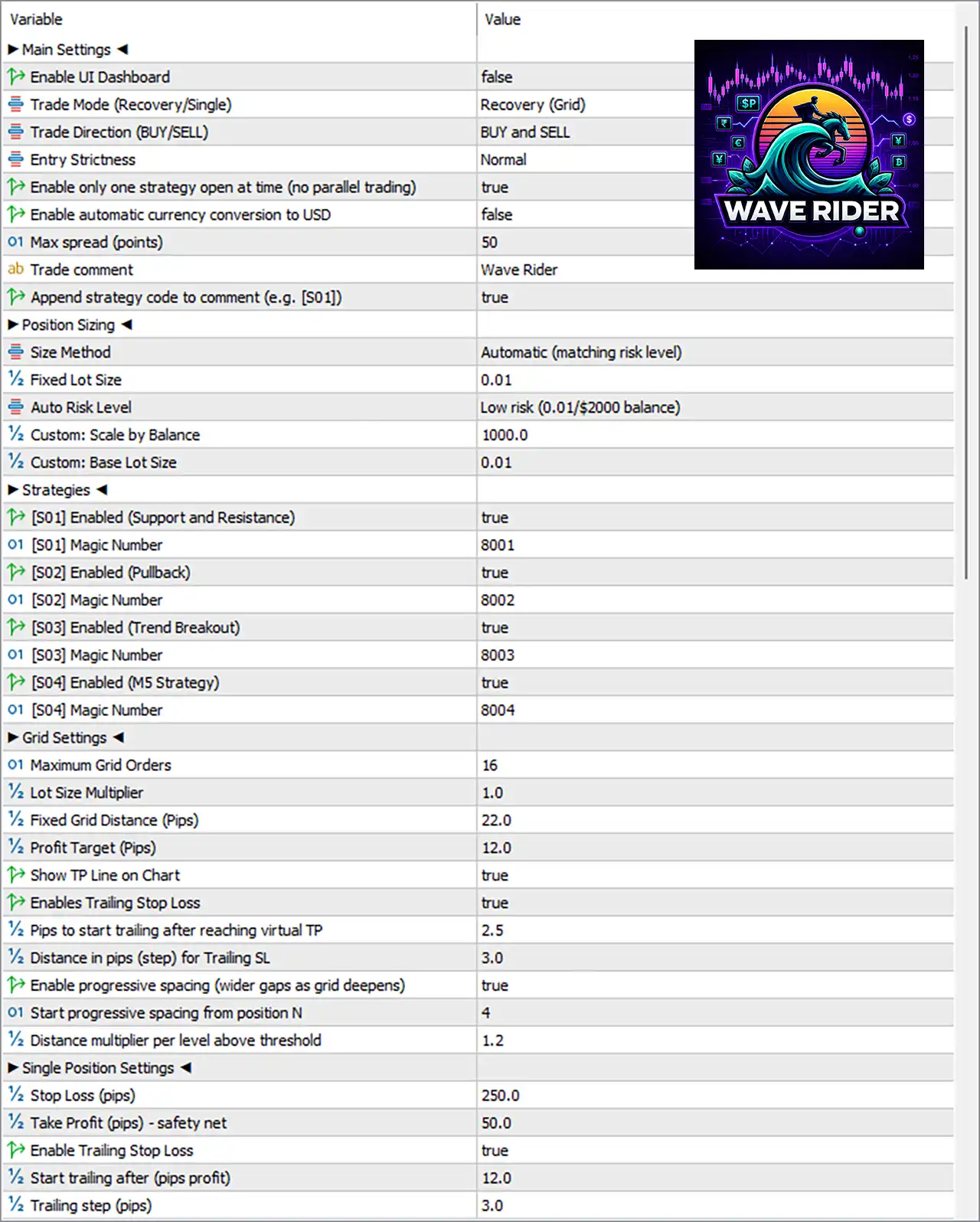
🔹 Enable UI Dashboard = false – Disables the on-chart user interface dashboard during trading.
🔹 Trade Mode (Recovery/Single) = Recovery (Grid) – Uses the Grid Recovery trading mode for managing positions.
🔹 Trade Direction (BUY/SELL) = BUY and SELL – Allows both long and short positions.
🔹 Entry Strictness = Normal – Applies the Normal level of entry confirmation before opening trades.
🔹 Enable only one strategy open at time (no parallel trading) = true – Prevents multiple strategies from running simultaneously.
🔹 Enable automatic currency conversion to USD = false – Disables automatic conversion of account balance into USD.
🔹 Max spread (points) = 50 – Blocks new entries whenever the spread exceeds 50 points.
🔹 Trade comment = Wave Rider – Adds "Wave Rider" as the comment for every trade.
🔹 Append strategy code to comment (e.g. [S01]) = true – Appends the strategy identifier to the trade comment.
🔄 Position Sizing
🔹 Size Method = Automatic (matching risk level) – Automatically calculates lot size according to the selected risk level.
🔹 Fixed Lot Size = 0.01 – Uses 0.01 lots when Fixed Lot mode is selected.
🔹 Auto Risk Level = Low risk (0.01/$2000 balance) – Applies the predefined Low Risk money management profile.
🔹 Custom: Scale by Balance = 1000.0 – Increases position size for every $1,000 of account balance.
🔹 Custom: Base Lot Size = 0.01 – Uses 0.01 lots as the starting lot size.
🔄 Strategy Configuration
🎯 Support & Resistance Strategy
🔹 [S01] Enabled (Support and Resistance) = true – Enables the Support & Resistance strategy.
🔹 [S01] Magic Number = 8001 – Assigns Magic Number 8001 to S01 trades.
🎯 Pullback Strategy
🔹 [S02] Enabled (Pullback) = true – Enables the Pullback strategy.
🔹 [S02] Magic Number = 8002 – Assigns Magic Number 8002.
🎯 Trend Breakout Strategy
🔹 [S03] Enabled (Trend Breakout) = true – Activates the Trend Breakout strategy.
🔹 [S03] Magic Number = 8003 – Uses Magic Number 8003.
🎯 M5 Strategy
🔹 [S04] Enabled (M5 Strategy) = true – Enables the M5 intraday strategy.
🔹 [S04] Magic Number = 8004 – Uses Magic Number 8004.
🔄 Grid Settings
🔹 Maximum Grid Orders = 16 – Allows up to 16 grid positions.
🔹 Lot Size Multiplier = 1.0 – Keeps the same lot size for each additional grid order.
🔹 Fixed Grid Distance (Pips) = 22.0 – Opens new grid positions every 22.0 pips.
🔹 Profit Target (Pips) = 12.0 – Closes the basket when 12.0 pips profit is achieved.
🔹 Show TP Line on Chart = true – Displays the Take Profit line on the chart.
🔹 Enables Trailing Stop Loss = true – Enables trailing stop for grid positions.
🔹 Pips to start trailing after reaching virtual TP = 2.5 – Starts trailing after 2.5 pips beyond the virtual TP.
🔹 Distance in pips (step) for Trailing SL = 3.0 – Moves the trailing stop every 3.0 pips.
🔹 Enable progressive spacing (wider gaps as grid deepens) = true – Gradually widens grid spacing as more positions are opened.
🔹 Start progressive spacing from position N = 4 – Progressive spacing begins at the 4th grid position.
🔹 Distance multiplier per level above threshold = 1.2 – Multiplies spacing by 1.2 after the threshold.
🔄 Single Position Settings
🔹 Stop Loss (pips) = 250.0 – Sets Stop Loss to 250.0 pips.
🔹 Take Profit (pips) - safety net = 50.0 – Uses a 50.0 pip safety Take Profit.
🔹 Enable Trailing Stop Loss = true – Activates trailing stop for single trades.
🔹 Start trailing after (pips profit) = 12.0 – Begins trailing after 12.0 pips profit.
🔹 Trailing step (pips) = 3.0 – Updates the trailing stop every 3.0 pips.
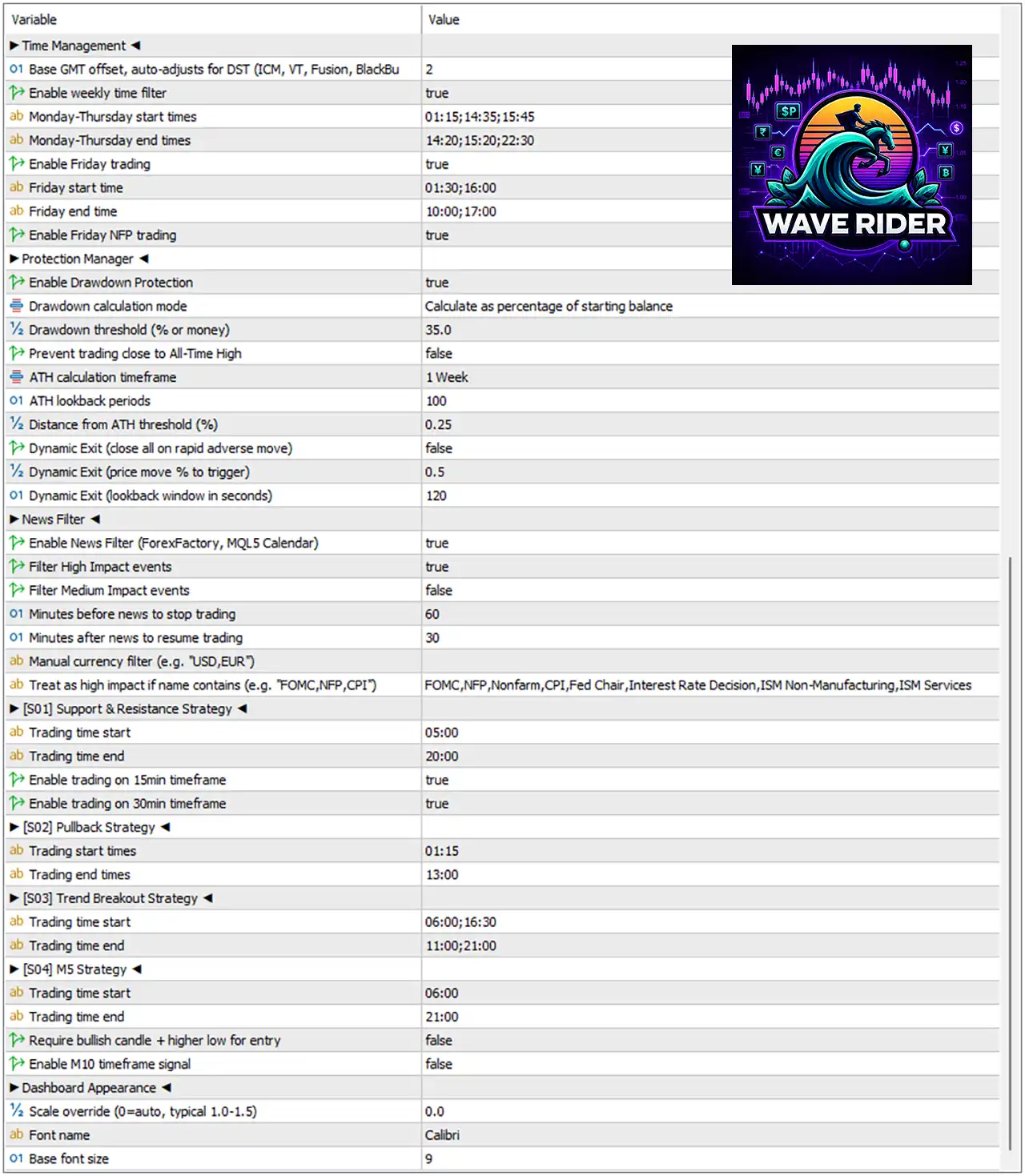
🔢 Time Management
🔹 Base GMT offset, auto-adjusts for DST (ICM, VT, Fusion, BlackBu) = 2 – Uses GMT +2 with automatic DST adjustment.
🔹 Enable weekly time filter = true – Restricts trading according to weekly schedules.
🔹 Monday-Thursday start times = 01:15;14:35;15:45 – Defines trading session start times from Monday through Thursday.
🔹 Monday-Thursday end times = 14:20;15:20;22:30 – Defines session closing times.
🔹 Enable Friday trading = true – Allows trading on Fridays.
🔹 Friday start time = 01:30;16:00 – Friday trading begins during the configured sessions.
🔹 Friday end time = 10:00;17:00 – Friday sessions end at the configured hours.
🔹 Enable Friday NFP trading = true – Allows trading even during Non-Farm Payroll Fridays.
🔢 Protection Manager
🔹 Enable Drawdown Protection = true – Enables automatic drawdown protection.
🔹 Drawdown calculation mode = Calculate as percentage of starting balance – Calculates drawdown relative to the initial balance.
🔹 Drawdown threshold (% or money) = 35.0 – Stops trading when drawdown reaches 35.0%.
🔹 Prevent trading close to All-Time High = false – Does not block trading near equity highs.
🔹 ATH calculation timeframe = 1 Week – Uses 1 Week for ATH calculations.
🔹 ATH lookback periods = 100 – Reviews the previous 100 periods.
🔹 Distance from ATH threshold (%) = 0.25 – Uses 0.25% as the ATH protection threshold.
🔹 Dynamic Exit (close all on rapid adverse move) = false – Disables emergency exit during rapid market reversals.
🔹 Dynamic Exit (price move % to trigger) = 0.5 – Sets the emergency trigger at 0.5%.
🔹 Dynamic Exit (lookback window in seconds) = 120 – Evaluates price movement over 120 seconds.
🔢 News Filter
🔹 Enable News Filter (ForexFactory, MQL5 Calendar) = true – Enables built-in news protection.
🔹 Filter High Impact events = true – Blocks trading around High Impact news.
🔹 Filter Medium Impact events = false – Ignores Medium Impact news.
🔹 Minutes before news to stop trading = 60 – Stops opening trades 60 minutes before news.
🔹 Minutes after news to resume trading = 30 – Resumes trading 30 minutes afterward.
🔹 Manual currency filter (e.g. USD,EUR) = Blank – No manual currency restriction is configured.
🔹 Treat as high impact if name contains = FOMC,NFP,Nonfarm,CPI,Fed Chair,Interest Rate Decision,ISM Non-Manufacturing,ISM Services – Treats these keywords as High Impact events.
🔢 Strategy Trading Windows
🔄 S01 – Support & Resistance
🔹 Trading time start = 05:00 – Starts S01 trading at 05:00.
🔹 Trading time end = 20:00 – Ends S01 trading at 20:00.
🔹 Enable trading on 15min timeframe = true – Allows M15 trading.
🔹 Enable trading on 30min timeframe = true – Allows M30 trading.
🔄 S02 – Pullback
🔹 Trading start times = 01:15 – Pullback strategy begins at 01:15.
🔹 Trading end times = 13:00 – Stops Pullback trading at 13:00.
🔄 S03 – Trend Breakout
🔹 Trading time start = 06:00;16:30 – Starts Trend Breakout sessions.
🔹 Trading time end = 11:00;21:00 – Ends Trend Breakout sessions.
🔄 S04 – M5 Strategy
🔹 Trading time start = 06:00 – Begins M5 strategy at 06:00.
🔹 Trading time end = 21:00 – Ends M5 strategy at 21:00.
🔹 Require bullish candle + higher low for entry = false – Does not require this confirmation.
🔹 Enable M10 timeframe signal = false – M10 confirmation is disabled.
🔢 Dashboard Appearance
🔹 Scale override (0=auto, typical 1.0-1.5) = 0.0 – Uses automatic dashboard scaling.
🔹 Font name = Calibri – Uses Calibri font.
🔹 Base font size = 9 – Displays text with font size 9.
🔢 Conclusion
Wave Rider EA MT5 is a sophisticated multi-strategy Expert Advisor that combines Support & Resistance, Pullback, Trend Breakout, and M5 trading into a single automated system. With intelligent automatic position sizing, advanced grid recovery, drawdown protection, customizable trading sessions, and integrated news filtering, it offers exceptional flexibility for traders seeking a comprehensive MT5 solution while maintaining strong risk management and consistent execution.
🔢 FAQs
❓ What strategies are included in Wave Rider EA MT5?
Wave Rider EA MT5 includes Support & Resistance, Pullback, Trend Breakout, and M5 trading strategies, each with its own Magic Number.
❓ Does Wave Rider EA MT5 support automatic lot sizing?
Yes. The EA supports Automatic Position Sizing with predefined risk profiles as well as custom balance scaling and fixed lot trading.
❓ Can I disable individual strategies?
Yes. Each strategy (S01–S04) can be enabled or disabled independently from the input settings.
❓ Does the EA include news protection?
Yes. It features a built-in news filter supporting ForexFactory and the MQL5 Economic Calendar with configurable High Impact event protection.
❓ Is Wave Rider EA MT5 suitable for different account sizes?
Yes. Thanks to automatic lot sizing, adjustable risk levels, configurable grid parameters, and comprehensive drawdown protection, the EA can be adapted to both small and large trading accounts.



