


🔢 SomaOil EA MT5 Settings Guide
SomaOil EA is a professional multi-strategy breakout Expert Advisor specifically developed for WTI Crude Oil (XTIUSD) trading on MetaTrader 5. It combines intelligent money management, automatic lot sizing, economic news filters, trading session controls, and prop firm protection into a highly configurable automated trading system.
The flexible settings allow traders to optimize risk, execution, and portfolio management while maintaining disciplined trading performance.
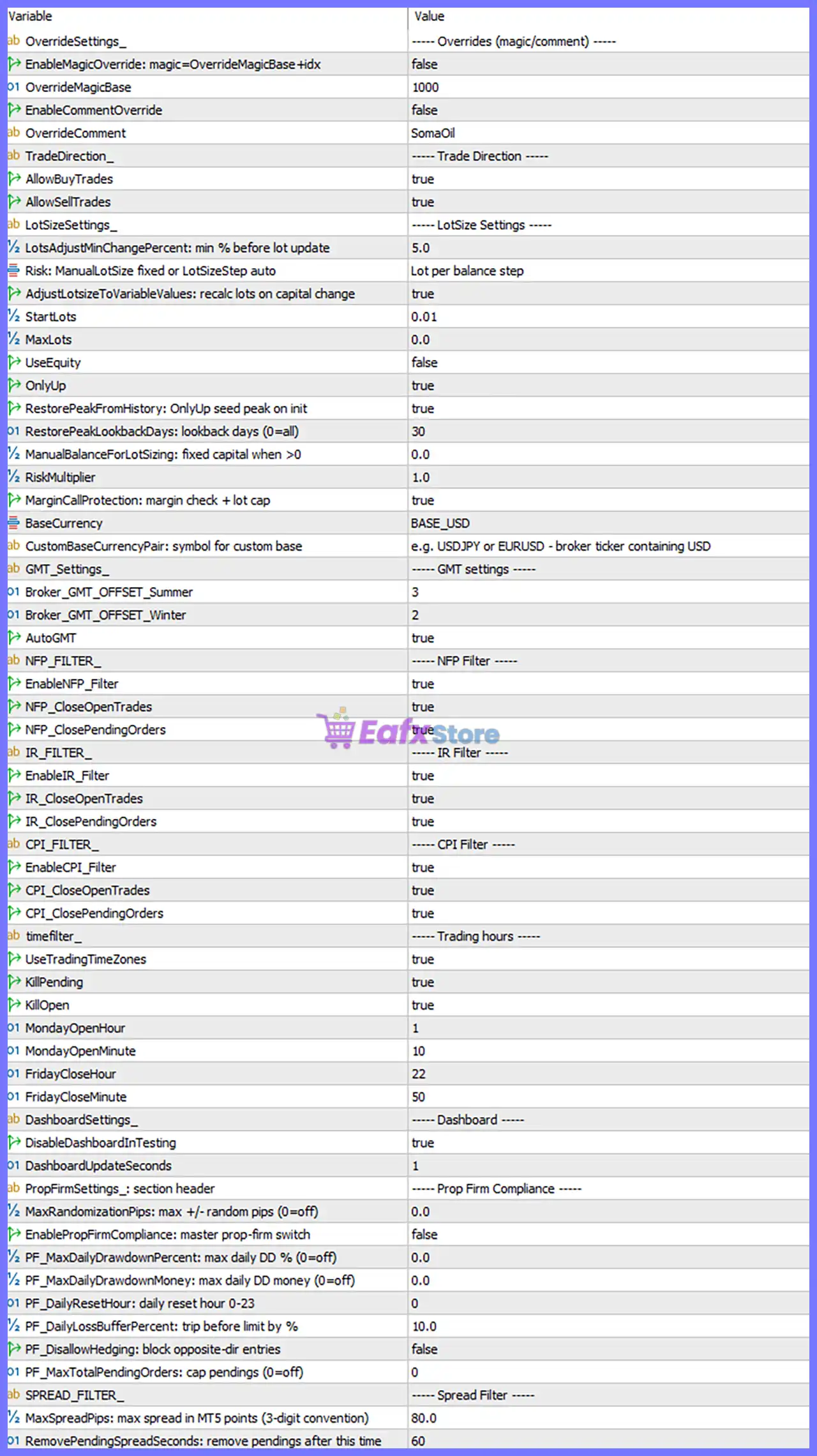
🔢 SomaOil EA MT5 Settings Explained
🔄 Override Settings
🔹 EnableMagicOverride: magic=OverrideMagicBase+idx = false – Keeps the default Magic Number instead of generating a custom Magic Number sequence.
🔹 OverrideMagicBase = 1000 – Base Magic Number used if Magic Override is enabled.
🔹 EnableCommentOverride = false – Uses the EA's default trade comment.
🔹 OverrideComment = SomaOil – Custom trade comment that will be applied if Comment Override is enabled.
🔄 Trade Direction
🔹 AllowBuyTrades = true – Enables the EA to open Buy positions.
🔹 AllowSellTrades = true – Enables the EA to open Sell positions.
🔄 Lot Size Settings
🔹 LotsAdjustMinChangePercent: min % before lot update = 5.0 – Updates automatic lot sizing only after the account changes by at least 5.0%.
🔹 Risk: ManualLotSize fixed or LotSizeStep auto = Lot per balance step – Uses automatic lot sizing based on balance increments.
🔹 AdjustLotsizeToVariableValues: recalc lots on capital change = true – Automatically recalculates lot size whenever account capital changes.
🔹 StartLots = 0.01 – Initial trading volume starts at 0.01 lots.
🔹 MaxLots = 0.0 – No maximum lot size limitation is applied.
🔹 UseEquity = false – Lot calculations are based on account balance instead of equity.
🔹 OnlyUp = true – Lot size only increases with account growth and does not decrease after drawdowns.
🔹 RestorePeakFromHistory: OnlyUp seed peak on init = true – Restores the highest historical account balance during EA initialization.
🔹 RestorePeakLookbackDays: lookback days (0=all) = 30 – Searches the last 30 days for the highest account balance.
🔹 ManualBalanceForLotSizing: fixed capital when >0 = 0.0 – Manual balance override is disabled.
🔹 RiskMultiplier = 1.0 – Applies a 1.0x risk multiplier to the calculated lot size.
🔹 MarginCallProtection: margin check + lot cap = true – Prevents trades when margin requirements become unsafe.
🔹 BaseCurrency = BASE_USD – Uses USD as the account reference currency.
🔹 CustomBaseCurrencyPair = e.g. USDJPY or EURUSD - broker ticker containing USD – Allows specification of a custom USD reference symbol if required.
🔄 GMT Settings
🔹 Broker_GMT_OFFSET_Summer = 3 – Broker GMT offset during Daylight Saving Time is +3.
🔹 Broker_GMT_OFFSET_Winter = 2 – Broker GMT offset during Winter Time is +2.
🔹 AutoGMT = true – Automatically detects the broker's GMT offset.
🔄 NFP Filter
🔹 EnableNFP_Filter = true – Enables Non-Farm Payroll news protection.
🔹 NFP_CloseOpenTrades = true – Closes open trades before major NFP announcements.
🔹 NFP_ClosePendingOrders = true – Removes pending orders before NFP events.
🔄 Interest Rate (IR) Filter
🔹 EnableIR_Filter = true – Enables Interest Rate announcement protection.
🔹 IR_CloseOpenTrades = true – Closes active positions before Interest Rate news.
🔹 IR_ClosePendingOrders = true – Cancels pending orders before Interest Rate events.
🔄 CPI Filter
🔹 EnableCPI_Filter = true – Enables Consumer Price Index news protection.
🔹 CPI_CloseOpenTrades = true – Closes active trades before CPI releases.
🔹 CPI_ClosePendingOrders = true – Deletes pending orders before CPI announcements.
🔄 Trading Hours
🔹 UseTradingTimeZones = true – Restricts trading to predefined trading sessions.
🔹 KillPending = true – Automatically removes pending orders outside trading hours.
🔹 KillOpen = true – Automatically closes open positions outside trading hours.
🔹 MondayOpenHour = 1 – Trading begins on Monday at 01:00.
🔹 MondayOpenMinute = 10 – Monday trading starts at 01:10.
🔹 FridayCloseHour = 22 – Trading stops on Friday at 22:00.
🔹 FridayCloseMinute = 50 – Friday trading ends at 22:50.
🔄 Dashboard Settings
🔹 DisableDashboardInTesting = true – Disables the graphical dashboard during Strategy Tester runs for faster backtesting.
🔹 DashboardUpdateSeconds = 1 – Updates the dashboard every 1 second.
🔄 Prop Firm Compliance
🔹 MaxRandomizationPips: max +/- random pips (0=off) = 0.0 – Randomized order entry is disabled.
🔹 EnablePropFirmCompliance: master prop-firm switch = false – Prop Firm protection mode is disabled.
🔹 PF_MaxDailyDrawdownPercent: max daily DD % (0=off) = 0.0 – No daily drawdown percentage limit is enforced.
🔹 PF_MaxDailyDrawdownMoney: max daily DD money (0=off) = 0.0 – No monetary daily drawdown limit is enabled.
🔹 PF_DailyResetHour: daily reset hour 0-23 = 0 – Daily protection resets at broker hour 00:00.
🔹 PF_DailyLossBufferPercent: trip before limit by % = 10.0 – Triggers protection 10.0% before the maximum daily drawdown limit.
🔹 PF_DisallowHedging: block opposite-dir entries = false – Hedging remains allowed.
🔹 PF_MaxTotalPendingOrders: cap pendings (0=off) = 0 – No restriction on the total number of pending orders.
🔄 Spread Filter
🔹 MaxSpreadPips: max spread in MT5 points (3-digit convention) = 80.0 – Prevents new trades when spread exceeds 80.0 MT5 points.
🔹 RemovePendingSpreadSeconds: remove pendings after this time = 60 – Removes pending orders after 60 seconds if spread conditions remain unfavorable.
🔢 Risk Level
🔹 Fix Lot – Trades using a constant lot size regardless of account balance, providing predictable exposure.
🔹 Safe – Uses conservative money management with lower risk and smaller position sizes to prioritize capital preservation.
🔹 Balanced – Offers a moderate balance between account growth and drawdown control, making it suitable for most traders.
🔹 Aggressive – Increases position sizing and account exposure to maximize profit potential while accepting higher trading risk.
🔢 Conclusion
SomaOil EA provides an extensive collection of professional trading parameters, including intelligent lot sizing, automatic GMT detection, advanced economic news protection, trading session management, spread filtering, and optional Prop Firm compliance features. These configurable settings allow traders to optimize performance for WTI Crude Oil while maintaining strict control over risk management and execution quality.
🔢 FAQs
❓ What market is SomaOil EA MT5 designed for?
SomaOil EA MT5 is specifically optimized for trading WTI Crude Oil (XTIUSD) on the MetaTrader 5 platform.
❓ Does SomaOil EA MT5 support automatic lot sizing?
Yes. The EA supports automatic balance-based lot sizing with dynamic recalculation as account equity changes.
❓ Can the EA avoid trading during major economic news?
Yes. It includes built-in filters for NFP, Interest Rate, and CPI events, with options to close open trades and remove pending orders.
❓ Does SomaOil EA MT5 include Prop Firm protection?
Yes. The EA contains configurable Prop Firm compliance settings, although they are disabled by default in the provided configuration.
❓ Can I control trading sessions and spread limits?
Yes. You can define trading hours, automatically close trades outside allowed sessions, and restrict trading when spreads exceed your specified maximum threshold.



