




XAU AutoTrader EA MT5 (Latest version) - Unlimited

Subscriptions for Special Plan
- 30 EA package is more economical!
- Special package with 99%
- Download 1 EA/Day

Subscriptions for Premium Membership
- Download Unlimited in 1 Year
- Get 100% Discount
- Get free access to all

Subscriptions for Gold Membership
- 1 Year Membership
- Get 100% Discount
- Access EA+Indicator+Course
Frequently bought together 🎁
Add these products to enhance your purchase




What is XAU AutoTrader EA?
XAU AutoTrader EA is a fully automated Expert Advisor (EA) developed exclusively for XAUUSD trading. It applies a structured breakout strategy using multi-timeframe support and resistance analysis. With adaptive lot sizing, smart trailing logic, and built-in risk management filters, it delivers stable, rule-based automated trading designed to adapt to changing gold market conditions.
 Vendor Website: View here
About the Author
This product is compiled by Moreno Dainese. This author has more than +6 years of experience working on MQL5 with many famous products such as XAU AutoTrader EA MT5, BTC AutoTrader EA MT5, Market Sentinel Pro MT5 and other advisors. Among them, XAU AutoTrader EA is his best performing products.
Delivery time 24h-48h after payment.
Refund if not delivered.
You will receive the current version without any limitations (ID+Time).
Key Features of XAU AutoTrader for MT5
🔹 Multi-Timeframe Level Analysis: Calculates support and resistance from M15 to D1 for stronger breakout precision.
🔹 Risk-Based Lot Sizing: Choose fixed lot or percentage-based position sizing for controlled exposure.
🔹 Smart Trailing Stop System: Locks profits dynamically using percentage-based trailing logic.
🔹 News & Weekend Protection: Pauses trading during high-impact events and closes before market gaps.
🔹 Spread & Session Filters: Avoids entries during unfavorable spreads or low-liquidity hours.
Why Choose & Use XAU AutoTrader EA?
🔹 Gold-Specific Optimization: Built specifically for XAUUSD volatility and breakout behavior.
🔹 Capital Preservation Focus: Emphasizes controlled risk rather than aggressive trade stacking.
🔹 Flexible Customization: Adjustable risk, time filters and protection settings.
🔹 Broker-Aware Design: Encourages forward testing for realistic compatibility validation.
🔹 Marketplace-Ready Automation: Ideal for traders seeking disciplined gold breakout trading.
XAU AutoTrader EA MT5 Review
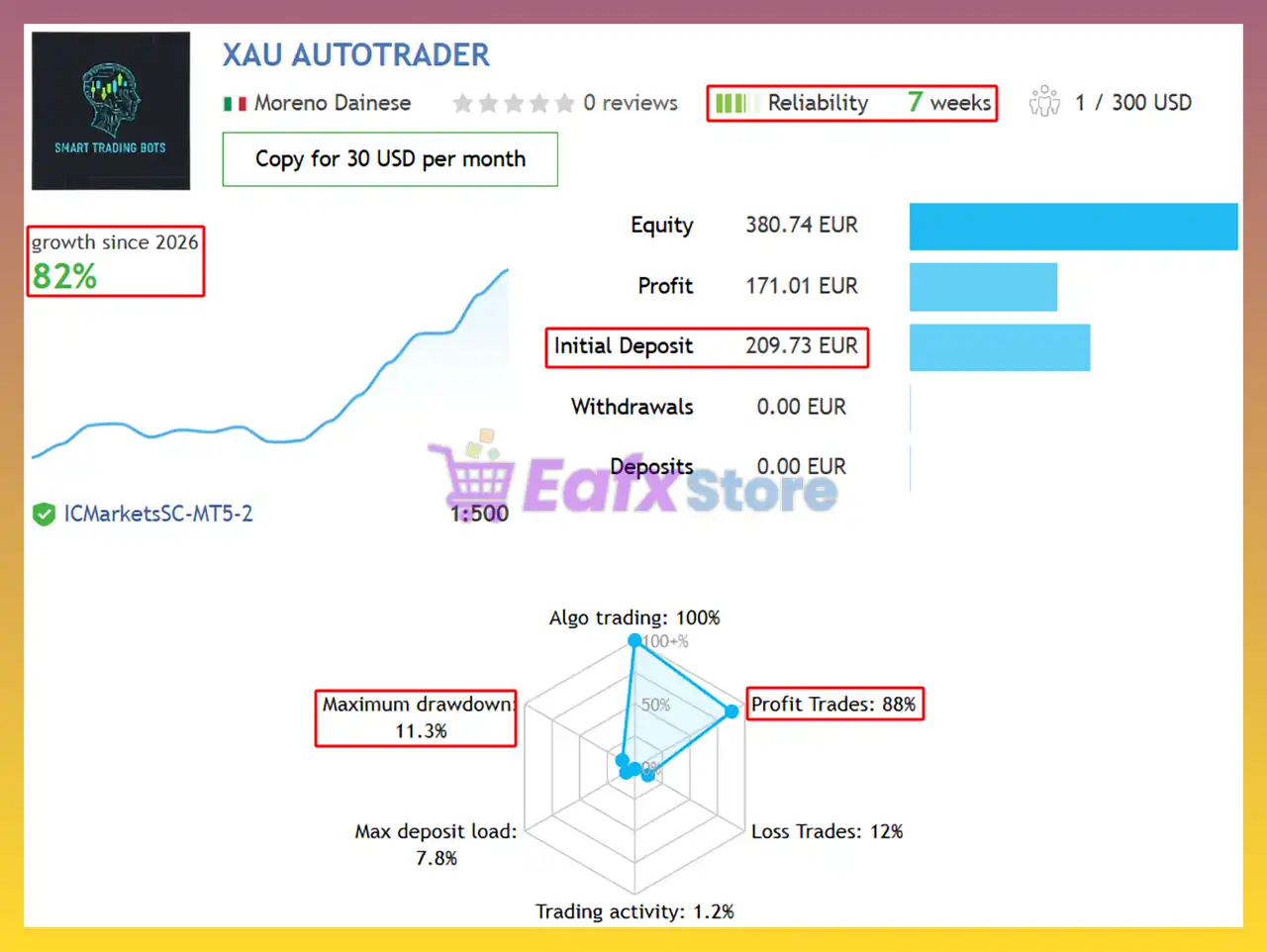
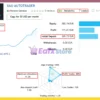
XAU AutoTrader EA Signal Results
The XAU AutoTrader MT5 achieved impressive profit performance when trading with XAUUSD (Gold) pair. Trading results on real account for 7 consecutive weeks of trading:
✅ Initial Deposit: €209.73
✅ Growth Rate: +82%
✅ Win Rate (% of total): 88%
✅ Maximum Drawdown: 11.3%
XAU AutoTrader EA Signal Results
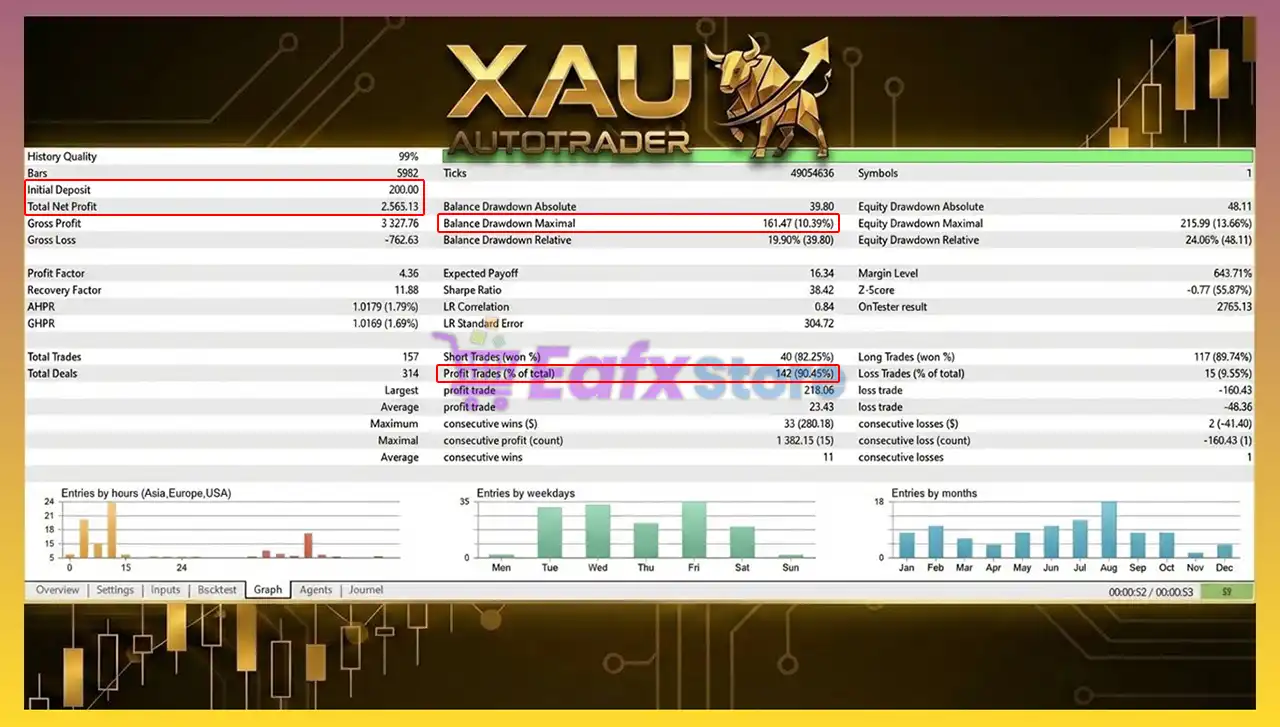
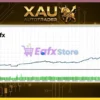
XAU AutoTrader EA Backtest Results
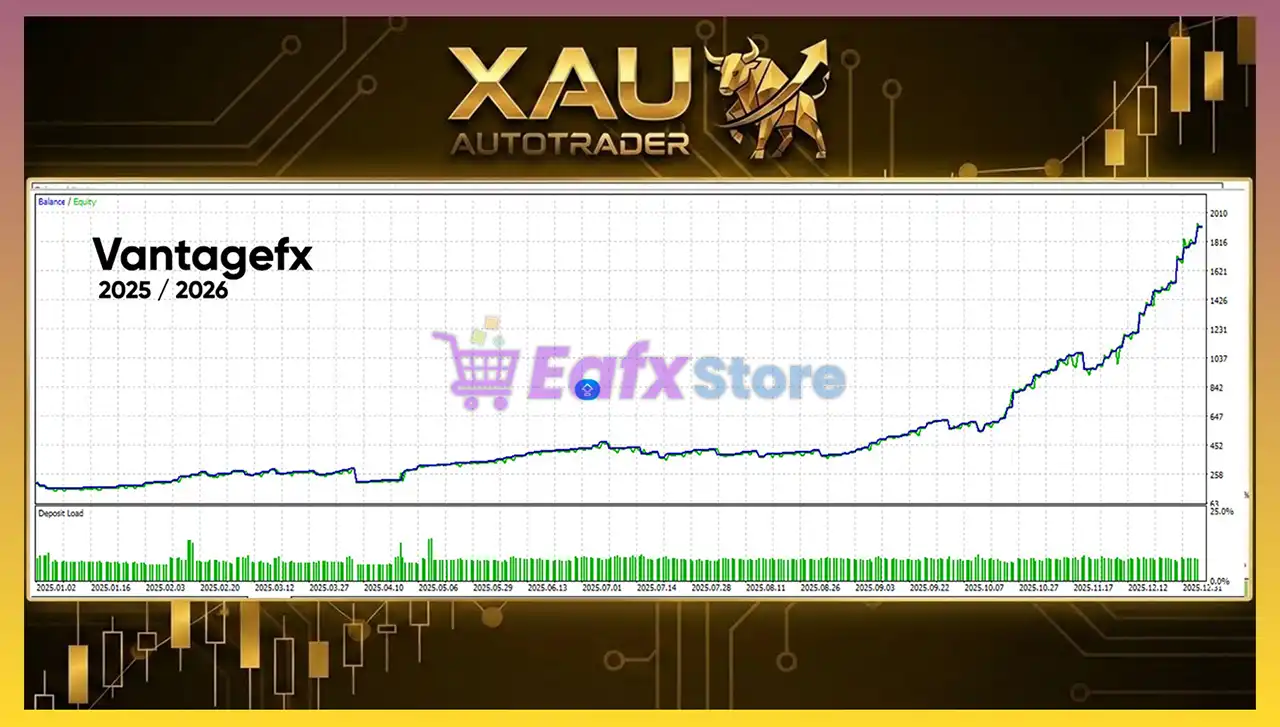
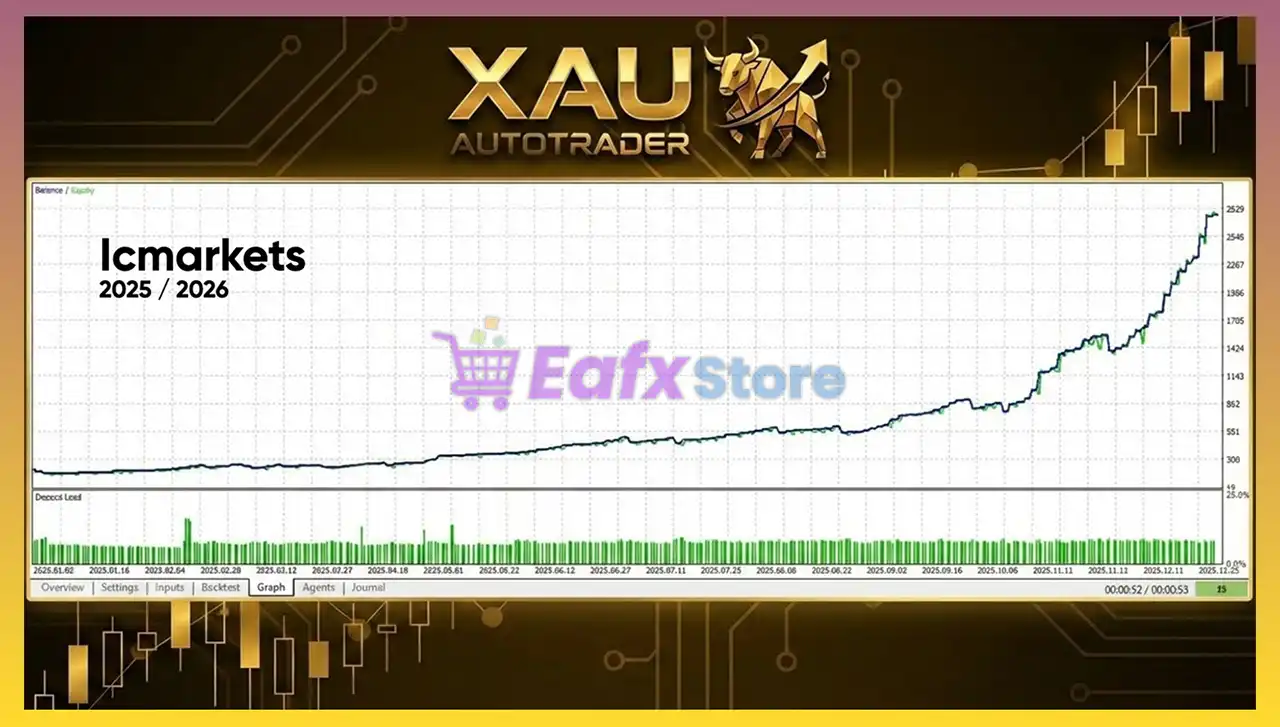
XAU AutoTrader EA has achieved impressive profit performance over many years of trading reversion tests with Gold. This EA demonstrates excellent ability to master the market and increase profits.
✅ Initial Deposit: $200
✅ Total Net Profit: $2,565.13
✅ Win Rate (% of total): 90.45%
✅ Maximum Drawdown: 10.39%
XAU AutoTrader EA MT5 Backtest
What is the XAU AutoTrader EA Trading Strategy?
🔹 Breakout Execution Model: Places Buy Stop at resistance and Sell Stop at support levels.
🔹 Predefined SL & TP Logic: Uses percentage-based Stop Loss (SL) and Take Profit (TP) calculations.
🔹 Pending Order Precision: Executes only when price confirms structural breakout.
🔹 Adaptive Risk Management: Adjusts exposure according to account size and volatility.
🔹 Structured Market Filtering: Trades only within defined sessions and stable conditions.
Is XAU AutoTrader MT5 Safe?
XAU AutoTrader EA shows significant potential in providing stable and reliable profits, making it a reliable tool in the forex market. The advisor is highly appreciated by the MQL5 community in many aspects and has won the trust of users.
⭐⭐⭐⭐⭐ Bob (2026.02.17)
“It’s good but the “Fixed Lot” setting should default to False so I can more quickly add the EA.”
⭐⭐⭐⭐⭐ Aymeric (2026.02.06)
“Absolutely outstanding EA! I purchased the XAU Autotrader after testing many other EAs without success, and this one is clearly on another level. Everything is 100% in line with the seller’s signals, exactly as advertised. Highly recommended without hesitation!”
Recommended settings
Recommended settings and parameters to pay attention to from developers and experts:
| Features | Type |
|---|---|
| Trading platform | MetaTrader 5 (MT5) |
| Time frames | H1 (60 minute chart) |
| Currency pairs | XAUUSD (Gold) |
| Minimum / Recommended deposit | $200 |
| Minimum / Recommended leverage | Any |
| Account type | Hedging account |
| Product type | Original version |
| Additional services | Unlock and Decompile |
| Recommended brokers | Exness Broker, Icmarkets Broker |
| Recommended VPS | MyfxVPS.com (Blue VPS, Golden VPS). Lowest Latency, 2 week Free Trial, 100% Free for 12-18 Months. |
Product Download Package?
The download package of the product suite includes:
 Experts: XAU AutoTrader.ex5
 Reviewed by David Easton
Conclusion
In short, XAU AutoTrader stands out as a gold-specific trading EA for MetaTrader 5 (MT5), combining breakout precision with advanced risk management. Its predefined SL/TP logic, session filters and news protection system reduce unnecessary exposure. Optimized for XAUUSD on H1, XAU AutoTrader offers flexible configuration and consistent automated trading results.
🔢 XAU AutoTrader EA MT5 Settings Guide
XAU AutoTrader EA is a fully automated Expert Advisor designed specifically for XAUUSD (Gold) trading on MetaTrader 5. The EA combines intelligent risk management, economic news filtering, multi-timeframe support and resistance detection, trailing stop management, pending order automation, and flexible trading session controls. With extensive customization options, traders can optimize the EA for different market conditions while maintaining disciplined risk control.
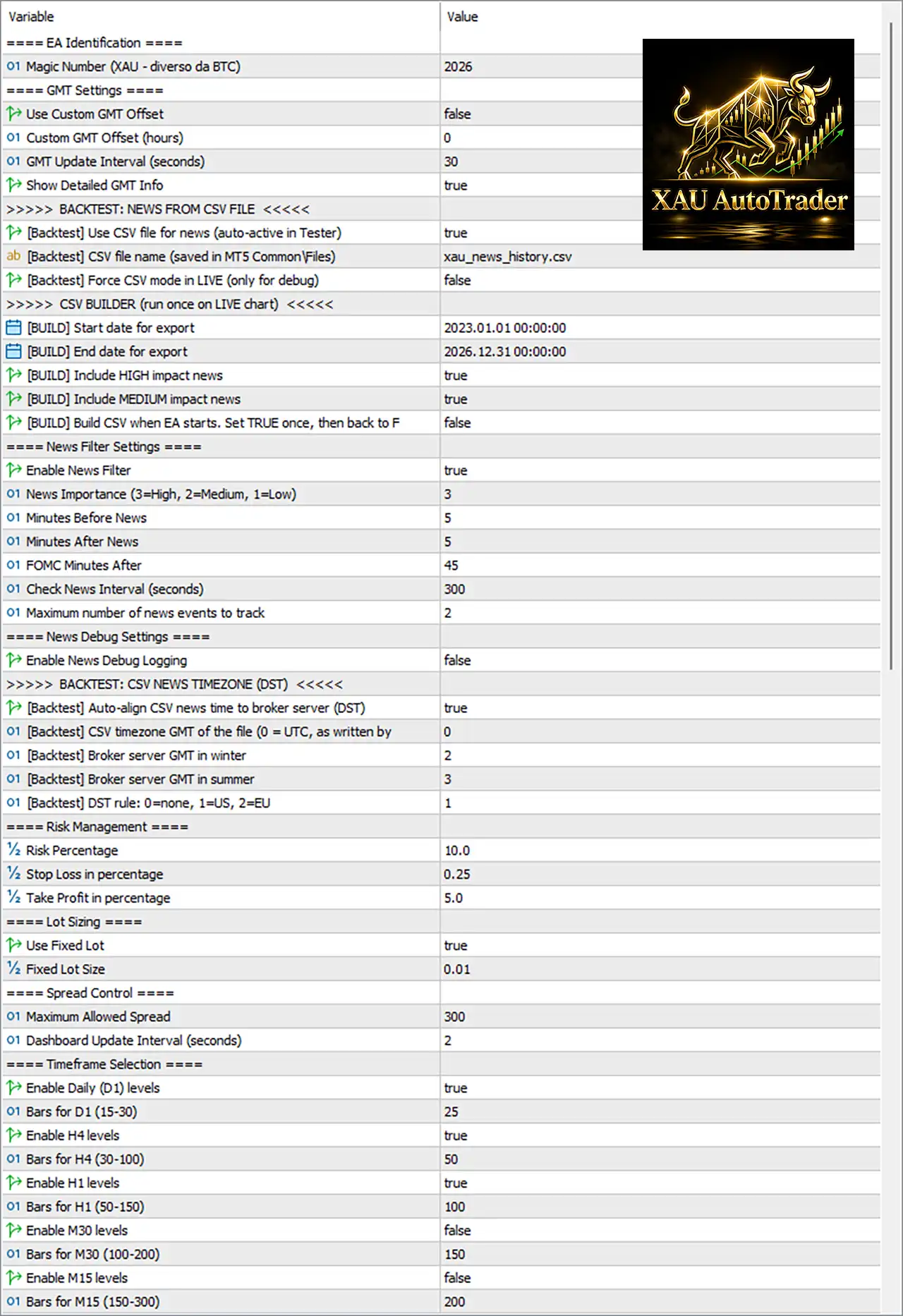
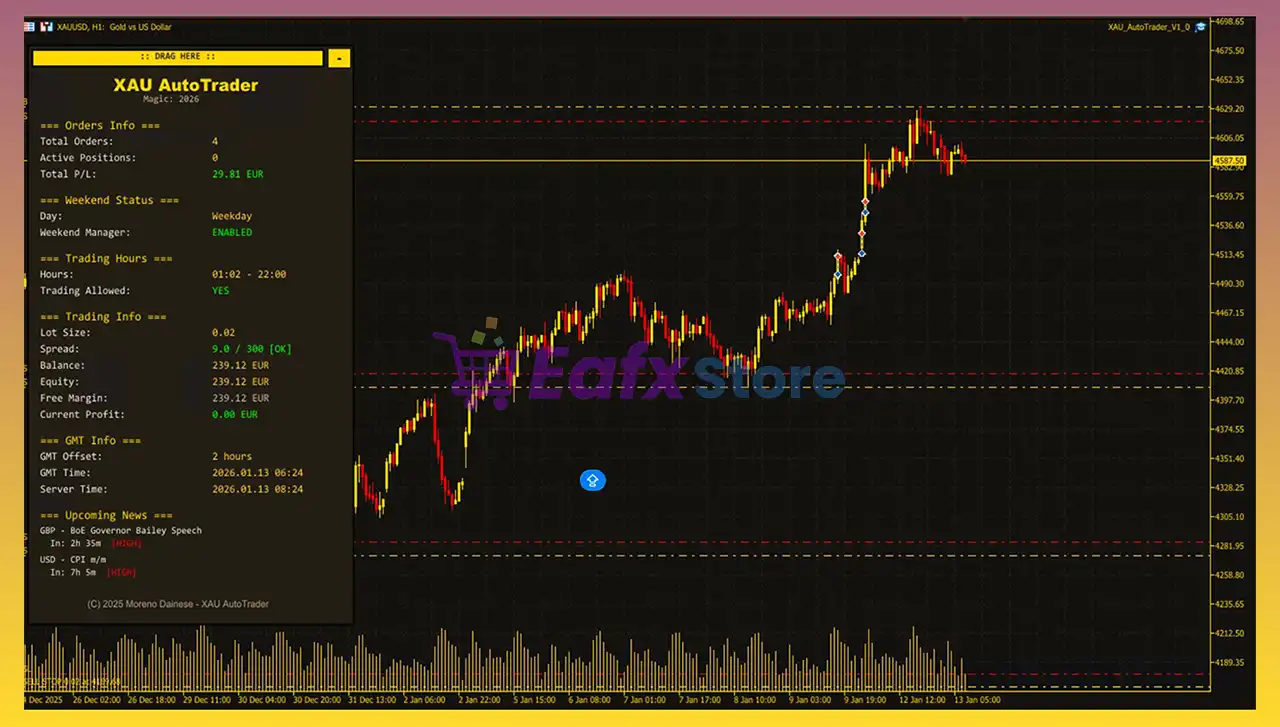
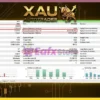
XAU AutoTrader EA MT5 Settings Panel
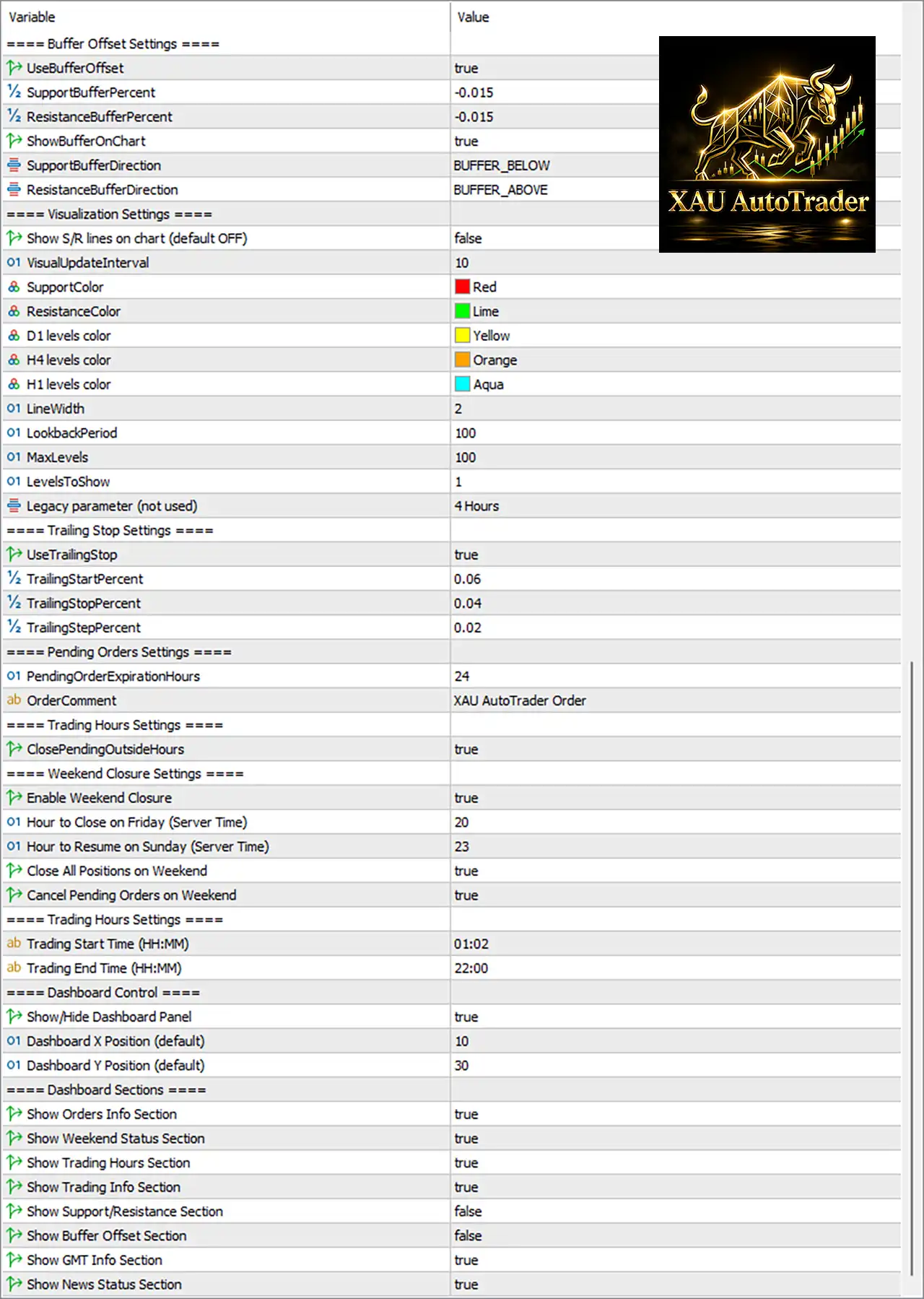
XAU AutoTrader EA Settings Panel
🔢 XAU AutoTrader EA MT5 Settings Explained
🔶 EA Identification
🔹 Magic Number (XAU – diverso da BTC) = 2026 – Assigns the unique Magic Number 2026 to identify all trades opened by XAU AutoTrader EA MT5.
🔶 GMT Settings
🔹 Use Custom GMT Offset = false – Uses the broker server time instead of a manually configured GMT offset.
🔹 Custom GMT Offset (hours) = 0 – Sets the manual GMT offset to 0 hours when custom GMT is enabled.
🔹 GMT Update Interval (seconds) = 30 – Refreshes GMT synchronization every 30 seconds.
🔹 Show Detailed GMT Info = true – Displays detailed GMT information on the dashboard.
🔶 Backtest News (CSV)
🔹 [Backtest] Use CSV file for news (auto-active in Tester) = true – Loads economic news from a CSV file during Strategy Tester backtests.
🔹 [Backtest] CSV file name (saved in MT5 CommonFiles) = xau_news_history.csv – Uses xau_news_history.csv as the historical news database.
🔹 [Backtest] Force CSV mode in LIVE (only for debug) = false – Keeps CSV mode disabled during live trading.
🔶 CSV Builder
🔹 [BUILD] Start date for export = 2023.01.01 00:00:00 – Begins exporting historical news from January 1, 2023.
🔹 [BUILD] End date for export = 2026.12.31 00:00:00 – Ends news export on December 31, 2026.
🔹 [BUILD] Include HIGH impact news = true – Includes High-impact news events.
🔹 [BUILD] Include MEDIUM impact news = true – Includes Medium-impact news events.
🔹 [BUILD] Build CSV when EA starts. Set TRUE once, then back to FALSE = false – Prevents rebuilding the CSV each time the EA starts.
🔶 News Filter Settings
🔹 Enable News Filter = true – Activates the built-in economic news protection.
🔹 News Importance (3=High, 2=Medium, 1=Low) = 3 – Filters only High-impact news events.
🔹 Minutes Before News = 5 – Stops opening new trades 5 minutes before scheduled news.
🔹 Minutes After News = 5 – Resumes trading 5 minutes after news.
🔹 FOMC Minutes After = 45 – Waits 45 minutes after FOMC announcements before trading resumes.
🔹 Check News Interval (seconds) = 300 – Updates news information every 300 seconds.
🔹 Maximum number of news events to track = 2 – Tracks up to 2 upcoming economic events.
🔶 News Debug
🔹 Enable News Debug Logging = false – Disables detailed news logging.
🔶 Backtest Timezone Settings
🔹 [Backtest] Auto-align CSV news time to broker server (DST) = true – Automatically synchronizes CSV news timestamps with broker server time.
🔹 [Backtest] CSV timezone GMT of the file (0 = UTC) = 0 – Uses UTC (GMT 0) for the CSV news file.
🔹 [Backtest] Broker server GMT in winter = 2 – Uses GMT+2 during winter.
🔹 [Backtest] Broker server GMT in summer = 3 – Uses GMT+3 during summer.
🔹 [Backtest] DST rule: 0=none, 1=US, 2=EU = 1 – Applies the US Daylight Saving Time rule.
🔶 Risk Management
🔹 Risk Percentage = 10.0 – Risks 10.0% of account equity per trading cycle.
🔹 Stop Loss in percentage = 0.25 – Sets Stop Loss at 0.25%.
🔹 Take Profit in percentage = 5.0 – Sets Take Profit at 5.0%.
🔶 Lot Sizing
🔹 Use Fixed Lot = true – Enables fixed lot trading.
🔹 Fixed Lot Size = 0.01 – Uses a constant position size of 0.01 lots.
🔶 Spread Control
🔹 Maximum Allowed Spread = 300 – Prevents new trades when spread exceeds 300 points.
🔹 Dashboard Update Interval (seconds) = 2 – Updates dashboard information every 2 seconds.
🔶 Timeframe Selection
🔹 Enable Daily (D1) levels = true – Uses Daily support and resistance levels.
🔹 Bars for D1 (15-30) = 25 – Calculates Daily levels using 25 bars.
🔹 Enable H4 levels = true – Enables H4 support and resistance analysis.
🔹 Bars for H4 (30-100) = 50 – Uses 50 H4 bars.
🔹 Enable H1 levels = true – Enables H1 support and resistance levels.
🔹 Bars for H1 (50-150) = 100 – Uses 100 H1 bars.
🔹 Enable M30 levels = false – Disables M30 support and resistance calculations.
🔹 Bars for M30 (100-200) = 150 – Uses 150 bars if M30 analysis is enabled.
🔹 Enable M15 levels = false – Disables M15 support and resistance calculations.
🔹 Bars for M15 (150-300) = 200 – Uses 200 bars if M15 analysis is enabled.
🔶 Buffer Offset Settings
🔹 UseBufferOffset = true – Enables support and resistance buffer offsets.
🔹 SupportBufferPercent = -0.015 – Applies a -0.015% adjustment below support levels.
🔹 ResistanceBufferPercent = -0.015 – Applies a -0.015% adjustment above resistance levels.
🔹 ShowBufferOnChart = true – Displays buffer zones directly on the trading chart.
🔹 SupportBufferDirection = BUFFER_BELOW – Places the support buffer below the detected support level.
🔹 ResistanceBufferDirection = BUFFER_ABOVE – Places the resistance buffer above the detected resistance level.
🔶 Visualization Settings
🔹 Show S/R lines on chart (default OFF) = false – Hides support and resistance lines.
🔹 VisualUpdateInterval = 10 – Refreshes chart objects every 10 ticks.
🔹 SupportColor = Red – Displays support levels in Red.
🔹 ResistanceColor = Lime – Displays resistance levels in Lime.
🔹 D1 levels color = Yellow – Shows Daily levels in Yellow.
🔹 H4 levels color = Orange – Displays H4 levels in Orange.
🔹 H1 levels color = Aqua – Displays H1 levels in Aqua.
🔹 LineWidth = 2 – Sets line thickness to 2.
🔹 LookbackPeriod = 100 – Uses 100 historical bars for level calculations.
🔹 MaxLevels = 100 – Stores up to 100 support and resistance levels.
🔹 LevelsToShow = 1 – Displays only 1 support/resistance level.
🔹 Legacy parameter (not used) = 4 Hours – Legacy parameter retained for compatibility but currently unused.
🔶 Trailing Stop Settings
🔹 UseTrailingStop = true – Enables automatic Trailing Stop management.
🔹 TrailingStartPercent = 0.06 – Starts trailing when profit reaches 0.06%.
🔹 TrailingStopPercent = 0.04 – Keeps Stop Loss 0.04% behind price.
🔹 TrailingStepPercent = 0.02 – Moves the trailing stop in 0.02% increments.
🔶 Pending Orders Settings
🔹 PendingOrderExpirationHours = 24 – Pending orders automatically expire after 24 hours.
🔹 OrderComment = XAU AutoTrader Order – Assigns “XAU AutoTrader Order” as the trade comment.
🔶 Trading Hours Settings
🔹 ClosePendingOutsideHours = true – Deletes pending orders outside the configured trading session.
🔶 Weekend Closure Settings
🔹 Enable Weekend Closure = true – Activates automatic weekend protection.
🔹 Hour to Close on Friday (Server Time) = 20 – Stops trading at 20:00 on Friday.
🔹 Hour to Resume on Sunday (Server Time) = 23 – Resumes trading at 23:00 on Sunday.
🔹 Close All Positions on Weekend = true – Closes all open trades before the weekend.
🔹 Cancel Pending Orders on Weekend = true – Deletes all pending orders before weekend market closure.
🔶 Trading Hours
🔹 Trading Start Time (HH:MM) = 01:02 – Trading begins daily at 01:02.
🔹 Trading End Time (HH:MM) = 22:00 – Trading ends daily at 22:00.
🔶 Dashboard Control
🔹 Show/Hide Dashboard Panel = true – Displays the EA dashboard.
🔹 Dashboard X Position (default) = 10 – Sets the dashboard horizontal position to 10.
🔹 Dashboard Y Position (default) = 30 – Sets the dashboard vertical position to 30.
🔶 Dashboard Sections
🔹 Show Orders Info Section = true – Displays active order information.
🔹 Show Weekend Status Section = true – Shows weekend protection status.
🔹 Show Trading Hours Section = true – Displays the active trading schedule.
🔹 Show Trading Info Section = true – Displays trading statistics.
🔹 Show Support/Resistance Section = false – Hides support and resistance information.
🔹 Show Buffer Offset Section = false – Hides buffer offset information.
🔹 Show GMT Info Section = true – Displays GMT synchronization details.
🔹 Show News Status Section = true – Shows the real-time news filter status.
🔢 Conclusion
XAU AutoTrader EA is a comprehensive automated Gold trading solution featuring advanced economic news protection, multi-timeframe support and resistance analysis, dynamic trailing stop management, buffer offset control, weekend safety protection, and flexible risk management. Its extensive customization options allow traders to tailor the EA to different trading styles while maintaining disciplined execution and effective risk control.
🔢 FAQs
❓ What is the purpose of the News Filter in XAU AutoTrader EA MT5?
The News Filter temporarily pauses trading around high-impact economic events to reduce unnecessary market risk.
❓ Can I use fixed lot sizing with this EA?
Yes. The EA is configured to use a Fixed Lot Size of 0.01, but this value can be adjusted to suit your trading plan.
❓ How does the Trailing Stop feature work?
The Trailing Stop activates after the position reaches 0.06% profit and follows the price with a 0.04% trailing distance using 0.02% adjustment steps.
❓ Why are multiple timeframe support and resistance levels used?
Using D1, H4, and H1 levels provides stronger market structure confirmation and helps improve entry and exit accuracy.
❓ Does XAU AutoTrader EA MT5 include weekend protection?
Yes. The EA can automatically close open positions, cancel pending orders, and suspend trading before the weekend to help reduce gap risk.
User Reviews
Only logged in customers who have purchased this product may leave a review.
❓ What trading strategy does XAU AutoTrader EA use?
XAU AutoTrader EA applies a structured breakout strategy based on multi-timeframe support and resistance analysis, placing pending orders only after confirmed level breaks.
❓ Is XAU AutoTrader EA optimized specifically for gold?
Yes, XAU AutoTrader EA is developed exclusively for XAUUSD. Its logic is tailored to gold volatility, focusing on breakout precision and structured market behavior.
❓ How does XAU AutoTrader EA manage risk?
XAU AutoTrader EA offers percentage-based or fixed lot sizing, predefined SL and TP logic, and adaptive exposure control to maintain disciplined capital management.
❓ What timeframe is recommended for XAU AutoTrader EA?
XAU AutoTrader EA is recommended for the H1 timeframe, providing balanced breakout structure and reliable confirmation from higher timeframe levels.
❓ Does XAU AutoTrader EA include a trailing stop feature?
Yes, XAU AutoTrader EA integrates a smart percentage-based trailing stop system that dynamically locks in profits during strong gold movements.
❓ Can XAU AutoTrader EA avoid trading during news events?
XAU AutoTrader EA includes news and weekend protection filters, pausing trading during high-impact events and closing positions before potential market gaps.
❓ What were the live signal results of XAU AutoTrader EA?
XAU AutoTrader EA reported strong real-account growth with high win rates and controlled drawdown over consecutive trading weeks on XAUUSD.
❓ Does XAU AutoTrader EA filter unfavorable market conditions?
Yes, XAU AutoTrader EA uses spread and session filters to avoid entries during low liquidity or unstable market conditions.
❓ What is the recommended deposit for XAU AutoTrader EA?
XAU AutoTrader EA requires a minimum deposit of $200 and supports flexible leverage, making it adaptable for various account sizes.
❓ Is XAU AutoTrader EA suitable for long-term automation?
XAU AutoTrader EA focuses on structured execution, adaptive risk management, and disciplined breakout logic, making it suitable for consistent long-term gold trading.
-
 Original price was: $2,000.00.$199.00Current price is: $199.00.
 -
 Original price was: $30,000.00.$599.00Current price is: $599.00.
 -
 Original price was: $3,750.00.$599.00Current price is: $599.00.
 -
 Original price was: $30,000.00.$599.00Current price is: $599.00.
-
 0Original price was: $1,299.00.$249.00Current price is: $249.00.
 -
 0Original price was: $290.00.$179.00Current price is: $179.00.
 -
 1Original price was: $500.00.$249.00Current price is: $249.00.
 -
 3Original price was: $199.00.$159.00Current price is: $159.00.
There are no reviews yet.