


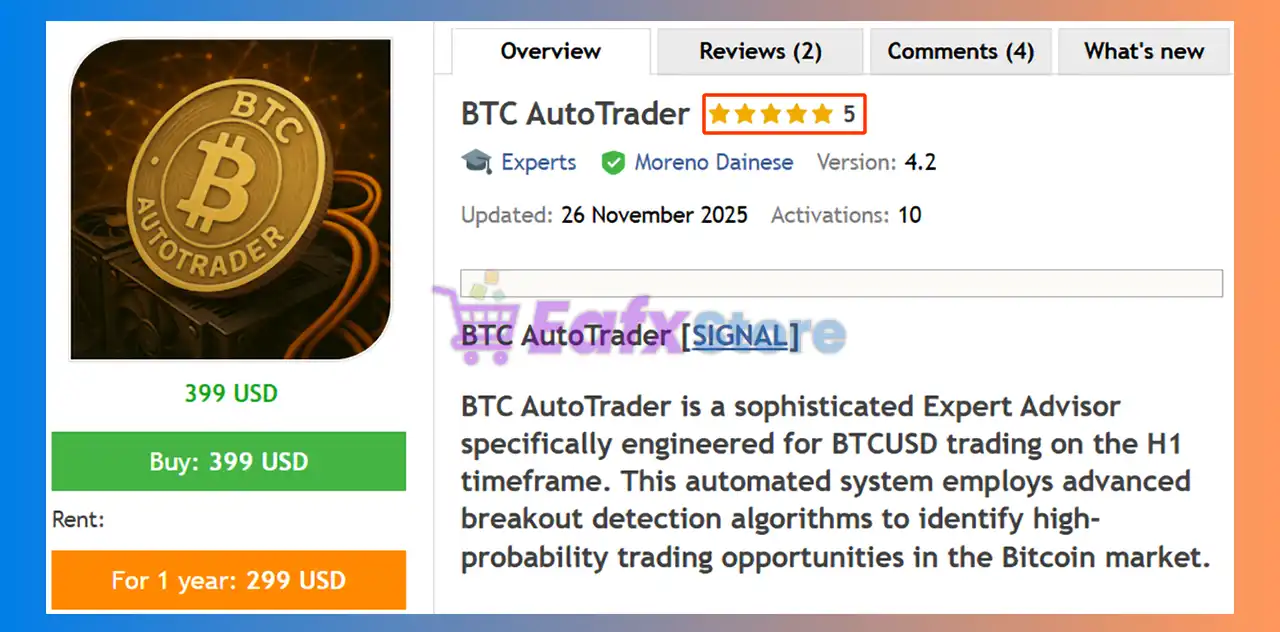




BTC AutoTrader EA MT5 (Latest version) - Unlimited

Subscriptions for Special Plan
- 30 EA package is more economical!
- Special package with 99%
- Download 1 EA/Day

Subscriptions for Premium Membership
- Download Unlimited in 1 Year
- Get 100% Discount
- Get free access to all

Subscriptions for Gold Membership
- 1 Year Membership
- Get 100% Discount
- Access EA+Indicator+Course
Frequently bought together 🎁
Add these products to enhance your purchase




What is BTC AutoTrader EA?
BTC AutoTrader EA is a powerful Expert Advisor (EA) for automated trading on Bitcoin, combining breakout detection, adaptive Indicators and structured risk management. Built for stability and adaptability, it analyzes BTCUSD market conditions in real time, ensuring precise execution and controlled exposure in volatile environments.
 Vendor Website: View here
About the Author
This product is compiled by Moreno Dainese. This author has more than +6 years of experience working on MQL5 with many famous products such as BTC AutoTrader EA MT5, XAU AutoTrader MT5, Market Sentinel Pro MT5, Gold Hydra Bot MT5 and other advisors. Among them, BTC AutoTrader MT5 is his best performing products.
Delivery time 24h-48h after payment.
Refund if not delivered.
You will receive the current version without any limitations (ID+Time).
Key Features of BTC AutoTrader EA for MT5
🔹 Advanced Breakout Detection Engine: Identifies high-probability BTCUSD breakout zones with precision.
🔹 Dynamic Support & Resistance Mapping: Detects real-time trading zones to reduce false signals.
🔹 Adaptive Trailing Stop System: Locks in profits while allowing trades to follow strong trends.
🔹 Integrated Risk Protection Framework: Includes spread filters, slippage control and news filter.
🔹 Flexible Configuration & Dashboard Control: Offers customizable settings and clear visual insights.
What is the BTC AutoTrader EA trading strategy?
🔹 Zone-Based Breakout Trading Logic: Executes trades when price breaks validated support zones.
🔹 Pending Order Precision Entry System: Uses timed orders to capture optimal market movements.
🔹 Volatility-Aware Market Analysis Model: Adapts to Bitcoin price fluctuations for stable entries.
🔹 Strict Risk-Controlled Trade Execution: Applies Stop Loss (SL), Trailing stop and controlled exposure rules.
🔹 News & Session Filtering Mechanism: Avoids trading during high-impact events and unstable periods.
BTC AutoTrader EA MT5 Review
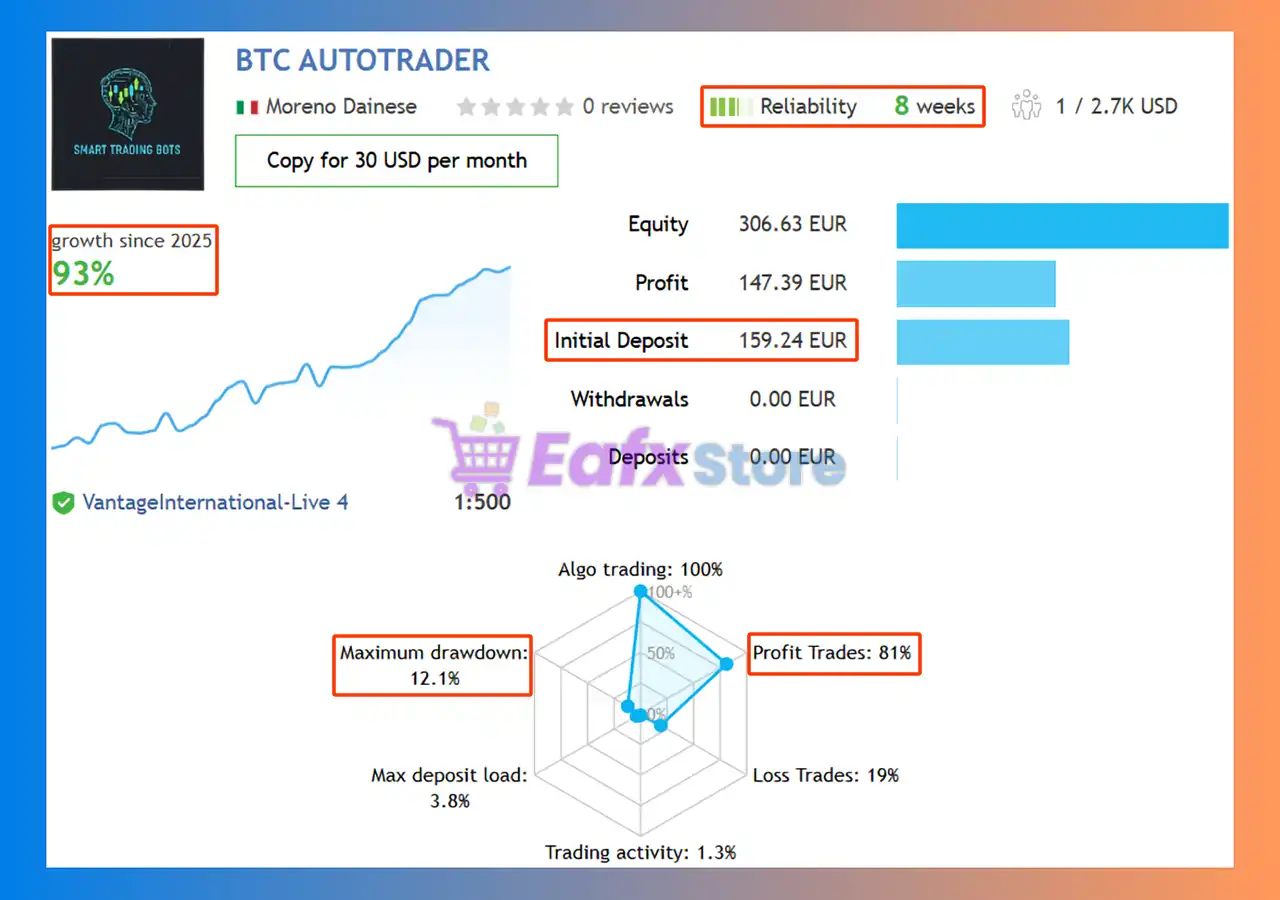
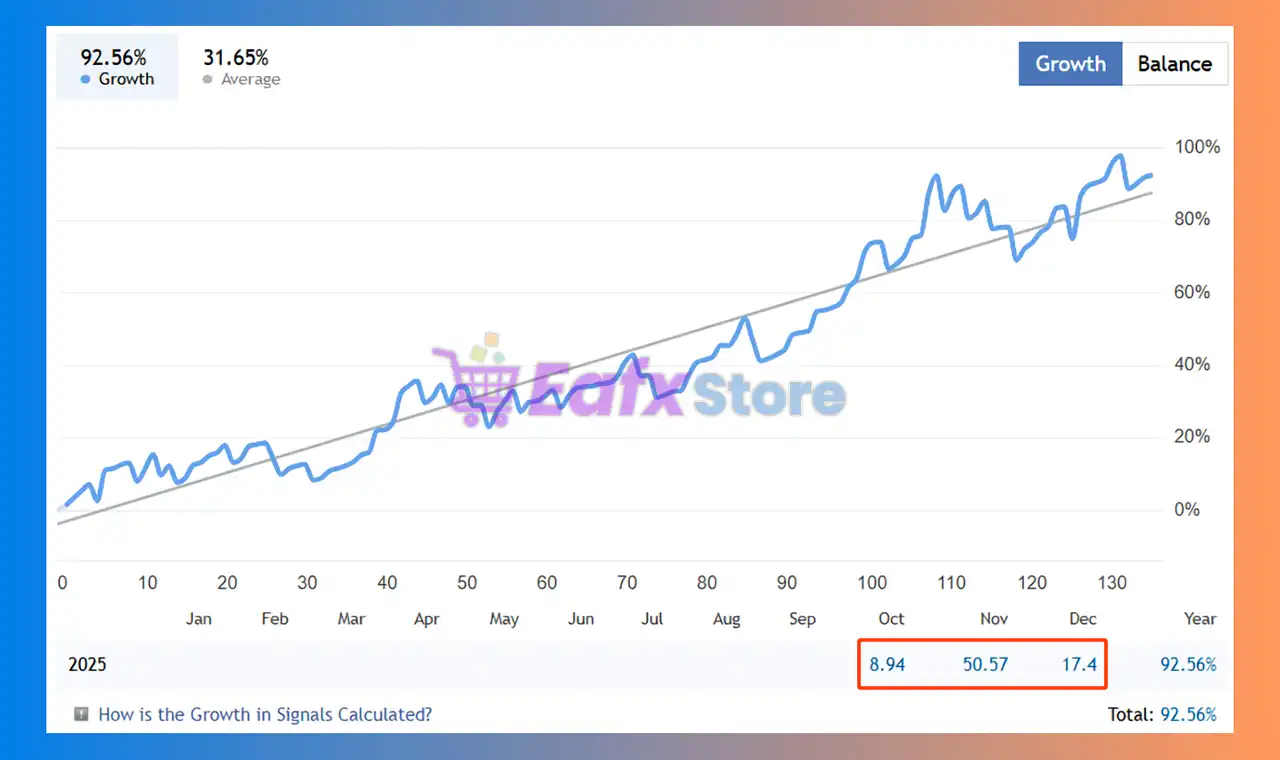
BTC AutoTrader EA Signal Results
The BTC AutoTrader EA achieved impressive profit performance when trading with BTC pair. Trading results on real account for 8 consecutive weeks of trading.
✅ Initial Deposit: $159.24
✅ Growth Rate: +93%
✅ Win Rate (% of total): 81%
✅ Maximum Drawdown: 12.1%
BTC AutoTrader EA MT5 Signal Results
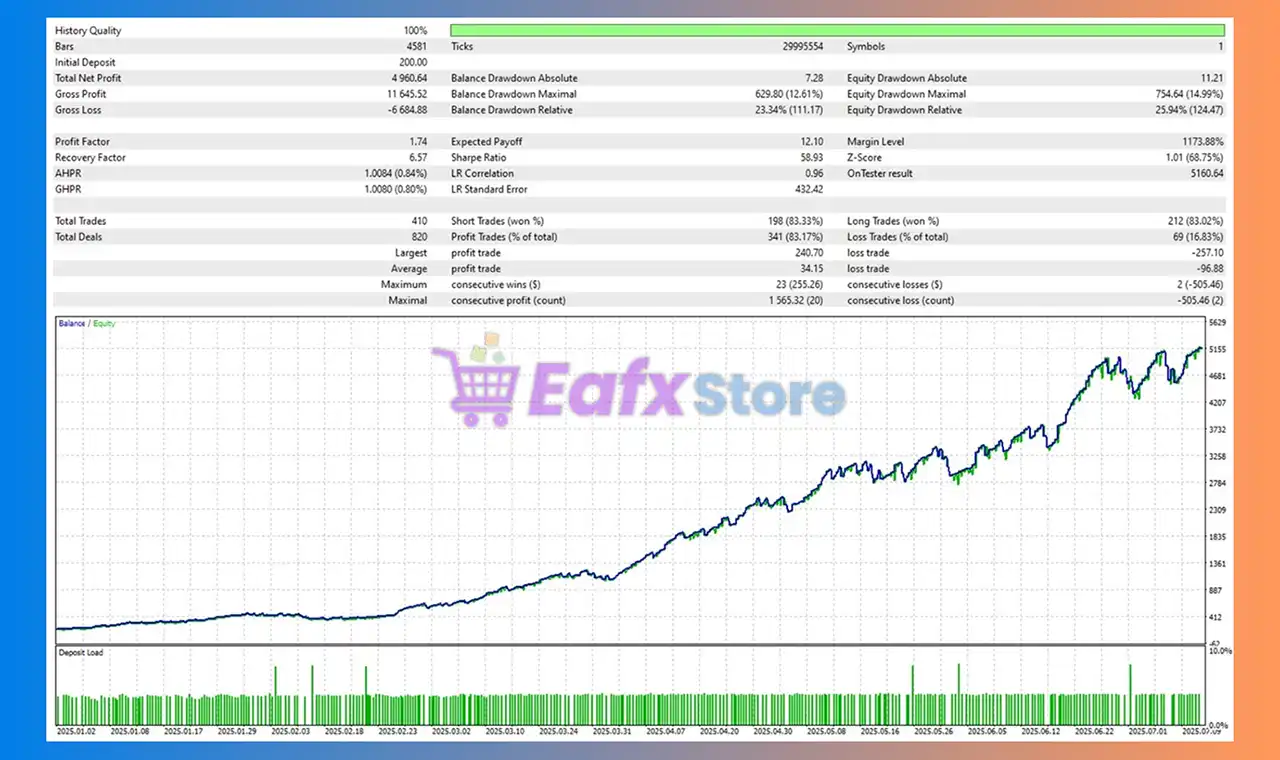
BTC AutoTrader MT5 Backtest Results
The BTC AutoTrader backtest trading results achieved impressive profit performance for 6 months on the BTCUSD (Gold) pair. The advisor showed the ability to maintain safe stars on the 60-minute chart.
✅ Initial Deposit: $200
✅ Total Net Profit: $4,960.64
✅ Win Rate (% of total): 83.17%
✅ Maximum Drawdown: 12.61%
BTC AutoTrader EA Backtest
Why choose & use BTC AutoTrader EA?
🔹 Optimized for Bitcoin Market Volatility: Designed specifically for BTCUSD trading conditions.
🔹 Stable Performance with Controlled Risk Exposure: Focuses on consistency over aggressive trading.
🔹 No High-Risk Recovery Techniques Used: Ensures disciplined execution and account protection.
🔹 User-Friendly Automated Trading System: Easy setup with customizable parameters for all users.
🔹 Marketplace-Ready Professional Solution: Ideal for traders seeking structured crypto automation.
Is BTC AutoTrader EA safe?
BTC AutoTrader EA shows significant potential in providing stable and reliable profits, making it a reliable tool in the forex market. The advisor is highly appreciated by the MQL5 community in many aspects and has won the trust of users.
⭐⭐⭐⭐⭐ Bob 2026.02.06)
“Excellent.”
⭐⭐⭐⭐⭐ Xavier Gregory Yvon Remy Boussougant (2025.11.02)
“Bonjour en essai l’auteur reponde a tout les question assez rapidement.”
⭐⭐⭐⭐⭐ Zachary Peach (2025.01.31)
“The EA is performing well and the developer is quick to respond to my questions. The dev is also still working to optimize performance.”
Recommended settings
Recommended settings and parameters to pay attention to from developers and experts:
| Features | Type |
|---|---|
| Trading platform | MetaTrader 5 (MT5) |
| Time frames | H1 (60 minute chart) |
| Currency pairs | BTCUSD (Bitcoin) |
| Minimum / Recommended deposit | $100 |
| Minimum / Recommended leverage | Any |
| Product type | Original version |
| Additional services | Unlock and Decompile |
| Recommended brokers | Exness Broker, Icmarkets Broker |
| Recommended VPS | MyfxVPS.com (Blue VPS, Golden VPS). Lowest Latency, 2 week Free Trial, 100% Free for 12-18 Months. |
Product Download Package?
The download package of the product suite includes:
✅ Experts: BTC AutoTrader.ex5
➡️ Reviewed by David Easton
Conclusion
In short, BTC AutoTrader EA for MT5 stands out as a disciplined, breakout-focused trading solution built specifically for BTCUSD. By combining zone-based breakout detection, pending order precision, and advanced risk controls without using grid or martingale, it delivers accurate entries and controlled drawdowns. With strong live and backtest results, BTC AutoTrader is a reliable, crypto-optimized EA designed for consistent and transparent Bitcoin trading performance.
🔢 BTC AutoTrader EA MT5 Settings Guide
BTC AutoTrader EA is a professional automated trading Expert Advisor developed for Bitcoin (BTC) trading on the MetaTrader 5 platform. The EA features an advanced economic news filter, intelligent breakout confirmation engine, dynamic trailing stop, configurable risk management, pending order automation, GMT synchronization and comprehensive dashboard controls.
These settings allow traders to optimize performance while maintaining strict risk management in both live trading and backtesting environments.
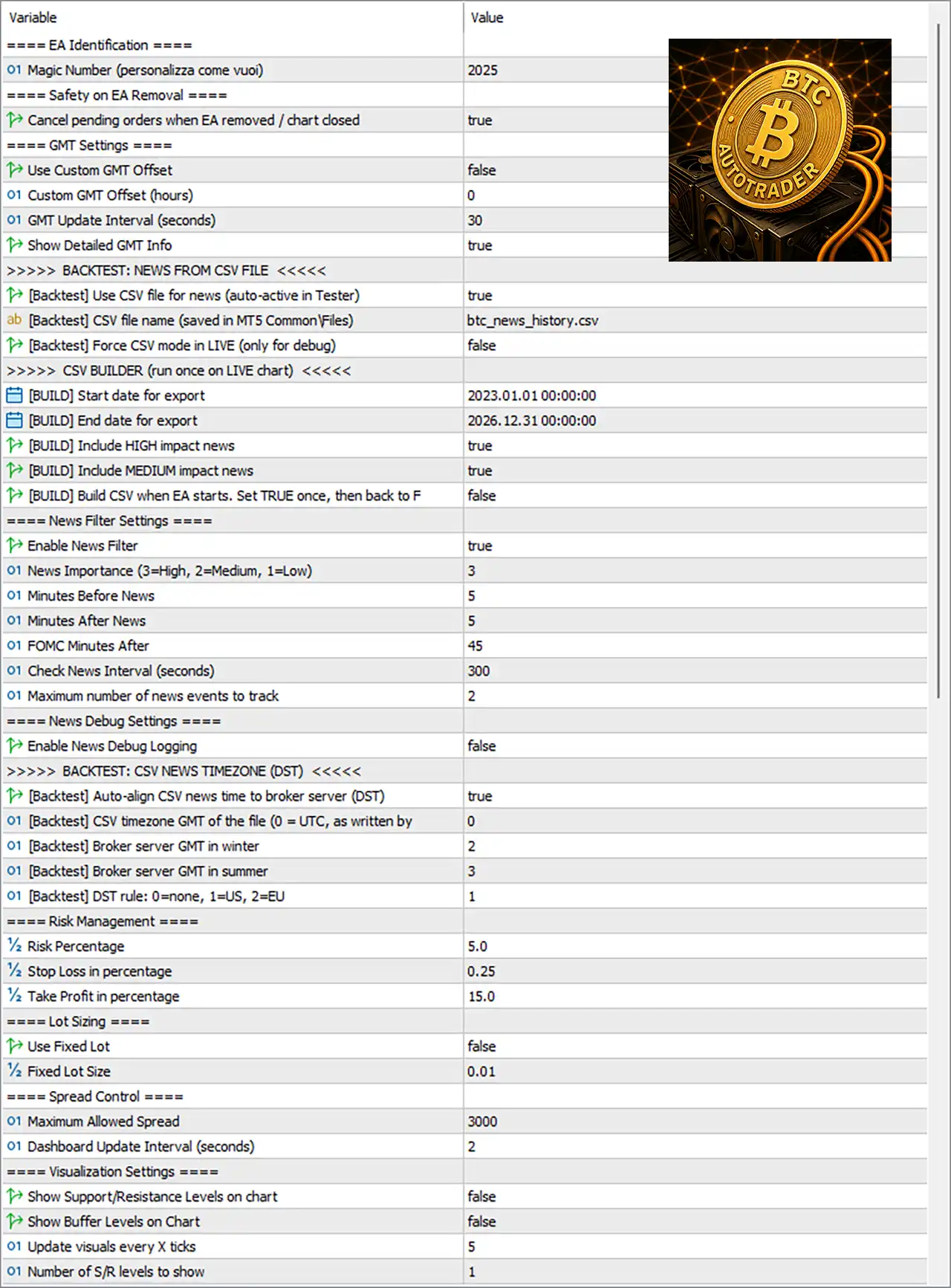
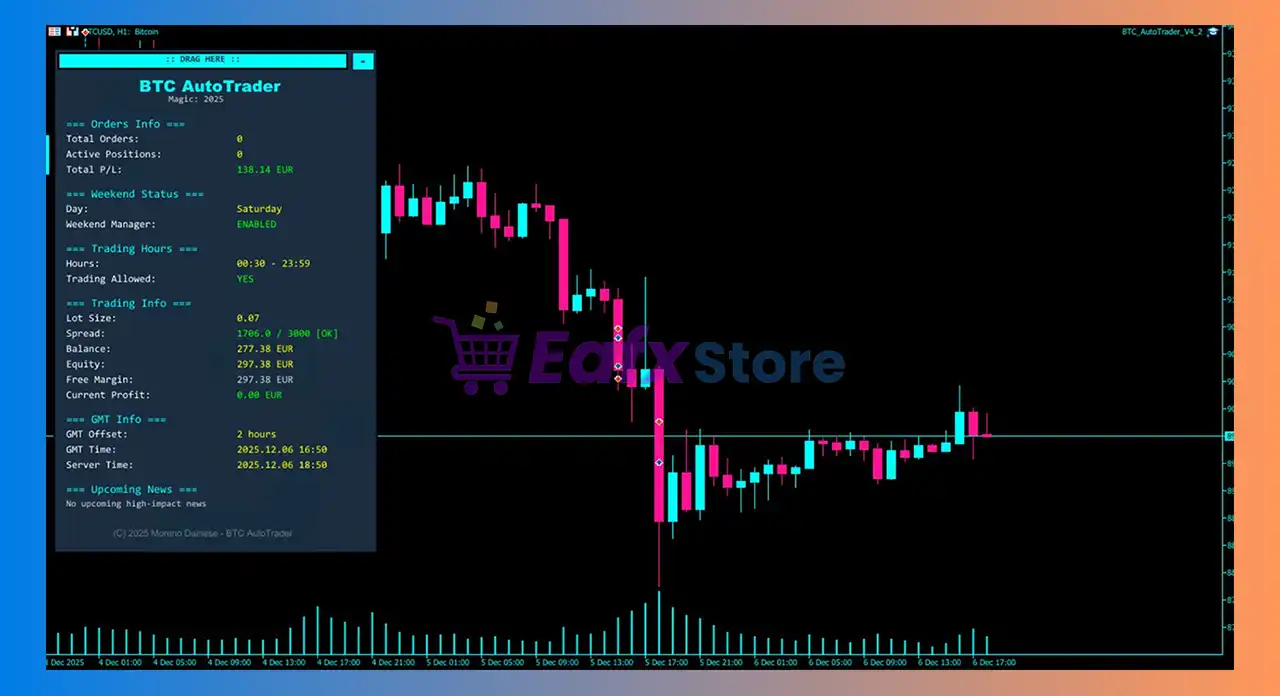
BTC AutoTrader EA MT5 Settings Panel
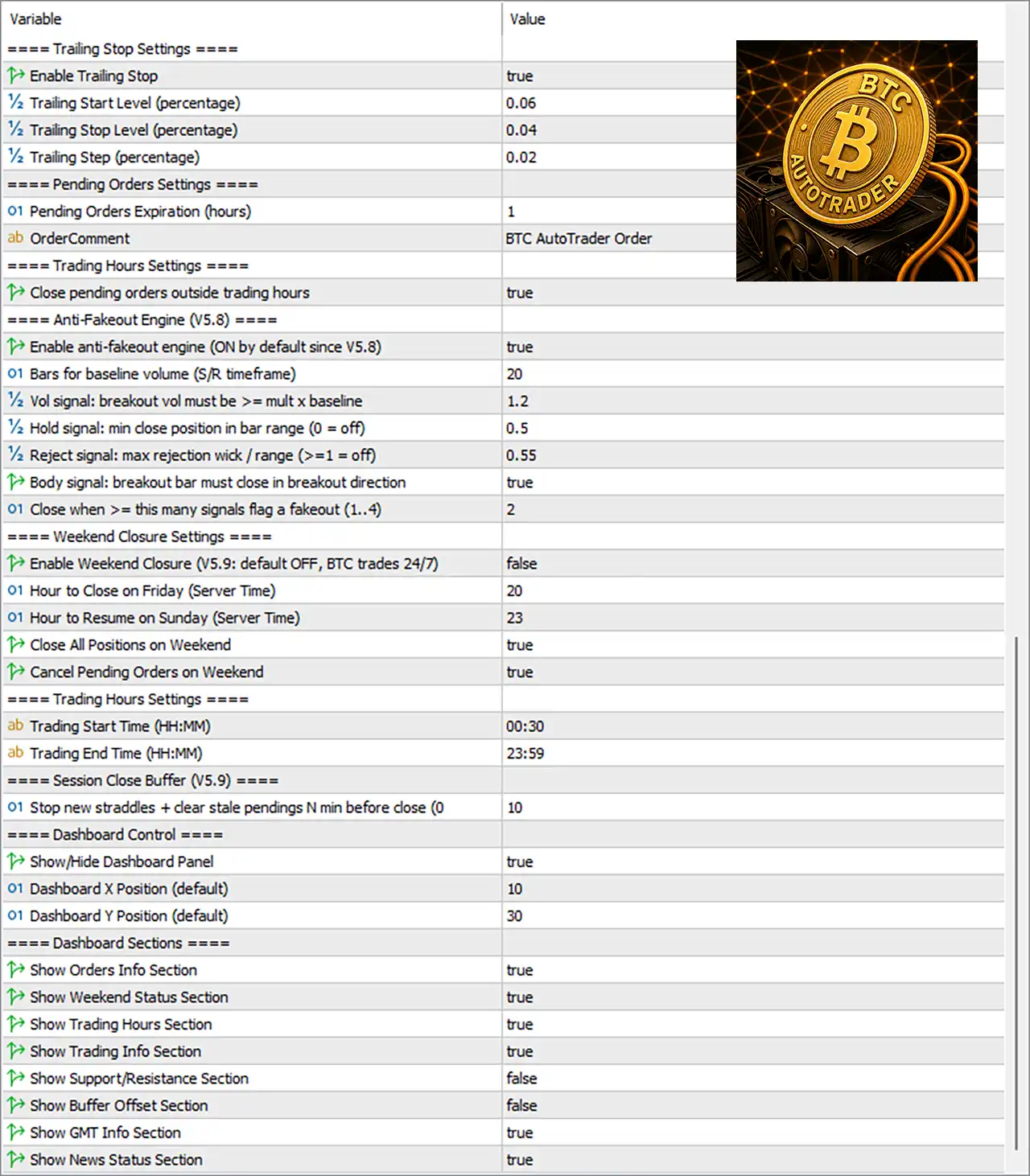
BTC AutoTrader EA Settings Panel
🔢 BTC AutoTrader EA MT5 Settings Explained
🔶 EA Identification
🔹 MagicNumber (personalizza come vuoi) = 2025 – Assigns the unique Magic Number 2025 to identify all trades opened by BTC AutoTrader EA MT5.
🔶 Safety on EA Removal
🔹 Cancel pending orders when EA removed / chart closed = true – Automatically deletes all pending orders when the EA is removed or the trading chart is closed.
🔶 GMT Settings
🔹 Use Custom GMT Offset = false – Uses the broker’s GMT time instead of a manually configured GMT offset.
🔹 Custom GMT Offset (hours) = 0 – Sets the manual GMT offset to 0 hours if the custom GMT option is enabled.
🔹 GMT Update Interval (seconds) = 30 – Refreshes GMT synchronization every 30 seconds.
🔹 Show Detailed GMT Info = true – Displays detailed GMT information on the trading dashboard.
🔶 Backtest – News from CSV File
🔹 [Backtest] Use CSV file for news (auto-active in Tester) = true – Loads economic news from a CSV file during Strategy Tester backtests.
🔹 [Backtest] CSV file name (saved in MT5 CommonFiles) = btc_news_history.csv – Uses btc_news_history.csv as the news database file.
🔹 [Backtest] Force CSV mode in LIVE (only for debug) = false – Disables CSV news mode during live trading.
🔶 CSV Builder
🔹 [BUILD] Start date for export = 2023.01.01 00:00:00 – Begins exporting historical news from January 1, 2023.
🔹 [BUILD] End date for export = 2026.12.31 00:00:00 – Ends news export on December 31, 2026.
🔹 [BUILD] Include HIGH impact news = true – Includes High-impact news events in the generated CSV.
🔹 [BUILD] Include MEDIUM impact news = true – Includes Medium-impact news events.
🔹 [BUILD] Build CSV when EA starts. Set TRUE once, then back to FALSE = false – Prevents rebuilding the CSV every time the EA starts.
🔶 News Filter Settings
🔹 Enable News Filter = true – Activates the built-in economic news protection.
🔹 News Importance (3=High, 2=Medium, 1=Low) = 3 – Filters only High-impact economic news.
🔹 Minutes Before News = 5 – Stops trading 5 minutes before scheduled news.
🔹 Minutes After News = 5 – Resumes trading 5 minutes after news.
🔹 FOMC Minutes After = 45 – Waits 45 minutes after FOMC events before trading again.
🔹 Check News Interval (seconds) = 300 – Refreshes news information every 300 seconds.
🔹 Maximum number of news events to track = 2 – Monitors a maximum of 2 upcoming news events.
🔶 News Debug Settings
🔹 Enable News Debug Logging = false – Disables detailed news debugging logs.
🔶 Backtest – CSV News Timezone (DST)
🔹 [Backtest] Auto-align CSV news time to broker server (DST) = true – Automatically synchronizes CSV news time with broker server time.
🔹 [Backtest] CSV timezone GMT of the file (0 = UTC) = 0 – Uses UTC (GMT 0) for the CSV file.
🔹 [Backtest] Broker server GMT in winter = 2 – Uses GMT+2 during winter.
🔹 [Backtest] Broker server GMT in summer = 3 – Uses GMT+3 during summer.
🔹 [Backtest] DST rule: 0=none, 1=US, 2=EU = 1 – Applies US Daylight Saving Time rules.
🔶 Risk Management
🔹 Risk Percentage = 5.0 – Risks 5.0% of account equity per trading cycle.
🔹 Stop Loss in percentage = 0.25 – Sets Stop Loss at 0.25%.
🔹 Take Profit in percentage = 15.0 – Sets Take Profit at 15.0%.
🔶 Lot Sizing
🔹 Use Fixed Lot = false – Uses dynamic lot sizing instead of a fixed lot.
🔹 Fixed Lot Size = 0.01 – Uses 0.01 lots when Fixed Lot mode is enabled.
🔶 Spread Control
🔹 Maximum Allowed Spread = 3000 – Prevents new entries when spread exceeds 3000 points.
🔹 Dashboard Update Interval (seconds) = 2 – Updates dashboard information every 2 seconds.
🔶 Visualization Settings
🔹 Show Support/Resistance Levels on chart = false – Hides Support and Resistance levels.
🔹 Show Buffer Levels on Chart = false – Hides buffer levels from the chart.
🔹 Update visuals every X ticks = 5 – Refreshes visual objects every 5 ticks.
🔹 Number of S/R levels to show = 1 – Displays 1 Support/Resistance level.
🔶 Trailing Stop Settings
🔹 Enable Trailing Stop = true – Enables automatic Trailing Stop management.
🔹 Trailing Start Level (percentage) = 0.06 – Starts trailing once profit reaches 0.06%.
🔹 Trailing Stop Level (percentage) = 0.04 – Maintains a trailing distance of 0.04%.
🔹 Trailing Step (percentage) = 0.02 – Moves the Stop Loss in 0.02% increments.
🔶 Pending Orders Settings
🔹 Pending Orders Expiration (hours) = 1 – Pending orders automatically expire after 1 hour.
🔹 OrderComment = BTC AutoTrader Order – Adds BTC AutoTrader Order as the trade comment.
🔶 Trading Hours Settings
🔹 Close pending orders outside trading hours = true – Deletes pending orders outside the configured trading session.
🔶 Anti-Fakeout Engine (V5.8)
🔹 Enable anti-fakeout engine (ON by default since V5.8) = true – Activates advanced breakout validation.
🔹 Bars for baseline volume (S/R timeframe) = 20 – Uses 20 bars as the baseline volume reference.
🔹 Vol signal: breakout vol must be >= mult x baseline = 1.2 – Requires breakout volume to be at least 1.2× the baseline.
🔹 Hold signal: min close position in bar range (0 = off) = 0.5 – Requires candle close to exceed 50% of its range.
🔹 Reject signal: max rejection wick/range (>1 = off) = 0.55 – Rejects candles with rejection wicks larger than 55%.
🔹 Body signal: breakout bar must close in breakout direction = true – Requires breakout candles to close in the breakout direction.
🔹 Close when >= this many signals flag a fakeout (1..4) = 2 – Closes trades when 2 fakeout conditions are detected.
🔶 Weekend Closure Settings
🔹 Enable Weekend Closure (V5.9: default OFF, BTC trades 24/7) = false – Keeps weekend trading enabled.
🔹 Hour to Close on Friday (Server Time) = 20 – Friday closing hour is 20:00.
🔹 Hour to Resume on Sunday (Server Time) = 23 – Sunday trading resumes at 23:00.
🔹 Close All Positions on Weekend = true – Closes all positions before the weekend.
🔹 Cancel Pending Orders on Weekend = true – Removes all pending orders before the weekend.
🔶 Trading Session
🔹 Trading Start Time (HH:MM) = 00:30 – Trading begins at 00:30.
🔹 Trading End Time (HH:MM) = 23:59 – Trading continues until 23:59.
🔶 Session Close Buffer
🔹 Stop new straddles + clear stale pendings N min before close = 10 – Stops creating new straddle orders and clears pending orders 10 minutes before market close.
🔶 Dashboard Control
🔹 Show/Hide Dashboard Panel = true – Displays the EA dashboard.
🔹 Dashboard X Position (default) = 10 – Places the dashboard at horizontal position 10.
🔹 Dashboard Y Position (default) = 30 – Places the dashboard at vertical position 30.
🔶 Dashboard Sections
🔹 Show Orders Info Section = true – Displays current order information.
🔹 Show Weekend Status Section = true – Displays weekend trading status.
🔹 Show Trading Hours Section = true – Shows active trading session times.
🔹 Show Trading Info Section = true – Displays trading statistics.
🔹 Show Support/Resistance Section = false – Hides Support and Resistance information.
🔹 Show Buffer Offset Section = false – Hides buffer offset details.
🔹 Show GMT Info Section = true – Displays GMT synchronization status.
🔹 Show News Status Section = true – Displays real-time news filter status.
🔢 Conclusion
BTC AutoTrader EA MT5 offers a comprehensive trading framework designed for automated Bitcoin trading. With configurable risk management, dynamic trailing stops, advanced news filtering, anti-fakeout breakout validation, pending order management, GMT synchronization, and customizable dashboard controls, the EA provides traders with the flexibility to optimize both live trading and backtesting while maintaining disciplined risk control.
🔢 FAQs
❓ What is the purpose of the News Filter in BTC AutoTrader EA MT5?
The News Filter automatically pauses trading around high-impact economic events to reduce unnecessary trading risk.
❓ Can I use a fixed lot size instead of dynamic risk management?
Yes. Enable Use Fixed Lot and specify your preferred Fixed Lot Size.
❓ How does the Anti-Fakeout Engine work?
It validates breakout trades using volume, candle body, wick rejection, and multiple confirmation signals to reduce false breakouts.
❓ Does BTC AutoTrader EA MT5 support trailing stops?
Yes. The EA includes an automatic percentage-based Trailing Stop with configurable activation, distance, and step settings.
❓ Can I customize the trading hours?
Yes. You can define the Trading Start Time, Trading End Time, weekend behavior, and pending order management to match your preferred trading schedule.
User Reviews
Only logged in customers who have purchased this product may leave a review.
❓ What is BTC AutoTrader EA and how does it work?
BTC AutoTrader EA is an automated trading system for MetaTrader 5 designed exclusively for BTCUSD. It uses zone-based breakout detection and pending orders to trade confirmed Bitcoin breakouts with high precision.
❓ What trading strategy does BTC AutoTrader EA use?
The EA applies a breakout-focused strategy, identifying key support and resistance zones and entering trades only when price confirms a real breakout, avoiding random market noise.
❓ Is BTC AutoTrader EA optimized specifically for Bitcoin (BTCUSD)?
Yes. BTC AutoTrader EA is fully optimized for BTCUSD price behavior on the H1 timeframe, taking into account Bitcoin’s volatility and momentum characteristics.
❓ Does BTC AutoTrader EA use Martingale, Grid, or risky techniques?
No. The EA avoids martingale, grid, and aggressive averaging strategies, focusing instead on disciplined risk control and structured breakout entries.
❓ What risk management features are included in BTC AutoTrader EA?
It includes trailing stop, spread protection, slippage control, time-expiring pending orders, and an integrated news filter to reduce risk during volatile conditions.
❓ What is the minimum deposit required to run BTC AutoTrader EA?
The recommended minimum deposit is $100, making BTC AutoTrader EA accessible to both beginner and small-capital traders.
❓ What timeframe and platform does BTC AutoTrader EA work best on?
BTC AutoTrader EA is designed for MetaTrader 5 (MT5) and performs best on the H1 (60-minute) timeframe.
❓ Can BTC AutoTrader EA trade automatically without manual intervention?
Yes. The EA is fully automated, executing trades, managing risk, and closing positions without manual input once installed and configured.
❓ Are there verified trading results or backtests for BTC AutoTrader EA?
Yes. The EA shows strong live signal results and backtests, with win rates above 80% and controlled drawdown around 12%, demonstrating stable performance.
❓ Who should use BTC AutoTrader EA?
BTC AutoTrader EA is ideal for traders seeking a disciplined, crypto-specific Bitcoin trading robot with transparent logic, controlled risk, and consistent breakout-based performance.
-
 Original price was: $2,000.00.$199.00Current price is: $199.00.
 -
 Original price was: $30,000.00.$599.00Current price is: $599.00.
 -
 Original price was: $3,750.00.$599.00Current price is: $599.00.
 -
 Original price was: $30,000.00.$599.00Current price is: $599.00.
-
 0Original price was: $1,299.00.$249.00Current price is: $249.00.
 -
 1Original price was: $500.00.$249.00Current price is: $249.00.
 -
 3Original price was: $199.00.$159.00Current price is: $159.00.
 -
 0Original price was: $199.00.$179.00Current price is: $179.00.
There are no reviews yet.