


🔢 XAU Sentinel AI EA – Complete Settings & Parameters Guide
XAU Sentinel AI EA is an advanced MetaTrader Expert Advisor (EA) designed specifically for XAUUSD (Gold) trading. The EA combines AI-based market regime detection, Supertrend sniper entries, ADX trend analysis, volatility filtering, stochastic range protection, higher timeframe confirmation, automated risk management, trailing stop technology, and economic news protection. These features help traders adapt to changing market conditions while maintaining disciplined risk control.
🔢 XAU Sentinel AI EA Settings Explained
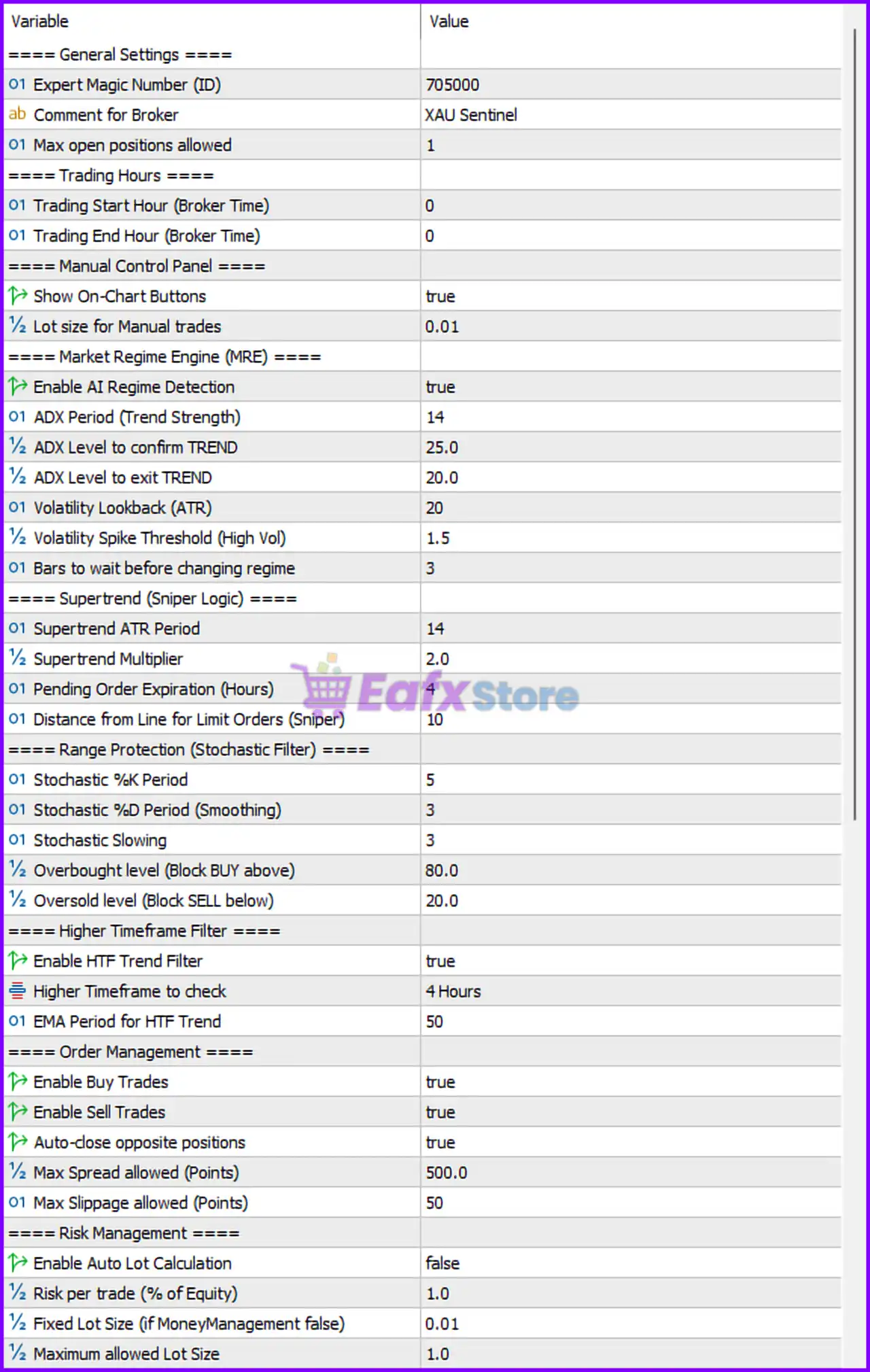
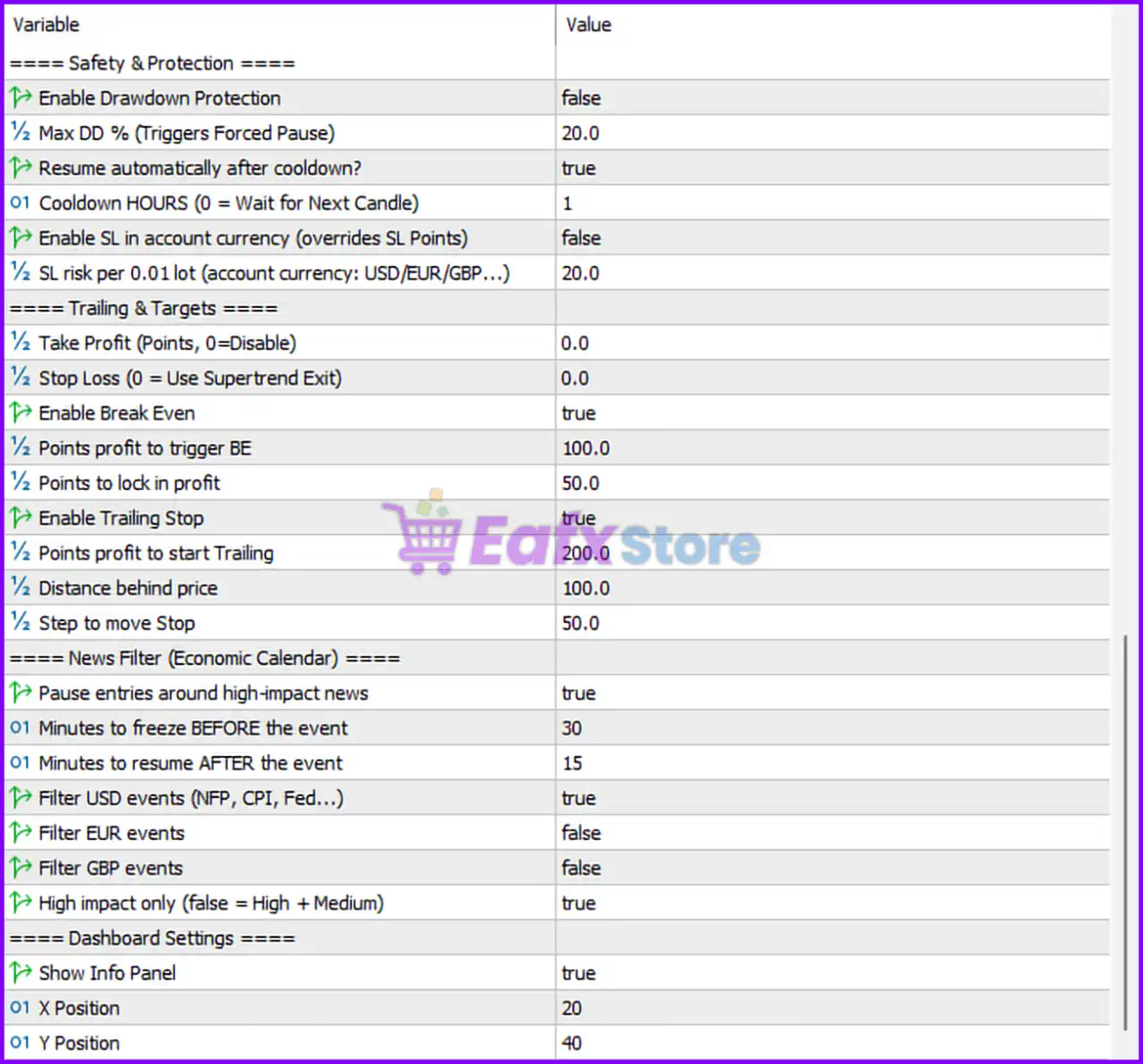
Below are the details of the parameters in the advisor’s trading system settings table:
🔶 General Settings
🔹 Expert Magic Number (ID) = 705000 — Unique identifier assigned to all trades opened by the EA.
🔹 Comment for Broker = XAU Sentinel — Custom trade comment displayed in the trading terminal and account history.
🔹 Max open positions allowed = 1 — Limits the EA to a maximum of 1 active position at any time.
🔶 Trading Hours Settings
🔹 Trading Start Hour (Broker Time) = 0 — Trading begins at broker server hour 0.
🔹 Trading End Hour (Broker Time) = 0 — Trading ends at broker server hour 0; effectively no trading-hour restriction is applied.
🔶 Manual Control Panel
🔹 Show On-Chart Buttons = true — Displays manual control buttons directly on the chart.
🔹 Lot size for Manual trades = 0.01 — Uses 0.01 lots for manually triggered trades from the control panel.
🔶 Market Regime Engine (MRE)
🔹 Enable AI Regime Detection = true — Activates AI-based market regime recognition to identify trending and ranging conditions.
🔹 ADX Period (Trend Strength) = 14 — Uses a 14-period ADX to measure trend strength.
🔹 ADX Level to confirm TREND = 25.0 — ADX must exceed 25.0 to confirm a valid trend.
🔹 ADX Level to exit TREND = 20.0 — Trend condition is removed when ADX falls below 20.0.
🔹 Volatility Lookback (ATR) = 20 — Uses a 20-period ATR for volatility calculations.
🔹 Volatility Spike Threshold (High Vol) = 1.5 — Detects high-volatility conditions when ATR exceeds 1.5 times normal levels.
🔹 Bars to wait before changing regime = 3 — Requires 3 bars before switching to a new market regime.
🔶 Supertrend (Sniper Logic)
🔹 Supertrend ATR Period = 14 — Uses a 14-period ATR in Supertrend calculations.
🔹 Supertrend Multiplier = 2.0 — Applies a multiplier of 2.0 to determine Supertrend sensitivity.
🔹 Pending Order Expiration (Hours) = 4 — Pending orders expire after 4 hours.
🔹 Distance from Line for Limit Orders (Sniper) = 10 — Places limit orders 10 points away from the Supertrend line.
🔶 Range Protection (Stochastic Filter)
🔹 Stochastic %K Period = 5 — Uses a 5-period %K value.
🔹 Stochastic %D Period (Smoothing) = 3 — Applies 3-period smoothing to the stochastic calculation.
🔹 Stochastic Slowing = 3 — Uses a slowing factor of 3.
🔹 Overbought level (Block BUY above) = 80.0 — Prevents Buy trades when Stochastic exceeds 80.0.
🔹 Oversold level (Block SELL below) = 20.0 — Prevents Sell trades when Stochastic falls below 20.0.
🔶 Higher Timeframe Filter
🔹 Enable HTF Trend Filter = true — Enables higher timeframe trend confirmation.
🔹 Higher Timeframe to check = 4 Hours — Uses the H4 timeframe for trend validation.
🔹 EMA Period for HTF Trend = 50 — Uses a 50-period EMA on the higher timeframe.
🔶 Order Management
🔹 Enable Buy Trades = true — Allows Buy positions.
🔹 Enable Sell Trades = true — Allows Sell positions.
🔹 Auto-close opposite positions = true — Closes opposite trades when a new signal appears.
🔹 Max Spread allowed (Points) = 500.0 — Maximum permitted spread is 500.0 points.
🔹 Max Slippage allowed (Points) = 50 — Maximum acceptable slippage is 50 points.
🔶 Risk Management
🔹 Enable Auto Lot Calculation = false — Automatic lot sizing is disabled.
🔹 Risk per trade (% of Equity) = 1.0 — Uses 1.0% equity risk when auto lot sizing is enabled.
🔹 Fixed Lot Size (if MoneyManagement false) = 0.01 — Uses a fixed lot size of 0.01.
🔹 Maximum allowed Lot Size = 1.0 — Caps position size at 1.0 lots.
🔶 Safety & Protection
🔹 Enable Drawdown Protection = false — Drawdown protection is disabled.
🔹 Max DD % (Triggers Forced Pause) = 20.0 — Trading would pause at 20.0% drawdown if protection is enabled.
🔹 Resume automatically after cooldown? = true — Automatically resumes trading after cooldown.
🔹 Cooldown HOURS (0 = Wait for Next Candle) = 1 — Cooldown period is 1 hour.
🔹 Enable SL in account currency (overrides SL Points) = false — Uses point-based stop losses instead of currency-based stop losses.
🔹 SL risk per 0.01 lot (account currency: USD/EUR/GBP...) = 20.0 — Risk amount per 0.01 lot if currency-based stop loss is enabled.
🔶 Trailing & Targets
🔹 Take Profit (Points, 0=Disable) = 0.0 — Fixed Take Profit is disabled.
🔹 Stop Loss (0 = Use Supertrend Exit) = 0.0 — Uses Supertrend exits instead of a fixed stop loss.
🔹 Enable Break Even = true — Activates break-even protection.
🔹 Points profit to trigger BE = 100.0 — Break-even activates after 100.0 points profit.
🔹 Points to lock in profit = 50.0 — Locks 50.0 points of profit when break-even is triggered.
🔹 Enable Trailing Stop = true — Enables trailing stop functionality.
🔹 Points profit to start Trailing = 200.0 — Trailing begins after 200.0 points profit.
🔹 Distance behind price = 100.0 — Trailing stop remains 100.0 points behind current price.
🔹 Step to move Stop = 50.0 — Stop loss updates every 50.0 points.
🔶 News Filter (Economic Calendar)
🔹 Pause entries around high-impact news = true — Stops opening trades during major news events.
🔹 Minutes to freeze BEFORE the event = 30 — Stops entries 30 minutes before news.
🔹 Minutes to resume AFTER the event = 15 — Resumes trading 15 minutes after news.
🔹 Filter USD events (NFP, CPI, Fed...) = true — Filters major USD economic releases.
🔹 Filter EUR events = false — EUR news filtering is disabled.
🔹 Filter GBP events = false — GBP news filtering is disabled.
🔹 High impact only (false = High + Medium) = true — Filters only high-impact events.
🔶 Dashboard Settings
🔹 Show Info Panel = true — Displays the EA dashboard on the chart.
🔹 X Position = 20 — Horizontal dashboard position is 20 pixels.
🔹 Y Position = 40 — Vertical dashboard position is 40 pixels.
🔢 Configuration Summary
🔹 Magic Number: 705000
🔹 Trading Symbol: XAUUSD (Gold)
🔹 Maximum Open Positions: 1
🔹 AI Regime Detection: Enabled
🔹 ADX Settings: 14 / 25.0 / 20.0
🔹 ATR Volatility Period: 20
🔹 Supertrend Settings: 14 / 2.0
🔹 Higher Timeframe Filter: H4 + EMA 50
🔹 Fixed Lot Size: 0.01
🔹 Maximum Lot Size: 1.0
🔹 Break Even: Enabled
🔹 Trailing Stop: Enabled
🔹 News Filter: Enabled for High-Impact USD Events
🔹 Dashboard Panel: Enabled
🔢 Conclusion
XAU Sentinel AI EA is a sophisticated gold trading robot that integrates AI-driven market regime analysis, Supertrend sniper entries, higher timeframe trend confirmation, stochastic filtering, advanced risk controls, and economic news protection. With features such as break-even management, trailing stops, volatility detection, and AI regime switching, the EA is designed to adapt dynamically to changing XAUUSD market conditions while maintaining strict risk management principles.
🔢 FAQs
❓ What is the primary trading instrument for XAU Sentinel AI EA?
The EA is designed specifically for trading XAUUSD (Gold).
❓ How does AI Regime Detection work?
It uses ADX and ATR-based analysis to identify whether the market is trending or ranging and adjusts trading behavior accordingly.
❓ Does the EA use fixed lots or dynamic lots?
In the current configuration, it uses a Fixed Lot Size of 0.01, although automatic lot sizing can be enabled.
❓ How does the news filter protect trades?
The EA pauses new entries 30 minutes before and resumes 15 minutes after high-impact USD economic events.
❓ What exit strategy does the EA use?
The current setup relies on Supertrend-based exits, along with Break Even and Trailing Stop management instead of fixed Take Profit and Stop Loss levels.



