







Quantum Quotient EA MT5 + Sets (Latest version) - Unlimited

Subscriptions for Special Plan
- 30 EA package is more economical!
- Special package with 99%
- Download 1 EA/Day

Subscriptions for Premium Membership
- Download Unlimited in 1 Year
- Get 100% Discount
- Get free access to all

Subscriptions for Gold Membership
- 1 Year Membership
- Get 100% Discount
- Access EA+Indicator+Course
Frequently bought together 🎁
Add these products to enhance your purchase



Quantum Quotient EA – Advanced Trading for Traders & PropFirms
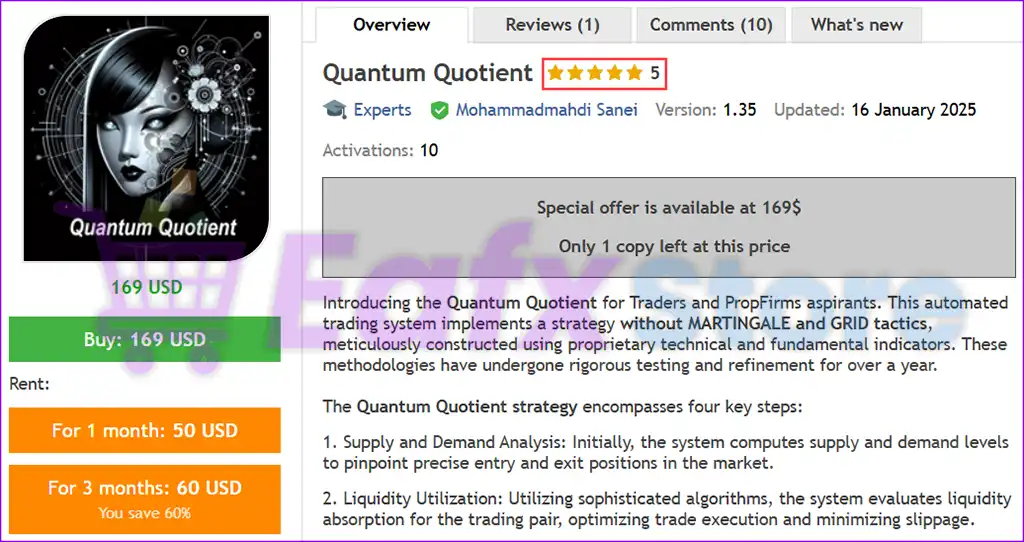
Quantum Quotient EA MT5 is a cutting-edge automated trading system designed for professional traders and PropFirm aspirants. This non-Martingale, non-Grid strategy is meticulously engineered using proprietary technical and fundamental indicators that have been rigorously tested and refined for over a year.
 Vendor Website: Click here
About the Author
This product is compiled by Mohammadmahdi Sanei. This author has more than +4 years of experience working on MQL5 with many famous products such as Quantum Quotient EA, Zenith Zone Bot MT5 and other advisors. Among them, Quantum Quotient EA MT5 is his best performing products.
Delivery time 24h-48h after payment.
Refund if not delivered.
You will receive the current version without any limitations (ID+Time).
Key Features of Quantum Quotient EA
Main Features
🔹Martingale & Grid-Free Strategy: Avoids risky Martingale and Grid techniques, focusing on sustainable trading.
🔹PropFirm Ready: Designed to meet the requirements of PropFirm challenges and trading.
🔹Low Drawdown: Minimizes potential losses, preserving capital.
🔹Proprietary Indicators: Utilizes custom-designed technical and fundamental indicators developed and refined over a year of rigorous testing.
🔹Comprehensive Forex System: Manages all aspects of automated trading, from market analysis to trade execution.
🔹Optimized Default Settings: Ready to use with pre-set parameters for optimal performance.
🔹Standard TP/SL Ratio: Employs a balanced approach to profit targets and stop-loss levels.
🔹Capital Risk Management: Prioritizes the protection of trading capital.
🔹Multi-currency Support: Can be used across multiple currency pairs (optimized for GBPNZD).
Additional Features
🔹Supply and Demand Analysis: Identifies key support and resistance levels for precise entry and exit points.
🔹Liquidity Utilization: Analyzes market liquidity to optimize trade execution and reduce slippage.
🔹Daily Performance Evaluation: Adapts to evolving market conditions by assessing daily performance.
🔹Real-Time News Impact Analysis: Reacts to breaking news events that may affect the market.
🔹Detailed Documentation: Provides comprehensive instructions for setup and usage.
🔹Proven Track Record (Implied): Demonstrated success in FTMO challenges.
Key Benefits
🔹Sustainable Trading: Avoids high-risk strategies like Martingale and Grid, promoting long-term profitability.
🔹Reduced Risk: Low drawdown and capital risk management features minimize potential losses.
🔹Time-Saving Automation: Automates trading, freeing up traders’ time for other activities.
🔹Data-Driven Decisions: Utilizes proprietary indicators and market analysis for informed trading decisions.
🔹PropFirm Compatibility: Meets the specific requirements of PropFirm trading challenges.
🔹Easy to Use: Optimized default settings and comprehensive documentation make it user-friendly.
🔹Transparency (Implied): Blog posts provide insights into the trading strategy and performance.
Quantum Quotient EA MT5 Review
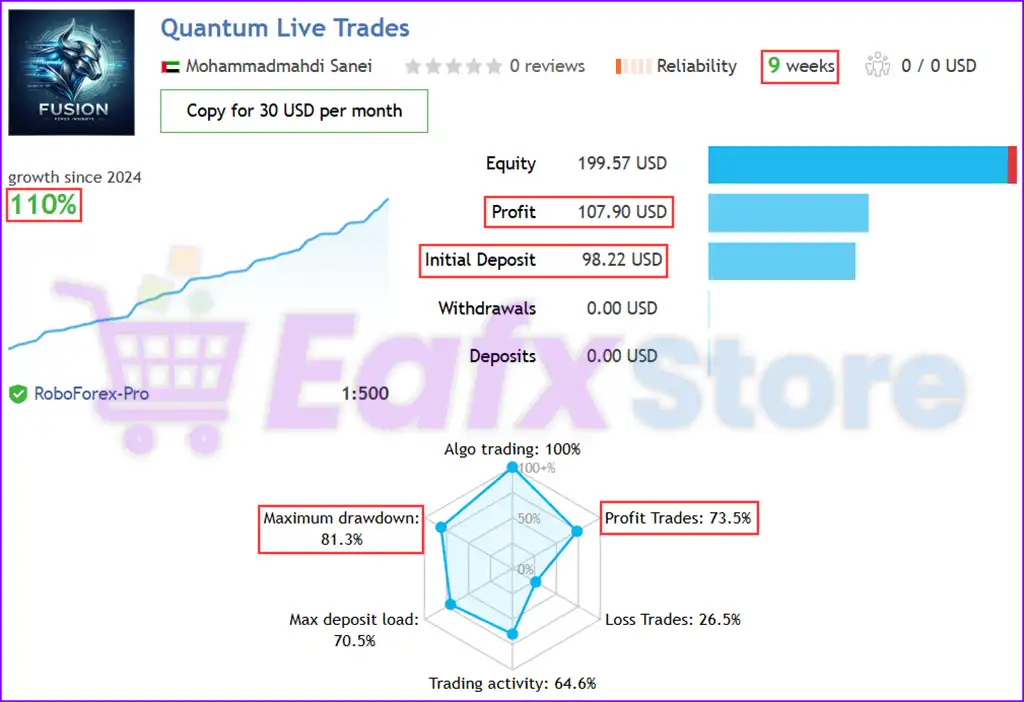
Quantum Quotient EA Live Results
Automated trading system with 1:500 leverage. The EA achieved 110% growth in just 9 weeks, showing high profits but high risk due to high drawdown (81.3%).
✅ Total Growth: 110% in 9 weeks
✅ Initial Deposit: $98
✅ Profit Trades: 73.5%
✅ Maximum Drawdown: 81.3%
Quantum Quotient MT5 Live Signal
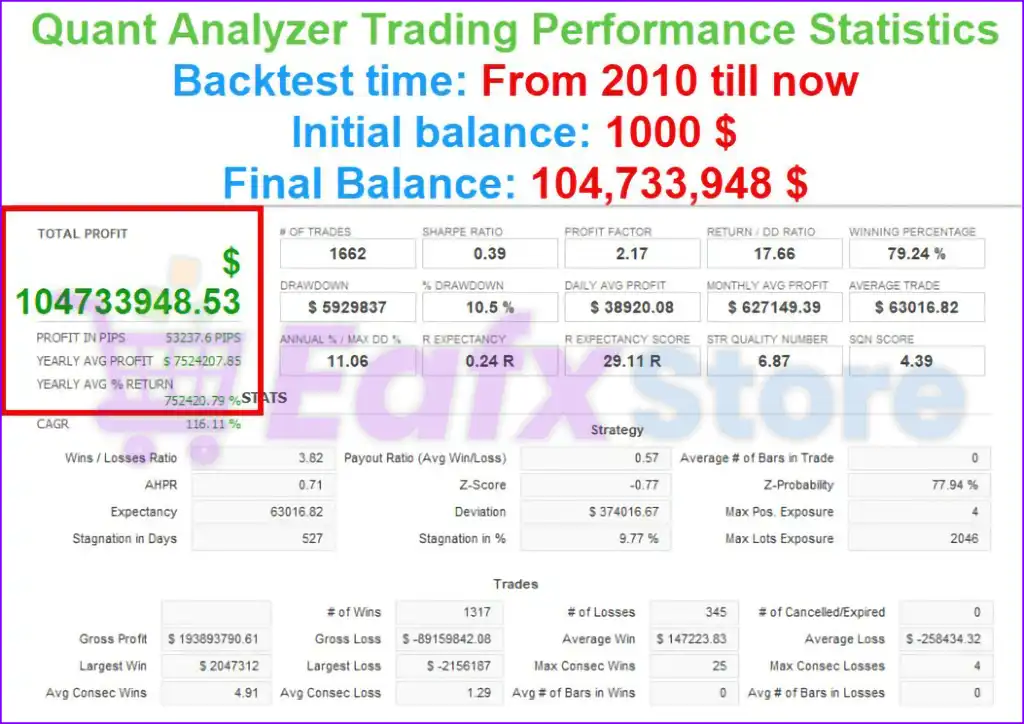
Quantum Quotient MT5 Backtest Results
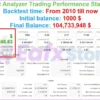
🔶 The automated trading system has delivered phenomenal backtest results from 2010 to 2024. Data shows that an initial deposit of $1,000 grew to a whopping $105M during this period. Specific performance metrics include:
✅ Initial Balance: $1,000
✅ Total Profit: $105M
✅ Win Rate: 79.24%
✅ Maximum Drawdown: 10.5%
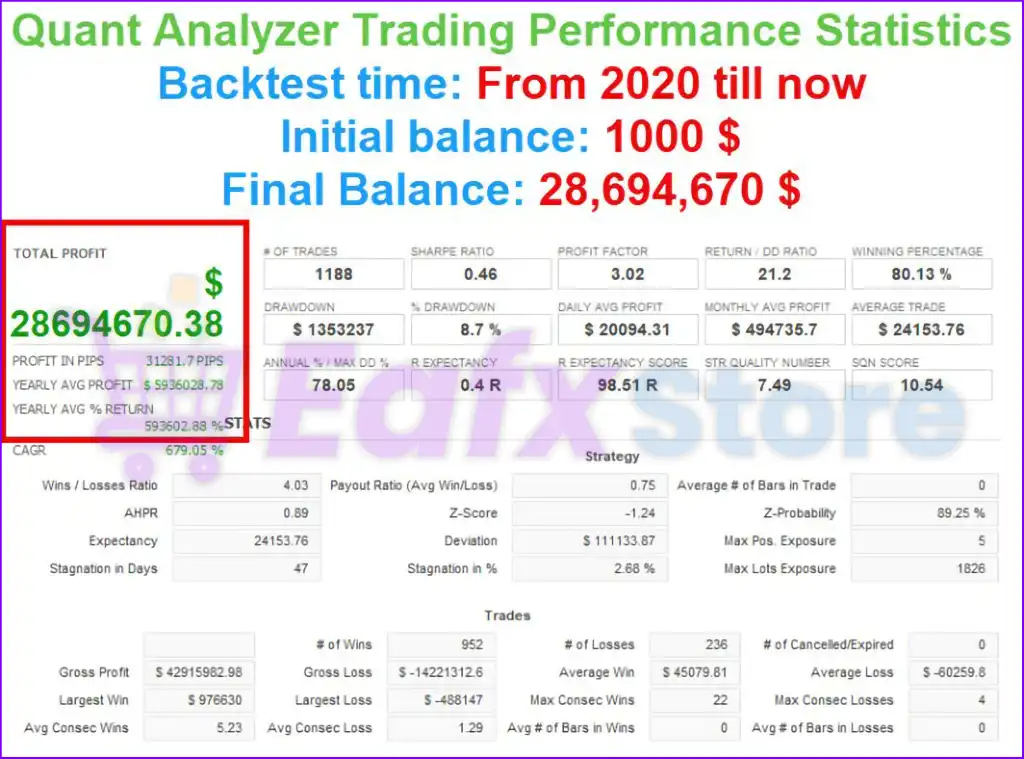
Quantum Quotient MT5 Review
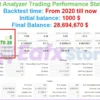
🔶 The automated trading system has been backtested since 2020 with an initial deposit of $1,000, which has reportedly grown the account balance to a staggering $28M. The reported profit factor is 3.02 and the win rate is 80.13%, making this strategy appear very profitable.
✅ Initial Deposit: $1,000
✅Total Net Profit: $28.69M
✅Win Rate: 80.13%
✅Maximum Drawdown: 8.7%
Quantum Quotient MT5 Reviews
Trading Specifications
Recommended settings and parameters to pay attention to from developers and experts:
| Features | Type |
|---|---|
| Trading platform | MetaTrader 5 (MT5) |
| Time frames | M30 (30 minute chart) |
| Currency pairs | GBPNZD |
| Minimum / Recommended deposit | $1,000 |
| Account type | Hedge, ECN, Raw, or accounts with low spreads. |
| Suitable brokers | Standard brokers and PropFirms |
| Additional services | Unlock and Decompile |
| Recommended brokers | Exness Broker, Icmarkets Broker |
| Recommended VPS | MyfxVPS.com ( Blue VPS, Golden VPS). Lowest Latency, 2 week Free Trial, 100% Free for 12-18 Months. |
Product Download Package?
The download package of the product suite includes:
Experts
✅ Quantum Quotient.ex5
SetFiles
✅ Quantum_EA_Low_Risk_Set_File_-_All_Brokers__1.set
✅ Quantum_EA_set_file_for_Martingale_-_ICmarkets_broker.set
➡️ Reviewed by David Easton
Conclusion: Why Choose Quantum Quotient EA MT5?
In short, Quantum Quotient EA MT5 stands out as a powerful, cutting-edge automated trading system designed for traders and PropFirm aspirants seeking consistent and sustainable profitability. Unlike high-risk strategies such as Martingale and Grid, this EA prioritizes capital protection with a low-drawdown, data-driven approach.
With proprietary technical and fundamental indicators refined over a year, Quantum Quotient EA delivers optimized trade execution, real-time news impact analysis, and liquidity utilization. Its exceptional backtesting results—transforming a $1,000 investment into millions—demonstrate its strong performance and potential.
🔢 Quantum Quotient EA MT5 Settings Explained – Complete Parameter Guide
Quantum Quotient EA is a fully automated MetaTrader 5 Expert Advisor designed for multi-currency Forex trading with intelligent signal processing, ATR-based recovery management, flexible money management and comprehensive risk controls.
It supports configurable trading sessions, profit targets, drawdown protection, martingale distance optimization, and spread filtering, making it suitable for traders seeking a balance between automation and capital preservation. Below is a complete SEO-friendly explanation of every parameter available in the settings panel.
Quantum Quotient EA MT5 Settings
🔢 Installation Panel Parameters
Below are the details of the parameters in the advisor’s trading system settings table:
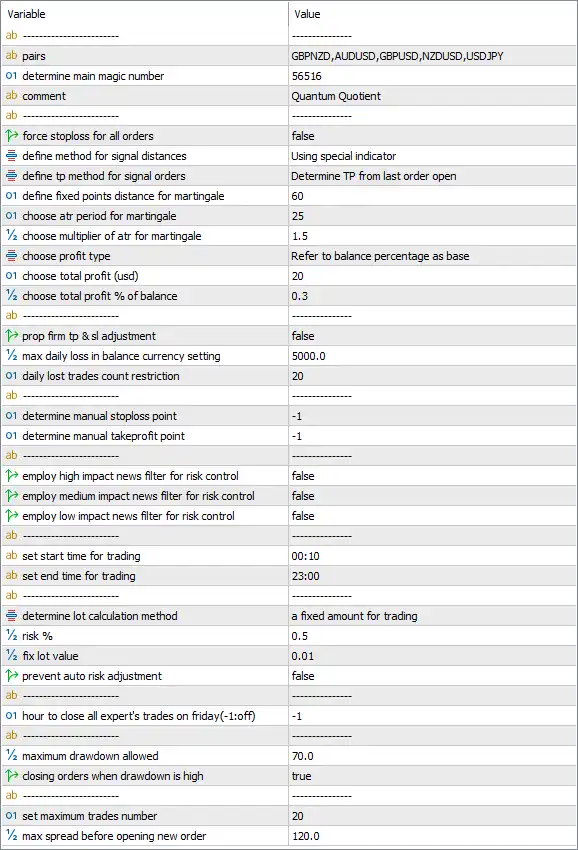
Quantum Quotient EA MT5 Settings Panel
🔶 General Settings
🔹 Pairs = GBPNZD, AUDUSD, GBPUSD, NZDUSD, USDJPY – Defines the currency pairs that the EA is configured to trade.
🔹 Determine Main Magic Number = 56516 – Sets the primary Magic Number (56516) used to uniquely identify and manage all trades opened by the EA.
🔹 Comment = Quantum Quotient – Adds the comment “Quantum Quotient” to every trade opened by the EA.
🔶 Trading Strategy Settings
🔹 Force StopLoss for All Orders = false – Disables mandatory Stop Loss placement for every position, allowing the EA to use its internal management logic.
🔹 Define Method for Signal Distances = Using Special Indicator – Calculates entry signal distances using the EA’s proprietary indicator.
🔹 Define TP Method for Signal Orders = Determine TP from Last Order Open – Calculates the Take Profit level based on the opening price of the latest position.
🔹 Define Fixed Points Distance for Martingale = 60 – Sets the fixed spacing between martingale orders to 60 points.
🔹 Choose ATR Period for Martingale = 25 – Uses an ATR Period of 25 for volatility calculations during martingale management.
🔹 Choose Multiplier of ATR for Martingale = 1.5 – Multiplies the ATR value by 1.5 when determining adaptive martingale distances.
🔶 Profit Management
🔹 Choose Profit Type = Refer to Balance Percentage as Base – Calculates profit targets using the account balance percentage rather than fixed pip values.
🔹 Choose Total Profit (USD) = 20 – Sets the total basket profit target to 20 USD when using fixed-currency profit mode.
🔹 Choose Total Profit % of Balance = 0.3 – Sets the overall basket profit target to 0.3% of the account balance.
🔶 Prop Firm & Risk Adjustment
🔹 Prop Firm TP & SL Adjustment = false – Disables automatic adjustments designed for prop firm trading rules.
🔹 Max Daily Loss in Balance Currency Setting = 5000.0 – Sets the maximum allowable daily loss to 5000.0 units of the account currency.
🔹 Daily Lost Trades Count Restriction = 20 – Limits the EA to 20 losing trades per day before additional restrictions apply.
🔶 Manual Stop Loss & Take Profit
🔹 Determine Manual StopLoss Point = -1 – A value of -1 disables manual Stop Loss and allows automatic management.
🔹 Determine Manual TakeProfit Point = -1 – A value of -1 disables manual Take Profit and enables automatic TP calculation.
🔶 News Filter
🔹 Employ High Impact News Filter for Risk Control = false – Does not pause trading during high-impact economic news.
🔹 Employ Medium Impact News Filter for Risk Control = false – Does not filter medium-impact news events.
🔹 Employ Low Impact News Filter for Risk Control = false – Does not filter low-impact news releases.
🔶 Trading Schedule
🔹 Set Start Time for Trading = 00:10 – Trading begins daily at 00:10.
🔹 Set End Time for Trading = 23:00 – Trading stops at 23:00 each day.
🔶 Money Management
🔹 Determine Lot Calculation Method = A Fixed Amount for Trading – Uses a fixed lot sizing method rather than dynamic position sizing.
🔹 Risk % = 0.5 – Sets the trading risk to 0.5% when percentage-based risk management is enabled.
🔹 Fix Lot Value = 0.01 – Opens new positions with a fixed volume of 0.01 lots.
🔹 Prevent Auto Risk Adjustment = false – Allows the EA to automatically adjust risk if required.
🔶 Friday Management
🔹 Hour to Close All Expert’s Trades on Friday (-1: Off) = -1 – A value of -1 disables automatic Friday trade closure.
🔶 Drawdown Protection
🔹 Maximum Drawdown Allowed = 70.0 – Limits the maximum account drawdown to 70.0%.
🔹 Closing Orders When Drawdown is High = true – Automatically closes open positions if the configured drawdown limit is exceeded.
🔶 Trading Limits
🔹 Set Maximum Trades Number = 20 – Limits the EA to a maximum of 20 simultaneously open trades.
🔹 Max Spread Before Opening New Order = 120.0 – Prevents opening new positions when the spread exceeds 120.0 points.
🔢 Conclusion
Quantum Quotient EA MT5 is a feature-rich automated trading solution that combines intelligent signal generation, ATR-based recovery techniques, flexible money management and extensive risk protection.
With support for multiple currency pairs, configurable trading sessions, drawdown control, spread filtering, and profit management, the EA offers traders a highly customizable framework suitable for both personal and professional trading environments.
🔢 FAQs
❓ What currency pairs are recommended for Quantum Quotient EA MT5?
The default configuration includes GBPNZD, AUDUSD, GBPUSD, NZDUSD, and USDJPY.
❓ Does Quantum Quotient EA MT5 use ATR for its trading logic?
Yes. The EA uses an ATR Period of 25 with a 1.5 multiplier to optimize martingale spacing based on market volatility.
❓ Can I use fixed lots or risk-based money management?
Yes. The EA supports fixed lot sizing (0.01 lots) and configurable percentage-based risk management (0.5%).
❓ Does Quantum Quotient EA MT5 include drawdown protection?
Yes. The EA limits drawdown to 70.0% and can automatically close positions when the configured threshold is reached.
❓ Can I restrict trading to specific hours?
Yes. The default trading window is from 00:10 to 23:00, and these trading session settings can be customized to suit your preferred schedule.
User Reviews
Only logged in customers who have purchased this product may leave a review.
1. What is Quantum Quotient EA MT5?
Quantum Quotient EA MT5 is an advanced automated trading system designed for professional traders and PropFirm challenges. It avoids high-risk strategies like Martingale and Grid, using proprietary indicators for precise and sustainable trading.
2. How does Quantum Quotient EA work?
The EA analyzes supply and demand, market liquidity, and real-time news events to optimize trade execution. It continuously evaluates daily performance to adapt to changing market conditions.
3. What makes Quantum Quotient EA different from other trading bots?
Unlike many trading bots, this EA:
✔ Does not use Martingale or Grid (reducing risk)
✔ Is PropFirm-friendly (meeting strict trading rules)
✔ Has low drawdown settings for capital protection
✔ Uses proprietary technical and fundamental indicators
4. Which currency pairs and timeframes does it support?
Quantum Quotient EA is optimized for GBPNZD and operates on the M30 timeframe.
5. What is the minimum deposit required to use this EA?
The recommended minimum deposit is $1,000.
6. What are the key performance results of Quantum Quotient EA?
✔ Live Trading: 110% growth in 9 weeks (but with 81.3% drawdown)
✔ Backtest (2010-2024): Grew $1,000 to $105M (10.5% drawdown)
✔ Backtest (since 2020): Grew $1,000 to $28M (8.7% drawdown, 80.13% win rate)
7. What types of accounts and brokers are recommended?
It is best used with:
✔ Hedge, ECN, Raw spread accounts
✔ Standard brokers and PropFirms (like Exness, HTFX)
8. Is Quantum Quotient EA easy to set up and use?
Yes, it comes with optimized preset files and a detailed setting guide. Traders can load the default settings and start trading immediately.
-
 Original price was: $500.00.$249.00Current price is: $249.00.
 -
 Original price was: $888.00.$249.00Current price is: $249.00.
 -
 Original price was: $439.00.$249.00Current price is: $249.00.
 -
 Original price was: $9,999.00.$249.00Current price is: $249.00.
-
 4Original price was: $499.00.$249.00Current price is: $249.00.
 -
 1Original price was: $500.00.$249.00Current price is: $249.00.
 -
 0Original price was: $778.00.$249.00Current price is: $249.00.
 -
 1Original price was: $699.00.$249.00Current price is: $249.00.
There are no reviews yet.