






Velora MT5 with SetFiles (Latest version) - Unlimited

Subscriptions for Special Plan
- 30 EA package is more economical!
- Special package with 99%
- Download 1 EA/Day

Subscriptions for Premium Membership
- Download Unlimited in 1 Year
- Get 100% Discount
- Get free access to all

Subscriptions for Gold Membership
- 1 Year Membership
- Get 100% Discount
- Access EA+Indicator+Course
Frequently bought together 🎁
Add these products to enhance your purchase



Quick Verdict
Velora MT5 is a next-generation AI-inspired Grid Expert Advisor (EA) designed for MetaTrader 5 that replaces traditional static grid logic with four intelligent modules working together. Featuring adaptive entries, dynamic grid spacing, smart position stacking, and autonomous exit management, Velora continuously refines its decisions over time, making it one of the most advanced adaptive trading systems available for XAUUSD.
Best For
✅ Gold (XAUUSD) traders.
✅ Experienced MT5 users.
✅ Adaptive Grid trading.
✅ Long-term automated trading.
✅ Traders seeking intelligent risk management.
✅ Portfolio automation.
Overall Rating
9.7/10 ⭐⭐⭐⭐⭐
| Category | Score |
|---|---|
| Profit Potential | 9.7/10 |
| Trading Intelligence | 9.9/10 |
| Risk Management | 9.7/10 |
| Innovation | 10.0/10 |
| Flexibility | 9.8/10 |
| Ease of Configuration | 9.2/10 |
| Overall Value | 9.7/10 |
What is Velora MT5?
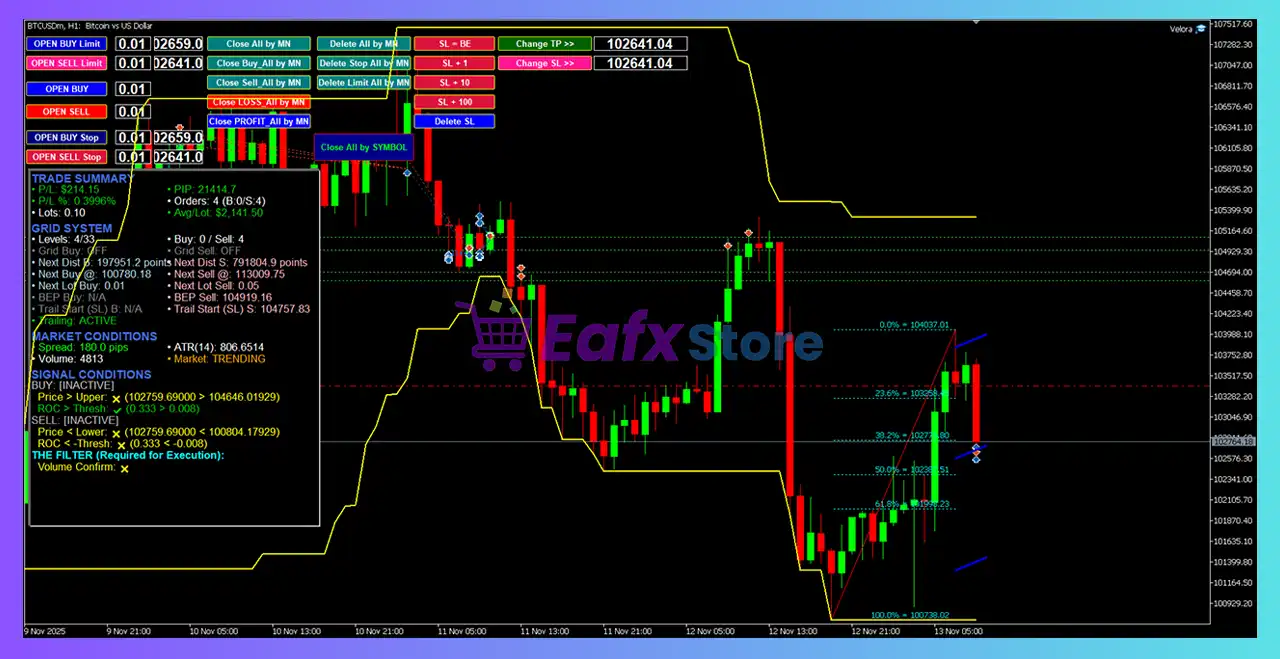
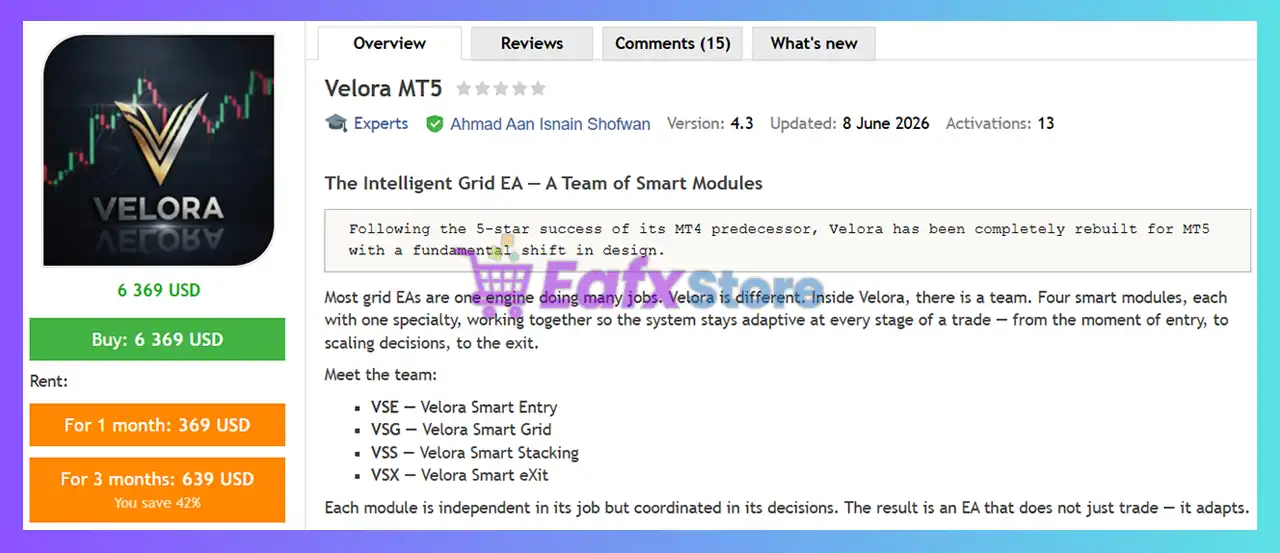
Velora MT5 is an advanced adaptive Grid Expert Advisor for MetaTrader 5 that introduces an entirely new approach to automated trading. Instead of relying on a single trading engine, Velora operates as a coordinated team of four specialized smart modules that independently manage entries, grid construction, position stacking, and trade exits.
Designed primarily for Gold (XAUUSD) on the H1 timeframe, Velora continuously analyzes market conditions, remembers previous trading outcomes, and gradually becomes more selective over time. Its persistent learning mechanism stores historical decision data locally, allowing the EA to improve trade filtering and execution across future trading sessions.
 Vendor Website: View here
Delivery time 24h-48h after payment.
Refund if not delivered.
You will receive the current version without any limitations (ID+Time).
Velora MT5 Review
About the Developer
Velora MT5 was developed by Ahmad Aan Isnain Shofwan, an experienced MQL5 developer from Indonesia with multiple commercial Expert Advisors and utilities published on the MQL5 Marketplace.
Other Popular Products by the Developer
🔹 Velora EA MT4
🔹 Miliarto Ultimate EA MT4
🔹 Black Bird EA MT4
🔹 Buas EA MT4
🔹 MyGrid Scalper Ultimate MT4
Developer Highlights
🔹 More than 4 years of MQL5 development experience.
🔹 Multiple commercial Expert Advisors covering Grid, Scalping, and Trend strategies.
🔹 Strong focus on adaptive automation and advanced trade management.
🔹 Active portfolio of MT4 and MT5 trading solutions.
How Does Velora MT5 Work?
Velora MT5 replaces the traditional single-engine Grid system with four intelligent modules that communicate continuously throughout every trading cycle.
VSE – Velora Smart Entry
VSE acts as the decision-maker responsible for evaluating whether a trade should be opened.
Its responsibilities include:
🔹 Selecting trade direction automatically.
🔹 Evaluating previous trading history.
🔹 Filtering poor-quality setups.
🔹 Detecting dangerous market conditions.
🔹 Building long-term trading memory.
Rather than forcing users to choose Buy or Sell manually, VSE evaluates current market structure before making every decision.
VSG – Velora Smart Grid
Once an entry is approved, VSG constructs the grid dynamically.
It continuously adjusts:
🔹 Grid spacing
🔹 Lot allocation
🔹 ATR-based volatility
🔹 Trend quality
🔹 Risk exposure
When market conditions become unfavorable, VSG can completely block additional grid orders through its Trade Veto mechanism.
VSS – Velora Smart Stacking
VSS focuses exclusively on increasing profitable opportunities.
Instead of averaging losing trades, VSS:
🔹 Adds positions only after profits are protected.
🔹 Confirms momentum before scaling.
🔹 Limits overall exposure.
🔹 Adapts stacking aggressiveness based on recent performance.
This creates controlled profit amplification instead of uncontrolled risk expansion.
VSX – Velora Smart eXit
VSX manages all trade exits automatically.
It performs:
🔹 Automatic Break-Even calculations.
🔹 ATR-based trailing activation.
🔹 Multi-timeframe trailing stops.
🔹 Dynamic profit locking.
🔹 Coordination with VSS to maximize trend continuation.
Key Features of Velora MT5
Four Independent Smart Modules
Each module specializes in a different stage of the trading process while working collaboratively.
Persistent Learning Memory
The EA remembers previous trading outcomes and continuously improves future entry selection.
Adaptive Grid Engine
Grid distance automatically changes according to ATR, volatility, and market health.
Intelligent Lot Allocation
Supports Fixed Lots, Manual Increment, Smart Fibonacci, and Convex lot progression.
Smart Position Stacking
Adds additional positions only when existing trades are already protected.
Autonomous Exit Management
Automatically calculates Break-Even levels and adaptive trailing stops.
Guardian Mode
Protects manually opened trades by integrating them into the EA’s own risk management framework.
Decision Logging
Every trading decision is recorded, providing complete transparency for analysis and optimization.
Multi-Layer Entry Protection
Includes filters for:
🔹 All-Time High proximity
🔹 Parabolic tops
🔹 Structural dips
🔹 Crash detection
🔹 Black Swan events
🔹 Stale market conditions
Velora MT5 Review
Velora MT5 represents one of the most innovative developments in adaptive Grid trading for MetaTrader 5. Instead of relying on rigid rules, the EA evolves through accumulated experience, allowing its Smart Entry module to become increasingly selective over time.
Its modular architecture is a major advantage. By separating entry, grid management, stacking, and exit into four specialized engines, each component focuses on a specific responsibility while coordinating with the others. This design improves flexibility and reduces the limitations commonly associated with traditional Grid systems.
The inclusion of persistent learning files is another standout feature. Trading history is stored locally, enabling the EA to retain its accumulated experience even after platform restarts or VPS migrations. As a result, Velora becomes progressively more refined the longer it operates.
Guardian Mode further distinguishes the EA by allowing manual trades to benefit from the same advanced risk management and exit logic as automated positions, making it an excellent choice for hybrid discretionary and algorithmic traders.
Overall, Velora MT5 offers a sophisticated balance between adaptive automation, intelligent Grid management, and long-term strategy refinement.
Velora MT5 Trading
Why Velora MT5 Stands Out
Adaptive Learning
Unlike traditional Grid EAs, Velora continuously learns from previous trading cycles.
Four-Module Architecture
Dedicated engines independently manage entries, grids, stacking, and exits.
Intelligent Grid Protection
Trade Veto prevents additional exposure during unfavorable market conditions.
Advanced Exit Logic
Multi-timeframe trailing and automatic Break-Even management maximize winning trades.
Manual Trade Integration
Guardian Mode bridges discretionary trading with automated trade management.
Transparent Decision Process
Every trading decision is logged for review and optimization.
Risk Management Features
Velora MT5 incorporates multiple layers of capital protection.
Smart Entry Filters
Rejects low-quality market conditions before trades are opened.
Dynamic Grid Distance
Automatically widens spacing during volatile market environments.
Adaptive Lot Sizing
Reduces position growth when market quality deteriorates.
Trade Veto System
Prevents unnecessary Grid expansion during dangerous price movements.
Exposure Limits
Hard limits ensure stacking cannot exceed predefined account risk.
Automatic Break-Even
Protects open positions as soon as sufficient profit develops.
Intelligent Trailing Stops
Adjusts trailing distances according to changing market structure.
Guardian Protection
Applies the EA’s complete protection framework to manually opened trades.
Recommended Trading Conditions
For optimal performance, the developer recommends the following setup:
| Features | Type |
|---|---|
| Trading platform | MetaTrader 5 (MT5) |
| Time frames | H1 (60 minute chart) |
| Currency pairs | XAUUSD (Gold) |
| Minimum / Recommended deposit | $100+ |
| Minimum / Recommended leverage | Any |
| Type of account | Any |
| Additional services | Unlock and Decompile |
| Recommended brokers | Exness Broker, Icmarkets Broker |
| Recommended VPS | MyfxVPS.com ( Blue VPS, Golden VPS). Lowest Latency, 2 week Free Trial, 100% Free for 12-18 Months. |
Product Download Package?
The download package of the product suite includes:
Experts
 Velora MT5.ex5
SetFiles
yVelora_MT5_Version_3_38f_-_XAUUSD-_BuySell_Trailing_DD_-_H1.set
tVelora_MT5_Version_3_38i_-_BTCUSD_-_BuySell__Trailing_DD_-_H1.set
1Velora_MT5_Version_3_38b_-_XAGUSD_-_BuySell__Trailing_DD_-_H1.set
iVelora_MT5_Version_3_387_-_XAUUSD-_BuySell_Trailing_DD_rMICRO_Accountz_-H1.set
 Reviewed by David Easton
Weaknesses and Risk Warnings
Although Velora MT5 introduces significant innovations, traders should consider the following points before deployment.
Primarily Optimized for Gold
The EA has been extensively tested on XAUUSD. Performance on other instruments may vary.
Learning Requires Time
Its adaptive memory becomes more effective after extended trading periods.
Grid-Based Strategy
Although significantly enhanced, Grid trading still carries higher risk during prolonged one-directional markets.
VPS Recommended
Continuous operation is essential to maximize learning and maintain persistent memory.
Historical Performance Is Not Guaranteed
Future market conditions may differ from historical behavior, and no Expert Advisor can guarantee consistent profits.
Who Should Use Velora MT5?
Professional Gold Traders
Ideal for traders focused primarily on XAUUSD.
Advanced Grid Traders
Suitable for users seeking a more intelligent alternative to conventional Grid systems.
Long-Term Algorithmic Investors
The learning engine becomes increasingly valuable over extended trading periods.
Hybrid Traders
Guardian Mode makes Velora an excellent companion for traders combining manual entries with automated trade management.
Experienced MT5 Users
The EA’s extensive customization and adaptive architecture are particularly beneficial for experienced algorithmic traders.
Final Verdict
Velora MT5 represents a major evolution in adaptive Grid trading by replacing traditional static logic with four specialized intelligent modules that cooperate throughout the entire trading lifecycle. Through VSE (Smart Entry), VSG (Smart Grid), VSS (Smart Stacking), and VSX (Smart Exit), the EA continuously analyzes market conditions, refines its decision-making, and optimizes both trade execution and risk management.
Its persistent learning capability, adaptive grid spacing, dynamic lot allocation, intelligent position stacking, and autonomous exit management set it apart from conventional Grid Expert Advisors. Features such as Trade Veto, Guardian Mode, multi-layer market protection, and transparent decision logging further enhance its flexibility and reliability for professional traders.
Velora MT5 Settings Explained – Complete Configuration Guide
Velora MT5 is a professional MetaTrader 5 Expert Advisor that combines intelligent market entry, adaptive grid trading, Smart Recovery, dynamic equity protection, advanced trailing algorithms, and comprehensive risk management.
Designed for both fully automated trading and manual trade assistance through Guardian Mode, Velora MT5 provides extensive customization options for trade execution, money management, recovery strategies, Telegram notifications, and chart visualization.
Velora MT5 Settings
Velora MT5 Settings
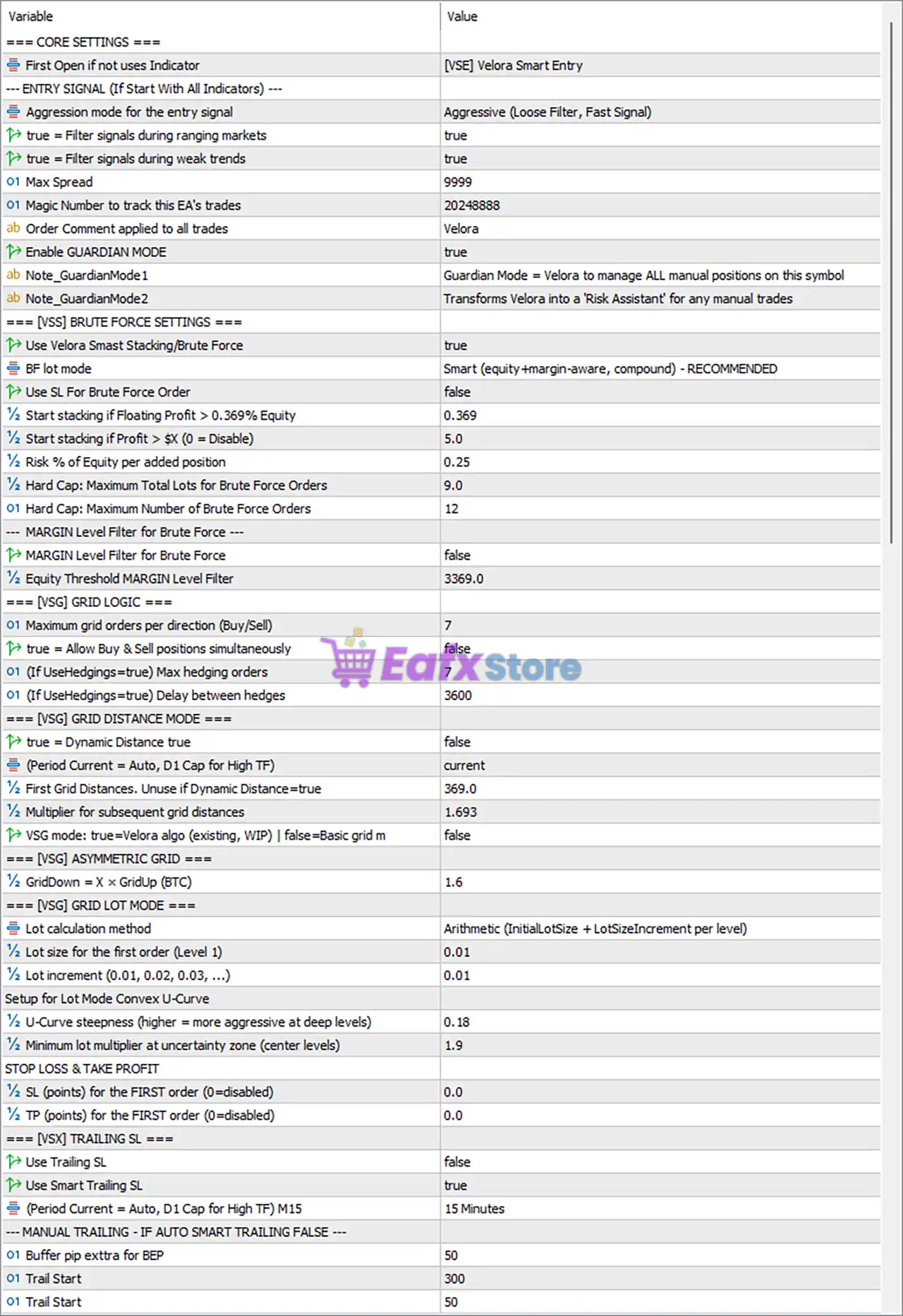
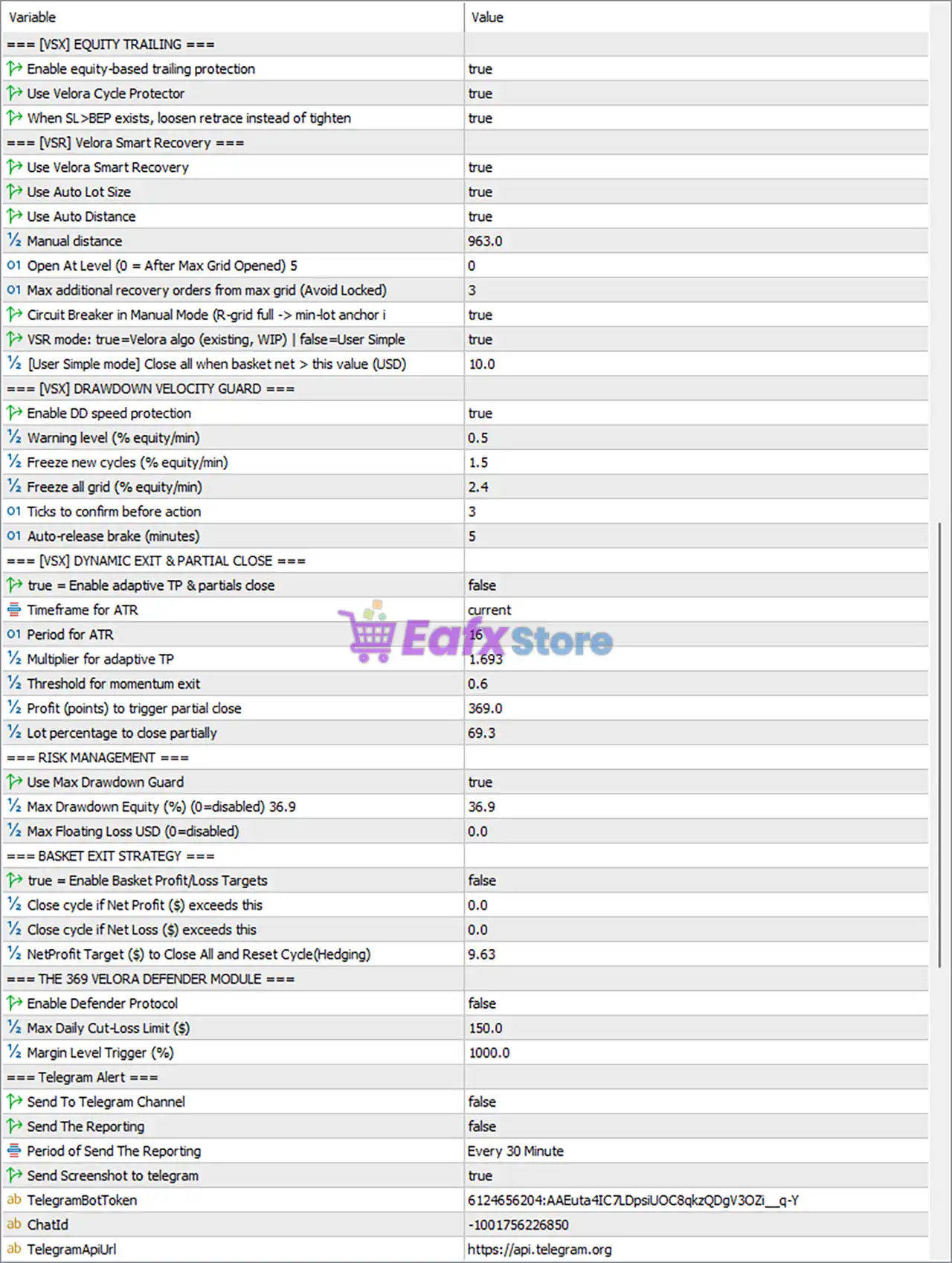
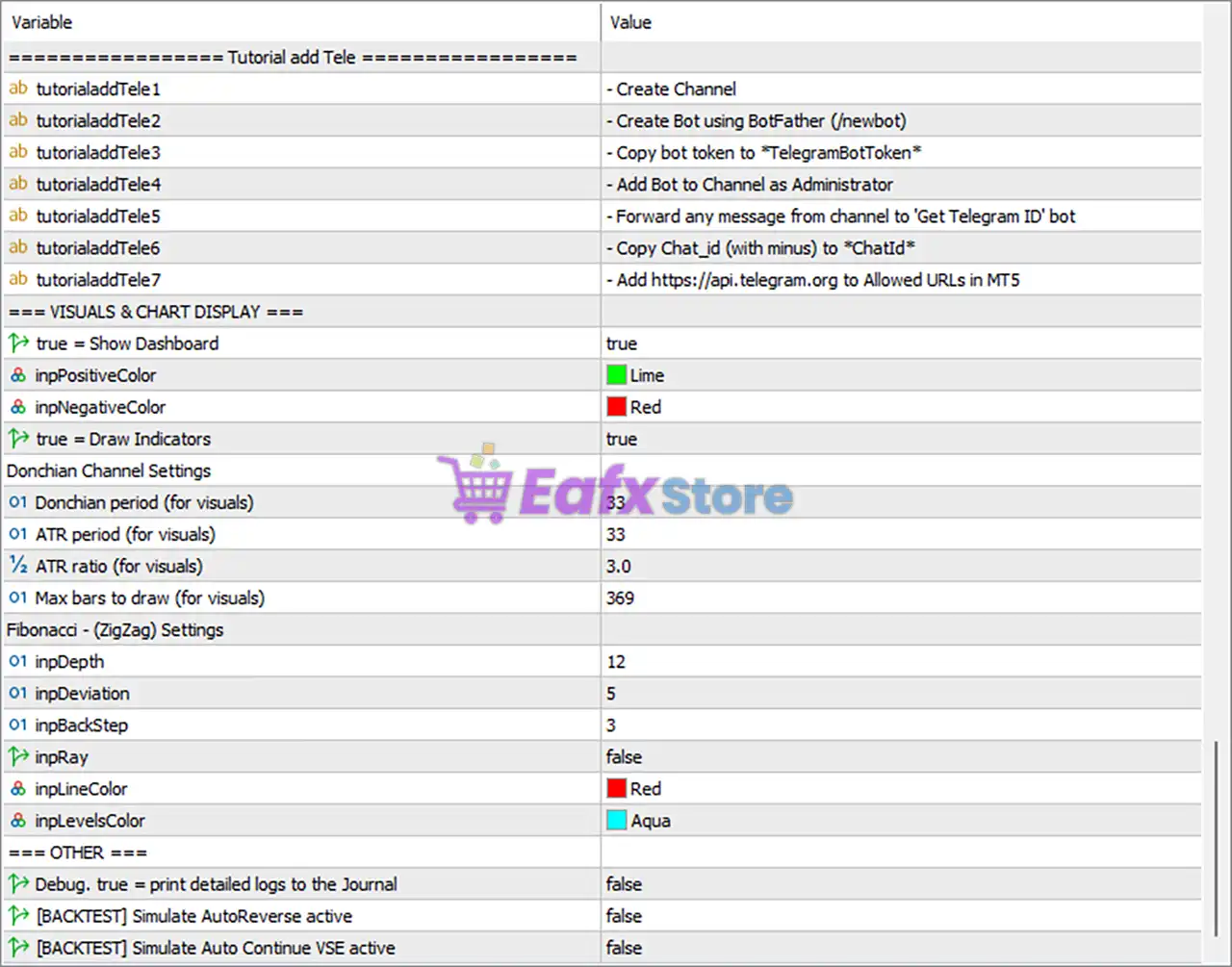
Below are the details of the parameters in the advisor’s trading system settings table:
Velora MT5 Settings Panel
Velora MT5 Setting Panel
Velora MT5 EA Settings Panel
Core Settings
🔹 First Open if not uses Indicator = [VSE] Velora Smart Entry – Uses the Velora Smart Entry engine for the initial trade when indicator-based entry is disabled.
Entry Signal Settings
🔹 Aggression mode for the entry signal = Aggressive (Loose Filter, Fast Signal) – Uses aggressive signal filtering for faster trade entries.
🔹 Filter signals during ranging markets = true – Blocks signals generated during sideways market conditions.
🔹 Filter signals during weak trends = true – Rejects trades when trend strength is insufficient.
🔹 Max Spread = 9999 – Sets the maximum acceptable spread to 9999 points.
🔹 Magic Number to track this EA’s trades = 20248888 – Assigns 20248888 as the unique trade identifier.
🔹 Order Comment applied to all trades = Velora – Adds Velora as the comment on every order.
🔹 Enable GUARDIAN MODE = true – Enables Guardian Mode to manage manual positions on the selected symbol.
🔹 Note_GuardianMode1 = Guardian Mode = Velora to manage ALL manual positions on this symbol – Explains Guardian Mode functionality.
🔹 Note_GuardianMode2 = Transforms Velora into a Risk Assistant for any manual trades – Enables Velora to assist manual trading with automated risk management.
Velora Smart Stacking / Brute Force Settings
🔹 Use Velora Smart Stacking/Brute Force = true – Activates the Smart Stacking engine.
🔹 BF lot mode = Smart (equity+margin-aware, compound) – RECOMMENDED – Uses intelligent equity and margin-based lot sizing.
🔹 Use SL For Brute Force Order = false – Stop Loss is disabled for Brute Force orders.
🔹 Start stacking if Floating Profit > 0.369% Equity = 0.369 – Begins stacking after floating profit exceeds 0.369% of equity.
🔹 Start stacking if Profit > $(0 = Disable) = 5.0 – Starts stacking after reaching $5.0 profit.
🔹 Risk % of Equity per added position = 0.25 – Each additional position risks 0.25% of equity.
🔹 Hard Cap: Maximum Total Lots for Brute Force Orders = 9.0 – Total Brute Force exposure is limited to 9.0 lots.
🔹 Hard Cap: Maximum Number of Brute Force Orders = 12 – Limits Brute Force orders to 12.
🔹 MARGIN Level Filter for Brute Force = false – Margin level filtering is disabled.
🔹 Equity Threshold MARGIN Level Filter = 3369.0 – Margin filter threshold is 3369.0.
Grid Logic
🔹 Maximum grid orders per direction (Buy/Sell) = 7 – Allows up to 7 grid orders per direction.
🔹 Allow Buy & Sell positions simultaneously = false – Hedging between Buy and Sell grids is disabled.
🔹 Max hedging orders = 7 – Allows up to 7 hedge orders if enabled.
🔹 Delay between hedges = 3600 – Waits 3600 seconds before opening another hedge.
Grid Distance Mode
🔹 Dynamic Distance = false – Uses fixed grid spacing.
🔹 Period Current = current – Uses the current chart timeframe.
🔹 First Grid Distance = 369.0 – Initial spacing between grid orders is 369.0 points.
🔹 Multiplier for subsequent grid distances = 1.693 – Expands grid spacing by 1.693x.
🔹 VSG mode = false – Uses the standard grid algorithm instead of the Velora Smart Grid.
Asymmetric Grid
🔹 GridDown = X × GridUp (BTC) = 1.6 – Downward grid spacing equals 1.6× upward spacing.
Grid Lot Mode
🔹 Lot calculation method = Arithmetic (InitialLotSize + LotSizeIncrement per level) – Uses arithmetic lot progression.
🔹 Lot size for the first order = 0.01 – Initial trade size is 0.01 lot.
🔹 Lot increment = 0.01 – Each grid level increases by 0.01 lot.
Convex U-Curve Settings
🔹 U-Curve steepness = 0.18 – Controls the aggressiveness of lot progression.
🔹 Minimum lot multiplier at uncertainty zone = 1.9 – Uses 1.9x minimum multiplier during uncertainty.
Stop Loss & Take Profit
🔹 SL (points) for the FIRST order = 0.0 – No Stop Loss is applied.
🔹 TP (points) for the FIRST order = 0.0 – No fixed Take Profit is applied.
Trailing Stop
🔹 Use Trailing SL = false – Manual trailing stop is disabled.
🔹 Use Smart Trailing SL = true – Enables adaptive trailing stop.
🔹 Trailing timeframe = 15 Minutes – Smart trailing calculations use the M15 timeframe.
🔹 Buffer pip extra for BEP = 50 – Adds 50 points beyond break-even.
🔹 Trail Start = 300 – Begins trailing after 300 points profit.
🔹 Trail Step = 50 – Updates trailing stop every 50 points.
Equity Trailing
🔹 Enable equity-based trailing protection = true – Protects accumulated account equity.
🔹 Use Velora Cycle Protector = true – Enables cycle-level equity protection.
🔹 When SL>BEP exists, loosen retrace instead of tighten = true – Uses softer retracement rules after break-even.
Velora Smart Recovery
🔹 Use Velora Smart Recovery = true – Enables the Smart Recovery algorithm.
🔹 Use Auto Lot Size = true – Recovery orders use automatic lot sizing.
🔹 Use Auto Distance = true – Recovery spacing adjusts automatically.
🔹 Manual distance = 963.0 – Manual recovery distance is 963.0 points.
🔹 Open At Level = 0 – Recovery starts immediately.
🔹 Max additional recovery orders = 3 – Allows up to 3 recovery orders.
🔹 Circuit Breaker in Manual Mode = true – Activates safety protection during manual recovery.
🔹 VSR mode = true – Uses the advanced Velora Smart Recovery algorithm.
🔹 Close all when basket net > $10.0 = 10.0 – Closes the basket after $10.0 net profit.
Drawdown Velocity Guard
🔹 Enable DD speed protection = true – Monitors rapid equity declines.
🔹 Warning level (% equity/min) = 0.5 – Issues warnings above 0.5% equity decline per minute.
🔹 Freeze new cycles = 1.5 – Stops new cycles after 1.5% decline.
🔹 Freeze all grid = 2.4 – Suspends all grid activity above 2.4% decline.
🔹 Ticks to confirm before action = 3 – Requires 3 ticks confirmation.
🔹 Auto-release brake = 5 – Resumes operation after 5 minutes.
Dynamic Exit & Partial Close
🔹 Enable adaptive TP & partial close = false – Adaptive exits are disabled.
🔹 Timeframe for ATR = current – Uses the current timeframe.
🔹 ATR Period = 16 – ATR calculation period is 16.
🔹 Multiplier for adaptive TP = 1.693 – TP scales by 1.693x ATR.
🔹 Threshold for momentum exit = 0.6 – Momentum exit activates at 0.6.
🔹 Profit to trigger partial close = 369.0 – Partial close begins after 369.0 points.
🔹 Lot percentage to close partially = 69.3 – Closes 69.3% of the position.
Risk Management
🔹 Use Max Drawdown Guard = true – Enables drawdown protection.
🔹 Max Drawdown Equity (%) = 36.9 – Maximum equity drawdown is 36.9%.
🔹 Max Floating Loss USD = 0.0 – Floating loss limit is disabled.
Basket Exit Strategy
🔹 Enable Basket Profit/Loss Targets = false – Basket targets are disabled.
🔹 Close cycle if Net Profit exceeds = 0.0 – Disabled.
🔹 Close cycle if Net Loss exceeds = 0.0 – Disabled.
🔹 Net Profit Target to Close All and Reset Cycle = 9.63 – Basket closes after $9.63 net profit.
Velora Defender Module
🔹 Enable Defender Protocol = false – Defender module is disabled.
🔹 Max Daily Cut-Loss Limit ($) = 150.0 – Daily loss limit is $150.0.
🔹 Margin Level Trigger (%) = 1000.0 – Margin protection activates below 1000%.
Telegram Alerts
🔹 Send To Telegram Channel = false – Telegram notifications are disabled.
🔹 Send The Reporting = false – Automatic reports are disabled.
🔹 Period of Send The Reporting = Every 30 Minute – Reporting interval is 30 minutes.
🔹 Send Screenshot to Telegram = true – Sends screenshots when reporting.
🔹 TelegramBotToken – Stores the Telegram Bot authentication token.
🔹 ChatId – Stores the Telegram Chat ID.
🔹 TelegramApiUrl = https://api.telegram.org – Official Telegram API endpoint.
Telegram Tutorial
🔹 tutorialaddTele1–tutorialaddTele7 – Step-by-step instructions for configuring Telegram Bot integration.
Visual & Chart Display
🔹 Show Dashboard = true – Displays the dashboard.
🔹 Positive Color = Lime – Positive values appear in Lime.
🔹 Negative Color = Red – Negative values appear in Red.
🔹 Draw Indicators = true – Displays indicator overlays.
Donchian Channel Settings
🔹 Donchian period = 33 – Donchian lookback period.
🔹 ATR period = 33 – ATR period for visualization.
🔹 ATR ratio = 3.0 – ATR multiplier is 3.0.
🔹 Max bars to draw = 369 – Draws up to 369 historical bars.
Fibonacci (ZigZag) Settings
🔹 Depth = 12 – ZigZag depth parameter.
🔹 Deviation = 5 – ZigZag deviation.
🔹 BackStep = 3 – ZigZag backstep.
🔹 Ray = false – Ray extension is disabled.
🔹 Line Color = Red – ZigZag line color.
🔹 Levels Color = Aqua – Fibonacci level color.
Other Settings
🔹 Debug = false – Detailed logging is disabled.
🔹 [BACKTEST] Simulate AutoReverse active = false – AutoReverse simulation is disabled.
🔹 [BACKTEST] Simulate Auto Continue VSE active = false – Auto Continue simulation is disabled.
Conclusion
Velora MT5 is a highly sophisticated Expert Advisor that integrates intelligent trade entry, adaptive grid management, Smart Recovery, equity protection, advanced trailing technology, and comprehensive risk controls into a single automated trading solution.
With flexible lot management, Guardian Mode, Telegram integration, powerful visualization tools, and multiple safety layers, Velora MT5 provides both professional and advanced retail traders with extensive customization for automated portfolio management while maintaining strong account protection.
FAQs
❓ What is Guardian Mode in Velora MT5?
Guardian Mode transforms Velora into a risk management assistant that automatically manages manual positions on the selected trading symbol.
❓ Does Velora MT5 support automatic recovery?
Yes. The built-in Velora Smart Recovery (VSR) system automatically manages recovery orders using intelligent lot sizing and adaptive spacing.
❓ Can Velora MT5 send Telegram notifications?
Yes. The EA supports Telegram alerts, screenshots, and scheduled reporting once the Bot Token and Chat ID are configured.
❓ Does Velora MT5 include equity protection?
Yes. The EA provides equity trailing, drawdown guards, cycle protection, drawdown velocity monitoring, and configurable maximum drawdown limits.
❓ Can Velora MT5 manage both manual and automated trades?
Yes. Besides fully automated trading, Guardian Mode allows Velora MT5 to supervise and protect manually opened positions using its advanced risk management engine.
User Reviews
Only logged in customers who have purchased this product may leave a review.
❓ What is Velora MT5 designed for?
Velora MT5 is an intelligent grid trading system that combines four coordinated smart modules to automate entries, grid management, profit stacking, and exits.
❓ How does Velora MT5 improve trade entries?
Velora MT5 uses its Smart Entry module to analyze market conditions, learn from previous trades, and block low-quality setups before opening positions.
❓ Does Velora MT5 use adaptive grid management?
Yes. Velora MT5 dynamically adjusts grid spacing and lot sizing based on market volatility, trend strength, and built-in safety conditions.
❓ What is the Smart Stacking feature in Velora MT5?
Velora MT5 increases winning positions only after a profitable cycle is secured, helping maximize gains while keeping overall exposure under strict control.
❓ How does Velora MT5 manage trade exits?
Velora MT5 uses ATR-based trailing stops, automatic break-even calculations, and multi-timeframe analysis to optimize exits without manual adjustments.
❓ Can Velora MT5 protect my manual trades?
Yes. Velora MT5 includes Guardian Mode, automatically applying Stop Loss, Take Profit, and trailing management to manually opened positions.
❓ Does Velora MT5 continue learning over time?
Yes. Velora MT5 stores trading experience in persistent memory files, allowing the Smart Entry module to improve decision-making across future sessions.
❓ What market is recommended for Velora MT5?
Velora MT5 is primarily optimized and extensively tested on XAUUSD using the H1 timeframe, although it can operate on other instruments.
❓ Is a VPS recommended for Velora MT5?
Yes. Velora MT5 performs best on a VPS, ensuring uninterrupted operation while allowing its learning engine to continuously build trading experience.
❓ Can I customize the trading behavior in Velora MT5?
Yes. Velora MT5 lets users configure entry modes, grid settings, stacking options, exit preferences, dashboard display, and manual risk management controls.
-
 Original price was: $2,000.00.$199.00Current price is: $199.00.
 -
 Original price was: $30,000.00.$599.00Current price is: $599.00.
 -
 Original price was: $3,750.00.$599.00Current price is: $599.00.
 -
 Original price was: $30,000.00.$599.00Current price is: $599.00.
-
 0Original price was: $290.00.$179.00Current price is: $179.00.
 -
 3Original price was: $199.00.$159.00Current price is: $159.00.
 -
 0Original price was: $500.00.$199.00Current price is: $199.00.
 -
 27Original price was: $60,000.00.$239.00Current price is: $239.00.
There are no reviews yet.