





KingBacchusI EA MT5 (Latest version) - Unlimited

Subscriptions for Special Plan
- 30 EA package is more economical!
- Special package with 99%
- Download 1 EA/Day

Subscriptions for Premium Membership
- Download Unlimited in 1 Year
- Get 100% Discount
- Get free access to all

Subscriptions for Gold Membership
- 1 Year Membership
- Get 100% Discount
- Access EA+Indicator+Course
Frequently bought together 🎁
Add these products to enhance your purchase



Quick Overview
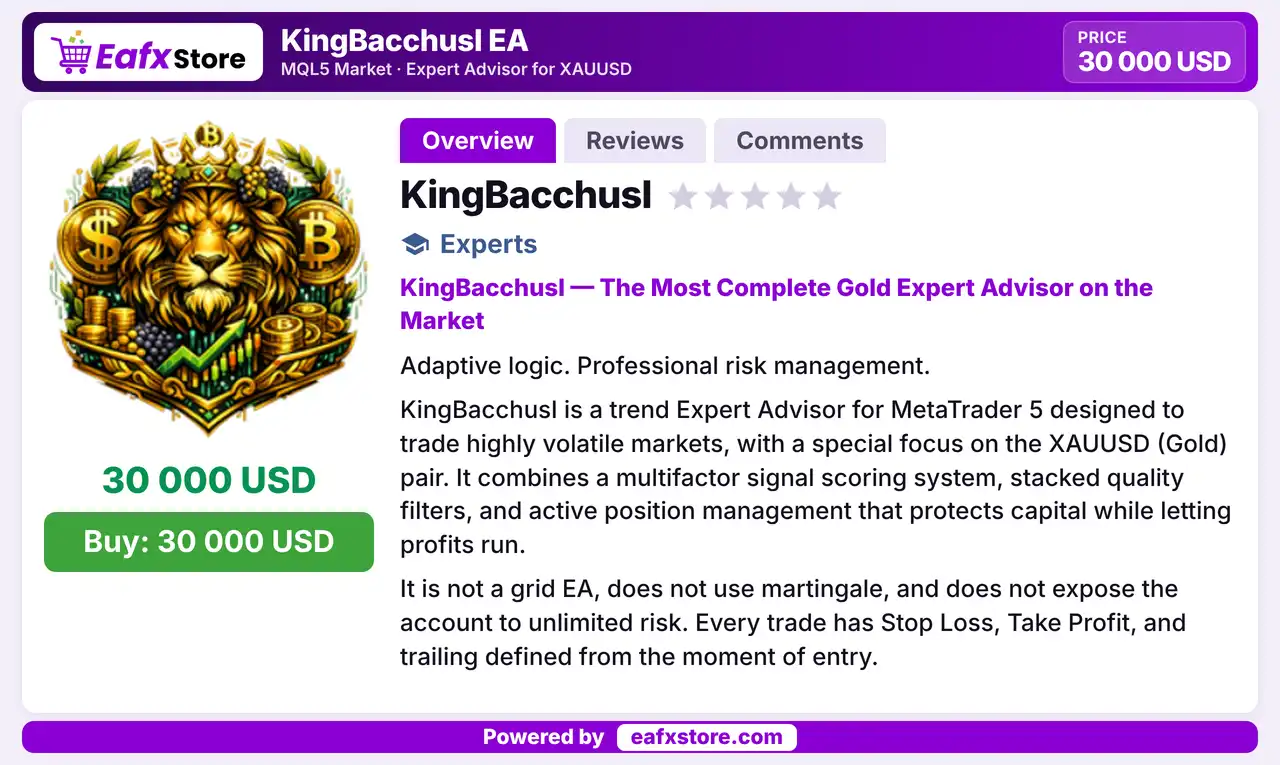
KingBacchusI EA is a trend robot for volatile markets, with a main focus on XAUUSD. It scores each signal across four market dimensions, passes it through stacked quality filters and manages open trades with partial profit taking, break-even and an ATR trailing stop.
Best For:
✅ Gold traders who like scored signals.
✅ Users who want breakout or pullback entries.
✅ Traders who value layered filters.
✅ Users who want a circuit breaker.
What is KingBacchusI EA MT5?
KingBacchusI EA is an Expert Advisor (EA) for MetaTrader 5, designed for volatile markets with a special focus on gold. It combines a signal scoring system, stacked quality filters and active position management.
Traders can choose between breakout and pullback entries, rely on a circuit breaker for losing streaks and review results through chart panels and an export module.
⭐ Vendor Website: View here
⭐ Delivery time 24h-48h after payment.
⭐ Refund if not delivered.
⭐ You will receive the current version without any limitations (ID+Time).
KingBacchusI EA MT5 Review
How Does KingBacchusI EA MT5 Work?
Signal Scoring
Trend, momentum, volatility and confluence form a score, and a trade is considered only when the score is above the threshold.
Entry and Filters
Breakout or pullback entries must pass time, spread, ATR, RSI, ADX, higher timeframe and market context checks.
Trade Management
The stop loss uses a structural or ATR level, with a partial take profit, break-even and an ATR trailing stop.
Protection and Testing
A circuit breaker pauses trading after losses, and out-of-sample testing with trade export supports review.
Trading Strategy
Score Every Signal
Trend strength, momentum, volatility and confluence are combined into one score, and a trade is considered only above a set threshold.
Choose Breakout or Pullback
Breakout mode enters on a band break confirmed by volume, while pullback mode waits for a retrace toward the long EMA before entering.
Pass Stacked Filters
Time, spread, ATR, RSI, ADX, higher timeframe and market context checks must all agree before an order is sent to the market.
Manage Each Ticket Actively
The stop loss uses a structural level or ATR, part of the trade can close at the first target and the stop can move to break-even.
Trail and Pause
An ATR trailing stop follows price, and a circuit breaker halts trading after a losing streak or a daily drop in the balance.
Historical Trading Results Performance
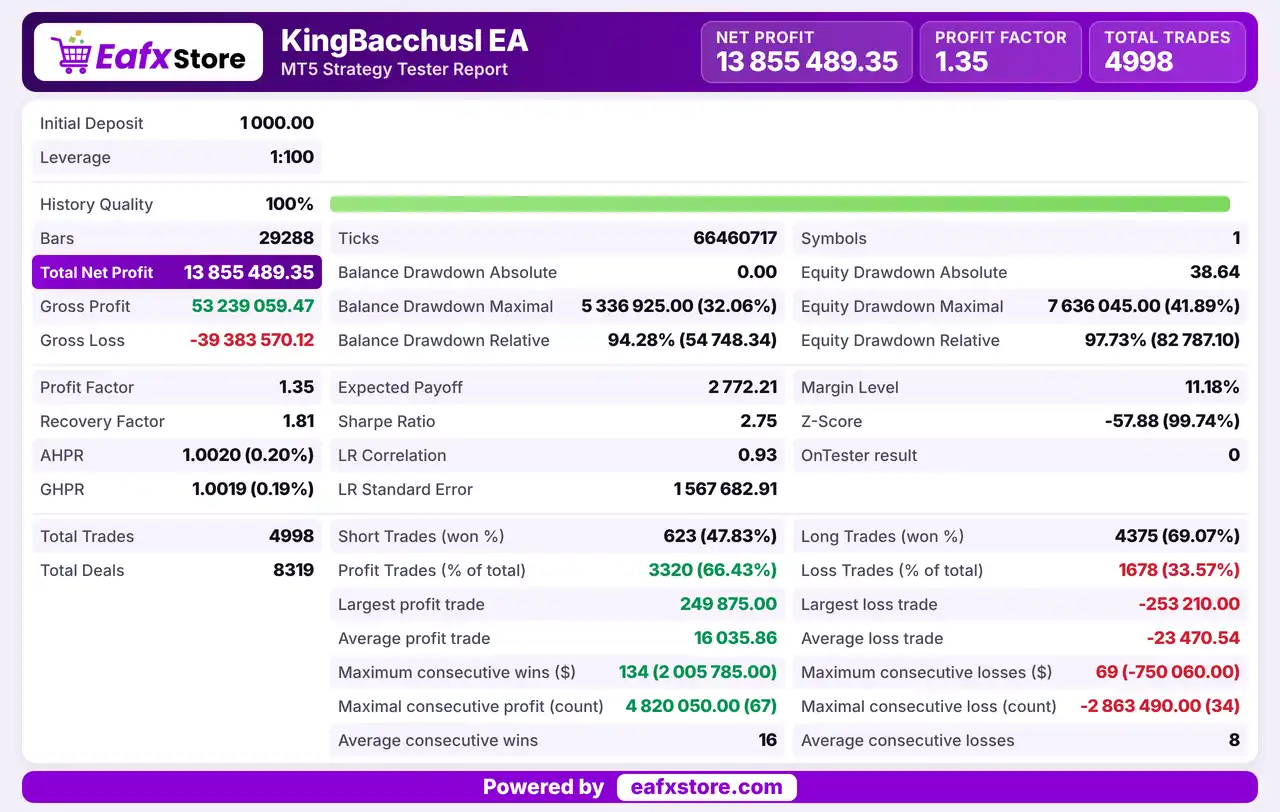
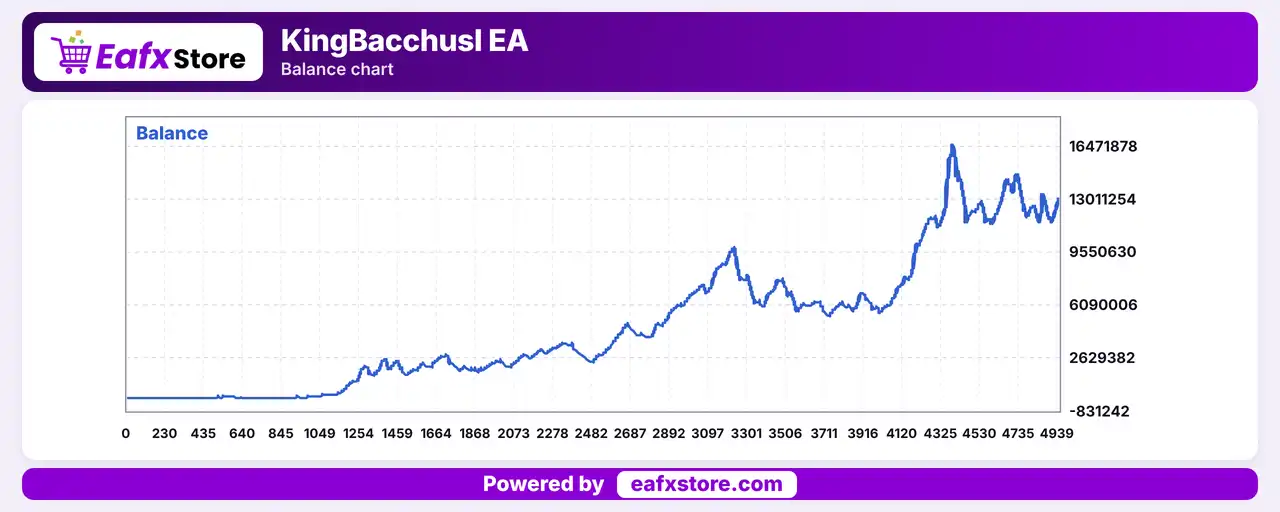
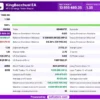
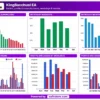
The backtest report shows a total net profit of $13,855,489.35 from an initial deposit of $1,000, with 4,998 trades recorded.
KingBacchusI EA MT5 Backtest Reuslts
KingBacchusI MT5 Backtest Reuslts
| Parameter | Results |
|---|---|
| Initial Deposit | $1,000 |
| Leverage | 1:100 |
| Total Net Profit | $13,855,489.35 |
| Gross Profit | 53,239,059.47 |
| Gross Loss | -39,383,570.12 |
| Profit Factor | 1.35 |
| Total Trades | 4,998 |
| Equity Drawdown Maximal | 41.89% |
Key Features of KingBacchusI EA MT5
Four Part Signal Scoring
Trend, momentum, volatility and confluence each contribute to a score, which turns many indicators into one clear entry decision.
Breakout and Pullback Modes
Two entry modes let the trader match the EA to fast macro sessions or to steadier trending markets with a more selective approach.
Stacked Quality Filters
Time, spread, ATR, RSI, ADX, higher timeframe trend and market context filters reduce entries in sideways or unstable markets.
Partial Take Profit and Break-even
Part of the position closes at the first target, and the stop can move to break-even, which secures gains without closing the whole trade.
ATR Trailing Stop
The trailing stop follows price at an ATR based distance and can start from entry or after break-even, with the target moving along with it.
Circuit Breaker and Panels
Trading pauses after a losing streak or a daily drop, while a chart panel and a performance panel show the filters, the score and the results.
Risk Management
Filters Reduce Trades, Not Risk
Eight checks can screen out poor setups, but a trade that passes them can still lose money.
A Stop Loss Can Still Slip
Gaps and fast moves on gold can pass the stop-loss level, so the real loss can be larger than the planned one.
Early Exits Cut Winners
Partial closing, break-even and trailing protect gains, but they can also close a trade before it reaches the full take-profit.
Learning Is Based on the Past
The adaptive threshold follows earlier results, so a change in market behavior can make its choices less reliable.
The Risk Claims Are Not Proof
The product describes limited risk and no martingale or grid, but only a demo test can confirm how it behaves.
What Sets It Apart
Scored Decisions
A combined score lets the EA weigh several signals together instead of reacting to a single indicator.
Eight Layers of Checks
The number of filters before execution is larger than in many trend robots, which aims to cut weak setups.
Self Adjusting Threshold
The minimum score is described as changing with past results in each market context, without a manual reset.
Built in Analysis Tools
Trade export, in-sample and out-of-sample metrics and a custom fitness function support serious testing.
Who Should Use KingBacchusI EA MT5?
Gold Trend Traders
People who want a rule based system with scored signals and clear exits for volatile markets such as gold.
Detail Oriented Testers
Users who will study the filters, the modes and the out-of-sample results before trading live with real money.
Risk Aware Traders
Those who value a circuit breaker, a spread limit and a managed exit on every single position they open.
Not for Traders Who
Want a plain one click setup, a published track record or any guaranteed profit from an automated trading system.
Recommended Trading Conditions
For the best performance, the developer recommends:
| Features | Type |
|---|---|
| Trading platform | MetaTrader 5 (MT5) |
| Time frames | M15, M30, H1 |
| Currency pairs | XAUUSD / GOLD |
| Minimum / Recommended deposit | $500+ |
| Minimum / Recommended leverage | Any |
| Account type | Standard, ECN |
| Additional services | Unlock and Decompile |
| Recommended brokers | Exness Broker, Icmarkets Broker |
| Recommended VPS | MyfxVPS.com (Blue VPS, Golden VPS). Lowest Latency, 2 week Free Trial, 100% Free for 12-18 Months. |
Product Download Package?
The download package of the product suite includes:
✅ Experts: KingBacchusI EA.ex5
Final Verdict
KingBacchusI EA MT5 is a trend robot focused on gold that scores each signal, offers breakout and pullback entries, applies stacked quality filters and manages every trade with partial exits, break-even and an ATR trailing stop. A circuit breaker and an adaptive threshold add control. It suits detail oriented traders who enjoy tuning and reviewing their settings. Its risk claims are not backed by published results and the many settings need time to learn, so a long demo test should come before any live trading.
🔢 KingBacchusI EA MT5 Settings Guide: Complete Input Parameters Explained
KingBacchusI EA MT5 is an automated trading Expert Advisor with configurable entry logic, EMA pullback detection, dynamic price bands, volume confirmation, and multi-timeframe trend filtering. Its settings also include ATR-based stop-loss and take-profit calculations, momentum and ADX filters, adaptive position sizing, partial profit-taking, breakeven protection, trailing stops, and daily drawdown controls.
The EA provides additional options for limiting open positions, filtering trading conditions, tracking performance, and exporting backtest trades. This guide explains every setting visible in the supplied input panels while preserving the original parameter names, values, and date-time details.
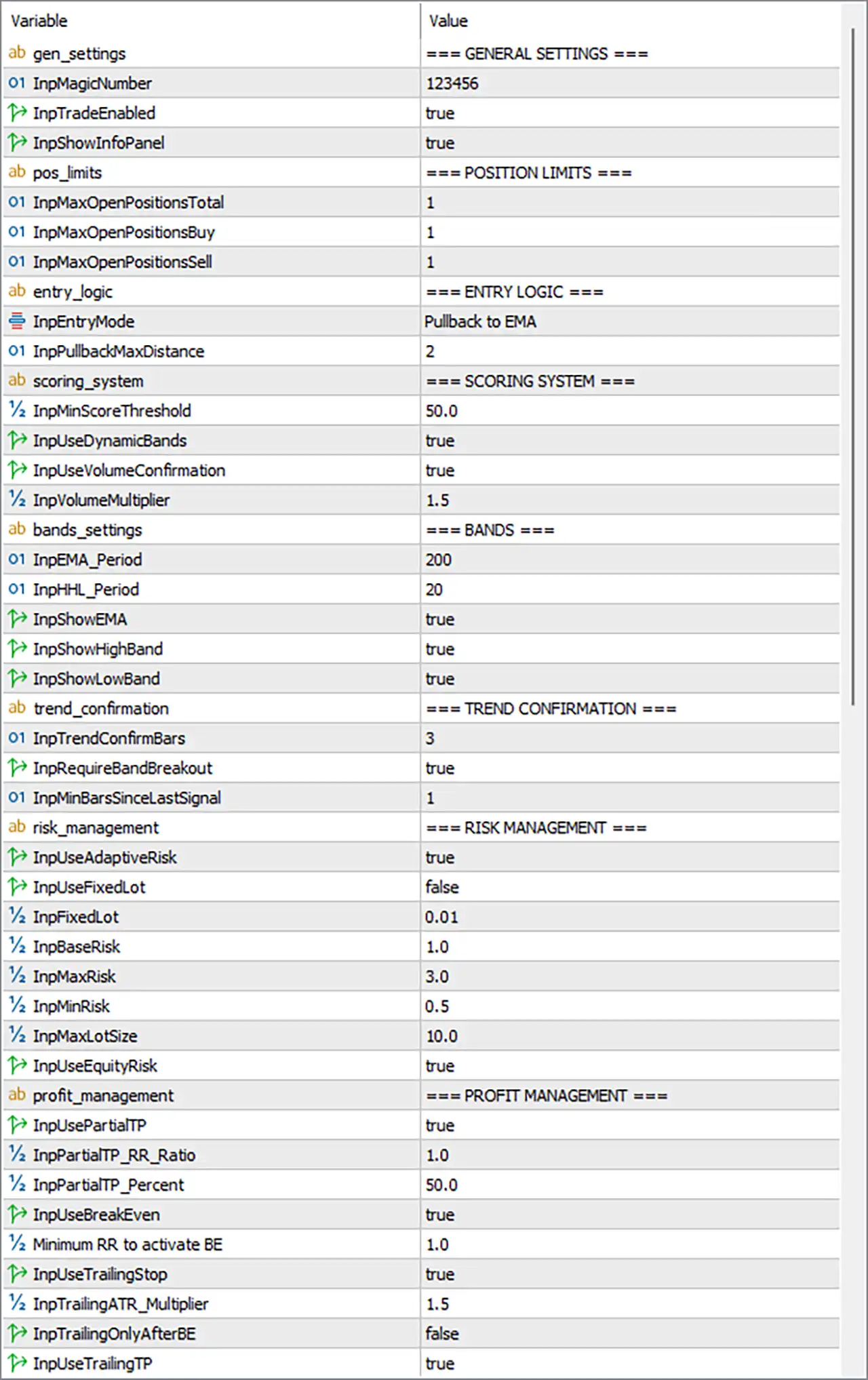
KingBacchusI EA MT5 Settings Panel
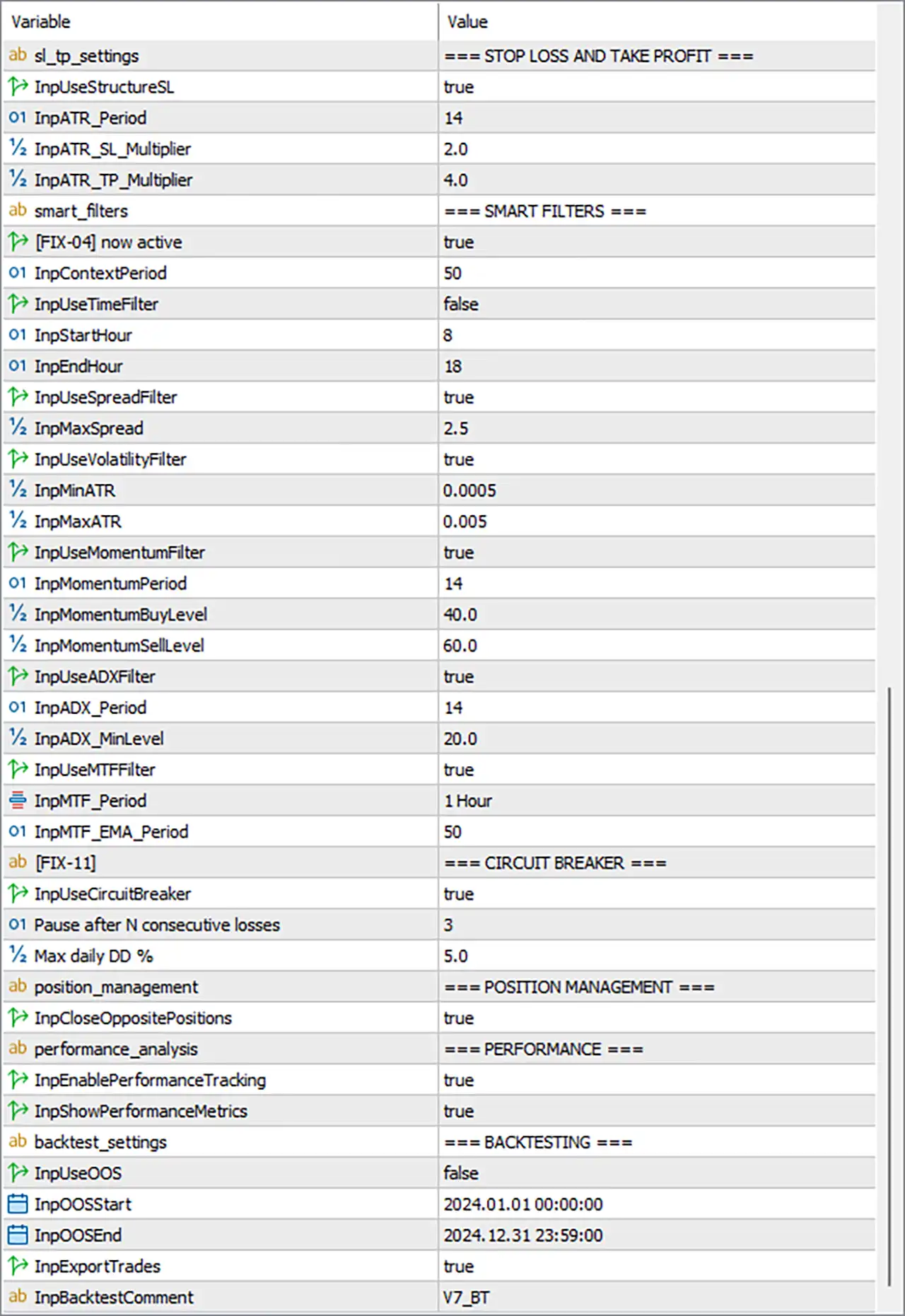
KingBacchusI EA Settings Panel
⚙️ General Settings
🔹 gen_settings = GENERAL SETTINGS: Section heading for the EA’s core operating parameters.
🔹 InpMagicNumber = 123456: Sets the EA’s magic number to 123456, allowing its trades to be identified separately from trades managed by other Expert Advisors.
🔹 InpTradeEnabled = true: Enables the EA’s trading functionality, allowing it to place trades when the configured entry conditions and filters are satisfied.
🔹 InpShowInfoPanel = true: Enables the on-chart information panel, making the EA’s available status or trading information visible on the chart.
⚙️ Position Limits
🔹 pos_limits = POSITION LIMITS: Section heading for controlling the number of open positions.
🔹 InpMaxOpenPositionsTotal = 1: Limits the total number of open positions managed under this rule to 1, preventing the EA from opening multiple simultaneous positions if the limit is enforced as configured.
🔹 InpMaxOpenPositionsBuy = 1: Sets the maximum number of simultaneous buy positions to 1.
🔹 InpMaxOpenPositionsSell = 1: Sets the maximum number of simultaneous sell positions to 1.
⚙️ Entry Logic
🔹 entry_logic = ENTRY LOGIC: Section heading for the EA’s entry method and pullback conditions.
🔹 InpEntryMode = Pullback to EMA: Selects the EMA pullback entry mode, which generally looks for price to retrace toward an Exponential Moving Average before considering a trade.
🔹 InpPullbackMaxDistance = 2: Sets the maximum permitted pullback distance to 2 in the EA’s internal measurement units. The exact meaning depends on whether the implementation measures distance in points, pips, price units, or another scale.
⚙️ Scoring System
🔹 scoring_system = SCORING SYSTEM: Section heading for the conditions used to assess the quality of potential entries.
🔹 InpMinScoreThreshold = 50.0: Sets the minimum entry score to 50.0. If the EA uses a 0–100 scoring scale, a signal would generally need to achieve at least 50.0 to qualify.
🔹 InpUseDynamicBands = true: Enables dynamic trading bands, allowing the EA to use its configured band calculations when evaluating potential entry conditions.
🔹 InpUseVolumeConfirmation = true: Enables volume confirmation, requiring the EA’s volume-related entry condition to be satisfied according to its programmed logic.
🔹 InpVolumeMultiplier = 1.5: Sets the volume multiplier to 1.5, potentially requiring measured volume to reach a multiple of a reference volume before confirming a signal.
⚙️ Bands Settings
🔹 bands_settings = BANDS: Section heading for the moving average and price-band display or calculation parameters.
🔹 InpEMA_Period = 200: Sets the EMA period to 200 bars, providing a longer-term moving-average reference for price analysis.
🔹 InpHHL_Period = 20: Sets the HHL period to 20 bars. The exact meaning of HHL depends on the EA’s internal indicator definition, but it is likely used in calculating high/low-related bands or levels.
🔹 InpShowEMA = true: Enables the display of the EMA on the chart, assuming the EA’s visual panel supports indicator plotting.
🔹 InpShowHighBand = true: Enables the display of the upper or high band on the chart.
🔹 InpShowLowBand = true: Enables the display of the lower or low band on the chart.
⚙️ Trend Confirmation
🔹 trend_confirmation = TREND CONFIRMATION: Section heading for confirming signal direction and validating band-based entries.
🔹 InpTrendConfirmBars = 3: Sets the trend-confirmation requirement to 3 bars, allowing the EA to evaluate multiple bars when checking whether a trend or signal condition is sufficiently established.
🔹 InpRequireBandBreakout = true: Requires a band breakout as part of the entry logic, subject to the EA’s implementation of a valid breakout.
🔹 InpMinBarsSinceLastSignal = 1: Requires at least 1 bar since the previous signal before another signal can qualify, potentially helping reduce repeated entries from closely spaced signals.
⚙️ Risk Management
🔹 risk_management = RISK MANAGEMENT: Section heading for position sizing and risk-related controls.
🔹 InpUseAdaptiveRisk = true: Enables adaptive risk sizing, allowing the EA to adjust its calculated risk allocation according to its internal risk-management rules.
🔹 InpUseFixedLot = false: Disables the fixed-lot mode, indicating that the EA is intended to use its alternative position-sizing method rather than always trading the same lot size.
🔹 InpFixedLot = 0.01: Sets the fixed lot size to 0.01 for use when fixed-lot mode is enabled or when the EA otherwise references this input.
🔹 InpBaseRisk = 1.0: Sets the base risk parameter to 1.0. Its unit may represent a percentage or an internal risk scale, so the exact interpretation should be confirmed in the EA’s implementation.
🔹 InpMaxRisk = 3.0: Sets the maximum risk parameter to 3.0, defining the configured upper limit for the adaptive risk calculation.
🔹 InpMinRisk = 0.5: Sets the minimum risk parameter to 0.5, defining the configured lower limit for the adaptive risk calculation.
🔹 InpMaxLotSize = 10.0: Sets the maximum permitted lot-size parameter to 10.0, subject to broker volume limits and the EA’s position-sizing logic.
🔹 InpUseEquityRisk = true: Enables the use of account equity in the risk calculation, if supported by the EA’s sizing implementation. Equity-based sizing can reflect floating profit and loss rather than relying only on the account balance.
⚙️ Profit Management
🔹 profit_management = PROFIT MANAGEMENT: Section heading for partial take-profit, breakeven, and trailing-stop controls.
🔹 InpUsePartialTP = true: Enables partial take-profit management, allowing the EA to close a portion of a position when the configured profit target is reached.
🔹 InpPartialTP_RR_Ratio = 1.0: Sets the partial take-profit risk-to-reward target to 1.0R, meaning a target equal to the initial risk distance under a conventional R-multiple calculation.
🔹 InpPartialTP_Percent = 50.0: Sets the partial closure percentage to 50.0%, so the EA is configured to close half of the position at the partial take-profit level if the feature is triggered.
🔹 InpUseBreakEven = true: Enables breakeven management, allowing the EA to move the stop-loss toward the entry price after the required profit condition is met.
🔹 Minimum RR to activate BE = 1.0: Sets the minimum risk-to-reward ratio for activating breakeven protection to 1.0R.
🔹 InpUseTrailingStop = true: Enables trailing-stop management, allowing the stop-loss to follow favorable price movement according to the EA’s trailing rules.
🔹 InpTrailingATR_Multiplier = 1.5: Sets the ATR multiplier for trailing-stop calculations to 1.5, controlling the volatility-based distance used by the trailing mechanism.
🔹 InpTrailingOnlyAfterBE = false: Disables the requirement that trailing-stop management must wait until breakeven has been activated. The EA may therefore apply its trailing logic before the trade reaches the breakeven trigger, depending on its implementation.
🔹 InpUseTrailingTP = true: Enables the trailing take-profit feature, if supported by the EA’s internal exit-management logic. The exact behavior may differ from a conventional trailing stop, which modifies the stop-loss rather than the take-profit level.
⚙️ Stop-Loss and Take-Profit Settings
🔹 sl_tp_settings = STOP LOSS AND TAKE PROFIT: Section heading for stop-loss and take-profit calculation settings.
🔹 InpUseStructureSL = true: Enables structure-based stop-loss placement, allowing the EA to use a relevant market-structure level when calculating the initial stop-loss.
🔹 InpATR_Period = 14: Sets the ATR calculation period to 14 bars, providing the volatility measurement used by the ATR-based stop-loss and take-profit settings.
🔹 InpATR_SL_Multiplier = 2.0: Sets the ATR stop-loss multiplier to 2.0, indicating a stop-loss distance of approximately two times the ATR if this multiplier is used directly by the EA’s formula.
🔹 InpATR_TP_Multiplier = 4.0: Sets the ATR take-profit multiplier to 4.0, indicating a take-profit distance of approximately four times the ATR if the multiplier is applied directly.
⚙️ Smart Filters
🔹 smart_filters = SMART FILTERS: Section heading for market-condition filters that can help qualify or reject potential trading signals.
🔹 [FIX-04] now active = true: Enables the feature identified by the developer’s internal label [FIX-04]. The exact functional change associated with this label is not specified in the visible input name.
🔹 InpContextPeriod = 50: Sets the context-analysis period to 50 bars, potentially providing a broader reference for evaluating the surrounding market conditions.
🔹 InpUseTimeFilter = false: Disables the time-based trading filter, so the configured start and end hours may not restrict entries while this option remains disabled.
🔹 InpStartHour = 8: Sets the configured trading start hour to 8, corresponding to 08:00 in the EA’s selected time reference if interpreted as a 24-hour clock.
🔹 InpEndHour = 18: Sets the configured trading end hour to 18, corresponding to 18:00 in the EA’s selected time reference if interpreted as a 24-hour clock.
🔹 InpUseSpreadFilter = true: Enables the spread filter, allowing the EA to reject entries when the current spread exceeds its configured threshold.
🔹 InpMaxSpread = 2.5: Sets the maximum permitted spread to 2.5 in the EA’s internal spread units. Confirm whether the value is measured in pips, points, or another price-based unit for the selected symbol.
🔹 InpUseVolatilityFilter = true: Enables the volatility filter, allowing the EA to reject market conditions where measured volatility falls outside the configured range.
🔹 InpMinATR = 0.0005: Sets the minimum ATR threshold to 0.0005. Trading may be filtered out when the calculated ATR falls below this value.
🔹 InpMaxATR = 0.005: Sets the maximum ATR threshold to 0.005. Trading may be filtered out when the calculated ATR exceeds this value.
🔹 InpUseMomentumFilter = true: Enables the momentum filter, requiring the EA’s configured momentum conditions to be considered before a trade is accepted.
🔹 InpMomentumPeriod = 14: Sets the momentum indicator period to 14 bars.
🔹 InpMomentumBuyLevel = 40.0: Sets the momentum threshold for buy signals to 40.0, based on the EA’s internal momentum indicator and comparison rules.
🔹 InpMomentumSellLevel = 60.0: Sets the momentum threshold for sell signals to 60.0, based on the EA’s internal momentum indicator and comparison rules.
🔹 InpUseADXFilter = true: Enables the Average Directional Index filter, allowing the EA to evaluate trend strength before accepting entries.
🔹 InpADX_Period = 14: Sets the ADX calculation period to 14 bars.
🔹 InpADX_MinLevel = 20.0: Sets the minimum ADX threshold to 20.0, potentially requiring a minimum level of trend strength before a trade can qualify.
🔹 InpUseMTFFilter = true: Enables the multi-timeframe filter, allowing the EA to use a higher or otherwise specified timeframe to confirm the entry direction.
🔹 InpMTF_Period = 1 Hour: Sets the multi-timeframe confirmation period to 1 Hour (H1).
🔹 InpMTF_EMA_Period = 50: Sets the EMA period used by the multi-timeframe filter to 50 bars.
⚙️ Circuit Breaker
🔹 [FIX-11] = CIRCUIT BREAKER: Section heading for the loss-control mechanism designed to pause trading when configured loss conditions are reached.
🔹 InpUseCircuitBreaker = true: Enables the circuit breaker, allowing the EA to pause or restrict trading when its loss-related conditions are triggered.
🔹 Pause after N consecutive losses = 3: Sets the consecutive-loss threshold to 3. The EA is configured to pause after three consecutive losing trades, subject to the implementation’s reset and resumption rules.
🔹 Max daily DD % = 5.0: Sets the maximum daily drawdown threshold to 5.0%. With the circuit breaker enabled, this setting can be used to restrict or pause trading after the defined daily loss limit is reached.
⚙️ Position Management
🔹 position_management = POSITION MANAGEMENT: Section heading for position-handling rules.
🔹 InpCloseOppositePositions = true: Enables the option to close opposite positions. When the EA’s qualifying conditions are met, it may close existing positions in the opposite direction before or while managing a new signal.
⚙️ Performance Analysis
🔹 performance_analysis = PERFORMANCE: Section heading for trade tracking and performance reporting.
🔹 InpEnablePerformanceTracking = true: Enables performance tracking, allowing the EA to record trading statistics according to its internal reporting system.
🔹 InpShowPerformanceMetrics = true: Enables the display of performance metrics, making supported statistics available through the EA’s interface or reporting features.
⚙️ Backtesting Settings
🔹 backtest_settings = BACKTESTING: Section heading for out-of-sample testing and trade-export settings.
🔹 InpUseOOS = false: Disables the out-of-sample (OOS) testing option. The configured OOS date range is still present, but whether it is used depends on enabling this switch.
🔹 InpOOSStart = 2024.01.01 00:00:00: Sets the configured out-of-sample start date and time to January 1, 2024, at 00:00:00.
🔹 InpOOSEnd = 2024.12.31 23:59:00: Sets the configured out-of-sample end date and time to December 31, 2024, at 23:59:00.
🔹 InpExportTrades = true: Enables trade exporting, allowing the EA to export supported trade records or results for further analysis.
🔹 InpBacktestComment = V7_BT: Sets the backtest comment or label to V7_BT, which can help identify the corresponding test run or exported results.
🔢 Conclusion
KingBacchusI EA MT5 combines EMA pullback entries, dynamic bands, volume confirmation, trend validation, ATR-based exits, adaptive risk sizing, and automated position management. Its current configuration allows only 1 total open position, enables adaptive risk and equity-based sizing, uses a base risk parameter of 1.0 with a configured range of 0.5–3.0, and enables partial take profit, breakeven protection, and trailing-stop management.
The EA also uses spread, volatility, momentum, ADX, and H1 multi-timeframe filters. Its circuit breaker is enabled with a pause after 3 consecutive losses and a maximum daily drawdown setting of 5.0%. Performance tracking, performance metrics, and trade exporting are enabled, while out-of-sample testing is disabled.
Before live deployment, confirm the EA’s units for InpPullbackMaxDistance, InpMaxSpread, and the ATR thresholds, as well as the exact interpretation of its risk parameters and trailing take-profit feature. Backtesting and demo testing are recommended to verify how the filters, entry logic, and loss controls interact under actual broker conditions.
User Reviews
Only logged in customers who have purchased this product may leave a review.
❓ What is KingBacchusI EA MT5?
A trend Expert Advisor for MetaTrader 5 that scores signals, applies stacked filters and manages trades actively, with a focus on gold.
❓ How does the scoring system in KingBacchusI EA MT5 work?
It combines trend, momentum, volatility and confluence into one score, and a trade is considered only above a set threshold.
❓ What entry modes does KingBacchusI EA MT5 have?
Breakout mode, which enters on a confirmed band break, and pullback mode, which enters on a bounce near the long EMA.
❓ Which timeframes suit KingBacchusI EA MT5?
M15, M30 or H1 are recommended for the main chart.
❓ Is KingBacchusI EA MT5 a grid or martingale EA?
The product describes no grid and no martingale, with a stop loss and a target set at entry. A demo test helps confirm this.
❓ How does KingBacchusI EA MT5 manage open trades?
It uses a structural or ATR stop loss, a partial take profit, an automatic break-even and an ATR trailing stop.
❓ What does the circuit breaker do in KingBacchusI EA MT5?
It pauses trading after a set number of losses in a row or a daily drop in the balance, and it resets on the next day.
❓ Does KingBacchusI EA MT5 learn from past trades?
It records signal patterns by context and adjusts the minimum score threshold, which is said to improve selectivity over time.
-
 Original price was: $30,000.00.$599.00Current price is: $599.00.
 -
 Original price was: $3,750.00.$599.00Current price is: $599.00.
 -
 Original price was: $30,000.00.$599.00Current price is: $599.00.
 -
 Original price was: $999.00.$89.00Current price is: $89.00.
-
 4Original price was: $499.00.$249.00Current price is: $249.00.
 -
 1Original price was: $500.00.$249.00Current price is: $249.00.
 -
 0Original price was: $430.00.$249.00Current price is: $249.00.
 -
 1Original price was: $1,299.00.$249.00Current price is: $249.00.
There are no reviews yet.