


Velora MT5 Settings Explained – Complete Configuration Guide
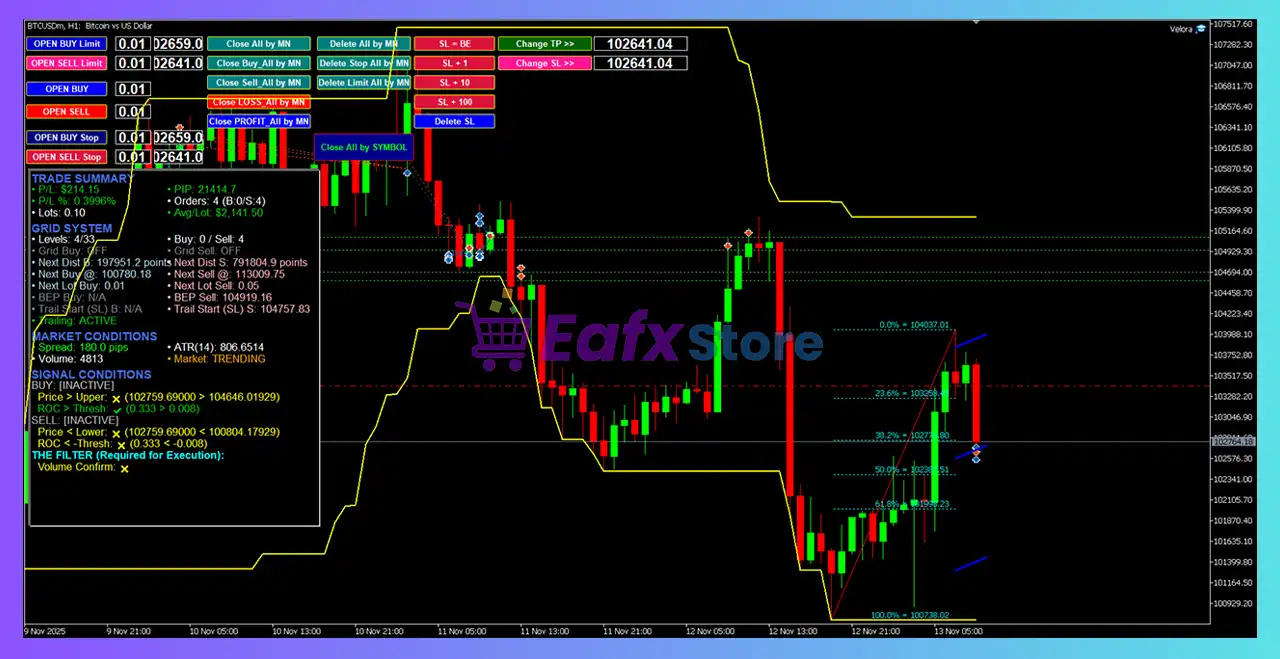
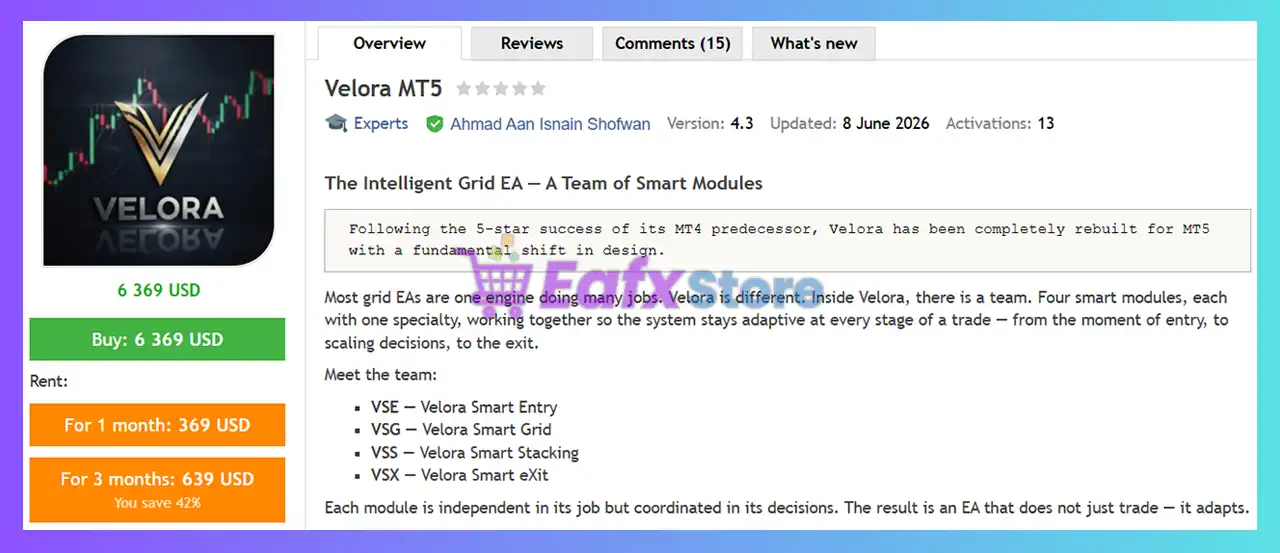
Velora MT5 is a professional MetaTrader 5 Expert Advisor that combines intelligent market entry, adaptive grid trading, Smart Recovery, dynamic equity protection, advanced trailing algorithms, and comprehensive risk management.
Designed for both fully automated trading and manual trade assistance through Guardian Mode, Velora MT5 provides extensive customization options for trade execution, money management, recovery strategies, Telegram notifications, and chart visualization.
Velora MT5 Settings
Below are the details of the parameters in the advisor’s trading system settings table:
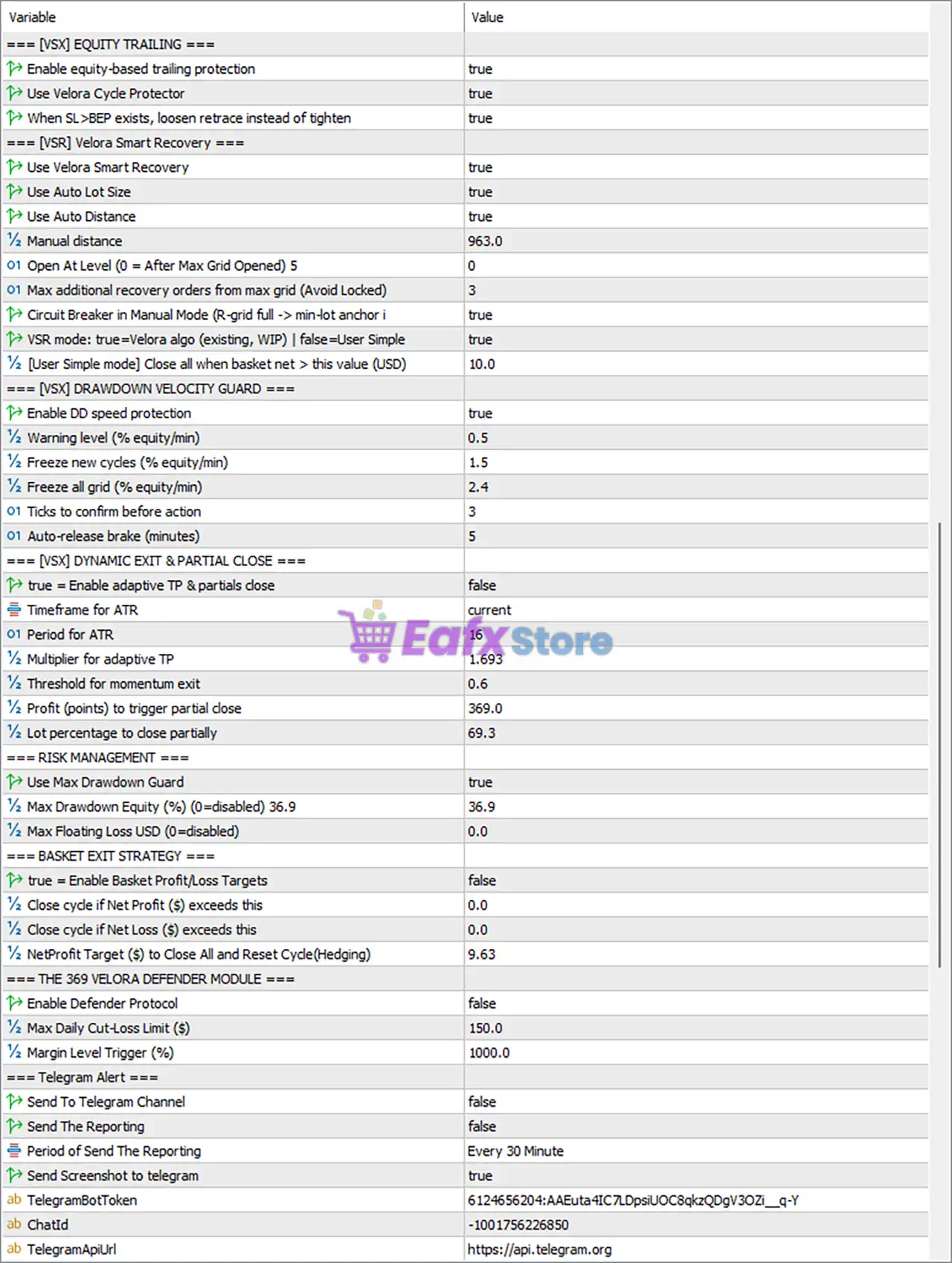
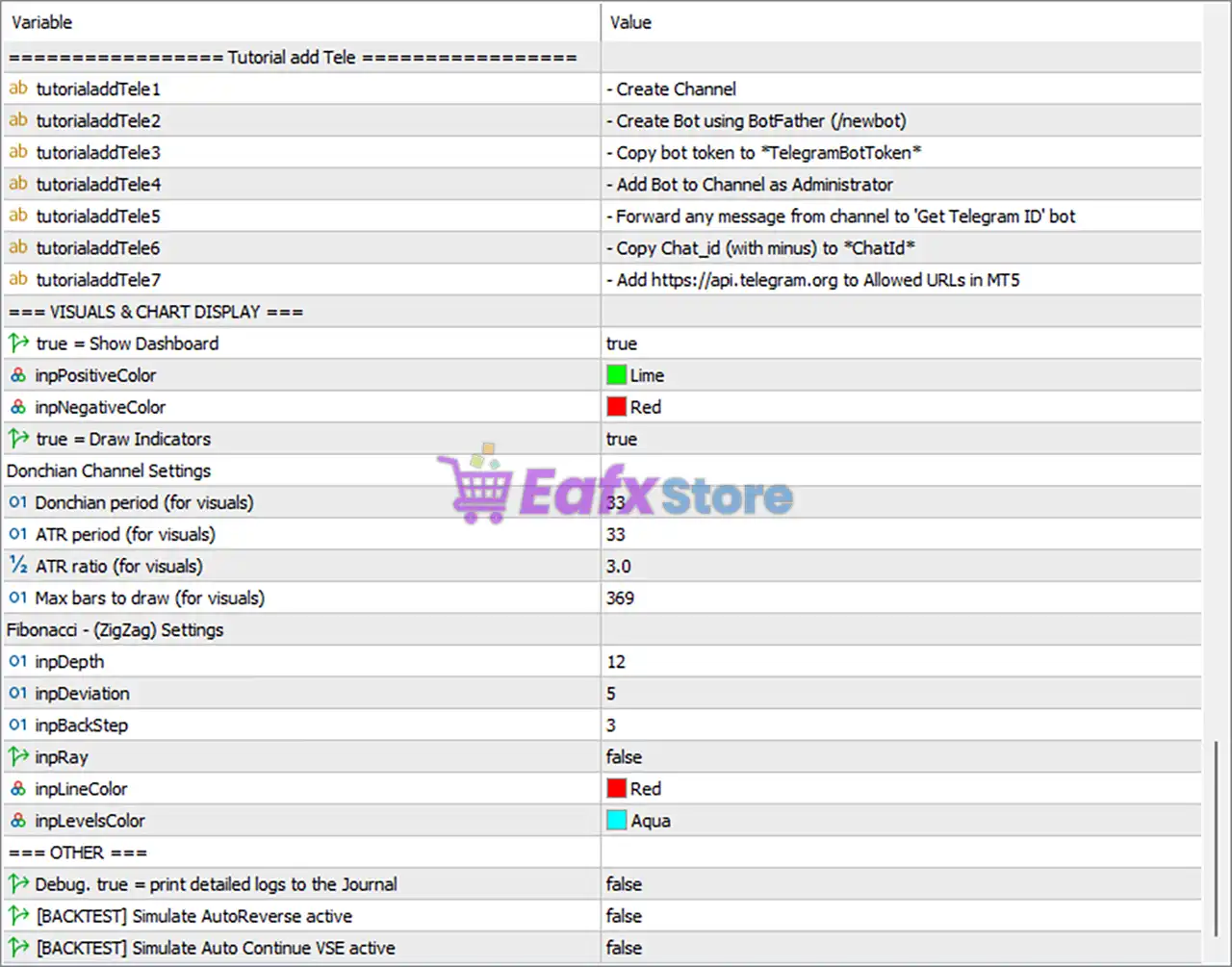
Core Settings
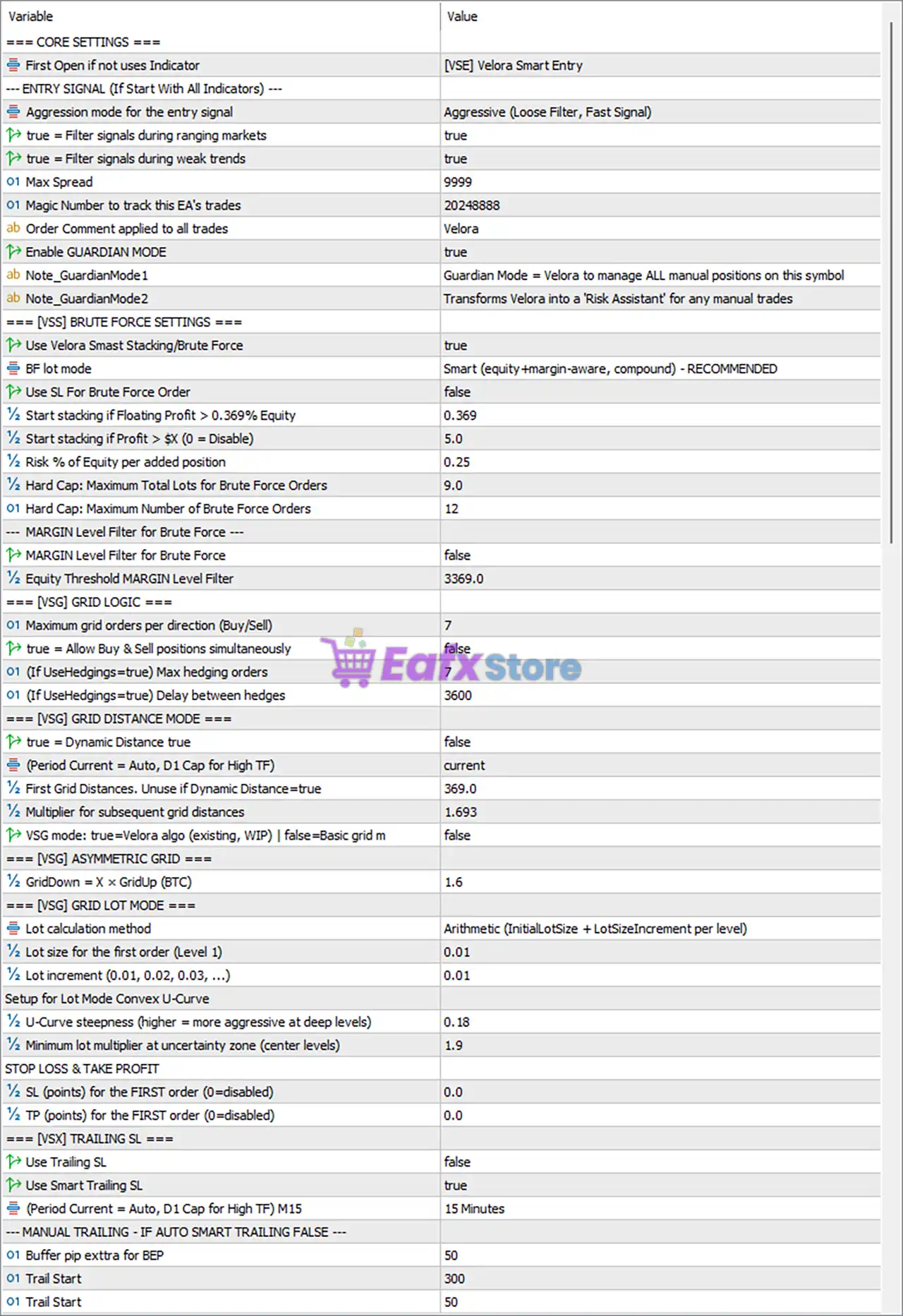
🔹 First Open if not uses Indicator = [VSE] Velora Smart Entry – Uses the Velora Smart Entry engine for the initial trade when indicator-based entry is disabled.
Entry Signal Settings
🔹 Aggression mode for the entry signal = Aggressive (Loose Filter, Fast Signal) – Uses aggressive signal filtering for faster trade entries.
🔹 Filter signals during ranging markets = true – Blocks signals generated during sideways market conditions.
🔹 Filter signals during weak trends = true – Rejects trades when trend strength is insufficient.
🔹 Max Spread = 9999 – Sets the maximum acceptable spread to 9999 points.
🔹 Magic Number to track this EA's trades = 20248888 – Assigns 20248888 as the unique trade identifier.
🔹 Order Comment applied to all trades = Velora – Adds Velora as the comment on every order.
🔹 Enable GUARDIAN MODE = true – Enables Guardian Mode to manage manual positions on the selected symbol.
🔹 Note_GuardianMode1 = Guardian Mode = Velora to manage ALL manual positions on this symbol – Explains Guardian Mode functionality.
🔹 Note_GuardianMode2 = Transforms Velora into a Risk Assistant for any manual trades – Enables Velora to assist manual trading with automated risk management.
Velora Smart Stacking / Brute Force Settings
🔹 Use Velora Smart Stacking/Brute Force = true – Activates the Smart Stacking engine.
🔹 BF lot mode = Smart (equity+margin-aware, compound) - RECOMMENDED – Uses intelligent equity and margin-based lot sizing.
🔹 Use SL For Brute Force Order = false – Stop Loss is disabled for Brute Force orders.
🔹 Start stacking if Floating Profit > 0.369% Equity = 0.369 – Begins stacking after floating profit exceeds 0.369% of equity.
🔹 Start stacking if Profit > $(0 = Disable) = 5.0 – Starts stacking after reaching $5.0 profit.
🔹 Risk % of Equity per added position = 0.25 – Each additional position risks 0.25% of equity.
🔹 Hard Cap: Maximum Total Lots for Brute Force Orders = 9.0 – Total Brute Force exposure is limited to 9.0 lots.
🔹 Hard Cap: Maximum Number of Brute Force Orders = 12 – Limits Brute Force orders to 12.
🔹 MARGIN Level Filter for Brute Force = false – Margin level filtering is disabled.
🔹 Equity Threshold MARGIN Level Filter = 3369.0 – Margin filter threshold is 3369.0.
Grid Logic
🔹 Maximum grid orders per direction (Buy/Sell) = 7 – Allows up to 7 grid orders per direction.
🔹 Allow Buy & Sell positions simultaneously = false – Hedging between Buy and Sell grids is disabled.
🔹 Max hedging orders = 7 – Allows up to 7 hedge orders if enabled.
🔹 Delay between hedges = 3600 – Waits 3600 seconds before opening another hedge.
Grid Distance Mode
🔹 Dynamic Distance = false – Uses fixed grid spacing.
🔹 Period Current = current – Uses the current chart timeframe.
🔹 First Grid Distance = 369.0 – Initial spacing between grid orders is 369.0 points.
🔹 Multiplier for subsequent grid distances = 1.693 – Expands grid spacing by 1.693x.
🔹 VSG mode = false – Uses the standard grid algorithm instead of the Velora Smart Grid.
Asymmetric Grid
🔹 GridDown = X × GridUp (BTC) = 1.6 – Downward grid spacing equals 1.6× upward spacing.
Grid Lot Mode
🔹 Lot calculation method = Arithmetic (InitialLotSize + LotSizeIncrement per level) – Uses arithmetic lot progression.
🔹 Lot size for the first order = 0.01 – Initial trade size is 0.01 lot.
🔹 Lot increment = 0.01 – Each grid level increases by 0.01 lot.
Convex U-Curve Settings
🔹 U-Curve steepness = 0.18 – Controls the aggressiveness of lot progression.
🔹 Minimum lot multiplier at uncertainty zone = 1.9 – Uses 1.9x minimum multiplier during uncertainty.
Stop Loss & Take Profit
🔹 SL (points) for the FIRST order = 0.0 – No Stop Loss is applied.
🔹 TP (points) for the FIRST order = 0.0 – No fixed Take Profit is applied.
Trailing Stop
🔹 Use Trailing SL = false – Manual trailing stop is disabled.
🔹 Use Smart Trailing SL = true – Enables adaptive trailing stop.
🔹 Trailing timeframe = 15 Minutes – Smart trailing calculations use the M15 timeframe.
🔹 Buffer pip extra for BEP = 50 – Adds 50 points beyond break-even.
🔹 Trail Start = 300 – Begins trailing after 300 points profit.
🔹 Trail Step = 50 – Updates trailing stop every 50 points.
Equity Trailing
🔹 Enable equity-based trailing protection = true – Protects accumulated account equity.
🔹 Use Velora Cycle Protector = true – Enables cycle-level equity protection.
🔹 When SL>BEP exists, loosen retrace instead of tighten = true – Uses softer retracement rules after break-even.
Velora Smart Recovery
🔹 Use Velora Smart Recovery = true – Enables the Smart Recovery algorithm.
🔹 Use Auto Lot Size = true – Recovery orders use automatic lot sizing.
🔹 Use Auto Distance = true – Recovery spacing adjusts automatically.
🔹 Manual distance = 963.0 – Manual recovery distance is 963.0 points.
🔹 Open At Level = 0 – Recovery starts immediately.
🔹 Max additional recovery orders = 3 – Allows up to 3 recovery orders.
🔹 Circuit Breaker in Manual Mode = true – Activates safety protection during manual recovery.
🔹 VSR mode = true – Uses the advanced Velora Smart Recovery algorithm.
🔹 Close all when basket net > $10.0 = 10.0 – Closes the basket after $10.0 net profit.
Drawdown Velocity Guard
🔹 Enable DD speed protection = true – Monitors rapid equity declines.
🔹 Warning level (% equity/min) = 0.5 – Issues warnings above 0.5% equity decline per minute.
🔹 Freeze new cycles = 1.5 – Stops new cycles after 1.5% decline.
🔹 Freeze all grid = 2.4 – Suspends all grid activity above 2.4% decline.
🔹 Ticks to confirm before action = 3 – Requires 3 ticks confirmation.
🔹 Auto-release brake = 5 – Resumes operation after 5 minutes.
Dynamic Exit & Partial Close
🔹 Enable adaptive TP & partial close = false – Adaptive exits are disabled.
🔹 Timeframe for ATR = current – Uses the current timeframe.
🔹 ATR Period = 16 – ATR calculation period is 16.
🔹 Multiplier for adaptive TP = 1.693 – TP scales by 1.693x ATR.
🔹 Threshold for momentum exit = 0.6 – Momentum exit activates at 0.6.
🔹 Profit to trigger partial close = 369.0 – Partial close begins after 369.0 points.
🔹 Lot percentage to close partially = 69.3 – Closes 69.3% of the position.
Risk Management
🔹 Use Max Drawdown Guard = true – Enables drawdown protection.
🔹 Max Drawdown Equity (%) = 36.9 – Maximum equity drawdown is 36.9%.
🔹 Max Floating Loss USD = 0.0 – Floating loss limit is disabled.
Basket Exit Strategy
🔹 Enable Basket Profit/Loss Targets = false – Basket targets are disabled.
🔹 Close cycle if Net Profit exceeds = 0.0 – Disabled.
🔹 Close cycle if Net Loss exceeds = 0.0 – Disabled.
🔹 Net Profit Target to Close All and Reset Cycle = 9.63 – Basket closes after $9.63 net profit.
Velora Defender Module
🔹 Enable Defender Protocol = false – Defender module is disabled.
🔹 Max Daily Cut-Loss Limit ($) = 150.0 – Daily loss limit is $150.0.
🔹 Margin Level Trigger (%) = 1000.0 – Margin protection activates below 1000%.
Telegram Alerts
🔹 Send To Telegram Channel = false – Telegram notifications are disabled.
🔹 Send The Reporting = false – Automatic reports are disabled.
🔹 Period of Send The Reporting = Every 30 Minute – Reporting interval is 30 minutes.
🔹 Send Screenshot to Telegram = true – Sends screenshots when reporting.
🔹 TelegramBotToken – Stores the Telegram Bot authentication token.
🔹 ChatId – Stores the Telegram Chat ID.
🔹 TelegramApiUrl = https://api.telegram.org – Official Telegram API endpoint.
Telegram Tutorial
🔹 tutorialaddTele1–tutorialaddTele7 – Step-by-step instructions for configuring Telegram Bot integration.
Visual & Chart Display
🔹 Show Dashboard = true – Displays the dashboard.
🔹 Positive Color = Lime – Positive values appear in Lime.
🔹 Negative Color = Red – Negative values appear in Red.
🔹 Draw Indicators = true – Displays indicator overlays.
Donchian Channel Settings
🔹 Donchian period = 33 – Donchian lookback period.
🔹 ATR period = 33 – ATR period for visualization.
🔹 ATR ratio = 3.0 – ATR multiplier is 3.0.
🔹 Max bars to draw = 369 – Draws up to 369 historical bars.
Fibonacci (ZigZag) Settings
🔹 Depth = 12 – ZigZag depth parameter.
🔹 Deviation = 5 – ZigZag deviation.
🔹 BackStep = 3 – ZigZag backstep.
🔹 Ray = false – Ray extension is disabled.
🔹 Line Color = Red – ZigZag line color.
🔹 Levels Color = Aqua – Fibonacci level color.
Other Settings
🔹 Debug = false – Detailed logging is disabled.
🔹 [BACKTEST] Simulate AutoReverse active = false – AutoReverse simulation is disabled.
🔹 [BACKTEST] Simulate Auto Continue VSE active = false – Auto Continue simulation is disabled.
Conclusion
Velora MT5 is a highly sophisticated Expert Advisor that integrates intelligent trade entry, adaptive grid management, Smart Recovery, equity protection, advanced trailing technology, and comprehensive risk controls into a single automated trading solution.
With flexible lot management, Guardian Mode, Telegram integration, powerful visualization tools, and multiple safety layers, Velora MT5 provides both professional and advanced retail traders with extensive customization for automated portfolio management while maintaining strong account protection.
FAQs
❓ What is Guardian Mode in Velora MT5?
Guardian Mode transforms Velora into a risk management assistant that automatically manages manual positions on the selected trading symbol.
❓ Does Velora MT5 support automatic recovery?
Yes. The built-in Velora Smart Recovery (VSR) system automatically manages recovery orders using intelligent lot sizing and adaptive spacing.
❓ Can Velora MT5 send Telegram notifications?
Yes. The EA supports Telegram alerts, screenshots, and scheduled reporting once the Bot Token and Chat ID are configured.
❓ Does Velora MT5 include equity protection?
Yes. The EA provides equity trailing, drawdown guards, cycle protection, drawdown velocity monitoring, and configurable maximum drawdown limits.
❓ Can Velora MT5 manage both manual and automated trades?
Yes. Besides fully automated trading, Guardian Mode allows Velora MT5 to supervise and protect manually opened positions using its advanced risk management engine.


