

SwiftCap Grid EA MT5 (Latest version) – GroupBuy
Select a variant to see availability.
Quick Verdict
SwiftCap Grid EA MT5 is a multi-symbol grid EA designed for traders seeking automated mean-reversion trading across several markets. Its structured position sizing, spread filters, and drawdown controls add flexibility, but the grid/martingale nature means risk can rise sharply during prolonged adverse trends.
Best For
✅ Traders seeking automated grid and mean-reversion trading.
✅ Users interested in multi-symbol Forex diversification.
✅ Traders who prefer flexible lot sizing and risk controls.
✅ Experienced users comfortable with Grid and Martingale strategies.
✅ Traders who can tolerate higher floating drawdown.
Overall Rating
8/10 ⭐⭐⭐⭐⭐
| Category | Rating |
|---|---|
| Strategy & Features | 7.5/10 |
| Risk Management | 8.0/10 |
| Live Signal Performance | 9.0/10 |
| Backtest Performance | 8.0/10 |
What is SwiftCap Grid EA MT5?
SwiftCap Grid EA MT5 is an automated Expert Advisor (EA) designed for multi-symbol grid and mean-reversion trading. It focuses on AUDCAD, AUDNZD, and NZDCAD, using structured position sizing, small take-profit targets and automated trade management. The EA also includes spread and slippage filters, trading-hour controls, and configurable drawdown protection, giving traders greater control over execution, exposure and account risk.
 Vendor Website: View here
This is GroupBuy ==> How to Join
How Does SwiftCap Grid EA MT5 Work?
Multi-Symbol Grid Trading
The EA is designed to monitor three supported currency pairs:
🔹 AUDCAD
🔹 AUDNZD
🔹 NZDCAD
Instead of focusing on one market, the system can distribute trading activity across multiple symbols.
Mean-Reversion Approach
SwiftCap Grid EA is built around the idea that price can temporarily move away from an expected range and later return toward more favorable levels.
The grid structure allows the EA to manage multiple positions as the market develops, while small take-profit targets aim to close positions relatively quickly when price moves back in the expected direction.
Automated Position Management
The EA automatically handles position sizing, trading conditions, spread checks, slippage limits, and configured drawdown actions.
This allows traders to run the strategy without manually managing every grid position.
Key Features of SwiftCap Grid EA MT5
Multi-Symbol Grid Trading
Trades AUDCAD, AUDNZD and NZDCAD for broader market exposure.
Mean-Reversion Strategy
Uses small take-profit targets to capture short-term price reversals.
Flexible Risk Management
Supports fixed lots and risk-based sizing for different account sizes.
Spread & Slippage Protection
Blocks trades when spread or slippage exceeds the configured limits.
Drawdown Protection
Can close all positions and stop trading when the selected drawdown limit is reached.
Extended Trading Hours
Supports a broad trading window from 00:00 to 23:00.
Plug-and-Play Setup
Requires no set files and is designed for simple automated installation.
Verified Live Signal Performance
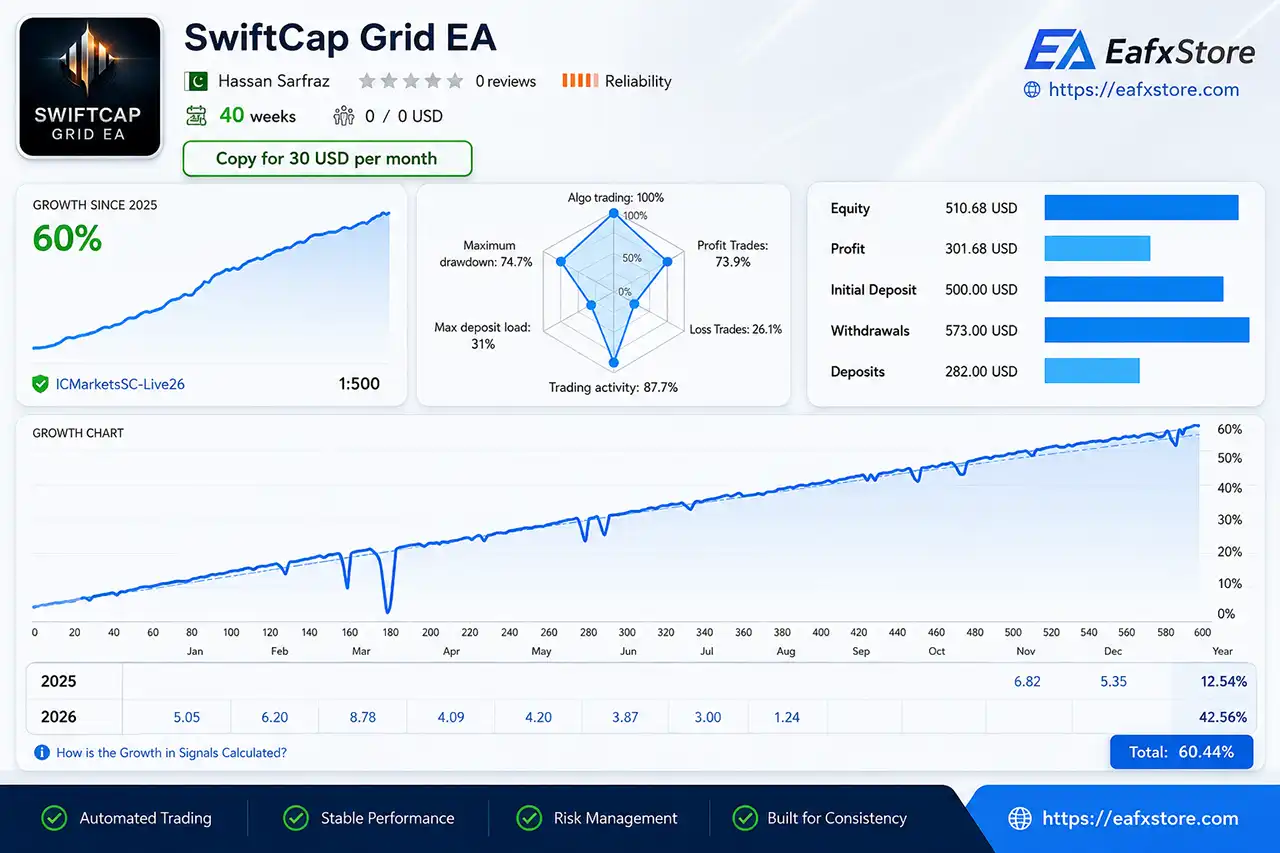
The supplied live signal screenshot shows SwiftCap Grid EA operating on a live account with an initial balance of $500.
The signal reports approximately 60.44% total growth, but the displayed maximum drawdown is very high, making risk management a critical consideration.
SwiftCap Grid EA Live Signal
| Live Signal Metric | Result |
|---|---|
| Initial Deposit | $500.00 |
| Current Equity | $510.68 |
| Reported Profit | $301.68 |
| Total Growth | 60.44% |
| Maximum Drawdown | 74.7% |
| Profit Trades | 73.9% |
| Loss Trades | 26.1% |
| Trading Activity | 87.7% |
| Leverage | 1:500 |
| Live Duration | 40 weeks |
Live Signal Analysis
The most important point is the difference between growth and risk. While the signal shows positive growth, the reported maximum drawdown of 74.7% indicates that the strategy can experience substantial temporary exposure.
This is particularly important for a grid/martingale system because prolonged directional moves can cause multiple positions to remain open while additional exposure accumulates.
The live signal should therefore be viewed as evidence of real-market operation, not as a guarantee of future performance or capital safety.
Historical Trading Results Performance
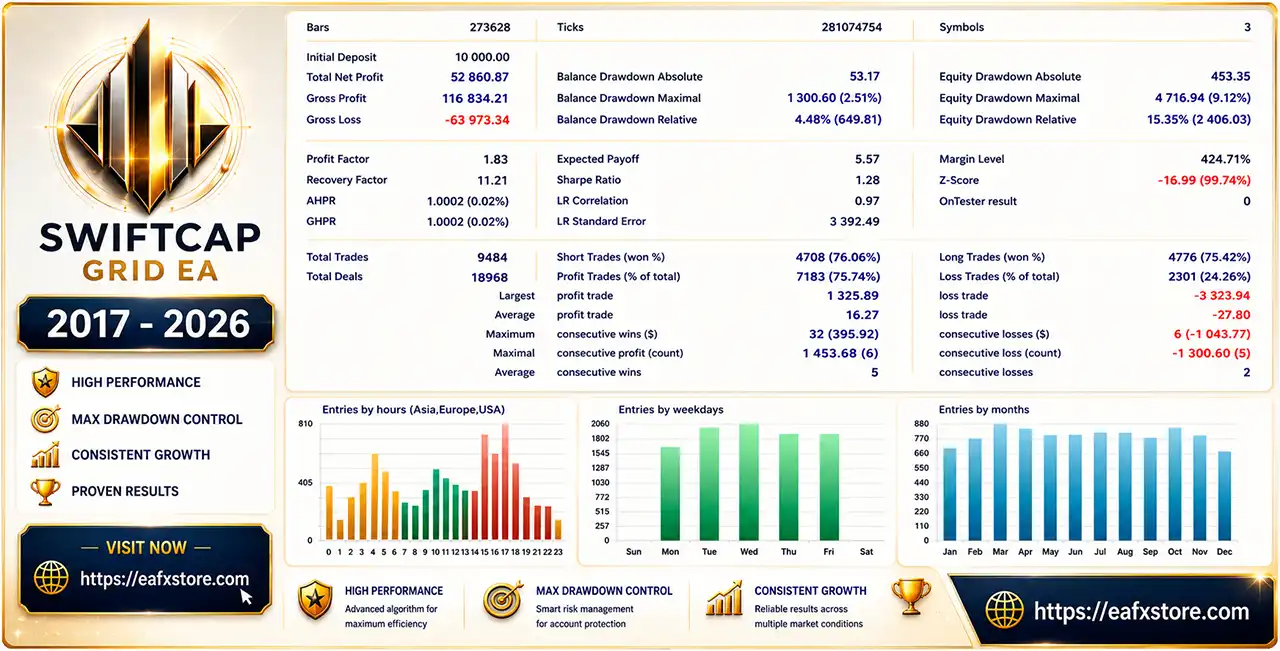
The supplied backtest screenshots show three separate test results using an initial deposit of $10,000 and three traded symbols. Because the screenshots do not provide enough information to identify the exact parameter difference between each test, they are presented separately rather than assuming a specific risk profile.
SwiftCap Grid EA MT5 Backtest Results (Set 1)
SwiftCap Grid EA MT5 Backtest
| Metric | Result |
|---|---|
| Initial Deposit | $10,000 |
| Net Profit | $52,860.87 |
| Profit Factor | 1.83 |
| Balance Drawdown Max | 2.51% |
| Equity Drawdown Max | 9.12% |
| Total Trades | 9,484 |
| Short Win Rate | 76.06% |
| Long Win Rate | 75.42% |
| Profit Trades | 75.74% |
The first test shows a positive equity progression with a relatively contained balance drawdown, although the equity drawdown is considerably higher.
SwiftCap Grid EA MT5 Backtest Results (Set 2)
SwiftCap Grid EA MT5 Backtest Results
| Metric | Result |
|---|---|
| Initial Deposit | $10,000 |
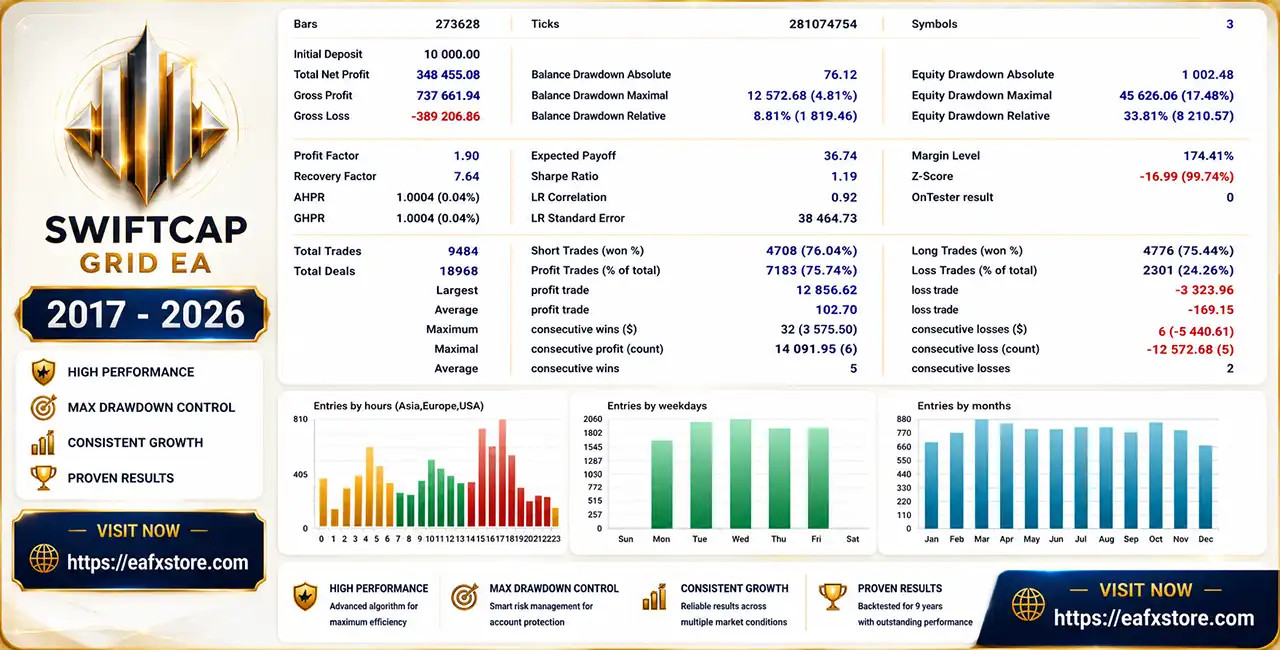
| Net Profit | $348,455.08 |
| Profit Factor | 1.90 |
| Balance Drawdown Max | 4.81% |
| Equity Drawdown Max | 17.48% |
| Total Trades | 9,484 |
| Short Win Rate | 76.04% |
| Long Win Rate | 75.44% |
| Profit Trades | 75.74% |
The second result produces substantially higher returns, while the corresponding equity drawdown also increases.
SwiftCap Grid EA MT5 Backtest Results (Set 3)
SwiftCap Grid EA Backtest Results
| Metric | Result |
|---|---|
| Initial Deposit | $10,000 |
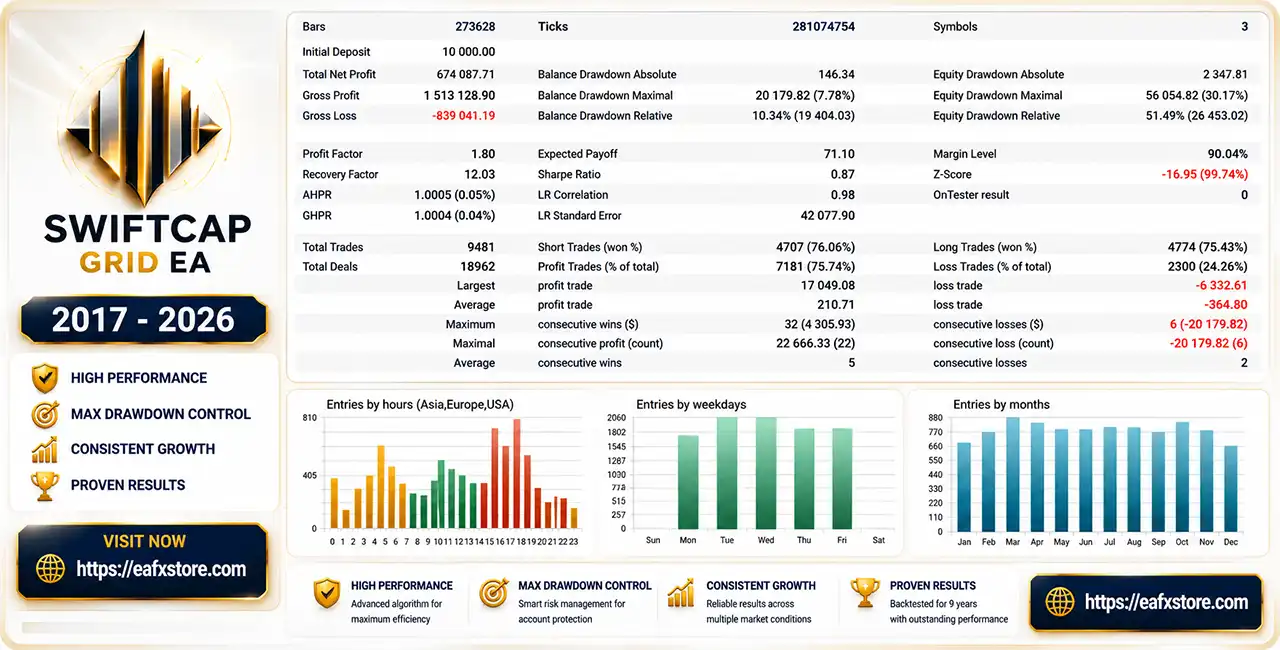
| Net Profit | $674,087.71 |
| Profit Factor | 1.80 |
| Balance Drawdown Max | 7.78% |
| Equity Drawdown Max | 30.17% |
| Total Trades | 9,481 |
| Short Win Rate | 76.06% |
| Long Win Rate | 75.43% |
| Profit Trades | 75.74% |
The third result demonstrates the strongest reported profit but also the highest equity drawdown among the supplied backtests.
What the Backtests Suggest
Across the supplied results, the EA maintains a relatively consistent trade distribution and profit factor.
However, the increasing equity drawdown across the different results demonstrates an important relationship: higher return potential can come with substantially higher exposure.
Backtests should therefore be treated as historical simulations rather than predictions of live performance.
Why SwiftCap Grid EA MT5 Stands Out
Multi-Symbol Diversification
Trading three currency pairs gives the EA more opportunities than a single-symbol system and can distribute activity across different market conditions.
Long-Term Strategy Philosophy
The developer states that the same strategy logic has been used without frequent optimization. This is presented as an attempt to avoid excessive curve fitting.
Flexible Position Sizing
Users can choose fixed-lot or risk-based sizing, allowing the system to be adapted to different account sizes.
Execution Protection
Maximum spread and slippage settings help prevent the EA from opening new positions when execution conditions become unfavorable.
Simple Installation
The EA is described as plug-and-play, with no set files required. Users mainly need to configure the supported symbols and attach the EA correctly.
Risk Management Features
SwiftCap Grid EA MT5 includes several controls intended to manage trading exposure.
Lot Size Control
The EA supports fixed-lot sizing as well as predefined risk profiles. The supplied configuration uses 0.01 lots as the fixed-lot example.
Maximum Lot Protection
A maximum lot parameter provides an upper limit on position size.
Spread Protection
New trades can be blocked when the spread exceeds the configured threshold.
Slippage Protection
The EA also checks execution slippage before opening new trades.
Drawdown Action
The drawdown system can be configured to close all positions and stop trading until restart when the defined threshold is reached.
However, the supplied configuration shows the percentage drawdown threshold at 100%, while the monetary and free-margin protections are disabled. These settings should be reviewed carefully before live deployment.
Recommended Trading Conditions
For the configuration described by the developer, the following conditions are recommended:
| Setting | Recommendation |
|---|---|
| Symbols | AUDCAD, AUDNZD, NZDCAD |
| Timeframe | M15 (15 minute chart) |
| Account Type | Hedging |
| Minimum Deposit | $500+ |
| Leverage | 1:100+ |
| Broker | Reputable broker with reliable execution |
| Spread | Low-spread conditions preferred |
| VPS | Strongly recommended |
| Trading Window | 00:00–23:00 |
Position Sizing Guidance
The supplied recommendations suggest:
🔹 $1,000 or below: 0.01 fixed lot.
🔹 Above $1,000: Medium Risk may be considered.
🔹 Long-term approach: Low Risk settings are preferred.
🔹 Smaller accounts: Maintain sufficient free margin and leverage.
For a grid strategy, starting conservatively is particularly important because exposure can increase as additional positions are opened.
Product Download Package?
The download package of the product suite includes:
 Setting (If Any).docx
Installation Guide.docx
 Reviewed by David Easton
Weaknesses and Risk Warnings
Grid and Martingale Risk
The developer’s own risk disclosure explicitly describes the EA as using a grid martingale strategy. This is the most important risk consideration.
A prolonged one-directional market move can cause multiple positions to remain exposed simultaneously, potentially producing substantial drawdown.
High Live Drawdown
The supplied live signal displays a 74.7% maximum drawdown. This is a major warning sign for traders prioritizing capital preservation.
Equity Drawdown Can Exceed Balance Drawdown
The historical screenshots also show that equity drawdown can be significantly higher than balance drawdown.
Floating losses may therefore be much larger than realized drawdown figures suggest.
Correlated Symbols
AUDCAD, AUDNZD, and NZDCAD are not completely independent markets.
Multi-symbol trading provides diversification, but correlation can also increase portfolio exposure during certain market conditions.
No Strategy Guarantees
Past backtest or live-signal performance does not guarantee future results.
Spreads, liquidity, execution, broker conditions, and market behavior can materially affect performance.
Who Should Use SwiftCap Grid EA MT5?
May be suitable for:
🔹 Experienced traders familiar with grid and martingale systems.
🔹 Traders who understand floating drawdown and portfolio exposure.
🔹 Users looking for automated multi-symbol trading.
🔹 Traders comfortable with conservative fixed-lot or low-risk configurations.
🔹 Users who can provide stable VPS operation.
🔹 Traders willing to monitor margin and account-level risk.
Who Should Avoid It?
It may not be appropriate for beginners who expect low-risk automated income or traders who cannot tolerate significant floating drawdown.
A non-grid strategy may be more suitable for traders whose primary objective is strict capital preservation.
Final Verdict
SwiftCap Grid EA MT5 offers a structured multi-symbol grid approach with flexible lot sizing, execution filters and configurable account protection. Its historical results are attractive, but the live signal also highlights the substantial risk inherent in grid trading. It is best approached with conservative settings, sufficient capital and a clear understanding of drawdown.
🔢 SwiftCap Grid EA MT5 Settings Guide
SwiftCap Grid EA MT5 is an automated grid-trading Expert Advisor built around structured position sizing, trading-hour controls, spread and slippage filters, and configurable drawdown protection.
The settings shown provide traders with control over the EA’s risk profile, lot calculation, execution conditions, and account protection rules, making the configuration suitable for users who want to fine-tune grid trading according to their account size and risk tolerance.
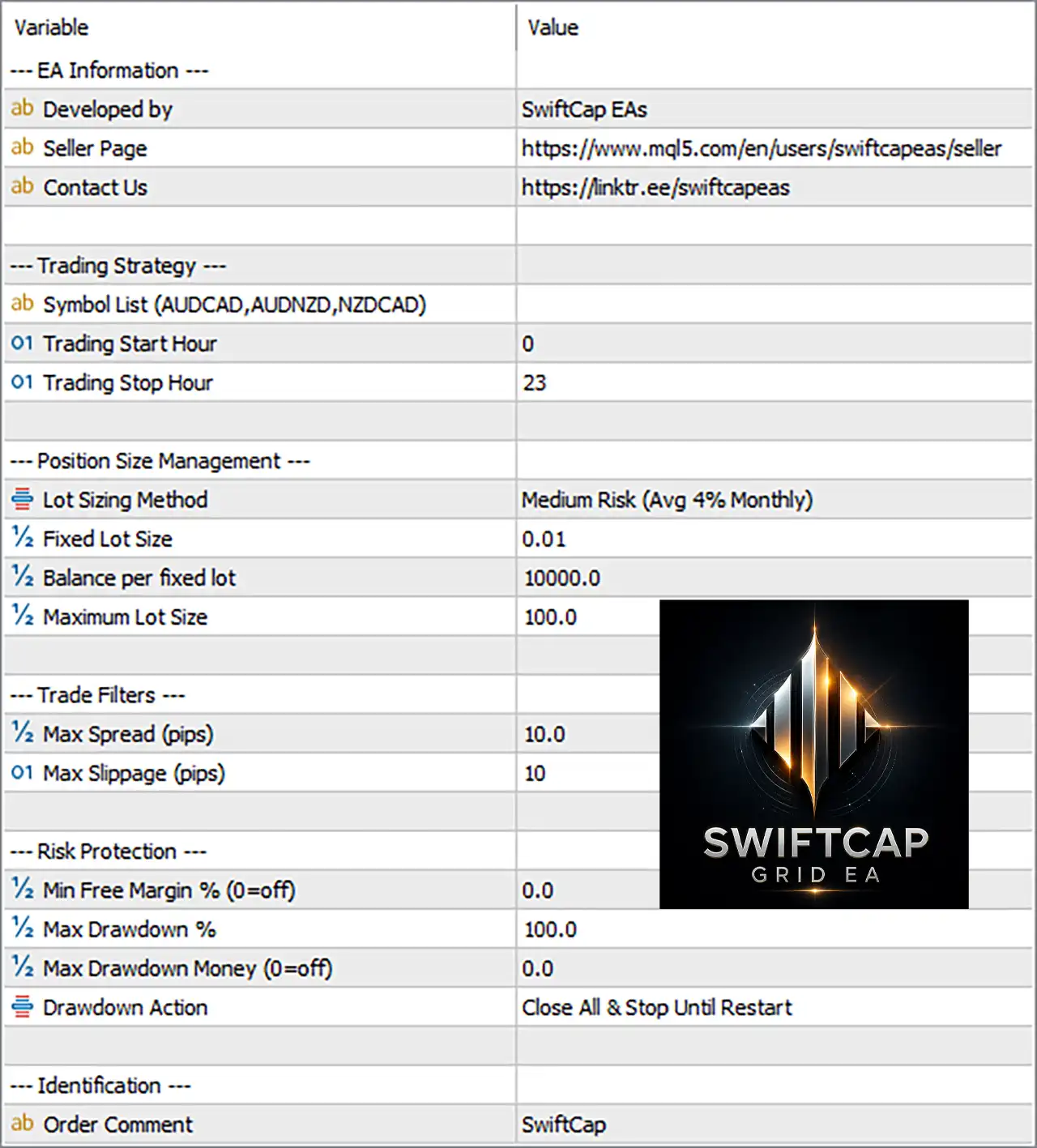
SwiftCap Grid EA MT5 Settings Panel
🔄 Trading Strategy
🔹 Symbol List (AUDCAD, AUDNZD, NZDCAD) = [blank] – The symbol list field is currently blank, while the parameter description references AUDCAD, AUDNZD, NZDCAD as supported symbols.
🔹 Trading Start Hour = 0 – Sets the trading window to begin at 00:00 according to the EA’s applicable trading time.
🔹 Trading Stop Hour = 23 – Sets the trading window to end at 23:00, allowing trading across most of the day.
🔄 Position Size Management
🔹 Lot Sizing Method = Medium Risk (Avg 4% Monthly) – Selects the Medium Risk position-sizing profile, described as targeting an average 4% monthly risk/return profile.
🔹 Fixed Lot Size = 0.01 – Sets the fixed trading volume to 0.01 lots when fixed-lot sizing is applicable.
🔹 Balance per fixed lot = 10000.0 – Uses 10000.0 account-balance units as the reference balance for each fixed lot.
🔹 Maximum Lot Size = 100.0 – Caps the maximum position size at 100.0 lots.
🔄 Trade Filters
🔹 Max Spread (pips) = 10.0 – Prevents new trades when the current spread exceeds 10.0 pips.
🔹 Max Slippage (pips) = 10 – Limits allowable execution slippage to 10 pips.
🔄 Risk Protection
🔹 Min Free Margin % (0=off) = 0.0 – Sets the minimum required free-margin percentage to 0.0, which means this protection is disabled.
🔹 Max Drawdown % = 100.0 – Sets the maximum account drawdown threshold to 100.0%.
🔹 Max Drawdown Money (0=off) = 0.0 – Sets the monetary drawdown limit to 0.0, meaning the money-based drawdown limit is disabled.
🔹 Drawdown Action = Close All & Stop Until Restart – When the configured drawdown protection is triggered, the EA closes all applicable positions and stops trading until it is restarted.
🔄 Identification
🔹 Order Comment = SwiftCap – Adds the comment SwiftCap to orders generated by the EA for easier trade identification.
🔢 SwiftCap Grid EA MT5 Risk Management Overview
The displayed configuration uses Medium Risk (Avg 4% Monthly) as its selected lot-sizing method. The EA provides several layers of position and account protection, including a 10.0-pip maximum spread, 10-pip maximum slippage, and configurable drawdown thresholds.
The Fixed Lot Size of 0.01 and Balance per fixed lot of 10000.0 provide additional control over position sizing, while the Maximum Lot Size of 100.0 acts as an upper limit.
The trading schedule is configured from 00:00 to 23:00, giving the EA a broad trading window. The minimum free-margin protection is disabled at 0.0, while the monetary drawdown limit is also disabled at 0.0. The percentage drawdown threshold is set to 100.0%, with the action configured as Close All & Stop Until Restart.
🔢 Key Configuration Highlights
🔹 Risk Profile: Medium Risk (Avg 4% Monthly)
🔹 Fixed Lot Size: 0.01
🔹 Balance per Fixed Lot: 10000.0
🔹 Maximum Lot Size: 100.0
🔹 Trading Hours: 00:00–23:00
🔹 Maximum Spread: 10.0 pips
🔹 Maximum Slippage: 10 pips
🔹 Minimum Free Margin: 0.0% — disabled
🔹 Maximum Drawdown: 100.0%
🔹 Maximum Drawdown Money: 0.0 — disabled
🔹 Drawdown Action: Close All & Stop Until Restart
🔹 Order Comment: SwiftCap
🔢 Conclusion
SwiftCap Grid EA MT5 offers a configurable framework for automated grid trading, combining medium-risk position sizing, flexible lot management, execution filters, broad trading hours, and drawdown controls. The current settings emphasize a 0.01 fixed lot, a 10000.0 balance reference, and strict execution limits of 10.0 pips spread and 10 pips slippage.
Before using the EA on a live account, traders should pay particular attention to the Maximum Drawdown %, Maximum Lot Size, Balance per fixed lot, and Lot Sizing Method, as these parameters can significantly influence exposure as the grid expands. Backtesting and forward testing on the intended broker are recommended before live deployment.
🔢 FAQs
❓ What is the default lot size in SwiftCap Grid EA MT5?
The displayed Fixed Lot Size is 0.01, while the selected Lot Sizing Method is Medium Risk (Avg 4% Monthly).
❓ What trading hours are configured for SwiftCap Grid EA MT5?
The EA is configured with a Trading Start Hour of 0 and a Trading Stop Hour of 23, providing a trading window from 00:00 to 23:00.
❓ What is the maximum allowed spread?
The Max Spread is 10.0 pips. Trades can be restricted when the market spread exceeds this configured threshold.
❓ What is the maximum lot size?
The Maximum Lot Size is 100.0 lots, which acts as the upper position-size limit shown in the configuration.
❓ What happens when the drawdown protection is triggered?
The configured Drawdown Action is Close All & Stop Until Restart, meaning the EA is designed to close all applicable trades and stop operating until it is restarted.
User Reviews
Only logged in customers who have purchased this product may leave a review.
❓ What trading strategy does SwiftCap Grid EA MT5 use?
SwiftCap Grid EA MT5 uses a mean-reversion grid approach with small take-profit targets and controlled recovery, aiming to capture repeated market retracements.
❓ Which instruments does SwiftCap Grid EA MT5 trade?
SwiftCap Grid EA MT5 is designed to trade AUDCAD, AUDNZD, and NZDCAD simultaneously, providing multi-symbol exposure within a single automated setup.
❓ What timeframe is recommended for SwiftCap Grid EA MT5?
SwiftCap Grid EA MT5 is designed for the M15 timeframe. The recommended setup uses an AUDCAD M15 chart while managing the other supported symbols automatically.
❓ Does SwiftCap Grid EA MT5 require a hedging account?
Yes. SwiftCap Grid EA MT5 requires a hedging account, while reliable execution and low-spread trading conditions are recommended for stable operation.
❓ What is the minimum deposit for SwiftCap Grid EA MT5?
SwiftCap Grid EA MT5 can work with different account balances, but a minimum deposit of $500 is recommended for the intended trading configuration.
❓ What risk settings should I use with SwiftCap Grid EA MT5?
For accounts of $1,000 or below, SwiftCap Grid EA MT5 recommends 0.01 fixed lots. Larger accounts can use Medium Risk, while Low Risk suits long-term growth.
❓ Is SwiftCap Grid EA MT5 a grid or martingale system?
Yes. SwiftCap Grid EA MT5 uses a grid martingale strategy, which can involve significant drawdowns, so traders should understand the risks before using real funds.
❓ How do I install SwiftCap Grid EA MT5?
Attach SwiftCap Grid EA MT5 to one AUDCAD M15 chart, add all three symbols to Market Watch, and enter their exact names in the EA inputs.
-
 Price range: $89.00 through $599.00
 -
 Price range: $80.00 through $599.00
 -
 Price range: $89.00 through $599.00
 -
 Price range: $89.00 through $6,600.00
-
 2
2 -
 3Price range: $89.00 through $599.00
 -
 3Price range: $89.00 through $599.00
 -
 1Price range: $89.00 through $599.00
There are no reviews yet.