

Introduction
Allylla Pullback Bot is an automated trading Expert Advisor (EA) designed primarily for Gold (XAUUSD/GOLD) trading on the MetaTrader 5 platform.
The EA incorporates several market protection mechanisms, including rollover filtering, weekend session filtering, large price-gap detection, and high-impact USD news filtering. It also provides configurable execution delays, break-even exits, recovery exits, and prop trading account management options.
With its multiple strategy configurations and risk management controls, Allylla Pullback Bot allows traders to customize automated Gold trading according to their preferred execution and account management requirements.

Allylla Pullback Bot MT5 Settings Explained
Lot Settings
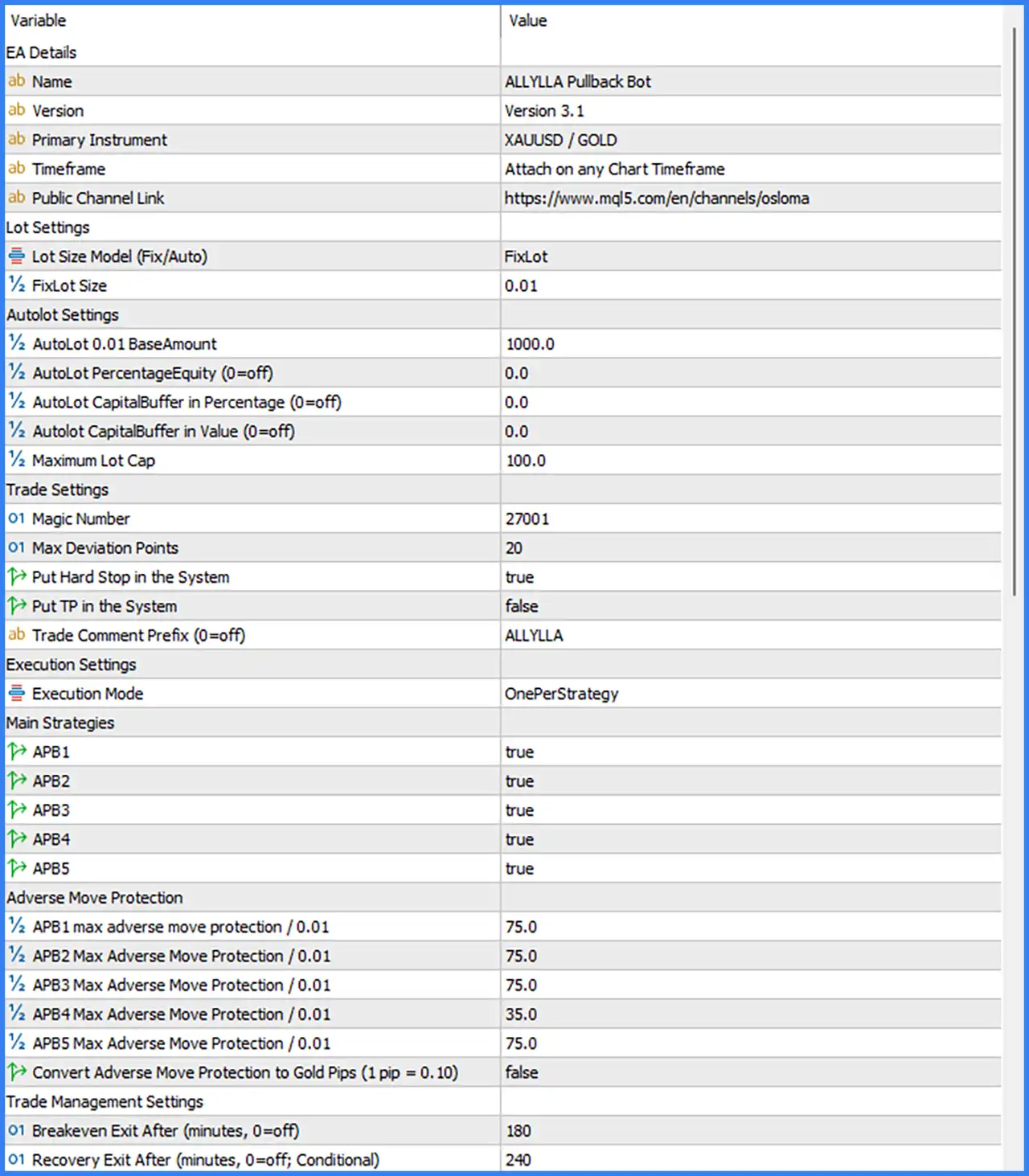
🔹 Lot Size Model (Fix/Auto) = FixLot – Selects the trading volume calculation method. The default FixLot option uses a predefined fixed lot size instead of automatically calculating position volume.
🔹 FixLot Size = 0.01 – Sets the fixed trading volume to 0.01 lots. This represents the default position size used when the FixLot model is selected.
Autolot Settings
🔹 AutoLot 0.01 BaseAmount = 1000.0 – Defines the account capital reference associated with each 0.01 lot in automatic lot-sizing calculations. The default reference amount is 1000.0.
🔹 AutoLot PercentageEquity (0=off) = 0.0 – Defines an optional equity-percentage-based automatic lot-sizing parameter. The default value of 0.0 disables this calculation mode.
🔹 AutoLot CapitalBuffer in Percentage (0=off) = 0.0 – Sets an optional capital buffer as a percentage for automatic lot calculations. The default value of 0.0 disables this percentage-based capital buffer.
🔹 AutoLot CapitalBuffer in Value (0=off) = 0.0 – Defines an additional capital buffer in monetary value for automatic lot sizing. The default value of 0.0 disables this fixed-value buffer.
🔹 Maximum Lot Cap = 100.0 – Establishes the maximum lot-size cap for automatic position sizing. The default value of 100.0 limits the calculated trading volume according to the EA's internal lot management rules.
Trade Settings
🔹 Magic Number = 27001 – Assigns Magic Number 27001 to trades managed by Allylla Pullback Bot MT5. This identifier helps distinguish the EA's positions from manually opened trades and other automated trading systems.
🔹 Max Deviation Points = 20 – Sets the maximum permitted execution price deviation to 20 points. This parameter controls the allowed difference between the requested execution price and the actual filled price.
🔹 Put Hard Stop in the System = true – Enables the placement of a hard Stop Loss through the trading system. When true, the EA is configured to place Stop Loss protection at the system or broker level.
🔹 Put TP in the System = false – Controls whether Take Profit levels are placed directly in the trading system. The default value of false disables this option.
🔹 Trade Comment Prefix (0=off) = ALLYLLA – Defines the prefix attached to trade comments. The default text ALLYLLA helps identify positions opened by the Expert Advisor.
Execution Settings
🔹 Execution Mode = OnePerStrategy – Selects the execution mode for the EA. OnePerStrategy indicates that trade execution is organized separately for each enabled strategy, allowing the individual strategy modules to manage their own trading operations.
Main Strategies
🔹 APB1 = true – Enables the first Allylla Pullback strategy module. When activated, APB1 is allowed to generate and execute trading opportunities according to its internal entry conditions.
🔹 APB2 = true – Enables the second pullback strategy module. This allows APB2 to participate in automated trading when its configured market conditions are satisfied.
🔹 APB3 = true – Activates the third pullback strategy module, allowing the EA to use its APB3 entry logic during trading operations.
🔹 APB4 = true – Enables the fourth pullback strategy module. The EA can execute APB4 trading signals when the strategy's internal conditions are met.
🔹 APB5 = true – Activates the fifth pullback strategy module, allowing all five APB strategies to operate simultaneously according to the selected execution mode.
Adverse Move Protection
🔹 APB1 max adverse move protection / 0.01 = 75.0 – Sets the maximum adverse price movement protection threshold for APB1 at 75.0 per 0.01 lot. This parameter defines the configured adverse movement limit for the first strategy.
🔹 APB2 Max Adverse Move Protection / 0.01 = 75.0 – Defines the maximum adverse movement threshold for APB2 at 75.0 per 0.01 lot, helping control unfavorable price movements associated with the second strategy.
🔹 APB3 Max Adverse Move Protection / 0.01 = 75.0 – Sets the adverse move protection threshold for APB3 to 75.0 per 0.01 lot, providing a separate protection reference for the third strategy.
🔹 APB4 Max Adverse Move Protection / 0.01 = 35.0 – Defines the maximum adverse movement protection threshold for APB4 at 35.0 per 0.01 lot. This is lower than the 75.0 thresholds configured for APB1, APB2, APB3, and APB5.
🔹 APB5 Max Adverse Move Protection / 0.01 = 75.0 – Sets the maximum adverse movement protection threshold for APB5 at 75.0 per 0.01 lot.
🔹 Convert Adverse Move Protection to Gold Pips (1 pip = 0.10) = false – Controls whether adverse movement protection values are converted into Gold pips using the specified conversion of 1 pip = 0.10. The default value of false disables this conversion option.
Trade Management Settings
🔹 Breakeven Exit After (minutes, 0=off) = 180 – Sets the break-even exit time to 180 minutes, equivalent to 3 hours. This parameter allows the EA to apply its break-even exit management after a position reaches the configured holding-time threshold.
🔹 Recovery Exit After (minutes, 0=off; Conditional) = 240 – Defines the conditional recovery exit period as 240 minutes, equivalent to 4 hours. This setting allows the EA to apply its recovery exit logic according to the configured time and internal conditions.
Filters Settings
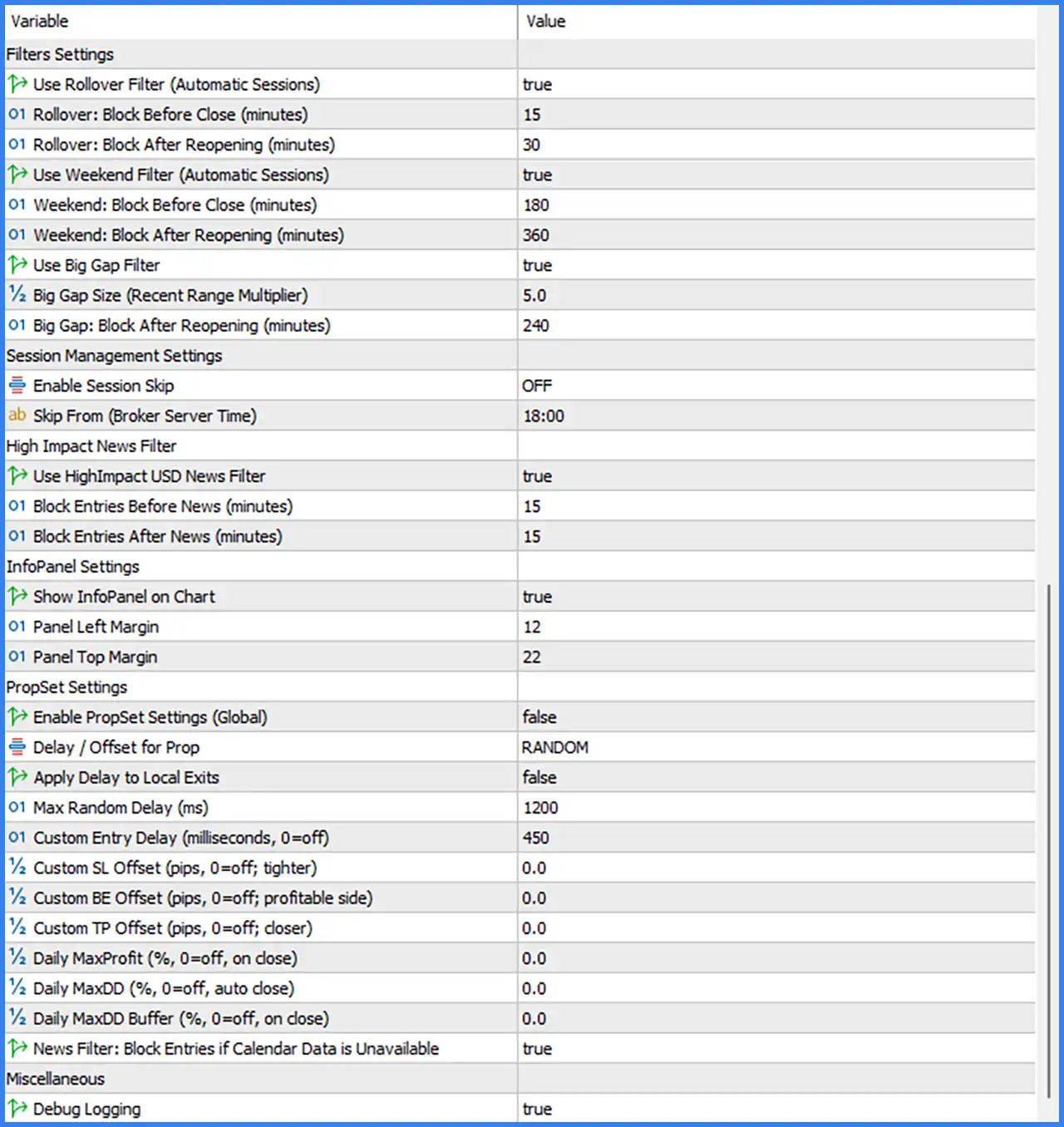
🔹 Use Rollover Filter (Automatic Sessions) = true – Enables automatic rollover filtering. The EA uses its rollover session management to restrict trading around broker rollover periods.
🔹 Rollover: Block Before Close (minutes) = 15 – Sets the trading restriction period to 15 minutes before the market session closes for rollover.
🔹 Rollover: Block After Reopening (minutes) = 30 – Defines a 30-minute waiting period after the market reopens from rollover before allowing trading operations.
🔹 Use Weekend Filter (Automatic Sessions) = true – Enables automatic weekend session filtering, allowing the EA to restrict trading around weekend market closures and reopenings.
🔹 Weekend: Block Before Close (minutes) = 180 – Sets the weekend trading restriction to 180 minutes, equivalent to 3 hours before the market closes.
🔹 Weekend: Block After Reopening (minutes) = 360 – Defines a 360-minute waiting period, equivalent to 6 hours after the market reopens before trading is allowed.
🔹 Use Big Gap Filter = true – Enables the large price-gap detection filter. This feature helps prevent the EA from opening trades immediately after significant price gaps.
🔹 Big Gap Size (Recent Range Multiplier) = 5.0 – Sets the price-gap detection threshold to 5.0 times the recent price range. This parameter determines the relative gap size used by the filter.
🔹 Big Gap: Block After Reopening (minutes) = 240 – Defines a 240-minute waiting period, equivalent to 4 hours, after a detected large price gap before trading can resume.
Session Management Settings
🔹 Enable Session Skip = OFF – Controls the session-skipping feature. The default OFF setting means the optional session skip function is disabled.
🔹 Skip From (Broker Server Time) = 18:00 – Defines the broker server time at which the EA's session-skipping schedule begins. The configured time is 18:00, although the feature is currently disabled.
High Impact News Filter
🔹 Use HighImpact USD News Filter = true – Enables the high-impact USD economic news filter. This feature helps prevent new trading entries around important US economic announcements.
🔹 Block Entries Before News (minutes) = 15 – Prevents new trading entries during the 15 minutes leading up to a selected high-impact USD news event.
🔹 Block Entries After News (minutes) = 15 – Defines a 15-minute trading restriction after a selected high-impact USD news event before new entries are permitted.
InfoPanel Settings
🔹 Show InfoPanel on Chart = true – Enables the display of the EA information panel directly on the MetaTrader 5 chart, allowing traders to monitor the available EA information.
🔹 Panel Left Margin = 12 – Sets the horizontal margin of the information panel to 12, controlling its position relative to the left side of the chart.
🔹 Panel Top Margin = 22 – Sets the vertical margin of the information panel to 22, controlling its position relative to the top of the chart.
PropSet Settings
🔹 Enable PropSet Settings (Global) = false – Enables or disables the global PropSet configuration. The default value of false means the additional global prop trading settings are not activated.
🔹 Delay / Offset for Prop = RANDOM – Selects the RANDOM delay or offset mode for prop trading execution. This setting defines the selected delay behavior when the PropSet functionality is used.
🔹 Apply Delay to Local Exits = false – Controls whether execution delays are applied to local exit operations. The default value of false means local exits are not subject to this optional delay.
🔹 Max Random Delay (ms) = 1200 – Sets the maximum random execution delay to 1200 milliseconds, equivalent to 1.2 seconds.
🔹 Custom Entry Delay (milliseconds, 0=off) = 450 – Defines an additional entry execution delay of 450 milliseconds. This parameter allows traders to configure a specific delay before entry execution.
🔹 Custom SL Offset (pips, 0=off; tighter) = 0.0 – Sets an optional Stop Loss adjustment of 0.0 pips. The default value disables this tighter Stop Loss offset.
🔹 Custom BE Offset (pips, 0=off; profitable side) = 0.0 – Defines an optional break-even adjustment of 0.0 pips toward the profitable side. The default value disables this additional break-even offset.
🔹 Custom TP Offset (pips, 0=off; closer) = 0.0 – Sets an optional Take Profit adjustment of 0.0 pips toward a closer target. The default value disables this custom Take Profit offset.
🔹 Daily MaxProfit (%, 0=off; on close) = 0.0 – Defines the daily maximum profit threshold as a percentage. The default value of 0.0 disables this daily profit protection feature.
🔹 Daily MaxDD (%, 0=off; auto close) = 0.0 – Sets the maximum daily drawdown threshold as a percentage. The default value of 0.0 disables this automatic drawdown closing function.
🔹 Daily MaxDD Buffer (%, 0=off; on close) = 0.0 – Defines an additional daily drawdown buffer as a percentage. The default value of 0.0 disables this supplementary drawdown protection parameter.
🔹 News Filter: Block Entries if Calendar Data is Unavailable = true – Prevents new trading entries when economic calendar data cannot be retrieved. When true, the EA applies a conservative entry restriction whenever the required news information is unavailable.
Miscellaneous Settings
🔹 Debug Logging = true – Enables detailed debugging logs. When set to true, the EA records additional diagnostic information that can help users or developers investigate trading behavior and identify potential issues.
Conclusion
Allylla Pullback Bot MT5 Version 3.1 provides a multi-strategy automated trading configuration specifically designed for Gold (XAUUSD/GOLD). Its five pullback modules, APB1 through APB5, are all enabled by default, with OnePerStrategy execution mode and an initial fixed lot size of 0.01.
The EA combines adverse move protection, break-even and recovery exits, automatic rollover and weekend filters, large price-gap detection, and high-impact USD news filtering. Its default protection thresholds are 75.0 per 0.01 lot for APB1, APB2, APB3, and APB5, while APB4 uses a lower threshold of 35.0.
For trade management, the EA uses a 180-minute break-even exit and a conditional 240-minute recovery exit. Its market protection configuration includes a 15-minute pre-rollover restriction, a 30-minute post-rollover restriction, and a 15-minute restriction both before and after high-impact USD news.