

Introduction to Alpha Gen EA MT4
Alpha Gen EA is an automated trading Expert Advisor (EA) designed for MetaTrader 4, featuring configurable lot sizing, Stop Loss (SL) and Take Profit (TP) management, Trailing stop functionality, and pending order control.

The EA provides several adjustable trading parameters, including a starting lot size of 0.01, a Stop Loss value of 2950.0, and a Take Profit value of 1000.0. It also incorporates trailing stop settings, spread-based order management, and scheduled pending order deletion.
With its configurable execution intervals and order management options, Alpha Gen EA MT4 gives traders flexibility in adjusting automated trading behavior according to their trading preferences.
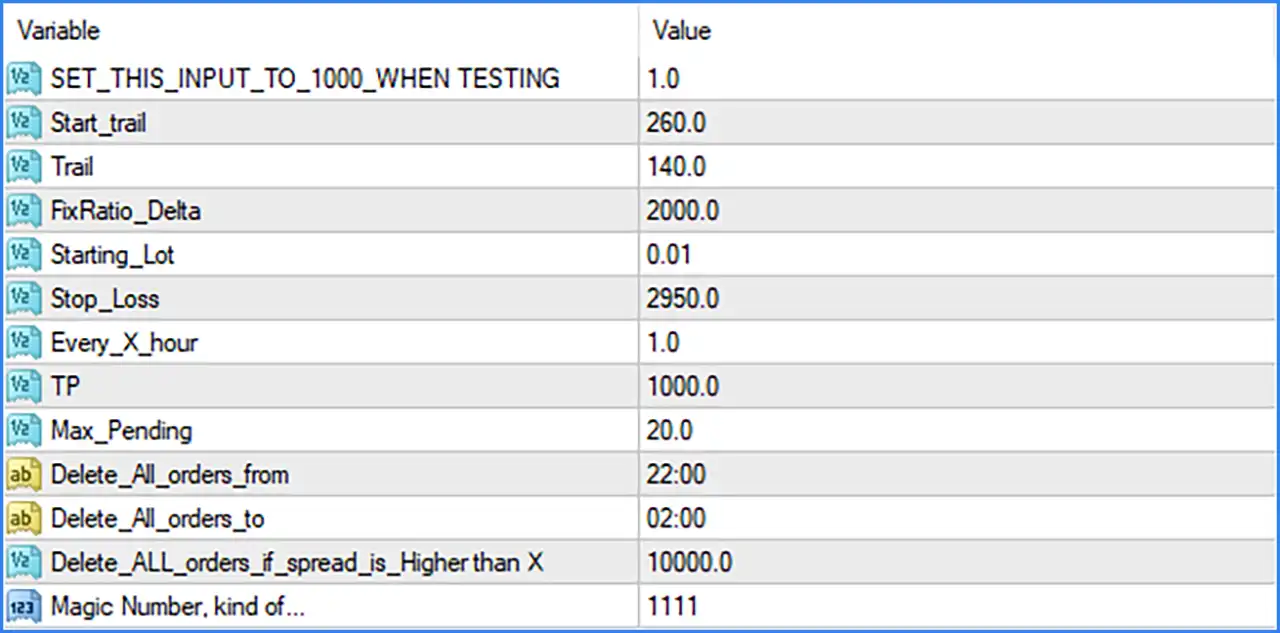
General and Testing Settings
🔹 SET_THIS_INPUT_TO_1000_WHEN_TESTING = 1.0 – Provides a configurable parameter associated with the EA's testing mode. The current value is 1.0; the exact scaling or testing function should be confirmed from the EA documentation.
Trailing Stop Settings
🔹 Start_trail = 260.0 – Sets the trailing stop activation threshold to 260.0, defining the configured level at which the EA starts applying its trailing stop mechanism.
🔹 Trail = 140.0 – Sets the trailing stop distance parameter to 140.0, controlling the configured distance used when adjusting trade protection.
🔹 FixRatio_Delta = 2000.0 – Sets the FixRatio Delta parameter to 2000.0, defining a configurable value used by the EA's internal trading or position management calculations.
Lot Size and Risk Management
🔹 Starting_Lot = 0.01 – Sets the initial trading volume to 0.01 lots, determining the starting position size when the EA opens a new trade.
🔹 Stop_Loss = 2950.0 – Sets the Stop Loss parameter to 2950.0, defining the configured loss-protection distance or threshold for the EA's trade management system.
Trading Frequency and Profit Settings
🔹 Every_X_hour = 1.0 – Sets the trading interval parameter to 1.0 hour, configuring the EA's hourly execution or trading-frequency condition.
🔹 TP = 1000.0 – Sets the Take Profit parameter to 1000.0, defining the configured profit target used by the EA to manage trading positions.
🔹 Max_Pending = 20.0 – Sets the maximum pending order parameter to 20.0, controlling the configured limit for pending orders managed by the EA.
Pending Order Management Settings
🔹 Delete_All_orders_from = 22:00 – Sets the starting time for the scheduled pending order deletion period to 22:00 (10:00 PM).
🔹 Delete_All_orders_to = 02:00 – Sets the ending time for the scheduled pending order deletion period to 02:00 (2:00 AM), defining the end of the configured deletion window.
🔹 Delete_ALL_orders_if_spread_is_Higher_than_X = 10000.0 – Sets the spread threshold to 10000.0, defining the configured condition under which the EA deletes orders when the spread exceeds this value.
Magic Number Settings
🔹 Magic Number, kind of... = 1111 – Assigns Magic Number 1111 to Alpha Gen EA MT4, allowing MetaTrader 4 to identify and distinguish the EA's trades from manual positions and orders opened by other Expert Advisors.