🧩 What is Apex G EA?
Apex G EA is an automated trading system (Expert Advisor) designed for the MetaTrader 4 platform. It leverages algorithmic logic to analyze market data and execute trades automatically, helping traders reduce emotional decision-making and maintain discipline.
This Expert Advisor (EA) appears to combine risk management, fixed lot control, trailing stop, grid trading, and time-based filters, making it suitable for traders who want flexible control over strategy behavior while managing exposure effectively.
📌📌📌 Buy this unlimited Apex G EA MT4 product here 📌📌📌
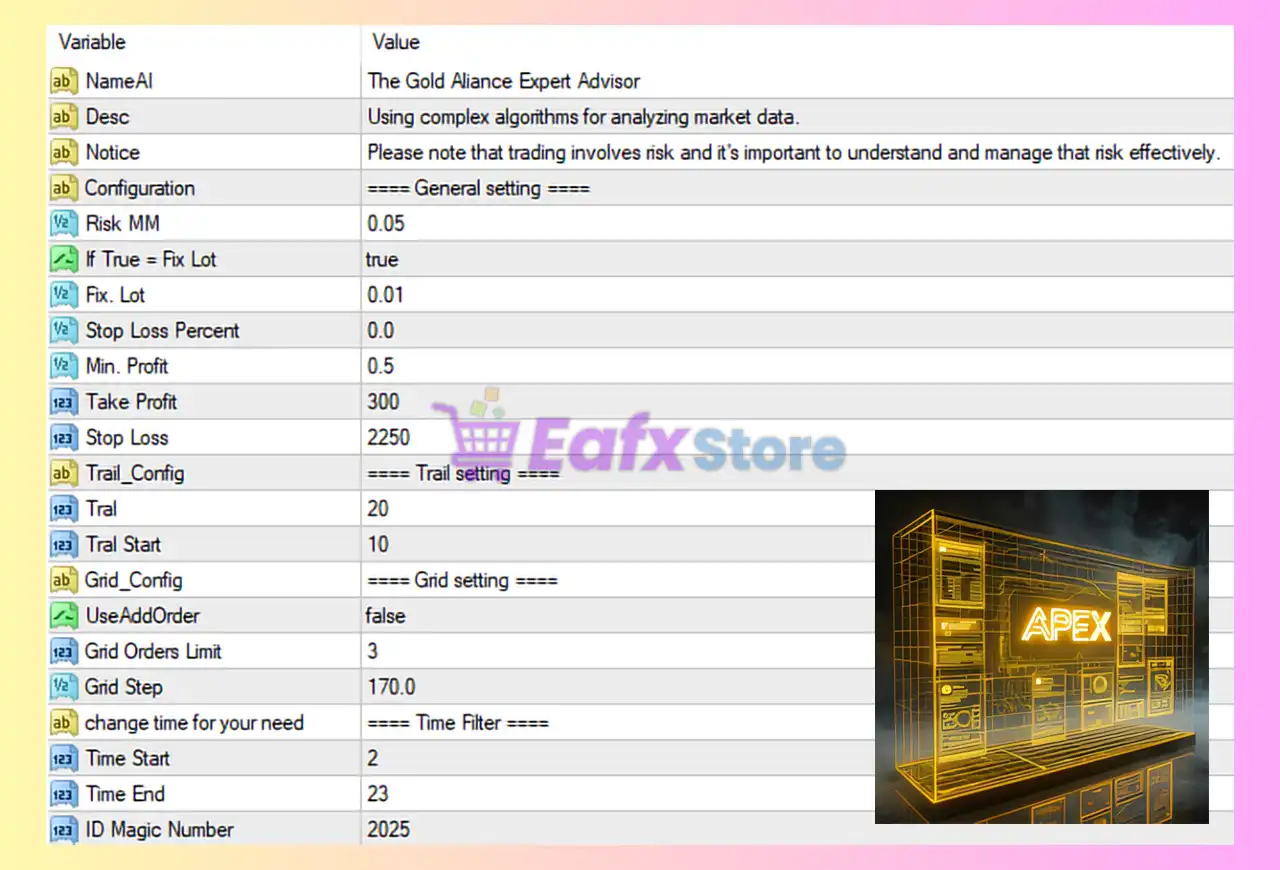
🧩 General Settings Overview
| Parameter | Value | Description |
|---|---|---|
| NameAI | The Gold Alliance Expert Advisor | Name of the Expert Advisor |
| Desc | Using complex algorithms for analyzing market data | General EA description |
| Notice | Trading involves risk | Risk disclaimer |
| Risk MM | 0.05 | Risk level per trade (5% if MM is enabled) |
| If True = Fix Lot | true | Enables fixed lot size instead of risk-based lot |
| Fix Lot | 0.01 | Fixed trade volume (micro lot) |
| Stop Loss Percent | 0.0 | Percentage-based stop loss disabled |
| Min. Profit | 0.5 | Minimum profit threshold before closing trades |
| Take Profit | 300 | Take Profit level (points) |
| Stop Loss | 2250 | Stop Loss level (points) |
🔶 Analysis
- Since Fix Lot = true, the EA ignores Risk MM and always trades 0.01 lots, which is very conservative and suitable for small accounts or testing.
- A large Stop Loss (2250 points) combined with a smaller Take Profit (300 points) suggests a strategy that allows trades room to breathe, possibly relying on recovery logic.
- Stop Loss Percent = 0 means only the fixed SL value is used.
🧩 Trailing Stop Configuration
| Parameter | Value | Description |
|---|---|---|
| Trail | 20 | Trailing stop distance (points) |
| Trail Start | 10 | Profit threshold to activate trailing stop |
🔶 Analysis
- Once the trade reaches 10 points in profit, the trailing stop activates.
- The stop loss then trails the price at a distance of 20 points, helping lock in profits while allowing further price movement.
- This setup is useful for trending markets but may cause premature exits in ranging conditions.
🧩 Grid Trading Settings
| Parameter | Value | Description |
|---|---|---|
| UseAddOrder | false | Grid / additional orders disabled |
| Grid Orders Limit | 3 | Maximum grid orders allowed |
| Grid Step | 170.0 | Distance between grid orders (points) |
🔶 Analysis
- Since UseAddOrder = false, grid trading is currently disabled, meaning the EA will only place single trades.
- If enabled in the future:
- The EA could place up to 3 additional orders.
- Each new order would be spaced 170 points apart.
- Disabling grid significantly reduces drawdown and account risk.
🧩 Time Filter Settings
| Parameter | Value | Description |
|---|---|---|
| Time Start | 2 | Trading starts at 02:00 (platform time) |
| Time End | 23 | Trading ends at 23:00 (platform time) |
🔶 Analysis
- The EA trades only during specific market hours, avoiding low-liquidity periods.
- This filter helps reduce spread spikes and erratic price movements, especially during rollover hours.
🧩 Identification & Safety Settings
| Parameter | Value | Description |
|---|---|---|
| ID Magic Number | 2025 | Unique identifier for EA trades |
🔶 Analysis
- The Magic Number ensures the EA only manages its own trades.
- Essential when running multiple EAs or manual trades on the same MT4 account.
🧩 Risk Profile Summary
Overall Risk Level: LOW to MODERATE
Key reasons:
- Fixed micro lot size (0.01)
- Grid trading disabled
- Time filter enabled
- Trailing stop active
- Large stop loss requires careful balance with account size
This configuration is well-suited for conservative traders, small accounts, or forward testing on demo accounts.
🧩 Conclusion
The Apex G EA MT4 configuration shown in the image reflects a conservative and controlled trading approach. By using a fixed lot size, disabling grid orders, applying trailing stops, and restricting trading hours, the EA prioritizes capital preservation and stability over aggressive growth.
For traders seeking:
- Automated execution
- Reduced emotional trading
- Clear risk boundaries
This setup provides a solid foundation. However, performance can vary depending on market conditions, broker execution, and symbol volatility. Always test settings on a demo account before deploying them on a live account.